
🎉NEWCapSolver for AI agents-MCP, agent tools, and SDK integrations

Rajinder Singh
Deep Learning Researcher
Published Nov 06, 2023
Updated Nov 06, 2023 · min read
reCAPTCHA v2 Invisible is widely implemented to block automated access, form submissions, and scraping activities. To solve this type correctly, you must first identify the exact reCAPTCHA version, extract its parameters, and send accurate data to CapSolver.
This guide provides an expanded and structured walkthrough, including:
All methods described should be used responsibly and only for legal and compliant scenarios, such as QA testing, automation workflows, accessibility integrations, or stable access to publicly available information.
Correctly identifying the reCAPTCHA version is crucial. Each version—v2 Checkbox, v2 Invisible, v3 Score—requires a different CapSolver task type. Using the wrong type results in invalid tokens and failures.
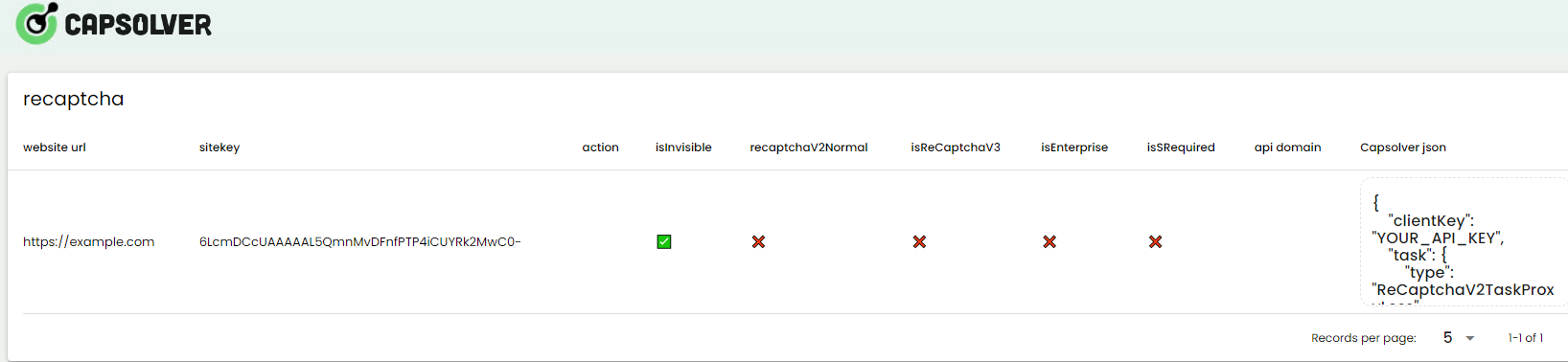
CapSolver provides a browser extension that automatically:
Example interface:
Full documentation:
Instruction Manual for reCAPTCHA Identification Extension
The generated CapSolver JSON will look like this:

Once you have the correct parameters, you can initiate a solving task.
A typical request looks like:
POST https://api.capsolver.com/createTask
Host: api.capsolver.com
Content-Type: application/json
{
    "clientKey": "YOUR_API_KEY",
    "task": {
        "type": "ReCaptchaV2TaskProxyLess",
        "websiteURL": "https://example.com",
        "websiteKey": "6LcR_okUAAAAAPYrPe-HK_0RULO1aZM15ENyM-Mf",
        "anchor": "value",
        "reload": "value",
        "isInvisible": true
    }
}This ensures maximum compatibility.
After creating the task, retrieve the result with:
POST https://api.capsolver.com/getTaskResult
Host: api.capsolver.com
Content-Type: application/json
{
    "clientKey":"YOUR_API_KEY",
    "taskId": "37223a89-06ed-442c-a0b8-22067b79c5b4"
}
If the token does not work, contact CapSolver support for diagnostics.
They can help identify parameter issues or advise proxy usage.
Invisible reCAPTCHA often uses hidden callback fields such as:
anchorreloadMissing these results in invalid tokens.
Each token is designed for:
Always request a new token for each attempt.
Ensure the following match between token generation and usage:
Mismatch can cause reCAPTCHA to reject the token.
Many websites accept Proxyless solving unless they enforce strict IP rules.
Invisible reCAPTCHA does not show a checkbox. It triggers automatically when submitting a form.
The CapSolver extension will label it clearly as reCAPTCHA v2 Invisible.
Common reasons include:
anchor or reload parametersStart with Proxyless.
Use proxy mode only if the target site ties verification to IP-based trust.
Yes. CapSolver handles the interaction simulation and returns a g-recaptcha-response token ready for submission.
This usually occurs when:
Use the CapSolver browser extension for guaranteed accuracy.
Successfully solving reCAPTCHA v2 Invisible requires accurate identification, correct parameter extraction, and proper task configuration. With CapSolver’s browser extension, API, and proxy options, you can efficiently automate this process while maintaining high success rates and compatibility.
By following the steps and best practices in this guide, you can ensure reliable and stable solving for legal automation scenarios such as testing, workflow optimization, and accessing publicly available information.
If issues persist, CapSolver’s support team is available to assist with diagnostics and fine-tuning.
Receive an additional balance bonus when topping up your CapSolver account.
Bonus Code: CAPN
Reward: Additional 5% bonus on every recharge
Limit: No usage limits
Redeem here:
CapSolver Dashboard

Rajinder Singh
Deep Learning Researcher
Making CAPTCHA solving more reliable in automated workflows.
ABOUT THE AUTHOR
Understand reCAPTCHA v3 score range (0.0 to 1.0), its meaning, and how to improve your score. Learn how to handle low scores and optimize user experience.
Facing "reCAPTCHA Invalid Site Key" or "invalid reCAPTCHA token" errors? Discover common causes, step-by-step fixes, and troubleshooting tips to resolve reCAPTCHA verification failed issues. Learn how to fix reCAPTCHA verification failed please try again.


