How to Solve reCAPTCHA in Web Scraping Using Python

Ethan Collins
Pattern Recognition Specialist
Web scraping has become an essential tool for developers, data engineers, and SEO specialists. However, one of the most common obstacles in web scraping is reCAPTCHA, a security mechanism designed to distinguish between humans and automated bots. reCAPTCHA protects websites from abusive activities such as account creation, spamming, and data scraping.
This article provides a detailed overview of reCAPTCHA, explains why it is challenging for automation, and demonstrates how Python and CapSolver can help solve it safely and efficiently.
What is reCAPTCHA
reCAPTCHA, developed by Google, is a security system that presents users with challenges that are easy for humans but difficult for automated programs. These challenges are designed to prevent malicious bots from accessing a website’s content, ensuring the integrity of web services.
Typical reCAPTCHA challenges include:
- Text-based verification: Users type distorted characters displayed in an image.
- Image selection: Users select images that match a given description (e.g., “select all traffic lights”).
- Behavior analysis: Captures mouse movements, scrolling, and typing patterns to determine if the user is human.
By leveraging these challenges, websites can prevent unwanted scraping, spam, and automated attacks. However, this also creates hurdles for legitimate automation use cases such as SEO analysis, price monitoring, and market research.
Why reCAPTCHA Blocks Web Scraping
Web scraping tools often mimic human browsing behavior to collect data. However, traditional scrapers are limited in their ability to solve reCAPTCHA because:
-
Image recognition is complex
Image-based challenges require accurate recognition of objects, which is difficult for simple automated scripts. -
Behavioral analysis
Invisible CAPTCHAs track mouse movement, click patterns, and page interaction, which traditional scripts do not simulate well. -
IP and session restrictions
reCAPTCHA may block repetitive requests from the same IP or flag suspicious patterns.
As a result, scrapers often fail to extract data or get blocked entirely. This is where tools like Capsolver become essential.
Different Types of reCAPTCHA
Google has released multiple versions of reCAPTCHA over the years to improve security and usability. Understanding each type is critical for automation.
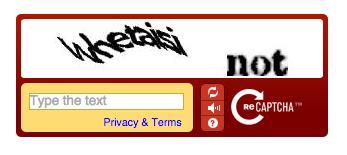
1. reCAPTCHA v1
The first version presented users with two distorted words. One word was known (for human verification), and the other unknown (used for digitizing text from books). Users had to type both words correctly to pass the test.
- Characteristics: Simple text recognition, 2 words, basic distortion.
- Limitations: Now deprecated, rarely used.
2. reCAPTCHA v2
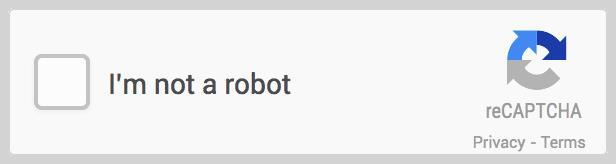
Introduced the “I’m not a robot” checkbox, which evaluates the user’s behavior upon clicking. Suspicious activity triggers a secondary challenge, usually an image-based puzzle.
- Characteristics: Checkbox interaction, image recognition challenges, human behavior assessment.
- Applications: Commonly seen on login pages, forms, and comment sections.
3. Invisible reCAPTCHA v2
This version does not show a checkbox. Instead, it runs in the background and triggers challenges only when it detects suspicious behavior.
- Characteristics: Seamless user experience, triggers only on anomalies.
- Benefits: Reduced friction for human users while maintaining security.

4. reCAPTCHA v2 Enterprise
Enterprise v2 adds more sophisticated protections against bots, including advanced risk analysis, adaptive challenges, and better integration with corporate websites.
5. reCAPTCHA v3
Unlike v2, reCAPTCHA v3 runs entirely in the background, analyzing user behavior and assigning a risk score. No challenge is shown unless suspicious activity is detected.
- Characteristics: Score-based assessment, invisible to most users, used for adaptive responses.
- Applications: E-commerce platforms, financial websites, and enterprise tools.

6. reCAPTCHA v3 Enterprise
Enterprise v3 provides granular insights into website traffic and allows nuanced risk-based responses. Ideal for organizations with sensitive data or high-traffic web platforms.
reCAPTCHA in Web Scraping
Websites use reCAPTCHA to block automated scraping. Traditional scraping tools cannot bypass these challenges, making it essential to integrate CAPTCHA-solving solutions to continue automated data extraction.
Solving reCAPTCHA with Capsolver
CapSolver leverages machine learning to solve reCAPTCHA automatically. By integrating Capsolver into Python workflows, developers can bypass CAPTCHA barriers efficiently.
Claim Your CapSolver Bonus
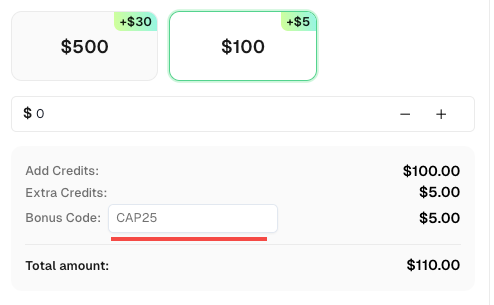
Boost your automation performance with a quick bonus! Use the promo code CAP25 when adding funds to your CapSolver account to get an extra 5% credit on every recharge — with no limit. Start optimizing your CAPTCHA-solving workflow today!
Prerequisites
- Python installed
- Capsolver API key
- Optional: working proxy (required for certain task types)
Step 1: Install Capsolver
bash
pip install capsolverStep 2: Solve reCAPTCHA v2 with Proxy
python
import capsolver

PROXY = "http://username:password@host:port"
capsolver.api_key = "Your Capsolver API Key"
PAGE_URL = "PAGE_URL"
PAGE_KEY = "PAGE_SITE_KEY"

def solve_recaptcha_v2(url, key):
    solution = capsolver.solve({
        "type": "ReCaptchaV2Task",
        "websiteURL": url,
        "websiteKey": key,
        "proxy": PROXY
    })
    return solution

def main():
    print("Solving reCaptcha v2...")
    solution = solve_recaptcha_v2(PAGE_URL, PAGE_KEY)
    print("Solution:", solution)

if __name__ == "__main__":
    main()
Step 3: Solve reCAPTCHA v2 without Proxy
python
import capsolver

capsolver.api_key = "Your Capsolver API Key"
PAGE_URL = "PAGE_URL"
PAGE_KEY = "PAGE_SITE_KEY"

def solve_recaptcha_v2_proxyless(url, key):
    solution = capsolver.solve({
        "type": "ReCaptchaV2TaskProxyless",
        "websiteURL": url,
        "websiteKey": key,
    })
    return solution

def main():
    print("Solving reCaptcha v2 (proxyless)...")
    solution = solve_recaptcha_v2_proxyless(PAGE_URL, PAGE_KEY)
    print("Solution:", solution)

if __name__ == "__main__":
    main()
Step 4: Retrieve the Result
After creating a task, poll the getTaskResult endpoint until the CAPTCHA is solved:
json
POST https://api.capsolver.com/getTaskResult
Host: api.capsolver.com
Content-Type: application/json

{
  "clientKey": "YOUR_API_KEY",
  "taskId": "TASK_ID"
}
Once ready, the response contains the solved CAPTCHA token.
Conclusion
By integrating CapSolver into Python workflows, web scraping can overcome reCAPTCHA barriers efficiently. Developers can now automate data extraction without interruption, saving time and ensuring higher success rates. CapSolver’s flexibility, supporting both proxy and proxyless tasks, makes it suitable for a wide range of scraping scenarios.
Frequently Asked Questions (FAQ)
1. Which types of reCAPTCHA can Capsolver solve?
Capsolver supports reCAPTCHA v2/v3, including invisible and enterprise versions, as well as image-to-text CAPTCHAs and many more.
2. Do I need a proxy to use Capsolver?
Not always. Proxyless tasks are available for standard cases.
3. How fast does Capsolver solve reCAPTCHA?
Average solve time is 1–10 seconds, depending on CAPTCHA complexity and server load.
More
The Other CAPTCHAApr 14, 2026
Can AI Solve CAPTCHA? How Detection and Solve Really Work
Explore how AI detects and solves CAPTCHA challenges, from image recognition to behavioral analysis. Understand the technology behind AI CAPTCHA solvers and how CapSolver aids automated workflows. Learn about the evolving battle between AI and human verification.

The Other CAPTCHAApr 09, 2026
CAPTCHA Solving API Performance Comparison: Speed, Accuracy & Cost (2026)
Compare top CAPTCHA solving APIs by speed, accuracy, uptime, and pricing. See how CapSolver, 2Captcha, CapMonster Cloud, and others stack up in our detailed performance comparison.

