🎉NEWCapSolver for AI agents-MCP, agent tools, and SDK integrations

Lucas Mitchell
Automation Engineer
Published May 21, 2026
Updated May 21, 2026 · min read
Imagine this: you spend an hour booking a flight, repeatedly comparing prices and filling out forms. In contrast, an Agentic Browser completes the task in minutes with just one command: "Help me book a window seat for a flight from Beijing to Shanghai this Friday afternoon." It is no longer just a display tool but an intelligent agent capable of understanding intent and executing tasks autonomously. Over the past two years, this concept has moved toward productization, with Google Chrome launching Auto Browse and Opera releasing Opera Neon This article will provide a popular introduction to how Agentic Browsers work and the critical role that infrastructure like CapSolver plays in this ecosystem.
Since its birth in the 1990s, the core mission of the browser has always been the "presentation and interaction of information." It is essentially a passive rendering engine: the user inputs instructions, and the browser parses the Dom and returns visual feedback. In this "human-operates-machine" unidirectional mode, the browser faithfully plays the role of a "window" to the digital world.
However, as web applications have grown exponentially in complexity, the limitations of traditional browsers have become increasingly prominent:
To more clearly contrast the shortcomings of traditional browsers, we can organize them across dimensions such as interaction mode, task understanding, and process continuity, as shown in the table below:
| Dimension | Traditional Browser | Core Pain Points / Limitations |
|---|---|---|
| Interaction Mode | Mouse/keyboard driven, point-by-point operation | Fragmented operations, low efficiency |
| Task Understanding | Only parses URL and DOM structure, no intent recognition | Cannot handle natural language instructions |
| Process Continuity | Stateless; cross-page/site requires manual connection | Context loss, multi-step tasks easily interrupted |
| Automation Capability | Relies on plugins or external scripts (e.g., Selenium) | High configuration threshold, weak interference resistance |
| Environment Perception | Static rendering, cannot understand visual semantics | Helpless against dynamic content, CAPTCHAs, and anti-scraping mechanisms |
Table 1-1: Performance and Limitations of Traditional Browsers Across Dimensions
Overall, traditional browsers are good at "displaying content by instruction" but poor at "understanding tasks and proactively assisting." This passive, fragmented, and stateless nature is precisely the core problem that Agentic Browsers aim to solve.
An Agentic Browser is not a simple addition of features to a traditional browser; it is a next-generation interaction terminal that deeply integrates LLM with the browser kernel. Its core definition can be summarized as: a digital action agent with intent understanding, environment perception, autonomous planning, and execution capabilities.
If a traditional browser is the "screen you look at," an Agentic Browser is the "digital employee that works for you." It no longer waits for users to click step-by-step but directly receives natural language instructions (e.g., "Help me transcribe last week's meeting recording, summarize it, and send it to the project team"). It then autonomously completes a series of operations in the browser environment, such as opening applications, finding files, calling AI tools, editing documents, and sending emails.
Its underlying operation relies on a complete agent architecture. Figure 1-1 intuitively presents the core modules and data flow of this architecture:
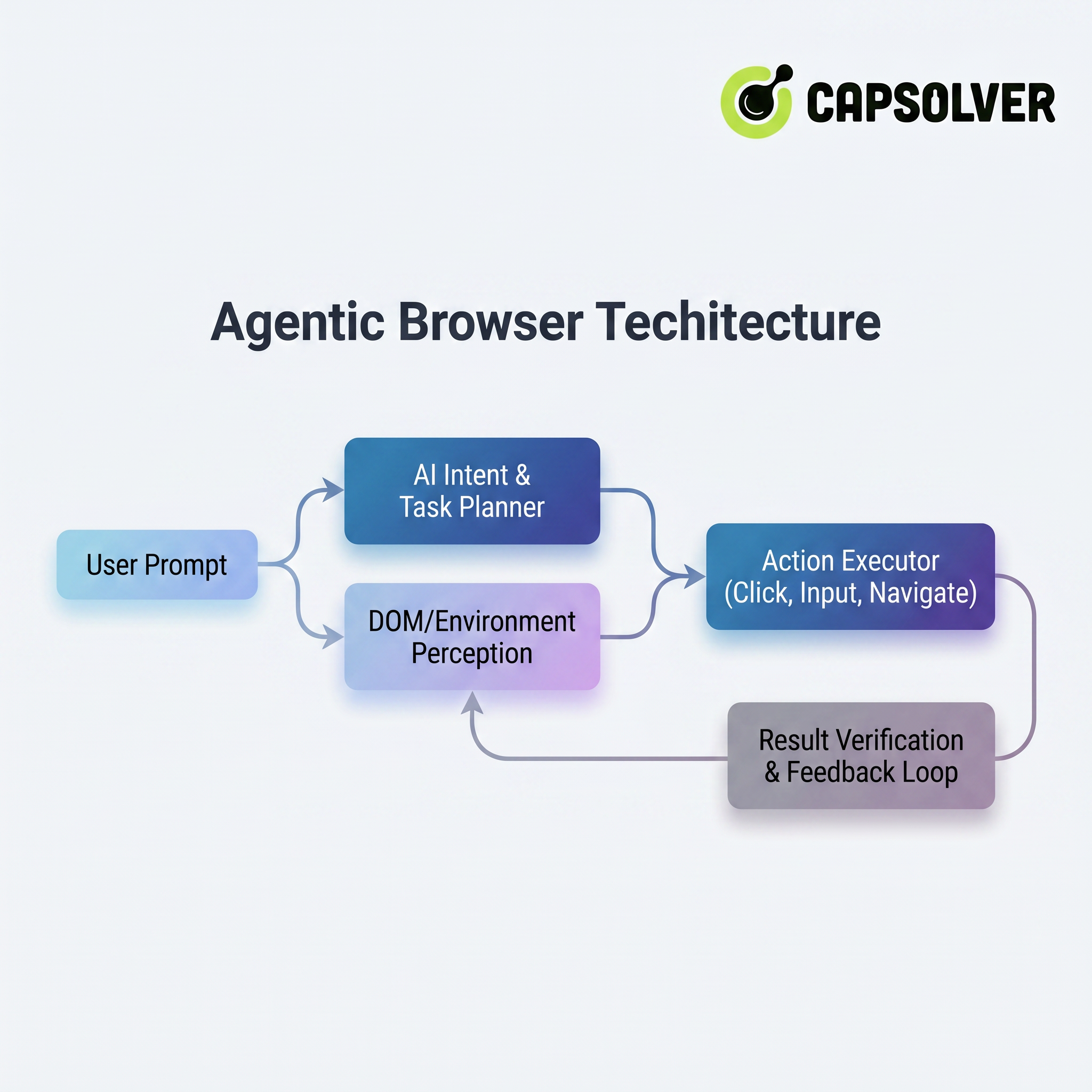
The architecture consists of four key layers from top to bottom (or by process):
Through this architecture, the Agentic Browser transforms the user's macro intent into micro-operations of the browser, truly realizing the concept of "you say a word, it does the legwork."
The emergence of the Agentic Browser marks a fundamental leap in the human-computer interaction paradigm. This shift is not just about efficiency; it is a reconstruction of control and interaction logic.
In the traditional mode, humans must adapt to the machine's logic: learning tedious menu hierarchies, remembering shortcuts, and manually handling abnormal pop-ups. In the Agentic mode, the machine begins to adapt to human logic: understanding colloquial instructions, anticipating user intent, and proactively coordinating cross-application tasks.
To more intuitively contrast these two modes, the figure below shows the essential difference in interaction roles between traditional passive browsers and agentic proactive browsers:
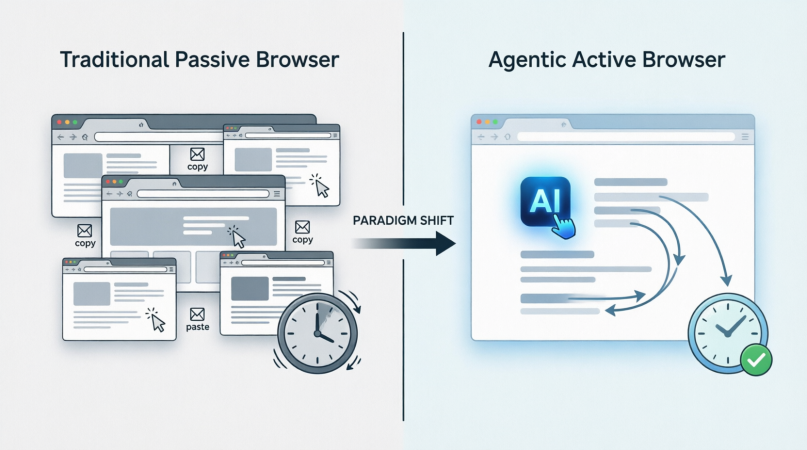
This paradigm shift is reflected in three key dimensions:
For ordinary users, this means the browser will transform from a "time-consuming tool" into a "time-releasing lever." When the browser starts working proactively for you, the focus of digital life will truly return to creation, decision-making, and thinking itself.
Take a few seconds to imagine a scenario: You tell an Agentic Browser, "Help me find Sony WH-1000XM5 headphones on E-commerce Site A, select black, find the official store with the lowest price, place an order with next-day delivery, and choose cash on delivery." Just this one sentence involves a complex series of events behind the scenes. The Agentic Browser needs to "understand" your needs, decompose them into executable steps, "see" the content on the webpage, "act" on it, and handle unexpected situations like page changes.
The following diagram summarizes the entire process:
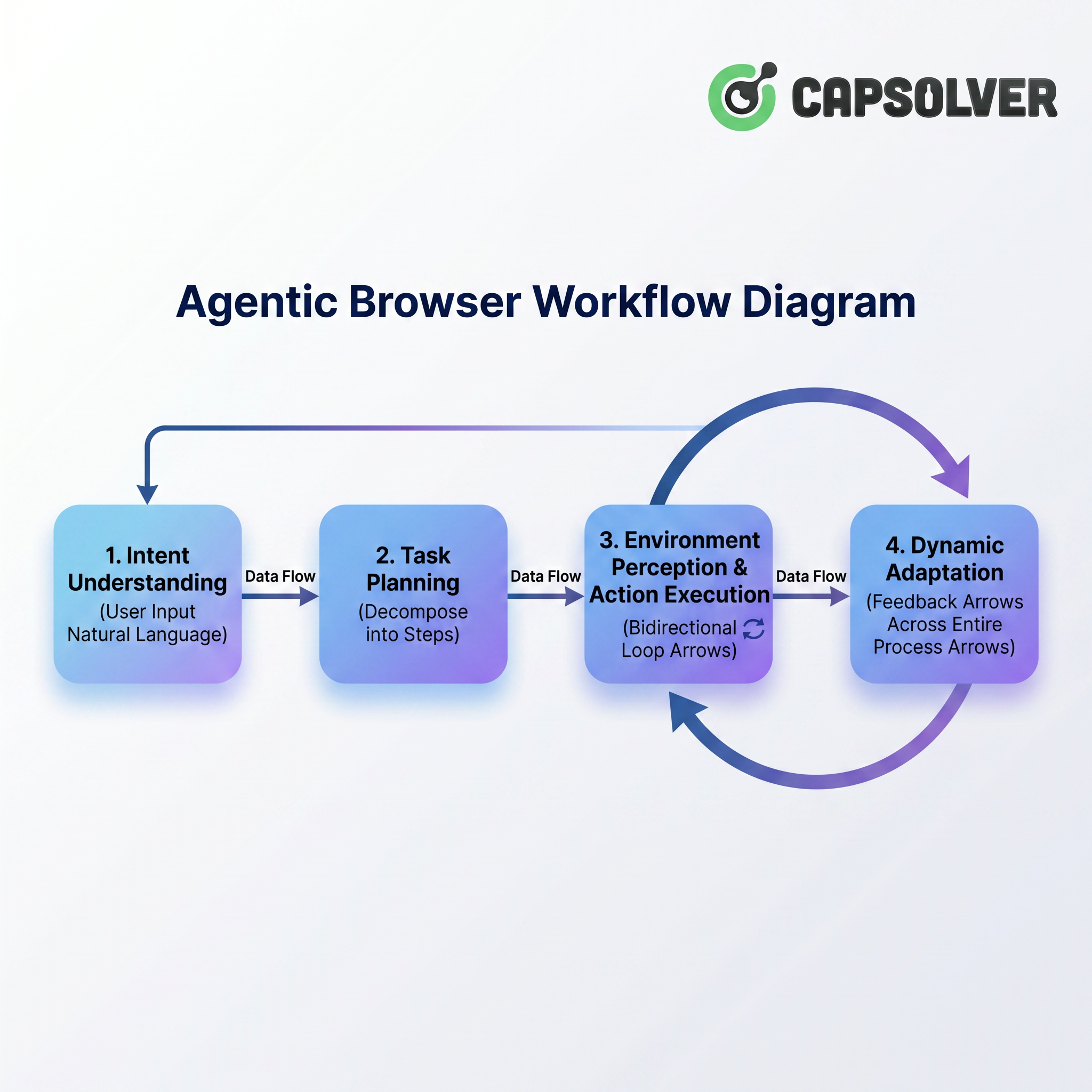
The entire process starts from the user's natural language instruction, passes through intent understanding and task planning, and then enters the core stage of "environment perception and action execution." Notably, there is a bidirectional loop between environment perception and action execution—the Agentic Browser observes the page state while executing operations and continues to perceive the next page change based on the execution results. Meanwhile, "dynamic adaptation" runs through the entire process as a feedback arrow, ensuring flexibility in adjusting strategies when encountering pop-ups, CAPTCHAs, or page structure changes. Next, we will delve into each stage to dismantle how the Agentic Browser "understands, sees, acts, and adapts."
When a casual sentence is thrown at the browser, it must first turn it into a clearly structured "task list." This is the intent understanding stage.
If you tell a traditional browser to "buy headphones," it can probably only open a default search engine and type those words exactly. An Agentic Browser, however, uses Large Language Models (LLMs) for deep parsing. Its goal is not to search, but to decompose the task.
Using the previous example, the AI needs to identify:
This decomposition process is not a simple template application but requires contextual reasoning. For example, it needs to determine which logistics option corresponds to "next-day delivery" and confirm if the product supports it. Ultimately, a task planning map is generated. The figure below shows the complete structure of this task in the form of a decision tree:
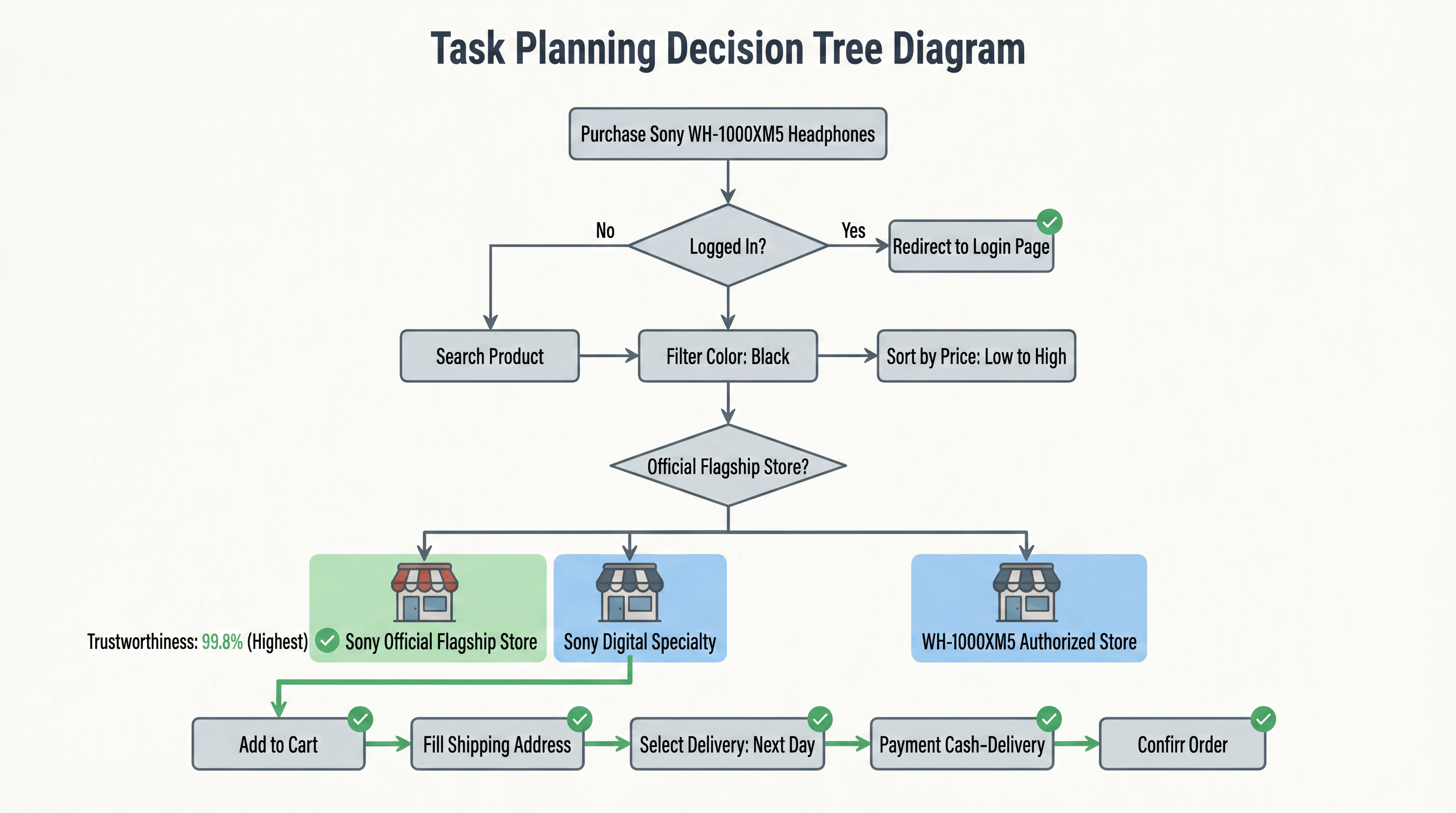
This decision tree transforms the user's natural language instruction into an executable operation tree. Starting from the root node "Buy headphones," it refines step-by-step along the "Yes" branches, with each step containing condition judgments (e.g., whether it's an official store, credit score comparison) and atomic actions (e.g., search, filter, fill). This structured task planning allows the browser to clearly know "what to do first, what to do next, and how to choose when encountering branches." From this moment on, the browser is no longer a search box but an executor heading into the web world with a clear goal.
With a plan in place, the next step is to let the AI "see" the colorful webpage like a human. This is technically called environment perception. Traditional automation scripts rely on element positioning (CSS selectors, XPath), which is extremely fragile—a change in a webpage's class will cause them to fail. Agentic Browsers use a multi-perception fusion approach, acting as if they have both eyes and a sense of touch.
The three levels of perception are summarized in the table below:
| Level | Description | Technical Implementation | Example |
|---|---|---|---|
| DOM Structure & Semantic Analysis | Reads the webpage's Document Object Model, extracting tags, roles, and text, combined with ARIA accessibility labels to understand element functions. | HTML parsing, semantic labeling | Can identify "this is a button" and "that is an input box," knowing which div actually carries the "Add to Cart" action. |
| Visual Screenshot Understanding | Takes a screenshot of the current viewport and uses multi-modal models to analyze pixels, understanding layout and visual relationships like a human eye. | Computer vision, image segmentation | Even if a button's HTML tag is non-standard, as long as it looks like a button (rounded corners, color block, text), it can be located. |
| Interaction State Reasoning | Determines the current state of components through CSS styles, focus states, disabled attributes, etc. | Style analysis, state detection | Can see if a button is grayed out and unclickable or highlighted and clickable; whether a dropdown menu is collapsed or expanded. |
Table 2-1: The Three Levels of Environment Perception
These three types of perception do not work in isolation but occur simultaneously and verify each other. Figure 2-3 intuitively shows this fusion process:
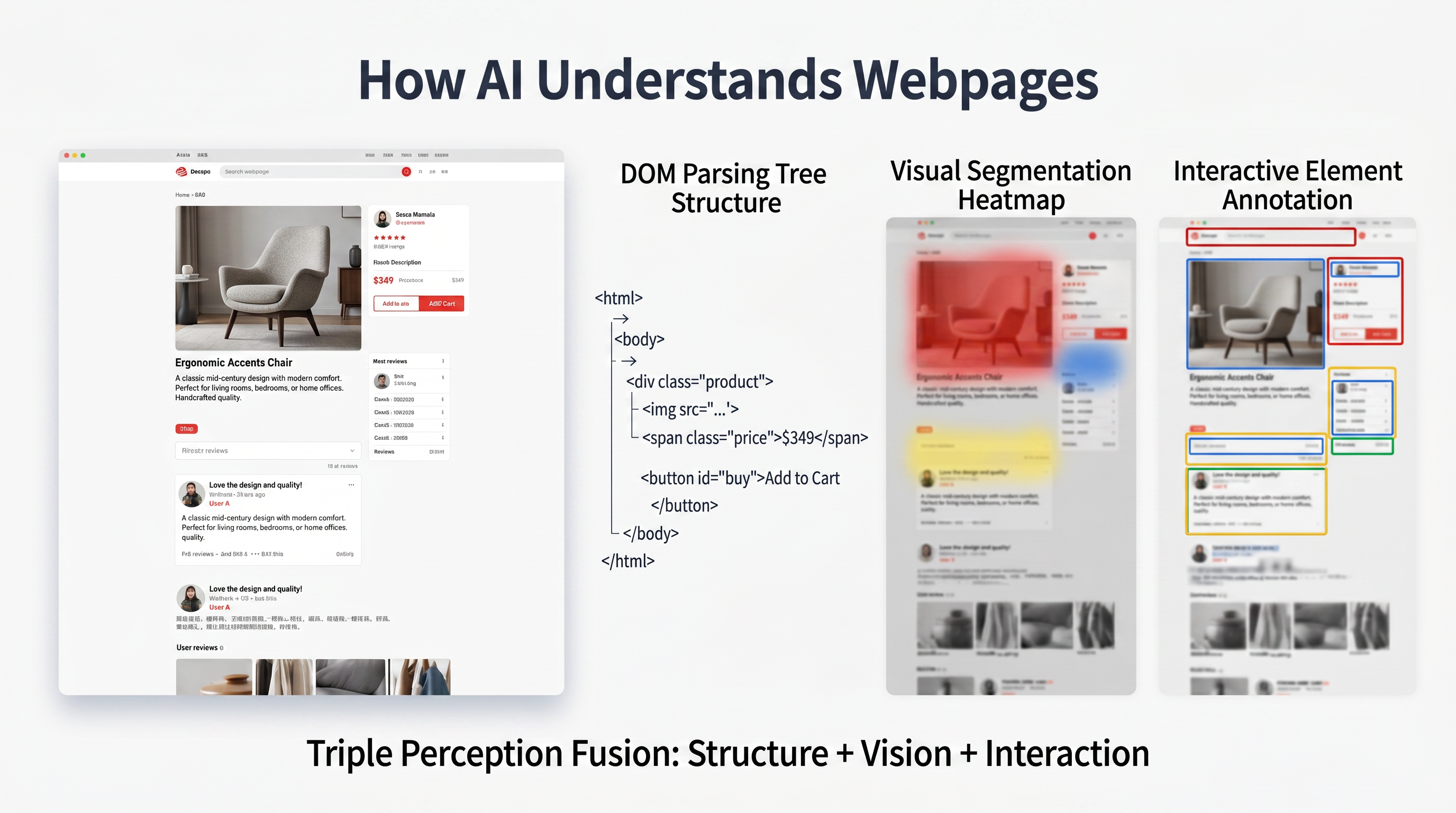
At any given moment, the Agentic Browser reads the DOM tree (structure), analyzes the heatmap (visual), and marks interaction boxes (interaction). The three overlap to form a "comprehensive understanding" of the webpage. It is this redundant design of "relying on vision if code is not understood" that gives Agentic Browsers extreme robustness. When a webpage changes "Buy Now" to "Grab Now," or makes a button a fancy image link, it can still accurately locate and execute the operation.
With the task plan and environment understanding, it's time to act. The action execution stage is responsible for transforming abstract "steps" into atomic operations in a real browser: clicking, typing, scrolling, hovering, handling pop-ups, etc.
Agentic Browsers typically run in a controlled real browser instance (such as headful or headless Chromium), simulating human operations through browser automation protocols (like CDP). But they are smarter than traditional automation due to biomimetic execution:
sleep, it listens for events like DOM changes, network request completion, and the visibility of key elements.To more intuitively show a typical interaction's complete action sequence, Figure 2-4 uses "Click Add to Cart" as an example to map out the detailed steps of action execution:
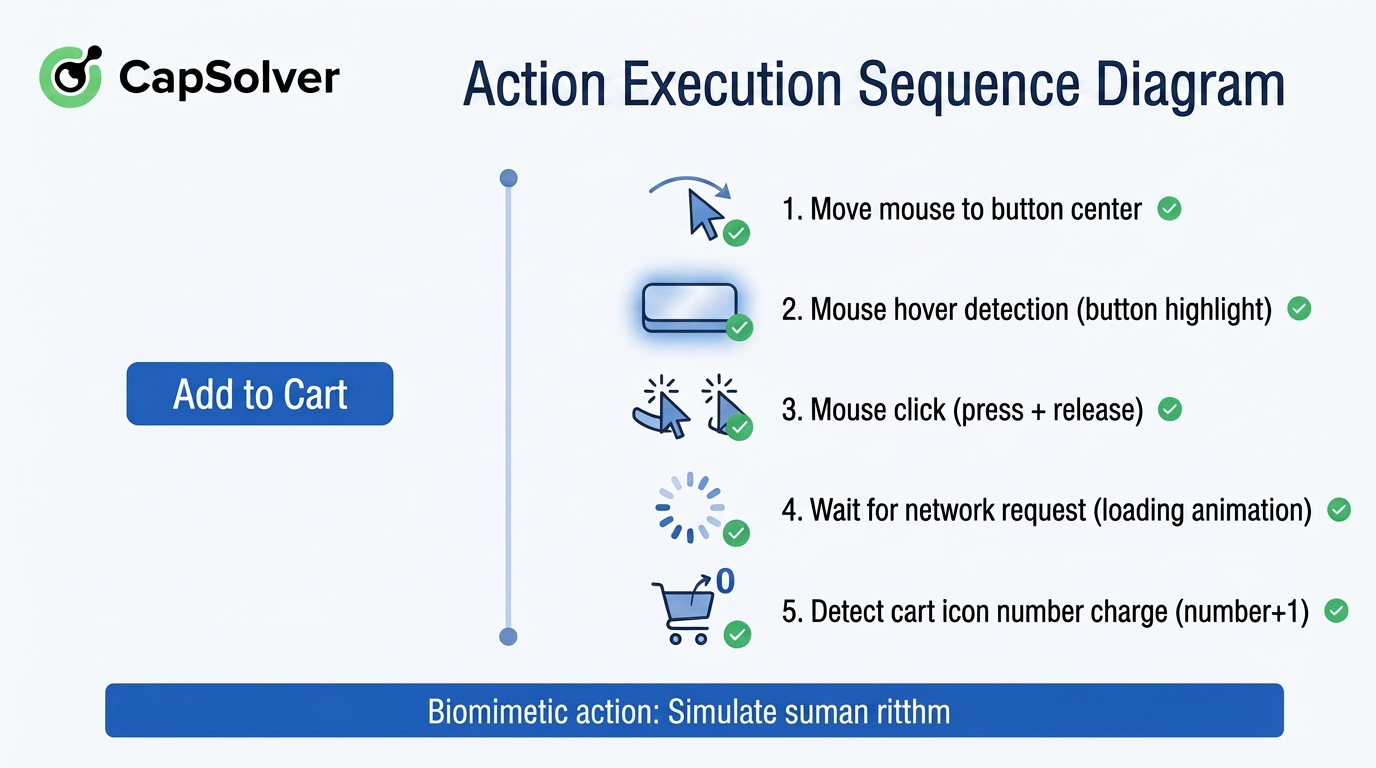
As shown in Figure 2-4, every step corresponds to a real user's operational habits: from hovering to trigger visual feedback, to waiting for the backend response after clicking, and finally verifying the frontend state change. This fine-grained sequence design allows the Agentic Browser not only to "do the right action" but also to "act like a human."
Furthermore, the entire process generates a real-time action log, allowing users to pause, ask about progress, or correct errors at any time. The Agentic Browser is not a one-time run-to-the-end tool but a human-machine collaborative "semi-automatic" mode—you can intervene at key decision points, such as having the browser stop and wait for your confirmation before final payment. The "Biomimetic Execution: Simulating Real Human Operational Rhythm" below summarizes the philosophy behind this series of actions: making every step of the machine carry human warmth.
Webpages in the real world are alive: A/B testing might show you a blue button this time and a red one next time; page layouts change drastically during promotion seasons; "Claim Coupon" modals or CAPTCHA challenges suddenly pop up. This is where Agentic Browsers part ways with traditional RPA—dynamic adaptation capability.
Dynamic adaptation includes three levels of reaction:
We can view the entire adaptation process as a continuous self-correcting loop:
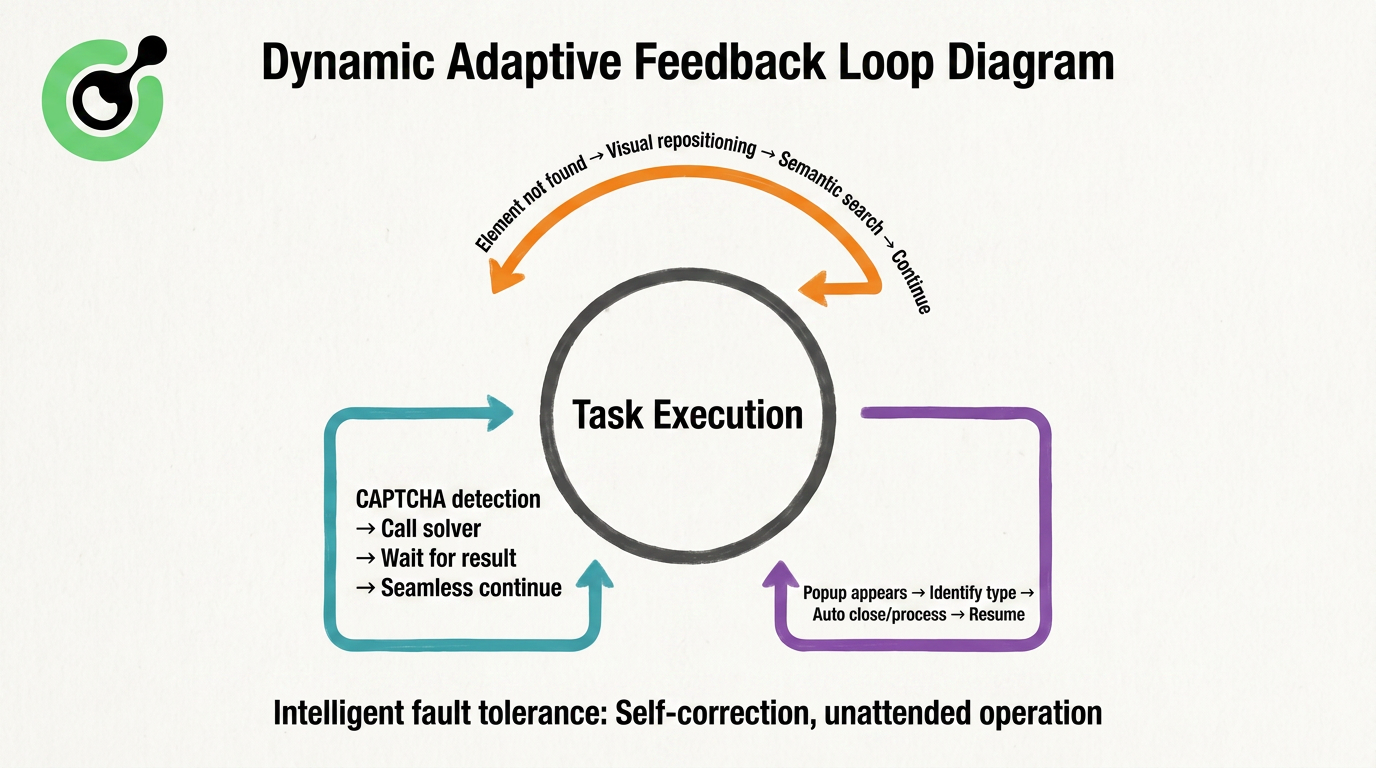
The entire closed loop revolves around "task execution": when encountering a CAPTCHA, the system automatically calls external solving resources, waits for the result, and resumes seamlessly; when encountering a pop-up, it identifies and handles it, then returns to the main task flow. This mechanism complements the "Intelligent Fault Tolerance Mechanism" at the bottom, ensuring that the Agentic Browser can complete complex webpage processes that were once "certain to fail" without supervision. It is this closed loop that makes the Agentic Browser no longer afraid of change but learn to adapt like a human.
For more information on the development and technical landscape of Agentic Browsers and web automation, please refer to the following authoritative sources:
The evolution from traditional browsers to Agentic Browsers represents a monumental shift in how we interact with the digital world. By integrating LLMs, multimodal perception, and biomimetic execution, Agentic Browsers are no longer just passive windows but active, intelligent assistants capable of understanding complex intents and navigating dynamic web environments. They handle the tedious, repetitive tasks, freeing up human users to focus on higher-level decision-making and creativity. However, as these agents become more sophisticated, they inevitably encounter the ultimate gatekeepers of the web: CAPTCHAs. To truly unlock the potential of Agentic Browsers, robust infrastructure is required to overcome these hurdles seamlessly.
Recommendation: To ensure your Agentic Browser or automation scripts run smoothly without being blocked by complex CAPTCHAs, we highly recommend integrating CapSolver. CapSolver provides a reliable, AI-driven infrastructure to bypass various CAPTCHA challenges seamlessly, acting as the perfect "invisible engine" for your automated workflows.
Bonus Code
Redeem Your CapSolver Bonus Code
Boost your automation budget instantly!
Use bonus code CAP26 when topping up your CapSolver account to get an extra 5% bonus on every recharge — with no limits.
Redeem it now in your CapSolver Dashboard
Read the second part of this series: Agentic Browser's Invisible Engine: Overcoming CAPTCHAs with Specialized Infrastructure
Q1: What is the main difference between a traditional browser and an Agentic Browser?
A1: A traditional browser is a passive tool that requires step-by-step manual input (clicks, typing) to navigate and perform tasks. An Agentic Browser is an active digital agent that understands natural language commands, plans tasks autonomously, and executes them on your behalf.
Q2: How does an Agentic Browser understand what to do on a web page?
A2: It uses a combination of DOM structure analysis, visual screenshot understanding (using computer vision), and interaction state reasoning to "see" and comprehend the web page just like a human would, making it highly resilient to UI changes.
Q3: Can an Agentic Browser handle unexpected pop-ups or changes in a website?
A3: Yes, it features dynamic adaptation capabilities. It can detect anomalies, handle unexpected pop-ups intelligently, and adjust its execution strategy on the fly without crashing like traditional automation scripts.
Q4: What happens when an Agentic Browser encounters a CAPTCHA?
A4: When a CAPTCHA is detected, the Agentic Browser pauses its current task and delegates the solving process to specialized infrastructure, such as CapSolver. Once solved, it seamlessly resumes the task.
Lucas Mitchell
Automation Engineer
Helping browser automation recover and continue.
ABOUT THE AUTHOR
Add a CAPTCHA inspection tool to Haystack, read reCAPTCHA parameters with the official SDK, and verify the connection before a separate solving step.

Add CAPTCHA solver tools to Goose with a local MCP extension. Configure Python, inspect tool discovery, and troubleshoot the setup before a solving task.