
🎉NEWCapSolver for AI agents-MCP, agent tools, and SDK integrations

Emma Foster
Machine Learning Engineer
Published Jun 26, 2023
Updated Jun 26, 2023 · min read
This tutorial will guide you through the process of solving any version of reCaptcha using Capsolver.
CapSolver is a Captcha Solving Service that helps you solve Captchas.
We use AI-powered Captcha Solving Algorithms, which result in faster solving speed and significantly reduced costs, providing an excellent developer experience.
The goal will be to solve the problem of solves not being accepted, with this tutorial you will fix that problem.
Before you read this blog, it's recommended that you know the basic stuff of how to solve reCaptcha using our API. Check this documentation: reCaptcha v2 docs or reCaptcha v3 docs
On most user case, directly requesting our reCaptcha will work normally. However, may no work or some data may be missing, causing your token to be invalid.
In this case, you can submit additional parameters as described below to help obtain a more stable token score:
reCaptchaInspect Element (or press button F12)Network sectionpreserve log/anchor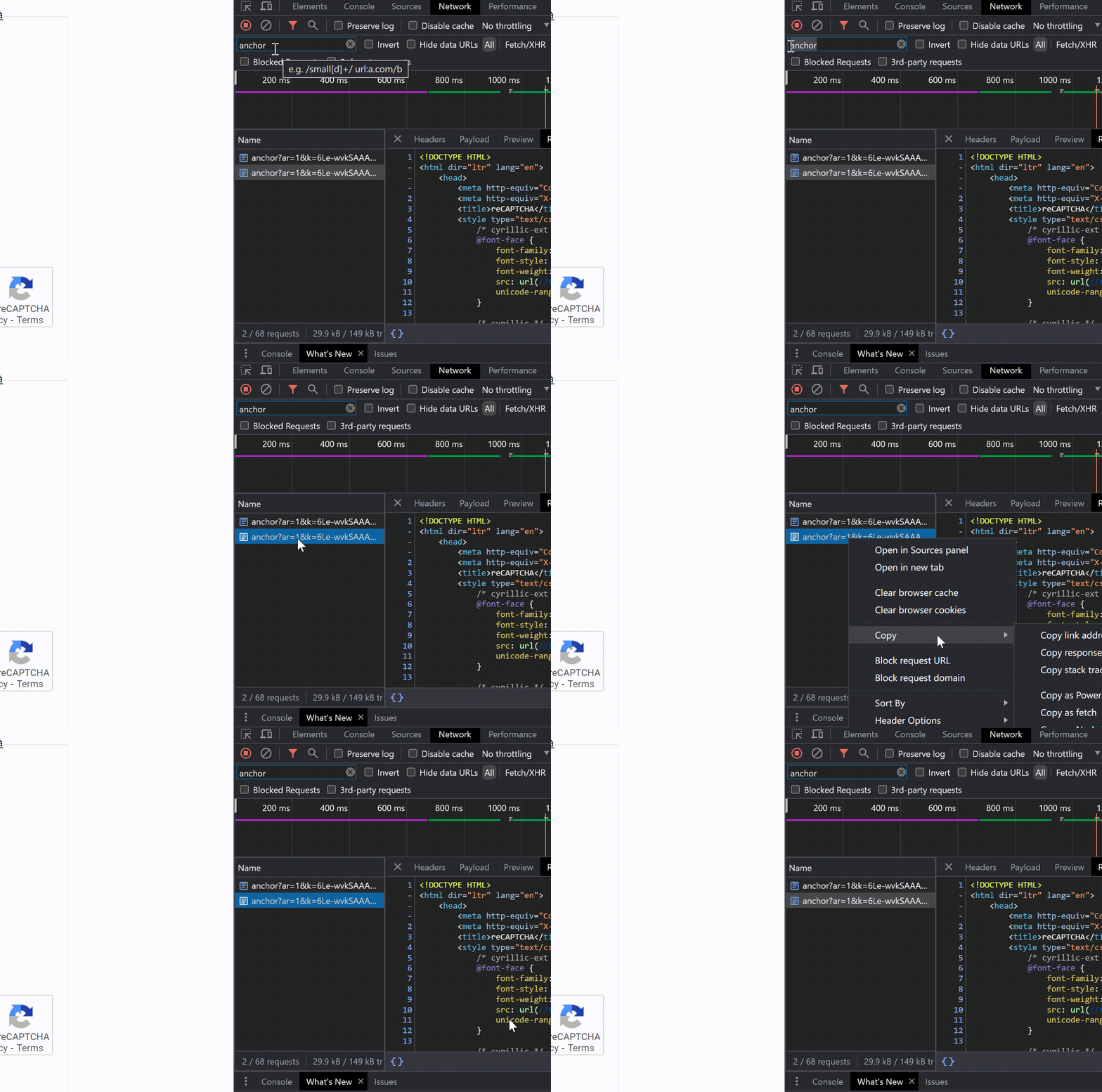
response value into base64, you can use this site: https://www.base64encode.org/This step is similar to the step 1. But instead of copy the response of the anchor, you will need to copy the fetch of the reload request.
If you didn't close the inspect element and the website, you can continue with this guide from this number, if you closed, you need to start from step 1
See the request that constains /reload
Right click the reload request, click copy and then copy as fetch
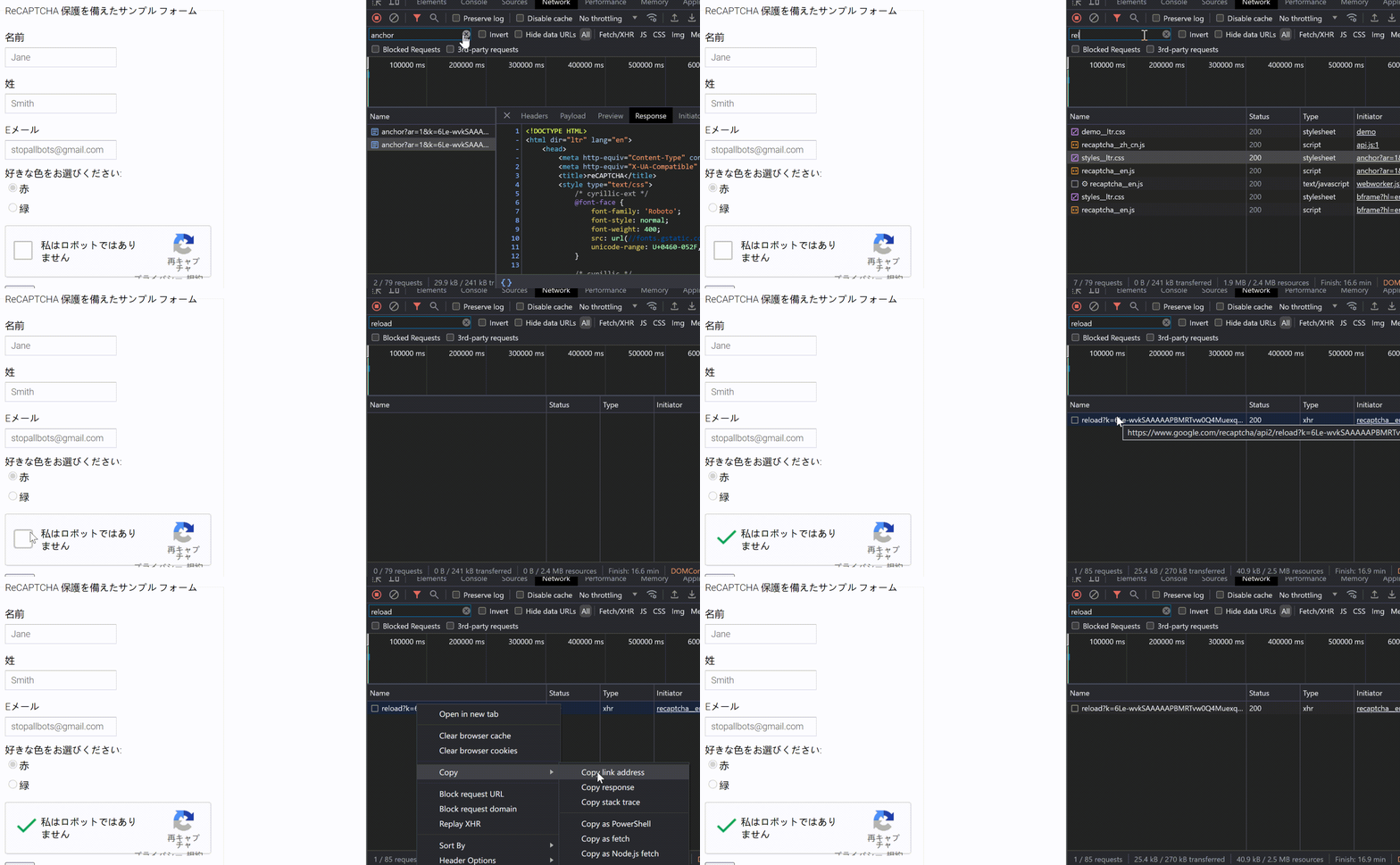
🌀 Keep in mind that the anchor and reload requests should be successive. This means the anchor request should be the last one before the reload request.
Convert this fetch value into base64, you can use this site: https://www.base64encode.org/
Save the base64 fetch value into fetchBase64.txt
After you have anchorBase64.txt and fetchBase64.txt, you will need to submit us these values. You just need to send us one time.
This is a example JSON, keep in mind that there are many parameters that are optional so you may no require them.
Read our documentation to understand each parameter.
Claim Your Bonus Code for top captcha solutions; CapSolver: CAPT. After redeeming it, you will get an extra 5% bonus after each recharge, Unlimited
    "task": {
    //Required
    "type": "ReCaptchaV2Task", //Always prioritize task types that use your own proxy, should improve a lot the pass ratio, proxyless is not good for high security
    //Required
    "websiteURL": "https://www.google.com/recaptcha/api2/demo",
    //Required
    "websiteKey": "6Le-wvkSAAAAAPBMRTvw0Q4Muexq9bi0DJwx_mJ-",
    // Paste your saved anchor and reload base64 content
    "anchor":"base64 content",
    "reload":"base64 content"
    }
Only submit once.
If you encounter an invalid reCaptcha v2 token or a low reCaptcha v3 score, please contact our customer service or reach out via Telegram or Discord. Our team will help you configure the json to ensure token validity and improve score.
Documentations:
ReCaptcha V2 Documentation
ReCaptcha V3 Documentation
Also read these blogs:
How to solve reCaptcha v3
How to solve reCaptcha v2
By adopting the strategies outlined above, you can effortlessly resolve the challenges of reCAPTCHA v2/v3 enterprise versions. We also offer detailed custom services to meet specific customer requirements. Should you have any inquiries, please reach out to us via our customer service system.
Capsolver Team 💜
Emma Foster
Machine Learning Engineer
Where machine learning meets practical AI tooling.
ABOUT THE AUTHOR
Find a reCAPTCHA callback through widget attributes, rendering code, and browser debugging. Check token handling without relying on fragile internal paths.
Use CapSolver getToken for supported reCAPTCHA tasks with a documented JSON request, a cURL example, direct results, and clear token-validation steps.

