
🎉全新面向 AI Agent 的 CapSolver-MCP、agent 工具和 SDK 集成

Sora Fujimoto
AI Solutions Architect
已发表 Mar 12, 2026
已更新 Mar 13, 2026 · 最小阅读量
AWS WAF(Web 应用程序防火墙)是亚马逊的企业级机器人防护系统,被互联网上一些最大的网站使用。与显示图像拼图或复选框的传统 CAPTCHA 不同,AWS WAF 使用隐形挑战和基于令牌的验证——这使得自动化工具难以处理。
如果您可以在 n8n 工作流中自动解决 AWS WAF 挑战,会怎么样?无论是构建可重用的求解器 API、抓取受 CAPTCHA 保护的网站,还是自动化登录表单——所有这些都无需编写一行传统代码。
在本指南中,您将学习如何将 n8n(一个可视化工作流自动化工具)与 CapSolver(一个由 AI 驱动的 CAPTCHA 解决服务)结合起来,按需解决 AWS WAF 挑战——无论是作为独立的 API 端点还是作为任何大型自动化工作流中的一个步骤。
您将构建什么:
求解器 API — 一个可重用的端点,您的其他工具可以调用:
直接使用工作流 — CapSolver 作为大型自动化中的一个步骤嵌入:
AWS WAF(Web 应用程序防火墙)是亚马逊网络服务的机器人缓解和网络安全服务。它保护网站免受常见的网络攻击、机器人流量和自动化滥用。许多高流量网站——尤其是电子商务平台、金融服务和企业应用程序——使用 AWS WAF 来通过隐形 CAPTCHA 挑战来限制访问。
AWS WAF 与 reCAPTCHA 和 Turnstile 的区别:
websiteURL 即可开始解决。aws-waf-token Cookie,必须通过 Cookie HTTP 标头随后续请求发送。awsKey、awsIv、awsContext、awsChallengeJS 和其他参数。这些是可选的,仅在特定实现中需要。
与 CloudFront 不同。 AWS WAF 是位于 Web 应用程序前面的防火墙层。CloudFront 是亚马逊的 CDN。一个站点可以使用 CloudFront 而不使用 AWS WAF,或者使用 AWS WAF 而不使用 CloudFront——它们是独立的服务,尽管通常一起使用。
在开始之前,请确保您具备以下条件:
重要提示: 确保您的 CapSolver 账户中有足够的余额。AWS WAF 解决任务会根据使用情况消耗积分。
CapSolver 作为 官方集成 在 n8n 中可用——无需安装社区节点。您可以在构建工作流时直接在节点面板中找到它。
由于它是官方集成,您需要在 n8n 中创建凭据,以便 CapSolver 节点可以使用您的账户进行身份验证。
转到您的 n8n 实例并导航到 Settings -> Credentials。您将在此处看到所有已配置的凭据。

All(默认)n8n 将自动测试连接。您应该会看到一个绿色的 "Connection tested successfully" 横幅,确认您的 API 密钥有效。
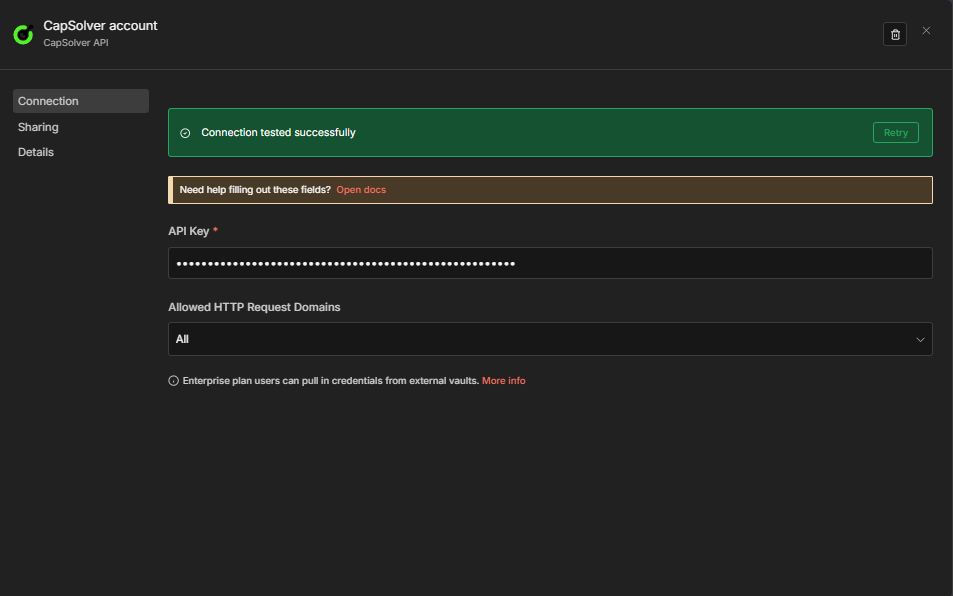
重要提示: 工作流中的每个 CapSolver 节点都将引用此凭据。您只需创建一次——所有求解器工作流都将共享相同的凭据。
现在您已准备好构建您的 AWS WAF 求解器工作流!
在解决 AWS WAF 挑战之前,您需要确认目标站点正在使用 AWS WAF 并收集任何可选参数。最简单的方法是结合使用 CapSolver 浏览器扩展和手动检查。
导航到您的目标网站并打开 DevTools (F12)。查找这些明显的迹象:
aws-waf-token cookiecaptcha.awswaf.com 或包含 challenge.js 的 URL 的请求x-amzn-waf-* 头大多数 AWS WAF 解决方案只需要 websiteURL。但是,某些站点会公开可提高解决准确性的附加参数:
| 参数 | 查找位置 | 描述 |
|---|---|---|
awsKey |
页面源代码 / JS 变量 | CAPTCHA 页面返回的密钥值 |
awsIv |
页面源代码 / JS 变量 | CAPTCHA 页面返回的 iv 值 |
awsContext |
页面源代码 / JS 变量 | CAPTCHA 页面返回的上下文值 |
awsChallengeJS |
网络选项卡 | challenge.js URL(例如,https://captcha.awswaf.com/.../challenge.js) |
awsApiJs |
网络选项卡 | jsapi.js URL |
awsProblemUrl |
网络选项卡 | 问题端点 URL |
awsApiKey |
网络选项卡 | 问题端点的 api_key 值 |
awsExistingToken |
Cookies | 如果刷新,则为以前的 aws-waf-token |
提示: 对于大多数站点,您只需要
websiteURL。首先只使用该参数,仅当令牌不被接受时才添加可选参数。
有关识别 CAPTCHA 参数的详细指南,请查看 CapSolver 官方文档。
此工作流创建一个 POST API 端点,该端点接受 AWS WAF 参数并返回已解决的 cookie 令牌。

工作流由四个节点组成:
$json.error 不为空)进行分支{"error": "..."}| 设置 | 值 |
|---|---|
| HTTP 方法 | POST |
| 路径 | solver-aws-waf |
| 响应 | Response Node |
这会在以下位置创建端点:https://your-n8n-instance.com/webhook/solver-aws-waf
| 参数 | 值 | 描述 |
|---|---|---|
| 操作 | AWS WAF |
必须设置为 AWS WAF |
| 类型 | AntiAwsWafTaskProxyLess |
无需代理(默认)。对于更严格的站点,使用 AntiAwsWafTask 和代理 |
| 网站 URL | {{ $json.body.websiteURL }} |
带有 AWS WAF 挑战的页面 URL |
| awsKey | (可选) | CAPTCHA 页面返回的密钥值 |
| awsIv | (可选) | CAPTCHA 页面返回的 iv 值 |
| awsContext | (可选) | CAPTCHA 页面返回的上下文值 |
| awsChallengeJS | (可选) | challenge.js 链接 |
| awsApiJs | (可选) | jsapi.js 链接 |
与 Turnstile/reCAPTCHA 的主要区别: AWS WAF 不需要
websiteKey。只有websiteURL是强制性的。还要在此节点中选择您的 CapSolver 凭据。
| 设置 | 值 |
|---|---|
| 条件 | ={{ $json.error }} 不为空 |
| True 分支 | 路由到 错误 响应 Webhook 节点 |
| False 分支 | 路由到 成功 响应 Webhook 节点 |
这使得画布上的错误路径明确。CapSolver 节点在出错时继续 (onError: continueRegularOutput),因此失败会以 {"error": "..."} 的形式到达此处,而不是使工作流崩溃。
成功分支(CapSolver 错误?的 False 输出):
| 设置 | 值 |
|---|---|
| 响应方式 | JSON |
| 响应正文 | ={{ JSON.stringify($json.data) }} |
错误分支(CapSolver 错误?的 True 输出):
| 设置 | 值 |
|---|---|
| 响应方式 | JSON |
| 响应正文 | ={{ JSON.stringify({ error: $json.error }) }} |
错误消息根据失败发生的位置遵循两种格式之一:
| 失败点 | 格式 |
|---|---|
| 任务创建被拒绝(错误的密钥、余额不足、无效数据等) | {"error": "Failed to create task: Request failed with status code 400"} |
| 任务已创建但 CAPTCHA 无法解决 | {"error": "Solve failed: <reason>"} |
| 解决超时 120 秒 | {"error": "Get task result timeout: unable to solve within 120000 seconds"} |
注意: 任务创建失败(错误的 API 密钥、零余额、无效任务数据)都以相同的 HTTP 400 消息显示——n8n 节点在读取 CapSolver 的错误正文之前捕获 HTTP 异常。
常见错误示例:
{"error": "Failed to create task: Request failed with status code 400"}
{"error": "Solve failed: Invalid parameters"}
{"error": "Get task result timeout: unable to solve within 120000 seconds"}向您的 webhook 端点发送 POST 请求:
curl -X POST https://your-n8n-instance.com/webhook/solver-aws-waf \
  -H "Content-Type: application/json" \
  -d '{
    "websiteURL": "https://example.com/login"
  }'
预期响应:
{
  "taskId": "abc123...",
  "solution": {
    "cookie": "aws-waf-token=AQAAAA..."
  },
  "status": "ready"
}复制下面的 JSON 并通过 Menu -> Import from JSON 导入到 n8n 中:
{
  "name": "AWS WAF Solver API",
  "nodes": [
    {
      "parameters": {
        "content": "## AWS WAF 求解器 API\n\n**适用于:** 需要在其他工具中解决 AWS WAF 挑战的团队。\n\n**功能:** 接收 AWS WAF 参数,将挑战发送到 CapSolver,并返回已解决的 `aws-waf-token` cookie。\n\n**工作原理:**\n1. Webhook 接收带有 `websiteURL` 和可选参数的 POST 请求。\n2. CapSolver 解决 AWS WAF 挑战。\n3. 成功时,Webhook 返回包含 `aws-waf-token` cookie 的 JSON 响应。\n4. 失败时,Webhook 返回错误消息。\n\n**设置:**\n1. 在 **Settings → Credentials** 下添加您的 CapSolver API 密钥。\n2. 激活工作流。\n3. 记下 Webhook URL。\n\n**重要提示:**\n- AWS WAF 不需要 `websiteKey`。只需 `websiteURL`。\n- 解决方案是一个 `aws-waf-token` cookie,必须作为 HTTP `Cookie` 头发送。",
        "height": 480,
        "width": 460,
        "color": 1
      },
      "type": "n8n-nodes-base.stickyNote",
      "typeVersion": 1,
      "position": [
        -728,
        -400
      ],
      "id": "sticky-blog-main-1773678228095-1",
      "name": "Sticky Note"
    },
    {
      "parameters": {
        "httpMethod": "POST",
        "path": "solver-aws-waf",
        "responseMode": "responseNode",
        "options": {}
      },
      "type": "n8n-nodes-base.webhook",
      "typeVersion": 2.1,
      "position": [
        -400,
        0
      ],
      "id": "aw111111-1111-1111-1111-aw1111111101",
      "name": "Webhook Trigger",
      "webhookId": "aw111111-aaaa-bbbb-cccc-aw1111111101",
      "onError": "continueRegularOutput"
    },
    {
      "parameters": {
        "operation": "AWS WAF",
        "type": "AntiAwsWafTaskProxyLess",
        "websiteURL": "={{ $json.body.websiteURL }}",
        "awsKey": "={{ $json.body.awsKey }}",
        "awsIv": "={{ $json.body.awsIv }}",
        "awsContext": "={{ $json.body.awsContext }}",
        "awsChallengeJS": "={{ $json.body.awsChallengeJS }}",
        "awsApiJs": "={{ $json.body.awsApiJs }}",
        "optional": {}
      },
      "type": "n8n-nodes-capsolver.capSolver",
      "typeVersion": 1,
      "position": [
        -96,
        0
      ],
      "id": "aw111111-1111-1111-1111-aw1111111102",
      "name": "Solve AWS WAF",
      "credentials": {
        "capSolverApi": {
          "id": "YOUR_CREDENTIAL_ID",
          "name": "CapSolver account"
        }
      }
    },
    {
      "parameters": {
        "conditions": {
          "options": {
            "caseSensitive": true,
            "leftValue": "",
            "typeValidation": "strict",
            "version": 2
          },
          "conditions": [
            {
              "id": "aws-if-001",
              "leftValue": "={{ $json.error }}",
              "operator": {
                "type": "string",
                "operation": "isEmpty",
                "singleValue": true
              }
            }
          ],
          "combinator": "and"
        },
        "options": {}
      },
      "type": "n8n-nodes-base.if",
      "typeVersion": 2.2,
      "position": [
        208,
        0
      ],
      "id": "aw111111-1111-1111-1111-aw1111111103",
      "name": "CapSolver Error?"
    },
    {
      "parameters": {
        "respondWith": "json",
        "responseBody": "={{ JSON.stringify($json.data) }}",
        "options": {}
      },
      "type": "n8n-nodes-base.respondToWebhook",
      "typeVersion": 1.5,
      "position": [
        512,
        -80
      ],
      "id": "aw111111-1111-1111-1111-aw1111111104",
      "name": "Respond to Webhook (Success)"
    },
    {
      "parameters": {
        "respondWith": "json",
        "responseBody": "={{ JSON.stringify({ error: $json.error }) }}",
        "options": {}
      },
      "type": "n8n-nodes-base.respondToWebhook",
      "typeVersion": 1.5,
      "position": [
        512,
        128
      ],
      "id": "aw111111-1111-1111-1111-aw1111111105",
      "name": "Respond to Webhook (Error)"
    }
  ],
  "connections": {
    "Webhook Trigger": {
      "main": [
        [
          {
            "node": "Solve AWS WAF",
            "type": "main",
            "index": 0
          }
        ]
      ]
    },
    "Solve AWS WAF": {
      "main": [
        [
          {
            "node": "CapSolver Error?",
            "type": "main",
            "index": 0
          }
        ]
      ]
    },
    "CapSolver Error?": {
      "main": [
        [
          {
            "node": "Respond to Webhook (Success)",
            "type": "main",
            "index": 0
          }
        ],
        [
          {
            "node": "Respond to Webhook (Error)",
            "type": "main",
            "index": 0
          }
        ]
      ]
    }
  },
  "active": false,
  "settings": {
    "executionOrder": "v1"
  }
}上面的求解器 API 和提交示例展示了核心模式:解决 AWS WAF 挑战,提交 cookie,处理结果。以下工作流将此模式扩展到生产就绪用例——每个都具有双重触发器(计划 + Webhook)、持久状态跟踪和结构化输出。
| 工作流 | 用途 |
|---|---|
AWS WAF 抓取 — 价格和产品详情 — CapSolver + 计划 + Webhook |
每 6 小时抓取一次价格和产品名称,与存储在 staticData 中的先前值进行比较,并在发生变化时发出警报 |
AWS WAF 账户登录 — CapSolver + 计划 + Webhook |
在受 AWS WAF 保护的站点上登录您自己的账户,方法是先解决,然后使用 cookie POST 凭据 |
此工作流每 6 小时(计划)或按需(Webhook)抓取一个产品页面,使用 HTML 节点提取价格,并将其与先前存储的值进行比较。
计划路径:
每 6 小时 -> 解决 AWS WAF -> 获取产品页面 -> 提取数据
  -> 比较数据 -> 数据已更改? -> 构建警报 / 无更改
关键行为:
Cookie 头发送(这是提交 AWS WAF 令牌的正确方式——而不是作为表单字段).product-price、h1)提取价格和产品名称$workflow.staticData.lastPrice 在执行之间持久化先前的价格deal)和上涨(严重性:info){
"name": "AWS WAF Scraping — Price & Product Details — CapSolver + Schedule + Webhook",
"nodes": [
{
"parameters": {
"content": "## AWS WAF 抓取 — 价格和产品监控器\n\n**适用于:** 监控受 AWS WAF 保护的站点上的价格或产品数据的团队。\n\n**功能:** 解决 AWS WAF,获取产品页面,通过 CSS 选择器提取价格和名称,与存储值进行比较,并在发生变化时发出警报。\n\n**工作原理:**\n1. 计划(每 6 小时)或 Webhook 触发流程\n2. CapSolver 解决 AWS WAF 挑战\n3. HTTP 请求使用已解决的令牌获取产品页面\n4. HTML 节点提取价格和产品名称\n5. 代码节点比较当前价格与存储价格 → 价格变化时发出警报\n\n**设置:**\n1. 在 **Settings → Credentials** 下添加您的 CapSolver API 密钥\n2. 替换占位符 URL 和站点密钥\n3. 更新“提取数据”中的 CSS 选择器以匹配您的目标页面\n4. 将“构建警报”的输出连接到您的通知渠道",
"height": 560,
"width": 460,
"color": 1
},
"type": "n8n-nodes-base.stickyNote",
"typeVersion": 1,
"position": [
-920,
-380
],
"id": "sticky-blog-main-1773678228094-1",
"name": "Sticky Note"
},
{
"parameters": {
"content": "### 计划路径\n每 6 小时自动运行。\n结果存储在工作流静态数据中,用于跨执行比较。",
"height": 480,
"width": 1900,
"color": 6
},
"type": "n8n-nodes-base.stickyNote",
"typeVersion": 1,
"position": [
-440,
-280
],
"id": "sticky-blog-section-1773678228094-2",
"name": "Sticky Note1"
},
{
"parameters": {
"content": "### Webhook 路径\n按需触发器——相同的逻辑,将结果作为 JSON 响应返回。",
"height": 480,
"width": 1900,
"color": 6
},
"type": "n8n-nodes-base.stickyNote",
"typeVersion": 1,
"position": [
-440,
140
],
"id": "sticky-blog-section-1773678228094-3",
"name": "Sticky Note2"
},
{
"parameters": {
"rule": {
"interval": [
{
"field": "hours",
"hoursInterval": 6
}
]
}
},
"type": "n8n-nodes-base.scheduleTrigger",
"typeVersion": 1.3,
"position": [
-400,
0
],
"id": "aw333333-3333-3333-3333-aw3333333301",
"name": "Every 6 Hours"
},
{
"parameters": {
"operation": "AWS WAF",
"type": "AntiAwsWafTaskProxyLess",
"websiteURL": "https://YOUR-TARGET-SITE.com/product-page",
"optional": {}
},
"type": "n8n-nodes-capsolver.capSolver",
"typeVersion": 1,
"position": [
-96,
0
],
"id": "aw333333-3333-3333-3333-aw3333333302",
"name": "Solve AWS WAF",
"credentials": {
"capSolverApi": {
"id": "YOUR_CREDENTIAL_ID",
"name": "CapSolver account"
}
}
},
{
"parameters": {
"url": "https://YOUR-TARGET-SITE.com/product-page",
"sendHeaders": true,
"headerParameters": {
"parameters": [
{
"name": "user-agent",
"value": "Mozilla/5.0 (Windows NT 10.0; Win64; x64) AppleWebKit/537.36 (KHTML, like Gecko) Chrome/125.0.0.0 Safari/537.36"
},
{
"name": "Cookie",
"value": "={{ $json.data.solution.cookie }}"
}
]
},
"options": {
"response": {
"response": {
"fullResponse": false
}
}
}
},
"type": "n8n-nodes-base.httpRequest",
"typeVersion": 4.3,
"position": [
208,
0
],
"id": "aw333333-3333-3333-3333-aw3333333303",
"name": "Fetch Product Page"
},
{
"parameters": {
"operation": "extractHtmlContent",
"sourceData": "json",
"dataPropertyName": "data",
"extractionValues": {
"values": [
{
"key": "price",
"cssSelector": ".product-price, [data-price], .price",
"returnValue": "text",
"returnArray": false
},
{
"key": "productName",
"cssSelector": "h1, .product-title",
"returnValue": "text",
"returnArray": false
}
]
},
"options": {}
},
"type": "n8n-nodes-base.html",
"typeVersion": 1.2,
"position": [
512,
0
],
"id": "aw333333-3333-3333-3333-aw3333333304",
"name": "Extract Data"
},
{
"parameters": {
"jsCode": "// Get current and previous price from workflow static data\nconst staticData = $workflow.staticData;\nconst currentPrice = $input.first().json.price;\nconst previousPrice = staticData.lastPrice;\nconst productName = $input.first().json.productName || 'Product';\n\n// Parse numeric values for comparison\nconst parsePrice = (str) => {\n if (!str) return null;\n const match = str.match(/[\\d,]+\\.?\\d*/);\n return match ? parseFloat(match[0].replace(',', '')) : null;\n};\n\nconst currentNum = parsePrice(currentPrice);\nconst previousNum = parsePrice(previousPrice);\n\n// Update stored price\nstaticData.lastPrice = currentPrice;\nstaticData.lastChecked = new Date().toISOString();\n\nconst changed = previousNum !== null && currentNum !== null && currentNum !== previousNum;\nconst direction = changed ? (currentNum < previousNum ? 'dropped' : 'increased') : 'unchanged';\nconst diff = changed ? Math.abs(currentNum - previousNum).toFixed(2) : '0';\n\nreturn [{\n json: {\n productName,\n currentPrice,\n previousPrice: previousPrice || 'first check',\n changed,\n direction,\n diff: changed ? `$${diff}` : null,\n checkedAt: new Date().toISOString()\n }\n}];"
},
"type": "n8n-nodes-base.code",
"typeVersion": 2,
"position": [
800,
0
],
"id": "aw333333-3333-3333-3333-aw3333333305",
"name": "Compare Data"
},
{
"parameters": {
"conditions": {
"options": {
"caseSensitive": true,
"leftValue": "",
"typeValidation": "strict",
"version": 2
},
"conditions": [
{
"id": "price-if-001",
"leftValue": "={{ $json.changed }}",
"operator": {
"type": "boolean",
"operation": "true",
"singleValue": true
}
}
],
"combinator": "and"
},
"options": {}
},
"type": "n8n-nodes-base.if",
"typeVersion": 2.2,
"position": [
1104,
0
],
"id": "aw333333-3333-3333-3333-aw3333333306",
"name": "Data Changed?"
},
{
"parameters": {
"assignments": {
"assignments": [
{
"id": "alert-001",
"name": "alert",
"value": "=Price {{ $json.direction }} for {{ $json.productName }}: {{ $json.previousPrice }} → {{ $json.currentPrice }} ({{ $json.direction === 'dropped' ? '-' : '+' }}{{ $json.diff }})",
"type": "string"
},
{
"id": "alert-002",
"name": "severity",
"value": "={{ $json.direction === 'dropped' ? 'deal' : 'info' }}",
"type": "string"
},
{
"id": "alert-003",
"name": "checkedAt",
"value": "={{ $json.checkedAt }}",
"type": "string"
}
]
},
"options": {}
},
"type": "n8n-nodes-base.set",
"typeVersion": 3.4,
"position": [
1408,
-80
],
"id": "aw333333-3333-3333-3333-aw3333333307",
"name": "Build Alert"
},
{
"parameters": {
"assignments": {
"assignments": [
{
"id": "nc-001",
"name": "status",
"value": "no_change",
"type": "string"
},
{
"id": "nc-002",
"name": "currentPrice",
"value": "={{ $json.currentPrice }}",
"type": "string"
},
{
"id": "nc-003",
"name": "checkedAt",
"value": "={{ $json.checkedAt }}",
"type": "string"
}
]
},
"options": {}
},
"type": "n8n-nodes-base.set",
"typeVersion": 3.4,
"position": [
1408,
128
],
"id": "aw333333-3333-3333-3333-aw3333333308",
"name": "No Change"
},
{
"parameters": {
"httpMethod": "POST",
"path": "price-monitor-aws-waf",
"responseMode": "responseNode",
"options": {}
},
"type": "n8n-nodes-base.webhook",
"typeVersion": 2.1,
"position": [
-400,
420
],
"id": "aw333333-3333-3333-3333-aw3333333309",
"name": "Webhook Trigger",
"webhookId": "aw333333-aaaa-bbbb-cccc-aw3333333309",
"onError": "continueRegularOutput"
},
{
"parameters": {
"operation": "AWS WAF",
"type": "AntiAwsWafTaskProxyLess",
"websiteURL": "https://YOUR-TARGET-SITE.com/product-page",
"optional": {}
},
"type": "n8n-nodes-capsolver.capSolver",
"typeVersion": 1,
"position": [
-96,
420
],
"id": "aw333333-3333-3333-3333-aw3333333310",
"name": "Solve AWS WAF [Webhook]",
"credentials": {
"capSolverApi": {
"id": "YOUR_CREDENTIAL_ID",
"name": "CapSolver account"
}
}
},
{
"parameters": {
"url": "https://YOUR-TARGET-SITE.com/product-page",
"sendHeaders": true,
"headerParameters": {
"parameters": [
{
"name": "user-agent",
"value": "Mozilla/5.0 (Windows NT 10.0; Win64; x64) AppleWebKit/537.36 (KHTML, like Gecko) Chrome/125.0.0.0 Safari/537.36"
},
{
"name": "Cookie",
"value": "={{ $json.data.solution.cookie }}"
}
]
},
"options": {
"response": {
"response": {
"fullResponse": false
}
}
}
},
"type": "n8n-nodes-base.httpRequest",
"typeVersion": 4.3,
"position": [
208,
420
],
"id": "aw333333-3333-3333-3333-aw3333333311",
"name": "Fetch Product Page [Webhook]"
},
{
"parameters": {
"operation": "extractHtmlContent",
"sourceData": "json",
"dataPropertyName": "data",
"extractionValues": {
"values": [
{
"key": "price",
"cssSelector": ".product-price, [data-price], .price",
"returnValue": "text",
"returnArray": false
},
{
"key": "productName",
"cssSelector": "h1, .product-title",
"returnValue": "text",
"returnArray": false
}
]
},
"options": {}
},
"type": "n8n-nodes-base.html",
"typeVersion": 1.2,
"position": [
512,
420
],
"id": "aw333333-3333-3333-3333-aw3333333312",
"name": "Extract Data [Webhook]"
},
{
"parameters": {
"jsCode": "// Get current and previous price from workflow static data\nconst staticData = $workflow.staticData;\nconst currentPrice = $input.first().json.price;\nconst previousPrice = staticData.lastPrice;\nconst productName = $input.first().json.productName || 'Product';\n\n// Parse numeric values for comparison\nconst parsePrice = (str) => {\n if (!str) return null;\n const match = str.match(/[\\d,]+\\.?\\d*/);\n return match ? parseFloat(match[0].replace(',', '')) : null;\n};\n\nconst currentNum = parsePrice(currentPrice);\nconst previousNum = parsePrice(previousPrice);\n\n// Update stored price\nstaticData.lastPrice = currentPrice;\nstaticData.lastChecked = new Date().toISOString();\n\nconst changed = previousNum !== null && currentNum !== null && currentNum !== previousNum;\nconst direction = changed ? (currentNum < previousNum ? 'dropped' : 'increased') : 'unchanged';\nconst diff = changed ? Math.abs(currentNum - previousNum).toFixed(2) : '0';\n\nreturn [{\n json: {\n productName,\n currentPrice,\n previousPrice: previousPrice || 'first check',\n changed,\n direction,\n diff: changed ? `$${diff}` : null,\n checkedAt: new Date().toISOString()\n }\n}];"
},
"type": "n8n-nodes-base.code",
"typeVersion": 2,
"position": [
800,
420
],
"id": "aw333333-3333-3333-3333-aw3333333313",
"name": "Compare Data [Webhook]"
},
{
"parameters": {
"conditions": {
"options": {
"caseSensitive": true,
"leftValue": "",
"typeValidation": "strict",
"version": 2
},
"conditions": [
{
"id": "price-if-002",
"leftValue": "={{ $json.changed }}",
"operator": {
"type": "boolean",
"operation": "true",
"singleValue": true
}
}
],
"combinator": "and"
},
"options": {}
},
"type": "n8n-nodes-base.if",
"typeVersion": 2.2,
"position": [
1104,
420
],
"id": "aw333333-3333-3333-3333-aw3333333314",
"name": "Data Changed? [Webhook]"
},
{
"parameters": {
"assignments": {
"assignments": [
{
"id": "alert-004",
"name": "alert",
"value": "=Price {{ $json.direction }} for {{ $json.productName }}: {{ $json.previousPrice }} → {{ $json.currentPrice }} ({{ $json.direction === 'dropped' ? '-' : '+' }}{{ $json.diff }})",
"type": "string"
},
{
"id": "alert-005",
"name": "severity",
"value": "={{ $json.direction === 'dropped' ? 'deal' : 'info' }}",
"type": "string"
},
{
"id": "alert-006",
"name": "checkedAt",
"value": "={{ $json.checkedAt }}",
"type": "string"
}
]
},
"options": {}
},
"type": "n8n-nodes-base.set",
"typeVersion": 3.4,
"position": [
1408,
340
],
"id": "aw333333-3333-3333-3333-aw3333333315",
"name": "Build Alert [Webhook]"
},
{
"parameters": {
"assignments": {
"assignments": [
{
"id": "nc-004",
"name": "status",
"value": "no_change",
"type": "string"
},
{
"id": "nc-005",
"name": "currentPrice",
"value": "={{ $json.currentPrice }}",
"type": "string"
},
{
"id": "nc-006",
"name": "checkedAt",
"value": "={{ $json.checkedAt }}",
"type": "string"
}
]
},
"options": {}
},
"type": "n8n-nodes-base.set",
"typeVersion": 3.4,
"position": [
1408,
548
],
"id": "aw333333-3333-3333-3333-aw3333333316",
"name": "No Change [Webhook]"
},
{
"parameters": {
"respondWith": "json",
"responseBody": "={{ JSON.stringify($json) }}",
"options": {}
},
"type": "n8n-nodes-base.respondToWebhook",
"typeVersion": 1.5,
"position": [
1712,
420
],
"id": "aw333333-3333-3333-3333-aw3333333317",
"name": "Respond to Webhook [Webhook]"
}
],
"connections": {
"Every 6 Hours": {
"main": [
[
{
"node": "Solve AWS WAF",
"type": "main",
"index": 0
}
]
]
},
"Solve AWS WAF": {
"main": [
[
{
"node": "Fetch Product Page",
"type": "main",
"index": 0
}
]
]
},
"Fetch Product Page": {
"main": [
[
{
"node": "Extract Data",
"type": "main",
"index": 0
}
]
]
},
"Extract Data": {
"main": [
[
{
"node": "Compare Data",
"type": "main",
"index": 0
}
]
]
},
"Compare Data": {
"main": [
[
{
"node": "Data Changed?",
"type": "main",
"index": 0
}
]
]
},
"Data Changed?": {
"main": [
[
{
"node": "Build Alert",
"type": "main",
"index": 0
}
],
[
{
"node": "No Change",
"type": "main",
"index": 0
}
]
]
},
"Webhook Trigger": {
"main": [
[
{
"node": "Solve AWS WAF [Webhook]",
"type": "main",
"index": 0
}
]
]
},
"Solve AWS WAF [Webhook]": {
"main": [
[
{
"node": "Fetch Product Page [Webhook]",
"type": "main",
"index": 0
}
]
]
},
"Fetch Product Page [Webhook]": {
"main": [
[
{
"node": "Extract Data [Webhook]",
"type": "main",
"index": 0
}
]
]
},
"Extract Data [Webhook]": {
"main": [
[
{
"node": "Compare Data [Webhook]",
"type": "main",
"index": 0
}
]
]
},
"Compare Data [Webhook]": {
"main": [
[
{
"node": "Data Changed? [Webhook]",
"type": "main",
"index": 0
}
]
]
},
"Data Changed? [Webhook]": {
"main": [
[
{
"node": "Build Alert [Webhook]",
"type": "main",
"index": 0
}
],
[
{
"node": "No Change [Webhook]",
"type": "main",
"index": 0
}
]
]
},
"Build Alert [Webhook]": {
"main": [
[
{
"node": "Respond to Webhook [Webhook]",
"type": "main",
"index": 0
}
]
]
},
"No Change [Webhook]": {
"main": [
[
{
"node": "Respond to Webhook [Webhook]",
"type": "main",
"index": 0
}
]
]
}
},
"active": false,
"settings": {
"executionOrder": "v1"
}
}此工作流自动化了受 AWS WAF 保护的登录表单的端到端提交。它在提交凭据之前解决了 AWS WAF 挑战。
此工作流由五个节点组成:
| 设置 | 值 |
|---|---|
| HTTP 方法 | POST |
| 路径 | login-aws-waf |
| 响应 | Response Node |
这会在以下位置创建端点:https://your-n8n-instance.com/webhook/login-aws-waf
| 参数 | 值 |
|---|---|
| 操作 | AWS WAF |
| 网站 URL | https://YOUR-TARGET-SITE.com/login |
还要选择您的 CapSolver 凭据。
| 设置 | 值 |
|---|---|
| 方法 | POST |
| URL | https://YOUR-TARGET-SITE.com/login |
| 内容类型 | form-urlencoded |
| 正文参数 | username=YOUR_USERNAME、password=YOUR_PASSWORD、Cookie={{ $(\'Solve AWS WAF\').item.json.data.solution.cookie }} |
重要提示: 确保将
YOUR_USERNAME和YOUR_PASSWORD替换为实际凭据。此外,您可能需要调整表单字段名称以匹配目标站点的 HTML。
| 设置 | 值 |
|---|---|
| 响应方式 | JSON |
| 响应正文 | ={{ JSON.stringify($json) }} |
向您的 webhook 端点发送 POST 请求:
curl -X POST https://your-n8n-instance.com/webhook/login-aws-waf \
  -H "Content-Type: application/json" \
  -d '{
    "websiteURL": "https://example.com/login",
    "username": "testuser",
    "password": "testpass"
  }'
预期响应(成功):
{
  "status": "success",
  "message": "Login successful",
  "solution": {
    "cookie": "aws-waf-token=AQAAAA..."
  }
}
预期响应(失败):
{
  "status": "failed",
  "message": "Login failed: Invalid credentials or captcha",
  "error": "..."
}复制下面的 JSON 并通过 Menu -> Import from JSON 导入到 n8n 中:
{
  "name": "AWS WAF Account Login — CapSolver + Schedule + Webhook",
  "nodes": [
    {
      "parameters": {
        "content": "## AWS WAF 账户登录 — CapSolver + 计划 + Webhook\n\n**适用于:** 需要自动化登录受 AWS WAF 保护的账户的团队。\n\n**功能:** 解决 AWS WAF 挑战,然后使用已解决的 cookie 和用户凭据提交登录表单。\n\n**工作原理:**\n1. Webhook 触发流程。\n2. CapSolver 解决 AWS WAF 挑战。\n3. HTTP 请求使用已解决的 cookie 和用户凭据提交登录表单。\n4. Webhook 响应登录结果。\n\n**设置:**\n1. 在 **Settings → Credentials** 下添加您的 CapSolver API 密钥。\n2. 替换占位符 URL 和凭据。\n3. 调整表单字段名称以匹配您的目标站点。\n4. 激活工作流。",
        "height": 480,
        "width": 460,
        "color": 1
      },
      "type": "n8n-nodes-base.stickyNote",
      "typeVersion": 1,
      "position": [
        -728,
        -400
      ],
      "id": "sticky-blog-main-1773678228096-1",
      "name": "Sticky Note"
    },
    {
      "parameters": {
        "httpMethod": "POST",
        "path": "login-aws-waf",
        "responseMode": "responseNode",
        "options": {}
      },
      "type": "n8n-nodes-base.webhook",
      "typeVersion": 2.1,
      "position": [
        -400,
        0
      ],
      "id": "aw444444-4444-4444-4444-aw4444444401",
      "name": "Webhook Trigger",
      "webhookId": "aw444444-aaaa-bbbb-cccc-aw4444444401",
      "onError": "continueRegularOutput"
    },
    {
      "parameters": {
        "operation": "AWS WAF",
        "type": "AntiAwsWafTaskProxyLess",
        "websiteURL": "={{ $json.body.websiteURL }}",
        "optional": {}
      },
      "type": "n8n-nodes-capsolver.capSolver",
      "typeVersion": 1,
      "position": [
        -96,
        0
      ],
      "id": "aw444444-4444-4444-4444-aw4444444402",
      "name": "Solve AWS WAF",
      "credentials": {
        "capSolverApi": {
          "id": "YOUR_CREDENTIAL_ID",
          "name": "CapSolver account"
        }
      }
    },
    {
      "parameters": {
        "method": "POST",
        "url": "={{ $json.body.websiteURL }}",
        "sendHeaders": true,
        "headerParameters": {
          "parameters": [
            {
              "name": "user-agent",
              "value": "Mozilla/5.0 (Windows NT 10.0; Win64; x64) AppleWebKit/537.36 (KHTML, like Gecko) Chrome/125.0.0.0 Safari/537.36"
            },
            {
              "name": "Content-Type",
              "value": "application/x-www-form-urlencoded"
            },
            {
              "name": "Cookie",
              "value": "={{ $(\'Solve AWS WAF\').item.json.data.solution.cookie }}"
            }
          ]
        },
        "sendBody": true,
        "contentType": "form-urlencoded",
        "bodyParameters": {
          "parameters": [
            {
              "name": "username",
              "value": "={{ $json.body.username }}"
            },
            {
              "name": "password",
              "value": "={{ $json.body.password }}"
            }
          ]
        },
        "options": {
          "response": {
            "response": {
              "fullResponse": false
            }
          }
        }
      },
      "type": "n8n-nodes-base.httpRequest",
      "typeVersion": 4.3,
      "position": [
        208,
        0
      ],
      "id": "aw444444-4444-4444-4444-aw4444444403",
      "name": "Submit Login Form"
    },
    {
      "parameters": {
        "respondWith": "json",
        "responseBody": "={{ JSON.stringify($json) }}",
        "options": {}
      },
      "type": "n8n-nodes-base.respondToWebhook",
      "typeVersion": 1.5,
      "position": [
        512,
        0
      ],
      "id": "aw444444-4444-4444-4444-aw4444444404",
      "name": "Respond to Webhook"
    }
  ],
  "connections": {
    "Webhook Trigger": {
      "main": [
        [
          {
            "node": "Solve AWS WAF",
            "type": "main",
            "index": 0
          }
        ]
      ]
    },
    "Solve AWS WAF": {
      "main": [
        [
          {
            "node": "Submit Login Form",
            "type": "main",
            "index": 0
          }
        ]
      ]
    },
    "Submit Login Form": {
      "main": [
        [
          {
            "node": "Respond to Webhook",
            "type": "main",
            "index": 0
          }
        ]
      ]
    }
  },
  "active": false,
  "settings": {
    "executionOrder": "v1"
  }
}此错误表示您的 CapSolver 账户或套餐不包含 AWS WAF 访问权限。请检查您的 CapSolver 仪表板 以验证您的套餐是否包含此服务。
此错误表示您在 CapSolver 节点中提供的 websiteURL 参数不正确。请仔细检查目标站点的开发人员工具网络选项卡,以确保您使用的是正确的值。
如果 AWS WAF 已成功解决,但登录仍然失败,则可能存在以下问题:
此错误表示您在 n8n 中配置的 CapSolver API 密钥不正确或已过期。请检查您的 CapSolver 仪表板 并更新 n8n 中的凭据。
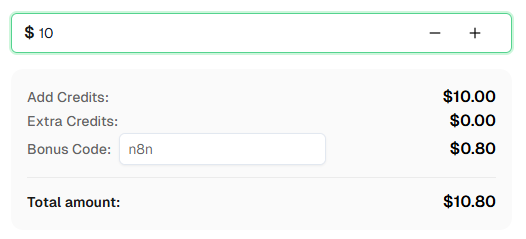
websiteURL 以及任何可选的 awsKey、awsIv、awsContext、awsChallengeJS 和 awsApiJs 参数是否正确。这些是成功解决 AWS WAF 的关键。准备好开始了吗? 注册 CapSolver 并使用奖励代码 n8n 在首次充值时获得额外 8% 的奖励!
您已经学习了如何使用 n8n 和 CapSolver 构建 AWS WAF 求解器 API 和 账户登录自动化工作流。
总结:
AWS WAF 的主要复杂性在于其隐形挑战和基于 cookie 的身份验证。通过在 HTTP 请求中正确处理 aws-waf-token cookie,您可以有效地自动化 AWS WAF 解决。然后,您可以将这些已解决的令牌无缝集成到您的登录或抓取工作流中。
提示: 这些工作流使用 Webhook 触发器,但您可以将触发器节点替换为任何其他 n8n 触发器——手动、应用程序事件、表单提交等。一旦 AWS WAF 解决,使用 n8n 的内置节点将结果保存到 Google 表格、数据库、云存储或通过 Telegram/Slack/电子邮件发送警报。
AWS WAF 是亚马逊的企业级 Web 应用程序防火墙,通过隐形挑战和基于令牌的验证来保护网站免受机器人流量和滥用。
AWS WAF 不需要站点密钥,而是使用基于 cookie 的身份验证,并返回一个 aws-waf-token cookie。它通常是隐形挑战,没有可见的用户交互小部件。
价格因使用情况而异。请查看 CapSolver 定价页面 以获取当前的 AWS WAF 价格。AWS WAF 解决任务通常比简单的图像到文本识别更昂贵,但比某些其他复杂的 CAPTCHA 类型更便宜。
AWS WAF 解决任务通常需要 10-30 秒,具体取决于挑战的复杂性和 CapSolver 服务器负载。与 ImageToTextTask 不同,AWS WAF 解决涉及任务创建和轮询,因此不是即时的。
CapSolver 的 AWS WAF 解决服务通常不需要您提供代理。CapSolver 在内部处理代理要求。您只需要提供 websiteURL 以及任何可选参数。
aws-waf-token 不被接受?如果 aws-waf-token 不被接受,请检查以下事项:
awsKey、awsIv 等可选参数,请确保您已正确提供它们。如果 AWS WAF 已成功解决但登录仍然失败,请检查以下事项:
是的。此工作流适用于自托管 n8n 和 n8n Cloud。CapSolver 节点已作为官方集成可用;您只需添加您的 API 凭据。
Sora Fujimoto
AI Solutions Architect
Connecting agents, browsers, and APIs into one workflow.
关于作者


