
🎉全新面向 AI Agent 的 CapSolver-MCP、agent 工具和 SDK 集成

Emma Foster
Machine Learning Engineer
已发表 Mar 16, 2026
已更新 Mar 18, 2026 · 最小阅读量
基于图像的验证码(CAPTCHA)无处不在——登录表单、注册页面、票务网站和政府门户。它们显示扭曲的字母、数字或两者的混合图像,并要求用户输入所看到的内容。使用传统工具自动化处理这些验证码意味着需要构建自己的 OCR 流水线,处理噪声过滤器,并针对每种字体和扭曲样式处理边缘情况。
如果你可以在 n8n 工作流中自动解决图像验证码——无论你是正在构建一个可重复使用的 验证码识别 API,还是正在自动化一个需要读取验证码图像的表单提交——而且完全不需要训练任何模型,那会怎样?
在本指南中,你将学习如何结合 n8n(一种可视化工作流自动化工具)和 CapSolver(一种基于 AI 的验证码识别服务),按需解决“图像转文本”验证码——既可以作为独立的 API 端点,也可以作为任何自动化工作流中的一个步骤。
你将构建的内容:
识别 API —— 一个可供其他工具调用的可重复使用端点:
直接使用工作流 —— 将 CapSolver 嵌入到大型自动化流程中的一个步骤:
图像转文本(Image To Text)是 CapSolver 基于 OCR 的识别服务。你发送验证码的 base64 编码图像,CapSolver 会立即返回识别出的文本——字母、数字或两者。
这与 CapSolver 的其他操作(如 reCAPTCHA 或 Turnstile)有本质区别:
| 功能 | 图像转文本 (识别) | reCAPTCHA / Turnstile (令牌) |
|---|---|---|
| 资源类型 | 识别 (Recognition) | 令牌 (Token) |
| 输入 | Base64 图像 | 网站 URL + 站点密钥 (site key) |
| 结果 | 识别出的文本 (即时) | 令牌 (需要轮询) |
| 是否需要代理 | 否 | 取决于任务类型 |
| 用例 | 从图像中读取扭曲的文本 | 生成验证令牌 |
关键区别在于 识别操作会立即返回结果 —— 不需要先创建任务再进行轮询。你发送图像,CapSolver 读取它,文本在单个请求-响应周期内返回。
| 参数 | 值 | 描述 |
|---|---|---|
body |
Base64 字符串 | 验证码图像,经过 base64 编码。不要有换行符,不要有 data:image/...;base64, 前缀 —— 仅提供原始 base64 字符串 |
module |
"common" |
识别模块。"common" 处理通用的字母数字 OCR |
| 参数 | 描述 |
|---|---|
websiteURL |
验证码出现页面的 URL(有助于 CapSolver 优化识别) |
images (1-9) |
使用 "number" 模块解决多图数字验证码时的附加图像 |
| 模块 | 用途 |
|---|---|
common |
通用 OCR —— 字母、数字、混合字符。大多数验证码的默认选择 |
number |
仅限数字的验证码。支持通过 images 参数批量识别最多 9 张附加图像 |
在开始之前,请确保你拥有以下内容:
重要提示: 请确保你的 CapSolver 账户中有足够的余额。ImageToText 任务根据使用量消耗额度。
CapSolver 在 n8n 中作为 官方集成 提供 —— 无需安装社区节点。在构建工作流时,你可以直接在节点面板中找到它。
由于它是官方集成,你需要在 n8n 中 创建一个凭据,以便 CapSolver 节点可以对你的账户进行身份验证。
进入你的 n8n 实例,导航至 Settings -> Credentials。你将在此处看到所有已配置的凭据。

All(默认)n8n 将自动测试连接。你应该会看到一个绿色的 "Connection tested successfully" 横幅,确认你的 API 密钥有效。
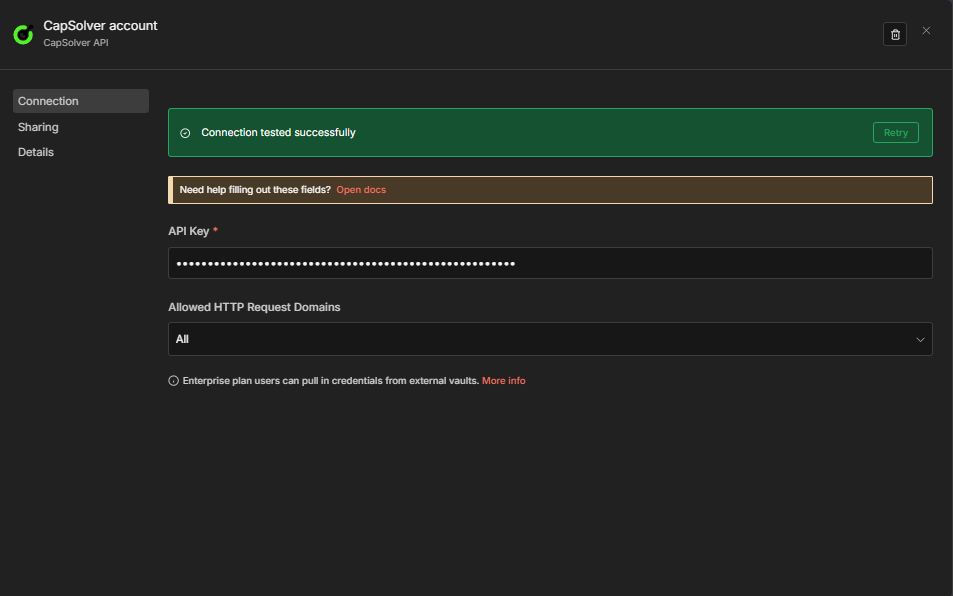
重要提示: 工作流中的每个 CapSolver 节点都将引用此凭据。你只需创建一次——你所有的识别工作流都将共享同一个凭据。
现在你已经准备好构建你的图像转文本识别工作流了!
在深入研究工作流之前,了解 ImageToTextTask 的 base64 要求非常重要。这是最常见的错误来源。
body 参数必须包含一个 干净的 base64 字符串 —— 即图像文件的原始编码字节。具体要求:
data: 前缀 —— 如果你有 data:image/png;base64,iVBORw0KGgo...,你必须去掉 data:image/png;base64, 部分。\n 字符。当你在 n8n 中使用 HTTP Request 节点获取图像时,响应以 二进制数据 形式到达。要将其转换为 CapSolver 所需的 base64,请使用 Code 节点:
// 将二进制图像数据转换为干净的 base64
const binaryData = $input.first().binary.data;
const base64String = binaryData.data; // 在 n8n 的二进制格式中已经是 base64

// 如果存在 data: 前缀,则将其剥离(安全检查)
const cleanBase64 = base64String.replace(/^data:image\/\w+;base64,/, '');

// 移除任何换行符
const finalBase64 = cleanBase64.replace(/\n/g, '');

return [{ json: { body: finalBase64 } }];| 错误 | 结果 |
|---|---|
发送 data:image/png;base64,... |
CapSolver 拒绝该 body,认为其无效 |
| Base64 字符串包含换行符 | CapSolver 无法解码图像 |
| 发送图像 URL 而不是 base64 | 参数错误 —— body 期望 base64,而不是 URL |
| 发送空字符串 | CapSolver 返回错误 |
此工作流创建了一个 POST API 端点,该端点接受 base64 验证码图像并返回识别出的文本。
该工作流由六个节点组成:
body 是否存在且为有效 base64 的 Code 节点| 设置 | 值 |
|---|---|
| HTTP Method | POST |
| Path | solver-image-to-text |
| Respond | Response Node |
这将在以下位置创建一个端点:https://your-n8n-instance.com/webhook/solver-image-to-text
此节点检查请求体是否包含有效的 body 参数,并剥离任何意外的 data: 前缀或换行符:
const body = $input.first().json.body;

if (!body || !body.body) {
  return [{ json: { error: 'Missing required field: body (base64 encoded image)' } }];
}

let imageBase64 = String(body.body);

// 如果意外包含了 data: 前缀,则将其剥离
imageBase64 = imageBase64.replace(/^data:image\/\w+;base64,/, '');

// 移除换行符和空格
imageBase64 = imageBase64.replace(/[\n\r\s]/g, '');

// 基础 base64 验证
if (!/^[A-Za-z0-9+/]+=*$/.test(imageBase64)) {
  return [{ json: { error: 'Invalid base64 encoding in body field' } }];
}

return [{
  json: {
    body: imageBase64,
    module: body.module || 'common'
  }
}];| 参数 | 值 | 描述 |
|---|---|---|
| Resource | Recognition |
选择识别资源(不是令牌) |
| Operation | Image To Text |
ImageToTextTask 操作 |
| Body | {{ $json.body }} |
干净的 base64 图像字符串 |
| Module | {{ $json.module }} |
识别模块(默认:common) |
重要提示: 在 CapSolver 节点中,你必须先选择 Resource = Recognition,然后选择 Operation = Image To Text。这与 reCAPTCHA 或 Turnstile 等令牌操作不同。同时在此节点中选择你的 CapSolver 凭据。
| 设置 | 值 |
|---|---|
| Condition | ={{ $json.error }} is not empty |
| True 分支 | 路由到 Error Respond to Webhook 节点 |
| False 分支 | 路由到 Success Respond to Webhook 节点 |
CapSolver 节点在出错时会继续运行(onError: continueRegularOutput),因此失败会以 { "error": "..." } 的形式到达此处,而不是导致工作流崩溃。
| 设置 | 值 |
|---|---|
| Respond With | JSON |
| Response Body | ={{ JSON.stringify($json.data) }} |
| 设置 | 值 |
|---|---|
| Respond With | JSON |
| Response Body | ={{ JSON.stringify({ error: $json.error }) }} |
错误消息遵循以下两种格式之一:
| 失败点 | 格式 |
|---|---|
| 任务创建失败 | { "error": "..." } |
| 识别过程失败 | { "status": "failed", "error": "..." } |
向你的 webhook 端点发送一个 POST 请求:
curl -X POST https://your-n8n-instance.com/webhook/solver-image-to-text \
  -H "Content-Type: application/json" \
  -d '{
    "body": "iVBORw0KGgoAAAANSUhEUgAA...",
    "module": "common"
  }'
预期响应:
{
  "solution": {
    "text": "xK7mQ"
  },
  "status": "ready"
}
solution.text 字段包含识别出的验证码文本。这就是你需要输入到验证码输入框中的值。
复制下面的 JSON 并通过 Menu -> Import from JSON 导入到 n8n:
{
  "name": "Image To Text — Solver API",
  "nodes": [
    {
      "parameters": {
        "content": "## Image To Text — Solver API\n\n**适用对象:** 需要为其应用程序提供基于 OCR 的验证码识别端点的开发人员。\n\n**功能:** 通过 webhook 接受 base64 编码的验证码图像,验证输入,使用 CapSolver 的 ImageToTextTask 识别进行识别,并返回识别出的文本。\n\n**工作原理:**\n1. Webhook 接收包含 `body`(base64 图像)和可选 `module` 的 POST 请求\n2. Code 节点验证 base64 输入并剥离任何 data: 前缀\n3. CapSolver Recognition 节点立即识别图像验证码\n4. IF 节点检查错误\n5. 响应返回识别出的文本或错误详情\n\n**设置:**\n1. 在 **Settings → Credentials** 下添加你的 CapSolver API 密钥\n2. 激活工作流以启用 webhook 端点\n3. 将 base64 图像 POST 到 `/webhook/solver-image-to-text`",
        "height": 480,
        "width": 460,
        "color": 1
      },
      "type": "n8n-nodes-base.stickyNote",
      "typeVersion": 1,
      "position": [-620, -280],
      "id": "sticky-itt-main-001",
      "name": "Sticky Note"
    },
    {
      "parameters": {
        "content": "### 接收与验证\nWebhook 接受带有 base64 图像的 POST 请求。Code 节点验证并清理输入。",
        "height": 480,
        "width": 700,
        "color": 6
      },
      "type": "n8n-nodes-base.stickyNote",
      "typeVersion": 1,
      "position": [-140, -280],
      "id": "sticky-itt-section-002",
      "name": "Sticky Note1"
    },
    {
      "parameters": {
        "content": "### 识别图像验证码\nCapSolver Recognition 节点 —— 立即返回识别出的文本(无需轮询)。",
        "height": 480,
        "width": 400,
        "color": 6
      },
      "type": "n8n-nodes-base.stickyNote",
      "typeVersion": 1,
      "position": [580, -280],
      "id": "sticky-itt-section-003",
      "name": "Sticky Note2"
    },
    {
      "parameters": {
        "content": "### 错误检查与响应\nIF 节点根据错误进行分支。成功返回识别出的文本,失败返回错误详情。",
        "height": 480,
        "width": 900,
        "color": 6
      },
      "type": "n8n-nodes-base.stickyNote",
      "typeVersion": 1,
      "position": [1000, -280],
      "id": "sticky-itt-section-004",
      "name": "Sticky Note3"
    },
    {
      "parameters": {
        "content": "### 验证逻辑\n剥离 data: 前缀,移除换行符,检查 base64 格式。",
        "height": 480,
        "width": 400,
        "color": 6
      },
      "type": "n8n-nodes-base.stickyNote",
      "typeVersion": 1,
      "position": [160, -280],
      "id": "sticky-itt-section-005",
      "name": "Sticky Note4"
    },
    {
      "parameters": {
        "content": "### 响应处理\n成功:返回包含识别文本的解决方案。错误:返回错误消息。",
        "height": 480,
        "width": 500,
        "color": 6
      },
      "type": "n8n-nodes-base.stickyNote",
      "typeVersion": 1,
      "position": [1420, -280],
      "id": "sticky-itt-section-006",
      "name": "Sticky Note5"
    },
    {
      "parameters": {
        "httpMethod": "POST",
        "path": "solver-image-to-text",
        "responseMode": "responseNode",
        "options": {}
      },
      "type": "n8n-nodes-base.webhook",
      "typeVersion": 2,
      "position": [-100, 0],
      "id": "itt-11111111-1111-1111-1111-111111111101",
      "name": "Receive Solver Request",
      "webhookId": "itt-aaaa-bbbb-cccc-dddd-111111111101"
    },
    {
      "parameters": {
        "jsCode": "const body = $input.first().json.body;\n\nif (!body || !body.body) {\n  return [{ json: { error: 'Missing required field: body (base64 encoded image)' } }];\n}\n\nlet imageBase64 = String(body.body);\n\n// Strip data: prefix if accidentally included\nimageBase64 = imageBase64.replace(/^data:image\\/\\w+;base64,/, '');\n\n// Remove newlines and whitespace\nimageBase64 = imageBase64.replace(/[\\n\\r\\s]/g, '');\n\n// Basic base64 validation\nif (!/^[A-Za-z0-9+\\/]+=*$/.test(imageBase64)) {\n  return [{ json: { error: 'Invalid base64 encoding in body field' } }];\n}\n\nreturn [{\n  json: {\n    body: imageBase64,\n    module: body.module || 'common'\n  }\n}];"
      },
      "type": "n8n-nodes-base.code",
      "typeVersion": 2,
      "position": [200, 0],
      "id": "itt-11111111-1111-1111-1111-111111111102",
      "name": "Validate Image Input"
    },
    {
      "parameters": {
        "resource": "recognition",
        "operation": "Image To Text",
        "body": "={{ $json.body }}",
        "module": "={{ $json.module }}"
      },
      "type": "n8n-nodes-capsolver.capSolver",
      "typeVersion": 1,
      "position": [620, 0],
      "id": "itt-11111111-1111-1111-1111-111111111103",
      "name": "Solve Image Captcha",
      "onError": "continueRegularOutput",
      "credentials": {
        "capSolverApi": {
          "id": "YOUR_CREDENTIAL_ID",
          "name": "CapSolver account"
        }
      }
    },
    {
      "parameters": {
        "conditions": {
          "options": {
            "caseSensitive": true,
            "leftValue": "",
            "typeValidation": "loose",
            "version": 2
          },
          "conditions": [
            {
              "id": "itt-err-001",
              "leftValue": "={{ $json.error }}",
              "operator": {
                "type": "string",
                "operation": "isNotEmpty",
                "singleValue": true
              }
            }
          ],
          "combinator": "and"
        },
        "options": {}
      },
      "type": "n8n-nodes-base.if",
      "typeVersion": 2.2,
      "position": [1040, 0],
      "id": "itt-11111111-1111-1111-1111-111111111104",
      "name": "Image Captcha Error?"
    },
    {
      "parameters": {
        "respondWith": "json",
        "responseBody": "={{ JSON.stringify({ error: $json.error }) }}",
        "options": {}
      },
      "type": "n8n-nodes-base.respondToWebhook",
      "typeVersion": 1.1,
      "position": [1460, -100],
      "id": "itt-11111111-1111-1111-1111-111111111105",
      "name": "Respond to Webhook Error"
    },
    {
      "parameters": {
        "respondWith": "json",
        "responseBody": "={{ JSON.stringify($json.data) }}",
        "options": {}
      },
      "type": "n8n-nodes-base.respondToWebhook",
      "typeVersion": 1.1,
      "position": [1460, 100],
      "id": "itt-11111111-1111-1111-1111-111111111106",
      "name": "Respond to Webhook"
    }
  ],
  "connections": {
    "Receive Solver Request": {
      "main": [
        [
          {
            "node": "Validate Image Input",
            "type": "main",
            "index": 0
          }
        ]
      ]
    },
    "Validate Image Input": {
      "main": [
        [
          {
            "node": "Solve Image Captcha",
            "type": "main",
            "index": 0
          }
        ]
      ]
    },
    "Solve Image Captcha": {
      "main": [
        [
          {
            "node": "Image Captcha Error?",
            "type": "main",
            "index": 0
          }
        ]
      ]
    },
    "Image Captcha Error?": {
      "main": [
        [
          {
            "node": "Respond to Webhook Error",
            "type": "main",
            "index": 0
          }
        ],
        [
          {
            "node": "Respond to Webhook",
            "type": "main",
            "index": 0
          }
        ]
      ]
    }
  },
  "active": false,
  "settings": {
    "executionOrder": "v1"
  }
}此工作流自动化了受图像验证码保护的网站上的端到端表单提交。它从目标网站获取验证码图像,将其转换为 base64,使用 CapSolver 进行识别,并使用识别出的文本提交表单。
它支持两种激活模式:
计划路径:
每 6 小时 → 设置目标配置 → 获取验证码图像 → 转换为 Base64
  → 识别图像验证码 → 使用识别结果提交表单 → 检查提交结果
  → 标记成功 / 标记失败
Webhook 路径:
Webhook 触发 → 设置目标配置 [Webhook] → 获取验证码图像 [Webhook]
  → 转换为 Base64 [Webhook] → 识别图像验证码 [Webhook]
  → 使用识别结果提交表单 [Webhook] → 检查提交结果 [Webhook]
→ 标记成功 [Webhook] / 标记失败 [Webhook] → 响应 Webhook计划触发器 (Schedule Trigger):
| 设置 | 值 |
|---|---|
| Interval | 每 6 小时 |
Webhook 触发器:
| 设置 | 值 |
|---|---|
| HTTP Method | POST |
| Path | image-captcha-form |
| Respond | Response Node |
此节点将目标网站的所有配置存储在一个地方:
| 配置字段 | 用途 |
|---|---|
captchaImageURL |
提供验证码图像的 URL(例如 https://example.com/captcha.png) |
formActionURL |
接收表单 POST 的端点 |
captchaFieldName |
验证码答案的表单字段名称(例如 captcha, captcha_code, verification) |
module |
CapSolver 识别模块(通用 OCR 使用 common,仅数字使用 number) |
userAgent |
请求时发送的用户代理字符串 |
| 设置 | 值 |
|---|---|
| Method | GET |
| URL | ={{ $json.captchaImageURL }} |
| Response Format | File (二进制) |
这将以二进制数据形式下载验证码图像。响应将在 $binary.data 中可用。
注意: 某些网站需要 cookie 或会话标头才能提供验证码图像。如果验证码与会话绑定,你可能需要添加一个先前的请求来获取会话 cookie 并将其传递。
// 将二进制验证码图像转换为干净的 base64 字符串
const binaryData = $input.first().binary.data;
const base64String = binaryData.data;

// 如果存在 data: 前缀,则将其剥离
const cleanBase64 = base64String.replace(/^data:image\/\w+;base64,/, '');

// 移除任何换行符
const finalBase64 = cleanBase64.replace(/\n/g, '');

// 传递来自 Set Target Config 节点的目标配置
const config = $('Set Target Config').first().json;

return [{
  json: {
    body: finalBase64,
    module: config.module || 'common',
    captchaFieldName: config.captchaFieldName,
    formActionURL: config.formActionURL,
    userAgent: config.userAgent
  }
}];| 参数 | 值 |
|---|---|
| Resource | Recognition |
| Operation | Image To Text |
| Body | {{ $json.body }} |
| Module | {{ $json.module }} |
这将立即在 $json.data.solution.text 中返回识别出的文本。
| 设置 | 值 |
|---|---|
| Method | POST |
| URL | ={{ $('Set Target Config').first().json.formActionURL }} |
| Content Type | form-urlencoded |
| Body Fields | 表单字段 + 验证码答案 |
验证码答案填入 captchaFieldName 指定的字段:
| 字段 | 值 |
|---|---|
username |
your-username |
password |
your-password |
{{ captchaFieldName }} |
={{ $json.data.solution.text }} |
| 设置 | 值 |
|---|---|
| Condition | {{ $json.statusCode < 400 }} —— 检查 HTTP 响应是否指示成功 |
| True 分支 | 标记成功 |
| False 分支 | 标记失败 |
发送一个 POST 请求来触发表单自动化:
curl -X POST https://your-n8n-instance.com/webhook/image-captcha-form \
  -H "Content-Type: application/json" \
  -d '{}'
预期响应(成功):
{
  "action": "form_submission",
  "status": "success",
  "captchaText": "xK7mQ",
  "message": "Form submitted successfully with solved captcha",
  "submittedAt": "2026-03-16T12:00:00.000Z"
}
预期响应(失败):
{
  "action": "form_submission",
  "status": "failed",
  "statusCode": 403,
  "message": "Form submission was rejected by the target site",
  "submittedAt": "2026-03-16T12:00:00.000Z"
}复制下面的 JSON 并通过 Menu -> Import from JSON 导入到 n8n:
{
"name": "Form Automation — Solve Image Captcha & Submit",
"nodes": [
{
"parameters": {
"content": "## 表单自动化 — 识别图像验证码并提交\n\n**适用对象:** 在受图像验证码保护的网站上自动化表单提交的团队。\n\n**功能:** 从目标网站获取验证码图像,将其转换为 base64,使用 CapSolver OCR 进行识别,并使用识别出的文本提交表单。\n\n**工作原理:**\n1. 计划(每 6 小时)或 Webhook 触发流程\n2. Set Target Config 定义目标 URL、字段名称和模块\n3. HTTP Request 以二进制形式获取验证码图像\n4. Code 节点将二进制转换为干净的 base64\n5. CapSolver Recognition 立即识别图像\n6. HTTP Request 使用识别出的文本提交表单\n7. IF 节点检查提交是否成功\n\n**设置:**\n1. 在 **Settings → Credentials** 下添加你的 CapSolver API 密钥\n2. 使用你的目标网站详情更新 Set Target Config\n3. 更新 Submit Form 中的表单字段以匹配目标\n4. 激活工作流",
"height": 480,
"width": 460,
"color": 1
},
"type": "n8n-nodes-base.stickyNote",
"typeVersion": 1,
"position": [-920, -380],
"id": "sticky-fa-main-001",
"name": "Sticky Note"
},
{
"parameters": {
"content": "### 计划路径\n每 6 小时自动运行一次。获取验证码,识别并提交表单。",
"height": 480,
"width": 2800,
"color": 6
},
"type": "n8n-nodes-base.stickyNote",
"typeVersion": 1,
"position": [-440, -280],
"id": "sticky-fa-section-002",
"name": "Sticky Note1"
},
{
"parameters": {
"content": "### Webhook 路径\n按需触发 —— 逻辑相同,以 JSON 响应形式返回结果。",
"height": 480,
"width": 2800,
"color": 6
},
"type": "n8n-nodes-base.stickyNote",
"typeVersion": 1,
"position": [-440, 240],
"id": "sticky-fa-section-003",
"name": "Sticky Note2"
},
{
"parameters": {
"content": "### 获取与转换\n下载验证码图像,将二进制转换为 base64。",
"height": 480,
"width": 700,
"color": 6
},
"type": "n8n-nodes-base.stickyNote",
"typeVersion": 1,
"position": [170, -280],
"id": "sticky-fa-section-004",
"name": "Sticky Note3"
},
{
"parameters": {
"content": "### 识别与提交\nCapSolver 读取图像,使用答案提交表单。",
"height": 480,
"width": 700,
"color": 6
},
"type": "n8n-nodes-base.stickyNote",
"typeVersion": 1,
"position": [890, -280],
"id": "sticky-fa-section-005",
"name": "Sticky Note4"
},
{
"parameters": {
"content": "### 结果处理\n检查 HTTP 状态,标记成功或失败。",
"height": 480,
"width": 700,
"color": 6
},
"type": "n8n-nodes-base.stickyNote",
"typeVersion": 1,
"position": [1610, -280],
"id": "sticky-fa-section-006",
"name": "Sticky Note5"
},
{
"parameters": {
"rule": {
"interval": [
{
"field": "hours",
"hoursInterval": 6
}
]
}
},
"type": "n8n-nodes-base.scheduleTrigger",
"typeVersion": 1.3,
"position": [-400, 0],
"id": "fa-22222222-2222-2222-2222-222222222201",
"name": "Every 6 Hours"
},
{
"parameters": {
"assignments": {
"assignments": [
{
"id": "fa-cfg-001",
"name": "captchaImageURL",
"value": "https://YOUR-TARGET-SITE.com/captcha.png",
"type": "string"
},
{
"id": "fa-cfg-002",
"name": "formActionURL",
"value": "https://YOUR-TARGET-SITE.com/submit",
"type": "string"
},
{
"id": "fa-cfg-003",
"name": "captchaFieldName",
"value": "captcha",
"type": "string"
},
{
"id": "fa-cfg-004",
"name": "module",
"value": "common",
"type": "string"
},
{
"id": "fa-cfg-005",
"name": "userAgent",
"value": "Mozilla/5.0 (Windows NT 10.0; Win64; x64) AppleWebKit/537.36 (KHTML, like Gecko) Chrome/125.0.0.0 Safari/537.36",
"type": "string"
}
]
},
"options": {}
},
"type": "n8n-nodes-base.set",
"typeVersion": 3.4,
"position": [-96, 0],
"id": "fa-22222222-2222-2222-2222-222222222202",
"name": "Set Target Config"
},
{
"parameters": {
"url": "={{ $json.captchaImageURL }}",
"sendHeaders": true,
"headerParameters": {
"parameters": [
{
"name": "user-agent",
"value": "={{ $json.userAgent }}"
}
]
},
"options": {
"response": {
"response": {
"responseFormat": "file"
}
}
}
},
"type": "n8n-nodes-base.httpRequest",
"typeVersion": 4.3,
"position": [208, 0],
"id": "fa-22222222-2222-2222-2222-222222222203",
"name": "Fetch Captcha Image"
},
{
"parameters": {
"jsCode": "// 将二进制验证码图像转换为干净的 base64 字符串\nconst binaryData = $input.first().binary.data;\nconst base64String = binaryData.data;\n\n// 如果存在 data: 前缀,则将其剥离\nconst cleanBase64 = base64String.replace(/^data:image\\/\\w+;base64,/, '');\n\n// 移除任何换行符\nconst finalBase64 = cleanBase64.replace(/\\n/g, '');\n\n// 传递目标配置\nconst config = $('Set Target Config').first().json;\n\nreturn [{\n json: {\n body: finalBase64,\n module: config.module || 'common',\n captchaFieldName: config.captchaFieldName,\n formActionURL: config.formActionURL,\n userAgent: config.userAgent\n }\n}];"
},
"type": "n8n-nodes-base.code",
"typeVersion": 2,
"position": [512, 0],
"id": "fa-22222222-2222-2222-2222-222222222204",
"name": "Convert to Base64"
},
{
"parameters": {
"resource": "recognition",
"operation": "Image To Text",
"body": "={{ $json.body }}",
"module": "={{ $json.module }}"
},
"type": "n8n-nodes-capsolver.capSolver",
"typeVersion": 1,
"position": [930, 0],
"id": "fa-22222222-2222-2222-2222-222222222205",
"name": "Solve Image Captcha",
"onError": "continueRegularOutput",
"credentials": {
"capSolverApi": {
"id": "YOUR_CREDENTIAL_ID",
"name": "CapSolver account"
}
}
},
{
"parameters": {
"method": "POST",
"url": "={{ $('Set Target Config').first().json.formActionURL }}",
"sendHeaders": true,
"headerParameters": {
"parameters": [
{
"name": "content-type",
"value": "application/x-www-form-urlencoded"
},
{
"name": "user-agent",
"value": "={{ $('Set Target Config').first().json.userAgent }}"
}
]
},
"sendBody": true,
"contentType": "form-urlencoded",
"bodyParameters": {
"parameters": [
{
"name": "username",
"value": "YOUR_USERNAME"
},
{
"name": "password",
"value": "YOUR_PASSWORD"
},
{
"name": "={{ $('Set Target Config').first().json.captchaFieldName }}",
"value": "={{ $json.data.solution.text }}"
}
]
},
"options": {
"response": {
"response": {
"fullResponse": true,
"neverError": true
}
}
}
},
"type": "n8n-nodes-base.httpRequest",
"typeVersion": 4.3,
"position": [1234, 0],
"id": "fa-22222222-2222-2222-2222-222222222206",
"name": "Submit Form with Solution"
},
{
"parameters": {
"conditions": {
"options": {
"caseSensitive": false,
"leftValue": "",
"typeValidation": "strict",
"version": 2
},
"conditions": [
{
"id": "fa-if-001",
"leftValue": "={{ $json.statusCode }}",
"rightValue": 400,
"operator": {
"type": "number",
"operation": "lt"
}
}
],
"combinator": "and"
},
"options": {}
},
"type": "n8n-nodes-base.if",
"typeVersion": 2.2,
"position": [1538, 0],
"id": "fa-22222222-2222-2222-2222-222222222207",
"name": "Check Submission Result"
},
{
"parameters": {
"assignments": {
"assignments": [
{
"id": "fa-ms-001",
"name": "action",
"value": "form_submission",
"type": "string"
},
{
"id": "fa-ms-002",
"name": "status",
"value": "success",
"type": "string"
},
{
"id": "fa-ms-003",
"name": "captchaText",
"value": "={{ $('Solve Image Captcha').first().json.data.solution.text }}",
"type": "string"
},
{
"id": "fa-ms-004",
"name": "message",
"value": "Form submitted successfully with solved captcha",
"type": "string"
},
{
"id": "fa-ms-005",
"name": "submittedAt",
"value": "={{ new Date().toISOString() }}",
"type": "string"
}
]
},
"options": {}
},
"type": "n8n-nodes-base.set",
"typeVersion": 3.4,
"position": [1842, -80],
"id": "fa-22222222-2222-2222-2222-222222222208",
"name": "Mark Success"
},
{
"parameters": {
"assignments": {
"assignments": [
{
"id": "fa-mf-001",
"name": "action",
"value": "form_submission",
"type": "string"
},
{
"id": "fa-mf-002",
"name": "status",
"value": "failed",
"type": "string"
},
{
"id": "fa-mf-003",
"name": "statusCode",
"value": "={{ $json.statusCode }}",
"type": "number"
},
{
"id": "fa-mf-004",
"name": "message",
"value": "Form submission was rejected by the target site",
"type": "string"
},
{
"id": "fa-mf-005",
"name": "submittedAt",
"value": "={{ new Date().toISOString() }}",
"type": "string"
}
]
},
"options": {}
},
"type": "n8n-nodes-base.set",
"typeVersion": 3.4,
"position": [1842, 120],
"id": "fa-22222222-2222-2222-2222-222222222209",
"name": "Mark Failed"
},
{
"parameters": {
"httpMethod": "POST",
"path": "image-captcha-form",
"responseMode": "responseNode",
"options": {}
},
"type": "n8n-nodes-base.webhook",
"typeVersion": 2.1,
"position": [-400, 520],
"id": "fa-22222222-2222-2222-2222-222222222210",
"name": "Webhook Trigger",
"webhookId": "fa-aaaa-bbbb-cccc-dddd-222222222210",
"onError": "continueRegularOutput"
},
{
"parameters": {
"assignments": {
"assignments": [
{
"id": "fa-cfg-011",
"name": "captchaImageURL",
"value": "https://YOUR-TARGET-SITE.com/captcha.png",
"type": "string"
},
{
"id": "fa-cfg-012",
"name": "formActionURL",
"value": "https://YOUR-TARGET-SITE.com/submit",
"type": "string"
},
{
"id": "fa-cfg-013",
"name": "captchaFieldName",
"value": "captcha",
"type": "string"
},
{
"id": "fa-cfg-014",
"name": "module",
"value": "common",
"type": "string"
},
{
"id": "fa-cfg-015",
"name": "userAgent",
"value": "Mozilla/5.0 (Windows NT 10.0; Win64; x64) AppleWebKit/537.36 (KHTML, like Gecko) Chrome/125.0.0.0 Safari/537.36",
"type": "string"
}
]
},
"options": {}
},
"type": "n8n-nodes-base.set",
"typeVersion": 3.4,
"position": [-96, 520],
"id": "fa-22222222-2222-2222-2222-222222222211",
"name": "Set Target Config [Webhook]"
},
{
"parameters": {
"url": "={{ $json.captchaImageURL }}",
"sendHeaders": true,
"headerParameters": {
"parameters": [
{
"name": "user-agent",
"value": "={{ $json.userAgent }}"
}
]
},
"options": {
"response": {
"response": {
"responseFormat": "file"
}
}
}
},
"type": "n8n-nodes-base.httpRequest",
"typeVersion": 4.3,
"position": [208, 520],
"id": "fa-22222222-2222-2222-2222-222222222212",
"name": "Fetch Captcha Image [Webhook]"
},
{
"parameters": {
"jsCode": "// 将二进制验证码图像转换为干净的 base64 字符串\nconst binaryData = $input.first().binary.data;\nconst base64String = binaryData.data;\n\n// 如果存在 data: 前缀,则将其剥离\nconst cleanBase64 = base64String.replace(/^data:image\\/\\w+;base64,/, '');\n\n// 移除任何换行符\nconst finalBase64 = cleanBase64.replace(/\\n/g, '');\n\n// 传递目标配置\nconst config = $('Set Target Config [Webhook]').first().json;\n\nreturn [{\n json: {\n body: finalBase64,\n module: config.module || 'common',\n captchaFieldName: config.captchaFieldName,\n formActionURL: config.formActionURL,\n userAgent: config.userAgent\n }\n}];"
},
"type": "n8n-nodes-base.code",
"typeVersion": 2,
"position": [512, 520],
"id": "fa-22222222-2222-2222-2222-222222222213",
"name": "Convert to Base64 [Webhook]"
},
{
"parameters": {
"resource": "recognition",
"operation": "Image To Text",
"body": "={{ $json.body }}",
"module": "={{ $json.module }}"
},
"type": "n8n-nodes-capsolver.capSolver",
"typeVersion": 1,
"position": [930, 520],
"id": "fa-22222222-2222-2222-2222-222222222214",
"name": "Solve Image Captcha [Webhook]",
"onError": "continueRegularOutput",
"credentials": {
"capSolverApi": {
"id": "YOUR_CREDENTIAL_ID",
"name": "CapSolver account"
}
}
},
{
"parameters": {
"method": "POST",
"url": "={{ $('Set Target Config [Webhook]').first().json.formActionURL }}",
"sendHeaders": true,
"headerParameters": {
"parameters": [
{
"name": "content-type",
"value": "application/x-www-form-urlencoded"
},
{
"name": "user-agent",
"value": "={{ $('Set Target Config [Webhook]').first().json.userAgent }}"
}
]
},
"sendBody": true,
"contentType": "form-urlencoded",
"bodyParameters": {
"parameters": [
{
"name": "username",
"value": "YOUR_USERNAME"
},
{
"name": "password",
"value": "YOUR_PASSWORD"
},
{
"name": "={{ $('Set Target Config [Webhook]').first().json.captchaFieldName }}",
"value": "={{ $json.data.solution.text }}"
}
]
},
"options": {
"response": {
"response": {
"fullResponse": true,
"neverError": true
}
}
}
},
"type": "n8n-nodes-base.httpRequest",
"typeVersion": 4.3,
"position": [1234, 520],
"id": "fa-22222222-2222-2222-2222-222222222215",
"name": "Submit Form with Solution [Webhook]"
},
{
"parameters": {
"conditions": {
"options": {
"caseSensitive": false,
"leftValue": "",
"typeValidation": "strict",
"version": 2
},
"conditions": [
{
"id": "fa-if-002",
"leftValue": "={{ $json.statusCode }}",
"rightValue": 400,
"operator": {
"type": "number",
"operation": "lt"
}
}
],
"combinator": "and"
},
"options": {}
},
"type": "n8n-nodes-base.if",
"typeVersion": 2.2,
"position": [1538, 520],
"id": "fa-22222222-2222-2222-2222-222222222216",
"name": "Check Submission Result [Webhook]"
},
{
"parameters": {
"assignments": {
"assignments": [
{
"id": "fa-ms-011",
"name": "action",
"value": "form_submission",
"type": "string"
},
{
"id": "fa-ms-012",
"name": "status",
"value": "success",
"type": "string"
},
{
"id": "fa-ms-013",
"name": "captchaText",
"value": "={{ $('Solve Image Captcha [Webhook]').first().json.data.solution.text }}",
"type": "string"
},
{
"id": "fa-ms-014",
"name": "message",
"value": "Form submitted successfully with solved captcha",
"type": "string"
},
{
"id": "fa-ms-015",
"name": "submittedAt",
"value": "={{ new Date().toISOString() }}",
"type": "string"
}
]
},
"options": {}
},
"type": "n8n-nodes-base.set",
"typeVersion": 3.4,
"position": [1842, 440],
"id": "fa-22222222-2222-2222-2222-222222222217",
"name": "Mark Success [Webhook]"
},
{
"parameters": {
"assignments": {
"assignments": [
{
"id": "fa-mf-011",
"name": "action",
"value": "form_submission",
"type": "string"
},
{
"id": "fa-mf-012",
"name": "status",
"value": "failed",
"type": "string"
},
{
"id": "fa-mf-013",
"name": "statusCode",
"value": "={{ $json.statusCode }}",
"type": "number"
},
{
"id": "fa-mf-014",
"name": "message",
"value": "Form submission was rejected by the target site",
"type": "string"
},
{
"id": "fa-mf-015",
"name": "submittedAt",
"value": "={{ new Date().toISOString() }}",
"type": "string"
}
]
},
"options": {}
},
"type": "n8n-nodes-base.set",
"typeVersion": 3.4,
"position": [1842, 600],
"id": "fa-22222222-2222-2222-2222-222222222218",
"name": "Mark Failed [Webhook]"
},
{
"parameters": {
"respondWith": "json",
"responseBody": "={{ JSON.stringify($json) }}",
"options": {}
},
"type": "n8n-nodes-base.respondToWebhook",
"typeVersion": 1.5,
"position": [2146, 520],
"id": "fa-22222222-2222-2222-2222-222222222219",
"name": "Respond to Webhook"
}
],
"connections": {
"Every 6 Hours": {
"main": [
[
{
"node": "Set Target Config",
"type": "main",
"index": 0
}
]
]
},
"Set Target Config": {
"main": [
[
{
"node": "Fetch Captcha Image",
"type": "main",
"index": 0
}
]
]
},
"Fetch Captcha Image": {
"main": [
[
{
"node": "Convert to Base64",
"type": "main",
"index": 0
}
]
]
},
"Convert to Base64": {
"main": [
[
{
"node": "Solve Image Captcha",
"type": "main",
"index": 0
}
]
]
},
"Solve Image Captcha": {
"main": [
[
{
"node": "Submit Form with Solution",
"type": "main",
"index": 0
}
]
]
},
"Submit Form with Solution": {
"main": [
[
{
"node": "Check Submission Result",
"type": "main",
"index": 0
}
]
]
},
"Check Submission Result": {
"main": [
[
{
"node": "Mark Success",
"type": "main",
"index": 0
}
],
[
{
"node": "Mark Failed",
"type": "main",
"index": 0
}
]
]
},
"Webhook Trigger": {
"main": [
[
{
"node": "Set Target Config [Webhook]",
"type": "main",
"index": 0
}
]
]
},
"Set Target Config [Webhook]": {
"main": [
[
{
"node": "Fetch Captcha Image [Webhook]",
"type": "main",
"index": 0
}
]
]
},
"Fetch Captcha Image [Webhook]": {
"main": [
[
{
"node": "Convert to Base64 [Webhook]",
"type": "main",
"index": 0
}
]
]
},
"Convert to Base64 [Webhook]": {
"main": [
[
{
"node": "Solve Image Captcha [Webhook]",
"type": "main",
"index": 0
}
]
]
},
"Solve Image Captcha [Webhook]": {
"main": [
[
{
"node": "Submit Form with Solution [Webhook]",
"type": "main",
"index": 0
}
]
]
},
"Submit Form with Solution [Webhook]": {
"main": [
[
{
"node": "Check Submission Result [Webhook]",
"type": "main",
"index": 0
}
]
]
},
"Check Submission Result [Webhook]": {
"main": [
[
{
"node": "Mark Success [Webhook]",
"type": "main",
"index": 0
}
],
[
{
"node": "Mark Failed [Webhook]",
"type": "main",
"index": 0
}
]
]
},
"Mark Success [Webhook]": {
"main": [
[
{
"node": "Respond to Webhook",
"type": "main",
"index": 0
}
]
]
},
"Mark Failed [Webhook]": {
"main": [
[
{
"node": "Respond to Webhook",
"type": "main",
"index": 0
}
]
]
}
},
"active": false,
"settings": {
"executionOrder": "v1"
}
}如果你曾使用 CapSolver n8n 节点处理过 reCAPTCHA、Turnstile 或其他挑战类型,那么你使用的是 Token (令牌) 资源。图像转文本(Image To Text)使用的是 Recognition (识别) 资源,这两者之间的区别非常重要:
websiteURL 和 websiteKey。这就是为什么 CapSolver n8n 节点有两个独立的资源:
| 资源 | 操作 |
|---|---|
| Token | reCAPTCHA v2, reCAPTCHA v3, Cloudflare Turnstile, Cloudflare Challenge, GeeTest V3, GeeTest V4, DataDome, AWS WAF, MTCaptcha |
| Recognition | Image To Text |
在为图像转文本配置 CapSolver 节点时,请确保先选择 Resource = Recognition —— 这将改变可用的操作和参数。
这些工作流是模板。在实际目标上,你应该预期需要进行以下自定义:
表单自动化模板从单个 URL (captchaImageURL) 获取图像。在实践中,验证码图像可能是:
<img> 标签的形式嵌入在页面 HTML 中。许多图像验证码系统是 会话绑定 的 —— 验证码图像与服务器端会话相关联。如果你在一个请求中获取图像,在另一个请求中提交答案,你需要:
不同的网站对验证码答案使用不同的表单字段名称:
| 常见字段名称 |
|---|
captcha |
captcha_code |
verification |
captcha_text |
answer |
security_code |
检查表单 HTML 以找到确切的字段名称。
大多数图像验证码使用 module: "common" 即可工作。但如果验证码仅包含数字,请尝试 module: "number" —— 它针对数字识别进行了优化,可能会提供更好的结果。
模板包含占位符 username 和 password 字段。你的目标可能需要:
此错误表示你的 CapSolver 账户或套餐不包含 ImageToText 访问权限。请检查你的 CapSolver 控制面板 以确认你的套餐包含此服务。
图像验证码识别并非 100% 准确。如果你得到的结果不正确:
module —— "common" vs "number" 或特定的模块 ID。常见原因:
data:image/...;base64, 前缀。如果表单提交即使在识别文本正确的情况下也总是失败,最可能的原因是获取图像和提交表单之间的 会话不匹配。确保在两个请求中传递相同的会话 cookie。
这通常意味着:
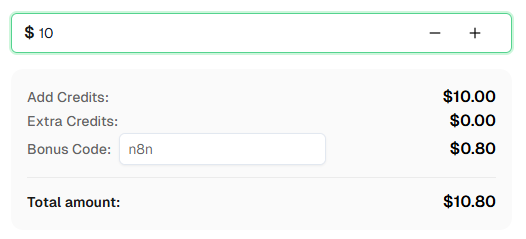
"common",仅数字使用 "number"。准备好开始了吗? 注册 CapSolver 并使用优惠码 n8n,首充可获得额外 8% 的奖励!
你已经学习了如何使用 n8n 和 CapSolver 构建 图像转文本识别 API 和 表单自动化工作流。
回顾:
核心要点:图像转文本是 CapSolver 中最容易集成的操作 —— 你发送 base64 图像并立即获得文本。挑战通常在于周围的工作流:正确获取图像、保留会话状态以及将答案提交到正确的表单字段。
提示: 这些工作流使用计划(Schedule)+ Webhook 触发器,但你可以将触发节点更换为任何 n8n 触发器 —— 手动、应用事件、表单提交等。识别验证码后,使用 n8n 的内置节点将结果保存到 Google Sheets、数据库、云存储,或通过 Telegram/Slack/Email 发送警报。
ImageToTextTask 是 CapSolver 基于 OCR 的验证码识别服务。你发送验证码的 base64 编码图像,CapSolver 会返回识别出的文本(字母、数字或两者)。它使用 CapSolver n8n 节点中的 Recognition (识别) 资源,这与用于 reCAPTCHA、Turnstile 和其他挑战类型的 Token (令牌) 资源不同。
价格根据使用情况而定。请查看 CapSolver 价格页面 了解当前的 ImageToText 费率。图像识别任务通常是 CapSolver 最实惠的操作之一。
图像转文本是一种 识别 (Recognition) 操作,这意味着结果会立即返回 —— 通常在 1 秒内。不像令牌操作那样有任务创建或轮询延迟。
不需要。与令牌操作(reCAPTCHA, Turnstile, Cloudflare Challenge)不同,图像转文本不需要代理。你直接将图像数据发送给 CapSolver —— 不涉及浏览器交互或网站访问。
CapSolver 接受常见的图像格式(PNG, JPEG, GIF, BMP)作为 base64 编码数据。图像应包含可见的验证码 —— 不要发送空白、损坏或过大的图像。
module 参数的作用是什么?module 参数告诉 CapSolver 使用哪个识别引擎:
"common" —— 通用 OCR,用于字母、数字和混合字符。这是默认设置,适用于大多数验证码。"number" —— 针对仅数字验证码进行了优化。还支持通过最多 9 张附加图像进行批量识别。"module_001" 到 "module_032" —— 针对特定验证码样式的专用引擎。有关每个模块的详细信息,请查看 CapSolver 文档。不支持。CapSolver 的图像转文本识别 不 支持区分大小写。如果目标网站要求区分大小写的验证码答案,识别结果可能不匹配。这是一个已知的局限性。
可以。此工作流既适用于自行托管的 n8n,也适用于 n8n Cloud。CapSolver 节点已作为官方集成提供 —— 只需添加你的 API 凭据即可。
许多网站将验证码图像与服务器会话绑定。处理方法如下:
在 n8n 中,你可以从 HTTP Request 响应标头中提取 cookie,并将其传递给后续请求。
图像验证码识别并非 100% 准确 —— 尤其是对于扭曲严重或噪声较多的图像。如果你得到的结果不正确:
"common"、"number" 或特定的模块 ID)。对于图像转文本,CapSolver 返回的是 识别出的文本,而不是令牌。如果表单提交被拒绝:
solution.text 的值。Emma Foster
Machine Learning Engineer
Where machine learning meets practical AI tooling.
关于作者

