
🎉全新面向 AI Agent 的 CapSolver-MCP、agent 工具和 SDK 集成

Anh Tuan
Data Science Expert
已发表 Sep 05, 2024
已更新 Sep 04, 2024 · 最小阅读量
ScrapeGraph AI 是一个 Python 网页抓取库,它利用大型语言模型 (LLM) 和基于图的逻辑来构建用于网站和本地文档(包括 XML、HTML、JSON、Markdown 等)的抓取管道。只需指定要提取的数据,该库将处理其余工作!
该库提供了以下几个功能:
在深入使用 ScrapeGraph AI 之前,请确保你已安装以下内容:
pip install scrapegraphai capsolver

playwright installimport json
from scrapegraphai.graphs import SmartScraperGraph
# 定义抓取管道的配置
graph_config = {
"llm": {
"api_key": "YOUR_OPENAI_APIKEY",
"model": "openai/gpt-4o-mini",
},
"verbose": True,
"headless": False,
}
# 创建 SmartScraperGraph 实例
smart_scraper_graph = SmartScraperGraph(
prompt="列出所有带描述的引用",
source="https://quotes.toscrape.com/",
config=graph_config
)
# 运行管道
result = smart_scraper_graph.run()
print(json.dumps(result, indent=4))import json
from scrapegraphai.graphs import SmartScraperGraph
# 定义抓取管道的配置
graph_config = {
"llm": {
"model": "ollama/llama3.1",
"temperature": 0,
"format": "json", # Ollama 需要显式指定格式
# "base_url": "http://localhost:11434", # 任意设置 ollama URL
},"verbose": True,
"headless": False
}
# 创建 SmartScraperGraph 实例
smart_scraper_graph = SmartScraperGraph(
prompt="列出所有带描述的引言",
source="https://quotes.toscrape.com/",
config=graph_config
)
# 运行管道
result = smart_scraper_graph.run()
print(json.dumps(result, indent=4))在本节中,我们将探索如何将 Capsolver 集成到 ScrapeGraph AI 中以绕过验证码。CapSolver 是一项外部服务,可帮助解决各种类型的验证码,包括 ReCaptcha V2,它通常在网站上使用。
我们将演示如何使用 Capsolver 解决 ReCaptcha V2,然后抓取需要先解决验证码才能访问的页面的内容。
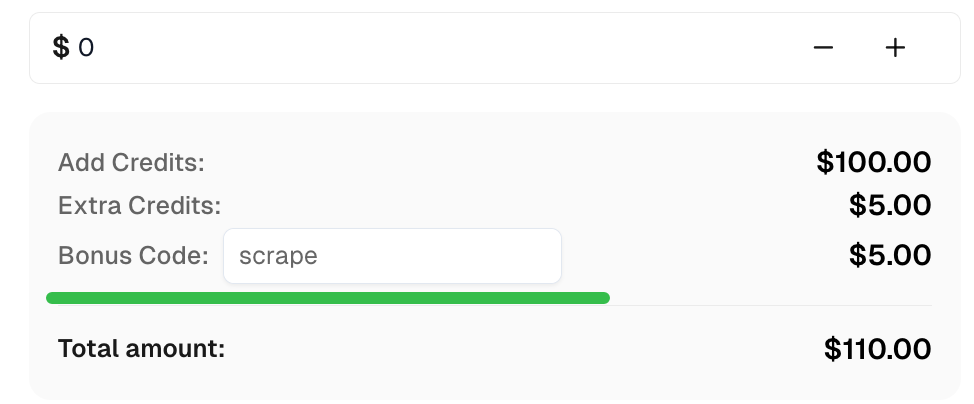
领取您的奖励代码,获取顶级验证码解决方案;CapSolver:scrape。兑换后,您每次充值都将获得额外 5% 的奖励,无限次数。
import capsolver
import os
import json
from scrapegraphai.graphs import SmartScraperGraph

# 考虑使用环境变量存储敏感信息
```python
PROXY = os.getenv("PROXY", "http://username:password@host:port")
capsolver.api_key = os.getenv("CAPSOLVER_API_KEY", "Your Capsolver API Key")
PAGE_URL = os.getenv("PAGE_URL", "PAGE_URL")
PAGE_KEY = os.getenv("PAGE_SITE_KEY", "PAGE_SITE_KEY")

def solve_recaptcha_v2(url, key):
    solution = capsolver.solve({
        "type": "ReCaptchaV2Task",
        "websiteURL": url,
        "websiteKey": key,
        "proxy": PROXY
    })
    return solution['solution']['gRecaptchaResponse']

def main():
    print("正在解决 reCaptcha v2")
    solution = solve_recaptcha_v2(PAGE_URL, PAGE_KEY)
    print("解决方案:", solution)

# 定义抓取管道的配置
graph_config = {
    "llm": {
        "api_key": "YOUR_OPENAI_APIKEY",
        "model": "openai/gpt-4o-mini",
    },
    "verbose": True,
    "headless": False,
}

# 创建 SmartScraperGraph 实例
smart_scraper_graph = SmartScraperGraph(

prompt="查找每个引用的描述。",
    source="https://quotes.toscrape.com/",
    config=graph_config
)

result = smart_scraper_graph.run()
print(json.dumps(result, indent=4))使用 ScrapeGraph AI,您可以高效地抓取网站,同时处理代理和验证码的复杂性。将其与 Capsolver 相结合,可以无缝地绕过 ReCaptcha V2 挑战,从而访问原本难以抓取的内容。
您可以随意扩展此脚本以满足您的抓取需求,并尝试 ScrapeGraph AI 提供的其他功能。始终确保您的抓取活动遵守网站服务条款和法律准则。
祝您抓取愉快!
Anh Tuan
Data Science Expert
Turning task outcomes into actionable insights.
关于作者


