如何使用 node-fetch 进行网页抓取

Ethan Collins
Pattern Recognition Specialist
什么是 node-fetch?
node-fetch 是一个轻量级的 JavaScript 库,它将 window.fetch API 引入 Node.js。它常用于从 Node.js 环境发出 HTTP 请求,提供了一种现代且灵活的方式来异步处理网络操作。
特性:
- 基于 Promise: 使用 JavaScript Promise 以简单的方式管理异步操作。
- Node.js 支持: 专为 Node.js 环境设计。
- 流支持: 支持流,使其非常适合处理大型数据。
- 小巧高效: 极简设计,专注于性能和与现代 JavaScript 特性的兼容性。
先决条件
在使用 node-fetch 之前,请确保您已安装:
安装
要使用 node-fetch,您需要使用 npm 或 yarn 安装它:
bash
npm install node-fetch或
bash
yarn add node-fetch基本示例:发出 GET 请求
以下是使用 node-fetch 执行简单 GET 请求的方法:
javascript
const fetch = require('node-fetch');

fetch('https://httpbin.org/get')
  .then(response => response.json())
  .then(data => {
    console.log('Response Body:', data);
  })
  .catch(error => {
    console.error('Error:', error);
  });
网页抓取示例:从 API 获取 JSON 数据
让我们从 API 获取数据并记录结果:
javascript
const fetch = require('node-fetch');

fetch('https://jsonplaceholder.typicode.com/posts')
  .then(response => response.json())
  .then(posts => {
    posts.forEach(post => {
      console.log(`${post.title} — ${post.body}`);
    });
  })
  .catch(error => {
    console.error('Error:', error);
  });
使用 CapSolver 和 node-fetch 处理验证码
在本节中,我们将整合 CapSolver 与 node-fetch 来处理验证码。CapSolver 提供用于解决验证码(如 ReCaptcha V3)的 API,从而能够自动化需要解决此类验证码的任务。
示例:使用 CapSolver 和 node-fetch 解决 ReCaptcha V3
首先,安装 node-fetch 和 CapSolver:
bash
npm install node-fetch
npm install capsolver
现在,以下是解决 ReCaptcha V3 并将其解决方案用于您的请求的方法:
javascript
const fetch = require('node-fetch');
const CAPSOLVER_KEY = 'YourKey';
const PAGE_URL = 'https://antcpt.com/score_detector';
const PAGE_KEY = '6LcR_okUAAAAAPYrPe-HK_0RULO1aZM15ENyM-Mf';
const PAGE_ACTION = 'homepage';

async function createTask(url, key, pageAction) {
  try {
    const apiUrl = 'https://api.capsolver.com/createTask';
    const payload = {
      clientKey: CAPSOLVER_KEY,
      task: {
        type: 'ReCaptchaV3TaskProxyLess',
        websiteURL: url,
        websiteKey: key,
        pageAction: pageAction
      }
    };

    const response = await fetch(apiUrl, {
      method: 'POST',
      headers: { 'Content-Type': 'application/json' },
      body: JSON.stringify(payload)
    });

    const data = await response.json();
    return data.taskId;

  } catch (error) {
    console.error('Error creating CAPTCHA task:', error);
    throw error;
  }
}

async function getTaskResult(taskId) {
  try {
    const apiUrl = 'https://api.capsolver.com/getTaskResult';
    const payload = {
      clientKey: CAPSOLVER_KEY,
      taskId: taskId,
    };

    let result;
    do {
      const response = await fetch(apiUrl, {
        method: 'POST',
        headers: { 'Content-Type': 'application/json' },
        body: JSON.stringify(payload)
      });

      result = await response.json();
      if (result.status === 'ready') {
        return result.solution;
      }

      await new Promise(resolve => setTimeout(resolve, 5000)); // wait 5 seconds
    } while (true);

  } catch (error) {
    console.error('Error fetching CAPTCHA result:', error);
    throw error;
  }
}

async function main() {
  console.log('Creating CAPTCHA task...');
  const taskId = await createTask(PAGE_URL, PAGE_KEY, PAGE_ACTION);
  console.log(`Task ID: ${taskId}`);

  console.log('Retrieving CAPTCHA result...');
  const solution = await getTaskResult(taskId);
  const token = solution.gRecaptchaResponse;
  console.log(`Token Solution: ${token}`);

  const res = await fetch('https://antcpt.com/score_detector/verify.php', {
    method: 'POST',
    headers: { 'Content-Type': 'application/json' },
    body: JSON.stringify({ 'g-recaptcha-response': token })
  });

  const response = await res.json();
  console.log(`Score: ${response.score}`);
}

main().catch(err => {
  console.error(err);
});
使用 node-fetch 处理代理
要通过代理路由您的请求,您将需要一个代理代理,例如 https-proxy-agent。以下是实现方法:
bash
npm install https-proxy-agent使用代理的示例:
javascript
const fetch = require('node-fetch');
const HttpsProxyAgent = require('https-proxy-agent');

const proxyAgent = new HttpsProxyAgent('http://username:password@proxyserver:8080');

fetch('https://httpbin.org/ip', { agent: proxyAgent })
  .then(response => response.json())
  .then(data => {
    console.log('Response Body:', data);
  })
  .catch(error => {
    console.error('Error:', error);
  });
使用 node-fetch 处理 Cookie
对于 node-fetch 中的 Cookie 处理,您可以使用 fetch-cookie 等库。以下是使用方法:
bash
npm install fetch-cookie示例:
javascript
const fetch = require('node-fetch');
const fetchCookie = require('fetch-cookie');
const cookieFetch = fetchCookie(fetch);

cookieFetch('https://httpbin.org/cookies/set?name=value')
  .then(response => response.json())
  .then(data => {
    console.log('Cookies:', data);
  })
  .catch(error => {
    console.error('Error:', error);
  });
高级用法:自定义标头和 POST 请求
您可以自定义标头并使用 node-fetch 执行 POST 请求:
javascript
const fetch = require('node-fetch');

const headers = {
  'User-Agent': 'Mozilla/5.0 (compatible)',
  'Accept-Language': 'en-US,en;q=0.5',
};

const data = {
  username: 'testuser',
  password: 'testpass',
};

fetch('https://httpbin.org/post', {
  method: 'POST',
  headers: headers,
  body: JSON.stringify(data),
})
  .then(response => response.json())
  .then(data => {
    console.log('Response JSON:', data);
  })
  .catch(error => {
    console.error('Error:', error);
  });
奖励代码
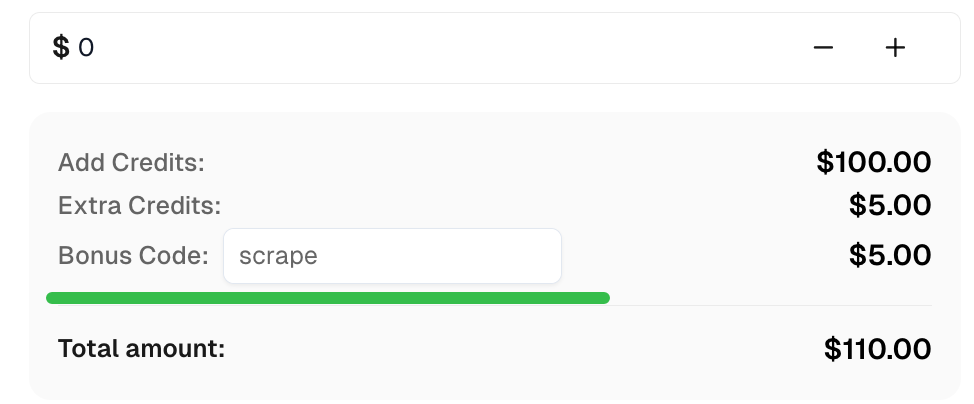
在 CapSolver 获取顶级验证码解决方案的奖励代码:scrape。兑换后,每次充值后您将获得额外 5% 的奖励,无限次。
结论
使用 node-fetch,您可以有效地管理 Node.js 中的 HTTP 请求。通过将其与 CapSolver 集成,您可以解决 ReCaptcha V3 和验证码等验证码,从而访问受限内容。此外,node-fetch 通过标头、代理支持和 Cookie 管理提供自定义功能,使其成为网页抓取和自动化的多功能工具。
