
🎉全新面向 AI Agent 的 CapSolver-MCP、agent 工具和 SDK 集成

Anh Tuan
Data Science Expert
已发表 Sep 23, 2024
已更新 Sep 23, 2024 · 最小阅读量

aiohttp 是一个功能强大的Python异步HTTP客户端/服务器框架。它利用Python的asyncio库实现并发网络操作,使其非常高效地执行诸如网页抓取、Web开发以及任何网络相关操作的任务。
特性:
asyncio构建,实现非阻塞网络操作。在开始使用aiohttp之前,请确保您已安装:
使用pip安装aiohttp:
pip install aiohttp以下是使用aiohttp执行简单GET请求的方法:
import asyncio
import aiohttp

async def fetch(url):
    async with aiohttp.ClientSession() as session:
        async with session.get(url) as response:
            status = response.status
            text = await response.text()
            print(f'Status Code: {status}')
            print('Response Body:', text)

if __name__ == '__main__':
asyncio.run(fetch('https://httpbin.org/get'))让我们抓取Quotes to Scrape网站以提取引言及其作者:
import asyncio
import aiohttp
from bs4 import BeautifulSoup

async def fetch_content(url):
    async with aiohttp.ClientSession() as session:
        async with session.get(url) as response:
            return await response.text()

async def scrape_quotes():
    url = 'http://quotes.toscrape.com/'
    html = await fetch_content(url)
    soup = BeautifulSoup(html, 'html.parser')
    quotes = soup.find_all('div', class_='quote')
    for quote in quotes:
        text = quote.find('span', class_='text').get_text(strip=True)
        author = quote.find('small', class_='author').get_text(strip=True)
        print(f'{text} — {author}')

if __name__ == '__main__':
    asyncio.run(scrape_quotes())
输出:
“The world as we have created it is a process of our thinking. It cannot be changed without changing our thinking.” — Albert Einstein
“It is our choices, Harry, that show what we truly are, far more than our abilities.” — J.K. Rowling
... (更多引言)在本节中,我们将探讨如何将CapSolver与aiohttp集成以绕过验证码。CapSolver是一项外部服务,可帮助解决各种类型的验证码,包括ReCaptcha v2、v3。
我们将演示如何使用CapSolver解决ReCaptcha V2,然后访问需要解决验证码的页面。
首先,安装CapSolver包:
pip install capsolver现在,以下是如何解决ReCaptcha V2并在您的请求中使用解决方案:
import asyncio
import os
import aiohttp
import capsolver

# 设置您的CapSolver API密钥
capsolver.api_key = os.getenv("CAPSOLVER_API_KEY", "您的CapSolver API密钥")
PAGE_URL = os.getenv("PAGE_URL", "https://example.com")  # 带有验证码的页面URL
SITE_KEY = os.getenv("SITE_KEY", "SITE_KEY")             # 验证码站点密钥

async def solve_recaptcha_v2():
    solution = capsolver.solve({
        "type": "ReCaptchaV2TaskProxyless",
        "websiteURL": PAGE_URL,
        "websiteKey": SITE_KEY
    })
    return solution['solution']['gRecaptchaResponse']

async def access_protected_page():
    captcha_response = await solve_recaptcha_v2()
    print("验证码已解决!")

    async with aiohttp.ClientSession() as session:
        data = {
            'g-recaptcha-response': captcha_response,
            # 如果网站需要,请包含其他表单数据
        }
        async with session.post(PAGE_URL, data=data) as response:
            content = await response.text()
            print('页面内容:', content)

if __name__ == '__main__':
    asyncio.run(access_protected_page())
注意: 将PAGE_URL替换为包含验证码的页面的URL,并将SITE_KEY替换为验证码的站点密钥。站点密钥通常可以在页面HTML源代码中验证码小部件内找到。
要通过代理路由您的请求,请指定proxy参数:
import asyncio
import aiohttp

async def fetch(url, proxy):
    async with aiohttp.ClientSession() as session:
        async with session.get(url, proxy=proxy) as response:
            return await response.text()

async def main():
    proxy = 'http://用户名:密码@代理服务器:端口'
    url = 'https://httpbin.org/ip'
    content = await fetch(url, proxy)
    print('Response Body:', content)

if __name__ == '__main__':
asyncio.run(main())您可以使用CookieJar管理Cookie:
import asyncio
import aiohttp

async def main():
    jar = aiohttp.CookieJar()
    async with aiohttp.ClientSession(cookie_jar=jar) as session:
        await session.get('https://httpbin.org/cookies/set?name=value')
        # 显示Cookie
        for cookie in jar:
            print(f'{cookie.key}: {cookie.value}')

if __name__ == '__main__':
asyncio.run(main())您可以发送自定义标头并使用aiohttp执行POST请求:
import asyncio
import aiohttp

async def main():
    headers = {
        'User-Agent': 'Mozilla/5.0 (compatible)',
        'Accept-Language': 'en-US,en;q=0.5',
    }
    data = {
        'username': 'testuser',
        'password': 'testpass',
    }
    async with aiohttp.ClientSession() as session:
        async with session.post('https://httpbin.org/post', headers=headers, data=data) as response:
            json_response = await response.json()
            print('Response JSON:', json_response)

if __name__ == '__main__':
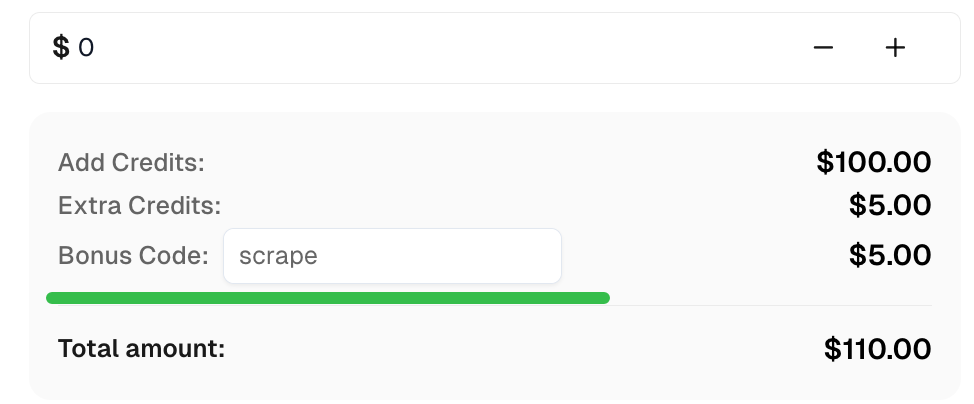
asyncio.run(main())在CapSolver获取顶级验证码解决方案的奖励代码:scrape。兑换后,每次充值后将获得额外5%的奖励,无限次。
使用aiohttp,您可以高效地执行异步网页抓取任务并并发处理多个网络操作。将其与CapSolver集成,您可以解决像ReCaptcha V2这样的验证码,从而访问可能受限的内容。
您可以根据自己的具体需求扩展这些示例。请务必遵守您抓取的网站的服务条款并遵守法律法规。
祝您抓取愉快!
Anh Tuan
Data Science Expert
Turning task outcomes into actionable insights.
关于作者


