CapSolver を使って n8n で Cloudflare Challenge を解決する方法

Sora Fujimoto
AI Solutions Architect
Cloudflareのボット保護は、CAPTCHAウィジェットの範囲をはるかに超えています。Cloudflare Challenge — サイトへのアクセスを完全にブロックする全画面の「ブラウザを検証中…」画面は、ウェブ上で最も攻撃的なボット防御の一つです。これは実際のブラウザ環境で完全なJavaScriptチャレンジを実行し、行動信号をチェックし、TLS接続のフィンガープリントを確認してから初めて通過を許可します。
標準的な自動化ツールはここで失敗します。チャレンジが解けないわけではなく、CloudflareがTLSハンドシェイク自体をフィンガープリントしているためです — ブラウザ以外のHTTPクライアントはチャレンジが表示される前にブロックされたり、有効なcf_clearanceクッキーがあっても直後に再チャレンジをかけられます。
このガイドでは、n8nで実際に動作するCloudflare Challengeスクレイパーの構築方法を学びます — **CapSolver**を使ってチャレンジを解決し、ローカルのGo TLSサーバーでChromeのTLSフィンガープリントを偽装し、n8nワークフローで全体を結合します。
構築するもの:
- Cloudflare Bot Managementを回避する二重トリガーワークフロー(スケジュール+Webhook)
- 本物のChrome TLSフィンガープリントでHTTPリクエストを行う軽量Goサーバー
- どのCF保護サイトにも向けられる再利用可能なスクレイパーテンプレート
- スクレイピング、アカウントログイン、独立したチャレンジソルバーAPIのユースケースワークフロー — すべてCloudflare Challengeの背後で動作
- Turnstileワークフロー — ソルバーAPI、スクレイピングテンプレート、アカウントログインフロー(Cloudflare Turnstile利用サイト向け、プロキシやTLSサーバー不要)
Cloudflare Challengeとは?
Cloudflare Challenge(JSチャレンジまたはBot Managementチャレンジとも呼ばれる)は、Cloudflareが保護対象サイトへの訪問者アクセス前に挿入する全画面の中間ページです。見たことがあるはずです:「ブラウザを検証中…」や「少々お待ちください…」という文字列とローディングバーやCloudflareロゴが表示された、黒または白の画面です。
Turnstileとは異なり — ページ内に埋め込まれた小さなウィジェット — Cloudflare Challengeはページ全体を占有し、完了するまでコンテンツにアクセスできません。
| Cloudflare Challenge | Cloudflare Turnstile | |
|---|---|---|
| 表示場所 | 全画面中間ページ — サイトアクセスを完全にブロック | ページ内に埋め込まれたウィジェット(例:ログインフォーム) |
| 見た目 | 「ブラウザを検証中…」読み込み画面 | フォーム内の小さなチェックボックスまたは不可視ウィジェット |
| 導入者 | Cloudflareがセキュリティルールに基づき自動追加 | サイト所有者がHTMLに埋め込み |
| 解決手段 | AntiCloudflareTask — プロキシ必須 |
AntiTurnstileTaskProxyLess — プロキシ不要 |
| 返されるクッキー | cf_clearance(ドメイン特化、IP紐付け) |
Turnstileトークン(短命、一回限り) |
| プロキシ要否 | あり — 解決とフェッチで同一IP使用必須 | なし |
フォーム内に埋め込まれたチェックボックスやウィジェットが見えたら、それはTurnstileです — このチャレンジではありません。不明な場合はCapSolverのチャレンジタイプ判別ガイドを確認してください。
標準HTTPクライアントが失敗する理由
多くのガイドが触れない問題ですが、CloudflareはクッキーだけでなくTLSフィンガープリントもチェックします。
ブラウザがHTTPSでサイトに接続するとき、TLS ClientHelloにはサポートされている暗号スイート、拡張機能、設定などの詳細が含まれます。Cloudflareはこのフィンガープリント(JA3またはJA4フィンガープリントと呼ばれる)を記録し、既知のブラウザプロファイルと比較します。
Goのnet/http、Pythonのrequests、curl、ほとんどのHTTPライブラリはTLSフィンガープリントが異なります。CapSolverがチャレンジを正常に解決して有効なcf_clearanceクッキーを返しても、Cloudflareは後続のフェッチで非ブラウザTLSフィンガープリントを検出すると再チャレンジまたはブロックします。
対処方法は、**httpcloak**を使ったGoサーバーです — 本物のChrome TLSスタックを偽装するライブラリで以下を含みます:
- JA3 / JA4フィンガープリント
- HTTP/2 SETTINGSフレーム
- ALPNネゴシエーション
- ヘッダーの順序と値
これにより、ネットワークレベルで正確にChromeブラウザからのリクエストに見えます。
前提条件
| 要件 | 備考 |
|---|---|
| n8nセルフホスト | 必須 — TLSサーバーはn8nと同じマシンで動作する必要があります。n8n Cloudは本用途に適しません。 |
| CapSolverアカウント | こちらから登録しAPIキーを取得 |
| Go 1.21+ | n8nサーバーにインストール済みであること。go versionで確認可能。 |
| 住宅用またはモバイルプロキシ | データセンタープロキシは大多数のCloudflare保護サイトで失敗します。 詳細は下記プロキシ要件参照。 |
n8nでのCapSolver設定
CapSolverはn8nの公式統合として利用可能で、コミュニティノードのインストールは不要です。
ステップ1: 認証情報ページを開く
n8nインスタンスへアクセスし、設定 → 認証情報に移動します。

ステップ2: CapSolver認証情報を作成
- 右上の認証情報を作成をクリック
- **「CapSolver」**で検索し、CapSolver APIを選択
- CapSolverダッシュボードからAPIキーを入力
- 許可されたHTTPリクエストドメインは
Allのままにする - 保存をクリック
緑色の**「接続は正常にテストされました」**のバナーが表示されるはずです。
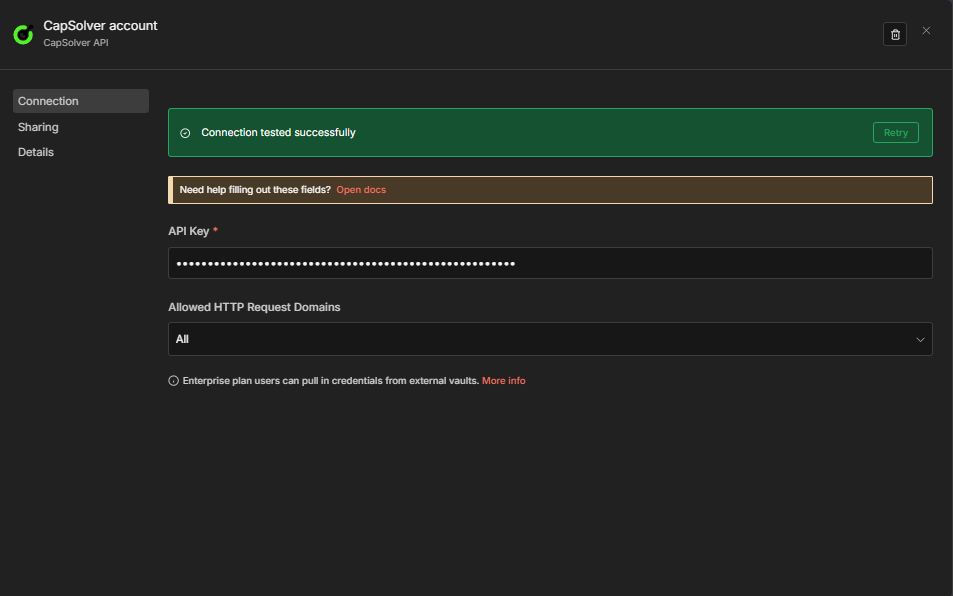
重要: ワークフロー内のすべてのCapSolverノードは、この認証情報を参照します。一度作成すれば、すべてのソルバーワークフローで共有可能です。
ステップ1 — TLSサーバーの構築
このGoサーバーはn8nからのフェッチリクエストを受け、httpcloakのChrome TLSプロファイルを用いて実行します。小さな自己完結型のバイナリで、n8nと同時に動かします。
ソースファイルの作成
ディレクトリを作成し、以下をmain.goとして保存してください:
bash
mkdir -p ~/tls-server && cd ~/tls-server
go
package main

import (
	"context"
	"encoding/json"
	"fmt"
	"io"
	"log"
	"net/http"
	"strings"
	"time"

	"github.com/sardanioss/httpcloak/client"
)

type FetchRequest struct {
	URL     string            `json:"url"`
	Method  string            `json:"method"`
	Headers map[string]string `json:"headers"`
	Proxy   string            `json:"proxy"`
	Body    string            `json:"body"`
}

type FetchResponse struct {
	Status  int                 `json:"status"`
	Body    string              `json:"body"`
	Headers map[string][]string `json:"headers"`
}

type ErrorResponse struct {
	Error string `json:"error"`
}

func writeError(w http.ResponseWriter, status int, msg string) {
	w.Header().Set("Content-Type", "application/json")
	w.WriteHeader(status)
	json.NewEncoder(w).Encode(ErrorResponse{Error: msg})
}

func fetchHandler(w http.ResponseWriter, r *http.Request) {
	if r.Method != http.MethodPost {
		writeError(w, http.StatusMethodNotAllowed, "only POST allowed")
		return
	}

	var req FetchRequest
	if err := json.NewDecoder(r.Body).Decode(&req); err != nil {
		writeError(w, http.StatusBadRequest, "invalid JSON: "+err.Error())
		return
	}

	if req.URL == "" {
		writeError(w, http.StatusBadRequest, "url is required")
		return
	}
	if req.Method == "" {
		req.Method = "GET"
	}

	ctx, cancel := context.WithTimeout(context.Background(), 60*time.Second)
	defer cancel()

	c := client.NewClient("chrome-145", client.WithTimeout(60*time.Second))
	defer c.Close()

	if req.Proxy != "" {
		c.SetProxy(req.Proxy)
	}

	// Extract user-agent separately so httpcloak uses it instead of its preset value.
	headers := make(map[string][]string, len(req.Headers))
	var userAgent string
	for k, v := range req.Headers {
		lower := strings.ToLower(k)
		if lower == "user-agent" {
			userAgent = v
		} else {
			headers[k] = []string{v}
		}
	}

	var bodyReader io.Reader
	if req.Body != "" {
		bodyReader = strings.NewReader(req.Body)
	}

	hcReq := &client.Request{
		Method:    strings.ToUpper(req.Method),
		URL:       req.URL,
		Headers:   headers,
		Body:      bodyReader,
		UserAgent: userAgent,
		FetchMode: client.FetchModeNavigate,
	}

	resp, err := c.Do(ctx, hcReq)
	if err != nil {
		writeError(w, http.StatusBadGateway, "fetch failed: "+err.Error())
		return
	}

	body, err := resp.Text()
	if err != nil {
		writeError(w, http.StatusInternalServerError, "read body failed: "+err.Error())
		return
	}

	w.Header().Set("Content-Type", "application/json")
	json.NewEncoder(w).Encode(FetchResponse{
		Status:  resp.StatusCode,
		Body:    body,
		Headers: resp.Headers,
	})
}

func main() {
	const port = "7878"

	mux := http.NewServeMux()
	mux.HandleFunc("/fetch", fetchHandler)
	mux.HandleFunc("/health", func(w http.ResponseWriter, r *http.Request) {
		w.Header().Set("Content-Type", "application/json")
		fmt.Fprint(w, `{"status":"ok"}`)
	})

	log.Printf("TLS server (httpcloak chrome-145) listening on :%s", port)
	log.Fatal(http.ListenAndServe(":"+port, mux))
}
初期化とビルド
bash
go mod init tls-server
go get github.com/sardanioss/httpcloak/client
go build -o main main.go
サーバーの起動
bash
./main起動確認(別の端末で)
bash
curl http://localhost:7878/health期待されるレスポンス: {"status":"ok"}
注意: TLSサーバーはn8nインスタンスと同一マシンで動作させる必要があります。n8nワークフローは
http://localhost:7878/fetchへ呼び出します。n8n Cloudを利用している場合はセルフホスト構成が必要です — これがCloudflare Challengeスクレイピングにおいてセルフホストn8nが強く推奨される理由の一つです。
ステップ2 — n8nがlocalhostにアクセスできるようにする
デフォルトではn8nはHTTP Requestノードからlocalhostアドレスへの呼び出しをブロックします(SSRF対策)。この制限を解除する必要があります。
N8N_BLOCK_ACCESS_TO_LOCALHOST=falseという環境変数を追加し、n8nインスタンスを再起動してください。方法はn8nの実行方法によって異なります。
n8nを直接実行している場合:
bash
export N8N_BLOCK_ACCESS_TO_LOCALHOST=false
n8n start
Dockerを使っている場合:
docker runコマンドに-e N8N_BLOCK_ACCESS_TO_LOCALHOST=falseを追加するか、docker-compose.ymlのenvironmentセクションに追加してください。
ワークフロー:Cloudflare Challenge ソルバーAPI
このワークフローはPOSTエンドポイントを作成し、Cloudflare保護付きURLとプロキシを受け取り、CapSolver経由でチャレンジを解き、生のcf_clearanceクッキーとuserAgentを返します。TLSサーバーは不要で、フェッチはアプリケーション側が処理します。
動作概要
Webhook (POST /solver-cloudflare-challenge) → Cloudflare Challenge (CapSolver)
                                             → 解決結果整形 → Webhookに応答
4ノード、Webhookのみ、スケジュールパスなし、TLSサーバー依存なし。
- Webhook —
websiteURLとproxyを含むPOSTリクエストを受け付ける - Cloudflare Challenge —
AntiCloudflareTaskでCapSolverがチャレンジを解く - 解決結果整形 —
cookiesオブジェクトをクッキーストリングにシリアライズし、continueOnFailでエラー処理 - Webhook応答 —
cf_clearance、シリアライズ済クッキーストリング、userAgentを返す### ノード構成
1. Webhookノード
| 設定 | 値 |
|---|---|
| HTTPメソッド | POST |
| パス | solver-cloudflare-challenge |
| 応答 | Response Node |
これにより、エンドポイントが作成されます: https://your-n8n-instance.com/webhook/solver-cloudflare-challenge
2. CapSolverノード(Cloudflareチャレンジ)
| パラメータ | 値 | 説明 |
|---|---|---|
| 操作 | Cloudflare Challenge |
AntiCloudflareTask を選択 |
| タイプ | AntiCloudflareTask |
フルページのCloudflareチャレンジ |
| WebサイトURL | ={{ $json.body.websiteURL }} |
Cloudflareで保護されたURL |
| プロキシ | ={{ $json.body.proxy }} |
host:port:user:pass形式の住宅用プロキシ |
| 失敗時も継続 | true |
クラッシュせず構造化されたエラーを返す |
CapSolverはプロキシ経由で実際のブラウザを起動し、ターゲットURLを読み込み、Cloudflareチャレンジを解決します。成功すると、solutionオブジェクトが返されます:
cookies— クリアランスクッキーを含む{ cf_clearance: "..." }のオブジェクトuserAgent— 解決時にブラウザが使った正確なUser-Agent文字列
注意: フィールド名は
websiteURL(targetURLではありません)で、これは他のSolver APIやCapSolverノードと一致しています。
3. ソリューションの整形(コードノード)
AntiCloudflareTaskはcookiesを単純なトークン文字列ではなくオブジェクト({ cf_clearance: "..." })として返すため、このノードが必要です。クッキーをシリアライズし、cf_clearanceを抽出し、CapSolverが失敗した場合は構造化されたエラーを返します。
javascript
const input = $input.first().json;

if (input.error || !input.data || !input.data.solution) {
  const errorMsg = input.error
    ? (input.error.message || JSON.stringify(input.error))
    : 'No solution returned — site may not be showing a challenge';
  return [{ json: { success: false, error: errorMsg } }];
}

const solution = input.data.solution;
const cookies = solution.cookies;
const cfClearance = (cookies && typeof cookies === 'object')
  ? (cookies.cf_clearance || '') : '';
const cookieString = (cookies && typeof cookies === 'object')
  ? Object.entries(cookies).map(([k, v]) => `${k}=${v}`).join('; ')
  : (cookies || '');

return [{ json: {
  success: true,
  cf_clearance: cfClearance,
  cookies: cookieString,
  userAgent: solution.userAgent || '',
  solvedAt: new Date().toISOString()
}}];
4. Webhookへの応答
| 設定 | 値 |
|---|---|
| 応答形式 | JSON |
| レスポンスボディ | ={{ JSON.stringify($json) }} |
テスト方法
bash
curl -X POST https://your-n8n-instance.com/webhook/solver-cloudflare-challenge \
  -H "Content-Type: application/json" \
  -d '{
    "websiteURL": "https://protected-site.com",
    "proxy": "host:port:user:pass"
  }'
成功時のレスポンス:
json
{
  "success": true,
  "cf_clearance": "abc123...",
  "cookies": "cf_clearance=abc123...",
  "userAgent": "Mozilla/5.0 (Windows NT 10.0; Win64; x64) ... Chrome/145.0.0.0 ...",
  "solvedAt": "2026-03-11T12:00:00.000Z"
}失敗時のレスポンス(チャレンジが見つからない、プロキシ不良など):
json
{
  "success": false,
  "error": "No solution returned — site may not be showing a challenge"
}
このワークフローをインポートする
以下のJSONをコピーして、n8nのメニュー → JSONからインポートからインポートしてください。インポート後、Cloudflare ChallengeノードでCapSolverの認証情報を選択してください。
ワークフローJSONを展開
json
{
  "nodes": [
    {
      "parameters": {
        "content": "## Cloudflare Challenge \u2014 Solver API\n\n### How it works\n\n1. Receives a request via webhook to solve a Cloudflare challenge.\n2. Uses the Cloudflare Challenge node to attempt solving the challenge.\n3. Formats the solved challenge token via custom code.\n4. Responds back to the original request with the solved token.\n\n### Setup steps\n\n- [ ] Configure the Webhook node to receive requests.\n- [ ] Set up CapSolver credentials to enable solving Cloudflare challenges.\n- [ ] Ensure the Response node is properly configured to send back the solved token.\n\n### Customization\n\nYou can customize the code in the 'Format Solution' node to change the formatting of the solved token response.",
        "width": 480,
        "height": 672
      },
      "type": "n8n-nodes-base.stickyNote",
      "typeVersion": 1,
      "position": [
        -816,
        -128
      ],
      "id": "254f3829-0e6e-4ae3-bf83-85851be9a7bc",
      "name": "Sticky Note"
    },
    {
      "parameters": {
        "content": "## Receive and solve challenge\n\nTriggers on a new request and attempts to solve the Cloudflare challenge.",
        "width": 512,
        "height": 304,
        "color": 7
      },
      "type": "n8n-nodes-base.stickyNote",
      "typeVersion": 1,
      "position": [
        -256,
        -128
      ],
      "id": "44e79738-a2f0-41ec-8ff0-514afbd6cc45",
      "name": "Sticky Note1"
    },
    {
      "parameters": {
        "content": "## Format and return solution\n\nFormats the solution and responds back with the solved token.",
        "width": 496,
        "height": 304,
        "color": 7
      },
      "type": "n8n-nodes-base.stickyNote",
      "typeVersion": 1,
      "position": [
        352,
        -128
      ],
      "id": "fc40112d-389d-4d4e-8872-af2ae533c513",
      "name": "Sticky Note2"
    },
    {
      "parameters": {
        "httpMethod": "POST",
        "path": "solver-cloudflare-challenge",
        "responseMode": "responseNode",
        "options": {}
      },
      "type": "n8n-nodes-base.webhook",
      "typeVersion": 2.1,
      "position": [
        -208,
        0
      ],
      "id": "cf770001-7777-7777-7777-777777777701",
      "name": "Receive Solver Request",
      "webhookId": "cf770001-aaaa-bbbb-cccc-777777777701",
      "onError": "continueRegularOutput"
    },
    {
      "parameters": {
        "operation": "Cloudflare Challenge",
        "websiteURL": "={{ $json.body.websiteURL }}",
        "proxy": "={{ $json.body.proxy }}",
        "userAgent": "={{ $json.body.userAgent }}",
        "html": "={{ $json.body.html }}"
      },
      "type": "n8n-nodes-capsolver.capSolver",
      "typeVersion": 1,
      "position": [
        112,
        0
      ],
      "id": "cf770001-7777-7777-7777-777777777702",
      "name": "Cloudflare Challenge",
      "credentials": {
        "capSolverApi": {
          "id": "BeBFMAsySMsMGeE9",
          "name": "CapSolver account"
        }
      },
      "onError": "continueRegularOutput"
    },
    {
      "parameters": {
        "jsCode": "const input = $input.first().json;\n\nif (input.error || !input.data || !input.data.solution) {\n  const errorMsg = input.error\n    ? (input.error.message || JSON.stringify(input.error))\n    : 'No solution returned \u2014 site may not be showing a challenge';\n  return [{ json: { success: false, error: errorMsg } }];\n}\n\nconst solution = input.data.solution;\nconst cookies = solution.cookies;\nconst cfClearance = (cookies && typeof cookies === 'object') ? (cookies.cf_clearance || '') : '';\nconst cookieString = (cookies && typeof cookies === 'object')\n  ? Object.entries(cookies).map(([k, v]) => `${k}=${v}`).join('; ')\n  : (cookies || '');\n\nreturn [{ json: {\n  success: true,\n  cf_clearance: cfClearance,\n  cookies: cookieString,\n  userAgent: solution.userAgent || '',\n  solvedAt: new Date().toISOString()\n}}];"
      },
      "type": "n8n-nodes-base.code",
      "typeVersion": 2,
      "position": [
        400,
        0
      ],
      "id": "cf770001-7777-7777-7777-777777777703",
      "name": "Format Solution"
    },
    {
      "parameters": {
        "respondWith": "json",
        "responseBody": "={{ JSON.stringify($json) }}",
        "options": {}
      },
      "type": "n8n-nodes-base.respondToWebhook",
      "typeVersion": 1.5,
      "position": [
        700,
        0
      ],
      "id": "cf770001-7777-7777-7777-777777777704",
      "name": "Return Solved Token"
    }
  ],
  "connections": {
    "Receive Solver Request": {
      "main": [
        [
          {
            "node": "Cloudflare Challenge",
            "type": "main",
            "index": 0
          }
        ]
      ]
    },
    "Cloudflare Challenge": {
      "main": [
        [
          {
            "node": "Format Solution",
            "type": "main",
            "index": 0
          }
        ]
      ]
    },
    "Format Solution": {
      "main": [
        [
          {
            "node": "Return Solved Token",
            "type": "main",
            "index": 0
          }
        ]
      ]
    }
  },
  "pinData": {},
  "meta": {
    "instanceId": "962ff0267b713be0344b866fa54daae28de8ed2144e2e6867da355dae193ea1f"
  }
}
ワークフロー:Cloudflareチャレンジソリューションの使用方法
前述のSolver APIは、解決済みの cf_clearance クッキーと userAgent を取得する方法を示しています。しかし、これらを実際にどう使うのでしょうか?
reCAPTCHAやTurnstileのようにフォームフィールドでトークンを送信するのとは異なり、Cloudflareチャレンジはクッキー(cf_clearance)を返します。このクッキーは、解決時に使用したプロキシIPとUser-Agentに紐づいていて、後続のすべてのリクエストヘッダーに含めて送信する必要があります。両者はフェッチ時に正確に一致していなければなりません。
一般的なパターンは以下の通りです:
- Cloudflareチャレンジを解決 → CapSolverから
cf_clearanceクッキーとuserAgentを取得 - リクエストを準備 → クッキー、User-Agent、Chromeのような
sec-ch-uaヘッダーを組み立てる - TLSサーバー経由でフェッチ →
http://localhost:7878/fetchを使って、ChromeのTLSフィンガープリントに合わせる - レスポンスを検証 → サイトから実際のコンテンツが返っているか(ステータス200とHTML)を確認し、再チャレンジページでないかを判断
- 結果を処理 → HTMLノード、フィールド編集、コードノードなどで必要なデータを抽出
重要なポイント: 一般的なHTTPクライアントは、有効な
cf_clearanceクッキーがあってもここで失敗します。CloudflareはTLSハンドシェイク自体のフィンガープリントを採っています。GoベースのTLSサーバー(httpcloak)は、ネットワークレベルで正確にChromeに見えるフェッチを実現します。Cloudflare保護ページのすべてのワークフローはこのTLSサーバー経由で通信する必要があります。### 例:Cloudflareチャレンジスクレイパー
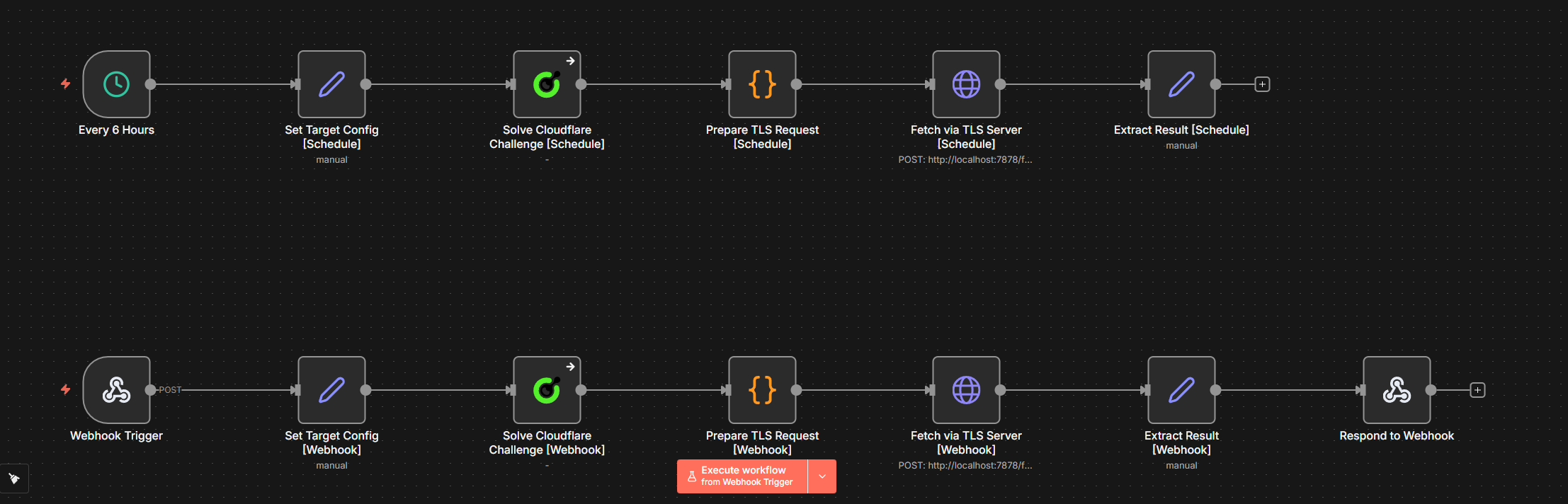
ワークフローフロー
スケジュール経路:
6時間ごと → ターゲット設定 [Schedule] → Cloudflareチャレンジを解く
          → TLSリクエスト準備 → TLSサーバ経由でフェッチ → 結果抽出
Webhook経路:
Webhookトリガー → ターゲット設定 [Webhook] → Cloudflareチャレンジを解く
                → TLSリクエスト準備 → TLSサーバ経由でフェッチ → 結果抽出 → Webhookに応答
動作の仕組み
- ターゲット設定 —
targetURLとproxy(host:port:user:pass形式)を保存します。スケジュール経路では固定値を使用し、Webhook経路ではPOSTボディから読み込みます。 - Cloudflareチャレンジを解く — CapSolverノード(
onError: "continueRegularOutput") — ページにチャレンジが表示されていなくても処理を続行します。 - TLSリクエスト準備 —
host:port:user:pass形式のプロキシをhttp://user:pass@host:portURL形式に変換し、solution.cookiesをクッキーヘッダー文字列にシリアライズ、チャレンジの正確なuserAgentを使ってChrome風リクエストヘッダーを構築するコードノード。 - TLSサーバ経由でフェッチ —
contentType: "raw"を使用してhttp://localhost:7878/fetchへのHTTPリクエスト("json"ではなく、n8nのJSONモードはボディを破損させるため)。 - 結果抽出 — TLSサーバレスポンスから
status、body、およびfetchedAtを抽出。 - Webhookに応答 — 結果をJSON形式で返します(Webhook経路のみ)。
なぜ
contentType: "raw"で、"json"ではないのか?
n8nのjsonコンテントタイプモードは、ボディパラメーターをキーと値のペアとして期待します。JSON.stringify($json)を文字列として渡すと、n8nは全体の文字列を1つの不正なパラメーターとして扱い、{"": ""}をサーバに送信してしまいます。rawモードを使うことで、評価された式の通りにボディを正確に送信できます。
ワークフローJSONを展開する
json
{
  "nodes": [
    {
      "parameters": {
        "content": "## Cloudflare Challenge \u2014 CapSolver + Schedule + Webhook\n\n### How it works\n\n1. Triggers schedule every 6 hours to solve Cloudflare challenges.\n2. Webhook triggers on request to solve Cloudflare challenges.\n3. Sets target and proxy configuration for requests.\n4. Solves the Cloudflare challenge using CapSolver.\n5. Sends results via TLS and processes the HTTP response.\n\n### Setup steps\n\n- Ensure CapSolver credentials are configured.\n- Confirm webhook URL is set and accessible.\n- Check schedule configuration for every 6 hours trigger.\n- Verify endpoint http://localhost:7878/fetch is available.\n\n### Customization\n\nConsider customizing the target URL or proxy settings within the set nodes.",
        "width": 480,
        "height": 688
      },
      "type": "n8n-nodes-base.stickyNote",
      "typeVersion": 1,
      "position": [
        -1008,
        -112
      ],
      "id": "3c1c3e96-631a-4cf6-bbff-85fd8b1a01e8",
      "name": "Sticky Note"
    },
    {
      "parameters": {
        "content": "## Scheduled Cloudflare challenge\n\nTriggered every 6 hours to solve Cloudflare challenge.",
        "width": 1696,
        "height": 272,
        "color": 7
      },
      "type": "n8n-nodes-base.stickyNote",
      "typeVersion": 1,
      "position": [
        -448,
        -112
      ],
      "id": "e9187404-7818-4233-af66-091c90a40476",
      "name": "Sticky Note1"
    },
    {
      "parameters": {
        "content": "## Webhook Cloudflare challenge\n\nRespond to solver requests via webhook to solve Cloudflare challenge.",
        "width": 2000,
        "height": 272,
        "color": 7
      },
      "type": "n8n-nodes-base.stickyNote",
      "typeVersion": 1,
      "position": [
        -448,
        304
      ],
      "id": "b5d5ba23-8ed2-4afb-8113-3fa8f2fba51e",
      "name": "Sticky Note2"
    },
    {
      "parameters": {
        "rule": {
          "interval": [
            {
              "field": "hours",
              "hoursInterval": 6
            }
          ]
        }
      },
      "type": "n8n-nodes-base.scheduleTrigger",
      "typeVersion": 1.3,
      "position": [
        -400,
        0
      ],
      "id": "cf111111-1111-1111-1111-111111111101",
      "name": "Every 6 Hours"
    },
    {
      "parameters": {
        "assignments": {
          "assignments": [
            {
              "id": "cfg-s-001",
              "name": "targetURL",
              "value": "https://www.listaspam.com/busca.php?Telefono=671484239",
              "type": "string"
            },
            {
              "id": "cfg-s-002",
              "name": "proxy",
              "value": "YOUR_PROXY_HOST:PORT:USER:PASS",
              "type": "string"
            }
          ]
        },
        "options": {}
      },
      "type": "n8n-nodes-base.set",
      "typeVersion": 3.4,
      "position": [
        -96,
        0
      ],
      "id": "cf111111-1111-1111-1111-111111111102",
      "name": "Set Target Config [Schedule]"
    },
    {
      "parameters": {
        "operation": "Cloudflare Challenge",
        "websiteURL": "={{ $json.targetURL }}",
        "proxy": "={{ $json.proxy }}"
      },
      "type": "n8n-nodes-capsolver.capSolver",
      "typeVersion": 1,
      "position": [
        208,
        0
      ],
      "id": "cf111111-1111-1111-1111-111111111103",
      "name": "Solve Cloudflare Challenge [Schedule]",
      "credentials": {
        "capSolverApi": {
          "id": "BeBFMAsySMsMGeE9",
          "name": "CapSolver account"
        }
      },
      "onError": "continueRegularOutput"
    },
    {
      "parameters": {
        "jsCode": "const config = $('Set Target Config [Schedule]').first().json;\nconst capResult = $input.first().json;\n\nfunction toProxyURL(proxy) {\n  if (!proxy) return '';\n  if (proxy.startsWith('http')) return proxy;\n  const parts = proxy.split(':');\n  if (parts.length === 4) {\n    return `http://${parts[2]}:${parts[3]}@${parts[0]}:${parts[1]}`;\n  }\n  return proxy;\n}\n\nlet cookieStr = '';\nlet ua = 'Mozilla/5.0 (Windows NT 10.0; Win64; x64) AppleWebKit/537.36 (KHTML, like Gecko) Chrome/145.0.0.0 Safari/537.36';\n\nif (capResult.data && capResult.data.solution) {\n  const solution = capResult.data.solution;\n  const cookies = solution.cookies;\n  cookieStr = cookies && typeof cookies === 'object'\n    ? Object.entries(cookies).map(([k, v]) => `${k}=${v}`).join('; ')\n    : (cookies || '');\n  if (solution.userAgent) ua = solution.userAgent;\n}\n\nconst chromeMatch = ua.match(/Chrome\\/(\\d+)/);\nconst chromeVer = chromeMatch ? chromeMatch[1] : '145';\nconst secChUa = `\"Chromium\";v=\"${chromeVer}\", \"Not A(Brand\";v=\"8\", \"Google Chrome\";v=\"${chromeVer}\"`;\n\nconst headers = {\n  'accept': 'text/html,application/xhtml+xml,application/xml;q=0.9,image/avif,image/webp,image/apng,*/*;q=0.8',\n  'accept-language': 'en-US,en;q=0.9',\n  'sec-ch-ua': secChUa,\n  'sec-ch-ua-mobile': '?0',\n  'sec-ch-ua-platform': '\"Windows\"',\n  'sec-fetch-dest': 'document',\n  'sec-fetch-mode': 'navigate',\n  'sec-fetch-site': 'none',\n  'sec-fetch-user': '?1',\n  'upgrade-insecure-requests': '1',\n  'user-agent': ua\n};\n\nif (cookieStr) headers['cookie'] = cookieStr;\n\nreturn [{ json: {\n  url: config.targetURL,\n  method: 'GET',\n  proxy: toProxyURL(config.proxy),\n  headers\n}}];"
      },
      "type": "n8n-nodes-base.code",
      "typeVersion": 2,
      "position": [
        512,
        0
      ],
      "id": "cf111111-1111-1111-1111-111111111104",
      "name": "Prepare TLS Request [Schedule]"
    },
    {
      "parameters": {
        "method": "POST",
        "url": "http://localhost:7878/fetch",
        "sendBody": true,
        "contentType": "raw",
        "rawContentType": "application/json",
        "body": "={{ JSON.stringify($json) }}",
        "options": {
          "timeout": 60000
        }
      },
      "type": "n8n-nodes-base.httpRequest",
      "typeVersion": 4.3,
      "position": [
        800,
        0
      ],
      "id": "cf111111-1111-1111-1111-111111111105",
      "name": "Fetch via TLS Server [Schedule]"
    },
    {
      "parameters": {
        "assignments": {
          "assignments": [
            {
              "id": "out-s-001",
              "name": "status",
              "value": "={{ $json.status }}",
              "type": "number"
            },
            {
              "id": "out-s-002",
              "name": "body",
              "value": "={{ $json.body }}",
              "type": "string"
            },
            {
              "id": "out-s-003",
              "name": "fetchedAt",
              "value": "={{ new Date().toISOString() }}",
              "type": "string"
            }
          ]
        },
        "options": {}
      },
      "type": "n8n-nodes-base.set",
      "typeVersion": 3.4,
      "position": [
        1104,
        0
      ],
      "id": "cf111111-1111-1111-1111-111111111106",
      "name": "Extract Result [Schedule]"
    },
    {
      "parameters": {
        "httpMethod": "POST",
        "path": "cloudflare-scraper",
        "responseMode": "responseNode",
        "options": {}
      },
      "type": "n8n-nodes-base.webhook",
      "typeVersion": 2.1,
      "position": [
        -400,
        420
      ],
      "id": "cf111111-1111-1111-1111-111111111107",
      "name": "Receive Solver Request",
      "webhookId": "cf111111-aaaa-bbbb-cccc-111111111107",
      "onError": "continueRegularOutput"
    },
    {
      "parameters": {
        "assignments": {
          "assignments": [
            {
              "id": "cfg-w-001",
              "name": "targetURL",
              "value": "={{ $json.body.targetURL }}",
              "type": "string"
            },
            {
              "id": "cfg-w-002",
              "name": "proxy",
              "value": "={{ $json.body.proxy }}",
              "type": "string"
            }
          ]
        },
        "options": {}
      },
      "type": "n8n-nodes-base.set",
      "typeVersion": 3.4,
      "position": [
        -96,
        420
      ],
      "id": "cf111111-1111-1111-1111-111111111108",
      "name": "Set Target Config [Webhook]"
    },
    {
      "parameters": {
        "operation": "Cloudflare Challenge",
        "websiteURL": "={{ $json.targetURL }}",
        "proxy": "={{ $json.proxy }}"
      },
      "type": "n8n-nodes-capsolver.capSolver",
      "typeVersion": 1,
      "position": [
        208,
        420
      ],
      "id": "cf111111-1111-1111-1111-111111111109",
      "name": "Solve Cloudflare Challenge [Webhook]",
      "credentials": {
        "capSolverApi": {
          "id": "BeBFMAsySMsMGeE9",
          "name": "CapSolver account"
        }
      },
      "onError": "continueRegularOutput"
    },
    {
      "parameters": {
        "jsCode": "const config = $('Set Target Config [Webhook]').first().json;\nconst capResult = $input.first().json;\n\nfunction toProxyURL(proxy) {\n  if (!proxy) return '';\n  if (proxy.startsWith('http')) return proxy;\n  const parts = proxy.split(':');\n  if (parts.length === 4) {\n    return `http://${parts[2]}:${parts[3]}@${parts[0]}:${parts[1]}`;\n  }\n  return proxy;\n}\n\nlet cookieStr = '';\nlet ua = 'Mozilla/5.0 (Windows NT 10.0; Win64; x64) AppleWebKit/537.36 (KHTML, like Gecko) Chrome/145.0.0.0 Safari/537.36';\n\nif (capResult.data && capResult.data.solution) {\n  const solution = capResult.data.solution;\n  const cookies = solution.cookies;\n  cookieStr = cookies && typeof cookies === 'object'\n    ? Object.entries(cookies).map(([k, v]) => `${k}=${v}`).join('; ')\n    : (cookies || '');\n  if (solution.userAgent) ua = solution.userAgent;\n}\n\nconst chromeMatch = ua.match(/Chrome\\/(\\d+)/);\nconst chromeVer = chromeMatch ? chromeMatch[1] : '145';\nconst secChUa = `\"Chromium\";v=\"${chromeVer}\", \"Not A(Brand\";v=\"8\", \"Google Chrome\";v=\"${chromeVer}\"`;\n\nconst headers = {\n  'accept': 'text/html,application/xhtml+xml,application/xml;q=0.9,image/avif,image/webp,image/apng,*/*;q=0.8',\n  'accept-language': 'en-US,en;q=0.9',\n  'sec-ch-ua': secChUa,\n  'sec-ch-ua-mobile': '?0',\n  'sec-ch-ua-platform': '\"Windows\"',\n  'sec-fetch-dest': 'document',\n  'sec-fetch-mode': 'navigate',\n  'sec-fetch-site': 'none',\n  'sec-fetch-user': '?1',\n  'upgrade-insecure-requests': '1',\n  'user-agent': ua\n};\n\nif (cookieStr) headers['cookie'] = cookieStr;\n\nreturn [{ json: {\n  url: config.targetURL,\n  method: 'GET',\n  proxy: toProxyURL(config.proxy),\n  headers\n}}];"
      },
      "type": "n8n-nodes-base.code",
      "typeVersion": 2,
      "position": [
        512,
        420
      ],
      "id": "cf111111-1111-1111-1111-111111111110",
      "name": "Prepare TLS Request [Webhook]"
    },
    {
      "parameters": {
        "method": "POST",
        "url": "http://localhost:7878/fetch",
        "sendBody": true,
        "contentType": "raw",
        "rawContentType": "application/json",
        "body": "={{ JSON.stringify($json) }}",
        "options": {
          "timeout": 60000
        }
      },
      "type": "n8n-nodes-base.httpRequest",
      "typeVersion": 4.3,
      "position": [
        800,
        420
      ],
      "id": "cf111111-1111-1111-1111-111111111111",
      "name": "Fetch via TLS Server [Webhook]"
    },
    {
      "parameters": {
        "assignments": {
          "assignments": [
            {
              "id": "out-w-001",
              "name": "status",
              "value": "={{ $json.status }}",
              "type": "number"
            },
            {
              "id": "out-w-002",
              "name": "body",
              "value": "={{ $json.body }}",
              "type": "string"
            },
            {
              "id": "out-w-003",
              "name": "fetchedAt",
              "value": "={{ new Date().toISOString() }}",
              "type": "string"
            }
          ]
        },
        "options": {}
      },
      "type": "n8n-nodes-base.set",
      "typeVersion": 3.4,
      "position": [
        1104,
        420
      ],
      "id": "cf111111-1111-1111-1111-111111111112",
      "name": "Extract Result [Webhook]"
    },
    {
      "parameters": {
        "respondWith": "json",
        "responseBody": "={{ JSON.stringify($json) }}",
        "options": {}
      },
      "type": "n8n-nodes-base.respondToWebhook",
      "typeVersion": 1.5,
      "position": [
        1408,
        420
      ],
      "id": "cf111111-1111-1111-1111-111111111113",
      "name": "Return Solved Token"
    }
  ],
  "connections": {
    "Every 6 Hours": {
      "main": [
        [
          {
            "node": "Set Target Config [Schedule]",
            "type": "main",
            "index": 0
          }
        ]
      ]
    },
    "Set Target Config [Schedule]": {
      "main": [
        [
          {
            "node": "Solve Cloudflare Challenge [Schedule]",
            "type": "main",
            "index": 0
          }
        ]
      ]
    },
    "Solve Cloudflare Challenge [Schedule]": {
      "main": [
        [
          {
            "node": "Prepare TLS Request [Schedule]",
            "type": "main",
            "index": 0
          }
        ]
      ]
    },
    "Prepare TLS Request [Schedule]": {
      "main": [
        [
          {
            "node": "Fetch via TLS Server [Schedule]",
            "type": "main",
            "index": 0
          }
        ]
      ]
    },
    "Fetch via TLS Server [Schedule]": {
      "main": [
        [
          {
            "node": "Extract Result [Schedule]",
            "type": "main",
            "index": 0
          }
        ]
      ]
    },
    "Receive Solver Request": {
      "main": [
        [
          {
            "node": "Set Target Config [Webhook]",
            "type": "main",
            "index": 0
          }
        ]
      ]
    },
    "Set Target Config [Webhook]": {
      "main": [
        [
          {
            "node": "Solve Cloudflare Challenge [Webhook]",
            "type": "main",
            "index": 0
          }
        ]
      ]
    },
    "Solve Cloudflare Challenge [Webhook]": {
      "main": [
        [
          {
            "node": "Prepare TLS Request [Webhook]",
            "type": "main",
            "index": 0
          }
        ]
      ]
    },
    "Prepare TLS Request [Webhook]": {
      "main": [
        [
          {
            "node": "Fetch via TLS Server [Webhook]",
            "type": "main",
            "index": 0
          }
        ]
      ]
    },
    "Fetch via TLS Server [Webhook]": {
      "main": [
        [
          {
            "node": "Extract Result [Webhook]",
            "type": "main",
            "index": 0
          }
        ]
      ]
    },
    "Extract Result [Webhook]": {
      "main": [
        [
          {
            "node": "Return Solved Token",
            "type": "main",
            "index": 0
          }
        ]
      ]
    }
  },
  "pinData": {},
  "meta": {
    "instanceId": "962ff0267b713be0344b866fa54daae28de8ed2144e2e6867da355dae193ea1f"
  }
}
---## ワークフロー:ユースケース例
上記のSolver APIとスクレイパーの例はコアパターンを示しています:チャレンジを解決し、その解決策を使ってTLS経由で情報を取得します。以下のワークフローは、このパターンを本番対応のユースケースに拡張したもので、スケジュール+Webhookの二重トリガー、永続的な状態追跡、構造化された出力を備えています。それぞれに同じ前提条件が必要です:自己ホスト型n8nインスタンス、ポート7878で実行されるTLSサーバー、住宅用プロキシ、およびCapSolverの認証情報。
| ワークフロー | 目的 |
|---|---|
Cloudflare Challenge Scraping — Price & Product Details — CapSolver + Schedule + Webhook |
CF保護されたページから6時間ごとに価格と商品名をスクレイピングし、前回の値と比較、変化があればアラートを送信 |
Cloudflare Challenge Account Login — CapSolver + Schedule + Webhook |
まずチャレンジを解決してからTLSサーバー経由で認証情報をPOSTし、CF保護されたサイトに自分のアカウントでログイン |
Turnstile — Solver API |
Turnstileを解決してトークンを返すWebhookを公開 — プロキシやTLSサーバーは不要 |
Turnstile Scraping — Price & Product Monitor |
Turnstileを解決し、トークンを使って商品ページを取得、価格と名前を抽出し、変化があればアラート |
Turnstile Account Login |
まずチャレンジを解決し、トークンを使って認証情報をPOSTしてTurnstile保護サイトに自分のアカウントでログイン — プロキシやTLSサーバーは不要 |
このワークフローは、商品ページを6時間ごとに(スケジュール)または要求時(Webhook)にスクレイピングし、HTMLノードを使用して価格を抽出し、以前に保存した値と比較します。
スケジュール経路:
6時間ごと → ターゲット設定 → CFチャレンジの解決 → TLSリクエストの準備
    → TLSサーバー経由で取得 → データ抽出 → データ比較
    → データが変わったか? → アラート作成 / 変化なし
エラー処理: CapSolverが失敗した場合、ワークフローはCookieなしで継続します(
continueOnFailを通じて)。チャレンジが現在表示されていないページであれば、TLSサーバーの取得は成功する可能性があります。
主な挙動:
- TLSサーバーが
{ status, body, headers }を返すため、dataPropertyName: "body"("data"ではない)を使用 - HTMLノードはCSSセレクター(
.product-price、h1)を使って価格と商品名を抽出 $workflow.staticData.lastPriceによって前回価格が実行間で保持される- 価格の比較は、値下がり(重要度:
deal)および値上がり(重要度:info)の両方を検知 - プロキシ形式の自動変換:
host:port:user:pass→http://user:pass@host:portはtoProxyURL()ヘルパーで変換
フルワークフロージェイソンを展開
json
{
"nodes": [
{
"parameters": {
"content": "## Cloudflare Challenge Scraping \u2014 Price & Product Details \u2014 CapSolver + Schedule + Webhook\n\n### How it works\n\n1. Triggers are set to periodically check the target website or in response to an external webhook.\n2. Configurations for target URL and proxies are applied.\n3. Cloudflare challenges are solved to navigate website protections.\n4. Secure requests are made to fetch data from the target server.\n5. Extracted data is compared to check for changes.\n6. Alerts are built and dispatched or data returned based on detected changes.\n\n### Setup steps\n\n- [ ] Configure the URL and proxy settings in the 'Set Target Config' nodes.\n- [ ] Connect CapSolver credentials for solving Cloudflare challenges.\n- [ ] Ensure webhook URL is configured correctly to receive external requests.\n\n### Customization\n\nTo adjust monitoring frequency, modify the interval in the 'Every 6 Hours' node or the webhook trigger settings.",
"width": 480,
"height": 896
},
"type": "n8n-nodes-base.stickyNote",
"typeVersion": 1,
"position": [
-1104,
-192
],
"id": "85c55c3d-335a-47e5-8721-82fa4d633033",
"name": "Sticky Note"
},
{
"parameters": {
"content": "## Scheduled trigger setup\n\nInitializes every 6-hour scheduling to begin the data scraping process via scheduling.",
"width": 1392,
"height": 272,
"color": 7
},
"type": "n8n-nodes-base.stickyNote",
"typeVersion": 1,
"position": [
-544,
-112
],
"id": "6ac3bd35-66ef-43ed-a8b5-5d5f6d367fba",
"name": "Sticky Note1"
},
{
"parameters": {
"content": "## Scheduled data processing\n\nHandles data extraction, comparison and alert builds after being triggered by schedule.",
"width": 1088,
"height": 480,
"color": 7
},
"type": "n8n-nodes-base.stickyNote",
"typeVersion": 1,
"position": [
960,
-192
],
"id": "a1c60513-ed8b-43f2-bff3-a7b19436337f",
"name": "Sticky Note2"
},
{
"parameters": {
"content": "## Webhook trigger setup\n\nMonitors external requests via webhook to start the scraping process.",
"width": 1392,
"height": 272,
"color": 7
},
"type": "n8n-nodes-base.stickyNote",
"typeVersion": 1,
"position": [
-544,
384
],
"id": "ee4d9a0d-3233-4b70-828b-078c9eee0086",
"name": "Sticky Note3"
},
{
"parameters": {
"content": "## Webhook data processing and response\n\nExtracts and compares data from webhook trigger; returns responses based on changes.",
"width": 1392,
"height": 480,
"color": 7
},
"type": "n8n-nodes-base.stickyNote",
"typeVersion": 1,
"position": [
960,
336
],
"id": "4ad55fbf-2882-4c63-9e09-37e674b00145",
"name": "Sticky Note4"
},
{
"parameters": {
"rule": {
"interval": [
{
"field": "hours",
"hoursInterval": 6
}
]
}
},
"type": "n8n-nodes-base.scheduleTrigger",
"typeVersion": 1.3,
"position": [
-500,
0
],
"id": "cf333333-3333-3333-3333-333333333301",
"name": "Every 6 Hours"
},
{
"parameters": {
"assignments": {
"assignments": [
{
"id": "cfg-s-001",
"name": "targetURL",
"value": "https://YOUR_CF_PROTECTED_SITE.com/product-page",
"type": "string"
},
{
"id": "cfg-s-002",
"name": "proxy",
"value": "YOUR_PROXY_HOST:PORT:USER:PASS",
"type": "string"
}
]
},
"options": {}
},
"type": "n8n-nodes-base.set",
"typeVersion": 3.4,
"position": [
-200,
0
],
"id": "cf333333-3333-3333-3333-333333333302",
"name": "Set Target Config [Schedule]"
},
{
"parameters": {
"operation": "Cloudflare Challenge",
"websiteURL": "={{ $json.targetURL }}",
"proxy": "={{ $json.proxy }}"
},
"type": "n8n-nodes-capsolver.capSolver",
"typeVersion": 1,
"position": [
100,
0
],
"id": "cf333333-3333-3333-3333-333333333303",
"name": "Solve Cloudflare Challenge [Schedule]",
"onError": "continueRegularOutput",
"credentials": {
"capSolverApi": {
"id": "BeBFMAsySMsMGeE9",
"name": "CapSolver account"
}
}
},
{
"parameters": {
"jsCode": "const config = $('Set Target Config [Schedule]').first().json;\nconst capResult = $input.first().json;\n\nfunction toProxyURL(proxy) {\n if (!proxy) return '';\n if (proxy.startsWith('http')) return proxy;\n const parts = proxy.split(':');\n if (parts.length === 4) {\n return `http://${parts[2]}:${parts[3]}@${parts[0]}:${parts[1]}`;\n }\n return proxy;\n}\n\nlet cookieStr = '';\nlet ua = 'Mozilla/5.0 (Windows NT 10.0; Win64; x64) AppleWebKit/537.36 (KHTML, like Gecko) Chrome/145.0.0.0 Safari/537.36';\n\nif (capResult.data && capResult.data.solution) {\n const solution = capResult.data.solution;\n const cookies = solution.cookies;\n cookieStr = cookies && typeof cookies === 'object'\n ? Object.entries(cookies).map(([k, v]) => `${k}=${v}`).join('; ')\n : (cookies || '');\n if (solution.userAgent) ua = solution.userAgent;\n}\n\nconst chromeMatch = ua.match(/Chrome\\/(\\d+)/);\nconst chromeVer = chromeMatch ? chromeMatch[1] : '145';\nconst secChUa = `\"Chromium\";v=\"${chromeVer}\", \"Not A(Brand\";v=\"8\", \"Google Chrome\";v=\"${chromeVer}\"`;\n\nconst headers = {\n 'accept': 'text/html,application/xhtml+xml,application/xml;q=0.9,image/avif,image/webp,image/apng,*/*;q=0.8',\n 'accept-language': 'en-US,en;q=0.9',\n 'sec-ch-ua': secChUa,\n 'sec-ch-ua-mobile': '?0',\n 'sec-ch-ua-platform': '\"Windows\"',\n 'sec-fetch-dest': 'document',\n 'sec-fetch-mode': 'navigate',\n 'sec-fetch-site': 'none',\n 'sec-fetch-user': '?1',\n 'upgrade-insecure-requests': '1',\n 'user-agent': ua\n};\n\nif (cookieStr) headers['cookie'] = cookieStr;\n\nreturn [{ json: {\n url: config.targetURL,\n method: 'GET',\n proxy: toProxyURL(config.proxy),\n headers\n}}];"
},
"type": "n8n-nodes-base.code",
"typeVersion": 2,
"position": [
400,
0
],
"id": "cf333333-3333-3333-3333-333333333304",
"name": "Prepare TLS Request [Schedule]"
},
{
"parameters": {
"method": "POST",
"url": "http://localhost:7878/fetch",
"sendBody": true,
"contentType": "raw",
"rawContentType": "application/json",
"body": "={{ JSON.stringify($json) }}",
"options": {
"timeout": 60000
}
},
"type": "n8n-nodes-base.httpRequest",
"typeVersion": 4.3,
"position": [
700,
0
],
"id": "cf333333-3333-3333-3333-333333333305",
"name": "Fetch via TLS Server [Schedule]"
},
{
"parameters": {
"operation": "extractHtmlContent",
"extractionValues": {
"values": [
{
"key": "price",
"cssSelector": ".product-price, [data-price], .price",
"returnValue": "text",
"returnArray": false
},
{
"key": "productName",
"cssSelector": "h1, .product-title",
"returnValue": "text",
"returnArray": false
}
]
},
"options": {}
},
"type": "n8n-nodes-base.html",
"typeVersion": 1.2,
"position": [
1000,
0
],
"id": "cf333333-3333-3333-3333-333333333306",
"name": "Extract Data"
},
{
"parameters": {
"jsCode": "const staticData = $workflow.staticData;\nconst currentPrice = $input.first().json.price;\nconst previousPrice = staticData.lastPrice;\nconst productName = $input.first().json.productName || 'Product';\n\nconst parsePrice = (str) => {\n if (!str) return null;\n const match = str.match(/[\\d]+\\.?\\d*/);\n return match ? parseFloat(match[0].replace(',', '')) : null;\n};\n\nconst currentNum = parsePrice(currentPrice);\nconst previousNum = parsePrice(previousPrice);\n\nstaticData.lastPrice = currentPrice;\nstaticData.lastChecked = new Date().toISOString();\n\nconst changed = previousNum !== null && currentNum !== null && currentNum !== previousNum;\nconst direction = changed ? (currentNum < previousNum ? 'dropped' : 'increased') : 'unchanged';\nconst diff = changed ? Math.abs(currentNum - previousNum).toFixed(2) : '0';\n\nreturn [{\n json: {\n productName,\n currentPrice,\n previousPrice: previousPrice || 'first check',\n changed,\n direction,\n diff: changed ? `$${diff}` : null,\n checkedAt: new Date().toISOString()\n }\n}];"
},
"type": "n8n-nodes-base.code",
"typeVersion": 2,
"position": [
1300,
0
],
"id": "cf333333-3333-3333-3333-333333333307",
"name": "Compare Data"
},
{
"parameters": {
"conditions": {
"options": {
"caseSensitive": true,
"leftValue": "",
"typeValidation": "strict",
"version": 2
},
"conditions": [
{
"id": "price-if-001",
"leftValue": "={{ $json.changed }}",
"operator": {
"type": "boolean",
"operation": "true",
"singleValue": true
}
}
],
"combinator": "and"
},
"options": {}
},
"type": "n8n-nodes-base.if",
"typeVersion": 2.3,
"position": [
1600,
0
],
"id": "cf333333-3333-3333-3333-333333333308",
"name": "Data Changed?"
},
{
"parameters": {
"assignments": {
"assignments": [
{
"id": "alert-001",
"name": "alert",
"value": "=Price {{ $json.direction }} for {{ $json.productName }}: {{ $json.previousPrice }} \u2192 {{ $json.currentPrice }} ({{ $json.direction === 'dropped' ? '-' : '+' }}{{ $json.diff }})",
"type": "string"
},
{
"id": "alert-002",
"name": "severity",
"value": "={{ $json.direction === 'dropped' ? 'deal' : 'info' }}",
"type": "string"
},
{
"id": "alert-003",
"name": "checkedAt",
"value": "={{ $json.checkedAt }}",
"type": "string"
}
]
},
"options": {}
},
"type": "n8n-nodes-base.set",
"typeVersion": 3.4,
"position": [
1900,
-80
],
"id": "cf333333-3333-3333-3333-333333333309",
"name": "Build Alert"
},
{
"parameters": {
"assignments": {
"assignments": [
{
"id": "nc-001",
"name": "status",
"value": "no_change",
"type": "string"
},
{
"id": "nc-002",
"name": "currentPrice",
"value": "={{ $json.currentPrice }}",
"type": "string"
},
{
"id": "nc-003",
"name": "checkedAt",
"value": "={{ $json.checkedAt }}",
"type": "string"
}
]
},
"options": {}
},
"type": "n8n-nodes-base.set",
"typeVersion": 3.4,
"position": [
1900,
128
],
"id": "cf333333-3333-3333-3333-333333333310",
"name": "No Change"
},
{
"parameters": {
"httpMethod": "POST",
"path": "cloudflare-price-monitor",
"responseMode": "responseNode",
"options": {}
},
"type": "n8n-nodes-base.webhook",
"typeVersion": 2.1,
"position": [
-500,
500
],
"id": "cf333333-3333-3333-3333-333333333311",
"name": "Receive Monitor Request",
"webhookId": "cf333333-aaaa-bbbb-cccc-333333333311",
"onError": "continueRegularOutput"
},
{
"parameters": {
"assignments": {
"assignments": [
{
"id": "cfg-w-001",
"name": "targetURL",
"value": "={{ $json.body.targetURL }}",
"type": "string"
},
{
"id": "cfg-w-002",
"name": "proxy",
"value": "={{ $json.body.proxy }}",
"type": "string"
}
]
},
"options": {}
},
"type": "n8n-nodes-base.set",
"typeVersion": 3.4,
"position": [
-200,
500
],
"id": "cf333333-3333-3333-3333-333333333312",
"name": "Set Target Config [Webhook]"
},
{
"parameters": {
"operation": "Cloudflare Challenge",
"websiteURL": "={{ $json.targetURL }}",
"proxy": "={{ $json.proxy }}"
},
"type": "n8n-nodes-capsolver.capSolver",
"typeVersion": 1,
"position": [
100,
500
],
"id": "cf333333-3333-3333-3333-333333333313",
"name": "Solve Cloudflare Challenge [Webhook]",
"onError": "continueRegularOutput",
"credentials": {
"capSolverApi": {
"id": "BeBFMAsySMsMGeE9",
"name": "CapSolver account"
}
}
},
{
"parameters": {
"jsCode": "const config = $('Set Target Config [Webhook]').first().json;\nconst capResult = $input.first().json;\n\nfunction toProxyURL(proxy) {\n if (!proxy) return '';\n if (proxy.startsWith('http')) return proxy;\n const parts = proxy.split(':');\n if (parts.length === 4) {\n return `http://${parts[2]}:${parts[3]}@${parts[0]}:${parts[1]}`;\n }\n return proxy;\n}\n\nlet cookieStr = '';\nlet ua = 'Mozilla/5.0 (Windows NT 10.0; Win64; x64) AppleWebKit/537.36 (KHTML, like Gecko) Chrome/145.0.0.0 Safari/537.36';\n\nif (capResult.data && capResult.data.solution) {\n const solution = capResult.data.solution;\n const cookies = solution.cookies;\n cookieStr = cookies && typeof cookies === 'object'\n ? Object.entries(cookies).map(([k, v]) => `${k}=${v}`).join('; ')\n : (cookies || '');\n if (solution.userAgent) ua = solution.userAgent;\n}\n\nconst chromeMatch = ua.match(/Chrome\\/(\\d+)/);\nconst chromeVer = chromeMatch ? chromeMatch[1] : '145';\nconst secChUa = `\"Chromium\";v=\"${chromeVer}\", \"Not A(Brand\";v=\"8\", \"Google Chrome\";v=\"${chromeVer}\"`;\n\nconst headers = {\n 'accept': 'text/html,application/xhtml+xml,application/xml;q=0.9,image/avif,image/webp,image/apng,*/*;q=0.8',\n 'accept-language': 'en-US,en;q=0.9',\n 'sec-ch-ua': secChUa,\n 'sec-ch-ua-mobile': '?0',\n 'sec-ch-ua-platform': '\"Windows\"',\n 'sec-fetch-dest': 'document',\n 'sec-fetch-mode': 'navigate',\n 'sec-fetch-site': 'none',\n 'sec-fetch-user': '?1',\n 'upgrade-insecure-requests': '1',\n 'user-agent': ua\n};\n\nif (cookieStr) headers['cookie'] = cookieStr;\n\nreturn [{ json: {\n url: config.targetURL,\n method: 'GET',\n proxy: toProxyURL(config.proxy),\n headers\n}}];"
},
"type": "n8n-nodes-base.code",
"typeVersion": 2,
"position": [
400,
500
],
"id": "cf333333-3333-3333-3333-333333333314",
"name": "Prepare TLS Request [Webhook]"
},
{
"parameters": {
"method": "POST",
"url": "http://localhost:7878/fetch",
"sendBody": true,
"contentType": "raw",
"rawContentType": "application/json",
"body": "={{ JSON.stringify($json) }}",
"options": {
"timeout": 60000
}
},
"type": "n8n-nodes-base.httpRequest",
"typeVersion": 4.3,
"position": [
700,
500
],
"id": "cf333333-3333-3333-3333-333333333315",
"name": "Fetch via TLS Server [Webhook]"
},
{
"parameters": {
"operation": "extractHtmlContent",
"extractionValues": {
"values": [
{
"key": "price",
"cssSelector": ".product-price, [data-price], .price",
"returnValue": "text",
"returnArray": false
},
{
"key": "productName",
"cssSelector": "h1, .product-title",
"returnValue": "text",
"returnArray": false
}
]
},
"options": {}
},
"type": "n8n-nodes-base.html",
"typeVersion": 1.2,
"position": [
1008,
528
],
"id": "cf333333-3333-3333-3333-333333333316",
"name": "Extract Data [Webhook]"
},
{
"parameters": {
"jsCode": "const staticData = $workflow.staticData;\nconst currentPrice = $input.first().json.price;\nconst previousPrice = staticData.lastPrice;\nconst productName = $input.first().json.productName || 'Product';\n\nconst parsePrice = (str) => {\n if (!str) return null;\n const match = str.match(/[\\d]+\\.?\\d*/);\n return match ? parseFloat(match[0].replace(',', '')) : null;\n};\n\nconst currentNum = parsePrice(currentPrice);\nconst previousNum = parsePrice(previousPrice);\n\nstaticData.lastPrice = currentPrice;\nstaticData.lastChecked = new Date().toISOString();\n\nconst changed = previousNum !== null && currentNum !== null && currentNum !== previousNum;\nconst direction = changed ? (currentNum < previousNum ? 'dropped' : 'increased') : 'unchanged';\nconst diff = changed ? Math.abs(currentNum - previousNum).toFixed(2) : '0';\n\nreturn [{\n json: {\n productName,\n currentPrice,\n previousPrice: previousPrice || 'first check',\n changed,\n direction,\n diff: changed ? `$${diff}` : null,\n checkedAt: new Date().toISOString()\n }\n}];"
},
"type": "n8n-nodes-base.code",
"typeVersion": 2,
"position": [
1296,
528
],
"id": "cf333333-3333-3333-3333-333333333317",
"name": "Compare Data [Webhook]"
},
{
"parameters": {
"conditions": {
"options": {
"caseSensitive": true,
"leftValue": "",
"typeValidation": "strict",
"version": 2
},
"conditions": [
{
"id": "price-if-002",
"leftValue": "={{ $json.changed }}",
"operator": {
"type": "boolean",
"operation": "true",
"singleValue": true
}
}
],
"combinator": "and"
},
"options": {}
},
"type": "n8n-nodes-base.if",
"typeVersion": 2.3,
"position": [
1600,
528
],
"id": "cf333333-3333-3333-3333-333333333318",
"name": "Data Changed? [Webhook]"
},
{
"parameters": {
"assignments": {
"assignments": [
{
"id": "alert-004",
"name": "alert",
"value": "=Price {{ $json.direction }} for {{ $json.productName }}: {{ $json.previousPrice }} \u2192 {{ $json.currentPrice }} ({{ $json.direction === 'dropped' ? '-' : '+' }}{{ $json.diff }})",
"type": "string"
},
{
"id": "alert-005",
"name": "severity",
"value": "={{ $json.direction === 'dropped' ? 'deal' : 'info' }}",
"type": "string"
},
{
"id": "alert-006",
"name": "checkedAt",
"value": "={{ $json.checkedAt }}",
"type": "string"
}
]
},
"options": {}
},
"type": "n8n-nodes-base.set",
"typeVersion": 3.4,
"position": [
1904,
448
],
"id": "cf333333-3333-3333-3333-333333333319",
"name": "Build Alert [Webhook]"
},
{
"parameters": {
"assignments": {
"assignments": [
{
"id": "nc-004",
"name": "status",
"value": "no_change",
"type": "string"
},
{
"id": "nc-005",
"name": "currentPrice",
"value": "={{ $json.currentPrice }}",
"type": "string"
},
{
"id": "nc-006",
"name": "checkedAt",
"value": "={{ $json.checkedAt }}",
"type": "string"
}
]
},
"options": {}
},
"type": "n8n-nodes-base.set",
"typeVersion": 3.4,
"position": [
1904,
656
],
"id": "cf333333-3333-3333-3333-333333333320",
"name": "No Change [Webhook]"
},
{
"parameters": {
"respondWith": "json",
"responseBody": "={{ JSON.stringify($json) }}",
"options": {}
},
"type": "n8n-nodes-base.respondToWebhook",
"typeVersion": 1.5,
"position": [
2208,
528
],
"id": "cf333333-3333-3333-3333-333333333321",
"name": "Return Scraped Data"
}
],
"connections": {
"Every 6 Hours": {
"main": [
[
{
"node": "Set Target Config [Schedule]",
"type": "main",
"index": 0
}
]
]
},
"Set Target Config [Schedule]": {
"main": [
[
{
"node": "Solve Cloudflare Challenge [Schedule]",
"type": "main",
"index": 0
}
]
]
},
"Solve Cloudflare Challenge [Schedule]": {
"main": [
[
{
"node": "Prepare TLS Request [Schedule]",
"type": "main",
"index": 0
}
]
]
},
"Prepare TLS Request [Schedule]": {
"main": [
[
{
"node": "Fetch via TLS Server [Schedule]",
"type": "main",
"index": 0
}
]
]
},
"Fetch via TLS Server [Schedule]": {
"main": [
[
{
"node": "Extract Data",
"type": "main",
"index": 0
}
]
]
},
"Extract Data": {
"main": [
[
{
"node": "Compare Data",
"type": "main",
"index": 0
}
]
]
},
"Compare Data": {
"main": [
[
{
"node": "Data Changed?",
"type": "main",
"index": 0
}
]
]
},
"Data Changed?": {
"main": [
[
{
"node": "Build Alert",
"type": "main",
"index": 0
}
],
[
{
"node": "No Change",
"type": "main",
"index": 0
}
]
]
},
"Receive Monitor Request": {
"main": [
[
{
"node": "Set Target Config [Webhook]",
"type": "main",
"index": 0
}
]
]
},
"Set Target Config [Webhook]": {
"main": [
[
{
"node": "Solve Cloudflare Challenge [Webhook]",
"type": "main",
"index": 0
}
]
]
},
"Solve Cloudflare Challenge [Webhook]": {
"main": [
[
{
"node": "Prepare TLS Request [Webhook]",
"type": "main",
"index": 0
}
]
]
},
"Prepare TLS Request [Webhook]": {
"main": [
[
{
"node": "Fetch via TLS Server [Webhook]",
"type": "main",
"index": 0
}
]
]
},
"Fetch via TLS Server [Webhook]": {
"main": [
[
{
"node": "Extract Data [Webhook]",
"type": "main",
"index": 0
}
]
]
},
"Extract Data [Webhook]": {
"main": [
[
{
"node": "Compare Data [Webhook]",
"type": "main",
"index": 0
}
]
]
},
"Compare Data [Webhook]": {
"main": [
[
{
"node": "Data Changed? [Webhook]",
"type": "main",
"index": 0
}
]
]
},
"Data Changed? [Webhook]": {
"main": [
[
{
"node": "Build Alert [Webhook]",
"type": "main",
"index": 0
}
],
[
{
"node": "No Change [Webhook]",
"type": "main",
"index": 0
}
]
]
},
"Build Alert [Webhook]": {
"main": [
[
{
"node": "Return Scraped Data",
"type": "main",
"index": 0
}
]
]
},
"No Change [Webhook]": {
"main": [
[
{
"node": "Return Scraped Data",
"type": "main",
"index": 0
}
]
]
}
},
"pinData": {},
"meta": {
"instanceId": "962ff0267b713be0344b866fa54daae28de8ed2144e2e6867da355dae193ea1f"
}
}このワークフローは、Cloudflareで保護されたサイトへのログインを自動化します。Set Login Config ノードはすべてのパラメータを集中管理し、[Schedule] はスケジュール経路、[Webhook] はオンデマンドのWebhook経路用です。
スケジュール経路:
24時間ごと → Set Login Config → Cloudflareチャレンジを解く
             → TLSログインリクエストを準備 → TLSサーバー経由でログイン送信
             → ログイン成功? → 成功をマーク / 失敗をマーク
エラー処理: CapSolverが失敗した場合でも、Cookieなしでワークフローは続行します(
continueOnFail経由)。ログインリクエストはおそらく失敗し、Login Successful? ノードで検出されます。
主な動作:
- HTTPヘッダーとして
cf_clearanceクッキー +userAgentを使用(reCAPTCHAログインのようにフォーム本文にトークンは送信しません) - フォームフィールドは
URLSearchParams経由で設定 — Set Login Config 内のフィールド名(usernameField、passwordField)をサイトに合わせて編集してください - Login Successful? は
status < 400かつレスポンス本文にsuccessMarkerが含まれるかをチェック - Webhook経路は結果をJSONで返します(Respond to Webhook)
完全なワークフローJSONを展開する
json
{
"nodes": [
{
"parameters": {
"content": "## Cloudflare Challenge アカウントログイン \u2014 CapSolver + スケジュール + Webhook\n\n### 動作概要\n\n1. 24時間ごとにログイン処理をスケジュールし、Cloudflareチャレンジを解決します。\n2. スケジュール開始時にTLSログインリクエストを準備・送信します。\n3. スケジュールログインの成功・失敗を処理し、結果をログに記録します。\n4. Webhookでログインリクエストを受信し、Cloudflareチャレンジを解決します。\n5. Webhook開始時にTLSログインリクエストを準備・送信します。\n6. Webhookログインの成功・失敗を処理し、結果を返します。\n\n### セットアップ手順\n\n- [ ] Cloudflare CapSolver API認証情報が設定されていることを確認してください。\n- [ ] http://localhost:7878 にローカルでTLSサーバーを起動してください。\n- [ ] ログインリクエストを受信するWebhook URLを設定してください。\n\n### カスタマイズ\n\n特定の頻度要件に応じてスケジュール間隔を調整してください。",
"width": 480,
"height": 896
},
"type": "n8n-nodes-base.stickyNote",
"typeVersion": 1,
"position": [
-1248,
-320
],
"id": "ba1d6098-8cd2-40f1-b9ae-b945303e5d12",
"name": "Sticky Note"
},
{
"parameters": {
"content": "## スケジュールログイン開始\n\n24時間ごとにログイン処理を開始し、以降のアクションのトリガーとします。",
"width": 240,
"height": 336,
"color": 7
},
"type": "n8n-nodes-base.stickyNote",
"typeVersion": 1,
"position": [
-688,
-256
],
"id": "acc8f2a2-298f-4d1b-9db7-8a98fe626abb",
"name": "Sticky Note1"
},
{
"parameters": {
"content": "## スケジュールログインワークフロー\n\nCloudflareチャレンジを処理し、ログインリクエストを準備・送信し、24時間ごとに成功をチェックします。",
"width": 1328,
"height": 480,
"color": 7
},
"type": "n8n-nodes-base.stickyNote",
"typeVersion": 1,
"position": [
-416,
-320
],
"id": "1259d9f4-0b54-4693-89af-193f3ccda6a0",
"name": "Sticky Note2"
},
{
"parameters": {
"content": "## Webhookログイン開始\n\nWebhookを介してログインリクエストを受信し、後続のワークフローを開始します。",
"width": 240,
"height": 320,
"color": 7
},
"type": "n8n-nodes-base.stickyNote",
"typeVersion": 1,
"position": [
-688,
272
],
"id": "e95374d2-4029-469d-8e8f-a9afb66ae2ed",
"name": "Sticky Note3"
},
{
"parameters": {
"content": "## Webhookログインワークフロー\n\n受信したWebhookログインリクエストを処理し、Cloudflareチャレンジを解決、ログインリクエストを準備・送信し、成功をチェック、結果をログに記録します。",
"width": 1216,
"height": 528,
"color": 7
},
"type": "n8n-nodes-base.stickyNote",
"typeVersion": 1,
"position": [
-416,
192
],
"id": "da56a87e-6675-439a-8c65-7da631a86df1",
"name": "Sticky Note4"
},
{
"parameters": {
"content": "## Webhook結果返却\n\n最初のWebhookリクエストに対してログイン結果で応答します。",
"width": 240,
"height": 320,
"color": 7
},
"type": "n8n-nodes-base.stickyNote",
"typeVersion": 1,
"position": [
832,
256
],
"id": "7a3f246c-ebd5-419f-a955-b01669743b31",
"name": "Sticky Note5"
},
{
"parameters": {
"rule": {
"interval": [
{
"field": "hours",
"hoursInterval": 24
}
]
}
},
"type": "n8n-nodes-base.scheduleTrigger",
"typeVersion": 1.3,
"position": [
-640,
-80
],
"id": "cf666666-6666-6666-6666-666666666601",
"name": "毎24時間"
},
{
"parameters": {
"assignments": {
"assignments": [
{
"id": "login-001",
"name": "targetURL",
"value": "https://YOUR_CF_PROTECTED_SITE.com/login",
"type": "string"
},
{
"id": "login-002",
"name": "loginActionURL",
"value": "https://YOUR_CF_PROTECTED_SITE.com/login",
"type": "string"
},
{
"id": "login-003",
"name": "proxy",
"value": "YOUR_PROXY_HOST:PORT:USER:PASS",
"type": "string"
},
{
"id": "login-004",
"name": "usernameField",
"value": "email",
"type": "string"
},
{
"id": "login-005",
"name": "passwordField",
"value": "password",
"type": "string"
},
{
"id": "login-006",
"name": "usernameValue",
"value": "your-email@example.com",
"type": "string"
},
{
"id": "login-007",
"name": "passwordValue",
"value": "YOUR_ACCOUNT_PASSWORD",
"type": "string"
},
{
"id": "login-008",
"name": "successMarker",
"value": "account-dashboard",
"type": "string"
}
]
},
"options": {}
},
"type": "n8n-nodes-base.set",
"typeVersion": 3.4,
"position": [
-368,
-80
],
"id": "cf666666-6666-6666-6666-666666666602",
"name": "ログイン設定設定 [スケジュール]"
},
{
"parameters": {
"operation": "Cloudflare Challenge",
"websiteURL": "={{ $json.targetURL }}",
"proxy": "={{ $json.proxy }}",
"optional": {}
},
"type": "n8n-nodes-capsolver.capSolver",
"typeVersion": 1,
"position": [
-144,
-64
],
"id": "cf666666-6666-6666-6666-666666666603",
"name": "Cloudflareチャレンジを解決 [スケジュール]",
"credentials": {
"capSolverApi": {
"id": "BeBFMAsySMsMGeE9",
"name": "CapSolverアカウント"
}
}
},
{
"parameters": {
"jsCode": "const config = $('Set Login Config [Schedule]').first().json;\nconst capResult = $input.first().json;\n\nfunction toProxyURL(proxy) {\n if (!proxy) return '';\n if (proxy.startsWith('http')) return proxy;\n const parts = proxy.split(':');\n if (parts.length === 4) {\n return `http://${parts[2]}:${parts[3]}@${parts[0]}:${parts[1]}`;\n }\n return proxy;\n}\n\nlet cookieStr = '';\nlet ua = 'Mozilla/5.0 (Windows NT 10.0; Win64; x64) AppleWebKit/537.36 (KHTML, like Gecko) Chrome/145.0.0.0 Safari/537.36';\n\nif (capResult.data && capResult.data.solution) {\n const solution = capResult.data.solution;\n const cookies = solution.cookies;\n cookieStr = cookies && typeof cookies === 'object'\n ? Object.entries(cookies).map(([k, v]) => `${k}=${v}`).join('; ')\n : (cookies || '');\n if (solution.userAgent) ua = solution.userAgent;\n}\n\nconst chromeMatch = ua.match(/Chrome\\/(\\d+)/);\nconst chromeVer = chromeMatch ? chromeMatch[1] : '145';\nconst secChUa = `\"Chromium\";v=\"${chromeVer}\", \"Not A(Brand\";v=\"8\", \"Google Chrome\";v=\"${chromeVer}\"`;\n\nconst params = new URLSearchParams();\nparams.set(config.usernameField, config.usernameValue);\nparams.set(config.passwordField, config.passwordValue);\n\nconst headers = {\n 'accept': 'text/html,application/xhtml+xml,application/xml;q=0.9,image/avif,image/webp,image/apng,*/*;q=0.8',\n 'accept-language': 'en-US,en;q=0.9',\n 'content-type': 'application/x-www-form-urlencoded',\n 'sec-ch-ua': secChUa,\n 'sec-ch-ua-mobile': '?0',\n 'sec-ch-ua-platform': '\"Windows\"',\n 'sec-fetch-dest': 'document',\n 'sec-fetch-mode': 'navigate',\n 'sec-fetch-site': 'same-origin',\n 'sec-fetch-user': '?1',\n 'upgrade-insecure-requests': '1',\n 'user-agent': ua\n};\n\nif (cookieStr) headers['cookie'] = cookieStr;\n\nreturn [{ json: {\n url: config.loginActionURL,\n method: 'POST',\n proxy: toProxyURL(config.proxy),\n headers,\n body: params.toString()\n}}];"
},
"type": "n8n-nodes-base.code",
"typeVersion": 2,
"position": [
48,
-64
],
"id": "cf666666-6666-6666-6666-666666666604",
"name": "TLSログインリクエストを準備 [スケジュール]"
},
{
"parameters": {
"method": "POST",
"url": "http://localhost:7878/fetch",
"sendBody": true,
"contentType": "raw",
"rawContentType": "application/json",
"body": "={{ JSON.stringify($json) }}",
"options": {
"timeout": 60000
}
},
"type": "n8n-nodes-base.httpRequest",
"typeVersion": 4.3,
"position": [
240,
-64
],
"id": "cf666666-6666-6666-6666-666666666605",
"name": "TLSサーバー経由でログイン送信 [スケジュール]"
},
{
"parameters": {
"conditions": {
"options": {
"caseSensitive": false,
"leftValue": "",
"typeValidation": "strict",
"version": 2
},
"conditions": [
{
"id": "login-if-001",
"leftValue": "={{ $json.status < 400 && String($json.body || '').includes($('Set Login Config [Schedule]').item.json.successMarker) }}",
"operator": {
"type": "boolean",
"operation": "true",
"singleValue": true
}
}
],
"combinator": "and"
},
"options": {}
},
"type": "n8n-nodes-base.if",
"typeVersion": 2.3,
"position": [
432,
-64
],
"id": "cf666666-6666-6666-6666-666666666606",
"name": "ログイン成功? [スケジュール]"
},
{
"parameters": {
"assignments": {
"assignments": [
{
"id": "login-010",
"name": "action",
"value": "account_login",
"type": "string"
},
{
"id": "login-011",
"name": "status",
"value": "success",
"type": "string"
},
{
"id": "login-012",
"name": "message",
"value": "設定済みアカウントログインフローが成功しました(Cloudflareチャレンジバイパス経由)",
"type": "string"
},
{
"id": "login-013",
"name": "checkedAt",
"value": "={{ new Date().toISOString() }}",
"type": "string"
}
]
},
"options": {}
},
"type": "n8n-nodes-base.set",
"typeVersion": 3.4,
"position": [
768,
-208
],
"id": "cf666666-6666-6666-6666-666666666607",
"name": "ログイン成功をマーク [スケジュール]"
},
{
"parameters": {
"assignments": {
"assignments": [
{
"id": "login-014",
"name": "action",
"value": "account_login",
"type": "string"
},
{
"id": "login-015",
"name": "status",
"value": "failed",
"type": "string"
},
{
"id": "login-016",
"name": "statusCode",
"value": "={{ $json.status }}",
"type": "number"
},
{
"id": "login-017",
"name": "message",
"value": "ログインレスポンスが設定済み成功マーカーに一致しませんでした",
"type": "string"
},
{
"id": "login-018",
"name": "checkedAt",
"value": "={{ new Date().toISOString() }}",
"type": "string"
}
]
},
"options": {}
},
"type": "n8n-nodes-base.set",
"typeVersion": 3.4,
"position": [
768,
0
],
"id": "cf666666-6666-6666-6666-666666666608",
"name": "ログイン失敗をマーク [スケジュール]"
},
{
"parameters": {
"httpMethod": "POST",
"path": "cloudflare-account-login",
"responseMode": "responseNode",
"options": {}
},
"type": "n8n-nodes-base.webhook",
"typeVersion": 2.1,
"position": [
-640,
432
],
"id": "cf666666-6666-6666-6666-666666666609",
"name": "ログインリクエストを受信",
"webhookId": "cf666666-aaaa-bbbb-cccc-666666666609"
},
{
"parameters": {
"assignments": {
"assignments": [
{
"id": "login-019",
"name": "targetURL",
"value": "={{ $json.body.targetURL }}",
"type": "string"
},
{
"id": "login-020",
"name": "loginActionURL",
"value": "={{ $json.body.loginActionURL }}",
"type": "string"
},
{
"id": "login-021",
"name": "proxy",
"value": "={{ $json.body.proxy }}",
"type": "string"
},
{
"id": "login-022",
"name": "usernameField",
"value": "={{ $json.body.usernameField }}",
"type": "string"
},
{
"id": "login-023",
"name": "passwordField",
"value": "={{ $json.body.passwordField }}",
"type": "string"
},
{
"id": "login-024",
"name": "usernameValue",
"value": "={{ $json.body.usernameValue }}",
"type": "string"
},
{
"id": "login-025",
"name": "passwordValue",
"value": "={{ $json.body.passwordValue }}",
"type": "string"
},
{
"id": "login-026",
"name": "successMarker",
"value": "={{ $json.body.successMarker }}",
"type": "string"
}
]
},
"options": {}
},
"type": "n8n-nodes-base.set",
"typeVersion": 3.4,
"position": [
-368,
480
],
"id": "cf666666-6666-6666-6666-666666666610",
"name": "ログイン設定設定 [Webhook]"
},
{
"parameters": {
"operation": "Cloudflare Challenge",
"websiteURL": "={{ $json.targetURL }}",
"proxy": "={{ $json.proxy }}",
"optional": {}
},
"type": "n8n-nodes-capsolver.capSolver",
"typeVersion": 1,
"position": [
-144,
480
],
"id": "cf666666-6666-6666-6666-666666666611",
"name": "Cloudflareチャレンジを解決 [Webhook]",
"credentials": {
"capSolverApi": {
"id": "BeBFMAsySMsMGeE9",
"name": "CapSolverアカウント"
}
}
},
{
"parameters": {
"jsCode": "const config = $('Set Login Config [Webhook]').first().json;\nconst capResult = $input.first().json;\n\nfunction toProxyURL(proxy) {\n if (!proxy) return '';\n if (proxy.startsWith('http')) return proxy;\n const parts = proxy.split(':');\n if (parts.length === 4) {\n return `http://${parts[2]}:${parts[3]}@${parts[0]}:${parts[1]}`;\n }\n return proxy;\n}\n\nlet cookieStr = '';\nlet ua = 'Mozilla/5.0 (Windows NT 10.0; Win64; x64) AppleWebKit/537.36 (KHTML, like Gecko) Chrome/145.0.0.0 Safari/537.36';\n\nif (capResult.data && capResult.data.solution) {\n const solution = capResult.data.solution;\n const cookies = solution.cookies;\n cookieStr = cookies && typeof cookies === 'object'\n ? Object.entries(cookies).map(([k, v]) => `${k}=${v}`).join('; ')\n : (cookies || '');\n if (solution.userAgent) ua = solution.userAgent;\n}\n\nconst chromeMatch = ua.match(/Chrome\\/(\\d+)/);\nconst chromeVer = chromeMatch ? chromeMatch[1] : '145';\nconst secChUa = `\"Chromium\";v=\"${chromeVer}\", \"Not A(Brand\";v=\"8\", \"Google Chrome\";v=\"${chromeVer}\"`;\n\nconst params = new URLSearchParams();\nparams.set(config.usernameField, config.usernameValue);\nparams.set(config.passwordField, config.passwordValue);\n\nconst headers = {\n 'accept': 'text/html,application/xhtml+xml,application/xml;q=0.9,image/avif,image/webp,image/apng,*/*;q=0.8',\n 'accept-language': 'en-US,en;q=0.9',\n 'content-type': 'application/x-www-form-urlencoded',\n 'sec-ch-ua': secChUa,\n 'sec-ch-ua-mobile': '?0',\n 'sec-ch-ua-platform': '\"Windows\"',\n 'sec-fetch-dest': 'document',\n 'sec-fetch-mode': 'navigate',\n 'sec-fetch-site': 'same-origin',\n 'sec-fetch-user': '?1',\n 'upgrade-insecure-requests': '1',\n 'user-agent': ua\n};\n\nif (cookieStr) headers['cookie'] = cookieStr;\n\nreturn [{ json: {\n url: config.loginActionURL,\n method: 'POST',\n proxy: toProxyURL(config.proxy),\n headers,\n body: params.toString()\n}}];"
},
"type": "n8n-nodes-base.code",
"typeVersion": 2,
"position": [
48,
480
],
"id": "cf666666-6666-6666-6666-666666666612",
"name": "TLSログインリクエストを準備 [Webhook]"
},
{
"parameters": {
"method": "POST",
"url": "http://localhost:7878/fetch",
"sendBody": true,
"contentType": "raw",
"rawContentType": "application/json",
"body": "={{ JSON.stringify($json) }}",
"options": {
"timeout": 60000
}
},
"type": "n8n-nodes-base.httpRequest",
"typeVersion": 4.3,
"position": [
256,
480
],
"id": "cf666666-6666-6666-6666-666666666613",
"name": "TLSサーバー経由でログイン送信 [Webhook]"
},
{
"parameters": {
"conditions": {
"options": {
"caseSensitive": false,
"leftValue": "",
"typeValidation": "strict",
"version": 2
},
"conditions": [
{
"id": "login-if-002",
"leftValue": "={{ $json.status < 400 && String($json.body || '').includes($('Set Login Config [Webhook]').item.json.successMarker) }}",
"operator": {
"type": "boolean",
"operation": "true",
"singleValue": true
}
}
],
"combinator": "and"
},
"options": {}
},
"type": "n8n-nodes-base.if",
"typeVersion": 2.3,
"position": [
448,
496
],
"id": "cf666666-6666-6666-6666-666666666614",
"name": "ログイン成功? [Webhook]"
},
{
"parameters": {
"assignments": {
"assignments": [
{
"id": "login-028",
"name": "action",
"value": "account_login",
"type": "string"
},
{
"id": "login-029",
"name": "status",
"value": "success",
"type": "string"
},
{
"id": "login-030",
"name": "message",
"value": "設定済みアカウントログインフローが成功しました(Cloudflareチャレンジバイパス経由)",
"type": "string"
},
{
"id": "login-031",
"name": "checkedAt",
"value": "={{ new Date().toISOString() }}",
"type": "string"
}
]
},
"options": {}
},
"type": "n8n-nodes-base.set",
"typeVersion": 3.4,
"position": [
640,
320
],
"id": "cf666666-6666-6666-6666-666666666615",
"name": "ログイン成功をマーク [Webhook]"
},
{
"parameters": {
"assignments": {
"assignments": [
{
"id": "login-032",
"name": "action",
"value": "account_login",
"type": "string"
},
{
"id": "login-033",
"name": "status",
"value": "failed",
"type": "string"
},
{
"id": "login-034",
"name": "statusCode",
"value": "={{ $json.status }}",
"type": "number"
},
{
"id": "login-035",
"name": "message",
"value": "ログインレスポンスが設定済み成功マーカーに一致しませんでした",
"type": "string"
},
{
"id": "login-036",
"name": "checkedAt",
"value": "={{ new Date().toISOString() }}",
"type": "string"
}
]
},
"options": {}
},
"type": "n8n-nodes-base.set",
"typeVersion": 3.4,
"position": [
656,
544
],
"id": "cf666666-6666-6666-6666-666666666616",
"name": "ログイン失敗をマーク [Webhook]"
},
{
"parameters": {
"respondWith": "json",
"responseBody": "={{ JSON.stringify($json) }}",
"options": {}
},
"type": "n8n-nodes-base.respondToWebhook",
"typeVersion": 1.5,
"position": [
880,
416
],
"id": "cf666666-6666-6666-6666-666666666617",
"name": "ログイン結果を返却"
}
],
"connections": {
"毎24時間": {
"main": [
[
{
"node": "ログイン設定設定 [スケジュール]",
"type": "main",
"index": 0
}
]
]
},
"ログイン設定設定 [スケジュール]": {
"main": [
[
{
"node": "Cloudflareチャレンジを解決 [スケジュール]",
"type": "main",
"index": 0
}
]
]
},
"Cloudflareチャレンジを解決 [スケジュール]": {
"main": [
[
{
"node": "TLSログインリクエストを準備 [スケジュール]",
"type": "main",
"index": 0
}
]
]
},
"TLSログインリクエストを準備 [スケジュール]": {
"main": [
[
{
"node": "TLSサーバー経由でログイン送信 [スケジュール]",
"type": "main",
"index": 0
}
]
]
},
"TLSサーバー経由でログイン送信 [スケジュール]": {
"main": [
[
{
"node": "ログイン成功? [スケジュール]",
"type": "main",
"index": 0
}
]
]
},
"ログイン成功? [スケジュール]": {
"main": [
[
{
"node": "ログイン成功をマーク [スケジュール]",
"type": "main",
"index": 0
}
],
[
{
"node": "ログイン失敗をマーク [スケジュール]",
"type": "main",
"index": 0
}
]
]
},
"ログインリクエストを受信": {
"main": [
[
{
"node": "ログイン設定設定 [Webhook]",
"type": "main",
"index": 0
}
]
]
},
"ログイン設定設定 [Webhook]": {
"main": [
[
{
"node": "Cloudflareチャレンジを解決 [Webhook]",
"type": "main",
"index": 0
}
]
]
},
"Cloudflareチャレンジを解決 [Webhook]": {
"main": [
[
{
"node": "TLSログインリクエストを準備 [Webhook]",
"type": "main",
"index": 0
}
]
]
},
"TLSログインリクエストを準備 [Webhook]": {
"main": [
[
{
"node": "TLSサーバー経由でログイン送信 [Webhook]",
"type": "main",
"index": 0
}
]
]
},
"TLSサーバー経由でログイン送信 [Webhook]": {
"main": [
[
{
"node": "ログイン成功? [Webhook]",
"type": "main",
"index": 0
}
]
]
},
"ログイン成功? [Webhook]": {
"main": [
[
{
"node": "ログイン成功をマーク [Webhook]",
"type": "main",
"index": 0
}
],
[
{
"node": "ログイン失敗をマーク [Webhook]",
"type": "main",
"index": 0
}
]
]
},
"ログイン成功をマーク [Webhook]": {
"main": [
[
{
"node": "ログイン結果を返却",
"type": "main",
"index": 0
}
]
]
},
"ログイン失敗をマーク [Webhook]": {
"main": [
[
{
"node": "ログイン結果を返却",
"type": "main",
"index": 0
}
]
]
}
},
"pinData": {},
"meta": {
"instanceId": "962ff0267b713be0344b866fa54daae28de8ed2144e2e6867da355dae193ea1f"
}
}このワークフローは、Cloudflare Turnstile チャレンジを解決してトークンを返す POST エンドポイントを作成します。上記の Cloudflare Challenge Solver API の Turnstile バージョンですが、よりシンプルです:プロキシ不要、TLS サーバー不要、ノードは3つのみ。
フロー:
Webhook (POST /solver-turnstile) → Turnstile を解決 (CapSolver) → Webhookに応答- Webhook —
websiteURLとwebsiteKeyを含む POST リクエストを受け取る - Turnstile を解決 — CapSolver を使用して
AntiTurnstileTaskProxyLessにより Turnstile チャレンジを解決 - Webhookに応答 — 解決データ(
tokenを含む)を返す
Cloudflare Challenge との主な違い: Turnstile は
cf_clearanceクッキーではなくtoken文字列を返します。このトークンは後続リクエストでcf-turnstile-responseヘッダー(またはサイトに依存するフォームフィールド)として送信します。プロキシは不要です。
テスト方法
bash
curl -X POST https://your-n8n-instance.com/webhook/solver-turnstile \
  -H "Content-Type: application/json" \
  -d '{
    "websiteURL": "https://target-site.com/page",
    "websiteKey": "0x4AAAAAAA..."
  }'
このワークフローをインポート
下記 JSON をコピーして n8n の メニュー → JSON からインポート にてインポートしてください。インポート後は Solve Turnstile ノードで CapSolver の認証情報を選択してください。
ワークフロー JSON を展開
json
{
  "nodes": [
    {
      "parameters": {
        "content": "## Turnstile \u2014 Solver API\n\n### How it works\n\n1. Receives a solver request through a webhook.\n2. Solves the Turnstile CAPTCHA using a specialized solver node.\n3. Sends the response back via a webhook response.\n\n### Setup steps\n\n- [ ] Configure webhook URL for receiving requests.\n- [ ] Set up credentials for the capSolver node.\n- [ ] Ensure response webhook URL is correctly set up.\n\n### Customization\n\nThe solver node configuration can be adjusted to handle different types of Turnstile CAPTCHAs.",
        "width": 480,
        "height": 560
      },
      "type": "n8n-nodes-base.stickyNote",
      "typeVersion": 1,
      "position": [
        -848,
        -80
      ],
      "id": "d52f67cb-cb00-430f-bd76-b74cf4fe6184",
      "name": "Sticky Note"
    },
    {
      "parameters": {
        "content": "## Handle solver request\n\nReceives and processes a request to solve a Turnstile CAPTCHA, then sends the result back.",
        "width": 832,
        "height": 272,
        "color": 7
      },
      "type": "n8n-nodes-base.stickyNote",
      "typeVersion": 1,
      "position": [
        -288,
        -80
      ],
      "id": "21f62617-eaa2-41ae-8fb8-c8502f21c275",
      "name": "Sticky Note1"
    },
    {
      "parameters": {
        "httpMethod": "POST",
        "path": "solver-turnstile",
        "responseMode": "responseNode",
        "options": {}
      },
      "type": "n8n-nodes-base.webhook",
      "typeVersion": 2.1,
      "position": [
        -240,
        32
      ],
      "id": "ts-001",
      "name": "Receive Solver Request",
      "webhookId": "a7ef0297-8455-44bd-9305-26c179f040b5",
      "onError": "continueRegularOutput"
    },
    {
      "parameters": {
        "operation": "Cloudflare Turnstile",
        "websiteURL": "={{ $json.body.websiteURL }}",
        "websiteKey": "={{ $json.body.websiteKey }}",
        "optional": {}
      },
      "type": "n8n-nodes-capsolver.capSolver",
      "typeVersion": 1,
      "position": [
        80,
        32
      ],
      "id": "ts-002",
      "name": "Solve Turnstile",
      "credentials": {
        "capSolverApi": {
          "id": "BeBFMAsySMsMGeE9",
          "name": "CapSolver account"
        }
      }
    },
    {
      "parameters": {
        "respondWith": "json",
        "responseBody": "={{ JSON.stringify($json.data) }}",
        "options": {}
      },
      "type": "n8n-nodes-base.respondToWebhook",
      "typeVersion": 1.5,
      "position": [
        400,
        32
      ],
      "id": "ts-003",
      "name": "Respond to Webhook"
    }
  ],
  "connections": {
    "Receive Solver Request": {
      "main": [
        [
          {
            "node": "Solve Turnstile",
            "type": "main",
            "index": 0
          }
        ]
      ]
    },
    "Solve Turnstile": {
      "main": [
        [
          {
            "node": "Respond to Webhook",
            "type": "main",
            "index": 0
          }
        ]
      ]
    }
  },
  "pinData": {},
  "meta": {
    "instanceId": "962ff0267b713be0344b866fa54daae28de8ed2144e2e6867da355dae193ea1f"
  }
}このワークフローはCloudflare Turnstileを解決し、解決済みトークンで商品ページを取得し、価格と商品名を抽出して前回の値と比較し、変化があればアラートを発します。上記のCloudflare Challengeスクレイピングの例と同じ二重トリガーパターン(スケジュール+Webhook)に従います。
Cloudflare Challengeスクレイピングとの主な違い: TLSサーバーなし、プロキシなし、
Prepare TLS Requestコードノードなし。Turnstileトークンはcf-turnstile-responseヘッダーとしてn8nの組み込みHTTPリクエストノードを通じて直接送信されます。
スケジュールパス:
6時間ごと → ターゲット設定 → Turnstileを解決 → 商品ページを取得
             → データ抽出 → データ比較 → データ変化? → アラート作成 / 変化なし
Webhookパス:
Webhookトリガー → Turnstileを解決 → 商品ページを取得
               → データ抽出 → データ比較 → データ変化? → アラート作成 / 変化なし
               → Webhookに応答
主な動作:
- CapSolverの操作は
Cloudflare Turnstile(Cloudflare Challengeではない)— 内部的にAntiTurnstileTaskProxyLessを使用 - トークンは取得リクエストの
cf-turnstile-responseヘッダーとして送信 - プロキシフォーマット変換不要 — Turnstileの解決にはプロキシを使用しない
- 標準のn8n HTTPリクエストノード — 指紋照合用の
cf_clearanceクッキーがないためTLSサーバーは不要 - Challenge版と同じ価格比較ロジック:
$workflow.staticData.lastPriceを使い実行間の永続化を行う - WebhookパスはPOSTボディから
websiteURLとwebsiteKeyを直接読み取る(Set Target Configノード不要)
ワークフローJSONを展開する
json
{
"nodes": [
{
"parameters": {
"content": "## Turnstileスクレイピング — 価格&商品モニター\n\n### 動作概要\n\n1. ワークフローは6時間ごとまたはWebhook経由でトリガーされる。\n2. ターゲット設定がURLとキーを含めてセットされる。\n3. Turnstileキャプチャを解決し商品ページにアクセスする。\n4. 商品データを取得し、関係するデータを抽出する。\n5. 抽出したデータを前回データと比較し変化を検出する。\n6. 変化があればアラートを生成し、Webhookリクエストにはレスポンスを返す。\n\n### セットアップ手順\n\n- [ ] 必要に応じてスケジュールトリガーの間隔を設定する。\n- [ ] リアルタイムトリガー用のWebhook URLを設定する。\n- [ ] キャプチャ解決用の資格情報が有効であることを確認する。\n- [ ] ターゲットのウェブサイトURLと商品キーを設定。\n\n### カスタマイズ\n\nスケジュールトリガーの間隔は監視ニーズに応じて調整可能。",
"width": 480,
"height": 896
},
"type": "n8n-nodes-base.stickyNote",
"typeVersion": 1,
"position": [
-1184,
-240
],
"id": "1824aba9-471e-4052-912e-888d939349df",
"name": "Sticky Note"
},
{
"parameters": {
"content": "## スケジュールスクレイピングトリガー\n\n6時間ごとにワークフローを開始し、ターゲット設定を行う。",
"width": 512,
"height": 304,
"color": 7
},
"type": "n8n-nodes-base.stickyNote",
"typeVersion": 1,
"position": [
-624,
-80
],
"id": "89b7d6a2-b4bf-4a7d-8667-ce3f31d2eb92",
"name": "Sticky Note1"
},
{
"parameters": {
"content": "## スケジュールによるキャプチャ解決と取得\n\nスケジュールに基づきキャプチャを解決し商品ページデータを取得する。",
"width": 1472,
"height": 272,
"color": 7
},
"type": "n8n-nodes-base.stickyNote",
"typeVersion": 1,
"position": [
16,
-64
],
"id": "f39fc94b-d0ae-4141-9491-fa82702a72fc",
"name": "Sticky Note2"
},
{
"parameters": {
"content": "## スケジュールデータ評価\n\n取得した新しいデータを前回と比較し変化を検出しアラートを作成。",
"width": 240,
"height": 528,
"color": 7
},
"type": "n8n-nodes-base.stickyNote",
"typeVersion": 1,
"position": [
1536,
-240
],
"id": "0d31be95-f94c-40fd-99cd-7d988109d3f4",
"name": "Sticky Note3"
},
{
"parameters": {
"content": "## Webhookスクレイピングトリガー\n\nリアルタイム更新のためWebhook経由でスクレイピングワークフローをトリガー。",
"width": 240,
"height": 352,
"color": 7
},
"type": "n8n-nodes-base.stickyNote",
"typeVersion": 1,
"position": [
-624,
256
],
"id": "e4a50f47-180c-484e-bf70-09a46543e01b",
"name": "Sticky Note4"
},
{
"parameters": {
"content": "## Webhookキャプチャ解決と取得\n\nWebhookトリガーのためキャプチャを解決し商品ページデータを取得。",
"width": 1472,
"height": 272,
"color": 7
},
"type": "n8n-nodes-base.stickyNote",
"typeVersion": 1,
"position": [
16,
336
],
"id": "1167cf0e-d561-40fa-b366-331a20d99a31",
"name": "Sticky Note5"
},
{
"parameters": {
"content": "## Webhookデータ評価と応答\n\nデータの変化を評価し、結果をWebhookに応答。",
"width": 672,
"height": 432,
"color": 7
},
"type": "n8n-nodes-base.stickyNote",
"typeVersion": 1,
"position": [
1536,
320
],
"id": "0dab95b9-d762-43cf-9a11-b92212a8c2a7",
"name": "Sticky Note6"
},
{
"parameters": {
"rule": {
"interval": [
{
"field": "hours",
"hoursInterval": 6
}
]
}
},
"type": "n8n-nodes-base.scheduleTrigger",
"typeVersion": 1.3,
"position": [
-576,
48
],
"id": "ts-s-01",
"name": "6時間ごと"
},
{
"parameters": {
"assignments": {
"assignments": [
{
"id": "cfg-001",
"name": "websiteURL",
"value": "https://YOUR-TARGET-SITE.com/product-page",
"type": "string"
},
{
"id": "cfg-002",
"name": "websiteKey",
"value": "YOUR_SITE_KEY_HERE",
"type": "string"
}
]
},
"options": {}
},
"type": "n8n-nodes-base.set",
"typeVersion": 3.4,
"position": [
-256,
48
],
"id": "ts-s-02",
"name": "ターゲット設定 [スケジュール]"
},
{
"parameters": {
"operation": "Cloudflare Turnstile",
"websiteURL": "={{ $json.websiteURL }}",
"websiteKey": "={{ $json.websiteKey }}",
"optional": {}
},
"type": "n8n-nodes-capsolver.capSolver",
"typeVersion": 1,
"position": [
64,
48
],
"id": "ts-s-03",
"name": "Turnstileを解決",
"credentials": {
"capSolverApi": {
"id": "BeBFMAsySMsMGeE9",
"name": "CapSolverアカウント"
}
}
},
{
"parameters": {
"url": "={{ $('Set Target Config [Schedule]').first().json.websiteURL }}",
"sendHeaders": true,
"headerParameters": {
"parameters": [
{
"name": "user-agent",
"value": "Mozilla/5.0 (Windows NT 10.0; Win64; x64) AppleWebKit/537.36 (KHTML, like Gecko) Chrome/125.0.0.0 Safari/537.36"
},
{
"name": "cf-turnstile-response",
"value": "={{ $json.data.solution.token }}"
}
]
},
"options": {
"response": {
"response": {}
}
}
},
"type": "n8n-nodes-base.httpRequest",
"typeVersion": 4.3,
"position": [
384,
48
],
"id": "ts-s-04",
"name": "商品ページを取得"
},
{
"parameters": {
"operation": "extractHtmlContent",
"extractionValues": {
"values": [
{
"key": "price",
"cssSelector": ".product-price, [data-price], .price"
},
{
"key": "productName",
"cssSelector": "h1, .product-title"
}
]
},
"options": {}
},
"type": "n8n-nodes-base.html",
"typeVersion": 1.2,
"position": [
704,
48
],
"id": "ts-s-05",
"name": "データ抽出"
},
{
"parameters": {
"jsCode": "const staticData = $workflow.staticData;\nconst currentPrice = $input.first().json.price;\nconst previousPrice = staticData.lastPrice;\nconst productName = $input.first().json.productName || 'Product';\nconst parsePrice = (str) => { if (!str) return null; const match = str.match(/[\\d]+\\.?\\d*/); return match ? parseFloat(match[0].replace(',', '')) : null; };\nconst currentNum = parsePrice(currentPrice);\nconst previousNum = parsePrice(previousPrice);\nstaticData.lastPrice = currentPrice;\nstaticData.lastChecked = new Date().toISOString();\nconst changed = previousNum !== null && currentNum !== null && currentNum !== previousNum;\nconst direction = changed ? (currentNum < previousNum ? 'dropped' : 'increased') : 'unchanged';\nconst diff = changed ? Math.abs(currentNum - previousNum).toFixed(2) : '0';\nreturn [{ json: { productName, currentPrice, previousPrice: previousPrice || 'first check', changed, direction, diff: changed ? `$${diff}` : null, checkedAt: new Date().toISOString() } }];"
},
"type": "n8n-nodes-base.code",
"typeVersion": 2,
"position": [
1072,
48
],
"id": "ts-s-06",
"name": "データ比較"
},
{
"parameters": {
"conditions": {
"options": {
"version": 2,
"leftValue": "",
"caseSensitive": true,
"typeValidation": "strict"
},
"conditions": [
{
"id": "if-1",
"leftValue": "={{ $json.changed }}",
"operator": {
"type": "boolean",
"operation": "true",
"singleValue": true
}
}
],
"combinator": "and"
},
"options": {}
},
"type": "n8n-nodes-base.if",
"typeVersion": 2.2,
"position": [
1344,
48
],
"id": "ts-s-07",
"name": "データが変化した?"
},
{
"parameters": {
"assignments": {
"assignments": [
{
"id": "a1",
"name": "alert",
"value": "=価格が{{ $json.direction }}しました:{{ $json.productName }} {{ $json.previousPrice }} → {{ $json.currentPrice }}",
"type": "string"
},
{
"id": "a2",
"name": "severity",
"value": "={{ $json.direction === 'dropped' ? 'deal' : 'info' }}",
"type": "string"
}
]
},
"options": {}
},
"type": "n8n-nodes-base.set",
"typeVersion": 3.4,
"position": [
1584,
-48
],
"id": "ts-s-08",
"name": "アラート作成"
},
{
"parameters": {
"assignments": {
"assignments": [
{
"id": "n1",
"name": "status",
"value": "no_change",
"type": "string"
},
{
"id": "n2",
"name": "currentPrice",
"value": "={{ $json.currentPrice }}",
"type": "string"
}
]
},
"options": {}
},
"type": "n8n-nodes-base.set",
"typeVersion": 3.4,
"position": [
1584,
128
],
"id": "ts-s-09",
"name": "変化なし"
},
{
"parameters": {
"httpMethod": "POST",
"path": "price-monitor-turnstile",
"responseMode": "responseNode",
"options": {}
},
"type": "n8n-nodes-base.webhook",
"typeVersion": 2.1,
"position": [
-576,
448
],
"id": "ts-s-10",
"name": "Webhookトリガー",
"webhookId": "6a4f76c7-fc5c-440d-96cb-75c9c3bebcdb",
"onError": "continueRegularOutput"
},
{
"parameters": {
"operation": "Cloudflare Turnstile",
"websiteURL": "={{ $json.body.websiteURL }}",
"websiteKey": "={{ $json.body.websiteKey }}",
"optional": {}
},
"type": "n8n-nodes-capsolver.capSolver",
"typeVersion": 1,
"position": [
64,
448
],
"id": "ts-s-11",
"name": "Turnstileを解決 [W]",
"credentials": {
"capSolverApi": {
"id": "BeBFMAsySMsMGeE9",
"name": "CapSolverアカウント"
}
}
},
{
"parameters": {
"url": "={{ $('Webhook Trigger').item.json.body.websiteURL }}",
"sendHeaders": true,
"headerParameters": {
"parameters": [
{
"name": "user-agent",
"value": "Mozilla/5.0 (Windows NT 10.0; Win64; x64) AppleWebKit/537.36 (KHTML, like Gecko) Chrome/125.0.0.0 Safari/537.36"
},
{
"name": "cf-turnstile-response",
"value": "={{ $json.data.solution.token }}"
}
]
},
"options": {
"response": {
"response": {}
}
}
},
"type": "n8n-nodes-base.httpRequest",
"typeVersion": 4.3,
"position": [
384,
448
],
"id": "ts-s-12",
"name": "商品ページを取得 [W]"
},
{
"parameters": {
"operation": "extractHtmlContent",
"extractionValues": {
"values": [
{
"key": "price",
"cssSelector": ".product-price, [data-price], .price"
},
{
"key": "productName",
"cssSelector": "h1, .product-title"
}
]
},
"options": {}
},
"type": "n8n-nodes-base.html",
"typeVersion": 1.2,
"position": [
704,
448
],
"id": "ts-s-13",
"name": "データ抽出 [W]"
},
{
"parameters": {
"jsCode": "const staticData = $workflow.staticData;\nconst currentPrice = $input.first().json.price;\nconst previousPrice = staticData.lastPrice;\nconst productName = $input.first().json.productName || 'Product';\nconst parsePrice = (str) => { if (!str) return null; const match = str.match(/[\\d]+\\.?\\d*/); return match ? parseFloat(match[0].replace(',', '')) : null; };\nconst currentNum = parsePrice(currentPrice);\nconst previousNum = parsePrice(previousPrice);\nstaticData.lastPrice = currentPrice;\nstaticData.lastChecked = new Date().toISOString();\nconst changed = previousNum !== null && currentNum !== null && currentNum !== previousNum;\nconst direction = changed ? (currentNum < previousNum ? 'dropped' : 'increased') : 'unchanged';\nconst diff = changed ? Math.abs(currentNum - previousNum).toFixed(2) : '0';\nreturn [{ json: { productName, currentPrice, previousPrice: previousPrice || 'first check', changed, direction, diff: changed ? `$${diff}` : null, checkedAt: new Date().toISOString() } }];"
},
"type": "n8n-nodes-base.code",
"typeVersion": 2,
"position": [
1040,
448
],
"id": "ts-s-14",
"name": "データ比較 [W]"
},
{
"parameters": {
"conditions": {
"options": {
"version": 2,
"leftValue": "",
"caseSensitive": true,
"typeValidation": "strict"
},
"conditions": [
{
"id": "if-2",
"leftValue": "={{ $json.changed }}",
"operator": {
"type": "boolean",
"operation": "true",
"singleValue": true
}
}
],
"combinator": "and"
},
"options": {}
},
"type": "n8n-nodes-base.if",
"typeVersion": 2.2,
"position": [
1344,
448
],
"id": "ts-s-15",
"name": "データが変化した? [W]"
},
{
"parameters": {
"assignments": {
"assignments": [
{
"id": "a4",
"name": "alert",
"value": "=価格が{{ $json.direction }}しました:{{ $json.productName }} {{ $json.previousPrice }} → {{ $json.currentPrice }}",
"type": "string"
},
{
"id": "a5",
"name": "severity",
"value": "={{ $json.direction === 'dropped' ? 'deal' : 'info' }}",
"type": "string"
}
]
},
"options": {}
},
"type": "n8n-nodes-base.set",
"typeVersion": 3.4,
"position": [
1584,
432
],
"id": "ts-s-16",
"name": "アラート作成 [W]"
},
{
"parameters": {
"assignments": {
"assignments": [
{
"id": "n4",
"name": "status",
"value": "no_change",
"type": "string"
},
{
"id": "n5",
"name": "currentPrice",
"value": "={{ $json.currentPrice }}",
"type": "string"
}
]
},
"options": {}
},
"type": "n8n-nodes-base.set",
"typeVersion": 3.4,
"position": [
1584,
592
],
"id": "ts-s-17",
"name": "変化なし [W]"
},
{
"parameters": {
"respondWith": "json",
"responseBody": "={{ JSON.stringify($json) }}",
"options": {}
},
"type": "n8n-nodes-base.respondToWebhook",
"typeVersion": 1.5,
"position": [
2064,
544
],
"id": "ts-s-18",
"name": "Webhookに応答"
}
],
"connections": {
"6時間ごと": {
"main": [
[
{
"node": "ターゲット設定 [スケジュール]",
"type": "main",
"index": 0
}
]
]
},
"ターゲット設定 [スケジュール]": {
"main": [
[
{
"node": "Turnstileを解決",
"type": "main",
"index": 0
}
]
]
},
"Turnstileを解決": {
"main": [
[
{
"node": "商品ページを取得",
"type": "main",
"index": 0
}
]
]
},
"商品ページを取得": {
"main": [
[
{
"node": "データ抽出",
"type": "main",
"index": 0
}
]
]
},
"データ抽出": {
"main": [
[
{
"node": "データ比較",
"type": "main",
"index": 0
}
]
]
},
"データ比較": {
"main": [
[
{
"node": "データが変化した?",
"type": "main",
"index": 0
}
]
]
},
"データが変化した?": {
"main": [
[
{
"node": "アラート作成",
"type": "main",
"index": 0
}
],
[
{
"node": "変化なし",
"type": "main",
"index": 0
}
]
]
},
"Webhookトリガー": {
"main": [
[
{
"node": "Turnstileを解決 [W]",
"type": "main",
"index": 0
}
]
]
},
"Turnstileを解決 [W]": {
"main": [
[
{
"node": "商品ページを取得 [W]",
"type": "main",
"index": 0
}
]
]
},
"商品ページを取得 [W]": {
"main": [
[
{
"node": "データ抽出 [W]",
"type": "main",
"index": 0
}
]
]
},
"データ抽出 [W]": {
"main": [
[
{
"node": "データ比較 [W]",
"type": "main",
"index": 0
}
]
]
},
"データ比較 [W]": {
"main": [
[
{
"node": "データが変化した? [W]",
"type": "main",
"index": 0
}
]
]
},
"データが変化した? [W]": {
"main": [
[
{
"node": "アラート作成 [W]",
"type": "main",
"index": 0
}
],
[
{
"node": "変化なし [W]",
"type": "main",
"index": 0
}
]
]
},
"アラート作成 [W]": {
"main": [
[
{
"node": "Webhookに応答",
"type": "main",
"index": 0
}
]
]
},
"変化なし [W]": {
"main": [
[
{
"node": "Webhookに応答",
"type": "main",
"index": 0
}
]
]
}
},
"pinData": {},
"meta": {
"instanceId": "962ff0267b713be0344b866fa54daae28de8ed2144e2e6867da355dae193ea1f"
}
}このワークフローはTurnstile保護されたサイトへのログインを自動化します。上記のCloudflare Challengeアカウントログインと同じ二重トリガーパターン(スケジュール+Webhook)に従いますが、TLSサーバー、プロキシ、カスタムコードノードは使用しません。
Cloudflare Challengeログインとの主な違い: TLSサーバーなし、プロキシなし、
Prepare TLS Login Requestコードノードなし。Turnstileトークンはcf-turnstile-responseフォームフィールドとして、n8nの組み込みHTTPリクエストノードから直接送信されます。資格情報は標準のform-urlencodedボディパラメータとして送られます。
スケジュール経路:
24時間ごと → ログイン設定をセット → Turnstileを解く → ログインを送信
        → ログイン成功? → 成功マーク / 失敗マーク
Webhook経路:
Webhookトリガー → Turnstileを解く → ログインを送信
            → ログイン成功? → 成功マーク / 失敗マーク → Webhookへ応答
主な動作:
- CapSolverの操作は
Cloudflare Turnstile(Cloudflare Challengeではない) —AntiTurnstileTaskProxyLessを使用し、プロキシは不要 - トークンはPOSTボディ内の
cf-turnstile-responseフォームフィールドとして送信(CF ChallengeのようなCookieヘッダーではない) - カスタムコードノードは不要 — HTTPリクエストノードが
email、password、cf-turnstile-responseフィールドのform-urlencoded送信を直接処理 - **ログイン成功?**はレスポンスの
statusCode < 400かつ本文内にsuccessMarkerがあるかをチェック — CF Challengeログインと同じパターン - スケジュール経路はSet Login Configノード内にハードコードされた資格情報を使用;Webhook経路はPOSTボディから
usernameValue、passwordValue、usernameField、passwordField、loginActionURL、successMarkerを読み取り - Webhook経路は動的なフィールド名に対応 — 各フォームフィールドの
nameパラメータは式($('Webhook Trigger').item.json.body.usernameField || 'email')となっており、呼び出し元がサイトのフィールド名を指定可能
ワークフローJSONを展開
json
{
"nodes": [
{
"parameters": {
"content": "## Turnstileアカウントログイン\n\n### 仕組み\n\n1. スケジュールを使って24時間毎にログイン処理をトリガーします。\n2. ログイン設定を行い、Turnstileチャレンジを解決します。\n3. ログインフォームを送信し、ログイン成功を確認します。\n4. スケジュールフロー内でログイン試行を成功か失敗としてマークします。\n5. またはWebhookトリガーからログイン処理を開始し、Webhook経由のログインに対して同様の手順を実行します。\n\n### セットアップ手順\n\n- [ ] スケジューラを設定して定期実行をスケジュールします。\n- [ ] 外部トリガー用にWebhookエンドポイントを設定します。\n- [ ] ログイン資格情報とURL設定を行います。\n\n### カスタマイズ\n\nスケジューラのタイミング調整やWebhookレスポンスのハンドリングを必要に応じて変更してください。",
"width": 480,
"height": 896
},
"type": "n8n-nodes-base.stickyNote",
"typeVersion": 1,
"position": [
-1168,
-160
],
"id": "8ca80c21-2de5-41e7-b3e4-de184fc1d8fe",
"name": "Sticky Note"
},
{
"parameters": {
"content": "## スケジュールログインフロー\n\n24時間ごとにログイン手順を実行します",
"width": 1920,
"height": 448,
"color": 7
},
"type": "n8n-nodes-base.stickyNote",
"typeVersion": 1,
"position": [
-608,
-160
],
"id": "533be07a-6fe7-4ada-a40c-7a7749ba968d",
"name": "Sticky Note1"
},
{
"parameters": {
"content": "## Webhookログインフロー\n\nWebhookトリガーされたログイン要求を処理します",
"width": 2288,
"height": 416,
"color": 7
},
"type": "n8n-nodes-base.stickyNote",
"typeVersion": 1,
"position": [
-608,
320
],
"id": "c6a8e296-2bfb-4ffa-8819-aa420e936589",
"name": "Sticky Note2"
},
{
"parameters": {
"rule": {
"interval": [
{
"field": "hours",
"hoursInterval": 24
}
]
}
},
"type": "n8n-nodes-base.scheduleTrigger",
"typeVersion": 1.3,
"position": [
-560,
48
],
"id": "ts-l-01",
"name": "Every 24 Hours"
},
{
"parameters": {
"assignments": {
"assignments": [
{
"id": "l1",
"name": "websiteURL",
"value": "https://YOUR-LOGIN-PAGE.com",
"type": "string"
},
{
"id": "l2",
"name": "websiteKey",
"value": "YOUR_SITE_KEY_HERE",
"type": "string"
},
{
"id": "l3",
"name": "successMarker",
"value": "account-dashboard",
"type": "string"
},
{
"id": "l4",
"name": "userAgent",
"value": "Mozilla/5.0 (Windows NT 10.0; Win64; x64) AppleWebKit/537.36 (KHTML, like Gecko) Chrome/125.0.0.0 Safari/537.36",
"type": "string"
}
]
},
"options": {}
},
"type": "n8n-nodes-base.set",
"typeVersion": 3.4,
"position": [
-240,
48
],
"id": "ts-l-02",
"name": "ログイン設定をセット [スケジュール]"
},
{
"parameters": {
"operation": "Cloudflare Turnstile",
"websiteURL": "={{ $json.websiteURL }}",
"websiteKey": "={{ $json.websiteKey }}",
"optional": {}
},
"type": "n8n-nodes-capsolver.capSolver",
"typeVersion": 1,
"position": [
256,
48
],
"id": "ts-l-03",
"name": "Turnstileを解く [スケジュール]",
"credentials": {
"capSolverApi": {
"id": "BeBFMAsySMsMGeE9",
"name": "CapSolverアカウント"
}
}
},
{
"parameters": {
"method": "POST",
"url": "={{ $('Set Login Config [Schedule]').item.json.websiteURL }}/login",
"sendHeaders": true,
"headerParameters": {
"parameters": [
{
"name": "content-type",
"value": "application/x-www-form-urlencoded"
},
{
"name": "user-agent",
"value": "={{ $('Set Login Config [Schedule]').item.json.userAgent }}"
}
]
},
"sendBody": true,
"contentType": "form-urlencoded",
"bodyParameters": {
"parameters": [
{
"name": "email",
"value": "your-email@example.com"
},
{
"name": "password",
"value": "YOUR_ACCOUNT_PASSWORD"
},
{
"name": "cf-turnstile-response",
"value": "={{ $json.data.solution.token }}"
}
]
},
"options": {
"response": {
"response": {
"fullResponse": true,
"neverError": true
}
}
}
},
"type": "n8n-nodes-base.httpRequest",
"typeVersion": 4.3,
"position": [
576,
48
],
"id": "ts-l-04",
"name": "ログイン送信 [スケジュール]"
},
{
"parameters": {
"conditions": {
"options": {
"version": 2,
"leftValue": "",
"caseSensitive": false,
"typeValidation": "strict"
},
"conditions": [
{
"id": "lif1",
"leftValue": "={{ $json.statusCode < 400 && String($json.body || $json.data || '').includes($('Set Login Config [Schedule]').item.json.successMarker) }}",
"operator": {
"type": "boolean",
"operation": "true",
"singleValue": true
}
}
],
"combinator": "and"
},
"options": {}
},
"type": "n8n-nodes-base.if",
"typeVersion": 2.2,
"position": [
896,
48
],
"id": "ts-l-05",
"name": "ログイン成功? [スケジュール]"
},
{
"parameters": {
"assignments": {
"assignments": [
{
"id": "s1",
"name": "status",
"value": "success",
"type": "string"
},
{
"id": "s2",
"name": "checkedAt",
"value": "={{ new Date().toISOString() }}",
"type": "string"
}
]
},
"options": {}
},
"type": "n8n-nodes-base.set",
"typeVersion": 3.4,
"position": [
1168,
-48
],
"id": "ts-l-06",
"name": "成功マーク"
},
{
"parameters": {
"assignments": {
"assignments": [
{
"id": "f1",
"name": "status",
"value": "failed",
"type": "string"
},
{
"id": "f2",
"name": "statusCode",
"value": "={{ $json.statusCode }}",
"type": "number"
},
{
"id": "f3",
"name": "checkedAt",
"value": "={{ new Date().toISOString() }}",
"type": "string"
}
]
},
"options": {}
},
"type": "n8n-nodes-base.set",
"typeVersion": 3.4,
"position": [
1168,
128
],
"id": "ts-l-07",
"name": "失敗マーク"
},
{
"parameters": {
"httpMethod": "POST",
"path": "account-login-turnstile",
"responseMode": "responseNode",
"options": {}
},
"type": "n8n-nodes-base.webhook",
"typeVersion": 2.1,
"position": [
-560,
544
],
"id": "ts-l-08",
"name": "Webhookトリガー",
"webhookId": "9c7a53a4-d3ee-495b-9381-3a9425bb1b36"
},
{
"parameters": {
"operation": "Cloudflare Turnstile",
"websiteURL": "={{ $json.body.websiteURL }}",
"websiteKey": "={{ $json.body.websiteKey }}",
"optional": {}
},
"type": "n8n-nodes-capsolver.capSolver",
"typeVersion": 1,
"position": [
256,
544
],
"id": "ts-l-09",
"name": "Turnstileを解く [Webhook]",
"credentials": {
"capSolverApi": {
"id": "BeBFMAsySMsMGeE9",
"name": "CapSolverアカウント"
}
}
},
{
"parameters": {
"method": "POST",
"url": "={{ $('Webhook Trigger').item.json.body.loginActionURL }}",
"sendHeaders": true,
"headerParameters": {
"parameters": [
{
"name": "content-type",
"value": "application/x-www-form-urlencoded"
},
{
"name": "user-agent",
"value": "={{ $('Webhook Trigger').item.json.body.userAgent || 'Mozilla/5.0 (Windows NT 10.0; Win64; x64) AppleWebKit/537.36 (KHTML, like Gecko) Chrome/125.0.0.0 Safari/537.36' }}"
}
]
},
"sendBody": true,
"contentType": "form-urlencoded",
"bodyParameters": {
"parameters": [
{
"name": "={{ $('Webhook Trigger').item.json.body.usernameField || 'email' }}",
"value": "={{ $('Webhook Trigger').item.json.body.usernameValue }}"
},
{
"name": "={{ $('Webhook Trigger').item.json.body.passwordField || 'password' }}",
"value": "={{ $('Webhook Trigger').item.json.body.passwordValue }}"
},
{
"name": "cf-turnstile-response",
"value": "={{ $json.data.solution.token }}"
}
]
},
"options": {
"response": {
"response": {
"fullResponse": true,
"neverError": true
}
}
}
},
"type": "n8n-nodes-base.httpRequest",
"typeVersion": 4.3,
"position": [
576,
544
],
"id": "ts-l-10",
"name": "ログイン送信 [Webhook]"
},
{
"parameters": {
"conditions": {
"options": {
"version": 2,
"leftValue": "",
"caseSensitive": false,
"typeValidation": "strict"
},
"conditions": [
{
"id": "lif2",
"leftValue": "={{ $json.statusCode < 400 && String($json.body || $json.data || '').includes($('Webhook Trigger').item.json.body.successMarker) }}",
"operator": {
"type": "boolean",
"operation": "true",
"singleValue": true
}
}
],
"combinator": "and"
},
"options": {}
},
"type": "n8n-nodes-base.if",
"typeVersion": 2.2,
"position": [
896,
544
],
"id": "ts-l-11",
"name": "ログイン成功? [Webhook]"
},
{
"parameters": {
"assignments": {
"assignments": [
{
"id": "ws1",
"name": "status",
"value": "success",
"type": "string"
},
{
"id": "ws2",
"name": "checkedAt",
"value": "={{ new Date().toISOString() }}",
"type": "string"
}
]
},
"options": {}
},
"type": "n8n-nodes-base.set",
"typeVersion": 3.4,
"position": [
1168,
432
],
"id": "ts-l-12",
"name": "成功マーク [W]"
},
{
"parameters": {
"assignments": {
"assignments": [
{
"id": "wf1",
"name": "status",
"value": "failed",
"type": "string"
},
{
"id": "wf2",
"name": "statusCode",
"value": "={{ $json.statusCode }}",
"type": "number"
},
{
"id": "wf3",
"name": "checkedAt",
"value": "={{ new Date().toISOString() }}",
"type": "string"
}
]
},
"options": {}
},
"type": "n8n-nodes-base.set",
"typeVersion": 3.4,
"position": [
1168,
576
],
"id": "ts-l-13",
"name": "失敗マーク [W]"
},
{
"parameters": {
"respondWith": "json",
"responseBody": "={{ JSON.stringify($json) }}",
"options": {}
},
"type": "n8n-nodes-base.respondToWebhook",
"typeVersion": 1.5,
"position": [
1536,
544
],
"id": "ts-l-14",
"name": "Webhookへ応答"
}
],
"connections": {
"Every 24 Hours": {
"main": [
[
{
"node": "Set Login Config [Schedule]",
"type": "main",
"index": 0
}
]
]
},
"Set Login Config [Schedule]": {
"main": [
[
{
"node": "Solve Turnstile [Schedule]",
"type": "main",
"index": 0
}
]
]
},
"Solve Turnstile [Schedule]": {
"main": [
[
{
"node": "Submit Login [Schedule]",
"type": "main",
"index": 0
}
]
]
},
"Submit Login [Schedule]": {
"main": [
[
{
"node": "Login OK? [Schedule]",
"type": "main",
"index": 0
}
]
]
},
"Login OK? [Schedule]": {
"main": [
[
{
"node": "Mark Success",
"type": "main",
"index": 0
}
],
[
{
"node": "Mark Failed",
"type": "main",
"index": 0
}
]
]
},
"Webhook Trigger": {
"main": [
[
{
"node": "Solve Turnstile [Webhook]",
"type": "main",
"index": 0
}
]
]
},
"Solve Turnstile [Webhook]": {
"main": [
[
{
"node": "Submit Login [Webhook]",
"type": "main",
"index": 0
}
]
]
},
"Submit Login [Webhook]": {
"main": [
[
{
"node": "Login OK? [Webhook]",
"type": "main",
"index": 0
}
]
]
},
"Login OK? [Webhook]": {
"main": [
[
{
"node": "Mark Success [W]",
"type": "main",
"index": 0
}
],
[
{
"node": "Mark Failed [W]",
"type": "main",
"index": 0
}
]
]
},
"Mark Success [W]": {
"main": [
[
{
"node": "Respond to Webhook",
"type": "main",
"index": 0
}
]
]
},
"Mark Failed [W]": {
"main": [
[
{
"node": "Respond to Webhook",
"type": "main",
"index": 0
}
]
]
}
},
"pinData": {},
"meta": {
"instanceId": "962ff0267b713be0344b866fa54daae28de8ed2144e2e6867da355dae193ea1f"
}
}n8n で完全な Cloudflare チャレンジバイパスパイプラインを構築しました — ブラウザの自動化は不要、Puppeteer も Playwright も不要。協働する3つのコンポーネントだけです。チャレンジを解く CapSolver、Chrome のネットワークフィンガープリントを偽装する Go TLS サーバー、すべてをオーケストレーションする n8n ワークフロー。
重要なポイントは、チャレンジを解くことが問題の半分に過ぎないということです。後続のフェッチで TLS フィンガープリントを一致させなければ、cf_clearance は無意味です — Cloudflare はクッキーだけでなくハンドシェイクを検査します。httpcloak TLS サーバーはこの層を処理し、ネットワークレベルで本物の Chrome ブラウザと見分けがつかないフェッチを実現します。
このリポジトリは、Cloudflare 保護サイト向けの実際のスタートテンプレートを提供します:
- Challenge Solver API — 外部アプリ向けに生の
cf_clearanceとuserAgentを返すウェブフックを公開 - スクレイピング — Cloudflare 保護ページから価格や商品データを抽出し、変化検知も可能
- アカウントログイン — Cloudflare を越えて自分のアカウントにログイン
- Turnstile Solver API — Turnstile トークンを返す3ノードのウェブフック(プロキシ無し、TLSサーバー無し)
- Turnstile スクレイピング — n8n の標準 HTTP Request ノードを使用した Turnstile 保護ページの価格監視
- Turnstile アカウントログイン — フォーム URL エンコードされた資格情報と解決済みトークンを使って Turnstile 保護サイトにログイン
Solver API は最もシンプルな入口です — 4ノードで TLS サーバーは不要。Turnstile のワークフローはさらに簡単です — プロキシも TLS サーバーも一切不要、Turnstile はトークンを返し(IP結びつきのクッキーではない)、TLS のフィンガープリントも行わないためです。Cloudflare Challenge ワークフローでページを直接フェッチする場合は、CapSolver がチャレンジを解いて TLS サーバーが実際のリクエストを行います。プレースホルダーを設定し、ターゲットと一致するまでワークフローは非アクティブのままにし、準備ができたらアクティブにしてください。
ヒント: これらのワークフローはスケジュール + ウェブフックトリガーを使っていますが、トリガーノードは任意の n8n トリガー(手動、アプリイベント、フォーム送信など)に差し替え可能です。データ取得後は n8n の内蔵ノードを使って Google Sheets、データベース、クラウドストレージへ保存したり、Telegram/Slack/Email で通知を送ったりできます。
始める準備はできましたか? CapSolver にサインアップ して、ボーナスコード n8n を使うと、最初のチャージに追加8%のボーナスがつきます!
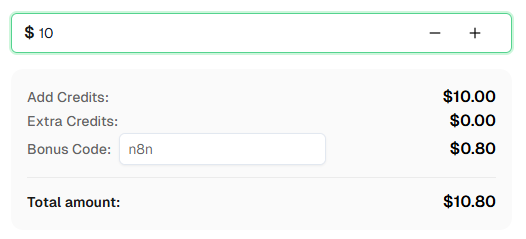
よくある質問
AntiCloudflareTask とは何で、AntiTurnstileTaskProxyLess とどう違うのですか?
AntiCloudflareTask はページ全体を保護する Cloudflare Bot Management チャレンジ(サイトアクセスを完全にブロックする「しばらくお待ちください」画面)を解決します。CapSolver はブラウザで実際の保護ページを読み込む必要があるため、プロキシが必要です。AntiTurnstileTaskProxyLess はログインフォームやサインアップフォームなどページ内に埋め込まれた Turnstile ウィジェットを解決し、プロキシは不要です。チャレンジが異なり、タスクタイプも異なります。
なぜ n8n の標準 HTTP Request ノードでページをフェッチできないのですか?
n8n の HTTP Request ノードは Go の標準 net/http ライブラリを使っており、このライブラリは Cloudflare が検出する独特の TLS フィンガープリントを持っています。有効な cf_clearance クッキーがあっても、Cloudflare は既知のブラウザ TLS プロファイルに一致しないリクエストに再度チェックをかけます。TLS サーバーは httpcloak を使って実際の Chrome TLS スタックを偽装し、この問題を解決します。
なぜデータセンタープロキシが失敗し続けるのですか?
Cloudflare のボットスコアリングは IP アドレスにリスクスコアを割り当てます。データセンター IP(AWS、GCP、VPS など)はよく知られていてリスクスコアが高いです。AntiCloudflareTask はプロキシを使ってチャレンジページを読み込みますが、Cloudflare が IP をデータセンターと検出すると、CapSolver が解決できないさらに難しいチャレンジを出すか、完全に失敗させます。住宅用やモバイル IP はリスクスコアが低く、より信頼されやすいです。
Turnstile ワークフローに TLS サーバーやプロキシは必要ですか?
いいえ。Turnstile は Cloudflare Challenge とは根本的に異なります。Turnstile は送信するヘッダーやフォームフィールドとして提出する短命の token を返します。これは特定の IP や TLS フィンガープリントには紐づいていません。CapSolver は AntiTurnstileTaskProxyLess を使って Turnstile を解決しますが、これはプロキシ不要です。トークンを送信するため、n8n の標準 HTTP Request ノードで問題なく動作し、TLS フィンガープリントの偽装も不要です。
cf_clearance は期限切れになりますか?
はい。期限はサイトの Cloudflare 設定によります。数分から24時間の範囲です。定期スクレイピングジョブではスケジュールされたワークフロー(6時間ごと)が定期的にチャレンジを再解決します。オンデマンドスクレイピングの場合はウェブフック経路が都度新しいチャレンジを解決します。
もっと見る
Web ScrapingApr 22, 2026
Rust Web Scraping Architecture for Scalable Data Extraction
スケーラブルなRustウェブスクレイピングアーキテクチャを学びましょう。リクエスト、スクレイパー、非同期スクレイピング、ヘッドレスブラウザスクレイピング、プロキシローテーション、およびコンプライアンス対応のCAPTCHA処理で。
Web ScrapingFeb 10, 2026
データ・アズ・ア・サービス(DaaS):それは何か、そしてなぜ2026年において重要なのか
2026年のデータ・アズ・ア・サービス(DaaS)を理解する。その利点、ユースケース、およびリアルタイムの洞察と拡張性を通じて企業を変革する方法について探る。
