
🎉नयाAI एजेंट के लिए CapSolver-MCP, एजेंट टूल और SDK एकीकरण

Lucas Mitchell
Automation Engineer
प्रकाशित Sep 30, 2024
अद्यतन Sep 27, 2024 · मिनट पढ़ने का समय
node-fetch एक हल्का जावास्क्रिप्ट लाइब्रेरी है जो window.fetch API को नोड.जेएस में लाता है। इसका उपयोग अक्सर नोड.जेएस वातावरण से HTTP अनुरोध करने के लिए किया जाता है, जो नेटवर्क संचालन को अतुल्यकालिक रूप से संभालने का एक आधुनिक और लचीला तरीका प्रदान करता है।
विशेषताएँ:
node-fetch का उपयोग करने से पहले, सुनिश्चित करें कि आपके पास है:
node-fetch का उपयोग करने के लिए, आपको इसे npm या yarn का उपयोग करके इंस्टॉल करना होगा:
npm install node-fetchया
yarn add node-fetchयहां node-fetch का उपयोग करके एक साधारण GET अनुरोध करने का तरीका बताया गया है:
const fetch = require('node-fetch');

fetch('https://httpbin.org/get')
  .then(response => response.json())
  .then(data => {
    console.log('Response Body:', data);
  })
  .catch(error => {
    console.error('Error:', error);
});आइए हम एक API से डेटा प्राप्त करें और परिणाम लॉग इन करें:
const fetch = require('node-fetch');

fetch('https://jsonplaceholder.typicode.com/posts')
  .then(response => response.json())
  .then(posts => {
    posts.forEach(post => {
      console.log(`${post.title} — ${post.body}`);
    });
  })
  .catch(error => {
    console.error('Error:', error);
});node-fetch के साथ कैप्चा हैंडल करनाइस खंड में, हम कैप्चा को संभालने के लिए node-fetch के साथ CapSolver को एकीकृत करेंगे। CapSolver ReCaptcha V3 और captcha जैसे कैप्चा को हल करने के लिए API प्रदान करता है, ऐसे कार्यों के स्वचालन को सक्षम करता है जिन्हें ऐसे कैप्चा को हल करने की आवश्यकता होती है।
node-fetch के साथ ReCaptcha V3 को हल करनासबसे पहले, node-fetch और CapSolver इंस्टॉल करें:
npm install node-fetch
npm install capsolver
अब, यहां बताया गया है कि ReCaptcha V3 को कैसे हल करें और अपने अनुरोध में समाधान का उपयोग करें:
const fetch = require('node-fetch');
const CAPSOLVER_KEY = 'YourKey';
const PAGE_URL = 'https://antcpt.com/score_detector';
const PAGE_KEY = '6LcR_okUAAAAAPYrPe-HK_0RULO1aZM15ENyM-Mf';
const PAGE_ACTION = 'homepage';

async function createTask(url, key, pageAction) {
  try {
    const apiUrl = 'https://api.capsolver.com/createTask';
    const payload = {
      clientKey: CAPSOLVER_KEY,
      task: {
        type: 'ReCaptchaV3TaskProxyLess',
        websiteURL: url,
        websiteKey: key,
        pageAction: pageAction
      }
    };

    const response = await fetch(apiUrl, {
      method: 'POST',
      headers: { 'Content-Type': 'application/json' },
      body: JSON.stringify(payload)
    });

    const data = await response.json();
    return data.taskId;

  } catch (error) {
    console.error('Error creating CAPTCHA task:', error);
    throw error;
  }
}

async function getTaskResult(taskId) {
  try {
    const apiUrl = 'https://api.capsolver.com/getTaskResult';
    const payload = {
      clientKey: CAPSOLVER_KEY,
      taskId: taskId,
    };

    let result;
    do {
      const response = await fetch(apiUrl, {
        method: 'POST',
        headers: { 'Content-Type': 'application/json' },
        body: JSON.stringify(payload)
      });

      result = await response.json();
      if (result.status === 'ready') {
        return result.solution;
      }

      await new Promise(resolve => setTimeout(resolve, 5000)); // wait 5 seconds
    } while (true);

  } catch (error) {
    console.error('Error fetching CAPTCHA result:', error);
    throw error;
  }
}

async function main() {
  console.log('Creating CAPTCHA task...');
  const taskId = await createTask(PAGE_URL, PAGE_KEY, PAGE_ACTION);
  console.log(`Task ID: ${taskId}`);

  console.log('Retrieving CAPTCHA result...');
  const solution = await getTaskResult(taskId);
  const token = solution.gRecaptchaResponse;
  console.log(`Token Solution: ${token}`);

  const res = await fetch('https://antcpt.com/score_detector/verify.php', {
    method: 'POST',
    headers: { 'Content-Type': 'application/json' },
    body: JSON.stringify({ 'g-recaptcha-response': token })
  });

  const response = await res.json();
  console.log(`Score: ${response.score}`);
}

main().catch(err => {
  console.error(err);
});
node-fetch के साथ प्रॉक्सी हैंडल करनाnode-fetch के साथ प्रॉक्सी के माध्यम से अपने अनुरोधों को रूट करने के लिए, आपको https-proxy-agent जैसे प्रॉक्सी एजेंट की आवश्यकता होगी। यहां बताया गया है कि इसे कैसे लागू करें:
npm install https-proxy-agentप्रॉक्सी के साथ उदाहरण:
const fetch = require('node-fetch');
const HttpsProxyAgent = require('https-proxy-agent');

const proxyAgent = new HttpsProxyAgent('http://username:password@proxyserver:8080');

fetch('https://httpbin.org/ip', { agent: proxyAgent })
  .then(response => response.json())
  .then(data => {
    console.log('Response Body:', data);
  })
  .catch(error => {
    console.error('Error:', error);
  });
node-fetch के साथ कुकीज़ हैंडल करनाnode-fetch में कुकी हैंडलिंग के लिए, आप fetch-cookie जैसी लाइब्रेरी का उपयोग कर सकते हैं। यहां बताया गया है कि इसका उपयोग कैसे करें:
npm install fetch-cookieउदाहरण:
const fetch = require('node-fetch');
const fetchCookie = require('fetch-cookie');
const cookieFetch = fetchCookie(fetch);

cookieFetch('https://httpbin.org/cookies/set?name=value')
  .then(response => response.json())
  .then(data => {
    console.log('Cookies:', data);
  })
  .catch(error => {
    console.error('Error:', error);
});आप node-fetch के साथ हेडर को अनुकूलित कर सकते हैं और POST अनुरोध कर सकते हैं:
const fetch = require('node-fetch');

const headers = {
  'User-Agent': 'Mozilla/5.0 (compatible)',
  'Accept-Language': 'en-US,en;q=0.5',
};

const data = {
  username: 'testuser',
  password: 'testpass',
};

fetch('https://httpbin.org/post', {
  method: 'POST',
  headers: headers,
  body: JSON.stringify(data),
})
  .then(response => response.json())
  .then(data => {
    console.log('Response JSON:', data);
  })
  .catch(error => {
    console.error('Error:', error);
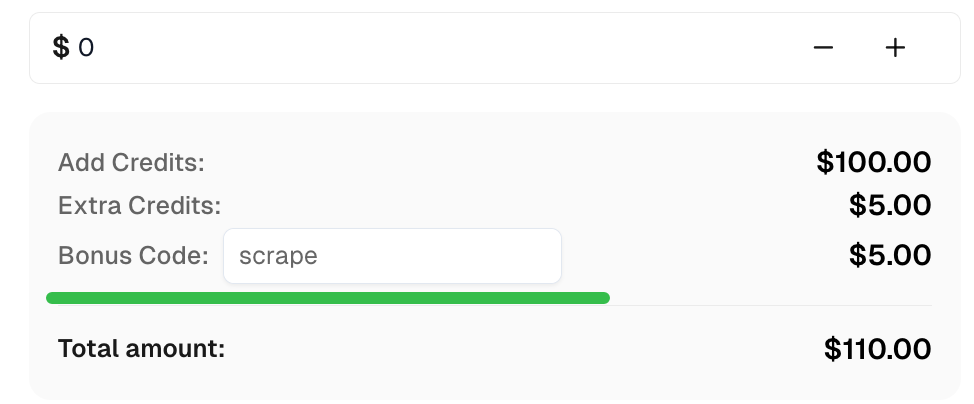
});CapSolver पर शीर्ष कैप्चा समाधानों के लिए अपना बोनस कोड प्राप्त करें: scrape. इसे रिडीम करने के बाद, आपको प्रत्येक रिचार्ज के बाद अतिरिक्त 5% बोनस मिलेगा, असीमित बार।
node-fetch के साथ, आप नोड.जेएस में HTTP अनुरोधों का प्रभावी ढंग से प्रबंधन कर सकते हैं। इसे CapSolver के साथ एकीकृत करके, आप ReCaptcha V3 और captcha जैसे कैप्चा को हल कर सकते हैं, प्रतिबंधित सामग्री तक पहुंच प्रदान कर सकते हैं। इसके अतिरिक्त, node-fetch हेडर, प्रॉक्सी समर्थन और कुकी प्रबंधन के माध्यम से अनुकूलन प्रदान करता है, जिससे यह वेब स्क्रैपिंग और स्वचालन के लिए एक बहुमुखी उपकरण बन जाता है।
Lucas Mitchell
Automation Engineer
Helping browser automation recover and continue.
लेखक के बारे में
ऐसे CAPTCHA हैंडलिंग को ठीक करें जो लोकली काम करता है लेकिन क्लाउड AI एजेंट में फेल हो जाता है। ब्राउज़र सेटअप, डिपेंडेंसियाँ, क्रेडेंशियल्स, नेटवर्क एक्सेस और पेज स्टेट की तुलना करें।

CAPTCHA अनुरोध को दोबारा भेजने से पहले CapSolver प्रॉक्सी त्रुटियों का निवारण करने के लिए कार्य पैरामीटर, प्रमाणीकरण, कनेक्टिविटी और सत्र सेटिंग्स की जाँच करें।