Cómo usar node-fetch para Web Scraping

Aloísio Vítor
Image Processing Expert
¿Qué es node-fetch?
node-fetch es una librería JavaScript ligera que lleva la API window.fetch a Node.js. Se utiliza a menudo para realizar solicitudes HTTP desde un entorno Node.js, proporcionando una forma moderna y flexible de manejar operaciones de red de forma asíncrona.
Características:
- Basada en promesas: Utiliza promesas de JavaScript para gestionar operaciones asíncronas de forma sencilla.
- Compatibilidad con Node.js: Diseñada específicamente para entornos Node.js.
- Compatibilidad con streams: Admite streams, lo que la hace muy adecuada para manejar grandes cantidades de datos.
- Pequeña y eficiente: Diseño minimalista, centrado en el rendimiento y la compatibilidad con las características modernas de JavaScript.
Requisitos previos
Antes de usar node-fetch, asegúrate de tener:
Instalación
Para usar node-fetch, necesitas instalarlo usando npm o yarn:
bash
npm install node-fetcho
bash
yarn add node-fetchEjemplo básico: Realizar una solicitud GET
Aquí te mostramos cómo realizar una solicitud GET simple usando node-fetch:
javascript
const fetch = require('node-fetch');

fetch('https://httpbin.org/get')
  .then(response => response.json())
  .then(data => {
    console.log('Cuerpo de la respuesta:', data);
  })
  .catch(error => {
    console.error('Error:', error);
  });
Ejemplo de web scraping: Obtener datos JSON de una API
Vamos a obtener datos de una API y registrar los resultados:
javascript
const fetch = require('node-fetch');

fetch('https://jsonplaceholder.typicode.com/posts')
  .then(response => response.json())
  .then(posts => {
    posts.forEach(post => {
      console.log(`${post.title} — ${post.body}`);
    });
  })
  .catch(error => {
    console.error('Error:', error);
  });
Manejo de captchas con CapSolver y node-fetch
En esta sección, integraremos CapSolver con node-fetch para manejar captchas. CapSolver proporciona APIs para resolver captchas como ReCaptcha V3, permitiendo la automatización de tareas que requieren la resolución de dichos captchas.
Ejemplo: Resolver ReCaptcha V3 con CapSolver y node-fetch
Primero, instala node-fetch y CapSolver:
bash
npm install node-fetch
npm install capsolver
Ahora, aquí te mostramos cómo resolver un ReCaptcha V3 y usar la solución en tu solicitud:
javascript
const fetch = require('node-fetch');
const CAPSOLVER_KEY = 'YourKey';
const PAGE_URL = 'https://antcpt.com/score_detector';
const PAGE_KEY = '6LcR_okUAAAAAPYrPe-HK_0RULO1aZM15ENyM-Mf';
const PAGE_ACTION = 'homepage';

async function createTask(url, key, pageAction) {
  try {
    const apiUrl = 'https://api.capsolver.com/createTask';
    const payload = {
      clientKey: CAPSOLVER_KEY,
      task: {
        type: 'ReCaptchaV3TaskProxyLess',
        websiteURL: url,
        websiteKey: key,
        pageAction: pageAction
      }
    };

    const response = await fetch(apiUrl, {
      method: 'POST',
      headers: { 'Content-Type': 'application/json' },
      body: JSON.stringify(payload)
    });

    const data = await response.json();
    return data.taskId;

  } catch (error) {
    console.error('Error creando tarea CAPTCHA:', error);
    throw error;
  }
}

async function getTaskResult(taskId) {
  try {
    const apiUrl = 'https://api.capsolver.com/getTaskResult';
    const payload = {
      clientKey: CAPSOLVER_KEY,
      taskId: taskId,
    };

    let result;
    do {
      const response = await fetch(apiUrl, {
        method: 'POST',
        headers: { 'Content-Type': 'application/json' },
        body: JSON.stringify(payload)
      });

      result = await response.json();
      if (result.status === 'ready') {
        return result.solution;
      }

      await new Promise(resolve => setTimeout(resolve, 5000)); // esperar 5 segundos
    } while (true);

  } catch (error) {
    console.error('Error obteniendo el resultado CAPTCHA:', error);
    throw error;
  }
}

async function main() {
  console.log('Creando tarea CAPTCHA...');
  const taskId = await createTask(PAGE_URL, PAGE_KEY, PAGE_ACTION);
  console.log(`ID de tarea: ${taskId}`);

  console.log('Obteniendo el resultado CAPTCHA...');
  const solution = await getTaskResult(taskId);
  const token = solution.gRecaptchaResponse;
  console.log(`Solución de token: ${token}`);

  const res = await fetch('https://antcpt.com/score_detector/verify.php', {
    method: 'POST',
    headers: { 'Content-Type': 'application/json' },
    body: JSON.stringify({ 'g-recaptcha-response': token })
  });

  const response = await res.json();
  console.log(`Puntuación: ${response.score}`);
}

main().catch(err => {
  console.error(err);
});
Manejo de proxies con node-fetch
Para enrutar tus solicitudes a través de un proxy con node-fetch, necesitarás un agente proxy como https-proxy-agent. Aquí te mostramos cómo implementarlo:
bash
npm install https-proxy-agentEjemplo con un proxy:
javascript
const fetch = require('node-fetch');
const HttpsProxyAgent = require('https-proxy-agent');

const proxyAgent = new HttpsProxyAgent('http://username:password@proxyserver:8080');

fetch('https://httpbin.org/ip', { agent: proxyAgent })
  .then(response => response.json())
  .then(data => {
    console.log('Cuerpo de la respuesta:', data);
  })
  .catch(error => {
    console.error('Error:', error);
  });
Manejo de cookies con node-fetch
Para el manejo de cookies en node-fetch, puedes usar una librería como fetch-cookie. Aquí te mostramos cómo usarla:
bash
npm install fetch-cookieEjemplo:
javascript
const fetch = require('node-fetch');
const fetchCookie = require('fetch-cookie');
const cookieFetch = fetchCookie(fetch);

cookieFetch('https://httpbin.org/cookies/set?name=value')
  .then(response => response.json())
  .then(data => {
    console.log('Cookies:', data);
  })
  .catch(error => {
    console.error('Error:', error);
  });
Uso avanzado: Encabezados personalizados y solicitudes POST
Puedes personalizar los encabezados y realizar solicitudes POST con node-fetch:
javascript
const fetch = require('node-fetch');

const headers = {
  'User-Agent': 'Mozilla/5.0 (compatible)',
  'Accept-Language': 'es-ES,es;q=0.5',
};

const data = {
  username: 'testuser',
  password: 'testpass',
};

fetch('https://httpbin.org/post', {
  method: 'POST',
  headers: headers,
  body: JSON.stringify(data),
})
  .then(response => response.json())
  .then(data => {
    console.log('Respuesta JSON:', data);
  })
  .catch(error => {
    console.error('Error:', error);
  });
Código de bonificación
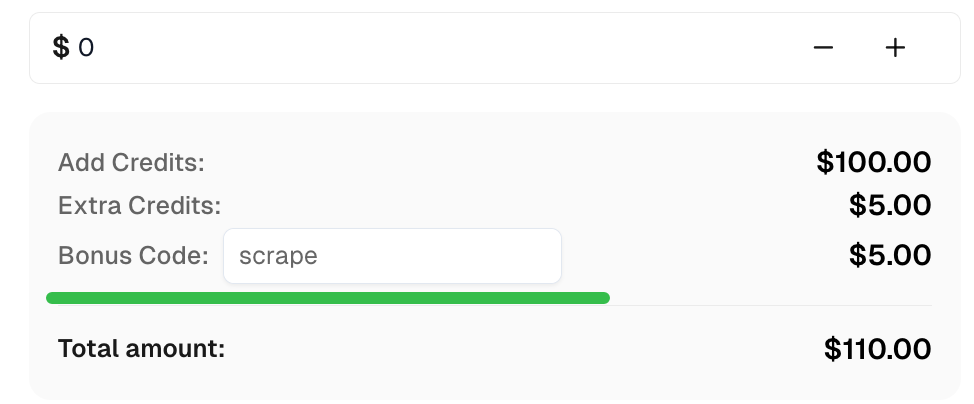
Reclama tu Código de bonificación para las mejores soluciones de captcha en CapSolver: scrape. Después de canjearlo, obtendrás un bono adicional del 5% después de cada recarga, un número ilimitado de veces.
Conclusión
Con node-fetch, puedes gestionar eficazmente las solicitudes HTTP en Node.js. Al integrarlo con CapSolver, puedes resolver captchas como ReCaptcha V3 y captcha, proporcionando acceso a contenido restringido. Además, node-fetch ofrece personalización a través de encabezados, soporte de proxy y gestión de cookies, lo que lo convierte en una herramienta versátil para el web scraping y la automatización.
Ver más
AISep 15, 2026
Cómo manejar múltiples CAPTCHA widgets en agentes de navegador de IA
Manejar múltiples widgets CAPTCHA en una sola página con propiedad explícita del formulario, parámetros del solucionador, enrutamiento de resultados y verificaciones para la acción del agente de IA deseada.

The Other CAPTCHASep 15, 2026
ImageToTextTask vs VisionEngine: Elija un solucionador de CAPTCHA de imagen
Compara ImageToTextTask y VisionEngine por entrada de CAPTCHA, salida de reconocimiento, requisitos de módulo y verificaciones de aplicación antes de elegir una tarea de resolución.