
🎉NEWCapSolver for AI agents-MCP, agent tools, and SDK integrations

Lucas Mitchell
Automation Engineer
Published Apr 16, 2026
Updated Apr 27, 2026 · min read
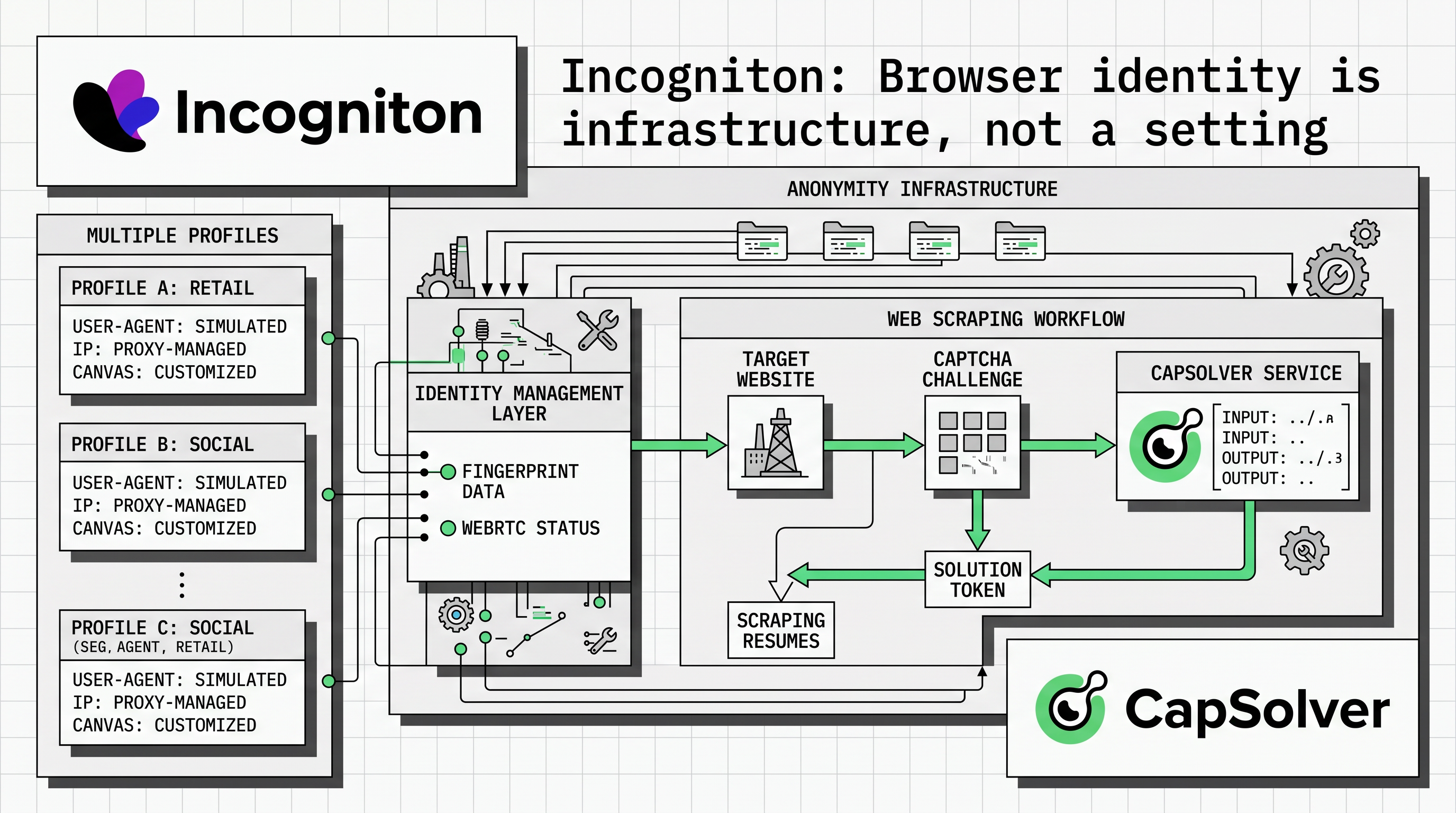
Most automation stacks are built in the wrong order. Engineers reach for a CAPTCHA solver, a proxy rotator, a headless browser - and treat the account layer as something to figure out later.
Later usually arrives as a ban wave. By then, the damage is already priced in: accounts gone, pixel history reset, Ad spend wasted. The issue isn’t the tools; it’s how browser identity is handled. This is the layer that determines whether platforms see 10 separate accounts or 1 account running 10 sessions.
When it’s handled wrongly, everything built on top of it becomes unreliable. Incogniton is the tool that gets that layer right.
A proxy changes where a request appears to originate. It doesn't change anything about the browser that sent it.
Platforms scoring accounts for suspicious behaviour aren't just checking IPs. They're reading canvas rendering output, WebGL hash, AudioContext response, font enumeration, screen parameters, hardware device counts, timezone offset, e.t.c. These signals stay consistent across every session, regardless of what IP sits in front of them.
Two accounts running on the same machine, with different proxies, still present an identical fingerprint.
A VPN is worse. It routes all traffic through a single exit point, which means accounts that should look geographically distinct end up sharing both an IP range and a device identity. The fingerprint problem remains, but the network problem is now compounded.
The fix isn't a better proxy. It's separating browser fingerprint and device identity at the browser level so each profile presents as a distinct physical machine, consistent within sessions and isolated across profiles. That's the gap a proxy can't close.
![][image1]
Incogniton is a virtual browser built for managing multiple accounts at scale. Each profile runs inside a fully isolated environment with its own fingerprint, configured to present as a separate physical device. To any platform's detection system, 10 profiles on one machine look like 10 users on 10 different devices.
The isolation isn't just at the fingerprint level. Cookies, local storage, cached data, and browser state are kept completely separate per profile, with no leakage between sessions. A profile you open today carries the same signals it had when you created it last week.
That consistency matters: platforms don't just score accounts on individual sessions, they build behavioural history over time. An account whose fingerprint shifts between sessions raises flags the same way an account with no history does.
Put simply, Incogniton keeps the identity layer stable, allowing other tools in the stack to operate within a consistent and fully isolated environment. This makes it easier to integrate automation services seamlessly. For a practical example of how solving Captcha in workflows can be implemented, you can refer to the CapSolver integration tutorial.
Browser identity isolation solves a different problem in every operation. The failure modes are different, the features that matter are different, and the cost of getting it wrong is different. Here's where Incogniton changes the outcome most directly.
The standard affiliate setup breaks at the browser layer first. Multiple ad accounts created in the same environment share a device fingerprint, which makes them linkable before any policy violation occurs. This is a common failure point in scaled campaigns, especially when running across regions, as outlined in Incogniton’s affiliate workflows.
![][image2]
The fix is structural. Each account runs in its own isolated browser profile with its own fingerprint and proxy, aligned to its GEO. Incogniton’s browser profile isolation ensures accounts do not share cookies or state, while consistent proxy configurationmaintains network separation. At scale, bulk profile management keeps setups consistent and reduces human error.
Airdrop farming often fails at the browser layer, not the wallet layer. Even with separate wallets, using the same browser environment creates shared fingerprint signals that link accounts. This is a known issue in crypto workflows where browser identity overrides on-chain separation.
The rule is simple: one wallet, one profile, one proxy. Each profile maintains a consistent fingerprint across sessions, supported by cookie management to preserve session continuity. This keeps identity stable over time and reduces cold-start signals.
Marketplaces and e-commerce platforms link accounts using more than just IP addresses. Shared browser environments can create overlapping fingerprint and session signals, which may lead to account association — a key constraint in multi-account setups, especially in complex automation workflows.
![][image3]
Incogniton isolates each storefront at the browser level, so accounts do not share cookies, cache, or fingerprint data. For repetitive workflows, automation support allows actions to run inside these isolated profiles using tools like Playwright or Puppeteer, preventing fingerprint correlation.
The main risk in agency setups is human error. Without enforced isolation, team members reuse browsers, share sessions, or access the wrong accounts. Over time, this creates an unintended linkage between client accounts. Structured environments like Incogniton’s become necessary here.
![][image4]
Team access and synchronization ensure each team member only works within assigned profiles. Profiles are synced securely across devices, without sharing credentials or breaking isolation. This keeps account separation intact in multi-user environments.
Data collection workflows depend on geographic and behavioural separation. If multiple sessions share a fingerprint, platforms may normalise responses regardless of IP. This affects accuracy in tasks like price monitoring and SERP tracking, as seen in common data collection setups
Each profile runs with its own proxy and persistent fingerprint, supported by browser profile isolation and proxy configuration per profile. Automation scripts run inside these environments, ensuring consistent, isolated sessions and more reliable data. In data-heavy workflows, verification challenges can still interrupt execution, especially when accessing protected endpoints. Integrating a CAPTCHA solving layer such as CapSolver helps maintain request continuity, allowing automation scripts to proceed without manual intervention or repeated failures.
Incogniton's free plan gives you 10 profiles for the first 2 months, enough to run a real workflow and evaluate the isolation properly before committing. After 2 months, it drops to 3 permanent free profiles.
Paid plans start at $19.99/month for 10 profiles, with the Entrepreneur plan at $29.99/month adding 50 profiles, automation API access, and the profile synchronizer. Team features and expanded profile counts are available on the Professional and Custom plans.
Two features worth noting that are not available on the free plan: the Cookie Collector (automated cookie generation per profile) and the Synchronizer (bulk profile configuration). Both are relevant to the use cases above. Factor that into which plan you start with.
Capsolver removes the CAPTCHA obstacle. Incogniton removes the identity obstacle that sits underneath it. Neither one is sufficient on its own, a solved CAPTCHA inside a flagged browser environment still produces a banned account, and a clean browser identity still stalls when it hits an unsolved verification gate.
The operators who scale are the ones who stop treating both as tactical fixes and start treating them as infrastructure decisions. Solve the identity layer once, correctly, at the foundation. Everything you build on top of it gets more reliable as a result.
Lucas Mitchell
Automation Engineer
Helping browser automation recover and continue.
ABOUT THE AUTHOR
Seamless web scraping with Crawl4AI & CapSolver: Automated CAPTCHA solution, enhanced efficiency, and robust data extraction for AI.
Solve CAPTCHAs easily in Automa RPA with CapSolver — seamless integration, high accuracy, and no-code automation support.
