
ProductsIntegrationsResourcesDocumentationPricing
Start Now

© 2026 CapSolver. All rights reserved.

CONTACT US

Slack: lola@capsolver.com

Products

  • reCAPTCHA v2
  • reCAPTCHA v3
  • Cloudflare Turnstile
  • Cloudflare Challenge
  • AWS WAF
  • Browser Extension
  • Many more CAPTCHA types

Integrations

  • Selenium
  • Playwright
  • Puppeteer
  • n8n
  • Partners
  • View All Integrations

Resources

  • Referral System
  • Documentation
  • API Reference
  • Blog
  • FAQs
  • Glossary
  • Status

Legal

  • Terms & Conditions
  • Privacy Policy
  • Refund Policy
  • Don't Sell My Info
Blog/Extension/CapSolver Extension: Effortlessly Solve Image Captcha and ImageToText Challenges in Your Browser
Aug30, 2023

CapSolver Extension: Effortlessly Solve Image Captcha and ImageToText Challenges in Your Browser

Lucas Mitchell

Lucas Mitchell

Automation Engineer

TLDR, The CapSolver Chrome Extension provides an AI-powered, one-click solution for bypassing frustrating Image Captcha and ImageToText challenges directly in your browser. Simply install the extension, enter your API key, and let the AI automatically detect and solve these Text Captcha variants, saving you time and effort.
CapSolver Extension: Effortlessly Solve Image Captcha and ImageToText Challenges in Your Browser

Introduction: The End of Captcha Frustration

Image Captcha and Text Captcha challenges, while essential for security, are a major bottleneck for users and automation workflows. They demand time, attention, and often result in frustrating failures. The CapSolver Extension is designed to eliminate this friction, offering a seamless, AI-driven solution to automatically solve these visual puzzles, including complex ImageToText tasks, right within your Chrome browser.

This guide will walk you through the simple steps to set up the extension and leverage its powerful ImageToText capabilities for instant captcha resolution.

☄️ Step 1: Secure Your CapSolver API Key and Funds

Before you can deploy the power of AI to solve Image Captcha challenges, you need to ensure you have the necessary prerequisites.

⚙️ Requirements:

  • A CapSolver API Key.
  • Sufficient funds in your CapSolver account.
  • The CapSolver Chrome Extension.

How to Obtain Your API Key

  1. Register or Log In: If you don't have an account, Register on CapSolver or Log in on CapSolver.
  2. Access Your Dashboard: Navigate to your user dashboard. For a comprehensive overview of your usage and balance, visit the main CapSolver dashboard.
  3. Copy Your API Key: Locate and copy your unique API Key from the designated section. This key is the credential that links the extension to your account and enables the solving service.

🤯 Step 2: Install and Configure the CapSolver Extension

Once you have your API key, the next step is to integrate the solver into your browser.

  1. Download the Extension: Install the CapSolver Captcha Bypass Extension from the Chrome Web Store.
  2. Paste the API Key: Open the newly installed extension in your browser and paste the API Key you copied in Step 1 into the configuration field.
  3. Save and Activate: Save the settings. The extension is now active and ready to tackle any Image Captcha or Text Captcha it encounters.

🚀 Step 3: Solving Image Captchas with One Click (Standard Mode)

The CapSolver Extension is designed for maximum ease of use, often requiring just a single click to solve an ImageToText challenge.
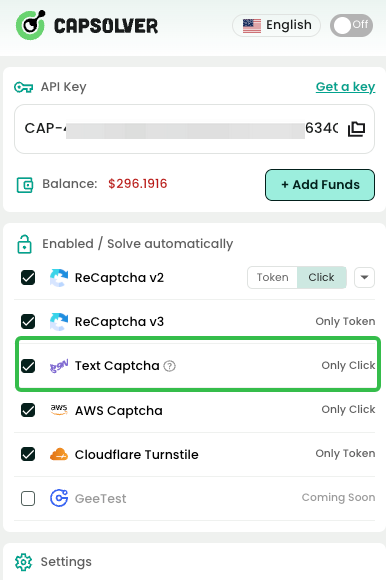
  1. Automatic Detection: The extension automatically scans the webpage for common Image Captcha elements.
  2. Manual Trigger (If needed): If the captcha is not automatically solved, you can manually trigger the process:
    • Open the CapSolver extension panel.
    • Use the built-in selection tool to mark the Image Captcha element.
    • Then, select the corresponding input field where the result should be placed.
  3. Instant Resolution: CapSolver's AI will process the image, perform the ImageToText recognition, and automatically fill the correct answer into the designated input box.

🛠️ Step 4: Advanced ImageToText Solving (Custom ID Configuration)

For websites with non-standard or custom Image Captcha implementations, the extension offers a powerful method using custom HTML IDs to ensure accurate targeting. This is particularly useful for complex ImageToText tasks.

This method requires setting specific IDs on the target elements:

  1. Target the Image Element: Set the id attribute of the Image Captcha element (the image itself) to 'capsolver-image-to-text-source'.
  2. Target the Result Input Box: Set the id attribute of the input field where the recognized text should be placed to 'capsolver-image-to-text-result'.

Once these IDs are set, the extension will prioritize this configuration, performing the ImageToText recognition on the source element and instantly populating the result into the input box. This level of customization ensures that even the most obscure Text Captcha formats can be solved.

For those interested in the underlying technology and more advanced strategies for solving Image CAPTCHAs, CapSolver provides extensive resources.

Conclusion

The CapSolver Extension transforms the tedious process of solving Image Captcha and ImageToText challenges into a background task. By leveraging cutting-edge AI, it provides a fast, reliable, and effortless way to bypass these security hurdles, whether you are browsing or running automated tasks. Stop wasting time on Text Captcha and start enjoying a smoother, more efficient web experience. To learn more about the technology behind this, explore the best OCR solutions for CAPTCHA images.

Key Takeaways

  • Instant Resolution: The extension uses AI to automatically solve Image Captcha and ImageToText challenges.
  • Simple Setup: Requires only a CapSolver API key and a few clicks to install and configure.
  • Dual Modes: Supports both automatic detection/manual selection and advanced custom ID configuration for maximum compatibility.
  • Efficiency: Eliminates the time and frustration associated with manually solving Text Captcha variants.

Frequently Asked Questions (FAQ)

1. What types of captchas can the CapSolver Extension solve?

The extension is primarily designed to solve various types of Image Captcha and Text Captcha challenges, including standard OCR-based ImageToText tasks, reCAPTCHA v2/v3, Cloudflare, and more.

2. Is the CapSolver Extension free to use?

The extension itself is free to install, but solving captchas requires a paid CapSolver API key with funds. The service operates on a pay-per-use model.

3. What should I do if the extension fails to solve an Image Captcha?

First, ensure your API key is correct and you have sufficient funds. If the issue persists, try the Advanced Solving (Custom ID Configuration) method (Step 4). If it's a new or complex captcha, contact CapSolver support for assistance.

4. Can I use the extension for automated web scraping?

Yes, the CapSolver Extension is a popular tool for developers and scrapers. It can be integrated into automation workflows to handle ImageToText and other captchas encountered during data collection.

5. How do I find my CapSolver API Key?

You can find your API Key on your CapSolver dashboard after logging in. It is a unique string that authenticates your requests.

More

ExtensionApr 08, 2026

Browser Extension for Automatic CAPTCHA Solving: How to Use It Efficiently

Learn how to set up a browser extension for automatic CAPTCHA solving. Boost your web automation efficiency with step-by-step instructions and code examples.

Adélia Cruz
Adélia Cruz
ExtensionJan 12, 2026

Best CAPTCHA Solver Chrome Extension in 2026: Compared & Ranked

Discover the best CAPTCHA solver Chrome extension in 2026. Compare top tools like CapSolver and AZcaptcha for speed, accuracy, and AI-powered bypass of reCAPTCHA and Cloudflare.


Contents

Sora Fujimoto
Sora Fujimoto
ExtensionNov 29, 2023

How to Solve AWS Captcha Using Puppeteer [Javascript] with CapSolver Extension

Learn to seamlessly solve AWS Captcha with Puppeteer and Capsolver Extension, a detailed guide on setting up and automating captcha solutions effectively

Ethan Collins
Ethan Collins
ExtensionJan 19, 2024

Best Captcha Solver Extension, What Extension Service Solves Captcha Automatically?

Solve CAPTCHAs automatically with the CapSolver browser extension — the fastest, AI-powered CAPTCHA solver for Chrome

Sora Fujimoto
Sora Fujimoto
