
🎉NEWCapSolver for AI agents-MCP, agent tools, and SDK integrations

Sora Fujimoto
AI Solutions Architect
Published Jan 19, 2024
Updated Oct 21, 2025 · min read
With the increasing importance of cyber security, CAPTCHAs (Completely Automated Public Turing tests to tell Computers and Humans Apart) have become an indispensable tool to separate human users from automated bots. While CAPTCHAs serve a vital purpose in safeguarding websites, manually solving them can be arduous and time-consuming. Fortunately, there are browser extensions available that automate the CAPTCHA solving process, providing a seamless browsing experience. In this article, we will delve deeper into CAPTCHAs, explore the merits of using extensions for automated CAPTCHA solving, and present the premier extension service, CapSolver, for effortless CAPTCHA resolution.
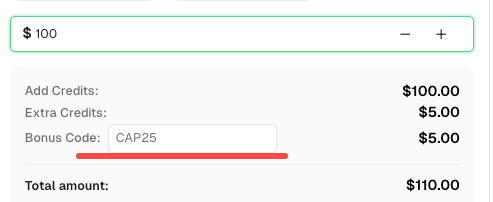
Before we start, here’s a bonus code for CapSolver: CAP25. After redeeming it, you will get an extra 5% bonus after each recharge.
CAPTCHAs are security measures designed to verify users' human identity by presenting them with challenges that necessitate human-like intelligence to overcome. These challenges often involve recognizing distorted text, selecting specific images, or solving simple puzzles. By successfully completing CAPTCHAs, users demonstrate their non-bot status, ensuring heightened security during online activities.
Automated CAPTCHA solving extensions offer a multitude of advantages over manual solving methods:
Time Efficiency: Automated extensions obviate the need for users to invest valuable time deciphering and manually entering CAPTCHA challenges. This significantly enhances productivity and fosters a seamless browsing experience.
Convenience: With automated CAPTCHA solvers, users can effortlessly traverse websites without interruptions, as the extensions handle CAPTCHA challenges in the background. This eradicates the frustration associated with frequent encounters of CAPTCHAs during online activities.
Superior Accuracy: Extensions equipped with advanced algorithms and machine learning techniques often achieve superior success rates in solving CAPTCHAs compared to manual attempts. This diminishes the likelihood of failed attempts and ensures a frictionless browsing experience.
CapSolver stands as the epitome of extension services for automated CAPTCHA solving. It boasts a wide array of features and benefits that distinguish it from other alternatives:
Advanced AI Algorithms: CapSolver harnesses cutting-edge artificial intelligence algorithms, including computer vision techniques, to accurately analyze and solve various types of CAPTCHAs. These algorithms have undergone extensive training on diverse datasets, guaranteeing high success rates in solveing CAPTCHAs encountered during browsing.
Seamless Integration: CapSolver seamlessly integrates into popular browsers like Chrome, ensuring effortless accessibility for users. Once installed, the extension adds a user-friendly interface to the browser toolbar, facilitating easy configuration of settings and monitoring of CAPTCHA-solving activities.
Extensive Compatibility: CapSolver supports a wide range of CAPTCHA challenges with comprehensive support, including reCAPTCHA v2, v3, and much more. Tailored solutions ensure smooth navigation through even the most advanced security systems.
By automating CAPTCHA solving through browser extensions, users can enjoy a convenient and time-saving solution for coping with CAPTCHA challenges. CapSolver, with its advanced AI algorithms, seamless integration, and extensive compatibility, reigns supreme as the ultimate extension service for automated CAPTCHA solving. By leveraging the power of CapSolver, users can effortlessly navigate the web, enhance productivity, and bid farewell to the frustrations associated with manual CAPTCHA solving. Embrace the capabilities of CapSolver and embark on a seamless browsing journey, leaving CAPTCHA challenges behind.
1. What types of CAPTCHAs does CapSolver support?
CapSolver supports all major CAPTCHA types, including Google reCAPTCHA v2, reCAPTCHA v3, Cloudflare Turnstile, AWS WAF and many others. It can automatically detect and solve most challenges encountered on websites or during automation tasks.
2. Is the CapSolver extension safe to use?
Yes. CapSolver is fully secure and designed to work locally within your browser environment. It does not collect personal data or interfere with browsing activities beyond CAPTCHA solving. Users retain full control over their API key and usage.
3. How can I install the CapSolver browser extension?
You can easily install the extension from the Chrome Web Store, Firefox Add-ons, or directly from the official GitHub repository. Installation takes less than a minute.
4. Do I need coding skills to use CapSolver?
Not at all. The CapSolver browser extension is completely plug-and-play. Once installed, it automatically detects CAPTCHAs on web pages and solves them for you. Developers, however, can use the CapSolver API to integrate it with automation tools like Puppeteer, Playwright, or Selenium.
5. Can CapSolver handle image-based or “click” CAPTCHAs?
Yes. CapSolver’s AI-based image recognition technology is designed to accurately identify and solve image selection CAPTCHAs, including “click all traffic lights,” “select all buses,” and other visual puzzles.
6. How does CapSolver differ from other CAPTCHA solvers?
Unlike traditional solvers that rely on third-party human labor or outdated OCR, CapSolver utilizes advanced machine learning and computer vision models. This means faster solving speed, higher accuracy, and full automation without manual input.
Sora Fujimoto
AI Solutions Architect
Connecting agents, browsers, and APIs into one workflow.
ABOUT THE AUTHOR
Learn how to set up a browser extension for automatic CAPTCHA solving. Boost your web automation efficiency with step-by-step instructions and code examples.

Discover the best CAPTCHA solver Chrome extension in 2026. Compare top tools like CapSolver and AZcaptcha for speed, accuracy, and AI-powered bypass of reCAPTCHA and Cloudflare.

