🎉NEWCapSolver for AI agents-MCP, agent tools, and SDK integrations

Ethan Collins
AI Agent Workflow Engineer
Published Feb 22, 2024
Updated Oct 20, 2025 · min read
Protecting websites from automated bots has become critical in today's digital environment, which is why reCAPTCHA has been widely adopted. While reCAPTCHAs serve an essential purpose, manually solving them can be time-consuming and frustrating, especially for users engaging in bulk tasks like data collection or SEO automation. However, with the advent of advanced technologies, we now have powerful, AI-driven solutions like CapSolver.
CapSolver is not just a tool; it's a comprehensive, machine-learning-based CAPTCHA solving service designed to handle the most complex challenges, including reCAPTCHA v2, v3, and Enterprise versions. Its core strength lies in its ability to emulate human-like behavior and utilize advanced algorithms to solve anti-bot mechanisms with high speed and accuracy. Whether you are a developer integrating a solution via API or a general user seeking a seamless browsing experience, CapSolver offers unparalleled reliability.
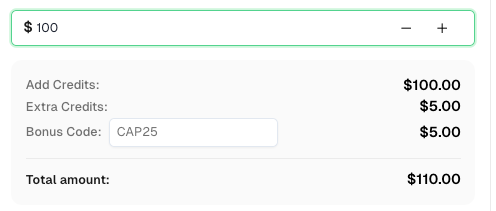
Speaking of which, here’s a bonus code for CapSolver: CAP25. After redeeming it, you will get an extra 5% bonus after each recharge.
reCAPTCHA was developed to safeguard websites and online platforms from malicious automation. It acts as a digital gatekeeper that differentiates between genuine human users and automated traffic, helping protect websites from spam, abuse, credential stuffing, and other forms of unauthorized behavior.
When implemented correctly, reCAPTCHA serves as a critical component of modern web security infrastructure. It ensures that online services like such as search platforms, comment systems, and data access interfaces — remain accessible to real users while preventing large-scale misuse from bots or scrapers.
However, reCAPTCHA can sometimes pose challenges in legitimate technical workflows. For example, search quality analysis, web data monitoring, and automated accessibility testing often rely on responsible automation to collect and validate information. In these cases, encountering frequent reCAPTCHA prompts can interrupt workflows and reduce efficiency, even when the intent of the automation is fully compliant and ethical.
That’s where intelligent solving solutions like CapSolver play a crucial role. Rather than attempting to bypass website protections, CapSolver provides a controlled, API-driven environment to help developers handle reCAPTCHA verification in authorized, responsible automation scenarios. By ensuring stable verification handling, CapSolver allows legitimate systems to operate smoothly — maintaining both productivity and respect for the web’s security ecosystem.
The CapSolver Auto CAPTCHA Solver Chrome extension is a cutting-edge tool that integrates seamlessly with the Chrome browser, allowing users to solve reCAPTCHAs automatically. By harnessing advanced algorithms and machine learning techniques, this extension optimizes the reCAPTCHA solving process, eliminating the need for manual intervention.
The extension is particularly useful for streamlining daily browsing and automation tasks. It supports a wide array of CAPTCHA types beyond just reCAPTCHA, making it a versatile tool for any user.
| Feature | Description | Supported CAPTCHA Types |
|---|---|---|
| Automatic Detection | Instantly identifies CAPTCHA elements on any webpage. | reCAPTCHA v2, v3, Enterprise |
| AI-Powered Solving | Uses machine learning models to solve challenges accurately. | AWS WAF , Cloudflare Turnstile |
| Seamless Integration | Works in the background without interrupting the user's flow. | Image CAPTCHA |
| API Key Linking | Connects directly to your CapSolver account for credit usage. | All supported types |
The CapSolver extension significantly reduces the time spent on solving reCAPTCHAs manually. By automating the process, it swiftly analyzes and solves reCAPTCHAs, enabling users to proceed with their online activities without unnecessary delays. This efficiency is crucial for web scraping and data gathering projects where speed is paramount. For developers, integrating the CapSolver API offers even greater control and scalability, allowing for high-volume, concurrent solving, as detailed in our guide on The Best 6 CAPTCHA Solver Tools for Automation.
With its advanced algorithms, CapSolver ensures a high degree of accuracy when solving reCAPTCHAs. This eliminates the risk of errors associated with manual solving, providing a reliable solution for websites that implement reCAPTCHA as a security measure. The high success rate of CapSolver is a direct result of continuous model training against the latest anti-bot updates.
By automating the reCAPTCHA solving process, CapSolver enhances the overall user experience. It eliminates the frustration of deciphering complex reCAPTCHAs, allowing users to browse seamlessly. This increased efficiency translates directly into increased productivity, allowing individuals to focus on their core tasks and activities. The extension’s intuitive interface makes it accessible and easy to use for individuals with varying technical expertise.
To leverage the power of the CapSolver Chrome extension and automate the process of solving reCAPTCHAs, follow these simple steps:
For those interested in automating reCAPTCHA solving within a broader development context, our article on Automating CAPTCHA Challenges: The Best Chrome Extension for Developers provides valuable insights into leveraging the extension for web scraping and automation frameworks.
The CapSolver Chrome extension revolutionizes the way we solve reCAPTCHAs. This powerful tool automates the process, allowing users to solve reCAPTCHAs effortlessly and efficiently. With its time-saving capabilities, high accuracy, and user-friendly interface, CapSolver is the most reliable solution for navigating websites secured by reCAPTCHA. Install the CapSolver Chrome extension today and experience the convenience of automatic reCAPTCHA solving, enhancing your online browsing experience and boosting productivity.
A: Yes, using a reCAPTCHA auto solver like CapSolver is generally legal. These tools are primarily designed for legitimate purposes such as web accessibility testing, data collection for research (web scraping), and automating repetitive tasks. They do not violate any laws, though their use must comply with the terms of service of the websites you are accessing. CapSolver encourages responsible and ethical use of its services.
A: Yes. reCAPTCHA v3 works by scoring user behavior (0.0 for bot, 1.0 for human). CapSolver's API for v3 focuses on generating a high-score token by simulating human-like browser interactions and environmental data. This process is highly effective at bypassing the v3 risk analysis engine.
A: Absolutely. While the article focuses on reCAPTCHA, the CapSolver extension is a versatile tool designed to solve a wide range of CAPTCHA types, including Cloudflare Turnstile, and various image-based CAPTCHAs and more. This multi-solution capability makes it a comprehensive tool for all your automated browsing needs.
A: The CapSolver extension itself is free to install. However, the service operates on a pay-per-solve model, meaning you need to purchase credits to solve CAPTCHAs. This ensures you only pay for successful solutions and provides a cost-effective solution for both low-volume and high-volume users.
Ethan Collins
AI Agent Workflow Engineer
Building clearer handoffs between AI agents and tools.
ABOUT THE AUTHOR
Learn how to set up a browser extension for automatic CAPTCHA solving. Boost your web automation efficiency with step-by-step instructions and code examples.

Discover the best CAPTCHA solver Chrome extension in 2026. Compare top tools like CapSolver and AZcaptcha for speed, accuracy, and AI-powered bypass of reCAPTCHA and Cloudflare.