ProductsIntegrationsResourcesDocumentationPricing
Start Now

© 2026 CapSolver. All rights reserved.

CONTACT US

Slack: lola@capsolver.com

Products

  • reCAPTCHA v2
  • reCAPTCHA v3
  • Cloudflare Turnstile
  • Cloudflare Challenge
  • AWS WAF
  • Browser Extension
  • Many more CAPTCHA types

Integrations

  • Selenium
  • Playwright
  • Puppeteer
  • n8n
  • Partners
  • View All Integrations

Resources

  • Referral System
  • Documentation
  • API Reference
  • Blog
  • FAQs
  • Glossary
  • Status

Legal

  • Terms & Conditions
  • Privacy Policy
  • Refund Policy
  • Don't Sell My Info
Blog/Extension/How to identify any captcha and their parameters
Oct31, 2023

How to identify any captcha and their parameters

Lucas Mitchell

Lucas Mitchell

Automation Engineer

📕 Steps to Start Detecting CAPTCHA Parameters:

Various types of CAPTCHAs like reCaptcha, cloudflare exist in the online space. Identifying their parameters can be essential when seeking to understand how to solve them. This blog will guide you on how to easily identify these CAPTCHA parameters using the Capsolver Extension Utility.

  1. Installation:

    • First, install the Captcha Solver Auto Solve extension on your Chrome browser.
      or firefox browser Captcha Solver Auto Solver FireFox Version
  2. Capsolver Setup:

    • Visit CapSolver.
    • Press the "F12" key on your keyboard to open the developer tools.
    • Navigate to the tab labeled Capsolver Captcha Detector.
  3. Detection:

    • Without closing the Capsolver panel, visit the website where you intend to trigger the CAPTCHA.
    • Trigger the captcha.
    • Remember: Do not close the Capsolver panel before triggering the CAPTCHA.

🤖 CAPTCHA Parameter Detection:

reCaptcha:

  • Identifiable Parameters:
    • Website URL
    • Site Key
    • pageAction
    • isInvisible
    • isEnterprise
    • isSRequired
    • isReCaptchaV3
    • Api Domain
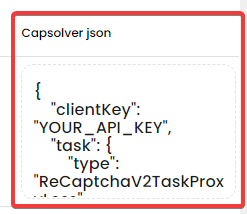
    • Capsolver Json:
      Once the CAPTCHA parameters have been detected, Capsolver will return a JSON detailing how you should submit the captcha parameters to their service.
      reCaptcha solver parameters

Cloudflare Turnstile

  • Identifiable Parameters:
    • website url
    • site key
    • action (This change everytime, you need to obtain new value)
    • cData (This change everytime, you need to obtain new value)

Keep the panel open and simply head to the site to activate the captcha. Closing the panel will erase previous identifications, and you'd need to reopen it and refresh the page.

Conclusion:

Identifying CAPTCHA parameters can be straightforward with the right tools. CapSolver makes it easy to not only identify these parameters but also provides a seamless integration JSON to submit the detected parameters. Remember always to use such tools responsibly and ethically. Ensure you respect the terms of service of websites and services you interact with.

More

ExtensionApr 08, 2026

Browser Extension for Automatic CAPTCHA Solving: How to Use It Efficiently

Learn how to set up a browser extension for automatic CAPTCHA solving. Boost your web automation efficiency with step-by-step instructions and code examples.

Adélia Cruz
Adélia Cruz
ExtensionJan 12, 2026

Best CAPTCHA Solver Chrome Extension in 2026: Compared & Ranked

Discover the best CAPTCHA solver Chrome extension in 2026. Compare top tools like CapSolver and AZcaptcha for speed, accuracy, and AI-powered bypass of reCAPTCHA and Cloudflare.


Contents

Sora Fujimoto
Sora Fujimoto
ExtensionAug 30, 2023

CapSolver Extension: Effortlessly Solve Image Captcha and ImageToText Challenges in Your Browser

Use the CapSolver Chrome Extension for AI-powered, one-click solving of Image Captcha and ImageToText challenges directly in your browser.

Lucas Mitchell
Lucas Mitchell
ExtensionNov 29, 2023

How to Solve AWS Captcha Using Puppeteer [Javascript] with CapSolver Extension

Learn to seamlessly solve AWS Captcha with Puppeteer and Capsolver Extension, a detailed guide on setting up and automating captcha solutions effectively

Ethan Collins
Ethan Collins
Get Free Trial