
🎉NEWCapSolver for AI agents-MCP, agent tools, and SDK integrations

Sora Fujimoto
AI Solutions Architect
Published Jan 25, 2024
Updated Oct 17, 2025 · min read

In the rapidly evolving digital sphere, the need for efficient CAPTCHA (Completely Automated Public Turing tests to tell Computers and Humans Apart) solving solutions has become increasingly crucial. Manual CAPTCHA solving can be time-consuming and tedious, prompting the rise of auto CAPTCHA solvers. In this article, we will explore why auto CAPTCHA solvers have become more important, the benefits of using browser extensions for CAPTCHA solving, and introduce the best CAPTCHA solver extension of the year: CapSolver.
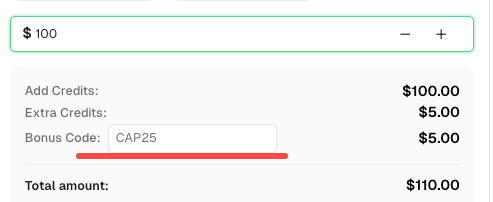
Speaking of which, here’s a bonus code for CapSolver Dashboard: CAP25. After redeeming it, you will get an extra 5% bonus after each recharge.
Browser extensions offer a plethora of advantages for CAPTCHA solving:
User-Friendly Experience: CAPTCHA solver extensions provide an intuitive interface, enabling users to configure settings and control the solver's behavior effortlessly. With a few clicks, users can enable or disable the solver, adjust preferences, and access additional features.
Real-Time Detection: CAPTCHA solver extensions actively monitor webpages, promptly identifying CAPTCHA challenges as they arise. This real-time detection ensures minimal delays or disruptions during users' browsing sessions.
Seamless Integration: CAPTCHA solver extensions seamlessly integrate with web browsers, allowing users to solve CAPTCHAs without navigating to external websites or interfaces. This integration enhances convenience and streamlines the CAPTCHA solving process.
CapSolver emerges as the preeminent CAPTCHA solver extension, offering unparalleled features and performance. Here's why:
Advanced Technology: CapSolver harnesses cutting-edge AI algorithms and machine learning techniques for precise CAPTCHA analysis and solving. CapSolver Extension supports the recognition of various popular CAPTCHA services, including:
Browser Integration: CapSolver is a browser extension specifically tailored for the Chrome and FireFox browser. Its seamless integration ensures effortless usage and compatibility with the browser's features and functionalities.
Intuitive User Interface: CapSolver provides a user-friendly interface, empowering users to effortlessly configure settings, monitor CAPTCHA-solving activities, and access additional features. The extension guarantees a seamless and user-centric experience.
If you want to manually install the CapSolver plugin, follow the instructions in the tutorial above: How to Modify the Configuration File and Install
/assets/config.js.config.js and modify the settings as needed, such as adding an API key.const puppeteer = require('puppeteer');
(async () => {
const path = 'C:/capSolver_extension'; // Folder where the plugin is extracted
const browser = await puppeteer.launch({
headless: false,
args: [
`--disable-extensions-except=${path}`,
`--load-extension=${path}`,
],
});
const page = await browser.newPage();
await page.goto("https://google.com/");
})();from selenium import webdriver
chrome_options = webdriver.ChromeOptions()
chrome_options.add_extension("./capSolver_extension.zip") # Path to the zip file of the plugin
driver = webdriver.Chrome(options=chrome_options)
driver.get("https://google.com/")CapSolver. offers one of the easiest and most powerful ways to automate CAPTCHA solving directly within your browser or automation tools.
With its AI-based accuracy, real-time detection, and effortless integration into Puppeteer and Selenium, it helps you streamline your automation workflows and save valuable time.
Don’t forget to redeem your bonus code CAP25 to get an extra 5% credit on your account recharge!
1. Does CapSolver work with reCAPTCHA and Cloudflare Turnstile?
Yes. CapSolver supports reCAPTCHA v2, reCAPTCHA v3, Cloudflare Turnstile, AWSWAF and other major CAPTCHA types.
2. Is the CapSolver extension safe to use?
Absolutely. The extension only handles CAPTCHA solving and doesn’t collect personal data.
3. Can I use CapSolver in headless browsers?
Yes, you can integrate it into headless Chromium browsers using Puppeteer or Selenium.
4. How can I monitor my CAPTCHA usage and balance?
You can track your usage in real time on the CapSolver Dashboard.
Sora Fujimoto
AI Solutions Architect
Connecting agents, browsers, and APIs into one workflow.
ABOUT THE AUTHOR
Learn how to set up a browser extension for automatic CAPTCHA solving. Boost your web automation efficiency with step-by-step instructions and code examples.

Discover the best CAPTCHA solver Chrome extension in 2026. Compare top tools like CapSolver and AZcaptcha for speed, accuracy, and AI-powered bypass of reCAPTCHA and Cloudflare.

