
🎉NEWCapSolver for AI agents-MCP, agent tools, and SDK integrations

Lucas Mitchell
Automation Engineer
Published May 21, 2023
Updated May 21, 2023 · min read
token from getTaskResult must be submitted to the target website to complete verification successfully.Cloudflare Turnstile is a privacy-focused CAPTCHA alternative that replaces traditional reCAPTCHA challenges. It is designed to reduce user friction while still effectively preventing automated abuse. From a developer’s perspective, however, Turnstile introduces new challenges for automation, testing, and data collection workflows.
Unlike Cloudflare’s 5s Challenge, Turnstile relies on token-based validation rather than browser fingerprint continuity. This makes it easier to integrate—provided the correct parameters and task type are used.
In this guide, you will learn:
This tutorial is suitable for developers looking for a fast, scalable, and low-maintenance Turnstile solution.
CapSolver automatically handles all Cloudflare Turnstile variants, including:

No additional configuration is required to distinguish between these types—CapSolver detects and processes them automatically.
Before solving the Cloudflare Turnstile, ensure you meet the following prerequisites and understand the validation requirements.
token returned in the getTaskResult response is the final CAPTCHA verification token.For a full parameter breakdown, refer to the official documentation:
https://docs.capsolver.com/en/guide/captcha/cloudflare_turnstile/
In this tutorial, we focus only on the required parameters. The supported task type for Cloudflare Turnstile is:
This task type is recommended when the website is protected by Cloudflare Turnstile and does not require browser-level fingerprint reuse.
Create a task using the createTask API and submit the required information:
POST https://api.capsolver.com/createTask

{
  "clientKey": "YOUR_API_KEY",
  "task": {
    "type": "AntiTurnstileTaskProxyLess",
    "websiteURL": "https://www.yourwebsite.com",
    "websiteKey": "0x4XXXXXXXXXXXXXXXXX",
    "metadata": {
      "action": "login",
      "cdata": "0000-1111-2222-3333-example-cdata"
    }
  }
}
websiteKey is mandatorymetadata.action and metadata.cdata are optional and depend on the website’s implementationPoll the getTaskResult endpoint until the task is completed:
POST https://api.capsolver.com/getTaskResult
Host: api.capsolver.com
Content-Type: application/json

{
  "clientKey": "YOUR_API_KEY",
  "taskId": "TASKID_OF_CREATETASK"
}
Once solved, the response will include a valid Turnstile token:
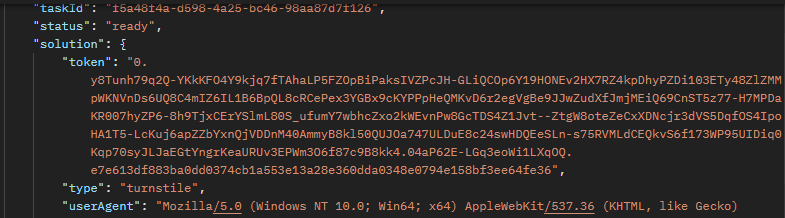
To complete verification on the target website:
token to the site’s Turnstile verification endpoint⚠️ If the token is rejected, verify that the website is protected by Cloudflare Turnstile and not the Cloudflare 5s Challenge, which requires a different task type and parameters.
Cloudflare Turnstile offers a streamlined alternative to traditional CAPTCHAs, but automation still requires a reliable token generation process.
CapSolver simplifies Turnstile resolution through AntiTurnstileTaskProxyLess, eliminating the need for custom proxies or browser fingerprint management. By supplying the correct parameters and properly submitting the returned token, developers can integrate Turnstile solving into their workflows quickly and at scale.
With the right setup, solving Cloudflare Turnstile becomes efficient, predictable, and production-ready.
Turnstile is a token-based CAPTCHA mechanism, while the 5s Challenge is a browser and network fingerprint verification process. They require different task types.
No. AntiTurnstileTaskProxyLess uses CapSolver’s internal proxy infrastructure.
Common reasons include incorrect websiteKey, expired tokens, or attempting to solve a Cloudflare 5s Challenge instead of Turnstile.
No. Turnstile tokens are single-use and tied to a specific session or action.
For Cloudflare Challenge 5s (IUAM) solutions, refer to:
https://www.capsolver.com/blog/how-to-solve-cloudflare-challenge
Lucas Mitchell
Automation Engineer
Helping browser automation recover and continue.
ABOUT THE AUTHOR
Learn what a Cloudflare Challenge is, how Cloudflare detects bots using JavaScript and machine learning, and why challenges appear during browsing. Complete guide for 2026.

Learn how to fix the "failed to verify cloudflare turnstile token" error. This guide covers causes, troubleshooting steps, and how to defeat cloudflare turnstile with CapSolver.
