How to solve Cloudflare Challenge with Python

Rajinder Singh
Deep Learning Researcher

TL;DR
Cloudflare’s 5-second challenge can interrupt automated Python workflows by blocking initial requests. This guide demonstrates how to programmatically handle the Cloudflare Challenge using Python and CapSolver. By combining a properly configured proxy, TLS fingerprinting, and CapSolver’s AntiCloudflareTask, you can obtain the required headers and cookies to access protected pages reliably.
Introduction
Cloudflare protection mechanisms are widely used to mitigate abusive traffic and automated access. One common mechanism is the Cloudflare 5-second challenge, which validates browser behavior before granting access to a website. For developers building data collection, monitoring, or automation workflows in Python, this challenge can result in repeated 403 responses and disrupted pipelines.
In this article, we walk through a practical Python-based approach to handling the Cloudflare Challenge. Using CapSolver’s API alongside a TLS-aware HTTP client, you will learn how to detect the challenge, request a solution, and successfully complete a verified follow-up request.
⚙️ Prerequisites
- A working proxy
- Python installed
- CapSolver API key
🤖 Step 1: Install Necessary Packages
Redeem Your CapSolver Bonus Code
Boost your automation budget instantly!
Use bonus code CAPN when topping up your CapSolver account to get an extra 5% bonus on every recharge — with no limits.
Redeem it now in your CapSolver Dashboard
.
Execute the following commands to install the required packages:
python
pip install capsolver
pip install os
pip install requests👨💻 Step 2: Python Code for solve Cloudflare Challenge 5s
Here's a Python sample script to accomplish the task:
python
# -*- coding: utf-8 -*-
import requests
import time
import tls_client

# TODO: Your api key
API_KEY = ""
proxy = ""

# TODO: Your target site url:
page_url = ""


def call_capsolver():
    data = {
        "clientKey": API_KEY,
        "task": {
            "type": 'AntiCloudflareTask',
            "websiteURL": page_url,
            "proxy": proxy,
        }
    }
    uri = 'https://api.capsolver.com/createTask'
    res = requests.post(uri, json=data)
    resp = res.json()
    task_id = resp.get('taskId')
    if not task_id:
        print("no get taskId:", res.text)
        return
    print('created taskId:', task_id)

    while True:
        time.sleep(1)
        data = {
            "clientKey": API_KEY,
            "taskId": task_id
        }
        response = requests.post('https://api.capsolver.com/getTaskResult', json=data)
        resp = response.json()
        status = resp.get('status', '')
        if status == "ready":
            print("successfully => ", response.text)
            return resp.get('solution')
        if status == "failed" or resp.get("errorId"):
            print("failed! => ", response.text)
            return


def request_site(solution):
    session = tls_client.Session(
        client_identifier="chrome_120",
        random_tls_extension_order=True
    )
    return session.get(
        page_url,
        headers=solution.get('headers'),
        cookies=solution.get('cookies'),
        proxy=proxy,
    )


def main():
    solution = {
        "headers": {
            "accept": "text/html,application/xhtml+xml,application/xml;q=0.9,image/avif,image/webp,image/apng,*/*;q=0.8,application/signed-exchange;v=b3;q=0.7",
            "upgrade-insecure-requests": "1",
            "user-agent": "Mozilla/5.0 (Windows NT 10.0; Win64; x64) AppleWebKit/537.36 (KHTML, like Gecko) Chrome/120.0.0.0 Safari/537.36",
            "sec-fetch-site": "none",
            "sec-fetch-mode": "navigate",
            "sec-fetch-user": "?1",
            "sec-fetch-dest": "document",
            "accept-encoding": "gzip, deflate, br",
            "accept-language": "en-US,en;q=0.9",
        }
    }
    # first request (check your proxy):
    res = request_site(solution)
    print('1. response status code:', res.status_code)
    if res.status_code != 403:
        print("your proxy is good and didn't get the cloudflare challenge")
        return
    elif 'window._cf_chl_opt' not in res.text:
        print('==== proxy blocked ==== ')
        return

    # call capSolver:
    solution = call_capsolver()
    if not solution:
        return

    # second request (verify solution):
    res = request_site(solution)
    print('2. response status code:', res.status_code)


if __name__ == '__main__':
    main()
⚠️ Change these variables
- PROXY: Update with your proxy details. The format should be http://username:password@ip:port.
- capsolver.api_key: Obtain your API key from the CapSolver Dashboard.
- PAGE_URL: Replace with the URL of the website for which you wish to solve the CloudFlare challenge.
What the CloudFlare Challenge Looks Like
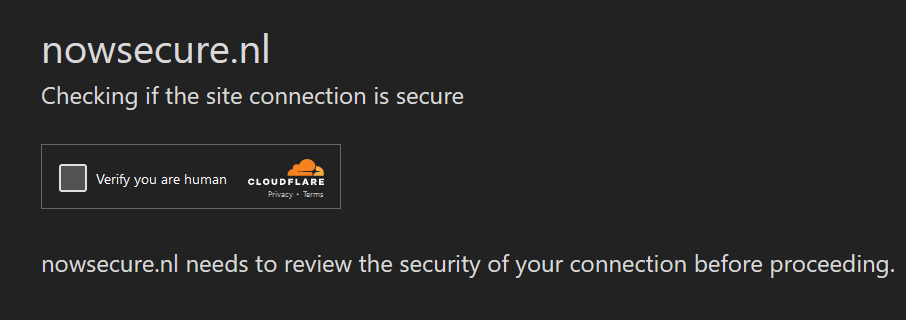
Meanwhile, if you'd like to test your scripts for bot characteristics, BrowserScan's Bot Detection tool can help you identify and refine bot-like behavior in your scripts.
Conclusion
Handling Cloudflare challenges in Python requires more than a standard HTTP request. By integrating CapSolver with a TLS-capable client and a stable proxy, developers can programmatically complete Cloudflare’s verification step and continue normal request flows.
This approach is especially useful for applications that depend on consistent access to Cloudflare-protected resources, such as monitoring tools, data aggregation services, and automated testing pipelines. With proper configuration and error handling, the process can be automated end to end while remaining stable and scalable.
FAQs
1. What is the Cloudflare 5-second challenge?
The Cloudflare 5-second challenge is a browser verification step that checks whether a visitor behaves like a real browser before allowing access. It often appears as a temporary interstitial page and can return HTTP 403 responses to automated scripts.
2. Why is a TLS-capable client required?
Cloudflare evaluates TLS fingerprints, header order, and browser-like behavior. Libraries such as tls_client help emulate real browser TLS characteristics, which is critical for passing the initial request and validating the solution returned by CapSolver.
3. Do I always need a proxy?
A proxy is strongly recommended. Clean, consistent proxies reduce the likelihood of immediate blocking and ensure that the challenge-solving request and verification request originate from the same IP address.
4. What does CapSolver return after solving the challenge?
CapSolver provides a solution containing headers and cookies that represent a verified browser session. These must be reused in subsequent requests to successfully access the target page.
5. Can this approach be extended to large-scale automation?
Yes. The same workflow can be integrated into larger Python systems by adding task queues, retry logic, and proxy rotation, making it suitable for scalable automation and data access scenarios.
More
CloudflareApr 29, 2026
What Is a Cloudflare Challenge? How It Works & When It Appears
Learn what a Cloudflare Challenge is, how Cloudflare detects bots using JavaScript and machine learning, and why challenges appear during browsing. Complete guide for 2026.

CloudflareApr 21, 2026
Cloudflare Turnstile Verification Failed? Causes, Fixes & Troubleshooting Guide
Learn how to fix the "failed to verify cloudflare turnstile token" error. This guide covers causes, troubleshooting steps, and how to defeat cloudflare turnstile with CapSolver.

