How to Solve Cloudflare Challenges?

Lucas Mitchell
Automation Engineer
TL;DR
- Cloudflare Challenges (including 5s Challenge, Standalone Challenge, Combined Challenge, and Turnstile) are common obstacles for automation and scraping workflows.
- CapSolver supports these scenarios through AntiCloudflareTask, automatically handling challenge detection and resolution.
- Successfully passing the Cloudflare 5s Challenge requires strict consistency across token, proxy IP, user-agent, headers, cookies, and TLS version.
- This guide demonstrates how to resolve the Cloudflare 5s Challenge step by step and correctly reuse the returned data to obtain a valid
cf_clearance.
Introduction
Cloudflare is widely adopted to protect websites against automated traffic, malicious bots, and abuse. Among its various protection mechanisms, the Cloudflare 5s Challenge is one of the most frequently encountered barriers for developers building web scraping, monitoring, or automation systems.
Unlike traditional CAPTCHAs, the Cloudflare 5s Challenge relies heavily on browser fingerprinting, TLS characteristics, and network consistency. Simply extracting a token is not sufficient—any mismatch between the browser environment and the verification request can result in immediate rejection.
In this tutorial, you will learn:
- The different Cloudflare Challenge types supported by CapSolver
- How CapSolver automatically detects and solves Cloudflare challenges
- How to use AntiCloudflareTask to resolve the Cloudflare 5s Challenge
- How to correctly reuse the returned token, headers, cookies, and browser fingerprint
By following this guide, you can build a reliable, repeatable, and production-ready Cloudflare challenge resolution workflow.
Cloudflare Challenges Addressed by CapSolver
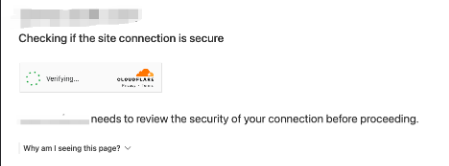
CapSolver supports multiple Cloudflare challenge scenarios, including:
-
Combined Challenge and Turnstile
-
Standalone Challenge
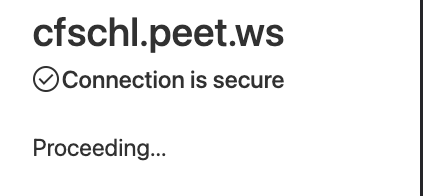
No special parameters are required for combined challenge and captcha scenarios.
When calling createTask, CapSolver automatically detects the protection type and handles it accordingly.
Addressing the Cloudflare 5s Challenge
Before solving the Cloudflare 5s Challenge, ensure the following prerequisites are met and follow the critical guidelines carefully.
Prerequisites
- CapSolver API Key
- A working proxy (Residential, ISP, or Datacenter)
Critical Guidelines for Valid Resolution
To ensure the cf_clearance cookie is accepted by the target website, all of the following must remain consistent:
- Use the Token returned by
getTaskResultas thecf_clearancecookie - Use the same User-Agent returned in the solution
- Use the same proxy IP that was used to solve the challenge
- Include all returned cookies
- Include all returned headers
- Use TLS version Chrome 120
Cloudflare validates multiple layers of browser and network fingerprinting. A mismatch in any parameter can invalidate the token.
For a full list of parameters, refer to the official documentation:
https://docs.capsolver.com/en/guide/captcha/cloudflare_challenge/
The required task type for this tutorial is:
- AntiCloudflareTask (requires your own proxies)
Step 1: Initiating the Process with CapSolver
Submit the task using the createTask API:
json
POST https://api.capsolver.com/createTask

{
  "clientKey": "YOUR_API_KEY",
  "task": {
    "type": "AntiCloudflareTask",
    "websiteURL": "https://www.yourwebsite.com",
    "proxy": "158.120.100.23:334:user:pass"
  }
}
Step 2: Obtaining the Results
Poll the getTaskResult endpoint until the task is completed:
json
POST https://api.capsolver.com/getTaskResult
Host: api.capsolver.com
Content-Type: application/json

{
  "clientKey": "YOUR_API_KEY",
  "taskId": "TASKID_OF_CREATETASK"
}
Once successful, the response will include the complete browser context, such as headers, cookies, user-agent, proxy, and the clearance token.
Using the cf_clearance Token Correctly
To successfully pass the Cloudflare validation:
- Set
solution.tokenas the value of thecf_clearancecookie - Use the same proxy IP used during challenge resolution
- Reuse the exact headers and user-agent provided
- Maintain TLS Chrome 120
- Include all returned cookies
⚠️ If the token is rejected, it usually indicates missing or inconsistent browser or network parameters.
Conclusion
The Cloudflare 5s Challenge is not merely a CAPTCHA—it is a comprehensive browser environment verification mechanism.
CapSolver simplifies this complexity through AntiCloudflareTask, abstracting away fingerprint generation, challenge execution, and validation logic. By strictly reusing the returned token, proxy, headers, cookies, user-agent, and TLS version, developers can achieve a stable and scalable Cloudflare challenge resolution workflow.
With the correct implementation, passing Cloudflare challenges becomes predictable, efficient, and suitable for production use.
FAQs
1. Why is my cf_clearance token rejected even though it is valid?
Because Cloudflare binds the token to the browser fingerprint, proxy IP, and TLS characteristics. Any inconsistency will invalidate the token.
2. Can I reuse the token with a different proxy or user-agent?
No. The cf_clearance token is strictly bound to the original proxy IP and browser environment.
3. Does AntiCloudflareTask support proxyless mode?
No. Solving the Cloudflare 5s Challenge requires a proxy to generate a valid and reusable clearance token.
4. Is Cloudflare Turnstile the same as the 5s Challenge?
No. Turnstile is an interactive CAPTCHA mechanism, while the 5s Challenge focuses on browser and network verification. They require different task types.
For Cloudflare Turnstile solutions, refer to:
https://www.capsolver.com/blog/how-to-solve-cloudflare-turnstile
More
CloudflareApr 29, 2026
What Is a Cloudflare Challenge? How It Works & When It Appears
Learn what a Cloudflare Challenge is, how Cloudflare detects bots using JavaScript and machine learning, and why challenges appear during browsing. Complete guide for 2026.

CloudflareApr 21, 2026
Cloudflare Turnstile Verification Failed? Causes, Fixes & Troubleshooting Guide
Learn how to fix the "failed to verify cloudflare turnstile token" error. This guide covers causes, troubleshooting steps, and how to defeat cloudflare turnstile with CapSolver.
