
🎉NEWCapSolver for AI agents-MCP, agent tools, and SDK integrations

Nikolai Smirnov
Software Development Lead
Published Aug 24, 2026
Updated Aug 24, 2026 · min read
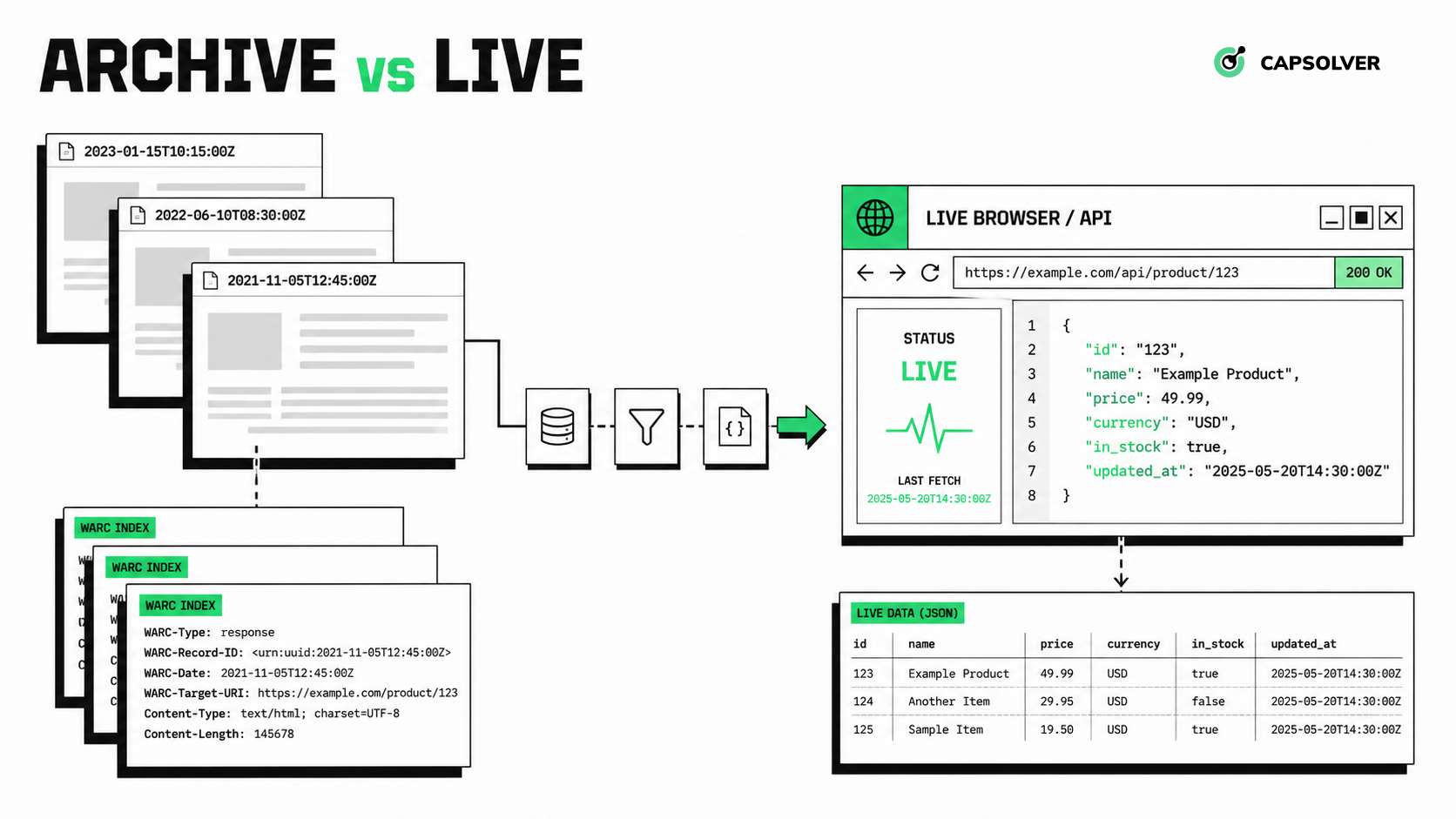
Web data pipelines fail when “available” is confused with “current.” An archived page may be easy to retrieve but too old for a pricing decision. A live page may be current but expensive to render, unstable across sessions, or replaced by a verification screen. The correct choice starts with the dataset’s time requirement, not the scraper library.
This guide compares web archives with live web scraping across freshness, coverage, reproducibility, cost, and operational risk. It also shows how Common Crawl and the Wayback Machine fit different archive workloads. When an authorized live workflow encounters a supported verification challenge, CapSolver can serve as a bounded recovery step instead of changing the archive strategy itself.
A web archive returns a captured representation from an earlier crawl, while live web scraping requests the current representation from the origin or its application runtime.
That distinction affects every downstream decision. Archive timestamps describe when a crawler recorded a resource. They do not promise that the capture includes every image, script, API response, or interaction needed to reconstruct the original experience. Live retrieval can observe current state, but the result must still be checked for freshness, completeness, and access status.
| Decision factor | Common Crawl | Wayback Machine | Live web scraping |
|---|---|---|---|
| Primary fit | Large-scale corpus analysis | URL history and point-in-time inspection | Current operational data |
| Time model | Separate crawl indexes | Timestamped captures per URL | Retrieval time chosen by your job |
| Coverage | Broad but selective crawl corpus | Selective captures, including submitted pages | Only the URLs your workflow requests |
| Dynamic application state | Usually incomplete | Often incomplete | Available when the browser and authorized session render it |
| Reproducibility | Strong when crawl ID and record metadata are stored | Strong when capture timestamp and replay URL are stored | Requires saving raw response, timestamp, and runtime context |
| Origin traffic | No new request to the target site | No new request when replaying an existing capture | Sends a new request to the target service |
| Best use | Research, language models, link analysis, historical corpora | Audits, evidence trails, content change review | Prices, availability, dashboards, current public records |
Common Crawl provides downloadable crawl data and indexes designed for analysis at corpus scale. Its official data access guide explains that crawl data can be processed in AWS or downloaded over HTTPS. The records are stored in web archive formats, while indexes help you find the WARC file, byte range, capture timestamp, status, MIME type, and digest for a URL.
The Common Crawl CDXJ index documentation makes an important operational detail explicit: each crawl has its own index. There is no single index covering every monthly crawl. A reproducible Common Crawl job should therefore store at least:
CC-MAIN-YYYY-WW;Common Crawl works well when you need many pages from a known crawl or want to analyze historical web structure without sending new traffic to every origin. It is a poor default for a field that must reflect the last hour, day, or transaction because the latest crawl may not include the URL or its newest state.
The Wayback Machine provides timestamped captures that are convenient for reviewing how a known URL changed. Internet Archive’s Save Page Now documentation states that the feature saves a single page and does not initiate a crawl of an entire site. That boundary matters when a project assumes one submitted URL will preserve every linked page.
Wayback captures are useful for checking an earlier policy page, recovering removed documentation, or comparing page copy across dates. Missing images and scripts are normal failure modes because an archive can only replay resources it captured. A page that depended on client-side API calls may also replay its HTML shell without recreating the original application state.
For programmatic history lookup, the Wayback CDX index can return capture timestamps, original URLs, status codes, and digests. The broader Memento framework in RFC 7089 defines HTTP concepts for accessing earlier resource states by datetime, which is useful when you design an archive-agnostic temporal data layer.
Live web scraping provides the current response available to your authorized client at retrieval time. It is the correct source when a workflow depends on current inventory, current prices, recently published notices, or application state produced by JavaScript.
Current does not automatically mean valid. A live request can return a stale CDN object, a login page, a consent screen, a rate-limit response, or a challenge page instead of the intended record. Some failure pages also return HTTP 200. Accept a live result only after checking the fields that define success for the dataset.
For a product observation, that might mean verifying all of these together:
The raw response, rendered HTML, screenshot, and extraction output should share one correlation ID. This gives the pipeline enough evidence to distinguish a parser regression from a source change or an access-control event.
Archive retrieval moves most acquisition work away from the origin, while live scraping makes your system responsible for scheduling, rendering, validation, and respectful request control.
Common Crawl can reduce acquisition traffic, but large WARC and index workloads still require storage, range requests, parsing, and deduplication. Wayback Machine queries are simpler for a small URL set, but archive availability and capture completeness are outside your control. Live scraping offers precise scheduling and target selection, but browser fleets, session state, JavaScript execution, retries, and evidence retention add cost.
The cheapest source is the one that meets the freshness requirement without forcing unnecessary processing. Fetching a live browser page every five minutes is wasteful when a monthly historical comparison is sufficient. Processing a full crawl corpus is equally inefficient when the requirement is ten known product URLs updated every hour.
Choose Common Crawl for broad historical datasets, the Wayback Machine for known-URL history, and live scraping for current state.
Use Common Crawl when the unit of analysis is a large corpus and you can bind every result to a crawl ID. Keep digests so duplicate content does not inflate your sample.
Use the Wayback Machine when reviewers need to inspect a specific page at a specific date. Store the original URL, capture timestamp, and replay URL rather than saving only a screenshot.
Use live scraping when delayed data would change a business decision. Define the freshness service-level objective before choosing the schedule, and lower request frequency when the source changes slowly.
Use a hybrid design when you need both history and current state. An archive can provide the baseline; scheduled live observations can add recent records that are not yet present in an archive.
Redeem Your CapSolver Bonus Code
Boost your automation budget instantly!
Use bonus code CAP26 when topping up your CapSolver account to get an extra 5% bonus on every recharge — with no limits.
Redeem it now in your CapSolver Dashboard
A hybrid pipeline should treat archive lookup, live retrieval, extraction, and validation as separate stages.
This architecture also supports graceful degradation. If live retrieval is temporarily unavailable, the application can return a clearly labelled archived record rather than silently presenting stale data as current.
CAPTCHA handling belongs only in the authorized live-retrieval branch; it is not required when you read an existing archive capture. A 403 response, missing selector, or empty page is not proof that a supported CAPTCHA is present. The runtime should detect and classify the actual challenge before it calls any solving service.
For permitted workflows, the CapSolver AI-agent recovery paths provide MCP, agent-tool, and core SDK options. The live workflow must preserve the relevant browser session and verify the original data action after a result is returned. One solver result should not be treated as proof that the expected record was loaded.
The operational rule is simple: classify first, attempt a bounded recovery only when authorized, and stop when the application still does not return the expected business data. The web scraping CAPTCHA handling guide covers session consistency and error classification in more detail.
Archive access and live scraping both require governance. Public availability does not remove copyright, privacy, contractual, or jurisdictional obligations. Minimize stored fields, avoid sensitive personal data, respect applicable site terms and access policies, and set retention periods that match the documented purpose.
Archive records also need accurate labeling. A historical capture should never be presented as a current fact. Live records need the same discipline: store retrieval time, validation status, and source URL so downstream users can assess freshness.
Web archive vs live web scraping is a time-and-evidence decision. Common Crawl is strongest for reproducible corpus analysis, the Wayback Machine is strongest for known-URL history, and live scraping is necessary when current state determines the outcome. A hybrid pipeline can use archives as a baseline and reserve live requests for records that fail the freshness requirement.
When an approved live workflow encounters a supported CAPTCHA challenge, CapSolver can add a controlled recovery step without changing the pipeline’s permission, freshness, or validation rules.
Start with one authorized data source, define a measurable freshness rule, and keep archive and live provenance separate. Review the CapSolver FAQ before adding CAPTCHA handling to a production workflow.
Q: Is Common Crawl the same as the Wayback Machine?
No. Common Crawl is designed for downloadable, corpus-scale web data analysis, while the Wayback Machine is oriented toward replaying timestamped captures of known URLs.
Q: Can a web archive replace live web scraping?
A web archive can replace live scraping only when its capture age and completeness meet the dataset’s requirements. Current prices, inventory, and application state usually require live retrieval.
Q: Which option is better for reproducible research?
Archived data is usually easier to reproduce because you can store a crawl ID or capture timestamp. Live data can also be reproducible when you retain the raw response, retrieval time, runtime context, and content digest.
Q: Why can an archived page look incomplete?
An archived page can be incomplete when scripts, images, API responses, or linked resources were not captured. Modern client-rendered applications are especially difficult to replay from HTML alone.
Q: Is live web scraping permitted?
Live web scraping is permitted only when your organization has a lawful, authorized basis for the workflow and follows applicable terms, access rules, privacy requirements, and data-use restrictions. CAPTCHA handling does not grant permission to access private, restricted, or sensitive data.
Nikolai Smirnov
Software Development Lead
Building dependable software for complex automation.
ABOUT THE AUTHOR
Learn scalable Rust web scraping architecture with reqwest, scraper, async scraping, headless browser scraping, proxy rotation, and compliant CAPTCHA handling.

Learn the best techniques to scrape job listings without getting blocked. Master Indeed scraping, Google Jobs API, and web scraping API with CapSolver.

