
🎉NEWCapSolver for AI agents-MCP, agent tools, and SDK integrations

Ethan Collins
AI Agent Workflow Engineer
Published Oct 23, 2023
Updated Oct 23, 2023 · min read
In today’s web automation and data collection workflows, CAPTCHAs are one of the biggest blockers. Whether you're running SEO tools, bots, scrapers, or internal automation pipelines, solving CAPTCHAs reliably and at scale is essential.
CapSolver provides an AI-powered, high-speed, and cost-efficient solution that replaces manual captcha solving with fully automated machine learning.
This guide introduces CapSolver, its Chrome extension, and how you can seamlessly integrate automatic captcha solving into your daily browsing or automation tasks.
CapSolver is a 100% AI and machine learning solution that specializes in solving various types of CAPTCHAs. It supports a wide range of CAPTCHA types, including reCAPTCHA (v2/v3/Enterprise), ImageToText, Cloudflare Turnstile, Challenge and more
The service can automatically decipher even very distorted or obscured captcha images and text thanks to deep learning algorithms and computer vision. This allows Capsolver to maintain accuracy rates exceeding 95% on even the most difficult captcha challenges.
CapSolver offers lightning-fast captcha solving, with average speeds under 5 seconds for most captcha types. The service has robust infrastructure to deliver reliable captcha solveing 24/7 without downtime.
Redeem Your CapSolver Bonus Code
Don’t miss the chance to further optimize your operations! Use the bonus code CAPN when topping up your CapSolver account and receive an extra 5% bonus on each recharge, with no limits. Visit the CapSolver to redeem your bonus now!
To further simplify captcha automation for users, CapSolver provides an ingenious Chrome extension. It integrates seamlessly with any webpage and automatically solves captchas in the background without any user interaction required.
The extension utilizes the same advanced AI and computer vision algorithms as CapSolver’s backend system to solve captchas behind the scenes. This provides effortless, transparent captcha automation as you browse any website.
Installing CapSolver’s captcha solving Chrome extension takes just a few simple steps:
Go to the Chrome Web Store and search for “CapSolver” to find the extension or download here
Click “Add to Chrome” to install the extension.
A popup will display asking you to add the extension - click “Add Extension”.
The extension will then be installed and added to your browser.
Click the extensions icon in your Chrome toolbar and pin the CapSolver extension for easy access.
And installation is complete! The extension will now work seamlessly in the background as you browse any websites with captcha challenges.
Using the extension is very straightforward. Once installed:
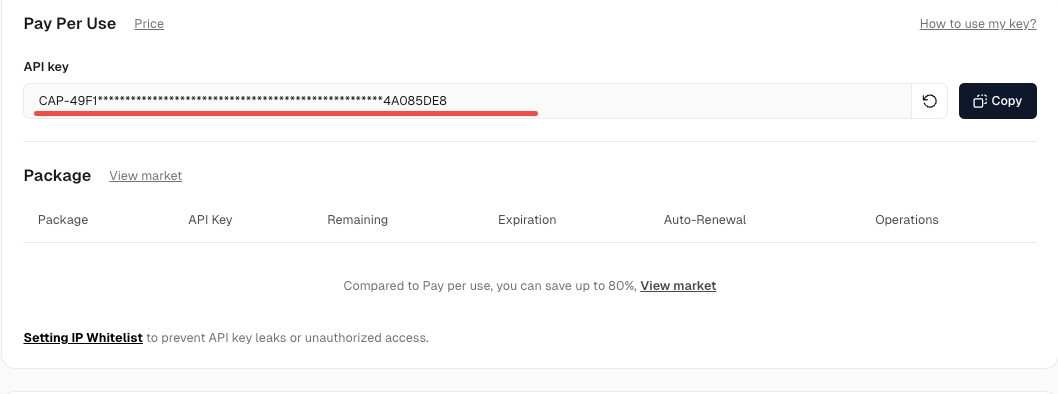
Copy your unique API key.
Click the Capsolver extension icon in your Chrome browser and paste your API key when prompted.
That’s it! The extension will now automatically solve any captchas encountered without any additional input required from you. The solving happens seamlessly in the background.
CapSolver ’s ingenious Chrome extension makes captcha automation completely seamless as you browse the web. Just install the extension, enter your API key, and any captchas you encounter will be automatically solved in the background without any user interaction required.
With its intelligent AI technology and constantly expanding support for major captcha types, CapSolver’s Chrome extension is an invaluable tool for anyone needing hassle-free captcha solveing on any website. Try out the extension and experience transparent, automated captcha solving first-hand!
1. Is the CapSolver Chrome extension free?
The extension is free to install and use; you only pay for API usage when captchas are solved.
2. Do I need any technical skills to use it?
No. Just install the extension, enter your API key, and it works automatically in the background.
3. What CAPTCHA types does CapSolver support?
CapSolver supports major types such as reCAPTCHA (v2/v3/Enterprise), ImageToText, Cloudflare Turnstile, AWS WAF CAPTCHA, and more.
4. Will it affect browser performance?
All solving is handled on CapSolver’s servers, so your browser remains fast and responsive.
Check that your API key is active, ensure you have credits, refresh the page, and make sure the extension is up to date.
Ethan Collins
AI Agent Workflow Engineer
Building clearer handoffs between AI agents and tools.
ABOUT THE AUTHOR
Choose the best CAPTCHA extension for Chrome automation, QA, and browser testing with CapSolver support for reCAPTCHA, Turnstile, text CAPTCHA, and AWS WAF.

Discover CapSolver, the premier no-code CAPTCHA solver for AI automation in 2026, to streamline workflows and enhance data collection without coding. Learn about its key features, benefits, and ethical use.


