
🎉NEWCapSolver for AI agents-MCP, agent tools, and SDK integrations

Lucas Mitchell
Automation Engineer
Published Mar 09, 2026
Updated Mar 18, 2026 · min read
Cloudflare Turnstile is quickly becoming the go-to CAPTCHA alternative for modern websites. Unlike traditional CAPTCHAs that force users to solve image puzzles, Turnstile runs silently in the background — making it harder to detect and bypass with standard automation tools.
What if you could solve Turnstile automatically inside your n8n workflows — whether you're building a reusable solver API, scraping a captcha-protected site, or automating a login form — all without writing a single line of traditional code?
In this guide, you'll learn how to combine n8n (a visual workflow automation tool) with CapSolver (an AI-powered captcha solving service) to solve Cloudflare Turnstile challenges on demand — either as a standalone API endpoint or as a step inside any automation workflow.
What you'll build:
Solver APIs — reusable endpoints your other tools can call:
Direct-use workflows — CapSolver embedded as a step inside larger automations:
Cloudflare Turnstile is a CAPTCHA alternative that verifies visitors automatically using browser signals — no puzzles, no checkboxes. It appears as a small widget embedded in forms (login, signup, checkout) and comes in three modes: Managed, Non-Interactive, and Invisible. From a solving perspective, the mode doesn't matter — you always need the same two parameters: websiteURL and websiteKey.
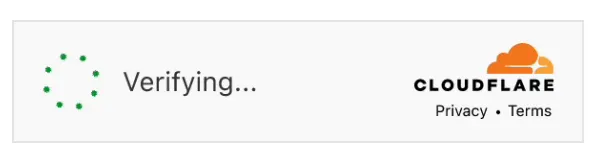
Not the same as Cloudflare Challenge. If you see a full-page "Performing security verification..." screen, that's a Cloudflare Challenge, not Turnstile — it requires a different solver.
Before getting started, make sure you have the following:
Important: Make sure you have sufficient balance in your CapSolver account. Turnstile solving tasks consume credits based on usage.
CapSolver is available as an official integration in n8n — no community node installation required. You can find it directly in the node panel when building your workflows.
Since it's an official integration, you need to create a credential in n8n so that the CapSolver node can authenticate with your account.
Go to your n8n instance and navigate to Settings → Credentials. You'll see all your configured credentials here.

All (default)n8n will automatically test the connection. You should see a green "Connection tested successfully" banner confirming your API key is valid.
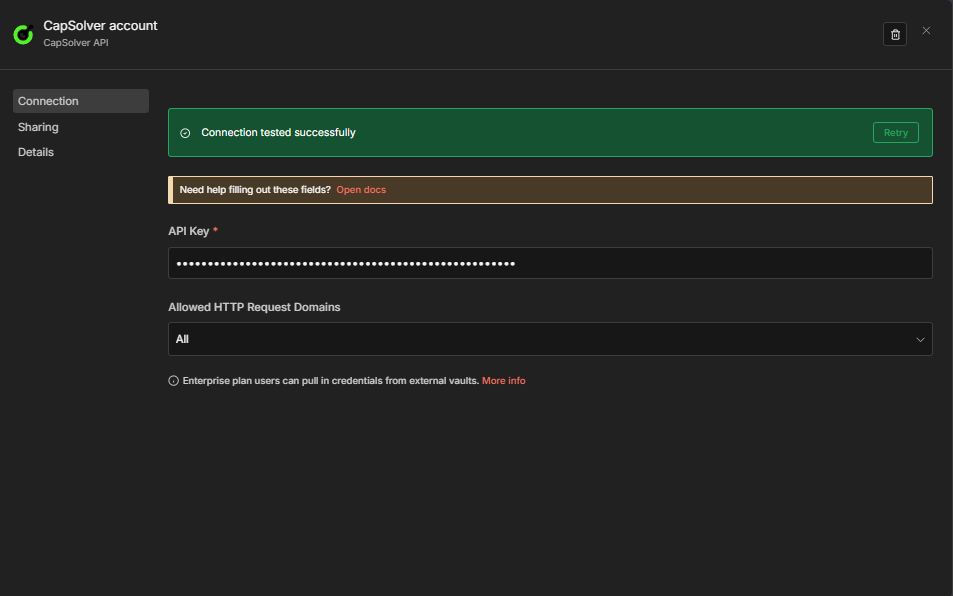
Important: Every CapSolver node in your workflows will reference this credential. You only need to create it once — all your solver workflows will share the same credential.
Now you're ready to build your Turnstile solver workflow!
This workflow creates a POST API endpoint that accepts Turnstile parameters and returns a solved token.
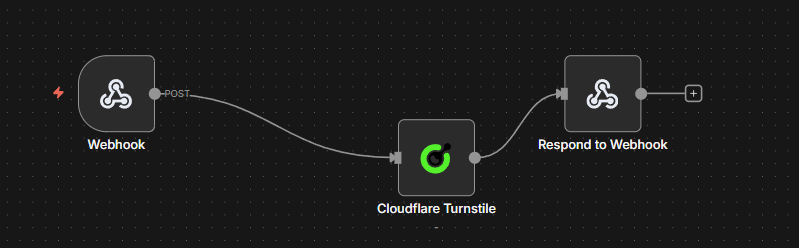
The workflow consists of four nodes:
$json.error is not empty){"error": "..."} on failure| Setting | Value |
|---|---|
| HTTP Method | POST |
| Path | solver-turnstile |
| Respond | Response Node |
This creates an endpoint at: https://your-n8n-instance.com/webhook/solver-turnstile
| Parameter | Value | Description |
|---|---|---|
| Operation | Cloudflare Turnstile |
Must be set to Cloudflare Turnstile |
| Type | AntiTurnstileTaskProxyLess |
This task type does not require a proxy |
| Website URL | {{ $json.body.websiteURL }} |
The URL of the page with the Turnstile widget |
| Website Key | {{ $json.body.websiteKey }} |
The Turnstile site key |
| metadata.action | (Optional) | Some sites require a specific action string for the Turnstile challenge |
| metadata.cdata | (Optional) | Custom data that some sites pass to the Turnstile widget for verification |
Some sites also require metadata.action and/or metadata.cdata — you can add these under the Optional section in the node. Also select your CapSolver credentials in this node.
| Setting | Value |
|---|---|
| Condition | ={{ $json.error }} is not empty |
| True branch | Routes to the Error Respond to Webhook node |
| False branch | Routes to the Success Respond to Webhook node |
This makes the error path explicit on the canvas. The CapSolver node continues on error (onError: continueRegularOutput), so failures arrive here as { "error": "..." } rather than crashing the workflow.
Success branch (false output of CapSolver Error?):
| Setting | Value |
|---|---|
| Respond With | JSON |
| Response Body | ={{ JSON.stringify($json.data) }} |
Send a POST request to your webhook endpoint:
curl -X POST https://your-n8n-instance.com/webhook/solver-turnstile \
  -H "Content-Type: application/json" \
  -d '{
    "websiteURL": "https://example.com/login",
    "websiteKey": "0x4AAAAAAADV8V8V8V8V8V8V"
  }'
Expected Response:
{
  "taskId": "abc123...",
  "solution": {
    "token": "0.XXXXXXXXXXXXXXXX..."
  },
  "status": "ready"
}Copy the JSON below and import it into n8n via Menu → Import from JSON:
{
  "nodes": [
    {
      "parameters": {
        "content": "## Turnstile — Solver API\n\n### How it works\n- Triggered by webhook\n- CapSolver: Cloudflare Turnstile\n- Conditional branch\n- Respond to webhook\n- Respond to webhook\n\n### Setup\n- Add your **CapSolver** API key under Settings → Credentials\n- Configure placeholder values\n- Activate the workflow",
        "height": 448,
        "width": 480
      },
      "type": "n8n-nodes-base.stickyNote",
      "typeVersion": 1,
      "position": [
        -800,
        -176
      ],
      "id": "5ffd9cef-8202-4382-b878-6c99193e85c9",
      "name": "Sticky Note"
    },
    {
      "parameters": {
        "content": "## Receive and Process Solver Request\n\nHandles incoming solver requests and processes them through Cloudflare Turnstile.",
        "height": 336,
        "width": 496,
        "color": 7
      },
      "type": "n8n-nodes-base.stickyNote",
      "typeVersion": 1,
      "position": [
        -240,
        -176
      ],
      "id": "6ad0812b-7141-41e4-96d6-e72e08a24405",
      "name": "Sticky Note1"
    },
    {
      "parameters": {
        "content": "## Evaluate Solver Response\n\nChecks for errors in the solver response and directs the flow accordingly.",
        "height": 336,
        "color": 7
      },
      "type": "n8n-nodes-base.stickyNote",
      "typeVersion": 1,
      "position": [
        352,
        -176
      ],
      "id": "8839e65a-8735-4135-9b0f-07ac081ebd70",
      "name": "Sticky Note2"
    },
    {
      "parameters": {
        "content": "## Respond to Webhook\n\nSends a response back to the webhook based on the solver's success or failure.",
        "height": 528,
        "color": 7
      },
      "type": "n8n-nodes-base.stickyNote",
      "typeVersion": 1,
      "position": [
        656,
        -256
      ],
      "id": "2fec67ea-a216-4717-8336-2aa060c352ab",
      "name": "Sticky Note3"
    },
    {
      "parameters": {
        "httpMethod": "POST",
        "path": "solver-turnstile",
        "responseMode": "responseNode",
        "options": {}
      },
      "type": "n8n-nodes-base.webhook",
      "typeVersion": 2.1,
      "position": [
        -192,
        0
      ],
      "id": "137be4f0-1762-4f0c-b993-c512d27e35de",
      "name": "Receive Solver Request",
      "webhookId": "901bdfa1-308c-4145-87fb-9c1958914751"
    },
    {
      "parameters": {
        "operation": "Cloudflare Turnstile",
        "websiteURL": "={{ $json.body.websiteURL }}",
        "websiteKey": "={{ $json.body.websiteKey }}",
        "optional": {}
      },
      "type": "n8n-nodes-capsolver.capSolver",
      "typeVersion": 1,
      "position": [
        112,
        0
      ],
      "id": "954ff1f0-d5de-4468-b0d1-fbce03676676",
      "name": "Cloudflare Turnstile",
      "credentials": {
        "capSolverApi": {
          "id": "BeBFMAsySMsMGeE9",
          "name": "CapSolver account"
        }
      }
    },
    {
      "parameters": {
        "conditions": {
          "options": {
            "caseSensitive": true,
            "leftValue": "",
            "typeValidation": "loose",
            "version": 2
          },
          "conditions": [
            {
              "id": "capsolver-err-001",
              "leftValue": "={{ $json.error }}",
              "operator": {
                "type": "string",
                "operation": "isNotEmpty",
                "singleValue": true
              }
            }
          ],
          "combinator": "and"
        },
        "options": {}
      },
      "type": "n8n-nodes-base.if",
      "typeVersion": 2.2,
      "position": [
        400,
        0
      ],
      "id": "a1b2c3d4-e5f6-7890-abcd-ef1234567890",
      "name": "CapSolver Error?"
    },
    {
      "parameters": {
        "respondWith": "json",
        "responseBody": "={{ JSON.stringify({ error: $json.error }) }}",
        "options": {}
      },
      "type": "n8n-nodes-base.respondToWebhook",
      "typeVersion": 1.5,
      "position": [
        704,
        -64
      ],
      "id": "e1f2a3b4-c5d6-7890-abcd-123456789012",
      "name": "Respond to Webhook (Error)"
    },
    {
      "parameters": {
        "respondWith": "json",
        "responseBody": "={{ JSON.stringify($json.data) }}",
        "options": {}
      },
      "type": "n8n-nodes-base.respondToWebhook",
      "typeVersion": 1.5,
      "position": [
        704,
        112
      ],
      "id": "db264e2b-48ce-4887-9b2b-2b8077993c30",
      "name": "Respond to Webhook"
    }
  ],
  "connections": {
    "Receive Solver Request": {
      "main": [
        [
          {
            "node": "Cloudflare Turnstile",
            "type": "main",
            "index": 0
          }
        ]
      ]
    },
    "Cloudflare Turnstile": {
      "main": [
        [
          {
            "node": "CapSolver Error?",
            "type": "main",
            "index": 0
          }
        ]
      ]
    },
    "CapSolver Error?": {
      "main": [
        [
          {
            "node": "Respond to Webhook (Error)",
            "type": "main",
            "index": 0
          }
        ],
        [
          {
            "node": "Respond to Webhook",
            "type": "main",
            "index": 0
          }
        ]
      ]
    }
  },
  "pinData": {},
  "meta": {
    "instanceId": "962ff0267b713be0344b866fa54daae28de8ed2144e2e6867da355dae193ea1f"
  }
}The Turnstile solver API endpoint accepts the following parameters:
| Parameter | Required | Description |
|---|---|---|
websiteURL |
Yes | The URL of the page hosting the Turnstile widget |
websiteKey |
Yes | The Turnstile site key |
metadata.action |
No | Action string required by some sites for the Turnstile challenge |
metadata.cdata |
No | Custom data passed to the Turnstile widget by some sites |
Tip: You can identify the
websiteURLandwebsiteKeyby inspecting the page source or using the CapSolver browser extension.
Compared to reCAPTCHA, Turnstile is simpler — you only need two required parameters. Some sites may also require the optional metadata.action or metadata.cdata fields — add these in the node's Optional section if the token isn't being accepted.
The API workflow above shows how to get a solved Turnstile token. But what do you actually do with it?
In real-world automation, solving the challenge is only half the job. You need to submit the token to the target website — exactly as a browser would — to unlock the data or action behind the Turnstile protection.
Here's the general pattern:
cf-turnstile-response form field)Example: https://example.com/ — A Turnstile-protected website
Manual Trigger → CapSolver Turnstile → HTTP POST Request → IF (check success) → Edit Fields (extract data)Cloudflare Turnstilehttps://example.com/login0x4AAAAAAA... (find it by inspecting the page source — see How to Identify Turnstile Parameterscf-turnstile-response form fieldusername, password)Key concept: Every website handles token submission differently. In this example, the token goes in a
cf-turnstile-responseform field via POST — but other sites may expect it in a different field name, as a JSON body, as a header, or through a completely different endpoint. Always inspect the site's actual form submission (using DevTools Network tab) to see exactly how the token needs to be sent.
The solver API and scraping example above show the core pattern: solve the Turnstile, submit the token, process the result. The following workflows extend this pattern to production-ready use cases — each with dual triggers (schedule + webhook), persistent state tracking, and structured output.
| Workflow | Purpose |
|---|---|
Turnstile Scraping — Price & Product Details — CapSolver + Schedule + Webhook |
Scrapes price and product name every 6 hours, compares against previous values stored in staticData, alerts on changes |
Turnstile Account Login — CapSolver + Schedule + Webhook |
Logs into your own account on a captcha-protected site by solving first, then POSTing credentials with the token |
This workflow scrapes a product page every 6 hours (schedule) or on demand (webhook), extracts the price using the HTML node, and compares it against the previously stored value.
Schedule path:
Every 6 Hours → Solve Captcha → Fetch Product Page → Extract Data
  → Compare Data → Data Changed? → Build Alert / No Change
Key behaviors:
cf-turnstile-response header (adapt to your site's expected format — some sites may use a different field name).product-price, h1)$workflow.staticData.lastPrice persists the previous price across executionsdeal) and increases (severity: info){
"nodes": [
{
"parameters": {
"content": "## Turnstile Scraping — Price & Product Details — CapSolver + Schedule + Webhook\n\n### How it works\n- Triggered by scheduleTrigger\n- Triggered by webhook\n- Sets: websiteURL, websiteKey\n- CapSolver: Cloudflare Turnstile\n- GET request\n- HTML extract\n- Custom code\n\n### Setup\n- Add your **CapSolver** API key under Settings → Credentials\n- Configure placeholder values\n- Activate the workflow",
"height": 928,
"width": 480
},
"type": "n8n-nodes-base.stickyNote",
"typeVersion": 1,
"position": [
-1312,
-272
],
"id": "e7600f37-30e2-414c-8482-136e850c7767",
"name": "Sticky Note"
},
{
"parameters": {
"content": "## Scheduled Scraping Setup\n\nTriggers scraping process every 6 hours and configures target settings.",
"height": 288,
"width": 496,
"color": 7
},
"type": "n8n-nodes-base.stickyNote",
"typeVersion": 1,
"position": [
-752,
-160
],
"id": "b5976b58-4e25-4db2-8968-b918d51ae3db",
"name": "Sticky Note1"
},
{
"parameters": {
"content": "## Scheduled Scraping Execution\n\nSolves Turnstile, fetches product page, extracts and compares data for scheduled trigger.",
"height": 464,
"width": 1456,
"color": 7
},
"type": "n8n-nodes-base.stickyNote",
"typeVersion": 1,
"position": [
-144,
-272
],
"id": "81ae9453-8fac-49c8-906e-f6054a1d5311",
"name": "Sticky Note2"
},
{
"parameters": {
"content": "## Webhook Scraping Setup\n\nInitiates scraping process via webhook trigger and solves Turnstile.",
"height": 304,
"width": 528,
"color": 7
},
"type": "n8n-nodes-base.stickyNote",
"typeVersion": 1,
"position": [
-752,
304
],
"id": "5b9d6820-6036-43d4-8d47-1c207864256e",
"name": "Sticky Note3"
},
{
"parameters": {
"content": "## Webhook Scraping Execution\n\nFetches product page, extracts and compares data, and responds to webhook.",
"height": 496,
"width": 1520,
"color": 7
},
"type": "n8n-nodes-base.stickyNote",
"typeVersion": 1,
"position": [
-160,
224
],
"id": "4260afbb-4a3a-4a18-9d01-f3724c390d4e",
"name": "Sticky Note4"
},
{
"parameters": {
"rule": {
"interval": [
{
"field": "hours",
"hoursInterval": 6
}
]
}
},
"type": "n8n-nodes-base.scheduleTrigger",
"typeVersion": 1.3,
"position": [
-704,
-32
],
"id": "ts-s-901",
"name": "Every 6 Hours"
},
{
"parameters": {
"assignments": {
"assignments": [
{
"id": "cfg-001",
"name": "websiteURL",
"value": "https://YOUR-TARGET-SITE.com/product-page",
"type": "string"
},
{
"id": "cfg-002",
"name": "websiteKey",
"value": "YOUR_SITE_KEY_HERE",
"type": "string"
}
]
},
"options": {}
},
"type": "n8n-nodes-base.set",
"typeVersion": 3.4,
"position": [
-400,
-32
],
"id": "ts-s-900",
"name": "Set Target Config [Schedule]"
},
{
"parameters": {
"operation": "Cloudflare Turnstile",
"websiteURL": "={{ $json.websiteURL }}",
"websiteKey": "={{ $json.websiteKey }}",
"optional": {}
},
"type": "n8n-nodes-capsolver.capSolver",
"typeVersion": 1,
"position": [
-96,
0
],
"id": "ts-s-902",
"name": "Solve Turnstile",
"credentials": {
"capSolverApi": {
"id": "BeBFMAsySMsMGeE9",
"name": "CapSolver account"
}
}
},
{
"parameters": {
"url": "={{ $('Set Target Config [Schedule]').first().json.websiteURL }}",
"sendHeaders": true,
"headerParameters": {
"parameters": [
{
"name": "user-agent",
"value": "Mozilla/5.0 (Windows NT 10.0; Win64; x64) AppleWebKit/537.36 (KHTML, like Gecko) Chrome/125.0.0.0 Safari/537.36"
},
{
"name": "cf-turnstile-response",
"value": "={{ $json.data.solution.token }}"
}
]
},
"options": {
"response": {
"response": {}
}
}
},
"type": "n8n-nodes-base.httpRequest",
"typeVersion": 4.3,
"position": [
208,
0
],
"id": "ts-s-903",
"name": "Fetch Product Page"
},
{
"parameters": {
"operation": "extractHtmlContent",
"extractionValues": {
"values": [
{
"key": "price",
"cssSelector": ".product-price, [data-price], .price"
},
{
"key": "productName",
"cssSelector": "h1, .product-title"
}
]
},
"options": {}
},
"type": "n8n-nodes-base.html",
"typeVersion": 1.2,
"position": [
512,
0
],
"id": "ts-s-904",
"name": "Extract Data"
},
{
"parameters": {
"jsCode": "const staticData = $workflow.staticData;\nconst currentPrice = $input.first().json.price;\nconst previousPrice = staticData.lastPrice;\nconst productName = $input.first().json.productName || 'Product';\nconst parsePrice = (str) => { if (!str) return null; const match = str.match(/[\\d,]+\\.?\\d*/); return match ? parseFloat(match[0].replace(',', '')) : null; };\nconst currentNum = parsePrice(currentPrice);\nconst previousNum = parsePrice(previousPrice);\nstaticData.lastPrice = currentPrice;\nstaticData.lastChecked = new Date().toISOString();\nconst changed = previousNum !== null && currentNum !== null && currentNum !== previousNum;\nconst direction = changed ? (currentNum < previousNum ? 'dropped' : 'increased') : 'unchanged';\nconst diff = changed ? Math.abs(currentNum - previousNum).toFixed(2) : '0';\nreturn [{ json: { productName, currentPrice, previousPrice: previousPrice || 'first check', changed, direction, diff: changed ? `$${diff}` : null, checkedAt: new Date().toISOString() } }];"
},
"type": "n8n-nodes-base.code",
"typeVersion": 2,
"position": [
688,
0
],
"id": "ts-s-905",
"name": "Compare Data"
},
{
"parameters": {
"conditions": {
"options": {
"caseSensitive": true,
"leftValue": "",
"typeValidation": "strict",
"version": 2
},
"conditions": [
{
"id": "if-1",
"leftValue": "={{ $json.changed }}",
"operator": {
"type": "boolean",
"operation": "true",
"singleValue": true
}
}
],
"combinator": "and"
},
"options": {}
},
"type": "n8n-nodes-base.if",
"typeVersion": 2.2,
"position": [
864,
0
],
"id": "ts-s-906",
"name": "Data Changed?"
},
{
"parameters": {
"assignments": {
"assignments": [
{
"id": "a1",
"name": "alert",
"value": "=Price {{ $json.direction }} for {{ $json.productName }}: {{ $json.previousPrice }} → {{ $json.currentPrice }}",
"type": "string"
},
{
"id": "a2",
"name": "severity",
"value": "={{ $json.direction === 'dropped' ? 'deal' : 'info' }}",
"type": "string"
},
{
"id": "a3",
"name": "checkedAt",
"value": "={{ $json.checkedAt }}",
"type": "string"
}
]
},
"options": {}
},
"type": "n8n-nodes-base.set",
"typeVersion": 3.4,
"position": [
1152,
-192
],
"id": "ts-s-907",
"name": "Build Alert"
},
{
"parameters": {
"assignments": {
"assignments": [
{
"id": "n1",
"name": "status",
"value": "no_change",
"type": "string"
},
{
"id": "n2",
"name": "currentPrice",
"value": "={{ $json.currentPrice }}",
"type": "string"
},
{
"id": "n3",
"name": "checkedAt",
"value": "={{ $json.checkedAt }}",
"type": "string"
}
]
},
"options": {}
},
"type": "n8n-nodes-base.set",
"typeVersion": 3.4,
"position": [
1168,
32
],
"id": "ts-s-908",
"name": "No Change"
},
{
"parameters": {
"httpMethod": "POST",
"path": "price-monitor-turnstile",
"responseMode": "responseNode",
"options": {}
},
"type": "n8n-nodes-base.webhook",
"typeVersion": 2.1,
"position": [
-704,
432
],
"id": "ts-s-909",
"name": "Webhook Trigger",
"webhookId": "28b7ba21-7608-45c2-8552-ec91b8ce7c9b"
},
{
"parameters": {
"operation": "Cloudflare Turnstile",
"websiteURL": "={{ $json.body.websiteURL }}",
"websiteKey": "={{ $json.body.websiteKey }}",
"optional": {}
},
"type": "n8n-nodes-capsolver.capSolver",
"typeVersion": 1,
"position": [
-368,
432
],
"id": "ts-s-910",
"name": "Solve Turnstile [Webhook]",
"credentials": {
"capSolverApi": {
"id": "BeBFMAsySMsMGeE9",
"name": "CapSolver account"
}
}
},
{
"parameters": {
"url": "={{ $('Webhook Trigger').item.json.body.websiteURL }}",
"sendHeaders": true,
"headerParameters": {
"parameters": [
{
"name": "user-agent",
"value": "Mozilla/5.0 (Windows NT 10.0; Win64; x64) AppleWebKit/537.36 (KHTML, like Gecko) Chrome/125.0.0.0 Safari/537.36"
},
{
"name": "cf-turnstile-response",
"value": "={{ $json.data.solution.token }}"
}
]
},
"options": {
"response": {
"response": {}
}
}
},
"type": "n8n-nodes-base.httpRequest",
"typeVersion": 4.3,
"position": [
-80,
432
],
"id": "ts-s-911",
"name": "Fetch Product Page [Webhook]"
},
{
"parameters": {
"operation": "extractHtmlContent",
"extractionValues": {
"values": [
{
"key": "price",
"cssSelector": ".product-price, [data-price], .price"
},
{
"key": "productName",
"cssSelector": "h1, .product-title"
}
]
},
"options": {}
},
"type": "n8n-nodes-base.html",
"typeVersion": 1.2,
"position": [
208,
432
],
"id": "ts-s-912",
"name": "Extract Data [Webhook]"
},
{
"parameters": {
"jsCode": "const staticData = $workflow.staticData;\nconst currentPrice = $input.first().json.price;\nconst previousPrice = staticData.lastPrice;\nconst productName = $input.first().json.productName || 'Product';\nconst parsePrice = (str) => { if (!str) return null; const match = str.match(/[\\d,]+\\.?\\d*/); return match ? parseFloat(match[0].replace(',', '')) : null; };\nconst currentNum = parsePrice(currentPrice);\nconst previousNum = parsePrice(previousPrice);\nstaticData.lastPrice = currentPrice;\nstaticData.lastChecked = new Date().toISOString();\nconst changed = previousNum !== null && currentNum !== null && currentNum !== previousNum;\nconst direction = changed ? (currentNum < previousNum ? 'dropped' : 'increased') : 'unchanged';\nconst diff = changed ? Math.abs(currentNum - previousNum).toFixed(2) : '0';\nreturn [{ json: { productName, currentPrice, previousPrice: previousPrice || 'first check', changed, direction, diff: changed ? `$${diff}` : null, checkedAt: new Date().toISOString() } }];"
},
"type": "n8n-nodes-base.code",
"typeVersion": 2,
"position": [
512,
432
],
"id": "ts-s-913",
"name": "Compare Data [Webhook]"
},
{
"parameters": {
"conditions": {
"options": {
"caseSensitive": true,
"leftValue": "",
"typeValidation": "strict",
"version": 2
},
"conditions": [
{
"id": "if-2",
"leftValue": "={{ $json.changed }}",
"operator": {
"type": "boolean",
"operation": "true",
"singleValue": true
}
}
],
"combinator": "and"
},
"options": {}
},
"type": "n8n-nodes-base.if",
"typeVersion": 2.2,
"position": [
704,
432
],
"id": "ts-s-914",
"name": "Data Changed? [Webhook]"
},
{
"parameters": {
"assignments": {
"assignments": [
{
"id": "a4",
"name": "alert",
"value": "=Price {{ $json.direction }} for {{ $json.productName }}: {{ $json.previousPrice }} → {{ $json.currentPrice }}",
"type": "string"
},
{
"id": "a5",
"name": "severity",
"value": "={{ $json.direction === 'dropped' ? 'deal' : 'info' }}",
"type": "string"
},
{
"id": "a6",
"name": "checkedAt",
"value": "={{ $json.checkedAt }}",
"type": "string"
}
]
},
"options": {}
},
"type": "n8n-nodes-base.set",
"typeVersion": 3.4,
"position": [
960,
240
],
"id": "ts-s-915",
"name": "Build Alert [Webhook]"
},
{
"parameters": {
"assignments": {
"assignments": [
{
"id": "n4",
"name": "status",
"value": "no_change",
"type": "string"
},
{
"id": "n5",
"name": "currentPrice",
"value": "={{ $json.currentPrice }}",
"type": "string"
},
{
"id": "n6",
"name": "checkedAt",
"value": "={{ $json.checkedAt }}",
"type": "string"
}
]
},
"options": {}
},
"type": "n8n-nodes-base.set",
"typeVersion": 3.4,
"position": [
992,
496
],
"id": "ts-s-916",
"name": "No Change [Webhook]"
},
{
"parameters": {
"respondWith": "json",
"responseBody": "={{ JSON.stringify($json) }}",
"options": {}
},
"type": "n8n-nodes-base.respondToWebhook",
"typeVersion": 1.5,
"position": [
1248,
384
],
"id": "ts-s-917",
"name": "Respond to Webhook"
}
],
"connections": {
"Every 6 Hours": {
"main": [
[
{
"node": "Set Target Config [Schedule]",
"type": "main",
"index": 0
}
]
]
},
"Set Target Config [Schedule]": {
"main": [
[
{
"node": "Solve Turnstile",
"type": "main",
"index": 0
}
]
]
},
"Solve Turnstile": {
"main": [
[
{
"node": "Fetch Product Page",
"type": "main",
"index": 0
}
]
]
},
"Fetch Product Page": {
"main": [
[
{
"node": "Extract Data",
"type": "main",
"index": 0
}
]
]
},
"Extract Data": {
"main": [
[
{
"node": "Compare Data",
"type": "main",
"index": 0
}
]
]
},
"Compare Data": {
"main": [
[
{
"node": "Data Changed?",
"type": "main",
"index": 0
}
]
]
},
"Data Changed?": {
"main": [
[
{
"node": "Build Alert",
"type": "main",
"index": 0
}
],
[
{
"node": "No Change",
"type": "main",
"index": 0
}
]
]
},
"Webhook Trigger": {
"main": [
[
{
"node": "Solve Turnstile [Webhook]",
"type": "main",
"index": 0
}
]
]
},
"Solve Turnstile [Webhook]": {
"main": [
[
{
"node": "Fetch Product Page [Webhook]",
"type": "main",
"index": 0
}
]
]
},
"Fetch Product Page [Webhook]": {
"main": [
[
{
"node": "Extract Data [Webhook]",
"type": "main",
"index": 0
}
]
]
},
"Extract Data [Webhook]": {
"main": [
[
{
"node": "Compare Data [Webhook]",
"type": "main",
"index": 0
}
]
]
},
"Compare Data [Webhook]": {
"main": [
[
{
"node": "Data Changed? [Webhook]",
"type": "main",
"index": 0
}
]
]
},
"Data Changed? [Webhook]": {
"main": [
[
{
"node": "Build Alert [Webhook]",
"type": "main",
"index": 0
}
],
[
{
"node": "No Change [Webhook]",
"type": "main",
"index": 0
}
]
]
},
"Build Alert [Webhook]": {
"main": [
[
{
"node": "Respond to Webhook",
"type": "main",
"index": 0
}
]
]
},
"No Change [Webhook]": {
"main": [
[
{
"node": "Respond to Webhook",
"type": "main",
"index": 0
}
]
]
}
},
"pinData": {},
"meta": {
"instanceId": "962ff0267b713be0344b866fa54daae28de8ed2144e2e6867da355dae193ea1f"
}
}This workflow automates login to a captcha-protected site. A Set Login Config node centralizes all parameters — [Schedule] for the schedule path and [Webhook] for the on-demand webhook path. Edit the appropriate config node to configure each path.
Schedule path:
Every 24 Hours → Set Login Config → Solve Captcha → Submit Login
  → Login Successful? → Mark Login Success / Mark Login Failed
Key behaviors:
Operation in the Solve Captcha node for other captcha typesemail, password, and cf-turnstile-response (edit the Submit Login node directly to match your site's field names)statusCode < 400 and the presence of a configurable successMarker in the response body{
"nodes": [
{
"parameters": {
"content": "## Turnstile Account Login — CapSolver + Schedule + Webhook\n\n### How it works\n- Triggered by scheduleTrigger\n- Triggered by webhook\n- Sets: websiteURL, websiteKey, successMarker\n- CapSolver: Cloudflare Turnstile\n- POST request\n- Conditional branch\n- Sets: status, checkedAt\n\n### Setup\n- Add your **CapSolver** API key under Settings → Credentials\n- Configure placeholder values\n- Activate the workflow",
"height": 768,
"width": 480
},
"type": "n8n-nodes-base.stickyNote",
"typeVersion": 1,
"position": [
-1168,
-128
],
"id": "887d0c97-af49-4830-99a3-8dd04a78ec10",
"name": "Sticky Note"
},
{
"parameters": {
"content": "## Scheduled Login Process\n\nHandles login process triggered every 24 hours",
"height": 416,
"width": 1920,
"color": 7
},
"type": "n8n-nodes-base.stickyNote",
"typeVersion": 1,
"position": [
-608,
-128
],
"id": "3fac5b95-ad9c-4029-ac4b-c99952659970",
"name": "Sticky Note1"
},
{
"parameters": {
"content": "## Webhook Triggered Login Process\n\nHandles login process triggered by a webhook",
"height": 384,
"width": 2288,
"color": 7
},
"type": "n8n-nodes-base.stickyNote",
"typeVersion": 1,
"position": [
-624,
336
],
"id": "08fa3f86-8373-44ab-abb1-1358cbb3f963",
"name": "Sticky Note2"
},
{
"parameters": {
"rule": {
"interval": [
{
"field": "hours",
"hoursInterval": 24
}
]
}
},
"type": "n8n-nodes-base.scheduleTrigger",
"typeVersion": 1.3,
"position": [
-560,
48
],
"id": "ts-l-01",
"name": "Every 24 Hours"
},
{
"parameters": {
"assignments": {
"assignments": [
{
"id": "l1",
"name": "websiteURL",
"value": "https://YOUR-LOGIN-PAGE.com",
"type": "string"
},
{
"id": "l2",
"name": "websiteKey",
"value": "YOUR_SITE_KEY_HERE",
"type": "string"
},
{
"id": "l3",
"name": "successMarker",
"value": "account-dashboard",
"type": "string"
},
{
"id": "l4",
"name": "userAgent",
"value": "Mozilla/5.0 (Windows NT 10.0; Win64; x64) AppleWebKit/537.36 (KHTML, like Gecko) Chrome/125.0.0.0 Safari/537.36",
"type": "string"
}
]
},
"options": {}
},
"type": "n8n-nodes-base.set",
"typeVersion": 3.4,
"position": [
-240,
48
],
"id": "ts-l-02",
"name": "Set Login Config [Schedule]"
},
{
"parameters": {
"operation": "Cloudflare Turnstile",
"websiteURL": "={{ $json.websiteURL }}",
"websiteKey": "={{ $json.websiteKey }}",
"optional": {}
},
"type": "n8n-nodes-capsolver.capSolver",
"typeVersion": 1,
"position": [
256,
48
],
"id": "ts-l-03",
"name": "Solve Turnstile [Schedule]",
"credentials": {
"capSolverApi": {
"id": "BeBFMAsySMsMGeE9",
"name": "CapSolver account"
}
}
},
{
"parameters": {
"method": "POST",
"url": "={{ $('Set Login Config [Schedule]').item.json.websiteURL }}/login",
"sendHeaders": true,
"headerParameters": {
"parameters": [
{
"name": "content-type",
"value": "application/x-www-form-urlencoded"
},
{
"name": "user-agent",
"value": "={{ $('Set Login Config [Schedule]').item.json.userAgent }}"
}
]
},
"sendBody": true,
"contentType": "form-urlencoded",
"bodyParameters": {
"parameters": [
{
"name": "email",
"value": "your-email@example.com"
},
{
"name": "password",
"value": "YOUR_ACCOUNT_PASSWORD"
},
{
"name": "cf-turnstile-response",
"value": "={{ $json.data.solution.token }}"
}
]
},
"options": {
"response": {
"response": {
"fullResponse": true,
"neverError": true
}
}
}
},
"type": "n8n-nodes-base.httpRequest",
"typeVersion": 4.3,
"position": [
576,
48
],
"id": "ts-l-04",
"name": "Submit Login [Schedule]"
},
{
"parameters": {
"conditions": {
"options": {
"version": 2,
"leftValue": "",
"caseSensitive": false,
"typeValidation": "strict"
},
"conditions": [
{
"id": "lif1",
"leftValue": "={{ $json.statusCode < 400 && String($json.body || $json.data || '').includes($('Set Login Config [Schedule]').item.json.successMarker) }}",
"operator": {
"type": "boolean",
"operation": "true",
"singleValue": true
}
}
],
"combinator": "and"
},
"options": {}
},
"type": "n8n-nodes-base.if",
"typeVersion": 2.2,
"position": [
896,
48
],
"id": "ts-l-05",
"name": "Login OK? [Schedule]"
},
{
"parameters": {
"assignments": {
"assignments": [
{
"id": "s1",
"name": "status",
"value": "success",
"type": "string"
},
{
"id": "s2",
"name": "checkedAt",
"value": "={{ new Date().toISOString() }}",
"type": "string"
}
]
},
"options": {}
},
"type": "n8n-nodes-base.set",
"typeVersion": 3.4,
"position": [
1168,
-48
],
"id": "ts-l-06",
"name": "Mark Success"
},
{
"parameters": {
"assignments": {
"assignments": [
{
"id": "f1",
"name": "status",
"value": "failed",
"type": "string"
},
{
"id": "f2",
"name": "statusCode",
"value": "={{ $json.statusCode }}",
"type": "number"
},
{
"id": "f3",
"name": "checkedAt",
"value": "={{ new Date().toISOString() }}",
"type": "string"
}
]
},
"options": {}
},
"type": "n8n-nodes-base.set",
"typeVersion": 3.4,
"position": [
1168,
128
],
"id": "ts-l-07",
"name": "Mark Failed"
},
{
"parameters": {
"httpMethod": "POST",
"path": "account-login-turnstile",
"responseMode": "responseNode",
"options": {}
},
"type": "n8n-nodes-base.webhook",
"typeVersion": 2.1,
"position": [
-560,
448
],
"id": "ts-l-08",
"name": "Webhook Trigger",
"webhookId": "9c7a53a4-d3ee-495b-9381-3a9425bb1b36"
},
{
"parameters": {
"operation": "Cloudflare Turnstile",
"websiteURL": "={{ $json.body.websiteURL }}",
"websiteKey": "={{ $json.body.websiteKey }}",
"optional": {}
},
"type": "n8n-nodes-capsolver.capSolver",
"typeVersion": 1,
"position": [
256,
448
],
"id": "ts-l-09",
"name": "Solve Turnstile [Webhook]",
"credentials": {
"capSolverApi": {
"id": "BeBFMAsySMsMGeE9",
"name": "CapSolver account"
}
}
},
{
"parameters": {
"method": "POST",
"url": "={{ $('Webhook Trigger').item.json.body.loginActionURL }}",
"sendHeaders": true,
"headerParameters": {
"parameters": [
{
"name": "content-type",
"value": "application/x-www-form-urlencoded"
},
{
"name": "user-agent",
"value": "={{ $('Webhook Trigger').item.json.body.userAgent || 'Mozilla/5.0 (Windows NT 10.0; Win64; x64) AppleWebKit/537.36 (KHTML, like Gecko) Chrome/125.0.0.0 Safari/537.36' }}"
}
]
},
"sendBody": true,
"contentType": "form-urlencoded",
"bodyParameters": {
"parameters": [
{
"name": "={{ $('Webhook Trigger').item.json.body.usernameField || 'email' }}",
"value": "={{ $('Webhook Trigger').item.json.body.usernameValue }}"
},
{
"name": "={{ $('Webhook Trigger').item.json.body.passwordField || 'password' }}",
"value": "={{ $('Webhook Trigger').item.json.body.passwordValue }}"
},
{
"name": "cf-turnstile-response",
"value": "={{ $json.data.solution.token }}"
}
]
},
"options": {
"response": {
"response": {
"fullResponse": true,
"neverError": true
}
}
}
},
"type": "n8n-nodes-base.httpRequest",
"typeVersion": 4.3,
"position": [
576,
448
],
"id": "ts-l-10",
"name": "Submit Login [Webhook]"
},
{
"parameters": {
"conditions": {
"options": {
"version": 2,
"leftValue": "",
"caseSensitive": false,
"typeValidation": "strict"
},
"conditions": [
{
"id": "lif2",
"leftValue": "={{ $json.statusCode < 400 && String($json.body || $json.data || '').includes($('Webhook Trigger').item.json.body.successMarker) }}",
"operator": {
"type": "boolean",
"operation": "true",
"singleValue": true
}
}
],
"combinator": "and"
},
"options": {}
},
"type": "n8n-nodes-base.if",
"typeVersion": 2.2,
"position": [
896,
448
],
"id": "ts-l-11",
"name": "Login OK? [Webhook]"
},
{
"parameters": {
"assignments": {
"assignments": [
{
"id": "ws1",
"name": "status",
"value": "success",
"type": "string"
},
{
"id": "ws2",
"name": "checkedAt",
"value": "={{ new Date().toISOString() }}",
"type": "string"
}
]
},
"options": {}
},
"type": "n8n-nodes-base.set",
"typeVersion": 3.4,
"position": [
1168,
352
],
"id": "ts-l-12",
"name": "Mark Success [W]"
},
{
"parameters": {
"assignments": {
"assignments": [
{
"id": "wf1",
"name": "status",
"value": "failed",
"type": "string"
},
{
"id": "wf2",
"name": "statusCode",
"value": "={{ $json.statusCode }}",
"type": "number"
},
{
"id": "wf3",
"name": "checkedAt",
"value": "={{ new Date().toISOString() }}",
"type": "string"
}
]
},
"options": {}
},
"type": "n8n-nodes-base.set",
"typeVersion": 3.4,
"position": [
1168,
544
],
"id": "ts-l-13",
"name": "Mark Failed [W]"
},
{
"parameters": {
"respondWith": "json",
"responseBody": "={{ JSON.stringify($json) }}",
"options": {}
},
"type": "n8n-nodes-base.respondToWebhook",
"typeVersion": 1.5,
"position": [
1504,
448
],
"id": "ts-l-14",
"name": "Respond to Webhook"
}
],
"connections": {
"Every 24 Hours": {
"main": [
[
{
"node": "Set Login Config [Schedule]",
"type": "main",
"index": 0
}
]
]
},
"Set Login Config [Schedule]": {
"main": [
[
{
"node": "Solve Turnstile [Schedule]",
"type": "main",
"index": 0
}
]
]
},
"Solve Turnstile [Schedule]": {
"main": [
[
{
"node": "Submit Login [Schedule]",
"type": "main",
"index": 0
}
]
]
},
"Submit Login [Schedule]": {
"main": [
[
{
"node": "Login OK? [Schedule]",
"type": "main",
"index": 0
}
]
]
},
"Login OK? [Schedule]": {
"main": [
[
{
"node": "Mark Success",
"type": "main",
"index": 0
}
],
[
{
"node": "Mark Failed",
"type": "main",
"index": 0
}
]
]
},
"Webhook Trigger": {
"main": [
[
{
"node": "Solve Turnstile [Webhook]",
"type": "main",
"index": 0
}
]
]
},
"Solve Turnstile [Webhook]": {
"main": [
[
{
"node": "Submit Login [Webhook]",
"type": "main",
"index": 0
}
]
]
},
"Submit Login [Webhook]": {
"main": [
[
{
"node": "Login OK? [Webhook]",
"type": "main",
"index": 0
}
]
]
},
"Login OK? [Webhook]": {
"main": [
[
{
"node": "Mark Success [W]",
"type": "main",
"index": 0
}
],
[
{
"node": "Mark Failed [W]",
"type": "main",
"index": 0
}
]
]
},
"Mark Success [W]": {
"main": [
[
{
"node": "Respond to Webhook",
"type": "main",
"index": 0
}
]
]
},
"Mark Failed [W]": {
"main": [
[
{
"node": "Respond to Webhook",
"type": "main",
"index": 0
}
]
]
}
},
"pinData": {},
"meta": {
"instanceId": "962ff0267b713be0344b866fa54daae28de8ed2144e2e6867da355dae193ea1f"
}
}You've learned how to build a Cloudflare Turnstile-solving API and production-ready scraping workflows using n8n and CapSolver — no traditional coding required.
In this guide, we covered:
The key takeaway: solving the Turnstile challenge is only half the job — you also need to submit the token to the target website to unlock the protected data.
Tip: These workflows use Schedule + Webhook triggers, but you can swap the trigger node to any n8n trigger — manual, app event, form submission, etc. After fetching data, use n8n's built-in nodes to save results to Google Sheets, databases, cloud storage, or send alerts via Telegram/Slack/Email.
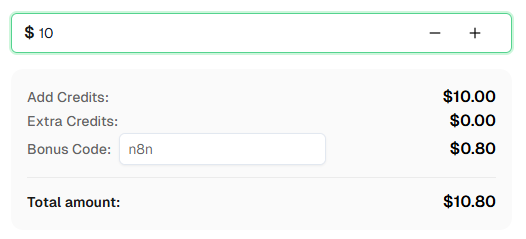
Ready to get started? Sign up for CapSolver and use bonus code n8n for an extra 8% bonus on your first recharge!
Cloudflare Turnstile is a CAPTCHA alternative that verifies visitors without requiring them to solve puzzles. It runs in the background using browser signals and behavioral analysis to determine if a visitor is human.
Pricing varies based on usage. Check the CapSolver pricing page for current Turnstile rates.
Turnstile challenges are typically solved in a few seconds since there are no image challenges involved.
Yes! This workflow works with both self-hosted n8n and n8n Cloud. The CapSolver node is already available as an official integration — just add your API credentials.
Search the page source for data-sitekey in the HTML or look for turnstile.render() in the JavaScript. You can also open DevTools (F12) → Network tab and filter by turnstile to find the site key in requests. For a detailed guide, see the CapSolver documentation.
Several things can cause this. First, tokens expire quickly — make sure you're submitting the token immediately. Second, verify you're sending the token to the right place: inspect the actual network request the browser makes when you submit the form (DevTools → Network tab) and confirm the field name (cf-turnstile-response is typical but not universal), request method, and endpoint all match what you've configured in n8n. Third, some sites require metadata.action or metadata.cdata parameters — use the CapSolver extension to check if any of these apply. If the token is still rejected, contact CapSolver support for site-specific help.
Lucas Mitchell
Automation Engineer
Helping browser automation recover and continue.
ABOUT THE AUTHOR
Learn how to use the CapSolver n8n template to monitor AWS WAF-protected product pages, solve challenges, extract prices, compare changes, and trigger alerts automatically.

Learn how to build web scrapers in n8n for captcha-protected sites using CapSolver. This step-by-step guide covers solving reCAPTCHA, submitting tokens correctly, extracting product data, and automating workflows with schedule and webhook triggers.