🎉NEWCapSolver for AI agents-MCP, agent tools, and SDK integrations

Emma Foster
Machine Learning Engineer
Published Sep 29, 2026
Updated Sep 29, 2026 · min read
AntiTurnstileTaskProxyLess, without a separate invisible task type.A form can fail even when its CAPTCHA has no visible interface. That makes “Turnstile invisible not working” an awkward problem to diagnose: a screenshot cannot show whether the challenge ran, whether a token reached the form, or whether the server rejected the submission. Repeatedly clicking the submit button gives you little additional evidence.
For a site you maintain or a client-authorized QA workflow, start by tracing those events. CapSolver can handle a supported Turnstile challenge within automation, but a solver cannot correct a broken component lifecycle or an application that omits token validation. The useful first question is which part of the form's verification path has actually failed.
Turnstile Invisible mode runs verification without displaying a widget or a loading indicator. The Cloudflare Turnstile glossary entry provides background on the service; Cloudflare's widget mode documentation distinguishes Invisible from Managed and Non-Interactive modes.
Managed mode can ask for interaction. Non-Interactive mode still has a visible interface. Invisible mode has no such visual footprint, so waiting for a checkbox is the wrong completion condition.
The absence of a visible widget also does not identify the mode by itself. A script might have failed to load, the application might not have mounted the component, or a visible widget might be configured to appear only at a particular stage. If you own the integration, check its configured widget mode and the page's actual initialization behavior.
Visibility determines what the visitor sees; execution determines when verification runs. Cloudflare's widget configuration reference separates appearance settings from the execution option.
For example, an owned form can prepare its widget when the component loads but defer execution until the user is ready to submit. An automation script that merely waits for the page to load may reach the form before that event occurs. Calling this a “missing CAPTCHA” would send the investigation in the wrong direction.
Check how the application starts verification and which event marks completion. Do not change CSS to make an invisible widget visible; establish whether the configured behavior has happened.
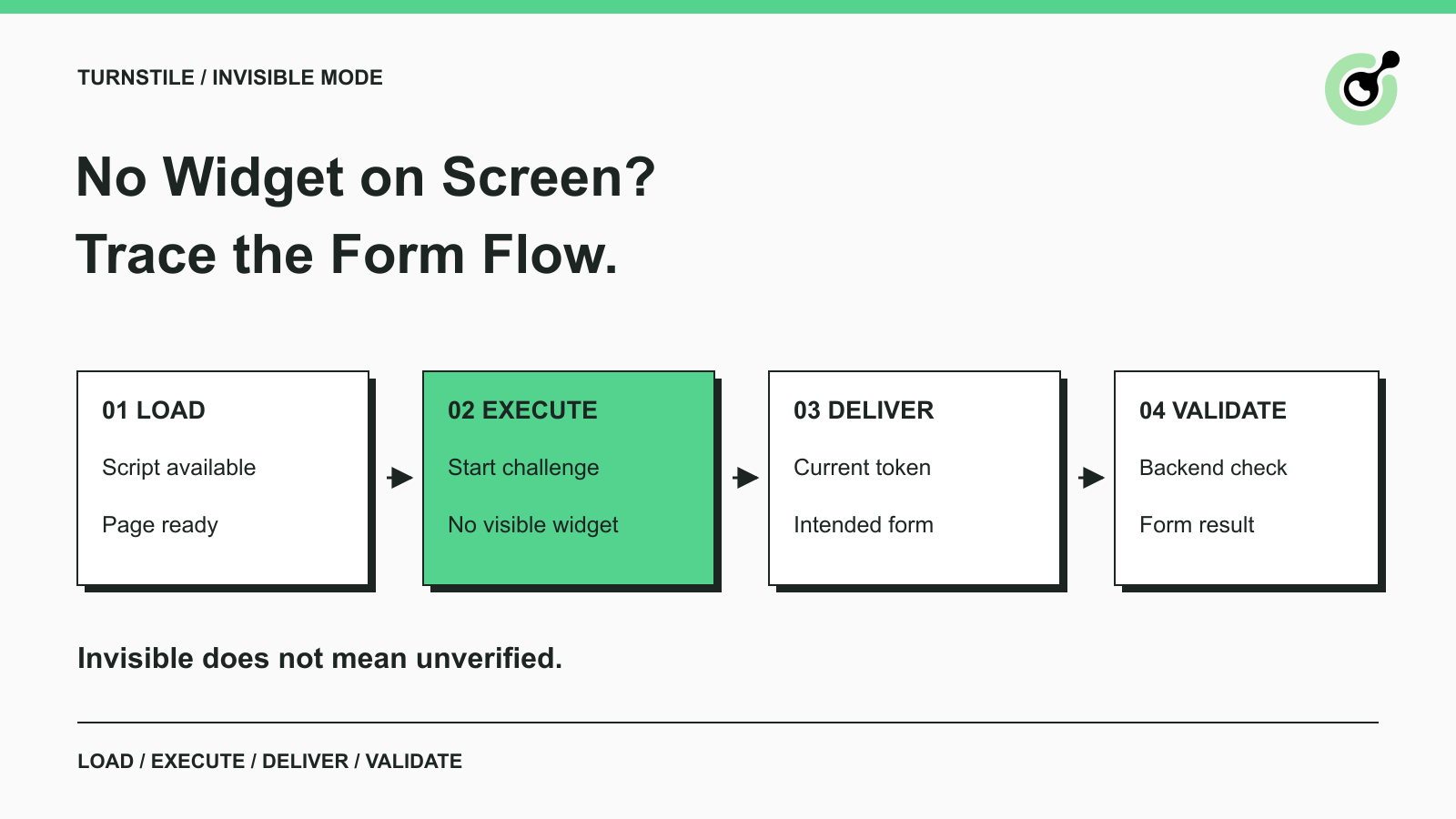
The failure belongs to the earliest stage without a confirmed outcome. Use one controlled form attempt and inspect its browser and server evidence together.
| Observation | First area to inspect | Evidence to collect |
|---|---|---|
| No widget and no script request | Page integration | Whether the intended component initialized |
| Script request fails | Loading environment | Network failure and relevant console message |
| Script loads but verification does not start | Execution timing | Which application event should trigger execution |
| Token is available but absent from submission | Form integration | Token presence in the intended request, without logging its value |
| Backend rejects verification | Validation | Provider response and application decision |
| Verification passes but operation fails | Application logic | Form errors or the missing business result |
These are diagnostic categories, not provider error codes. A team can use the table without inventing new API fields or replacing its existing error handling.
Keep the browser attempt identifiable with a test case or request reference. If the frontend trace comes from one submission and the backend log comes from another, the resulting timeline can look contradictory even when both components behave consistently.
Loading and execution checks establish whether the intended Turnstile integration is present and active. They are particularly useful when the visible page gives you no CAPTCHA status.
Inspect the Network panel for the Turnstile script and the Console for related failures. Cloudflare hosts Turnstile under challenges.cloudflare.com; its widget documentation calls out the need to allow the relevant connections when a site uses a Content Security Policy.
A blocked resource requires a site configuration or environment investigation. On an owned application, review the intended policy with the team responsible for it. A solver response will not make a missing script initialize, and disabling the application's protection is not a valid diagnostic result.
Reproduce with a supported, ordinary browser configuration under the same test conditions. Change one suspected cause at a time. If several extensions, deployment settings, and form components change together, a passing rerun will not tell you which change mattered.
Check whether the form is loaded immediately, opened in a dialog, or replaced after navigation. A component can disappear while an asynchronous operation is still running. Your application should not send a result from that old component into a newly opened form.
For a deferred form, record when the form becomes available, when the widget initializes, and when execution is requested. This is an application inspection task; it does not require guessing an invisible checkbox selector.
A useful reproduction describes a concrete sequence, such as opening a feedback dialog after the page loads and then submitting one test message. “Sometimes fails in the browser” gives the developer much less to investigate.
Token delivery succeeds only when the current form attempt passes its response to the backend through the application's expected integration. A callback firing and a form submitting are separate events.
Check that the completion callback belongs to the intended widget and that the form does not submit prematurely. If the application manages the response itself, inspect the actual submission path instead of assuming that the presence of a hidden field is sufficient.
Avoid keeping a single reusable token as global form state across later attempts. Cloudflare's server-side validation guide states that Turnstile tokens are single-use and valid for five minutes. The backend must validate the response with Siteverify.
For a long form, inspect the interval between obtaining the token and sending the submission. A visitor might finish verification and continue editing; an agent might pause for a separate decision. The correct handling depends on the component's documented expiration and reset behavior, not on an arbitrary longer sleep.
When troubleshooting, retain timestamps and whether a response was present. Avoid copying raw tokens into shared logs or support tickets. The investigation generally needs the stage and outcome, not the usable token itself.
Redeem Your CapSolver Bonus Code
Boost your automation budget instantly!
Use bonus code CAP26 when topping up your CapSolver account to get an extra 5% bonus on every recharge — with no limits.
Redeem it now in your CapSolver Dashboard
A Turnstile solver fits at the supported challenge-solving step after the workflow has identified the correct page and widget. It should not be the first response to every missing visual element.
The CapSolver Turnstile task reference documents AntiTurnstileTaskProxyLess and support for invisible, non-interactive, and managed-style Turnstile challenges without a separate subtype selection. The task requires websiteURL and websiteKey; metadata.action and metadata.cdata are optional values when present in the widget's integration.
For authorized automation, the practical preparation is straightforward:
The existing Turnstile parameter identification article addresses finding the page information. This guide focuses on diagnosing the invisible form flow rather than repeating a complete API integration.
The documented Turnstile task does not require a supplied proxy, and the current reference says a custom User-Agent parameter is ignored. Neither changing the task name to an imagined invisible variant nor adding unrelated parameters fixes a page lifecycle bug.
A returned solver token is one intermediate result. If the page has navigated or the form has been replaced, the workflow must resolve that change before continuing. If Siteverify succeeds but the application rejects a required field, investigate the field error instead of buying another solution.
An invisible-mode test should assert meaningful events and outcomes rather than the presence of a widget. Cloudflare provides dedicated Turnstile test keys for controlled implementation testing.
Use the appropriate test configuration in your own test environment to check successful and failed verification handling. Keep that exercise separate from evaluating a real solver on a permitted production-style integration: deterministic test keys do not measure real challenge-solving performance.
A compact test plan can cover four conditions. The ordinary form attempt reaches its expected completion state. A failed verification leaves the operation uncompleted and provides a useful message. A delayed submission handles token expiry correctly. Closing and reopening the form does not reuse the previous attempt's response.
For a hypothetical feedback form, success could be one test feedback reference returned by the owned backend. A QA run should check that reference and confirm the form did not submit twice. The example is a suggested acceptance condition, not a reported customer result.
If the site does not expose backend logs to your team, record the browser evidence and escalate the unresolved validation question to its owner. You cannot infer successful backend verification merely because the browser contains a response value.
For issues already narrowed to a rejected token, the invalid Turnstile token guide covers that narrower branch. Keeping the branches separate makes the initial “no widget” diagnosis faster to explain.
Invisible mode changes the interface you can observe, while the application still needs a complete verification path. Confirm loading and execution, trace the current token into the form, and check server validation and the requested operation separately.
Use CapSolver when a supported Turnstile challenge is the step your authorized automation needs to handle. Keep integration defects and ordinary application failures assigned to their actual owners so repeated solving does not conceal the original problem.
Q: Why is there no Turnstile widget on the page?
Invisible mode deliberately shows no widget. Confirm the configured mode, then check script loading and execution; absence alone cannot distinguish normal invisible behavior from an integration failure.
Q: Does invisible Turnstile need a different CapSolver task?
The documented task is AntiTurnstileTaskProxyLess, with no separate invisible subtype required. Use the correct page URL, site key, and relevant optional metadata from the current integration.
Q: Why does the form fail after a token is returned?
The token may not reach the intended submission, may be stale or already used, or may fail backend validation. The application can also reject the operation for reasons unrelated to CAPTCHA. Inspect those outcomes separately.
Q: Can I remove backend validation to fix invisible mode?
No. Cloudflare requires server-side token validation. Repair the integration while retaining that check, and use controlled test keys in the appropriate testing environment to investigate success and failure handling.
Q: What should an automated test wait for?
The test should wait for the application's relevant verification completion and then check the requested operation's result. Waiting for a visible checkbox cannot establish success for an Invisible-mode widget.
Emma Foster
Machine Learning Engineer
Where machine learning meets practical AI tooling.
ABOUT THE AUTHOR
Evaluate a Turnstile solver API by its documented inputs, token response, validation boundary, and controlled test cases before adding it to your workflow.
Diagnose Cloudflare Challenge flows with AntiCloudflareTask, stable proxy and user agent identity, fresh HTML, clearance handling, validation, and safe errors.