
🎉NEWCapSolver for AI agents-MCP, agent tools, and SDK integrations

Ethan Collins
AI Agent Workflow Engineer
Published Aug 27, 2026
Updated Aug 27, 2026 · min read
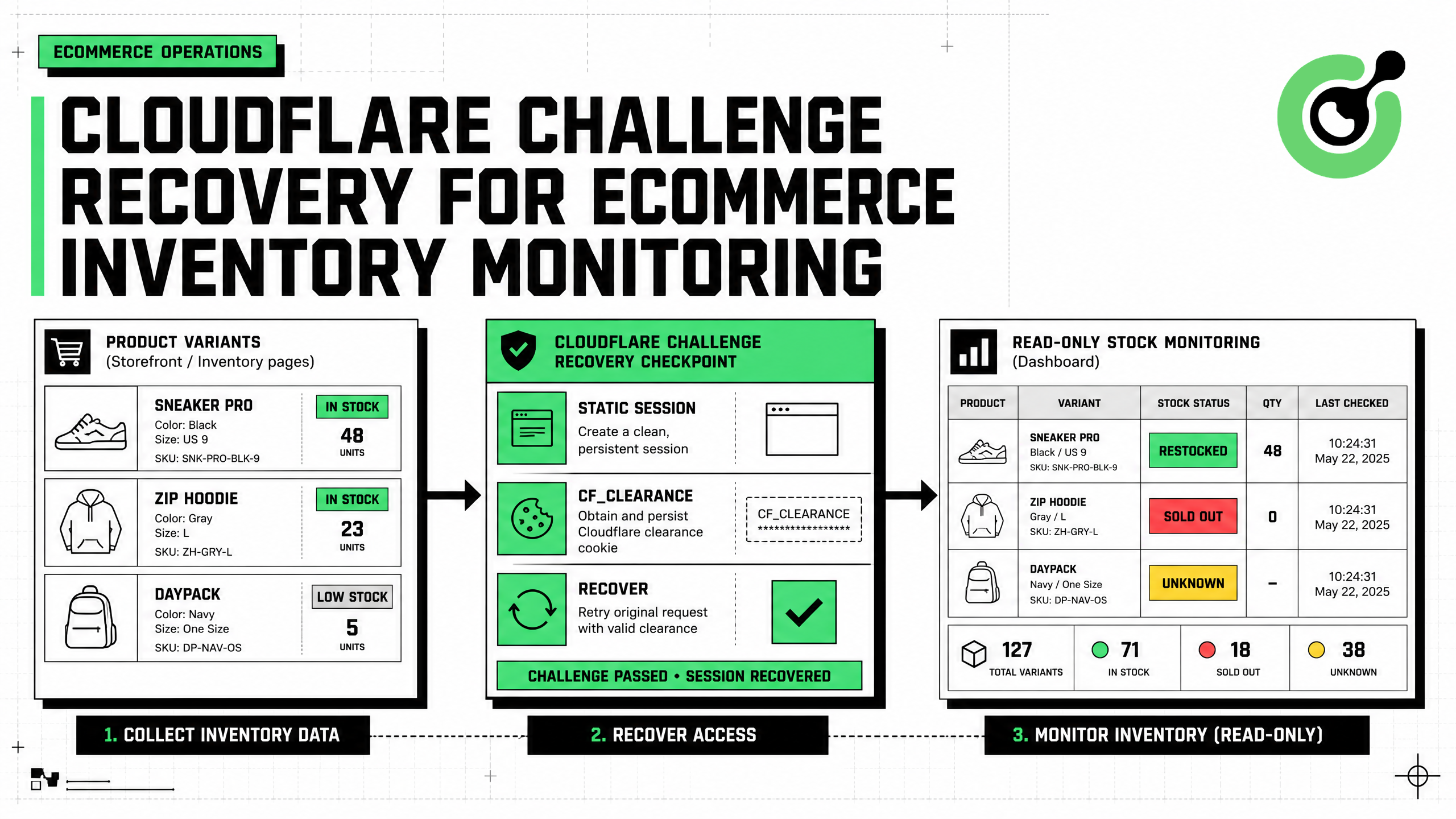
AntiCloudflareTask with a static or sticky proxy.Reliable ecommerce inventory monitoring is an evidence problem, not just a page-fetching problem. A product page can show “in stock” while a specific size is unavailable, a marketplace API can lag behind a merchant feed, and a Cloudflare Challenge can replace the expected page with an interstitial response. The right workflow is API-first, variant-aware, and session-consistent. It uses official feeds where available, records structured stock observations, and invokes CapSolver only when a supported Cloudflare Challenge interrupts an authorized browser fallback. This guide explains the data model, challenge-recovery flow, static-proxy and user-agent requirements, cookie handoff, inventory-change detection, alert controls, and compliance boundaries for retail operations, catalog intelligence, and approved availability monitoring.
Inventory monitoring should answer one specific operational question. Common examples include:
Avoid a vague target such as “monitor this product.” Define the product identifier, variant, region, delivery context, source, and alert condition.
inventory_job = {
    "canonical_product_id": "catalog-7821",
    "gtin": "0099999999999",
    "variant": {
        "color": "black",
        "size": "M",
    },
    "market": "US",
    "destination_postal_code": "94107",
    "sources": [
        "merchant_inventory_feed",
        "marketplace_api",
        "authorized_product_page",
    ],
    "alert_on": ["OUT_OF_STOCK_TO_IN_STOCK"],
}
The CapSolver ecommerce blog covers related commerce workflows, and the CapSolver web-scraping FAQ explains operational considerations for permitted public-data collection.
Official sources are usually more stable and easier to audit. Use merchant feeds, seller APIs, marketplace inventory endpoints, and licensed catalog providers before reading buyer-facing pages.
The eBay Browse API documentation supports item search by keyword, category, ePID, GTIN, condition, and other filters. For stores that publish structured product pages, Schema.org Offer defines fields such as availability, price, priceCurrency, seller, and eligible quantity. Google's Product structured data documentation explains how offer and availability data can appear in product markup.
| Source | Recommended role | Main strength | Main limitation |
|---|---|---|---|
| Merchant inventory feed | Primary for owned catalog | Direct SKU and quantity data | Limited to your commercial relationship |
| Marketplace API | Primary for approved marketplace listings | Structured identifiers and filters | Quotas and marketplace-specific fields |
| Licensed provider | Cross-market normalization | Consistent schema | License cost and coverage |
| Authorized public page | Validation and gap coverage | Reflects buyer-facing state | Layout changes and traffic validation |
Browser collection should validate or supplement a known data gap, not replace an available official source.
A generic in_stock: true field is not enough. Preserve variant, channel, market, seller, and evidence.
from dataclasses import dataclass, field
from datetime import datetime, timezone

@dataclass
class InventoryObservation:
    source: str
    canonical_product_id: str
    source_item_id: str | None
    gtin: str | None
    variant: dict[str, str]
    market: str
    seller_id: str | None
    availability: str
    quantity: int | None
    quantity_confidence: str
    delivery_method: str | None
    store_id: str | None
    source_url: str | None
    evidence: dict
    parser_version: str
    observed_at: str = field(
        default_factory=lambda: datetime.now(timezone.utc).isoformat()
    )
Use a controlled availability vocabulary:
VALID_AVAILABILITY = {
    "IN_STOCK",
    "OUT_OF_STOCK",
    "PREORDER",
    "BACKORDER",
    "LIMITED",
    "UNKNOWN",
}
If the page says only “available,” record quantity as None. Do not infer a numeric value.
The CapSolver Python web-data guide provides implementation context, while the CapSolver glossary can help teams standardize terms.
The parser should verify page identity before reading stock data. A challenge page can return HTTP 200 and still contain none of the expected product elements.
CHALLENGE_TITLES = {
    "just a moment...",
    "attention required!",
}

async def classify_page(page) -> str:
    title = (await page.title()).strip().lower()
    html = (await page.content()).lower()

    if title in CHALLENGE_TITLES:
        return "CLOUDFLARE_CHALLENGE"
    if "cf-chl-" in html or "challenge-platform" in html:
        return "CLOUDFLARE_CHALLENGE"
    if await page.locator('[data-product-id]').count():
        return "PRODUCT_PAGE"
    return "UNKNOWN_PAGE"
Treat these markers as routing signals, not universal proof. Maintain target-specific fixtures and test them against pages you are authorized to access.
The CapSolver Cloudflare product page describes the supported challenge task, and the CapSolver Cloudflare blog contains troubleshooting context.
CapSolver's official Cloudflare Challenge documentation defines AntiCloudflareTask.
| Field | Required | Inventory-monitoring use |
|---|---|---|
type |
Yes | Fixed as AntiCloudflareTask |
websiteURL |
Yes | Exact approved product or listing URL |
proxy |
Yes | Static or sticky proxy used by the browser |
userAgent |
No | Exact supported Chrome user agent from the browser |
html |
No | Fresh interstitial HTML when the target requires it |
The solution can include a cf_clearance cookie, token, and user agent. Those values are short-lived session material. They should be consumed by the monitoring runtime, not stored in an analytics warehouse.
Cloudflare's Challenges documentation explains the purpose and types of challenge mechanisms. Technical capability does not grant access permission, so the source policy remains the controlling rule.
Do not expose proxy credentials to an analyst, model, log, or alert. Resolve a profile inside trusted code.
import os
from urllib.parse import urlparse

import capsolver

capsolver.api_key = os.environ["CAPSOLVER_API_KEY"]

SOURCE_POLICY = {
    "shop.example.com": {
        "proxy_profile": "inventory_us_west",
        "max_checks_per_hour": 4,
    }
}

PROXY_VAULT = {
    "inventory_us_west": os.environ["INVENTORY_PROXY_US_WEST"],
}


def approved_host(url: str) -> str:
    host = urlparse(url).hostname
    if host not in SOURCE_POLICY:
        raise PermissionError("Inventory source is not approved")
    return host


def solve_cloudflare_challenge(
    url: str,
    chrome_user_agent: str,
    fresh_html: str = "",
) -> dict:
    host = approved_host(url)
    profile = SOURCE_POLICY[host]["proxy_profile"]

    task = {
        "type": "AntiCloudflareTask",
        "websiteURL": url,
        "proxy": PROXY_VAULT[profile],
        "userAgent": chrome_user_agent,
    }
    if fresh_html:
        task["html"] = fresh_html

    solution = capsolver.solve(task)
    cookies = solution.get("cookies") or {}
    clearance = cookies.get("cf_clearance") or solution.get("token")
    if not clearance:
        raise RuntimeError("Challenge solution did not include clearance")

    return {
        "cookies": cookies,
        "user_agent": solution.get("userAgent") or chrome_user_agent,
        "proxy_profile": profile,
    }
Use a static or sticky proxy. Do not rotate network identity between initial navigation, solving, and page recovery.
Create the Playwright context with the approved proxy and user agent, capture the challenge state, obtain the solution, and apply cookies within a compatible context.
from urllib.parse import urlparse

async def recover_inventory_page(browser, url: str):
    host = approved_host(url)
    profile = SOURCE_POLICY[host]["proxy_profile"]
    proxy = PROXY_VAULT[profile]

    bootstrap_context = await browser.new_context(
        proxy={"server": proxy},
    )
    bootstrap_page = await bootstrap_context.new_page()
    await bootstrap_page.goto(url, wait_until="domcontentloaded")

    state = await classify_page(bootstrap_page)
    if state != "CLOUDFLARE_CHALLENGE":
        return bootstrap_context, bootstrap_page, False

    user_agent = await bootstrap_page.evaluate("navigator.userAgent")
    html = await bootstrap_page.content()

    solution = solve_cloudflare_challenge(
        url=url,
        chrome_user_agent=user_agent,
        fresh_html=html,
    )

    await bootstrap_context.close()

    context = await browser.new_context(
        proxy={"server": proxy},
        user_agent=solution["user_agent"],
    )

    cookie_domain = urlparse(url).hostname
    await context.add_cookies([
        {
            "name": name,
            "value": value,
            "domain": cookie_domain,
            "path": "/",
            "secure": True,
            "httpOnly": True,
        }
        for name, value in solution["cookies"].items()
    ])

    page = await context.new_page()
    await page.goto(url, wait_until="domcontentloaded")
    return context, page, True
Different proxy formats require different Playwright fields. Parse proxy server, username, and password inside the vault adapter when needed.
Prefer JSON-LD or stable page contracts over presentation text.
import json

SCHEMA_AVAILABILITY = {
    "https://schema.org/InStock": "IN_STOCK",
    "https://schema.org/OutOfStock": "OUT_OF_STOCK",
    "https://schema.org/PreOrder": "PREORDER",
    "https://schema.org/BackOrder": "BACKORDER",
    "InStock": "IN_STOCK",
    "OutOfStock": "OUT_OF_STOCK",
}

async def read_jsonld_offers(page) -> list[dict]:
    blocks = await page.locator(
        'script[type="application/ld+json"]'
    ).all_text_contents()

    offers = []
    for raw in blocks:
        try:
            data = json.loads(raw)
        except json.JSONDecodeError:
            continue

        nodes = data if isinstance(data, list) else [data]
        for node in nodes:
            if not isinstance(node, dict):
                continue
            offer = node.get("offers")
            if isinstance(offer, dict):
                offers.append(offer)
            elif isinstance(offer, list):
                offers.extend(x for x in offer if isinstance(x, dict))
    return offers
Normalize availability without inventing quantity:
def normalize_offer_availability(offer: dict) -> tuple[str, int | None]:
    raw = str(offer.get("availability", ""))
    availability = SCHEMA_AVAILABILITY.get(raw, "UNKNOWN")

    inventory_level = offer.get("inventoryLevel")
    quantity = None
    if isinstance(inventory_level, dict):
        value = inventory_level.get("value")
        if isinstance(value, int) and value >= 0:
            quantity = value

    return availability, quantity
Store a hash of the relevant evidence and parser version. This makes alerts reproducible without retaining unnecessary page content.
Alert on transitions, not repeated snapshots.
def inventory_transition(previous: str, current: str) -> str | None:
    if previous == current:
        return None
    if previous in {"OUT_OF_STOCK", "UNKNOWN"} and current == "IN_STOCK":
        return "RESTOCKED"
    if previous == "IN_STOCK" and current == "OUT_OF_STOCK":
        return "SOLD_OUT"
    return "STATUS_CHANGED"
Require two observations when the source is noisy:
def confirmed_transition(observations: list[InventoryObservation]) -> str | None:
    if len(observations) < 3:
        return None
    older, previous, current = observations[-3:]
    if previous.availability != current.availability:
        return None
    return inventory_transition(older.availability, current.availability)
The second sample reduces alerts caused by a temporary parser or page-state error. Tune the rule to the source's update cadence.
A challenge event is an infrastructure signal. It is not an inventory change.
| Metric | Meaning | Alert destination |
|---|---|---|
inventory_restock_total |
Confirmed unavailable-to-available transition | Commerce operations |
inventory_unknown_total |
Parser could not determine availability | Data-quality queue |
challenge_encounter_total |
Approved page presented a challenge | Automation operations |
challenge_recovery_success |
Recovery completed and product page returned | Reliability dashboard |
challenge_loop_total |
Page remained challenged after recovery | Operator review |
Never classify a challenge page, HTTP error, or empty selector as OUT_OF_STOCK.
The CapSolver errors FAQ provides diagnostic guidance, and the CapSolver automation blog covers related recovery patterns.
Bonus Code: Use code WEBS at CapSolver Dashboard to get an extra 5% bonus on every recharge.
| Control | Recommended implementation |
|---|---|
| Source permission | Per-host approval record and purpose limit |
| Source priority | Feed or API before browser fallback |
| Proxy | Static or sticky profile resolved server-side |
| User agent | Same supported Chrome identity through recovery |
| Cookies | Short-lived encrypted storage; no analytics retention |
| Retry | One recovery attempt, then operator review |
| Rate limit | Source-specific quotas with backoff and jitter |
| Alerts | Read-only notification by default |
| High-impact action | Explicit confirmation before reservation or purchase |
Use the CapSolver CAPTCHA-solving FAQ to understand task flow and the CapSolver products page to review supported solution categories.
Monitor only sources you are authorized to access. Follow marketplace API licenses, merchant terms, rate limits, privacy requirements, and inventory-data contracts. Do not use challenge recovery to access private accounts, restricted seller dashboards, buyer records, or non-public inventory. Keep the system read-only unless a separate approved service handles reservation or checkout with explicit human consent.
Cloudflare Challenge recovery can make ecommerce inventory monitoring more reliable, but only when it sits inside an API-first, variant-aware, and policy-controlled data pipeline. The monitor should validate page identity, preserve proxy and user-agent consistency, consume clearance cookies briefly, parse structured availability evidence, and separate infrastructure failures from true stock changes.
Start an approved workflow with CapSolver, test it against a controlled source, and add evidence retention, rate limits, and operator review before scaling.
No. Prefer merchant feeds, marketplace APIs, seller APIs, and licensed data sources. Use an authorized browser only for permitted gaps or buyer-facing validation.
Use the documented AntiCloudflareTask with the exact target URL and a static or sticky proxy. Optional fields include the browser's supported Chrome user agent and fresh challenge HTML.
No. A challenge, error page, or missing selector is an infrastructure or parser state. Record UNKNOWN and route it separately from inventory transitions.
Keep them only in short-lived encrypted runtime storage. Do not place them in model context, analytics tables, alerts, or long-term logs.
Keep monitoring read-only by default. Reservation, checkout, and purchasing require a separate approved service, fresh price validation, policy limits, and explicit human confirmation.
Ethan Collins
AI Agent Workflow Engineer
Building clearer handoffs between AI agents and tools.
ABOUT THE AUTHOR
Fix the AntiCloudflareTask dynamic DNS proxy error. Learn why a 10-minute sticky session can use different exit IPs and how to verify both request paths.

Diagnose Turnstile invisible mode problems by checking script loading, execution, token delivery, and validation before adding a solver to automation.

