

🎉NEWCapSolver for AI agents-MCP, agent tools, and SDK integrations

Khadija Santos
AI Agent & MCP Engineer
Published Oct 30, 2026
Updated Oct 28, 2026 · min read
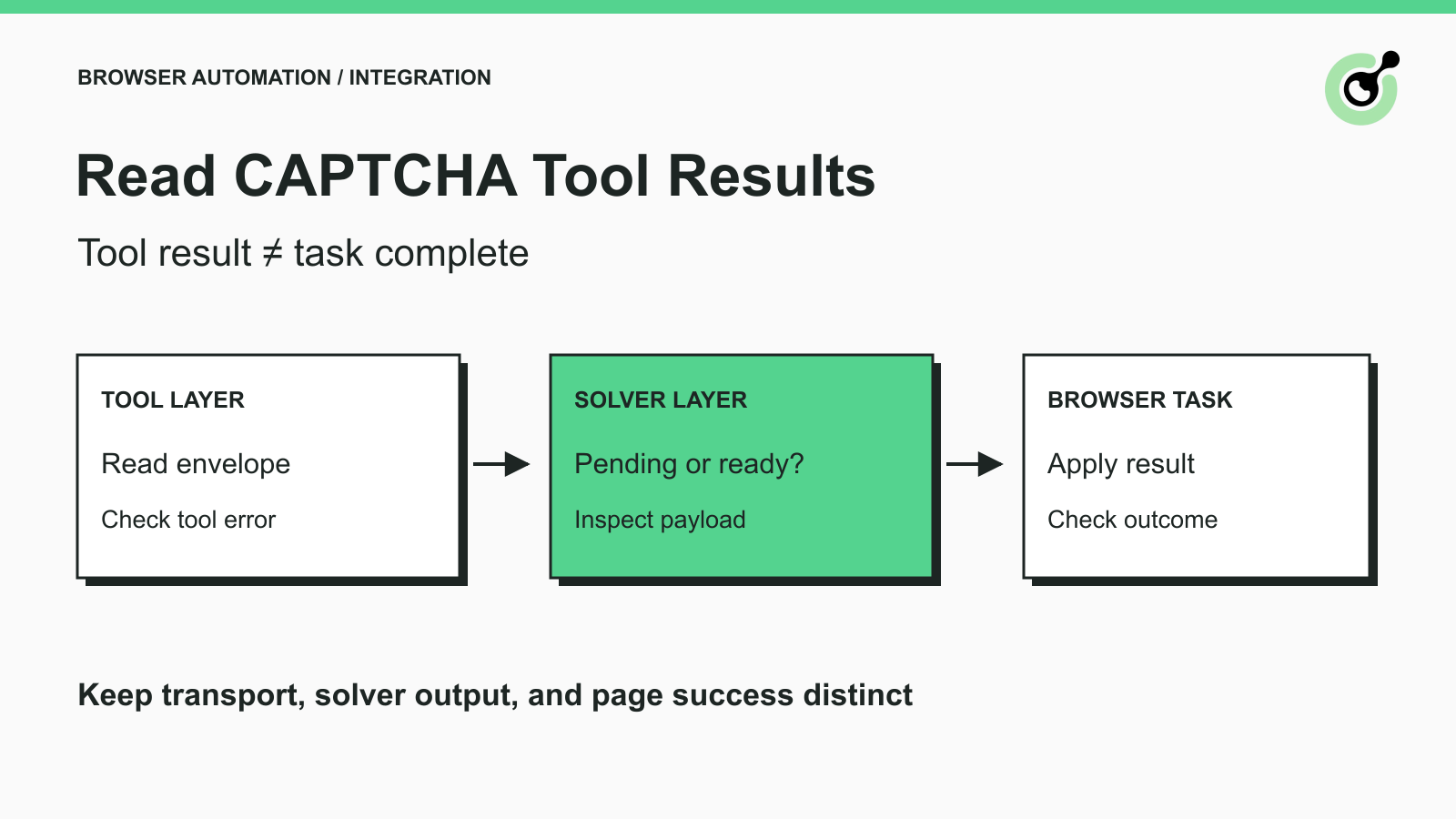
errorId before interpreting status or solution.A browser agent can receive a valid tool response and still have nothing useful to do next. The response might contain a validation error, an unfinished task, or a solution that the page has not accepted. Turning all three into the same “done” message makes the agent continue too early.
CapSolver exposes CAPTCHA operations through direct APIs and agent interfaces. The interface you choose determines the result shape. This guide explains how to interpret those shapes and design a small application summary without inventing new provider fields.
The concrete use case is an agent operating an owned test form. The browser reaches a supported CAPTCHA, the selected solver runs, and the application decides whether to wait, correct inputs, apply a result, or stop. The question here is what evidence should control that decision.
Identify the response layer before reading a field named success or status.
There are three useful layers: the tool transport, the CAPTCHA operation, and the browser task. An API defines a particular interface; its response should be interpreted within that contract. A tool wrapper may add another envelope, and the application may add its own workflow status.
| Layer | Question it answers | What it cannot establish by itself |
|---|---|---|
| MCP/tool transport | Did the tool call return, or did it report a tool error? | Whether a usable CAPTCHA solution exists |
| CAPTCHA service | Did the solving operation fail, remain pending, or produce its documented result? | Whether the intended form or page accepted that result |
| Browser/application | Did the intended operation reach its expected state? | Whether every earlier diagnostic was correctly recorded |
Keep the original outcome available for debugging. If your application normalizes results, label its fields as application-owned. Do not present a convenient internal field such as workflow_state as a documented CapSolver API field.
Check the MCP tool-error signal, then inspect the payload according to the tool's own contract.
The MCP tool specification describes tool result content and the isError flag. Client libraries can expose this through a different programming-language name. For example, FastMCP tool results expose .is_error, .content, and parsed data.
Do not assume every tool response is a bare JSON dictionary. Some servers return text content containing serialized JSON; some also provide structured content. Read the documented client property, then parse only the layer that actually contains JSON. Searching an entire response string for the word “success” is unreliable.
In a local connection test with FastMCP 3.4.11 and capsolver-mcp 0.1.3, an intentionally incomplete solve_captcha call returned a tool error identifying missing website_url and website_key inputs. A separate registry call returned successfully. Those observations confirm the error-reading path and registry execution, not paid solving.
A tool can also return a normal MCP envelope that contains a service-level failure. Therefore, “no tool exception” is only the first check. Next inspect the business result documented for that specific tool. Do not translate the direct API's fields into MCP fields by guesswork.
For a framework-specific registration example, the Pydantic AI tool guide covers typed inputs and adapter execution. The focus here is the decision after a response arrives, regardless of which framework registered the tool.
With the direct API, begin with errorId, then follow the documented task state.
The createTask reference and getTaskResult reference define this flow. A successful task creation may return a task identifier for later retrieval. That identifier is a handle for the operation, not the solved answer.
For a polled result, an error response must be handled before reading a solution. The documented idle and processing states are unfinished states. Continue the existing retrieval flow within its configured deadline; the reference instructs callers to wait three seconds before retrying a processing result. A ready result must still contain the solution shape documented for that task type.
| Response observation | Interpretation | Application action |
|---|---|---|
Nonzero errorId |
Service reports an error | Preserve errorCode and errorDescription; choose correction or stop |
| Task accepted, result still processing | No final solution yet | Poll the same task within the documented limits |
| Ready result with expected solution field | Candidate solution is available | Pass it to the component responsible for the same challenge |
| Missing or unexpected result fields | Contract not established | Stop interpretation and inspect the response; do not manufacture a token |
| Browser confirms the intended task | Application outcome established | Record workflow completion separately |
Some task types can complete synchronously. Follow the response documented for the selected type rather than forcing every task into a polling loop. Conversely, do not repeatedly call createTask just because an asynchronous result is not ready yet.
The reCAPTCHA v2 reference describes its solution fields. Other task families can return different data. A wrapper that assumes every result contains the same token field can silently discard a valid answer or mistake an unrelated field for one.
Redeem Your CapSolver Bonus Code
Boost your automation budget instantly!
Use bonus code CAP26 when topping up your CapSolver account to get an extra 5% bonus on every recharge — with no limits.
Redeem it now in your CapSolver Dashboard
Return enough information for the agent's next permitted step, while retaining detailed service data in the component that consumes it.
A small application summary can contain the operation stage, a normalized outcome, a safe explanation, and the next allowed action. These are your application fields, not a replacement for the provider response.
For example, after a pending direct API response, the summary might say: “CAPTCHA task is processing; continue waiting for the existing task.” After an input error, it might say: “The request is incomplete; obtain the missing page parameters before another attempt.” After a solver result, it might say: “A solution is available; browser verification is pending.”
Notice what these messages avoid: none claims that a form was submitted or a data request completed. The browser must provide that evidence later.
A practical implementation keeps two records. The operational record stores the task reference, safe diagnostic fields, and stage transitions. The browser component temporarily holds the solution value it needs. The model-facing summary points to the permitted next action without copying the full token into a conversational answer.
If the application accepts structured outputs from the model, validate those outputs against its own schema. A valid schema establishes shape, not truth. The model should not be allowed to change a pending solver observation into a completed browser outcome simply by returning a different status string.
Choose the next action from the error description and current page state, not from a universal retry rule.
The official error reference distinguishes invalid data, unsupported tasks, credentials, limits, and solving failures. Those categories require different handling. Retrying the same invalid payload does not correct its fields. Starting another paid task does not repair a missing credential.
Use a compact decision sequence:
A bounded stop is a useful result. “Could not complete this step” with an accurate reason is more actionable than an empty string that makes the agent behave as if solving succeeded.
The application must observe the expected result of the original task after the CAPTCHA step.
For an owned test form, define that condition before invoking the solver: perhaps a known confirmation element and the matching test submission record. An iframe disappearing, a response field being populated, or a tool returning a token may be useful intermediate evidence, but each is weaker than the intended application outcome.
Google's reCAPTCHA verification documentation explains the server-side verification step. That is why a token returned to the browser should not be confused with acceptance by the receiving application.
When a workflow fails, preserve the last established stage. “Solver returned; application rejected” is different from “solver never returned.” The distinction prevents a debugging session from changing the solver request when the actual problem is an unrelated required form field.
Test the result branches independently, then perform a permitted end-to-end test with real credentials and an owned page.
Include an input-validation failure, a service-error fixture, a processing response, a ready response, an unexpected payload, and a browser rejection after a candidate solution. Fixtures test your application's decisions; they do not prove live API behavior or CAPTCHA acceptance.
Also test a response that arrives after the application has stopped waiting. The application should preserve its stopped state instead of allowing a late result to resume an abandoned form. Keep the result associated with its original attempt.
The checks in this article establish documented response interpretation and a real MCP validation/registry path. They do not constitute a paid solving benchmark, a deployed customer case study, or a measurement of agent success rates.
Make the CAPTCHA result actionable by preserving its actual state and checking the browser outcome. CapSolver provides the documented solver interface for that step. Try CapSolver with a permitted test workflow and keep the final application check separate.
Q: Does isError false mean the CAPTCHA was solved?
No. It means the tool response was not marked as a tool execution error. Inspect the payload's documented business outcome and then verify the browser task separately.
Q: Should the agent receive the complete CAPTCHA token?
Only if the component that consumes the token actually needs it. Many designs can keep the value in application state and give the model a short status instead.
Q: Can I use the same result parser for REST and MCP?
Only after explicitly adapting their different response contracts. A REST task result and an MCP tool envelope are not interchangeable objects.
Q: What should I return when the result is still processing?
Return a pending status in your application's own format and keep retrieving the existing task within your deadline. Do not label it completed or create another task merely because the first is unfinished.
Q: What if the solver returns a result but the form fails?
Record solver completion and application failure separately. Inspect the page's rejection and current task context before deciding whether a new CAPTCHA attempt is appropriate.
Khadija Santos
AI Agent & MCP Engineer
Develops and maintains CapSolver’s MCP tooling, from implementation and package releases to AI agent integrations.
ABOUT THE AUTHOR
Keep parallel browser agents from mixing CAPTCHA results. Map task IDs to page owners, reject stale responses, and test routing before applying a solution.
Choose a CAPTCHA API or MCP for your AI agent by comparing task control, tool discovery, result handling, and browser responsibilities before you integrate.

