

🎉NEWCapSolver for AI agents-MCP, agent tools, and SDK integrations

Khadija Santos
AI Agent & MCP Engineer
Published Oct 29, 2026
Updated Oct 29, 2026 · min read
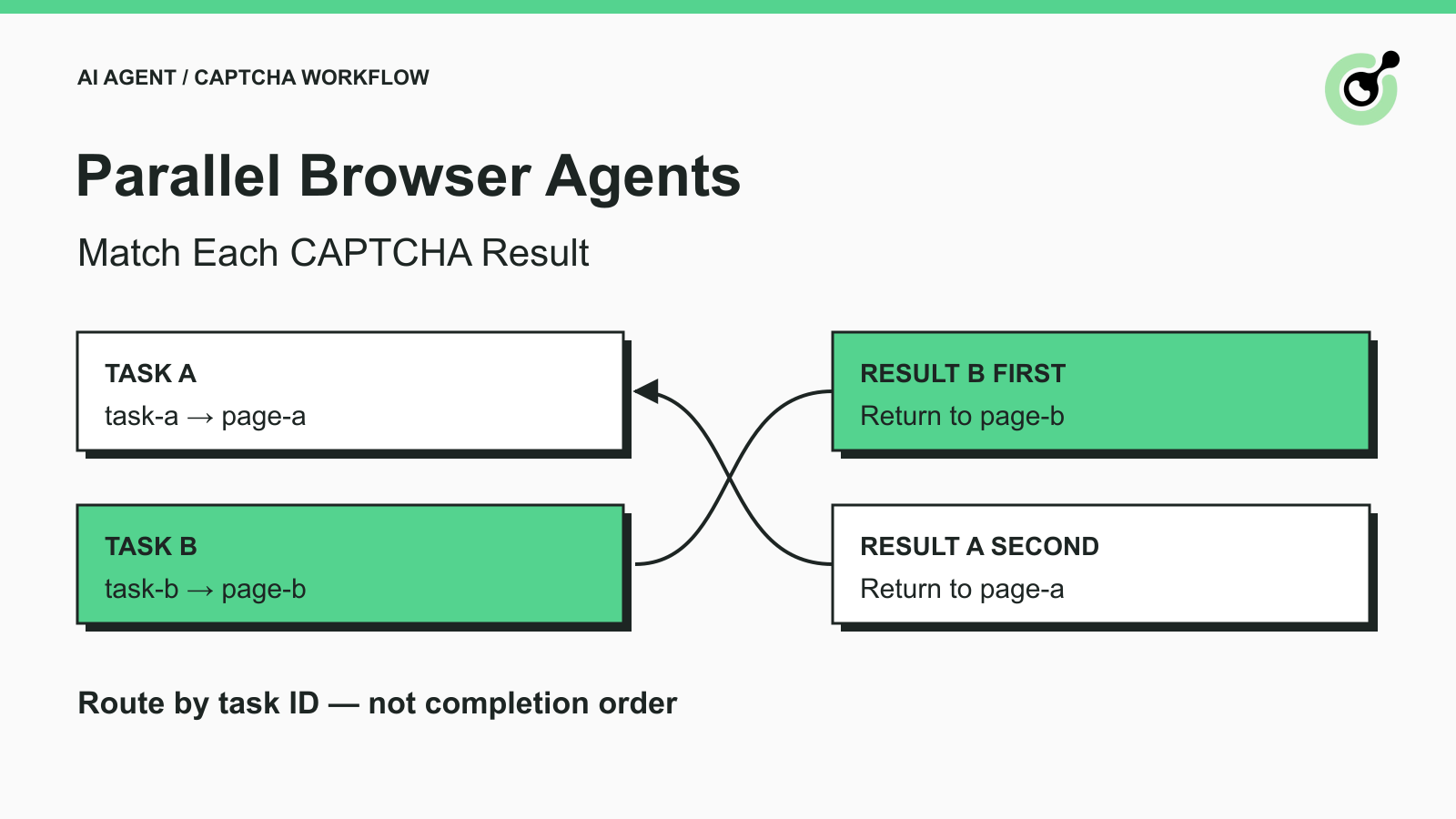
Two browser agents encounter supported CAPTCHAs during separate, authorized tasks. Agent A starts first, but Agent B receives a result first. If the application simply assigns the next result to the first waiting tab, both jobs can be affected even though each solver request was valid.
This is a task-correlation problem. More retries will not repair a result delivered to the wrong page. The application needs to remember which browser work item created each solver task and whether that work item is still current when the response arrives.
CapSolver returns task identifiers for asynchronous API work. This guide explains how to preserve that association across parallel agents, with a small local example you can run before connecting a real solver. It does not claim a concurrency benchmark or production CAPTCHA success.
A browser agent should keep the application job, page owner, and solver task ID associated with one attempt.
The createTask API returns a taskId for an asynchronous task. Save it when that creation response is accepted. The getTaskResult API takes that identifier to retrieve the corresponding result.
Your application also needs its own work-item identifier and a reference to the browser owner. These are application fields, not additional CapSolver request parameters. A page label such as page-a in the example identifies the worker that owns the page; it is not a reusable browser handle or an API credential.
Add a small attempt version, called epoch below. Increment it when a new navigation or challenge attempt makes an earlier pending result inappropriate. A URL alone is insufficient: two jobs can visit the same URL, and one page can load different state without changing its address.
Playwright's browser-context documentation explains isolated browser state. Context isolation and task correlation solve different problems. Separate cookies do not automatically route solver results to the right worker.
Completion order describes when results arrive, not which browser job owns them.
Python's asyncio.as_completed documentation describes processing awaitables as they finish. If your orchestration uses completion-order callbacks, each result must carry its own association rather than relying on a position in a list of waiting pages.
Treat task creation and binding as one local handoff: validate the creation response, store the returned ID with its work item, then allow result retrieval. A callback-based implementation needs an equivalent plan for results that arrive before its local binding is visible. Do not discard that race as an “unknown page” and immediately create another paid task.
The Python queue interface can help pass a complete work item between local workers. The queue is not a substitute for the mapping: carry the identifier with the result all the way to the page owner.
Accept a result for delivery only when the task ID is known and the recorded attempt still belongs to the active page.
Use a single owner to update this state in a small application. In a distributed service, use durable storage and an atomic claim or equivalent concurrency control. A Python dictionary shared informally between processes cannot provide that guarantee.
The example below is a local routing fixture, not an official SDK method or a complete solver integration. It uses invented task IDs and a fixture_marker, which is not a CAPTCHA token or a CapSolver solution field. Run it with Python 3; it requires no third-party packages, API key, browser, or network request.
def accept_result(reply, pending, current_epochs):
    task_id = reply.get('taskId')
    if not isinstance(task_id, str) or type(reply.get('errorId')) is not int:
        return 'malformed_reply', None
    job = pending.get(task_id)
    if job is None:
        return 'unknown_or_duplicate', None
    if current_epochs.get(job['page_id']) != job['epoch']:
        pending.pop(task_id)
        return 'stale_page', None
    if reply.get('errorId', 0) != 0:
        pending.pop(task_id)
        return 'solver_error', None
    if reply.get('status') != 'ready':
        return 'pending', None
    if not reply.get('solution'):
        pending.pop(task_id)
        return 'missing_solution', None
    pending.pop(task_id)
    return 'ready_for_owner', (job['page_id'], reply['solution'])

pending = {
    'fixture-task-a': {'page_id': 'page-a', 'epoch': 1},
    'fixture-task-b': {'page_id': 'page-b', 'epoch': 1},
}
epochs = {'page-a': 1, 'page-b': 1}
for task_id in ['fixture-task-b', 'fixture-task-a']:
    reply = {'taskId': task_id, 'errorId': 0, 'status': 'ready',
             'solution': {'fixture_marker': task_id}}
    state, target = accept_result(reply, pending, epochs)
    print(task_id, state, target[0] if target else None)
The example prints these two lines:
fixture-task-b ready_for_owner page-b
fixture-task-a ready_for_owner page-a
Task B finishes first and still returns to page B. The function deliberately hands the result to the owner without filling or submitting a page. Replace the fixture only after you have a documented task-specific result parser and a supported browser operation.
For a polling worker, retain the task ID used in the request as part of the local work item. If the response includes a task ID, verify that it matches; do not use an untrusted or mismatched response ID to relabel the request. The fixture assumes that this association has already been validated before accept_result is called.
Redeem Your CapSolver Bonus Code
Boost your automation budget instantly!
Use bonus code CAP26 when topping up your CapSolver account to get an extra 5% bonus on every recharge — with no limits.
Redeem it now in your CapSolver Dashboard
Late or repeated results should produce an explicit state instead of being applied to whichever tab is currently active.
Mark the old attempt stale when its page closes, navigates, or starts a replacement challenge. The fixture compares the stored epoch to current_epochs; removing a closed page also fails that check. Do not transfer an old result to a new attempt merely because the hostname matches.
Your page owner should check the attempt once more immediately before it uses a delivered result. The fixture's check and a later browser action are separate operations. Keeping page navigation and result application under the same owner prevents another worker from changing the page between them.
Keep the existing task binding while the solver reports a nonterminal state. Follow the current task documentation's polling guidance and your job deadline. Creating a replacement task every time a result is not ready can multiply pending work without resolving the original request.
Record the failure on the corresponding work item. The fixture separates solver errors, malformed envelopes, and missing solutions. A production parser must additionally validate the exact solution fields for the chosen task type; a nonempty dictionary is not enough to prove a usable token.
Claim delivery once. The local fixture removes a ready binding, so a repeat is classified as unknown or duplicate. Production workers need durable terminal records and an acknowledgement policy if delivery or browser execution can fail. Do not use this in-memory example as an exactly-once distributed queue.
Verify correct ownership and rejection behavior before drawing conclusions about throughput.
The local checks exercised reversed completion order, an ongoing task, an unknown ID, a changed attempt, a closed page, an error response, an empty solution, a malformed envelope, and a duplicate delivery. These checks passed for the published function. They did not test real CAPTCHA solving, browser fill-back, or application acceptance.
For an authorized end-to-end test, add the real task creation and retrieval calls, keep sensitive results in the browser worker, and confirm the intended application outcome after the documented solve step. If the page still shows a challenge or the expected record is absent, record that outcome separately from solver readiness.
Keep logs useful without copying raw tokens, cookies, or API keys. Store work-item IDs, task IDs, stage names, and sanitized error information. The existing API timeout guide addresses waiting behavior; this article's concern is which job receives the eventual result. The concurrencies glossary provides background on simultaneous work without implying a performance promise.
Keep every supported solve attached to the work item that requested it. CapSolver supplies the solver result; your application routes that result, checks that the attempt is still current, and verifies the browser task. That separation lets parallel agents remain independent when results arrive out of order.
Q: Can two browser agents share one pending task variable?
A single mutable variable is unsafe if later work overwrites the earlier association. Store a separate binding for each active solver task and its page owner.
Q: Is the page URL enough to identify the destination?
No. Different tabs can share a URL, and a page can change state at the same address. Keep the work-item identity and a current attempt version.
Q: Can I reuse a ready result after the page navigates?
Do not assume it remains applicable. Treat the old attempt as stale and inspect the new page before deciding on any further permitted solve.
Q: Does this example solve or submit a real CAPTCHA?
No. It tests local routing with invented identifiers and inert results. Paid solving and application acceptance require separate integration tests.
Q: Is the dictionary example safe across distributed workers?
No. It assumes a single owner in one process. Distributed execution needs durable task state, atomic delivery claims, and a failure-handling policy.
Khadija Santos
AI Agent & MCP Engineer
Develops and maintains CapSolver’s MCP tooling, from implementation and package releases to AI agent integrations.
ABOUT THE AUTHOR
Choose a CAPTCHA API or MCP for your AI agent by comparing task control, tool discovery, result handling, and browser responsibilities before you integrate.
Read CAPTCHA tool results correctly: distinguish transport errors, pending tasks, solver output, and browser success before letting an AI agent continue.

