Cách Giải reCAPTCHA v2/v3 Sử Dụng CapSolver và n8n

Anh Tuan
Data Science Expert
Nếu bạn từng cố gắng tự động hóa các tương tác web, chắc chắn bạn đã gặp phải reCAPTCHA — hệ thống thách thức của Google ngăn chặn bot truy cập các trang web. Dù bạn đang xây dựng trình thu thập dữ liệu, kiểm thử ứng dụng web, hay tự động hóa các tác vụ lặp đi lặp lại, reCAPTCHA có thể làm gián đoạn toàn bộ quy trình làm việc của bạn.
Điều gì sẽ xảy ra nếu bạn có thể giải reCAPTCHA tự động ngay trong các workflow của n8n — dù bạn đang xây dựng một API giải captcha có thể tái sử dụng, thu thập dữ liệu từ trang web được bảo vệ captcha, hay tự động hóa biểu mẫu đăng nhập — tất cả đều không cần viết một dòng mã truyền thống nào?
Trong hướng dẫn này, bạn sẽ học cách kết hợp n8n (công cụ tự động hóa workflow trực quan) với CapSolver (dịch vụ giải captcha sử dụng AI) để giải các thử thách reCAPTCHA v2, v2 Invisible và v3 theo yêu cầu — có thể dùng như một API độc lập hoặc như một bước trong bất kỳ quy trình tự động hóa nào.
Bạn sẽ xây dựng:
API giải captcha — một endpoint có thể tái sử dụng mà các công cụ khác của bạn có thể gọi:
- API giải reCAPTCHA (hỗ trợ v2, v2 Invisible và v3 — chỉ cần thay đổi Operation trong node CapSolver)
Workflow sử dụng trực tiếp — CapSolver được nhúng như một bước trong các quy trình tự động lớn hơn:
- Trình thu thập giá & sản phẩm giải reCAPTCHA, lấy trang được bảo vệ và cảnh báo khi giá thay đổi
- Tự động đăng nhập tài khoản giải reCAPTCHA trước khi gửi thông tin đăng nhập
reCAPTCHA là gì?
reCAPTCHA là hệ thống phát hiện bot của Google được sử dụng bởi hàng triệu trang web. Có ba phiên bản chính bạn sẽ gặp:
reCAPTCHA v2 — Checkbox ("Tôi không phải là người máy") + thử thách hình ảnh
reCAPTCHA v2 Invisible — Không có checkbox hiển thị, kích hoạt tự động ở nền
reCAPTCHA v3 — Hoàn toàn vô hình, đánh giá điểm số (0.0–1.0) dựa trên hành vi
Hiểu được phiên bản mà trang web sử dụng là rất quan trọng — mỗi phiên bản yêu cầu các tham số hơi khác nhau khi giải.
Yêu cầu trước khi bắt đầu
Trước khi bắt đầu, hãy đảm bảo bạn có:
- Một instance n8n — Hoặc tự host hoặc n8n Cloud
- Tài khoản CapSolver — Đăng ký tại đây và lấy API key của bạn
- Node CapSolver cho n8n — Đã có sẵn như một node chính thức trong n8n (không cần cài đặt thêm)
- Tiện ích mở rộng CapSolver trên trình duyệt (tùy chọn nhưng khuyến nghị) — Để xác định tham số captcha trên các trang web mục tiêu
Lưu ý: Hãy đảm bảo bạn có đủ số dư trong tài khoản CapSolver. Các tác vụ giải reCAPTCHA sẽ tiêu thụ credit tùy theo loại captcha.
Cài đặt CapSolver trong n8n
CapSolver có sẵn như một tích hợp chính thức trong n8n — không cần cài node cộng đồng. Bạn có thể tìm thấy nó trực tiếp trong bảng node khi xây dựng workflow.
Vì đây là tích hợp chính thức, bạn cần tạo một credential trong n8n để node CapSolver có thể xác thực với tài khoản của bạn.
Bước 1: Mở Trang Credentials
Truy cập instance n8n của bạn và vào Settings → Credentials. Bạn sẽ thấy tất cả các credential đã cấu hình ở đây.

Bước 2: Tạo Credential CapSolver
- Nhấn Create credential (góc trên bên phải)
- Tìm kiếm "CapSolver" và chọn CapSolver API
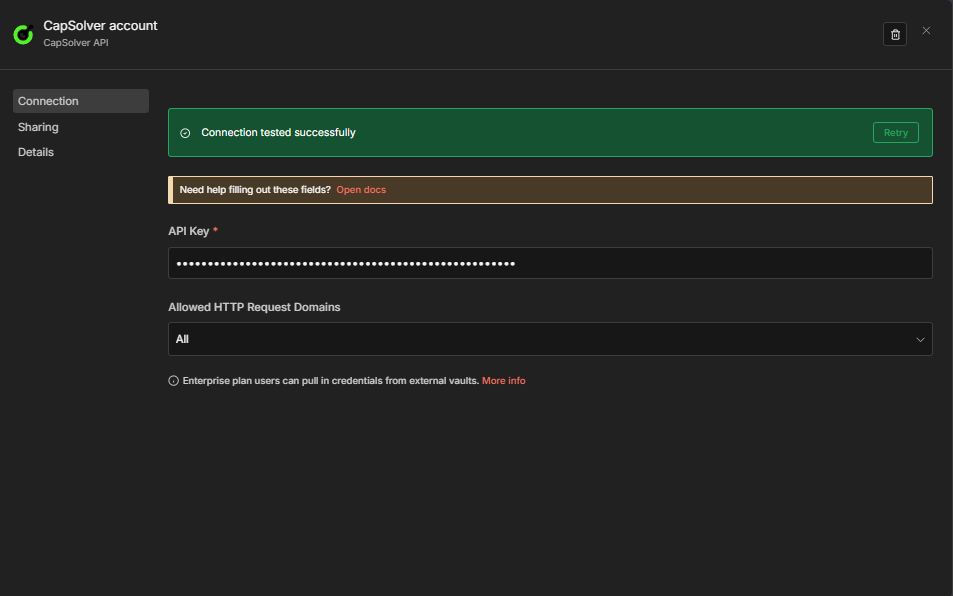
- Nhập API Key của bạn — sao chép trực tiếp từ Bảng điều khiển CapSolver
- Để Allowed HTTP Request Domains ở chế độ
All(mặc định) - Nhấn Save
n8n sẽ tự động kiểm tra kết nối. Bạn sẽ thấy thông báo màu xanh "Connection tested successfully" xác nhận API key hợp lệ.
Lưu ý: Mỗi node CapSolver trong workflow của bạn sẽ tham chiếu đến credential này. Bạn chỉ cần tạo một lần — tất cả workflow giải captcha sẽ dùng chung credential này.
Bây giờ bạn đã sẵn sàng xây dựng workflow giải reCAPTCHA!
Cách xác định tham số reCAPTCHA
Trước khi giải reCAPTCHA, bạn cần biết các tham số của nó — cụ thể là websiteURL và websiteKey (còn gọi là site key). Cách dễ nhất để tìm các tham số này là sử dụng Tiện ích mở rộng CapSolver trên trình duyệt.
Bước 1: Cài đặt Tiện ích CapSolver
Tải và cài đặt tiện ích CapSolver từ Chrome Web Store hoặc Firefox Add-ons.
Bước 2: Mở Bộ phát hiện CAPTCHA
- Truy cập trang web mục tiêu
- Nhấn F12 để mở Developer Tools
- Tìm tab "CapSolver Captcha Detector" trong DevTools

Bước 3: Kích hoạt CAPTCHA
Khi bảng phát hiện mở, tương tác với trang để kích hoạt reCAPTCHA. Tiện ích sẽ tự động phát hiện và hiển thị tất cả các tham số liên quan:
- Website URL — URL trang chứa CAPTCHA
- Website Key (Site Key) — Khóa công khai định danh captcha
- pageAction — Hành động cụ thể đang được xác minh (v3)
- isInvisible — Có phải reCAPTCHA vô hình không
- isEnterprise — Có sử dụng reCAPTCHA Enterprise không
- apiDomain — Endpoint API đang dùng (ví dụ:
recaptcha.net)

Mẹo: Tiện ích tạo ra một đầu ra JSON cho thấy chính xác cách định dạng các tham số này cho yêu cầu giải captcha của bạn. Điều này giúp bạn không phải tự tay kiểm tra mã nguồn trang.
Để xem hướng dẫn chi tiết về cách xác định tham số captcha, hãy xem tài liệu chính thức của CapSolver.
Workflow: API Giải reCAPTCHA
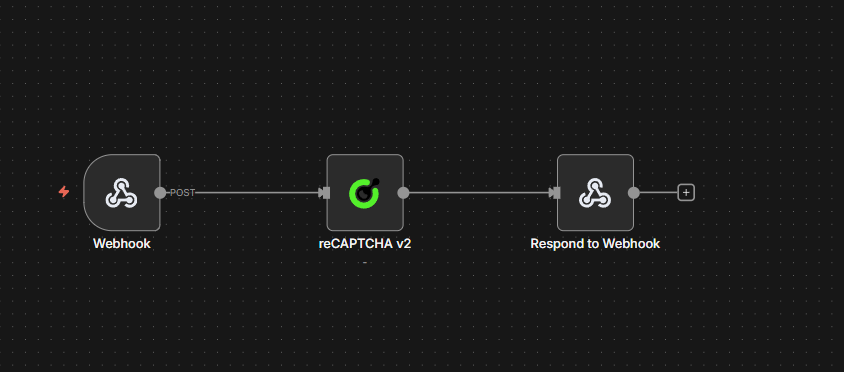
Workflow này tạo một endpoint POST nhận tham số reCAPTCHA và trả về token đã được giải. Cấu trúc 4 node giống nhau áp dụng cho tất cả các loại reCAPTCHA — chỉ cần thay đổi Operation trong node CapSolver.
Cách hoạt động
- Webhook — Nhận các yêu cầu POST với tham số captcha
- CapSolver — Giải thử thách sử dụng Operation đã cấu hình
- CapSolver Error? — Node IF phân nhánh dựa trên việc giải có lỗi hay không (
$json.errorkhông rỗng) - Respond to Webhook — Trả về kết quả khi thành công, hoặc
{"error": "..."}khi thất bại
Chọn loại reCAPTCHA của bạn
| Loại | Operation chọn | Tham số thêm |
|---|---|---|
| v2 Chuẩn | reCAPTCHA v2 |
— |
| v2 Invisible | reCAPTCHA v2 |
Đặt Is Invisible thành true trong node |
| v3 | reCAPTCHA v3 |
Thêm pageAction — phải khớp với hành động đã cấu hình trên trang (ví dụ: login, submit) |
Workflow dưới đây dùng reCAPTCHA v2 làm mặc định. Mở node CapSolver và thay đổi dropdown Operation để chuyển loại. Không cần thay đổi cấu trúc khác.
Cấu hình Node
1. Node Webhook
| Cài đặt | Giá trị |
|---|---|
| HTTP Method | POST |
| Path | solver-recaptcha |
| Respond | Response Node |
Điều này tạo endpoint tại: https://your-n8n-instance.com/webhook/solver-recaptcha
2. Node CapSolver
| Tham số | Giá trị | Mô tả |
|---|---|---|
| Operation | reCAPTCHA v2 |
Thay đổi thành reCAPTCHA v3 cho v3; với v2 Invisible giữ reCAPTCHA v2 và đặt Is Invisible thành true |
| Website URL | ={{ $json.body.websiteURL }} |
URL của trang chứa captcha |
| Website Key | ={{ $json.body.websiteKey }} |
Site key của reCAPTCHA |
| Page Action | ={{ $json.body.pageAction || '' }} |
Bắt buộc cho v3 — phải khớp với hành động trên trang |
| Is Invisible | ={{ $json.body.isInvisible || false }} |
Đặt true cho v2 Invisible |
| API Domain | ={{ $json.body.apiDomain || '' }} |
Tùy chọn — domain API tùy chỉnh (ví dụ: recaptcha.net) |
| Enterprise Payload | ={{ $json.body.enterprisePayload || '' }} |
Tùy chọn — payload bổ sung cho reCAPTCHA Enterprise |
| Is Session | ={{ $json.body.isSession || false }} |
Tùy chọn — bật giải theo phiên |
| Task Type | ={{ $json.body.taskType || 'ReCaptchaV2TaskProxyLess' }} |
Loại tác vụ CapSolver — xem bảng tham khảo bên dưới. Mặc định là ReCaptchaV2TaskProxyLess |
| Proxy | ={{ $json.body.proxy || '' }} |
Chỉ dùng khi Task Type yêu cầu proxy (không phải loại ProxyLess). Để trống hoặc bỏ qua cho loại ProxyLess. Định dạng: ip:port:user:pass |
Đồng thời chọn credentials CapSolver trong node.
Tham khảo Loại Tác Vụ reCAPTCHA:
| Loại Tác Vụ | Cần Proxy | Ghi chú |
|---|---|---|
ReCaptchaV2TaskProxyLess |
Không | v2 mặc định |
ReCaptchaV2Task |
Có | v2 dùng proxy |
ReCaptchaV2EnterpriseTaskProxyLess |
Không | Enterprise v2, không proxy |
ReCaptchaV2EnterpriseTask |
Có | Enterprise v2, cần proxy |
ReCaptchaV3TaskProxyLess |
Không | v3 mặc định |
ReCaptchaV3Task |
Có | v3 dùng proxy |
ReCaptchaV3EnterpriseTaskProxyLess |
Không | Enterprise v3, không proxy |
ReCaptchaV3EnterpriseTask |
Có | Enterprise v3, cần proxy |
Proxy: Chỉ áp dụng cho các loại tác vụ không phải
ProxyLess(ví dụ:ReCaptchaV2Task,ReCaptchaV3EnterpriseTask). Khi dùng loạiProxyLess, trường proxy bị bỏ qua — CapSolver sử dụng hạ tầng riêng. Khi dùng loại không phảiProxyLess, bạn phải cung cấp proxy.
3. Node CapSolver Error? (IF)
| Cài đặt | Giá trị |
|---|---|
| Điều kiện | ={{ $json.error }} không rỗng |
| Nhánh đúng | Chuyển đến node Error Respond to Webhook |
| Nhánh sai | Chuyển đến node Success Respond to Webhook |
Điều này làm cho đường lỗi rõ ràng trên canvas. Node CapSolver tiếp tục khi lỗi (onError: continueRegularOutput), nên lỗi sẽ đến đây dưới dạng { "error": "..." } thay vì làm workflow dừng. Bạn có thể thêm node khác vào nhánh đúng (ghi log, cảnh báo, thử lại) mà không ảnh hưởng nhánh thành công.
4. Node Respond to Webhook
Nhánh thành công (đầu ra false của CapSolver Error?):
| Cài đặt | Giá trị |
|---|---|
| Respond With | JSON |
| Response Body | ={{ JSON.stringify($json.data) }} |
Thử nghiệm
Gửi yêu cầu POST đến endpoint webhook của bạn:bash curl -X POST https://your-n8n-instance.com/webhook/solver-recaptcha \ -H "Content-Type: application/json" \ -d '{ "websiteURL": "https://example.com/login", "websiteKey": "6Le-wvkSAAAAAPBMRTvw0Q4Muexq9bi0DJwx_mJ-", "taskType": "ReCaptchaV2TaskProxyLess" }' > Loại tác vụ phải khớp với Operation của node. Mỗi workflow được triển khai được cấu hình cho một phiên bản reCAPTCHA cụ thể thông qua trường Operation trong node CapSolver (reCAPTCHA v2 hoặc reCAPTCHA v3). Chỉ các loại tác vụ dành cho phiên bản đó mới hợp lệ — gửi một loại tác vụ v3 cho workflow v2 (hoặc ngược lại) sẽ không hoạt động. Lưu ý: v2 Invisible sử dụng cùng một operation reCAPTCHA v2 như v2 tiêu chuẩn — điểm khác biệt là tham số isInvisible, không phải operation.
Đối với reCAPTCHA v3, cũng thêm "pageAction": "login" (hoặc hành động mà trang web sử dụng) vào phần thân yêu cầu, và sử dụng loại tác vụ v3 (ví dụ, "taskType": "ReCaptchaV3TaskProxyLess").
Phản hồi mong đợi:```json
{
"taskId": "abc123...",
"solution": {
"gRecaptchaResponse": "03AGdBq24PBCb..."
},
"status": "ready"
}
### Nhập Quy Trình Làm Việc Này
Sao chép JSON bên dưới và nhập nó vào n8n qua **Menu** → **Import from JSON**. Sau đó thay đổi **Operation** trong nút CapSolver thành loại reCAPTCHA mục tiêu của bạn.
<details>
<summary>Nhấn để mở rộng JSON quy trình làm việc (reCAPTCHA v2 — thay đổi Operation cho các loại khác)</summary>```json
{
"nodes": [
{
"parameters": {
"content": "## reCAPTCHA Solver API\n\n### How it works\n\n1. A webhook receives the reCAPTCHA solver request.\n2. The request is passed to the solver node to resolve the reCAPTCHA.\n3. The system checks if the solver encountered an error.\n4. If an error occurred, a response is sent indicating the failure.\n5. If successful, a response is sent with the result.\n\n### Setup steps\n\n- [ ] Configure webhook endpoint to receive solver requests.\n- [ ] Set up CapSolver credentials if necessary.\n\n### Customization\n\nAdjust the solver node settings depending on reCAPTCHA type or difficulty.",
"width": 480,
"height": 592
},
"type": "n8n-nodes-base.stickyNote",
"typeVersion": 1,
"position": [
-800,
-240
],
"id": "497d295f-4668-48ff-8eaa-97773cfd1c89",
"name": "Sticky Note"
},
{
"parameters": {
"content": "## Receive request and solve\n\nHandles incoming requests and solves reCAPTCHA.",
"width": 496,
"height": 272,
"color": 7
},
"type": "n8n-nodes-base.stickyNote",
"typeVersion": 1,
"position": [
-240,
-112
],
"id": "cb4b7a54-ae67-458e-bbef-18e3f6d242bb",
"name": "Sticky Note1"
},
{
"parameters": {
"content": "## Evaluate and respond\n\nChecks for errors and sends appropriate webhook responses.",
"width": 560,
"height": 432,
"color": 7
},
"type": "n8n-nodes-base.stickyNote",
"typeVersion": 1,
"position": [
464,
-240
],
"id": "fc9430f0-b899-45ce-b5cf-de9a1b10fbe2",
"name": "Sticky Note2"
},
{
"parameters": {
"httpMethod": "POST",
"path": "solver-recaptcha",
"responseMode": "responseNode",
"options": {}
},
"id": "rc-api-001",
"name": "Receive Solver Request",
"type": "n8n-nodes-base.webhook",
"typeVersion": 2,
"position": [
-192,
0
],
"webhookId": "solver-recaptcha"
},
{
"parameters": {
"websiteURL": "={{ $json.body.websiteURL }}",
"websiteKey": "={{ $json.body.websiteKey }}",
"optional": {}
},
"id": "rc-api-002",
"name": "Solve reCAPTCHA",
"type": "n8n-nodes-capsolver.capSolver",
"typeVersion": 1,
"position": [
112,
0
],
"credentials": {
"capSolverApi": {
"id": "BeBFMAsySMsMGeE9",
"name": "CapSolver account"
}
},
"continueOnFail": true
},
{
"parameters": {
"conditions": {
"options": {
"version": 2,
"caseSensitive": true,
"leftValue": "",
"typeValidation": "strict"
},
"combinator": "and",
"conditions": [
{
"id": "1",
"operator": {
"type": "string",
"operation": "isNotEmpty",
"singleValue": true
},
"leftValue": "={{ $json.error }}",
"rightValue": ""
}
]
},
"options": {}
},
"id": "rc-api-003",
"name": "CapSolver Error?",
"type": "n8n-nodes-base.if",
"typeVersion": 2.2,
"position": [
512,
-32
]
},
{
"parameters": {
"respondWith": "json",
"responseBody": "={{ JSON.stringify({ error: $json.error }) }}",
"options": {}
},
"id": "rc-api-004",
"name": "Respond to Webhook (Error)",
"type": "n8n-nodes-base.respondToWebhook",
"typeVersion": 1.1,
"position": [
880,
-128
]
},
{
"parameters": {
"respondWith": "json",
"responseBody": "={{ JSON.stringify($json.data) }}",
"options": {}
},
"id": "rc-api-005",
"name": "Respond to Webhook",
"type": "n8n-nodes-base.respondToWebhook",
"typeVersion": 1.1,
"position": [
880,
32
]
}
],
"connections": {
"Receive Solver Request": {
"main": [
[
{
"node": "Solve reCAPTCHA",
"type": "main",
"index": 0
}
]
]
},
"Solve reCAPTCHA": {
"main": [
[
{
"node": "CapSolver Error?",
"type": "main",
"index": 0
}
]
]
},
"CapSolver Error?": {
"main": [
[
{
"node": "Respond to Webhook (Error)",
"type": "main",
"index": 0
}
],
[
{
"node": "Respond to Webhook",
"type": "main",
"index": 0
}
]
]
}
},
"pinData": {},
"meta": {
"instanceId": "962ff0267b713be0344b866fa54daae28de8ed2144e2e6867da355dae193ea1f"
}
}
```</details>
---
## Quy trình làm việc: Gửi Token đến các Website
Cho đến nay, các quy trình API ở trên cho thấy cách **lấy** token captcha đã được giải. Nhưng bạn thực sự **làm gì** với nó?
Trong tự động hóa thực tế, việc giải captcha chỉ là một nửa công việc. Bạn cần **gửi token** đến website mục tiêu — chính xác như trình duyệt — để mở khóa dữ liệu hoặc hành động phía sau captcha.
Dưới đây là mẫu chung:
1. **Giải captcha** → Lấy token `gRecaptchaResponse` từ CapSolver
2. **Gửi token** → Gửi nó đến website mục tiêu qua một HTTP Request (thường dưới dạng trường form `g-recaptcha-response` hoặc tham số URL)
3. **Xác minh phản hồi** → Kiểm tra xem website có chấp nhận token và trả về dữ liệu mong muốn hay không
4. **Xử lý kết quả** → Trích xuất dữ liệu bạn cần
### Ví dụ: Giải & Gửi reCAPTCHA v2
**Ví dụ:** [example.com](https://example.com)
#### Luồng quy trình làm việc```
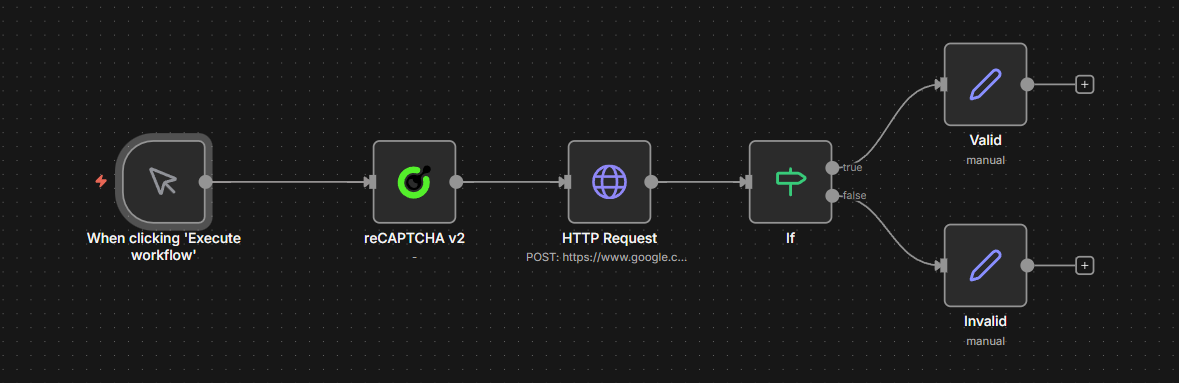
Manual Trigger → CapSolver reCAPTCHA v2 → HTTP POST Request → IF (check success) → Valid / Invalid
```#### Cách Hoạt Động
1. **Kích Hoạt Thủ Công** — Bắt đầu quy trình làm việc thủ công (nhấn "Execute workflow"). Bạn có thể thay thế bằng bất kỳ kích hoạt nào — Webhook, Lịch trình, Sự kiện Ứng dụng, v.v.
2. **CapSolver reCAPTCHA v2** — Giải captcha cho trang demo:
- URL trang web: `https://example.com`
- Khóa trang web: `YOUR_SITE_KEY`
3. **Yêu Cầu HTTP POST** — Gửi token đã giải đến cùng URL dưới dạng form POST:
- Token được gửi trong trường form `g-recaptcha-response`
- Đây chính xác là cách trình duyệt hoạt động khi bạn nhấn "Submit" sau khi giải captcha
4. **Node IF** — Kiểm tra xem HTML phản hồi có chứa `"recaptcha-success"` hay không, nghĩa là captcha đã được chấp nhận
5. **Hợp lệ / Không hợp lệ** — Node IF sẽ chuyển sang nhánh **Hợp lệ** khi thành công (nơi bạn trích xuất dữ liệu cần thiết, ví dụ, với **node HTML** cho danh sách sản phẩm, kết quả form, v.v.) hoặc nhánh **Không hợp lệ** khi thất bại (nơi bạn xử lý lỗi)
> **Khái niệm chính:** Mỗi trang web xử lý việc gửi token khác nhau. Trong demo này, token được gửi trong trường form `g-recaptcha-response` qua POST — nhưng các trang khác có thể yêu cầu token dưới dạng tham số URL, trong thân JSON, hoặc qua một endpoint hoàn toàn khác. Luôn kiểm tra việc gửi form thực tế của trang (sử dụng tab Mạng của DevTools) để xem chính xác token cần được gửi như thế nào.
<details>
<summary>Nhấn để mở rộng JSON quy trình làm việc</summary>```json
{
"nodes": [
{
"parameters": {
"content": "## reCAPTCHA v2 \u2014 All Triggers\n\n### How it works\n\n1. Receives solver requests through a webhook.\n2. Processes these requests using CapSolver and returns the results.\n3. Regularly triggers checks every hour using a schedule.\n4. Executes the scheduled process and checks the status of tasks.\n5. Allows manual testing of CapSolver through a manual trigger.\n\n### Setup steps\n\n- [ ] Set up webhook credentials for 'Receive Solver Request'.\n- [ ] Configure CapSolver with necessary keys for all CapSolver nodes.\n- [ ] Assign necessary permissions for HTTP request to reCAPTCHA endpoint.\n- [ ] Review and adjust the schedule in 'Schedule Trigger'.\n- [ ] Test manual execution with 'Manual Trigger'.\n",
"width": 480,
"height": 896
},
"type": "n8n-nodes-base.stickyNote",
"typeVersion": 1,
"position": [
-816,
-128
],
"id": "68e8c344-ce45-4e9f-859b-ca005db7c73e",
"name": "Sticky Note"
},
{
"parameters": {
"content": "## Receive and handle requests\n\nStarts with receiving a solver request via webhook, processes it, and returns the solver result.",
"width": 800,
"height": 304,
"color": 7
},
"type": "n8n-nodes-base.stickyNote",
"typeVersion": 1,
"position": [
-256,
-128
],
"id": "c26741c7-e0e6-4a4e-9fbf-2a623df014c8",
"name": "Sticky Note1"
},
{
"parameters": {
"content": "## Scheduled recurrent process\n\nInitiates the process on an hourly schedule, sets target parameters, and sends them to CapSolver.",
"width": 800,
"height": 304,
"color": 7
},
"type": "n8n-nodes-base.stickyNote",
"typeVersion": 1,
"position": [
-256,
224
],
"id": "4b879cbf-e269-4260-9596-740b95df628a",
"name": "Sticky Note2"
},
{
"parameters": {
"content": "## Process and validate token\n\nPosts to the reCAPTCHA validation endpoint and checks results, branching into pass or fail paths.",
"width": 736,
"height": 464,
"color": 7
},
"type": "n8n-nodes-base.stickyNote",
"typeVersion": 1,
"position": [
656,
96
],
"id": "7c860b53-f4a7-4d0b-8537-5253eec5a043",
"name": "Sticky Note3"
},
{
"parameters": {
"content": "## Manual testing process\n\nAllows manual trigger testing with CapSolver and formats the result for review.",
"width": 800,
"height": 272,
"color": 7
},
"type": "n8n-nodes-base.stickyNote",
"typeVersion": 1,
"position": [
-256,
576
],
"id": "8936a2df-c5b5-4c63-a0d5-afd190553a57",
"name": "Sticky Note4"
},
{
"parameters": {
"httpMethod": "POST",
"path": "solve-recaptcha-v2",
"responseMode": "responseNode",
"options": {}
},
"type": "n8n-nodes-base.webhook",
"typeVersion": 2.1,
"position": [
-208,
0
],
"id": "11111111-1111-1111-1111-111111111101",
"name": "Receive Solver Request",
"webhookId": "a1b2c3d4-e5f6-7890-abcd-ef1234567801",
"onError": "continueRegularOutput"
},
{
"parameters": {
"type": "={{ $json.body.taskType || 'ReCaptchaV2TaskProxyLess' }}",
"proxy": "={{ $json.body.proxy || '' }}",
"websiteURL": "={{ $json.body.websiteURL }}",
"websiteKey": "={{ $json.body.websiteKey }}",
"optional": {
"pageAction": "={{ $json.body.pageAction || '' }}",
"isInvisible": "={{ $json.body.isInvisible || false }}",
"apiDomain": "={{ $json.body.apiDomain || '' }}",
"enterprisePayload": "={{ $json.body.enterprisePayload || '' }}",
"isSession": "={{ $json.body.isSession || false }}"
}
},
"type": "n8n-nodes-capsolver.capSolver",
"typeVersion": 1,
"position": [
112,
0
],
"id": "11111111-1111-1111-1111-111111111102",
"name": "CapSolver [Webhook]",
"credentials": {
"capSolverApi": {
"id": "BeBFMAsySMsMGeE9",
"name": "CapSolver account"
}
}
},
{
"parameters": {
"respondWith": "json",
"responseBody": "={{ JSON.stringify($json.data) }}",
"options": {}
},
"type": "n8n-nodes-base.respondToWebhook",
"typeVersion": 1.5,
"position": [
400,
0
],
"id": "11111111-1111-1111-1111-111111111103",
"name": "Return Solver Result"
},
{
"parameters": {
"rule": {
"interval": [
{
"field": "hours",
"hoursInterval": 1
}
]
}
},
"type": "n8n-nodes-base.scheduleTrigger",
"typeVersion": 1.3,
"position": [
-208,
352
],
"id": "11111111-1111-1111-1111-111111111104",
"name": "Schedule Trigger (Every 1h)"
},
{
"parameters": {
"assignments": {
"assignments": [
{
"id": "sa-001",
"name": "websiteURL",
"value": "https://www.google.com/recaptcha/api2/demo",
"type": "string"
},
{
"id": "sa-002",
"name": "websiteKey",
"value": "6Le-wvkSAAAAAPBMRTvw0Q4Muexq9bi0DJwx_mJ-",
"type": "string"
}
]
},
"options": {}
},
"type": "n8n-nodes-base.set",
"typeVersion": 3.4,
"position": [
112,
352
],
"id": "11111111-1111-1111-1111-111111111105",
"name": "Set Target Params"
},
{
"parameters": {
"websiteURL": "={{ $json.websiteURL }}",
"websiteKey": "={{ $json.websiteKey }}",
"optional": {}
},
"type": "n8n-nodes-capsolver.capSolver",
"typeVersion": 1,
"position": [
400,
352
],
"id": "11111111-1111-1111-1111-111111111106",
"name": "CapSolver [Schedule]",
"credentials": {
"capSolverApi": {
"id": "BeBFMAsySMsMGeE9",
"name": "CapSolver account"
}
}
},
{
"parameters": {
"method": "POST",
"url": "https://www.google.com/recaptcha/api2/demo",
"sendHeaders": true,
"headerParameters": {
"parameters": [
{
"name": "content-type",
"value": "application/x-www-form-urlencoded"
},
{
"name": "user-agent",
"value": "Mozilla/5.0 (Windows NT 10.0; Win64; x64) AppleWebKit/537.36 (KHTML, like Gecko) Chrome/125.0.0.0 Safari/537.36"
}
]
},
"sendBody": true,
"contentType": "form-urlencoded",
"bodyParameters": {
"parameters": [
{
"name": "g-recaptcha-response",
"value": "={{ $json.data.solution.gRecaptchaResponse }}"
}
]
},
"options": {}
},
"type": "n8n-nodes-base.httpRequest",
"typeVersion": 4.3,
"position": [
704,
352
],
"id": "11111111-1111-1111-1111-111111111107",
"name": "Submit Token"
},
{
"parameters": {
"conditions": {
"options": {
"caseSensitive": true,
"leftValue": "",
"typeValidation": "strict",
"version": 2
},
"conditions": [
{
"id": "if-001",
"leftValue": "={{ $json.data }}",
"rightValue": "recaptcha-success",
"operator": {
"type": "string",
"operation": "contains"
}
}
],
"combinator": "and"
},
"options": {}
},
"type": "n8n-nodes-base.if",
"typeVersion": 2.3,
"position": [
1008,
352
],
"id": "11111111-1111-1111-1111-111111111108",
"name": "Check Result"
},
{
"parameters": {
"assignments": {
"assignments": [
{
"id": "sp-001",
"name": "status",
"value": "passed",
"type": "string"
},
{
"id": "sp-002",
"name": "message",
"value": "reCAPTCHA v2 monitor passed successfully",
"type": "string"
},
{
"id": "sp-003",
"name": "timestamp",
"value": "={{ new Date().toISOString() }}",
"type": "string"
}
]
},
"options": {}
},
"type": "n8n-nodes-base.set",
"typeVersion": 3.4,
"position": [
1248,
224
],
"id": "11111111-1111-1111-1111-111111111109",
"name": "Monitor Passed"
},
{
"parameters": {
"assignments": {
"assignments": [
{
"id": "sf-001",
"name": "status",
"value": "failed",
"type": "string"
},
{
"id": "sf-002",
"name": "message",
"value": "reCAPTCHA v2 monitor FAILED \u2014 token rejected",
"type": "string"
},
{
"id": "sf-003",
"name": "timestamp",
"value": "={{ new Date().toISOString() }}",
"type": "string"
}
]
},
"options": {}
},
"type": "n8n-nodes-base.set",
"typeVersion": 3.4,
"position": [
1248,
384
],
"id": "11111111-1111-1111-1111-111111111110",
"name": "Monitor Failed"
},
{
"parameters": {},
"type": "n8n-nodes-base.manualTrigger",
"typeVersion": 1,
"position": [
-208,
688
],
"id": "11111111-1111-1111-1111-111111111111",
"name": "Manual Trigger (Test)"
},
{
"parameters": {
"websiteURL": "https://www.google.com/recaptcha/api2/demo",
"websiteKey": "6Le-wvkSAAAAAPBMRTvw0Q4Muexq9bi0DJwx_mJ-",
"optional": {}
},
"type": "n8n-nodes-capsolver.capSolver",
"typeVersion": 1,
"position": [
112,
688
],
"id": "11111111-1111-1111-1111-111111111112",
"name": "CapSolver [Manual]",
"credentials": {
"capSolverApi": {
"id": "BeBFMAsySMsMGeE9",
"name": "CapSolver account"
}
}
},
{
"parameters": {
"assignments": {
"assignments": [
{
"id": "mr-001",
"name": "token",
"value": "={{ $json.data.solution.gRecaptchaResponse }}",
"type": "string"
},
{
"id": "mr-002",
"name": "taskId",
"value": "={{ $json.data.taskId }}",
"type": "string"
},
{
"id": "mr-003",
"name": "status",
"value": "solved",
"type": "string"
},
{
"id": "mr-004",
"name": "solvedAt",
"value": "={{ new Date().toISOString() }}",
"type": "string"
}
]
},
"options": {}
},
"type": "n8n-nodes-base.set",
"typeVersion": 3.4,
"position": [
400,
688
],
"id": "11111111-1111-1111-1111-111111111113",
"name": "Format Result"
}
],
"connections": {
"Receive Solver Request": {
"main": [
[
{
"node": "CapSolver [Webhook]",
"type": "main",
"index": 0
}
]
]
},
"CapSolver [Webhook]": {
"main": [
[
{
"node": "Return Solver Result",
"type": "main",
"index": 0
}
]
]
},
"Schedule Trigger (Every 1h)": {
"main": [
[
{
"node": "Set Target Params",
"type": "main",
"index": 0
}
]
]
},
"Set Target Params": {
"main": [
[
{
"node": "CapSolver [Schedule]",
"type": "main",
"index": 0
}
]
]
},
"CapSolver [Schedule]": {
"main": [
[
{
"node": "Submit Token",
"type": "main",
"index": 0
}
]
]
},
"Submit Token": {
"main": [
[
{
"node": "Check Result",
"type": "main",
"index": 0
}
]
]
},
"Check Result": {
"main": [
[
{
"node": "Monitor Passed",
"type": "main",
"index": 0
}
],
[
{
"node": "Monitor Failed",
"type": "main",
"index": 0
}
]
]
},
"Manual Trigger (Test)": {
"main": [
[
{
"node": "CapSolver [Manual]",
"type": "main",
"index": 0
}
]
]
},
"CapSolver [Manual]": {
"main": [
[
{
"node": "Format Result",
"type": "main",
"index": 0
}
]
]
}
},
"pinData": {},
"meta": {
"instanceId": "962ff0267b713be0344b866fa54daae28de8ed2144e2e6867da355dae193ea1f"
}
}
```</details>
> **Điều chỉnh cho các loại reCAPTCHA khác:** Mẫu này cũng áp dụng cho **v2 Invisible** và **v3**. Với v2 Invisible, đặt `isInvisible: true` trong node CapSolver. Với v3, thay đổi Operation thành `reCAPTCHA v3` và thêm tham số `pageAction`. Bước gửi HTTP Request sẽ khác nhau tùy theo trang web — luôn kiểm tra việc gửi form thực tế trong DevTools.
---
## Quy trình làm việc: Ví dụ sử dụng
API giải captcha và các ví dụ scraping ở trên cho thấy mẫu cơ bản: giải captcha, gửi token, xử lý kết quả. Các quy trình sau mở rộng mẫu này cho các **trường hợp sử dụng sẵn sàng cho sản xuất** — mỗi quy trình có hai kích hoạt (lịch trình + webhook), theo dõi trạng thái liên tục và đầu ra có cấu trúc.
| Quy trình làm việc | Mục đích |
|---|---|
| `reCAPTCHA Scraping — Giá & Thông tin sản phẩm — CapSolver + Lịch trình + Webhook` | Thu thập giá và tên sản phẩm mỗi 6 giờ, so sánh với giá trị trước đó lưu trong `staticData`, cảnh báo khi có thay đổi |
| `reCAPTCHA Đăng nhập tài khoản — CapSolver + Lịch trình + Webhook` | Đăng nhập vào tài khoản của bạn trên trang web có bảo vệ captcha bằng cách giải captcha trước, sau đó gửi thông tin đăng nhập cùng token |
### Ví dụ 1: Thu thập dữ liệu — Giá & Thông tin sản phẩm
Quy trình này thu thập dữ liệu trang sản phẩm mỗi 6 giờ (theo lịch) hoặc theo yêu cầu (webhook), trích xuất giá bằng node HTML, và so sánh với giá trị đã lưu trước đó.
**Đường dẫn theo lịch trình:**```
Every 6 Hours → Solve reCAPTCHA v3 → Fetch Product Page → Extract Data
→ Compare Data → Data Changed? → Build Alert / No Change
```> **Xử lý lỗi:** Nếu CapSolver thất bại, quá trình thực thi sẽ dừng lại và được đánh dấu là thất bại trong n8n. Kiểm tra **Executions** để xem lỗi, hoặc cấu hình [Error Workflow](https://docs.n8n.io/flow-logic/error-handling/) của n8n để nhận thông báo tự động.
Các hành vi chính:
- Sử dụng **reCAPTCHA v3** với tham số `pageAction` (có thể cấu hình)
- Token được gửi dưới dạng header `x-recaptcha-token` (điều chỉnh theo định dạng mong đợi của trang web bạn)
- **Node HTML** trích xuất giá và tên sản phẩm qua các bộ chọn CSS (`.product-price`, `h1`)
- `$workflow.staticData.lastPrice` lưu giữ giá trước đó qua các lần thực thi
- So sánh giá phát hiện cả **giảm giá** (mức độ nghiêm trọng: `deal`) và **tăng giá** (mức độ nghiêm trọng: `info`)
- Loại tác vụ là `ReCaptchaV3TaskProxyLess` (mã cứng) — chỉnh sửa trực tiếp node Solve reCAPTCHA v3 để thay đổi loại tác vụ hoặc proxy
<details>
<summary>Nhấn để mở rộng JSON workflow đầy đủ (17 nodes)</summary>```json
{
"nodes": [
{
"parameters": {
"content": "## reCAPTCHA Scraping \u2014 Price & Product Monitor\n\n### How it works\n\n1. Triggers the workflow every 6 hours or via webhook.\n2. Configures target website URL and key for scraping.\n3. Solves reCAPTCHA to access the webpage.\n4. Fetches and extracts product data from the webpage.\n5. Compares current data with previous data to check for changes.\n6. Builds alert or updates status based on data changes.\n\n### Setup steps\n\n- [ ] Configure the 'Every 6 Hours' trigger to set the appropriate time schedule.\n- [ ] Set up the target website URL and key parameters in the 'Set Target Config [Schedule]' node.\n- [ ] Ensure the 'Solve reCAPTCHA' and 'Solve reCAPTCHA [Webhook]' nodes are configured with the correct CAPTCHA services.\n- [ ] Set up webhook endpoint in the 'Webhook Trigger' node.\n- [ ] Configure the 'Respond to Webhook' node for handling webhook responses.\n\n### Customization\n\nAdjust the 'Compare Data' and 'Compare Data [Webhook]' code to fit specific data comparison logic or data formats.",
"height": 896,
"width": 480
},
"type": "n8n-nodes-base.stickyNote",
"typeVersion": 1,
"position": [
-1312,
-352
],
"id": "871c5a60-20b4-4cc0-a357-d5cecb8a322a",
"name": "Sticky Note"
},
{
"parameters": {
"content": "## Scheduled trigger setup\n\nTriggers every 6 hours and sets the target config for scraping.",
"height": 304,
"width": 496,
"color": 7
},
"type": "n8n-nodes-base.stickyNote",
"typeVersion": 1,
"position": [
-752,
-128
],
"id": "43acb039-cfcd-47c3-892e-e13da011b721",
"name": "Sticky Note1"
},
{
"parameters": {
"content": "## Scheduled CAPTCHA solving and page fetch\n\nSolves the CAPTCHA and fetches the product page based on schedule.",
"height": 304,
"width": 496,
"color": 7
},
"type": "n8n-nodes-base.stickyNote",
"typeVersion": 1,
"position": [
-144,
-128
],
"id": "68fc53a6-181e-4ca8-bf7d-f3f8e9b12f9d",
"name": "Sticky Note2"
},
{
"parameters": {
"content": "## Scheduled data extraction and comparison\n\nExtracts and compares data from the fetched page.",
"height": 272,
"width": 784,
"color": 7
},
"type": "n8n-nodes-base.stickyNote",
"typeVersion": 1,
"position": [
464,
-112
],
"id": "155fc92b-721a-40bf-80e6-6dd2082b126a",
"name": "Sticky Note3"
},
{
"parameters": {
"content": "## Scheduled alert or status update\n\nHandles response based on data comparison for scheduled runs.",
"height": 560,
"color": 7
},
"type": "n8n-nodes-base.stickyNote",
"typeVersion": 1,
"position": [
1296,
-352
],
"id": "ee2c8c8e-d21d-42aa-b261-49a6fffb3d11",
"name": "Sticky Note4"
},
{
"parameters": {
"content": "## Webhook trigger setup\n\nInitiates the workflow via a webhook request.",
"height": 368,
"color": 7
},
"type": "n8n-nodes-base.stickyNote",
"typeVersion": 1,
"position": [
-752,
304
],
"id": "6957473e-81a0-4afd-a0ea-e6f61c3be715",
"name": "Sticky Note5"
},
{
"parameters": {
"content": "## Webhook CAPTCHA solving and page fetch\n\nSolves the CAPTCHA and fetches the product page via webhook.",
"height": 304,
"width": 496,
"color": 7
},
"type": "n8n-nodes-base.stickyNote",
"typeVersion": 1,
"position": [
-144,
304
],
"id": "48990176-a5b5-48db-ac09-bcc207318f0a",
"name": "Sticky Note6"
},
{
"parameters": {
"content": "## Webhook data extraction and comparison\n\nProcesses data fetched from the page and checks for changes via webhook.",
"height": 272,
"width": 784,
"color": 7
},
"type": "n8n-nodes-base.stickyNote",
"typeVersion": 1,
"position": [
464,
320
],
"id": "844166d1-75f7-4192-8bfb-3a1381fb6235",
"name": "Sticky Note7"
},
{
"parameters": {
"content": "## Webhook alert or status update\n\nResponds to webhook trigger with alert or status update.",
"height": 544,
"width": 384,
"color": 7
},
"type": "n8n-nodes-base.stickyNote",
"typeVersion": 1,
"position": [
1328,
240
],
"id": "c1926a60-dfb3-4520-a530-82aa40c6341c",
"name": "Sticky Note8"
},
{
"parameters": {
"rule": {
"interval": [
{
"field": "hours",
"hoursInterval": 6
}
]
}
},
"type": "n8n-nodes-base.scheduleTrigger",
"typeVersion": 1.3,
"position": [
-704,
0
],
"id": "rc-s-901",
"name": "Every 6 Hours"
},
{
"parameters": {
"assignments": {
"assignments": [
{
"id": "cfg-001",
"name": "websiteURL",
"value": "https://YOUR-TARGET-SITE.com/product-page",
"type": "string"
},
{
"id": "cfg-002",
"name": "websiteKey",
"value": "YOUR_SITE_KEY_HERE",
"type": "string"
}
]
},
"options": {}
},
"type": "n8n-nodes-base.set",
"typeVersion": 3.4,
"position": [
-400,
0
],
"id": "rc-s-900",
"name": "Set Target Config [Schedule]"
},
{
"parameters": {
"websiteURL": "={{ $json.websiteURL }}",
"websiteKey": "={{ $json.websiteKey }}",
"optional": {}
},
"type": "n8n-nodes-capsolver.capSolver",
"typeVersion": 1,
"position": [
-96,
0
],
"id": "rc-s-902",
"name": "Solve reCAPTCHA",
"credentials": {
"capSolverApi": {
"id": "BeBFMAsySMsMGeE9",
"name": "CapSolver account"
}
}
},
{
"parameters": {
"method": "POST",
"url": "={{ $('Set Target Config [Schedule]').first().json.websiteURL }}",
"sendHeaders": true,
"headerParameters": {
"parameters": [
{
"name": "user-agent",
"value": "Mozilla/5.0 (Windows NT 10.0; Win64; x64) AppleWebKit/537.36 (KHTML, like Gecko) Chrome/125.0.0.0 Safari/537.36"
}
]
},
"sendBody": true,
"contentType": "form-urlencoded",
"bodyParameters": {
"parameters": [
{
"name": "g-recaptcha-response",
"value": "={{ $json.data.solution.gRecaptchaResponse }}"
}
]
},
"options": {
"response": {
"response": {}
}
}
},
"type": "n8n-nodes-base.httpRequest",
"typeVersion": 4.3,
"position": [
208,
0
],
"id": "rc-s-903",
"name": "Fetch Product Page"
},
{
"parameters": {
"operation": "extractHtmlContent",
"extractionValues": {
"values": [
{
"key": "price",
"cssSelector": ".product-price, [data-price], .price"
},
{
"key": "productName",
"cssSelector": "h1, .product-title"
}
]
},
"options": {}
},
"type": "n8n-nodes-base.html",
"typeVersion": 1.2,
"position": [
512,
0
],
"id": "rc-s-904",
"name": "Extract Data"
},
{
"parameters": {
"jsCode": "const staticData = $workflow.staticData;\nconst currentPrice = $input.first().json.price;\nconst previousPrice = staticData.lastPrice;\nconst productName = $input.first().json.productName || 'Product';\nconst parsePrice = (str) => { if (!str) return null; const match = str.match(/[\\d]+\\.?\\d*/); return match ? parseFloat(match[0].replace(',', '')) : null; };\nconst currentNum = parsePrice(currentPrice);\nconst previousNum = parsePrice(previousPrice);\nstaticData.lastPrice = currentPrice;\nstaticData.lastChecked = new Date().toISOString();\nconst changed = previousNum !== null && currentNum !== null && currentNum !== previousNum;\nconst direction = changed ? (currentNum < previousNum ? 'dropped' : 'increased') : 'unchanged';\nconst diff = changed ? Math.abs(currentNum - previousNum).toFixed(2) : '0';\nreturn [{ json: { productName, currentPrice, previousPrice: previousPrice || 'first check', changed, direction, diff: changed ? `$${diff}` : null, checkedAt: new Date().toISOString() } }];"
},
"type": "n8n-nodes-base.code",
"typeVersion": 2,
"position": [
800,
0
],
"id": "rc-s-905",
"name": "Compare Data"
},
{
"parameters": {
"conditions": {
"options": {
"caseSensitive": true,
"leftValue": "",
"typeValidation": "strict",
"version": 2
},
"conditions": [
{
"id": "if-1",
"leftValue": "={{ $json.changed }}",
"operator": {
"type": "boolean",
"operation": "true",
"singleValue": true
}
}
],
"combinator": "and"
},
"options": {}
},
"type": "n8n-nodes-base.if",
"typeVersion": 2.2,
"position": [
1104,
0
],
"id": "rc-s-906",
"name": "Data Changed?"
},
{
"parameters": {
"assignments": {
"assignments": [
{
"id": "a1",
"name": "alert",
"value": "=Price {{ $json.direction }} for {{ $json.productName }}: {{ $json.previousPrice }} \u2192 {{ $json.currentPrice }}",
"type": "string"
},
{
"id": "a2",
"name": "severity",
"value": "={{ $json.direction === 'dropped' ? 'deal' : 'info' }}",
"type": "string"
},
{
"id": "a3",
"name": "checkedAt",
"value": "={{ $json.checkedAt }}",
"type": "string"
}
]
},
"options": {}
},
"type": "n8n-nodes-base.set",
"typeVersion": 3.4,
"position": [
1344,
-160
],
"id": "rc-s-907",
"name": "Build Alert"
},
{
"parameters": {
"assignments": {
"assignments": [
{
"id": "n1",
"name": "status",
"value": "no_change",
"type": "string"
},
{
"id": "n2",
"name": "currentPrice",
"value": "={{ $json.currentPrice }}",
"type": "string"
},
{
"id": "n3",
"name": "checkedAt",
"value": "={{ $json.checkedAt }}",
"type": "string"
}
]
},
"options": {}
},
"type": "n8n-nodes-base.set",
"typeVersion": 3.4,
"position": [
1344,
48
],
"id": "rc-s-908",
"name": "No Change"
},
{
"parameters": {
"httpMethod": "POST",
"path": "price-monitor-recaptcha",
"responseMode": "responseNode",
"options": {}
},
"type": "n8n-nodes-base.webhook",
"typeVersion": 2.1,
"position": [
-704,
480
],
"id": "rc-s-909",
"name": "Webhook Trigger",
"webhookId": "rc-s-909-webhook",
"onError": "continueRegularOutput"
},
{
"parameters": {
"websiteURL": "={{ $json.body.websiteURL }}",
"websiteKey": "={{ $json.body.websiteKey }}",
"optional": {}
},
"type": "n8n-nodes-capsolver.capSolver",
"typeVersion": 1,
"position": [
-96,
432
],
"id": "rc-s-910",
"name": "Solve reCAPTCHA [Webhook]",
"credentials": {
"capSolverApi": {
"id": "BeBFMAsySMsMGeE9",
"name": "CapSolver account"
}
}
},
{
"parameters": {
"method": "POST",
"url": "={{ $('Webhook Trigger').item.json.body.websiteURL }}",
"sendHeaders": true,
"headerParameters": {
"parameters": [
{
"name": "user-agent",
"value": "Mozilla/5.0 (Windows NT 10.0; Win64; x64) AppleWebKit/537.36 (KHTML, like Gecko) Chrome/125.0.0.0 Safari/537.36"
}
]
},
"sendBody": true,
"contentType": "form-urlencoded",
"bodyParameters": {
"parameters": [
{
"name": "g-recaptcha-response",
"value": "={{ $json.data.solution.gRecaptchaResponse }}"
}
]
},
"options": {
"response": {
"response": {}
}
}
},
"type": "n8n-nodes-base.httpRequest",
"typeVersion": 4.3,
"position": [
208,
432
],
"id": "rc-s-911",
"name": "Fetch Product Page [Webhook]"
},
{
"parameters": {
"operation": "extractHtmlContent",
"extractionValues": {
"values": [
{
"key": "price",
"cssSelector": ".product-price, [data-price], .price"
},
{
"key": "productName",
"cssSelector": "h1, .product-title"
}
]
},
"options": {}
},
"type": "n8n-nodes-base.html",
"typeVersion": 1.2,
"position": [
512,
432
],
"id": "rc-s-912",
"name": "Extract Data [Webhook]"
},
{
"parameters": {
"jsCode": "const staticData = $workflow.staticData;\nconst currentPrice = $input.first().json.price;\nconst previousPrice = staticData.lastPrice;\nconst productName = $input.first().json.productName || 'Product';\nconst parsePrice = (str) => { if (!str) return null; const match = str.match(/[\\d]+\\.?\\d*/); return match ? parseFloat(match[0].replace(',', '')) : null; };\nconst currentNum = parsePrice(currentPrice);\nconst previousNum = parsePrice(previousPrice);\nstaticData.lastPrice = currentPrice;\nstaticData.lastChecked = new Date().toISOString();\nconst changed = previousNum !== null && currentNum !== null && currentNum !== previousNum;\nconst direction = changed ? (currentNum < previousNum ? 'dropped' : 'increased') : 'unchanged';\nconst diff = changed ? Math.abs(currentNum - previousNum).toFixed(2) : '0';\nreturn [{ json: { productName, currentPrice, previousPrice: previousPrice || 'first check', changed, direction, diff: changed ? `$${diff}` : null, checkedAt: new Date().toISOString() } }];"
},
"type": "n8n-nodes-base.code",
"typeVersion": 2,
"position": [
800,
432
],
"id": "rc-s-913",
"name": "Compare Data [Webhook]"
},
{
"parameters": {
"conditions": {
"options": {
"caseSensitive": true,
"leftValue": "",
"typeValidation": "strict",
"version": 2
},
"conditions": [
{
"id": "if-2",
"leftValue": "={{ $json.changed }}",
"operator": {
"type": "boolean",
"operation": "true",
"singleValue": true
}
}
],
"combinator": "and"
},
"options": {}
},
"type": "n8n-nodes-base.if",
"typeVersion": 2.2,
"position": [
1104,
432
],
"id": "rc-s-914",
"name": "Data Changed? [Webhook]"
},
{
"parameters": {
"assignments": {
"assignments": [
{
"id": "a4",
"name": "alert",
"value": "=Price {{ $json.direction }} for {{ $json.productName }}: {{ $json.previousPrice }} \u2192 {{ $json.currentPrice }}",
"type": "string"
},
{
"id": "a5",
"name": "severity",
"value": "={{ $json.direction === 'dropped' ? 'deal' : 'info' }}",
"type": "string"
},
{
"id": "a6",
"name": "checkedAt",
"value": "={{ $json.checkedAt }}",
"type": "string"
}
]
},
"options": {}
},
"type": "n8n-nodes-base.set",
"typeVersion": 3.4,
"position": [
1376,
368
],
"id": "rc-s-915",
"name": "Build Alert [Webhook]"
},
{
"parameters": {
"assignments": {
"assignments": [
{
"id": "n4",
"name": "status",
"value": "no_change",
"type": "string"
},
{
"id": "n5",
"name": "currentPrice",
"value": "={{ $json.currentPrice }}",
"type": "string"
},
{
"id": "n6",
"name": "checkedAt",
"value": "={{ $json.checkedAt }}",
"type": "string"
}
]
},
"options": {}
},
"type": "n8n-nodes-base.set",
"typeVersion": 3.4,
"position": [
1392,
608
],
"id": "rc-s-916",
"name": "No Change [Webhook]"
},
{
"parameters": {
"respondWith": "json",
"responseBody": "={{ JSON.stringify($json) }}",
"options": {}
},
"type": "n8n-nodes-base.respondToWebhook",
"typeVersion": 1.5,
"position": [
1568,
512
],
"id": "rc-s-917",
"name": "Respond to Webhook"
}
],
"connections": {
"Every 6 Hours": {
"main": [
[
{
"node": "Set Target Config [Schedule]",
"type": "main",
"index": 0
}
]
]
},
"Set Target Config [Schedule]": {
"main": [
[
{
"node": "Solve reCAPTCHA",
"type": "main",
"index": 0
}
]
]
},
"Solve reCAPTCHA": {
"main": [
[
{
"node": "Fetch Product Page",
"type": "main",
"index": 0
}
]
]
},
"Fetch Product Page": {
"main": [
[
{
"node": "Extract Data",
"type": "main",
"index": 0
}
]
]
},
"Extract Data": {
"main": [
[
{
"node": "Compare Data",
"type": "main",
"index": 0
}
]
]
},
"Compare Data": {
"main": [
[
{
"node": "Data Changed?",
"type": "main",
"index": 0
}
]
]
},
"Data Changed?": {
"main": [
[
{
"node": "Build Alert",
"type": "main",
"index": 0
}
],
[
{
"node": "No Change",
"type": "main",
"index": 0
}
]
]
},
"Webhook Trigger": {
"main": [
[
{
"node": "Solve reCAPTCHA [Webhook]",
"type": "main",
"index": 0
}
]
]
},
"Solve reCAPTCHA [Webhook]": {
"main": [
[
{
"node": "Fetch Product Page [Webhook]",
"type": "main",
"index": 0
}
]
]
},
"Fetch Product Page [Webhook]": {
"main": [
[
{
"node": "Extract Data [Webhook]",
"type": "main",
"index": 0
}
]
]
},
"Extract Data [Webhook]": {
"main": [
[
{
"node": "Compare Data [Webhook]",
"type": "main",
"index": 0
}
]
]
},
"Compare Data [Webhook]": {
"main": [
[
{
"node": "Data Changed? [Webhook]",
"type": "main",
"index": 0
}
]
]
},
"Data Changed? [Webhook]": {
"main": [
[
{
"node": "Build Alert [Webhook]",
"type": "main",
"index": 0
}
],
[
{
"node": "No Change [Webhook]",
"type": "main",
"index": 0
}
]
]
},
"Build Alert [Webhook]": {
"main": [
[
{
"node": "Respond to Webhook",
"type": "main",
"index": 0
}
]
]
},
"No Change [Webhook]": {
"main": [
[
{
"node": "Respond to Webhook",
"type": "main",
"index": 0
}
]
]
}
},
"pinData": {},
"meta": {
"instanceId": "962ff0267b713be0344b866fa54daae28de8ed2144e2e6867da355dae193ea1f"
}
}
```</details>
### Ví dụ 2: Đăng nhập tài khoản
Quy trình làm việc này tự động đăng nhập vào một trang web được bảo vệ bằng captcha. Một nút **Set Login Config** tập trung tất cả các tham số — **[Schedule]** cho đường dẫn theo lịch trình và **[Webhook]** cho đường dẫn webhook theo yêu cầu. Chỉnh sửa nút cấu hình thích hợp để cấu hình từng đường dẫn.
**Đường dẫn theo lịch trình:**```
Every 24 Hours → Set Login Config → Solve Captcha → Submit Login
→ Login Successful? → Mark Login Success / Mark Login Failed
```> **Xử lý lỗi:** Nếu CapSolver thất bại, quá trình thực thi sẽ dừng lại và được đánh dấu là thất bại trong n8n. Kiểm tra **Executions** để xem lỗi, hoặc cấu hình [Error Workflow](https://docs.n8n.io/flow-logic/error-handling/) của n8n để nhận thông báo tự động.
Các hành vi chính:
- Mặc định sử dụng **reCAPTCHA v2** (`ReCaptchaV2TaskProxyLess`) — thay đổi `taskType` trong **Set Login Config [Schedule]** hoặc **Set Login Config [Webhook]** cho đường dẫn tương ứng; thay đổi `Operation` trong node Solve Captcha nếu chuyển đổi giữa v2 và v3
- Các trường form được mã hóa cứng là `email`, `password`, và `g-recaptcha-response` — chỉnh sửa trực tiếp node **Submit Login** để phù hợp với tên trường của trang web mục tiêu của bạn
- Kiểm tra **Login Successful?** đánh giá cả `statusCode < 400` và sự hiện diện của `successMarker` có thể cấu hình trong nội dung phản hồi
- Đường dẫn **Webhook** sử dụng **Set Login Config [Webhook]** với các giá trị giữ chỗ mã hóa cứng tương tự — chỉnh sửa node đó để cấu hình đường dẫn webhook theo yêu cầu
- Đường dẫn webhook trả kết quả dưới dạng JSON qua **Respond to Webhook**
<details>
<summary>Nhấn để mở rộng toàn bộ workflow JSON (15 nodes)</summary>```json
{
"nodes": [
{
"parameters": {
"content": "## reCAPTCHA Account Login\n\n### How it works\n\n1. The workflow triggers every 24 hours to initiate a login process.\n2. It solves reCAPTCHA challenges for login attempts.\n3. Submits login credentials via HTTP requests.\n4. Checks if login is successful and records the outcome.\n5. A webhook can trigger the login process manually.\n6. Responds to webhook calls with login status.\n\n### Setup steps\n\n- [ ] Configure the schedule trigger for desired intervals.\n- [ ] Set up the webhook URL for manual login attempts.\n- [ ] Ensure that credentials for solving reCAPTCHA are valid.\n- [ ] Configure the HTTP request nodes with the correct login endpoint.\n- [ ] Confirm that response nodes are set with the correct output format.\n\n### Customization\n\nCustomizable time intervals for automated login attempts and custom webhook endpoints can be configured.",
"width": 480,
"height": 896
},
"type": "n8n-nodes-base.stickyNote",
"typeVersion": 1,
"position": [
-1248,
-352
],
"id": "b76c0299-05e6-4d65-ba90-63a8148242af",
"name": "Sticky Note"
},
{
"parameters": {
"content": "## Scheduled login initialization\n\nTriggers login attempts every 24 hours and configures necessary parameters.",
"width": 1408,
"height": 272,
"color": 7
},
"type": "n8n-nodes-base.stickyNote",
"typeVersion": 1,
"position": [
-688,
-112
],
"id": "0610b8c8-fce5-4efd-b3d2-1eeeb6eba648",
"name": "Sticky Note1"
},
{
"parameters": {
"content": "## Scheduled login results\n\nDetermines and marks the results of scheduled login attempts.",
"width": 240,
"height": 528,
"color": 7
},
"type": "n8n-nodes-base.stickyNote",
"typeVersion": 1,
"position": [
816,
-352
],
"id": "73eec9f0-dbe8-43a5-bff7-2308b4cac998",
"name": "Sticky Note2"
},
{
"parameters": {
"content": "## Webhook login initialization\n\nManual login attempts triggered by webhook, solving reCAPTCHA.",
"width": 1408,
"height": 272,
"color": 7
},
"type": "n8n-nodes-base.stickyNote",
"typeVersion": 1,
"position": [
-688,
320
],
"id": "0680f603-0a47-429f-81cb-69ff7741a9bd",
"name": "Sticky Note3"
},
{
"parameters": {
"content": "## Webhook login results and response\n\nRecords results of webhook login attempts and sends response.",
"width": 512,
"height": 496,
"color": 7
},
"type": "n8n-nodes-base.stickyNote",
"typeVersion": 1,
"position": [
816,
208
],
"id": "4f244d27-03e3-4670-8e6f-67ed6264ac8d",
"name": "Sticky Note4"
},
{
"parameters": {
"rule": {
"interval": [
{
"field": "hours",
"hoursInterval": 24
}
]
}
},
"type": "n8n-nodes-base.scheduleTrigger",
"typeVersion": 1.3,
"position": [
-640,
0
],
"id": "rc-l-921",
"name": "Every 24 Hours"
},
{
"parameters": {
"assignments": {
"assignments": [
{
"id": "l1",
"name": "websiteURL",
"value": "https://YOUR-LOGIN-PAGE.com",
"type": "string"
},
{
"id": "l2",
"name": "websiteKey",
"value": "YOUR_SITE_KEY_HERE",
"type": "string"
},
{
"id": "l3",
"name": "successMarker",
"value": "account-dashboard",
"type": "string"
},
{
"id": "l4",
"name": "userAgent",
"value": "Mozilla/5.0 (Windows NT 10.0; Win64; x64) AppleWebKit/537.36 (KHTML, like Gecko) Chrome/125.0.0.0 Safari/537.36",
"type": "string"
}
]
},
"options": {}
},
"type": "n8n-nodes-base.set",
"typeVersion": 3.4,
"position": [
-336,
0
],
"id": "rc-l-922",
"name": "Set Login Config [Schedule]"
},
{
"parameters": {
"websiteURL": "={{ $json.websiteURL }}",
"websiteKey": "={{ $json.websiteKey }}",
"optional": {}
},
"type": "n8n-nodes-capsolver.capSolver",
"typeVersion": 1,
"position": [
-32,
0
],
"id": "rc-l-923",
"name": "Solve Captcha [Schedule]",
"credentials": {
"capSolverApi": {
"id": "BeBFMAsySMsMGeE9",
"name": "CapSolver account"
}
}
},
{
"parameters": {
"method": "POST",
"url": "={{ $('Set Login Config [Schedule]').item.json.websiteURL }}/login",
"sendHeaders": true,
"headerParameters": {
"parameters": [
{
"name": "content-type",
"value": "application/x-www-form-urlencoded"
},
{
"name": "user-agent",
"value": "={{ $('Set Login Config [Schedule]').item.json.userAgent }}"
}
]
},
"sendBody": true,
"contentType": "form-urlencoded",
"bodyParameters": {
"parameters": [
{
"name": "email",
"value": "your-email@example.com"
},
{
"name": "password",
"value": "YOUR_ACCOUNT_PASSWORD"
},
{
"name": "g-recaptcha-response",
"value": "={{ $json.data.solution.gRecaptchaResponse }}"
}
]
},
"options": {
"response": {
"response": {
"fullResponse": true,
"neverError": true
}
}
}
},
"type": "n8n-nodes-base.httpRequest",
"typeVersion": 4.3,
"position": [
272,
0
],
"id": "rc-l-924",
"name": "Submit Login [Schedule]"
},
{
"parameters": {
"conditions": {
"options": {
"caseSensitive": false,
"leftValue": "",
"typeValidation": "strict",
"version": 2
},
"conditions": [
{
"id": "lif1",
"leftValue": "={{ $json.statusCode < 400 && String($json.body || $json.data || '').includes($('Set Login Config [Schedule]').item.json.successMarker) }}",
"operator": {
"type": "boolean",
"operation": "true",
"singleValue": true
}
}
],
"combinator": "and"
},
"options": {}
},
"type": "n8n-nodes-base.if",
"typeVersion": 2.2,
"position": [
576,
0
],
"id": "rc-l-925",
"name": "Login Successful? [Schedule]"
},
{
"parameters": {
"assignments": {
"assignments": [
{
"id": "s1",
"name": "action",
"value": "account_login",
"type": "string"
},
{
"id": "s2",
"name": "status",
"value": "success",
"type": "string"
},
{
"id": "s3",
"name": "message",
"value": "Configured account login flow succeeded",
"type": "string"
},
{
"id": "s4",
"name": "checkedAt",
"value": "={{ new Date().toISOString() }}",
"type": "string"
}
]
},
"options": {}
},
"type": "n8n-nodes-base.set",
"typeVersion": 3.4,
"position": [
864,
-192
],
"id": "rc-l-926",
"name": "Mark Login Success [Schedule]"
},
{
"parameters": {
"assignments": {
"assignments": [
{
"id": "f1",
"name": "action",
"value": "account_login",
"type": "string"
},
{
"id": "f2",
"name": "status",
"value": "failed",
"type": "string"
},
{
"id": "f3",
"name": "statusCode",
"value": "={{ $json.statusCode }}",
"type": "number"
},
{
"id": "f4",
"name": "message",
"value": "Login response did not match the configured success marker",
"type": "string"
},
{
"id": "f5",
"name": "checkedAt",
"value": "={{ new Date().toISOString() }}",
"type": "string"
}
]
},
"options": {}
},
"type": "n8n-nodes-base.set",
"typeVersion": 3.4,
"position": [
864,
16
],
"id": "rc-l-927",
"name": "Mark Login Failed [Schedule]"
},
{
"parameters": {
"httpMethod": "POST",
"path": "account-login-recaptcha",
"responseMode": "responseNode",
"options": {}
},
"type": "n8n-nodes-base.webhook",
"typeVersion": 2.1,
"position": [
-640,
432
],
"id": "rc-l-928",
"name": "Webhook Trigger",
"webhookId": "rc-l-928-webhook",
"onError": "continueRegularOutput"
},
{
"parameters": {
"websiteURL": "={{ $json.body.websiteURL }}",
"websiteKey": "={{ $json.body.websiteKey }}",
"optional": {}
},
"type": "n8n-nodes-capsolver.capSolver",
"typeVersion": 1,
"position": [
-32,
432
],
"id": "rc-l-929",
"name": "Solve Captcha [Webhook]",
"credentials": {
"capSolverApi": {
"id": "BeBFMAsySMsMGeE9",
"name": "CapSolver account"
}
}
},
{
"parameters": {
"method": "POST",
"url": "={{ $('Webhook Trigger').item.json.body.loginActionURL }}",
"sendHeaders": true,
"headerParameters": {
"parameters": [
{
"name": "content-type",
"value": "application/x-www-form-urlencoded"
},
{
"name": "user-agent",
"value": "={{ $('Webhook Trigger').item.json.body.userAgent || 'Mozilla/5.0 (Windows NT 10.0; Win64; x64) AppleWebKit/537.36 (KHTML, like Gecko) Chrome/125.0.0.0 Safari/537.36' }}"
}
]
},
"sendBody": true,
"contentType": "form-urlencoded",
"bodyParameters": {
"parameters": [
{
"name": "={{ $('Webhook Trigger').item.json.body.usernameField || 'email' }}",
"value": "={{ $('Webhook Trigger').item.json.body.usernameValue }}"
},
{
"name": "={{ $('Webhook Trigger').item.json.body.passwordField || 'password' }}",
"value": "={{ $('Webhook Trigger').item.json.body.passwordValue }}"
},
{
"name": "g-recaptcha-response",
"value": "={{ $json.data.solution.gRecaptchaResponse }}"
}
]
},
"options": {
"response": {
"response": {
"fullResponse": true,
"neverError": true
}
}
}
},
"type": "n8n-nodes-base.httpRequest",
"typeVersion": 4.3,
"position": [
272,
432
],
"id": "rc-l-930",
"name": "Submit Login [Webhook]"
},
{
"parameters": {
"conditions": {
"options": {
"caseSensitive": false,
"leftValue": "",
"typeValidation": "strict",
"version": 2
},
"conditions": [
{
"id": "lif2",
"leftValue": "={{ $json.statusCode < 400 && String($json.body || $json.data || '').includes($('Webhook Trigger').item.json.body.successMarker) }}",
"operator": {
"type": "boolean",
"operation": "true",
"singleValue": true
}
}
],
"combinator": "and"
},
"options": {}
},
"type": "n8n-nodes-base.if",
"typeVersion": 2.2,
"position": [
576,
432
],
"id": "rc-l-931",
"name": "Login Successful? [Webhook]"
},
{
"parameters": {
"assignments": {
"assignments": [
{
"id": "ws1",
"name": "action",
"value": "account_login",
"type": "string"
},
{
"id": "ws2",
"name": "status",
"value": "success",
"type": "string"
},
{
"id": "ws3",
"name": "message",
"value": "Configured account login flow succeeded",
"type": "string"
},
{
"id": "ws4",
"name": "checkedAt",
"value": "={{ new Date().toISOString() }}",
"type": "string"
}
]
},
"options": {}
},
"type": "n8n-nodes-base.set",
"typeVersion": 3.4,
"position": [
864,
336
],
"id": "rc-l-932",
"name": "Mark Login Success [Webhook]"
},
{
"parameters": {
"assignments": {
"assignments": [
{
"id": "wf1",
"name": "action",
"value": "account_login",
"type": "string"
},
{
"id": "wf2",
"name": "status",
"value": "failed",
"type": "string"
},
{
"id": "wf3",
"name": "statusCode",
"value": "={{ $json.statusCode }}",
"type": "number"
},
{
"id": "wf4",
"name": "message",
"value": "Login response did not match the configured success marker",
"type": "string"
},
{
"id": "wf5",
"name": "checkedAt",
"value": "={{ new Date().toISOString() }}",
"type": "string"
}
]
},
"options": {}
},
"type": "n8n-nodes-base.set",
"typeVersion": 3.4,
"position": [
880,
528
],
"id": "rc-l-933",
"name": "Mark Login Failed [Webhook]"
},
{
"parameters": {
"respondWith": "json",
"responseBody": "={{ JSON.stringify($json) }}",
"options": {}
},
"type": "n8n-nodes-base.respondToWebhook",
"typeVersion": 1.5,
"position": [
1184,
496
],
"id": "rc-l-934",
"name": "Respond to Webhook"
}
],
"connections": {
"Every 24 Hours": {
"main": [
[
{
"node": "Set Login Config [Schedule]",
"type": "main",
"index": 0
}
]
]
},
"Set Login Config [Schedule]": {
"main": [
[
{
"node": "Solve Captcha [Schedule]",
"type": "main",
"index": 0
}
]
]
},
"Solve Captcha [Schedule]": {
"main": [
[
{
"node": "Submit Login [Schedule]",
"type": "main",
"index": 0
}
]
]
},
"Submit Login [Schedule]": {
"main": [
[
{
"node": "Login Successful? [Schedule]",
"type": "main",
"index": 0
}
]
]
},
"Login Successful? [Schedule]": {
"main": [
[
{
"node": "Mark Login Success [Schedule]",
"type": "main",
"index": 0
}
],
[
{
"node": "Mark Login Failed [Schedule]",
"type": "main",
"index": 0
}
]
]
},
"Webhook Trigger": {
"main": [
[
{
"node": "Solve Captcha [Webhook]",
"type": "main",
"index": 0
}
]
]
},
"Solve Captcha [Webhook]": {
"main": [
[
{
"node": "Submit Login [Webhook]",
"type": "main",
"index": 0
}
]
]
},
"Submit Login [Webhook]": {
"main": [
[
{
"node": "Login Successful? [Webhook]",
"type": "main",
"index": 0
}
]
]
},
"Login Successful? [Webhook]": {
"main": [
[
{
"node": "Mark Login Success [Webhook]",
"type": "main",
"index": 0
}
],
[
{
"node": "Mark Login Failed [Webhook]",
"type": "main",
"index": 0
}
]
]
},
"Mark Login Success [Webhook]": {
"main": [
[
{
"node": "Respond to Webhook",
"type": "main",
"index": 0
}
]
]
},
"Mark Login Failed [Webhook]": {
"main": [
[
{
"node": "Respond to Webhook",
"type": "main",
"index": 0
}
]
]
}
},
"pinData": {},
"meta": {
"instanceId": "962ff0267b713be0344b866fa54daae28de8ed2144e2e6867da355dae193ea1f"
}
}
```</details>Kết luận
Bạn đã học cách xây dựng API giải reCAPTCHA và quy trình thu thập dữ liệu sẵn sàng cho sản xuất sử dụng n8n và CapSolver — không cần lập trình truyền thống.
Trong hướng dẫn này, chúng ta đã đề cập đến:
- Các điểm cuối API giải mã cho reCAPTCHA v2, v2 Invisible và v3 sử dụng quy trình làm việc dựa trên webhook
- Ví dụ về trường hợp sử dụng — thu thập dữ liệu và đăng nhập tài khoản — cho thấy cách gửi token đã giải và xử lý dữ liệu được bảo vệ
- Cách xác định các tham số captcha bằng tiện ích mở rộng trình duyệt CapSolver
- Các thực hành tốt nhất cho việc xử lý token, quản lý lỗi và sử dụng trong môi trường sản xuất
Điều quan trọng cần nhớ: giải captcha chỉ là một nửa công việc — bạn cũng cần gửi token đến trang web mục tiêu để mở khóa dữ liệu được bảo vệ.
Mẹo: Các quy trình này sử dụng trigger Schedule + Webhook, nhưng bạn có thể thay đổi node trigger thành bất kỳ trigger n8n nào — thủ công, sự kiện ứng dụng, gửi biểu mẫu, v.v. Sau khi lấy dữ liệu, sử dụng các node tích hợp sẵn của n8n để lưu kết quả vào Google Sheets, cơ sở dữ liệu, lưu trữ đám mây hoặc gửi cảnh báo qua Telegram/Slack/Email.
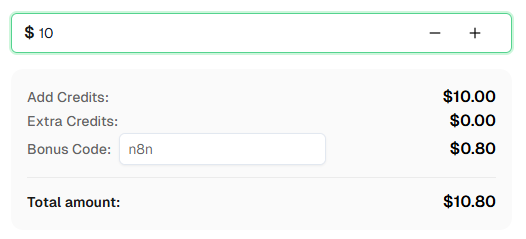
Sẵn sàng bắt đầu? Đăng ký CapSolver và sử dụng mã thưởng n8n để nhận thêm 8% tiền thưởng khi nạp lần đầu!
Câu hỏi thường gặp
Giải một reCAPTCHA tốn bao nhiêu tiền?
Giá cả thay đổi tùy theo loại captcha. reCAPTCHA v2 thường có giá khoảng 1-3 USD cho mỗi 1.000 lần giải. Xem trang giá của CapSolver để biết mức giá hiện tại.
Mất bao lâu để giải một reCAPTCHA?
Hầu hết các thử thách reCAPTCHA v2 được giải trong vòng 5-20 giây. reCAPTCHA v3 thường nhanh hơn vì không có thử thách hình ảnh.
Tôi có thể sử dụng các quy trình này với n8n Cloud không?
Có! Các quy trình này hoạt động với cả n8n tự lưu trữ và n8n Cloud. Node CapSolver đã có sẵn như một tích hợp chính thức — chỉ cần thêm thông tin API của bạn.
Làm sao để tìm site key reCAPTCHA của một trang web?
Cách đơn giản nhất là sử dụng tiện ích mở rộng trình duyệt CapSolver — mở DevTools, chuyển đến tab "CapSolver Captcha Detector", và kích hoạt captcha. Tiện ích sẽ tự động hiển thị tất cả các tham số. Ngoài ra, bạn có thể tìm trong mã nguồn trang với từ khóa data-sitekey hoặc render= trong URL script reCAPTCHA.
Sự khác biệt giữa reCAPTCHA v2 và v2 Invisible là gì?
Cả hai đều sử dụng công nghệ nền tảng giống nhau, nhưng v2 hiển thị hộp kiểm có thể nhìn thấy ("Tôi không phải là robot") trong khi v2 Invisible chạy ngầm mà không có widget hiển thị. Khi giải, điểm khác duy nhất là đặt isInvisible: true.
CapSolver trả về token nhưng trang web vẫn từ chối — tại sao?
Có vài nguyên nhân. Đầu tiên, token hết hạn rất nhanh — hãy chắc chắn bạn gửi token ngay lập tức. Thứ hai, xác nhận bạn đang gửi token đến đúng nơi: kiểm tra yêu cầu mạng thực tế trình duyệt gửi khi bạn nộp biểu mẫu (DevTools → tab Network) và xác nhận tên trường, phương thức yêu cầu và điểm cuối đều khớp với cấu hình trong n8n. Thứ ba, một số trang yêu cầu tham số bổ sung như enterprisePayload hoặc cookie và header cụ thể — sử dụng tiện ích CapSolver để kiểm tra xem có áp dụng không. Nếu token vẫn bị từ chối, liên hệ hỗ trợ CapSolver để được trợ giúp theo từng trang cụ thể.
Xem thêm
Web ScrapingApr 22, 2026
Kiến trúc Trích xuất Dữ liệu Từ Web bằng Rust cho Trích xuất Dữ liệu Có Thể Mở Rộng
Học kiến trúc gỡ mã web Rust có thể mở rộng với reqwest, scraper, gỡ mã bất đồng bộ, gỡ mã trình duyệt không đầu, xoay proxy và xử lý CAPTCHA tuân thủ.
Web ScrapingFeb 17, 2026
Cách giải CAPTCHA trên Nanobot bằng CapSolver
Tự động hóa việc giải CAPTCHA với Nanobot và CapSolver. Sử dụng Playwright để giải reCAPTCHA và Cloudflare tự động.

