
🎉नयाAI एजेंट के लिए CapSolver-MCP, एजेंट टूल और SDK एकीकरण

Rajinder Singh
Deep Learning Researcher
प्रकाशित Mar 10, 2026
अद्यतन Feb 09, 2026 · मिनट पढ़ने का समय
Cloudflare का बॉट सुरक्षा केवल CAPTCHA विजेट तक सीमित नहीं है। Cloudflare Challenge — पूरी पेज "Verifying your browser…" स्क्रीन जो साइट तक पूरी तरह से पहुँचने से रोकती है — वेब पर सबसे आक्रामक बॉट डिफेंस में से एक है। यह असली ब्राउज़र वातावरण में पूर्ण JavaScript चैलेंज चलाता है, व्यवहारिक संकेतों की जांच करता है, और आपके TLS कनेक्शन का फिंगरप्रिंट करता है इससे पहले कि आपको अनुमति दे।
यहाँ मानक ऑटोमेशन उपकरण विफल हो जाते हैं। इसलिए नहीं कि वे चैलेंज हल नहीं कर सकते, बल्कि क्योंकि Cloudflare TLS हैंडशेक का फिंगरप्रिंट करता है — और कोई भी गैर-ब्राउज़र HTTP क्लाइंट चैलेंज सर्व होने से पहले ही ब्लॉक हो जाता है, या वैध cf_clearance कुकी के बावजूद तुरंत फिर से चैलेंज किया जाता है।
इस मार्गदर्शिका में, आप सीखेंगे कि कैसे n8n में एक Cloudflare Challenge स्क्रेपर बनाएं जो वास्तव में काम करता है — साझा करते हुए CapSolver को चैलेंज हल करने के लिए, एक स्थानीय Go TLS सर्वर जो Chrome का TLS फिंगरप्रिंट स्पूफ़ करता है, और एक n8n वर्कफ़्लो जो इसे एक साथ जोड़ता है।
आप क्या बनाएंगे:
Cloudflare Challenge (जिसे JS challenge या Bot Management challenge भी कहा जाता है) एक पूरी पेज इंटरस्टीशियल है जिसे Cloudflare किसी संरक्षित साइट तक पहुंच से पहले आगंतुक के सामने डालता है। आपने इसे देखा होगा: एक काला या सफेद स्क्रीन जिसमें "Verifying your browser…" या "Just a moment…" लिखा होता है, और एक लोडिंग बार या Cloudflare लोगो।
Turnstile के विपरीत — जो एक छोटा विजेट होता है जो पेज के अंदर एम्बेड किया जाता है — Cloudflare Challenge पूरी साइट पे प्रभाव डालता है। आप तब तक कोई सामग्री देख नहीं सकते जब तक यह पूरा नहीं हो जाता।
| Cloudflare Challenge | Cloudflare Turnstile | |
|---|---|---|
| यह कहाँ दिखाई देता है | पूरी पेज इंटरस्टीशियल — साइट तक पूरी तरह से पहुँच रोकता है | पेज के अंदर एम्बेडेड विजेट (जैसे, लॉगिन फॉर्म) |
| कैसा दिखता है | "Verifying your browser…" लोडिंग स्क्रीन | फॉर्म में एक छोटा चेकबॉक्स या अदृश्य विजेट |
| इसे कौन जोड़ता है | सुरक्षा नियमों के आधार पर Cloudflare अपने आप जोड़ता है | वेबसाइट मालिक इसे अपने HTML में एम्बेड करता है |
| हल करने का तरीका | AntiCloudflareTask — प्रॉक्सी आवश्यक |
AntiTurnstileTaskProxyLess — प्रॉक्सी नहीं चाहिए |
| वापस मिलने वाली कूकी | cf_clearance (डोमेन-विशिष्ट, IP बाउंड) |
Turnstile टोकन (कम समय के लिए, एक बार प्रयोग में आता है) |
| क्या प्रॉक्सी आवश्यक है? | हाँ — हल करते समय और फेच करते समय समान IP इस्तेमाल होना चाहिए | नहीं |
यदि आप फॉर्म के अंदर एम्बेडेड चेकबॉक्स या विजेट देखते हैं, तो वह Turnstile है — यह Challenge नहीं। यदि आपको संदेह हो तो CapSolver की मार्गदर्शिका चैलेंज प्रकार पहचानने पर देखें।
यहाँ समस्या है जिसे अधिकांश गाइड छोड़ देते हैं: Cloudflare आपका TLS फिंगरप्रिंट जांचता है, सिर्फ आपकी कुकीज़ नहीं।
जब ब्राउज़र HTTPS के ज़रिए एक वेबसाइट से कनेक्ट करता है, तो यह TLS ClientHello भेजता है जिसमें उसके समर्थित साइफर सूट, एक्सटेंशन, और सेटिंग्स का विवरण होता है। Cloudflare इस फिंगरप्रिंट (जिसे JA3 या JA4 फिंगरप्रिंट कहा जाता है) को रिकॉर्ड करता है और इसे ज्ञात ब्राउज़र प्रोफाइल से तुलना करता है।
Go का net/http, Python का requests, curl, और अधिकांश HTTP लाइब्रेरीज़ के अपने अलग TLS फिंगरप्रिंट होते हैं। यदि CapSolver सफलतापूर्वक चैलेंज हल कर भी देता है और वैध cf_clearance कुकी लौटाता है, तो Cloudflare रिपीट चैलेंज या ब्लॉक कर देगा यदि अगले fetch पर कोई गैर-ब्राउज़र TLS फिंगरप्रिंट पाया गया।
समाधान: एक Go सर्वर जो httpcloak का उपयोग करता है — एक लाइब्रेरी जो असली Chrome TLS स्टैक स्पूफ़ करती है, जिसमें शामिल हैं:
यह fetch को नेटवर्क स्तर पर बिल्कुल Chrome ब्राउज़र अनुरोध की तरह दिखाता है।
| आवश्यकता | नोट्स |
|---|---|
| n8n सेल्फ-होस्टेड | आवश्यक — TLS सर्वर n8n के साथ उसी मशीन पर चलना चाहिए। n8n क्लाउड इस उपयोग के लिए उपयुक्त नहीं है। |
| CapSolver खाता | यहाँ साइन अप करें और अपनी API कुंजी प्राप्त करें |
| Go 1.21+ | n8n सर्वर पर इंस्टॉल होना चाहिए। जांचें go version से। |
| रेज़िडेंशियल या मोबाइल प्रॉक्सी | डेटासेंटर प्रॉक्सी अधिकांश Cloudflare-संरक्षित साइटों पर विफल होंगे। नीचे देखें Proxy Requirements। |
CapSolver n8n में एक आधिकारिक एकीकरण के रूप में उपलब्ध है — कोई कम्युनिटी नोड इंस्टालेशन आवश्यक नहीं।
अपने n8n इंस्टेंस पर जाएं और Settings → Credentials खोलें।

All पर छोड़ देंआपको हरे रंग में एक "Connection tested successfully" बैनर दिखाई देगा।
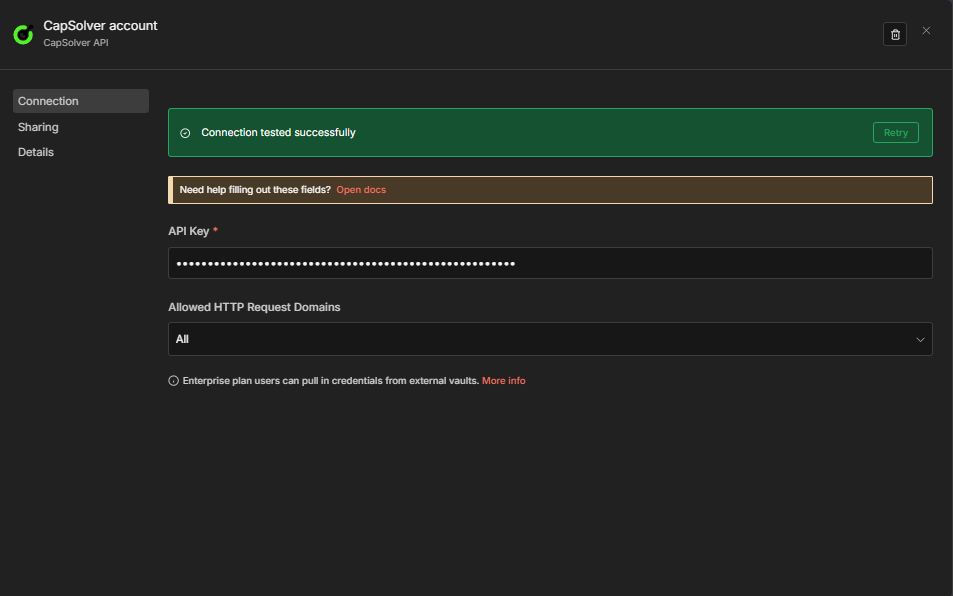
महत्वपूर्ण: आपके वर्कफ़्लो में प्रत्येक CapSolver नोड इस प्रमाणपत्र को संदर्भित करेगा। आपको इसे केवल एक बार बनाना है — आपके सभी सोल्वर वर्कफ़्लो एक ही प्रमाणपत्र साझा करेंगे।
यह Go सर्वर n8n से fetch अनुरोध प्राप्त करता है और httpcloak के Chrome TLS प्रोफ़ाइल का उपयोग करके उन्हें निष्पादित करता है। यह एक छोटा, स्व-संपूर्ण बाइनरी है जिसे आप n8n के साथ चलते हैं।
एक निर्देशिका बनाएं और इसे main.go के रूप में सहेजें:
mkdir -p ~/tls-server && cd ~/tls-serverpackage main
import (
"context"
"encoding/json"
"fmt"
"io"
"log"
"net/http"
"strings"
"time"
"github.com/sardanioss/httpcloak/client"
)
type FetchRequest struct {
URL string `json:"url"`
Method string `json:"method"`
Headers map[string]string `json:"headers"`
Proxy string `json:"proxy"`
Body string `json:"body"`
}
type FetchResponse struct {
Status int `json:"status"`
Body string `json:"body"`
Headers map[string][]string `json:"headers"`
}
type ErrorResponse struct {
Error string `json:"error"`
}
func writeError(w http.ResponseWriter, status int, msg string) {
w.Header().Set("Content-Type", "application/json")
w.WriteHeader(status)
json.NewEncoder(w).Encode(ErrorResponse{Error: msg})
}
func fetchHandler(w http.ResponseWriter, r *http.Request) {
if r.Method != http.MethodPost {
writeError(w, http.StatusMethodNotAllowed, "only POST allowed")
return
}
var req FetchRequest
if err := json.NewDecoder(r.Body).Decode(&req); err != nil {
writeError(w, http.StatusBadRequest, "invalid JSON: "+err.Error())
return
}
if req.URL == "" {
writeError(w, http.StatusBadRequest, "url is required")
return
}
if req.Method == "" {
req.Method = "GET"
}
ctx, cancel := context.WithTimeout(context.Background(), 60*time.Second)
defer cancel()
c := client.NewClient("chrome-145", client.WithTimeout(60*time.Second))
defer c.Close()
if req.Proxy != "" {
c.SetProxy(req.Proxy)
}
// Extract user-agent separately so httpcloak uses it instead of its preset value.
headers := make(map[string][]string, len(req.Headers))
var userAgent string
for k, v := range req.Headers {
lower := strings.ToLower(k)
if lower == "user-agent" {
userAgent = v
} else {
headers[k] = []string{v}
}
}
var bodyReader io.Reader
if req.Body != "" {
bodyReader = strings.NewReader(req.Body)
}
hcReq := &client.Request{
Method: strings.ToUpper(req.Method),
URL: req.URL,
Headers: headers,
Body: bodyReader,
UserAgent: userAgent,
FetchMode: client.FetchModeNavigate,
}
resp, err := c.Do(ctx, hcReq)
if err != nil {
writeError(w, http.StatusBadGateway, "fetch failed: "+err.Error())
return
}
body, err := resp.Text()
if err != nil {
writeError(w, http.StatusInternalServerError, "read body failed: "+err.Error())
return
}
w.Header().Set("Content-Type", "application/json")
json.NewEncoder(w).Encode(FetchResponse{
Status: resp.StatusCode,
Body: body,
Headers: resp.Headers,
})
}
func main() {
const port = "7878"
mux := http.NewServeMux()
mux.HandleFunc("/fetch", fetchHandler)
mux.HandleFunc("/health", func(w http.ResponseWriter, r *http.Request) {
w.Header().Set("Content-Type", "application/json")
fmt.Fprint(w, `{"status":"ok"}`)
})
log.Printf("TLS server (httpcloak chrome-145) listening on :%s", port)
log.Fatal(http.ListenAndServe(":"+port, mux))
}go mod init tls-server
go get github.com/sardanioss/httpcloak/client
go build -o main main.go./maincurl http://localhost:7878/healthअपेक्षित: {"status":"ok"}
नोट: TLS सर्वर सेम मशीन पर आपका n8n इंस्टेंस होना चाहिए। n8n वर्कफ़्लो इसे
http://localhost:7878/fetchपर कॉल करेगा। यदि आप n8n क्लाउड उपयोग कर रहे हैं, तो आपको खुद होस्टेड सेटअप की आवश्यकता होगी — यही कारण है कि Cloudflare Challenge स्क्रैपिंग के लिए self-hosted n8n जोर देकर सुझाया जाता है।
डिफ़ॉल्ट रूप से, n8n HTTP Request नोड्स को localhost पतों को कॉल करने से रोकता है (SSRF सुरक्षा)। आपको इस प्रतिबंध को अक्षम करना होगा।
N8N_BLOCK_ACCESS_TO_LOCALHOST=false पर्यावरण चर जोड़ें और अपने n8n इंस्टेंस को पुनः आरंभ करें। यह इस बात पर निर्भर करता है कि आप n8n कैसे चलाते हैं:
यदि आप सीधे n8n चलाते हैं:
export N8N_BLOCK_ACCESS_TO_LOCALHOST=false
n8n start
यदि आप Docker का उपयोग करते हैं:
अपने docker run कमांड में -e N8N_BLOCK_ACCESS_TO_LOCALHOST=false जोड़ें, या इसे docker-compose.yml की environment सेक्शन में जोड़ें।
यह वर्कफ़्लो एक POST एंडपॉइंट बनाता है जो Cloudflare-संरक्षित URL और प्रॉक्सी स्वीकार करता है, CapSolver के ज़रिए चैलेंज हल करता है, और कच्चा cf_clearance कुकी और userAgent लौटाता है। TLS सर्वर की कोई आवश्यकता नहीं — आपकी एप्लिकेशन fetch को संभालती है।
Webhook (POST /solver-cloudflare-challenge) → Cloudflare Challenge (CapSolver)
                                             → Format Solution → Webhook को जवाब दें
4 नोड्स, केवल वेबहुक, कोई शेड्यूल पाथ नहीं, कोई TLS सर्वर निर्भरता नहीं।
websiteURL और proxy के साथ POST अनुरोध प्राप्त करता हैAntiCloudflareTask के उपयोग से चैलेंज हल करता हैcookies ऑब्जेक्ट को कूकी स्ट्रिंग में सीरियलाइज़ करता है, continueOnFail के जरिए त्रुटियों को हैंडल करता हैcf_clearance, सीरियलाइज़्ड कूकी स्ट्रिंग, और userAgent लौटाता है### नोड कॉन्फ़िगरेशन| सेटिंग | मान |
|---|---|
| HTTP मेथड | POST |
| पाथ | solver-cloudflare-challenge |
| प्रतिक्रिया दें | Response Node |
यह इस एंडपॉइंट का निर्माण करता है: https://your-n8n-instance.com/webhook/solver-cloudflare-challenge
| पैरामीटर | मान | विवरण |
|---|---|---|
| ऑपरेशन | Cloudflare Challenge |
चुनता है AntiCloudflareTask |
| टाइप | AntiCloudflareTask |
पूरी पृष्ठ की Cloudflare चुनौती |
| वेबसाइट URL | ={{ $json.body.websiteURL }} |
Cloudflare-से संरक्षित URL |
| प्रॉक्सी | ={{ $json.body.proxy }} |
host:port:user:pass फॉर्मेट में रेसिडेंशियल प्रॉक्सी |
| Continue On Fail | true |
क्रैश होने के बजाय संरचित त्रुटियाँ लौटाता है |
CapSolver आपके प्रॉक्सी के माध्यम से एक वास्तविक ब्राउज़र लॉन्च करता है, लक्ष्य URL लोड करता है, और Cloudflare चुनौती को हल करता है। सफल होने पर, यह एक solution ऑब्जेक्ट लौटाता है जिसमें शामिल हैं:
cookies — एक ऑब्जेक्ट { cf_clearance: "..." } जिसमें क्लियरेंस कुकी होती हैuserAgent — ब्राउज़र द्वारा हल करते समय उपयोग किया गया सटीक User-Agent स्ट्रिंगटिप्पणी: यह फ़ील्ड
websiteURLहै (न किtargetURL) — जो अन्य सभी Solver APIs और CapSolver नोड द्वारा उपयोग किए गए फ़ील्ड नाम से मेल खाता है।
यह नोड जरूरी है क्योंकि AntiCloudflareTask cookies को एक ऑब्जेक्ट ({ cf_clearance: "..." }) के रूप में लौटाता है, न कि reCAPTCHA या Turnstile की तरह एक साधारण टोकन स्ट्रिंग। यह कुकी को सीरियलाइज़ करता है, cf_clearance निकालता है, और अगर CapSolver विफल हुआ तो संरचित त्रुटि लौटाता है।
const input = $input.first().json;

if (input.error || !input.data || !input.data.solution) {
  const errorMsg = input.error
    ? (input.error.message || JSON.stringify(input.error))
    : 'No solution returned — site may not be showing a challenge';
  return [{ json: { success: false, error: errorMsg } }];
}

const solution = input.data.solution;
const cookies = solution.cookies;
const cfClearance = (cookies && typeof cookies === 'object')
  ? (cookies.cf_clearance || '') : '';
const cookieString = (cookies && typeof cookies === 'object')
  ? Object.entries(cookies).map(([k, v]) => `${k}=${v}`).join('; ')
  : (cookies || '');

return [{ json: {
  success: true,
  cf_clearance: cfClearance,
  cookies: cookieString,
  userAgent: solution.userAgent || '',
  solvedAt: new Date().toISOString()
}}];| सेटिंग | मान |
|---|---|
| प्रतिक्रिया के साथ उत्तर दें | JSON |
| प्रतिक्रिया बॉडी | ={{ JSON.stringify($json) }} |
curl -X POST https://your-n8n-instance.com/webhook/solver-cloudflare-challenge \
  -H "Content-Type: application/json" \
  -d '{
    "websiteURL": "https://protected-site.com",
    "proxy": "host:port:user:pass"
  }'
सफल प्रतिक्रिया:
{
  "success": true,
  "cf_clearance": "abc123...",
  "cookies": "cf_clearance=abc123...",
  "userAgent": "Mozilla/5.0 (Windows NT 10.0; Win64; x64) ... Chrome/145.0.0.0 ...",
  "solvedAt": "2026-03-11T12:00:00.000Z"
}
विफल प्रतिक्रिया (कोई चुनौती नहीं मिली, खराब प्रॉक्सी, आदि):
{
  "success": false,
  "error": "No solution returned — site may not be showing a challenge"
}नीचे दिया गया JSON कॉपी करें और n8n में Menu → Import from JSON के माध्यम से इम्पोर्ट करें। इम्पोर्ट करने के बाद, Cloudflare Challenge नोड में अपने CapSolver क्रेडेंशियल का चयन करें।
{
  "nodes": [
    {
      "parameters": {
        "content": "## Cloudflare Challenge \u2014 Solver API\n\n### How it works\n\n1. Receives a request via webhook to solve a Cloudflare challenge.\n2. Uses the Cloudflare Challenge node to attempt solving the challenge.\n3. Formats the solved challenge token via custom code.\n4. Responds back to the original request with the solved token.\n\n### Setup steps\n\n- [ ] Configure the Webhook node to receive requests.\n- [ ] Set up CapSolver credentials to enable solving Cloudflare challenges.\n- [ ] Ensure the Response node is properly configured to send back the solved token.\n\n### Customization\n\nYou can customize the code in the 'Format Solution' node to change the formatting of the solved token response.",
        "width": 480,
        "height": 672
      },
      "type": "n8n-nodes-base.stickyNote",
      "typeVersion": 1,
      "position": [
        -816,
        -128
      ],
      "id": "254f3829-0e6e-4ae3-bf83-85851be9a7bc",
      "name": "Sticky Note"
    },
    {
      "parameters": {
        "content": "## Receive and solve challenge\n\nTriggers on a new request and attempts to solve the Cloudflare challenge.",
        "width": 512,
        "height": 304,
        "color": 7
      },
      "type": "n8n-nodes-base.stickyNote",
      "typeVersion": 1,
      "position": [
        -256,
        -128
      ],
      "id": "44e79738-a2f0-41ec-8ff0-514afbd6cc45",
      "name": "Sticky Note1"
    },
    {
      "parameters": {
        "content": "## Format and return solution\n\nFormats the solution and responds back with the solved token.",
        "width": 496,
        "height": 304,
        "color": 7
      },
      "type": "n8n-nodes-base.stickyNote",
      "typeVersion": 1,
      "position": [
        352,
        -128
      ],
      "id": "fc40112d-389d-4d4e-8872-af2ae533c513",
      "name": "Sticky Note2"
    },
    {
      "parameters": {
        "httpMethod": "POST",
        "path": "solver-cloudflare-challenge",
        "responseMode": "responseNode",
        "options": {}
      },
      "type": "n8n-nodes-base.webhook",
      "typeVersion": 2.1,
      "position": [
        -208,
        0
      ],
      "id": "cf770001-7777-7777-7777-777777777701",
      "name": "Receive Solver Request",
      "webhookId": "cf770001-aaaa-bbbb-cccc-777777777701",
      "onError": "continueRegularOutput"
    },
    {
      "parameters": {
        "operation": "Cloudflare Challenge",
        "websiteURL": "={{ $json.body.websiteURL }}",
        "proxy": "={{ $json.body.proxy }}",
        "userAgent": "={{ $json.body.userAgent }}",
        "html": "={{ $json.body.html }}"
      },
      "type": "n8n-nodes-capsolver.capSolver",
      "typeVersion": 1,
      "position": [
        112,
        0
      ],
      "id": "cf770001-7777-7777-7777-777777777702",
      "name": "Cloudflare Challenge",
      "credentials": {
        "capSolverApi": {
          "id": "BeBFMAsySMsMGeE9",
          "name": "CapSolver account"
        }
      },
      "onError": "continueRegularOutput"
    },
    {
      "parameters": {
        "jsCode": "const input = $input.first().json;\n\nif (input.error || !input.data || !input.data.solution) {\n  const errorMsg = input.error\n    ? (input.error.message || JSON.stringify(input.error))\n    : 'No solution returned \u2014 site may not be showing a challenge';\n  return [{ json: { success: false, error: errorMsg } }];\n}\n\nconst solution = input.data.solution;\nconst cookies = solution.cookies;\nconst cfClearance = (cookies && typeof cookies === 'object') ? (cookies.cf_clearance || '') : '';\nconst cookieString = (cookies && typeof cookies === 'object')\n  ? Object.entries(cookies).map(([k, v]) => `${k}=${v}`).join('; ')\n  : (cookies || '');\n\nreturn [{ json: {\n  success: true,\n  cf_clearance: cfClearance,\n  cookies: cookieString,\n  userAgent: solution.userAgent || '',\n  solvedAt: new Date().toISOString()\n}}];"
      },
      "type": "n8n-nodes-base.code",
      "typeVersion": 2,
      "position": [
        400,
        0
      ],
      "id": "cf770001-7777-7777-7777-777777777703",
      "name": "Format Solution"
    },
    {
      "parameters": {
        "respondWith": "json",
        "responseBody": "={{ JSON.stringify($json) }}",
        "options": {}
      },
      "type": "n8n-nodes-base.respondToWebhook",
      "typeVersion": 1.5,
      "position": [
        700,
        0
      ],
      "id": "cf770001-7777-7777-7777-777777777704",
      "name": "Return Solved Token"
    }
  ],
  "connections": {
    "Receive Solver Request": {
      "main": [
        [
          {
            "node": "Cloudflare Challenge",
            "type": "main",
            "index": 0
          }
        ]
      ]
    },
    "Cloudflare Challenge": {
      "main": [
        [
          {
            "node": "Format Solution",
            "type": "main",
            "index": 0
          }
        ]
      ]
    },
    "Format Solution": {
      "main": [
        [
          {
            "node": "Return Solved Token",
            "type": "main",
            "index": 0
          }
        ]
      ]
    }
  },
  "pinData": {},
  "meta": {
    "instanceId": "962ff0267b713be0344b866fa54daae28de8ed2144e2e6867da355dae193ea1f"
  }
}उपरोक्त Solver API दिखाता है कि कैसे एक हल किया गया cf_clearance कुकी और userAgent प्राप्त करें। लेकिन आप वास्तव में उनके साथ क्या करते हैं?
reCAPTCHA या Turnstile के विपरीत जहां आप फॉर्म फ़ील्ड में टोकन सबमिट करते हैं, Cloudflare Challenge एक कुकी (cf_clearance) लौटाता है जिसे हर बाद के अनुरोध पर हेडर के रूप में भेजना ज़रूरी है। यह कुकी उस प्रॉक्सी IP और User-Agent से बंधी होती है जो चुनौती हल करते समय उपयोग किए गए थे — दोनों को बिल्कुल मेल खाना चाहिए।
यहाँ सामान्य पैटर्न है:
cf_clearance कुकी और userAgent प्राप्त करेंsec-ch-ua हेडर के साथ हेडर बनाएंhttp://localhost:7878/fetch के ज़रिये अनुरोध भेजें ताकि Chrome के TLS फ़िंगरप्रिंट से मेल खाएमुख्य अवधारणा: मानक HTTP क्लाइंट यहां विफल हो जाते हैं, भले ही उनके पास वैध
cf_clearanceकुकी हो — Cloudflare TLS हैंडशेक का स्वयं फ़िंगरप्रिंट करता है। Go TLS सर्वर (httpcloak) नेटवर्क स्तर पर फ़ेच को ठीक Chrome जैसा दिखाता है। हर वर्कफ़्लो जो Cloudflare-से संरक्षित पृष्ठ को फ़ेच करता है, उसे TLS सर्वर के माध्यम से जाना चाहिए।### उदाहरण: Cloudflare चुनौती स्क्रेपर
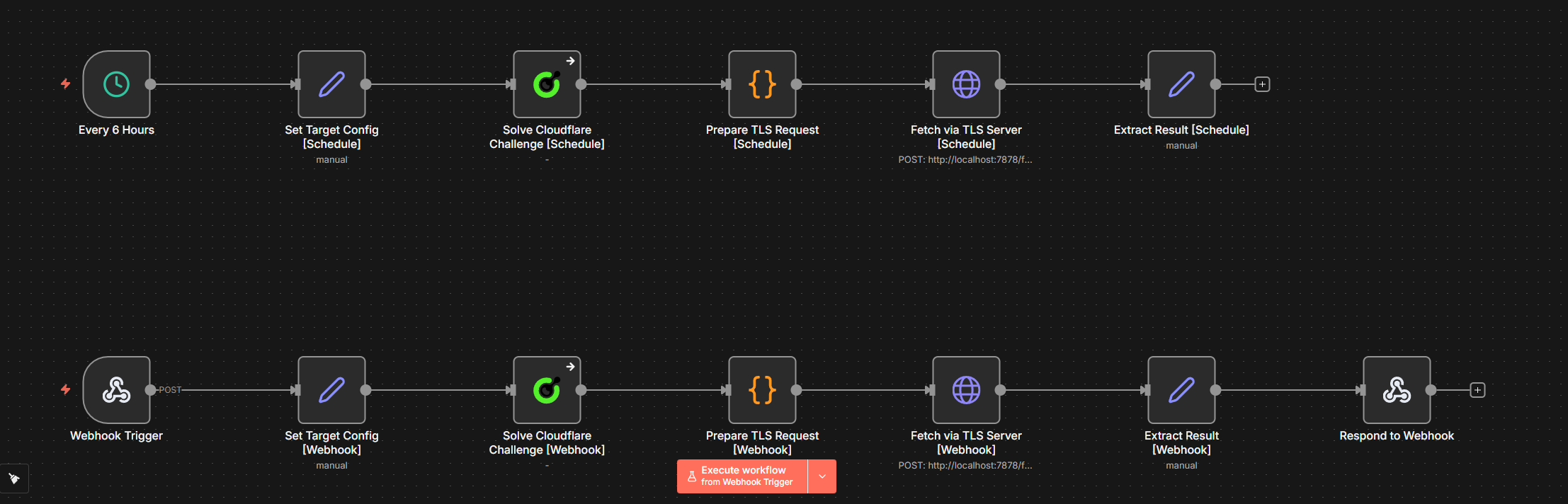
शेड्यूल पथ:
हर 6 घंटे → लक्षित कॉन्फ़िग सेट करें [Schedule] → Cloudflare चुनौती हल करें
           → TLS अनुरोध तैयार करें → TLS सर्वर के माध्यम से प्राप्त करें → परिणाम निकालें
वेबहुक पथ:
वेबहुक ट्रिगर → लक्षित कॉन्फ़िग सेट करें [Webhook] → Cloudflare चुनौती हल करें
→ TLS अनुरोध तैयार करें → TLS सर्वर के माध्यम से प्राप्त करें → परिणाम निकालें → वेबहुक को प्रतिक्रिया देंtargetURL और proxy (फॉर्मैट में host:port:user:pass) को संग्रहीत करता है। शेड्यूल पथ हार्डकोडेड मानों का उपयोग करता है; वेबहुक पथ इन्हें POST बॉडी से पढ़ता है।onError: "continueRegularOutput" के साथ — तब भी जारी रहता है जब पृष्ठ वर्तमान में चुनौती नहीं दिखा रहा हो।host:port:user:pass प्रॉक्सी को http://user:pass@host:port URL फॉर्मेट में परिवर्तित करता है, solution.cookies को कूकी हेडर स्ट्रिंग में अनुक्रमित करता है, और सॉल्व से सटीक userAgent के साथ Chrome जैसे अनुरोध हेडर बनाता है।http://localhost:7878/fetch को उपयोग करता है contentType: "raw" (न "json" - n8n का JSON मोड बॉडी को भ्रष्ट कर देता है)।status, body, और fetchedAt खींचता है।क्यों
contentType: "raw"और न कि"json"? n8n काjsonकंटेंट टाइप मोड बॉडी पैरामीटर को key-value जोड़े के रूप में अपेक्षित करता है। यदि आपJSON.stringify($json)को स्ट्रिंग के रूप में पास करते हैं, तो n8n पूरे स्ट्रिंग को एक गलत फॉर्मेटेड पैरामीटर के रूप में मानता है और सर्वर को{"": ""}भेजता है।rawमोड उपयोग करने पर बॉडी ठीक उसी तरह भेजी जाती है जैसे अभिव्यक्ति निष्पादित होती है।
{
  "nodes": [
    {
      "parameters": {
        "content": "## Cloudflare Challenge \u2014 CapSolver + Schedule + Webhook\n\n### How it works\n\n1. Triggers schedule every 6 hours to solve Cloudflare challenges.\n2. Webhook triggers on request to solve Cloudflare challenges.\n3. Sets target and proxy configuration for requests.\n4. Solves the Cloudflare challenge using CapSolver.\n5. Sends results via TLS and processes the HTTP response.\n\n### Setup steps\n\n- Ensure CapSolver credentials are configured.\n- Confirm webhook URL is set and accessible.\n- Check schedule configuration for every 6 hours trigger.\n- Verify endpoint http://localhost:7878/fetch is available.\n\n### Customization\n\nConsider customizing the target URL or proxy settings within the set nodes.",
        "width": 480,
        "height": 688
      },
      "type": "n8n-nodes-base.stickyNote",
      "typeVersion": 1,
      "position": [
        -1008,
        -112
      ],
      "id": "3c1c3e96-631a-4cf6-bbff-85fd8b1a01e8",
      "name": "Sticky Note"
    },
    {
      "parameters": {
        "content": "## Scheduled Cloudflare challenge\n\nTriggered every 6 hours to solve Cloudflare challenge.",
        "width": 1696,
        "height": 272,
        "color": 7
      },
      "type": "n8n-nodes-base.stickyNote",
      "typeVersion": 1,
      "position": [
        -448,
        -112
      ],
      "id": "e9187404-7818-4233-af66-091c90a40476",
      "name": "Sticky Note1"
    },
    {
      "parameters": {
        "content": "## Webhook Cloudflare challenge\n\nRespond to solver requests via webhook to solve Cloudflare challenge.",
        "width": 2000,
        "height": 272,
        "color": 7
      },
      "type": "n8n-nodes-base.stickyNote",
      "typeVersion": 1,
      "position": [
        -448,
        304
      ],
      "id": "b5d5ba23-8ed2-4afb-8113-3fa8f2fba51e",
      "name": "Sticky Note2"
    },
    {
      "parameters": {
        "rule": {
          "interval": [
            {
              "field": "hours",
              "hoursInterval": 6
            }
          ]
        }
      },
      "type": "n8n-nodes-base.scheduleTrigger",
      "typeVersion": 1.3,
      "position": [
        -400,
        0
      ],
      "id": "cf111111-1111-1111-1111-111111111101",
      "name": "Every 6 Hours"
    },
    {
      "parameters": {
        "assignments": {
          "assignments": [
            {
              "id": "cfg-s-001",
              "name": "targetURL",
              "value": "https://www.listaspam.com/busca.php?Telefono=671484239",
              "type": "string"
            },
            {
              "id": "cfg-s-002",
              "name": "proxy",
              "value": "YOUR_PROXY_HOST:PORT:USER:PASS",
              "type": "string"
            }
          ]
        },
        "options": {}
      },
      "type": "n8n-nodes-base.set",
      "typeVersion": 3.4,
      "position": [
        -96,
        0
      ],
      "id": "cf111111-1111-1111-1111-111111111102",
      "name": "Set Target Config [Schedule]"
    },
    {
      "parameters": {
        "operation": "Cloudflare Challenge",
        "websiteURL": "={{ $json.targetURL }}",
        "proxy": "={{ $json.proxy }}"
      },
      "type": "n8n-nodes-capsolver.capSolver",
      "typeVersion": 1,
      "position": [
        208,
        0
      ],
      "id": "cf111111-1111-1111-1111-111111111103",
      "name": "Solve Cloudflare Challenge [Schedule]",
      "credentials": {
        "capSolverApi": {
          "id": "BeBFMAsySMsMGeE9",
          "name": "CapSolver account"
        }
      },
      "onError": "continueRegularOutput"
    },
    {
      "parameters": {
        "jsCode": "const config = $('Set Target Config [Schedule]').first().json;\nconst capResult = $input.first().json;\n\nfunction toProxyURL(proxy) {\n  if (!proxy) return '';\n  if (proxy.startsWith('http')) return proxy;\n  const parts = proxy.split(':');\n  if (parts.length === 4) {\n    return `http://${parts[2]}:${parts[3]}@${parts[0]}:${parts[1]}`;\n  }\n  return proxy;\n}\n\nlet cookieStr = '';\nlet ua = 'Mozilla/5.0 (Windows NT 10.0; Win64; x64) AppleWebKit/537.36 (KHTML, like Gecko) Chrome/145.0.0.0 Safari/537.36';\n\nif (capResult.data && capResult.data.solution) {\n  const solution = capResult.data.solution;\n  const cookies = solution.cookies;\n  cookieStr = cookies && typeof cookies === 'object'\n    ? Object.entries(cookies).map(([k, v]) => `${k}=${v}`).join('; ')\n    : (cookies || '');\n  if (solution.userAgent) ua = solution.userAgent;\n}\n\nconst chromeMatch = ua.match(/Chrome\\/(\\d+)/);\nconst chromeVer = chromeMatch ? chromeMatch[1] : '145';\nconst secChUa = `\"Chromium\";v=\"${chromeVer}\", \"Not A(Brand\";v=\"8\", \"Google Chrome\";v=\"${chromeVer}\"`;\n\nconst headers = {\n  'accept': 'text/html,application/xhtml+xml,application/xml;q=0.9,image/avif,image/webp,image/apng,*/*;q=0.8',\n  'accept-language': 'en-US,en;q=0.9',\n  'sec-ch-ua': secChUa,\n  'sec-ch-ua-mobile': '?0',\n  'sec-ch-ua-platform': '\"Windows\"',\n  'sec-fetch-dest': 'document',\n  'sec-fetch-mode': 'navigate',\n  'sec-fetch-site': 'none',\n  'sec-fetch-user': '?1',\n  'upgrade-insecure-requests': '1',\n  'user-agent': ua\n};\n\nif (cookieStr) headers['cookie'] = cookieStr;\n\nreturn [{ json: {\n  url: config.targetURL,\n  method: 'GET',\n  proxy: toProxyURL(config.proxy),\n  headers\n}}];"
      },
      "type": "n8n-nodes-base.code",
      "typeVersion": 2,
      "position": [
        512,
        0
      ],
      "id": "cf111111-1111-1111-1111-111111111104",
      "name": "Prepare TLS Request [Schedule]"
    },
    {
      "parameters": {
        "method": "POST",
        "url": "http://localhost:7878/fetch",
        "sendBody": true,
        "contentType": "raw",
        "rawContentType": "application/json",
        "body": "={{ JSON.stringify($json) }}",
        "options": {
          "timeout": 60000
        }
      },
      "type": "n8n-nodes-base.httpRequest",
      "typeVersion": 4.3,
      "position": [
        800,
        0
      ],
      "id": "cf111111-1111-1111-1111-111111111105",
      "name": "Fetch via TLS Server [Schedule]"
    },
    {
      "parameters": {
        "assignments": {
          "assignments": [
            {
              "id": "out-s-001",
              "name": "status",
              "value": "={{ $json.status }}",
              "type": "number"
            },
            {
              "id": "out-s-002",
              "name": "body",
              "value": "={{ $json.body }}",
              "type": "string"
            },
            {
              "id": "out-s-003",
              "name": "fetchedAt",
              "value": "={{ new Date().toISOString() }}",
              "type": "string"
            }
          ]
        },
        "options": {}
      },
      "type": "n8n-nodes-base.set",
      "typeVersion": 3.4,
      "position": [
        1104,
        0
      ],
      "id": "cf111111-1111-1111-1111-111111111106",
      "name": "Extract Result [Schedule]"
    },
    {
      "parameters": {
        "httpMethod": "POST",
        "path": "cloudflare-scraper",
        "responseMode": "responseNode",
        "options": {}
      },
      "type": "n8n-nodes-base.webhook",
      "typeVersion": 2.1,
      "position": [
        -400,
        420
      ],
      "id": "cf111111-1111-1111-1111-111111111107",
      "name": "Receive Solver Request",
      "webhookId": "cf111111-aaaa-bbbb-cccc-111111111107",
      "onError": "continueRegularOutput"
    },
    {
      "parameters": {
        "assignments": {
          "assignments": [
            {
              "id": "cfg-w-001",
              "name": "targetURL",
              "value": "={{ $json.body.targetURL }}",
              "type": "string"
            },
            {
              "id": "cfg-w-002",
              "name": "proxy",
              "value": "={{ $json.body.proxy }}",
              "type": "string"
            }
          ]
        },
        "options": {}
      },
      "type": "n8n-nodes-base.set",
      "typeVersion": 3.4,
      "position": [
        -96,
        420
      ],
      "id": "cf111111-1111-1111-1111-111111111108",
      "name": "Set Target Config [Webhook]"
    },
    {
      "parameters": {
        "operation": "Cloudflare Challenge",
        "websiteURL": "={{ $json.targetURL }}",
        "proxy": "={{ $json.proxy }}"
      },
      "type": "n8n-nodes-capsolver.capSolver",
      "typeVersion": 1,
      "position": [
        208,
        420
      ],
      "id": "cf111111-1111-1111-1111-111111111109",
      "name": "Solve Cloudflare Challenge [Webhook]",
      "credentials": {
        "capSolverApi": {
          "id": "BeBFMAsySMsMGeE9",
          "name": "CapSolver account"
        }
      },
      "onError": "continueRegularOutput"
    },
    {
      "parameters": {
        "jsCode": "const config = $('Set Target Config [Webhook]').first().json;\nconst capResult = $input.first().json;\n\nfunction toProxyURL(proxy) {\n  if (!proxy) return '';\n  if (proxy.startsWith('http')) return proxy;\n  const parts = proxy.split(':');\n  if (parts.length === 4) {\n    return `http://${parts[2]}:${parts[3]}@${parts[0]}:${parts[1]}`;\n  }\n  return proxy;\n}\n\nlet cookieStr = '';\nlet ua = 'Mozilla/5.0 (Windows NT 10.0; Win64; x64) AppleWebKit/537.36 (KHTML, like Gecko) Chrome/145.0.0.0 Safari/537.36';\n\nif (capResult.data && capResult.data.solution) {\n  const solution = capResult.data.solution;\n  const cookies = solution.cookies;\n  cookieStr = cookies && typeof cookies === 'object'\n    ? Object.entries(cookies).map(([k, v]) => `${k}=${v}`).join('; ')\n    : (cookies || '');\n  if (solution.userAgent) ua = solution.userAgent;\n}\n\nconst chromeMatch = ua.match(/Chrome\\/(\\d+)/);\nconst chromeVer = chromeMatch ? chromeMatch[1] : '145';\nconst secChUa = `\"Chromium\";v=\"${chromeVer}\", \"Not A(Brand\";v=\"8\", \"Google Chrome\";v=\"${chromeVer}\"`;\n\nconst headers = {\n  'accept': 'text/html,application/xhtml+xml,application/xml;q=0.9,image/avif,image/webp,image/apng,*/*;q=0.8',\n  'accept-language': 'en-US,en;q=0.9',\n  'sec-ch-ua': secChUa,\n  'sec-ch-ua-mobile': '?0',\n  'sec-ch-ua-platform': '\"Windows\"',\n  'sec-fetch-dest': 'document',\n  'sec-fetch-mode': 'navigate',\n  'sec-fetch-site': 'none',\n  'sec-fetch-user': '?1',\n  'upgrade-insecure-requests': '1',\n  'user-agent': ua\n};\n\nif (cookieStr) headers['cookie'] = cookieStr;\n\nreturn [{ json: {\n  url: config.targetURL,\n  method: 'GET',\n  proxy: toProxyURL(config.proxy),\n  headers\n}}];"
      },
      "type": "n8n-nodes-base.code",
      "typeVersion": 2,
      "position": [
        512,
        420
      ],
      "id": "cf111111-1111-1111-1111-111111111110",
      "name": "Prepare TLS Request [Webhook]"
    },
    {
      "parameters": {
        "method": "POST",
        "url": "http://localhost:7878/fetch",
        "sendBody": true,
        "contentType": "raw",
        "rawContentType": "application/json",
        "body": "={{ JSON.stringify($json) }}",
        "options": {
          "timeout": 60000
        }
      },
      "type": "n8n-nodes-base.httpRequest",
      "typeVersion": 4.3,
      "position": [
        800,
        420
      ],
      "id": "cf111111-1111-1111-1111-111111111111",
      "name": "Fetch via TLS Server [Webhook]"
    },
    {
      "parameters": {
        "assignments": {
          "assignments": [
            {
              "id": "out-w-001",
              "name": "status",
              "value": "={{ $json.status }}",
              "type": "number"
            },
            {
              "id": "out-w-002",
              "name": "body",
              "value": "={{ $json.body }}",
              "type": "string"
            },
            {
              "id": "out-w-003",
              "name": "fetchedAt",
              "value": "={{ new Date().toISOString() }}",
              "type": "string"
            }
          ]
        },
        "options": {}
      },
      "type": "n8n-nodes-base.set",
      "typeVersion": 3.4,
      "position": [
        1104,
        420
      ],
      "id": "cf111111-1111-1111-1111-111111111112",
      "name": "Extract Result [Webhook]"
    },
    {
      "parameters": {
        "respondWith": "json",
        "responseBody": "={{ JSON.stringify($json) }}",
        "options": {}
      },
      "type": "n8n-nodes-base.respondToWebhook",
      "typeVersion": 1.5,
      "position": [
        1408,
        420
      ],
      "id": "cf111111-1111-1111-1111-111111111113",
      "name": "Return Solved Token"
    }
  ],
  "connections": {
    "Every 6 Hours": {
      "main": [
        [
          {
            "node": "Set Target Config [Schedule]",
            "type": "main",
            "index": 0
          }
        ]
      ]
    },
    "Set Target Config [Schedule]": {
      "main": [
        [
          {
            "node": "Solve Cloudflare Challenge [Schedule]",
            "type": "main",
            "index": 0
          }
        ]
      ]
    },
    "Solve Cloudflare Challenge [Schedule]": {
      "main": [
        [
          {
            "node": "Prepare TLS Request [Schedule]",
            "type": "main",
            "index": 0
          }
        ]
      ]
    },
    "Prepare TLS Request [Schedule]": {
      "main": [
        [
          {
            "node": "Fetch via TLS Server [Schedule]",
            "type": "main",
            "index": 0
          }
        ]
      ]
    },
    "Fetch via TLS Server [Schedule]": {
      "main": [
        [
          {
            "node": "Extract Result [Schedule]",
            "type": "main",
            "index": 0
          }
        ]
      ]
    },
    "Receive Solver Request": {
      "main": [
        [
          {
            "node": "Set Target Config [Webhook]",
            "type": "main",
            "index": 0
          }
        ]
      ]
    },
    "Set Target Config [Webhook]": {
      "main": [
        [
          {
            "node": "Solve Cloudflare Challenge [Webhook]",
            "type": "main",
            "index": 0
          }
        ]
      ]
    },
    "Solve Cloudflare Challenge [Webhook]": {
      "main": [
        [
          {
            "node": "Prepare TLS Request [Webhook]",
            "type": "main",
            "index": 0
          }
        ]
      ]
    },
    "Prepare TLS Request [Webhook]": {
      "main": [
        [
          {
            "node": "Fetch via TLS Server [Webhook]",
            "type": "main",
            "index": 0
          }
        ]
      ]
    },
    "Fetch via TLS Server [Webhook]": {
      "main": [
        [
          {
            "node": "Extract Result [Webhook]",
            "type": "main",
            "index": 0
          }
        ]
      ]
    },
    "Extract Result [Webhook]": {
      "main": [
        [
          {
            "node": "Return Solved Token",
            "type": "main",
            "index": 0
          }
        ]
      ]
    }
  },
  "pinData": {},
  "meta": {
    "instanceId": "962ff0267b713be0344b866fa54daae28de8ed2144e2e6867da355dae193ea1f"
  }
}
---## वर्कफ़्लो: उपयोग-मामला उदाहरण
उपर्युक्त Solver API और स्क्रैपर उदाहरण मुख्य पैटर्न दिखाते हैं: चुनौती को हल करें, समाधान का उपयोग करके TLS के माध्यम से डेटा प्राप्त करें। निम्नलिखित वर्कफ़्लो इस पैटर्न का विस्तार करते हैं उत्पादन-तैयार उपयोग-मामलों के लिए — प्रत्येक में द्वैतीय ट्रिगर (शेड्यूल + वेबहुक), स्थायी स्थिति ट्रैकिंग, और संरचित आउटपुट शामिल है। प्रत्येक के लिए समान पूर्वापेक्षाएँ आवश्यक हैं: एक स्व-होस्टेड n8n इंस्टेंस, पोर्ट 7878 पर चलने वाला TLS सर्वर, एक आवासीय प्रॉक्सी, और एक CapSolver क्रेडेंशियल।
| वर्कफ़्लो | उद्देश्य |
|---|---|
Cloudflare Challenge Scraping — Price & Product Details — CapSolver + Schedule + Webhook |
हर 6 घंटे में एक CF-संरक्षित पेज से कीमत और उत्पाद का नाम स्क्रैप करता है, पिछले मूल्यों की तुलना करता है, परिवर्तनों पर चेतावनी देता है |
Cloudflare Challenge Account Login — CapSolver + Schedule + Webhook |
पहले चुनौती को हल करके, फिर TLS सर्वर के माध्यम से क्रेडेंशियल्स POST करके आपके अपने CF-संरक्षित साइट खाते में लॉग इन करता है |
Turnstile — Solver API |
एक वेबहुक एक्सपोज़ करता है जो Turnstile को हल करता है और टोकन लौटाता है — प्रॉक्सी या TLS सर्वर की आवश्यकता नहीं |
Turnstile Scraping — Price & Product Monitor |
Turnstile को हल करता है, टोकन के साथ एक उत्पाद पेज प्राप्त करता है, कीमत और नाम निकालता है, और परिवर्तनों पर चेतावनी देता है |
Turnstile Account Login |
पहले चुनौती को हल करके, फिर टोकन के साथ क्रेडेंशियल्स POST करके अपने Turnstile-संरक्षित साइट खाते में लॉग इन करता है — प्रॉक्सी या TLS सर्वर की आवश्यकता नहीं |
यह वर्कफ़्लो हर 6 घंटे (शेड्यूल) या मांग पर (वेबहुक) एक उत्पाद पृष्ठ को स्क्रैप करता है, HTML नोड का उपयोग करके मूल्य निकालता है, और इसे पूर्व में संग्रहीत मूल्य के साथ तुलना करता है।
शेड्यूल पथ:
हर 6 घंटे → लक्ष्य कॉन्फ़िग सेट करें → CF चुनौती हल करें → TLS अनुरोध तैयार करें
           → TLS सर्वर के माध्यम से फ़ेच करें → डेटा निकालें → डेटा की तुलना करें
           → डेटा बदला? → अलर्ट बनाएं / कोई बदलाव नहीं
त्रुटि हैंडलिंग: यदि CapSolver विफल रहता है, तो वर्कफ़्लो बिना कुकीज़ के जारी रहता है (
continueOnFailके माध्यम से)। TLS सर्वर से फ़ेच अभी भी सफल हो सकता है यदि पृष्ठ वर्तमान में चुनौती नहीं दिखा रहा है।
मुख्य व्यवहार:
dataPropertyName: "body" (ना कि "data") का उपयोग करता है क्योंकि TLS सर्वर { status, body, headers } लौटाता है.product-price, h1) के माध्यम से मूल्य और उत्पाद नाम निकालता है$workflow.staticData.lastPrice पिछला मूल्य निष्पादन के बीच बनाए रखता हैdeal) और बढ़ोतरी (गंभीरता: info) का पता लगाती हैhost:port:user:pass → http://user:pass@host:port toProxyURL() हेल्पर के माध्यम से{
"nodes": [
{
"parameters": {
"content": "## क्लाउडफ़्लेर चुनौती स्क्रैपिंग — मूल्य और उत्पाद विवरण — CapSolver + शेड्यूल + वेबहुक\n\n### यह कैसे काम करता है\n\n1. ट्रिगर्स लक्षित वेबसाइट को समय-समय पर जांचने या बाहरी वेबहुक के जवाब में सेट किए जाते हैं।\n2. लक्ष्य URL और प्रॉक्सी के लिए कॉन्फ़िगरेशन लागू किए जाते हैं।\n3. वेबसाइट सुरक्षा को नेविगेट करने के लिए क्लाउडफ़्लेर चुनौतियाँ हल की जाती हैं।\n4. लक्ष्य सर्वर से डेटा प्राप्त करने के लिए सुरक्षित अनुरोध किए जाते हैं।\n5. निकाला गया डेटा परिवर्तन की जांच के लिए तुलना किया जाता है।\n6. पहचानी गई परिवर्तनों के आधार पर अलर्ट बनाए जाते हैं और भेजे जाते हैं या डेटा लौटाया जाता है।\n\n### सेटअप चरण\n\n- [ ] 'Set Target Config' नोड्स में URL और प्रॉक्सी सेटिंग्स कॉन्फ़िगर करें।\n- [ ] क्लाउडफ़्लेर चुनौतियाँ हल करने के लिए CapSolver क्रेडेंशियल कनेक्ट करें।\n- [ ] बाहरी अनुरोध प्राप्त करने के लिए वेबहुक URL सही तरीके से कॉन्फ़िगर करें।\n\n### अनुकूलन\n\nमॉनिटरिंग आवृत्ति को समायोजित करने के लिए, 'हर 6 घंटे' नोड या वेबहुक ट्रिगर सेटिंग्स में अंतराल संशोधित करें।",
"width": 480,
"height": 896
},
"type": "n8n-nodes-base.stickyNote",
"typeVersion": 1,
"position": [
-1104,
-192
],
"id": "85c55c3d-335a-47e5-8721-82fa4d633033",
"name": "Sticky Note"
},
{
"parameters": {
"content": "## शेड्यूल्ड ट्रिगर सेटअप\n\nडेटा स्क्रैपिंग प्रक्रिया को शुरू करने के लिए हर 6 घंटे शेड्यूलिंग को इनिशियलाइज़ करता है।",
"width": 1392,
"height": 272,
"color": 7
},
"type": "n8n-nodes-base.stickyNote",
"typeVersion": 1,
"position": [
-544,
-112
],
"id": "6ac3bd35-66ef-43ed-a8b5-5d5f6d367fba",
"name": "Sticky Note1"
},
{
"parameters": {
"content": "## अनुसूचित डेटा प्रोसेसिंग\n\nशेड्यूल द्वारा ट्रिगर होने के बाद डेटा निकासी, तुलना और अलर्ट निर्माण को संभालता है।",
"width": 1088,
"height": 480,
"color": 7
},
"type": "n8n-nodes-base.stickyNote",
"typeVersion": 1,
"position": [
960,
-192
],
"id": "a1c60513-ed8b-43f2-bff3-a7b19436337f",
"name": "Sticky Note2"
},
{
"parameters": {
"content": "## वेबहुक ट्रिगर सेटअप\n\nस्क्रैपिंग प्रक्रिया शुरू करने के लिए वेबहुक के माध्यम से बाहरी अनुरोधों की निगरानी करता है।",
"width": 1392,
"height": 272,
"color": 7
},
"type": "n8n-nodes-base.stickyNote",
"typeVersion": 1,
"position": [
-544,
384
],
"id": "ee4d9a0d-3233-4b70-828b-078c9eee0086",
"name": "Sticky Note3"
},
{
"parameters": {
"content": "## वेबहुक डेटा प्रोसेसिंग और प्रतिक्रिया\n\nवेबहुक ट्रिगर से डेटा निकालता है और तुलना करता है; परिवर्तनों के आधार पर प्रतिक्रियाएँ लौटाता है।",
"width": 1392,
"height": 480,
"color": 7
},
"type": "n8n-nodes-base.stickyNote",
"typeVersion": 1,
"position": [
960,
336
],
"id": "4ad55fbf-2882-4c63-9e09-37e674b00145",
"name": "Sticky Note4"
},
{
"parameters": {
"rule": {
"interval": [
{
"field": "hours",
"hoursInterval": 6
}
]
}
},
"type": "n8n-nodes-base.scheduleTrigger",
"typeVersion": 1.3,
"position": [
-500,
0
],
"id": "cf333333-3333-3333-3333-333333333301",
"name": "Every 6 Hours"
},
{
"parameters": {
"assignments": {
"assignments": [
{
"id": "cfg-s-001",
"name": "targetURL",
"value": "https://YOUR_CF_PROTECTED_SITE.com/product-page",
"type": "string"
},
{
"id": "cfg-s-002",
"name": "proxy",
"value": "YOUR_PROXY_HOST:PORT:USER:PASS",
"type": "string"
}
]
},
"options": {}
},
"type": "n8n-nodes-base.set",
"typeVersion": 3.4,
"position": [
-200,
0
],
"id": "cf333333-3333-3333-3333-333333333302",
"name": "Set Target Config [Schedule]"
},
{
"parameters": {
"operation": "Cloudflare Challenge",
"websiteURL": "={{ $json.targetURL }}",
"proxy": "={{ $json.proxy }}"
},
"type": "n8n-nodes-capsolver.capSolver",
"typeVersion": 1,
"position": [
100,
0
],
"id": "cf333333-3333-3333-3333-333333333303",
"name": "Solve Cloudflare Challenge [Schedule]",
"onError": "continueRegularOutput",
"credentials": {
"capSolverApi": {
"id": "BeBFMAsySMsMGeE9",
"name": "CapSolver account"
}
}
},
{
"parameters": {
"jsCode": "const config = $('Set Target Config [Schedule]').first().json;\nconst capResult = $input.first().json;\n\nfunction toProxyURL(proxy) {\n if (!proxy) return '';\n if (proxy.startsWith('http')) return proxy;\n const parts = proxy.split(':');\n if (parts.length === 4) {\n return `http://${parts[2]}:${parts[3]}@${parts[0]}:${parts[1]}`;\n }\n return proxy;\n}\n\nlet cookieStr = '';\nlet ua = 'Mozilla/5.0 (Windows NT 10.0; Win64; x64) AppleWebKit/537.36 (KHTML, जैसे Gecko) Chrome/145.0.0.0 Safari/537.36';\n\nif (capResult.data && capResult.data.solution) {\n const solution = capResult.data.solution;\n const cookies = solution.cookies;\n cookieStr = cookies && typeof cookies === 'object'\n ? Object.entries(cookies).map(([k, v]) => `${k}=${v}`).join('; ')\n : (cookies || '');\n if (solution.userAgent) ua = solution.userAgent;\n}\n\nconst chromeMatch = ua.match(/Chrome\\/(\\d+)/);\nconst chromeVer = chromeMatch ? chromeMatch[1] : '145';\nconst secChUa = `\"Chromium\";v=\"${chromeVer}\", \"Not A(Brand\";v=\"8\", \"Google Chrome\";v=\"${chromeVer}\"`;\n\nconst headers = {\n 'accept': 'text/html,application/xhtml+xml,application/xml;q=0.9,image/avif,image/webp,image/apng,*/*;q=0.8',\n 'accept-language': 'en-US,en;q=0.9',\n 'sec-ch-ua': secChUa,\n 'sec-ch-ua-mobile': '?0',\n 'sec-ch-ua-platform': '\"Windows\"',\n 'sec-fetch-dest': 'document',\n 'sec-fetch-mode': 'navigate',\n 'sec-fetch-site': 'none',\n 'sec-fetch-user': '?1',\n 'upgrade-insecure-requests': '1',\n 'user-agent': ua\n};\n\nif (cookieStr) headers['cookie'] = cookieStr;\n\nreturn [{ json: {\n url: config.targetURL,\n method: 'GET',\n proxy: toProxyURL(config.proxy),\n headers\n}}];"
},
"type": "n8n-nodes-base.code",
"typeVersion": 2,
"position": [
400,
0
],
"id": "cf333333-3333-3333-3333-333333333304",
"name": "Prepare TLS Request [Schedule]"
},
{
"parameters": {
"method": "POST",
"url": "http://localhost:7878/fetch",
"sendBody": true,
"contentType": "raw",
"rawContentType": "application/json",
"body": "={{ JSON.stringify($json) }}",
"options": {
"timeout": 60000
}
},
"type": "n8n-nodes-base.httpRequest",
"typeVersion": 4.3,
"position": [
700,
0
],
"id": "cf333333-3333-3333-3333-333333333305",
"name": "Fetch via TLS Server [Schedule]"
},
{
"parameters": {
"operation": "extractHtmlContent",
"extractionValues": {
"values": [
{
"key": "price",
"cssSelector": ".product-price, [data-price], .price",
"returnValue": "text",
"returnArray": false
},
{
"key": "productName",
"cssSelector": "h1, .product-title",
"returnValue": "text",
"returnArray": false
}
]
},
"options": {}
},
"type": "n8n-nodes-base.html",
"typeVersion": 1.2,
"position": [
1000,
0
],
"id": "cf333333-3333-3333-3333-333333333306",
"name": "Extract Data"
},
{
"parameters": {
"jsCode": "const staticData = $workflow.staticData;\nconst currentPrice = $input.first().json.price;\nconst previousPrice = staticData.lastPrice;\nconst productName = $input.first().json.productName || 'Product';\n\nconst parsePrice = (str) => {\n if (!str) return null;\n const match = str.match(/[\\d]+\\.?\\d*/);\n return match ? parseFloat(match[0].replace(',', '')) : null;\n};\n\nconst currentNum = parsePrice(currentPrice);\nconst previousNum = parsePrice(previousPrice);\n\nstaticData.lastPrice = currentPrice;\nstaticData.lastChecked = new Date().toISOString();\n\nconst changed = previousNum !== null && currentNum !== null && currentNum !== previousNum;\nconst direction = changed ? (currentNum < previousNum ? 'dropped' : 'increased') : 'unchanged';\nconst diff = changed ? Math.abs(currentNum - previousNum).toFixed(2) : '0';\n\nreturn [{\n json: {\n productName,\n currentPrice,\n previousPrice: previousPrice || 'first check',\n changed,\n direction,\n diff: changed ? `$${diff}` : null,\n checkedAt: new Date().toISOString()\n }\n}];"
},
"type": "n8n-nodes-base.code",
"typeVersion": 2,
"position": [
1300,
0
],
"id": "cf333333-3333-3333-3333-333333333307",
"name": "Compare Data"
},
{
"parameters": {
"conditions": {
"options": {
"caseSensitive": true,
"leftValue": "",
"typeValidation": "strict",
"version": 2
},
"conditions": [
{
"id": "price-if-001",
"leftValue": "={{ $json.changed }}",
"operator": {
"type": "boolean",
"operation": "true",
"singleValue": true
}
}
],
"combinator": "and"
},
"options": {}
},
"type": "n8n-nodes-base.if",
"typeVersion": 2.3,
"position": [
1600,
0
],
"id": "cf333333-3333-3333-3333-333333333308",
"name": "Data Changed?"
},
{
"parameters": {
"assignments": {
"assignments": [
{
"id": "alert-001",
"name": "alert",
"value": "=Price {{ $json.direction }} for {{ $json.productName }}: {{ $json.previousPrice }} \u2192 {{ $json.currentPrice }} ({{ $json.direction === 'dropped' ? '-' : '+' }}{{ $json.diff }})",
"type": "string"
},
{
"id": "alert-002",
"name": "severity",
"value": "={{ $json.direction === 'dropped' ? 'deal' : 'info' }}",
"type": "string"
},
{
"id": "alert-003",
"name": "checkedAt",
"value": "={{ $json.checkedAt }}",
"type": "string"
}
]
},
"options": {}
},
"type": "n8n-nodes-base.set",
"typeVersion": 3.4,
"position": [
1900,
-80
],
"id": "cf333333-3333-3333-3333-333333333309",
"name": "Build Alert"
},
{
"parameters": {
"assignments": {
"assignments": [
{
"id": "nc-001",
"name": "status",
"value": "no_change",
"type": "string"
},
{
"id": "nc-002",
"name": "currentPrice",
"value": "={{ $json.currentPrice }}",
"type": "string"
},
{
"id": "nc-003",
"name": "checkedAt",
"value": "={{ $json.checkedAt }}",
"type": "string"
}
]
},
"options": {}
},
"type": "n8n-nodes-base.set",
"typeVersion": 3.4,
"position": [
1900,
128
],
"id": "cf333333-3333-3333-3333-333333333310",
"name": "No Change"
},
{
"parameters": {
"httpMethod": "POST",
"path": "cloudflare-price-monitor",
"responseMode": "responseNode",
"options": {}
},
"type": "n8n-nodes-base.webhook",
"typeVersion": 2.1,
"position": [
-500,
500
],
"id": "cf333333-3333-3333-3333-333333333311",
"name": "Receive Monitor Request",
"webhookId": "cf333333-aaaa-bbbb-cccc-333333333311",
"onError": "continueRegularOutput"
},
{
"parameters": {
"assignments": {
"assignments": [
{
"id": "cfg-w-001",
"name": "targetURL",
"value": "={{ $json.body.targetURL }}",
"type": "string"
},
{
"id": "cfg-w-002",
"name": "proxy",
"value": "={{ $json.body.proxy }}",
"type": "string"
}
]
},
"options": {}
},
"type": "n8n-nodes-base.set",
"typeVersion": 3.4,
"position": [
-200,
500
],
"id": "cf333333-3333-3333-3333-333333333312",
"name": "Set Target Config [Webhook]"
},
{
"parameters": {
"operation": "Cloudflare Challenge",
"websiteURL": "={{ $json.targetURL }}",
"proxy": "={{ $json.proxy }}"
},
"type": "n8n-nodes-capsolver.capSolver",
"typeVersion": 1,
"position": [
100,
500
],
"id": "cf333333-3333-3333-3333-333333333313",
"name": "Solve Cloudflare Challenge [Webhook]",
"onError": "continueRegularOutput",
"credentials": {
"capSolverApi": {
"id": "BeBFMAsySMsMGeE9",
"name": "CapSolver account"
}
}
},
{
"parameters": {
"jsCode": "const config = $('Set Target Config [Webhook]').first().json;\nconst capResult = $input.first().json;\n\nfunction toProxyURL(proxy) {\n if (!proxy) return '';\n if (proxy.startsWith('http')) return proxy;\n const parts = proxy.split(':');\n if (parts.length === 4) {\n return `http://${parts[2]}:${parts[3]}@${parts[0]}:${parts[1]}`;\n }\n return proxy;\n}\n\nlet cookieStr = '';\nlet ua = 'Mozilla/5.0 (Windows NT 10.0; Win64; x64) AppleWebKit/537.36 (KHTML, जैसे Gecko) Chrome/145.0.0.0 Safari/537.36';\n\nif (capResult.data && capResult.data.solution) {\n const solution = capResult.data.solution;\n const cookies = solution.cookies;\n cookieStr = cookies && typeof cookies === 'object'\n ? Object.entries(cookies).map(([k, v]) => `${k}=${v}`).join('; ')\n : (cookies || '');\n if (solution.userAgent) ua = solution.userAgent;\n}\n\nconst chromeMatch = ua.match(/Chrome\\/(\\d+)/);\nconst chromeVer = chromeMatch ? chromeMatch[1] : '145';\nconst secChUa = `\"Chromium\";v=\"${chromeVer}\", \"Not A(Brand\";v=\"8\", \"Google Chrome\";v=\"${chromeVer}\"`;\n\nconst headers = {\n 'accept': 'text/html,application/xhtml+xml,application/xml;q=0.9,image/avif,image/webp,image/apng,*/*;q=0.8',\n 'accept-language': 'en-US,en;q=0.9',\n 'sec-ch-ua': secChUa,\n 'sec-ch-ua-mobile': '?0',\n 'sec-ch-ua-platform': '\"Windows\"',\n 'sec-fetch-dest': 'document',\n 'sec-fetch-mode': 'navigate',\n 'sec-fetch-site': 'none',\n 'sec-fetch-user': '?1',\n 'upgrade-insecure-requests': '1',\n 'user-agent': ua\n};\n\nif (cookieStr) headers['cookie'] = cookieStr;\n\nreturn [{ json: {\n url: config.targetURL,\n method: 'GET',\n proxy: toProxyURL(config.proxy),\n headers\n}}];"
},
"type": "n8n-nodes-base.code",
"typeVersion": 2,
"position": [
400,
500
],
"id": "cf333333-3333-3333-3333-333333333314",
"name": "Prepare TLS Request [Webhook]"
},
{
"parameters": {
"method": "POST",
"url": "http://localhost:7878/fetch",
"sendBody": true,
"contentType": "raw",
"rawContentType": "application/json",
"body": "={{ JSON.stringify($json) }}",
"options": {
"timeout": 60000
}
},
"type": "n8n-nodes-base.httpRequest",
"typeVersion": 4.3,
"position": [
700,
500
],
"id": "cf333333-3333-3333-3333-333333333315",
"name": "Fetch via TLS Server [Webhook]"
},
{
"parameters": {
"operation": "extractHtmlContent",
"extractionValues": {
"values": [
{
"key": "price",
"cssSelector": ".product-price, [data-price], .price",
"returnValue": "text",
"returnArray": false
},
{
"key": "productName",
"cssSelector": "h1, .product-title",
"returnValue": "text",
"returnArray": false
}
]
},
"options": {}
},
"type": "n8n-nodes-base.html",
"typeVersion": 1.2,
"position": [
1008,
528
],
"id": "cf333333-3333-3333-3333-333333333316",
"name": "Extract Data [Webhook]"
},
{
"parameters": {
"jsCode": "const staticData = $workflow.staticData;\nconst currentPrice = $input.first().json.price;\nconst previousPrice = staticData.lastPrice;\nconst productName = $input.first().json.productName || 'Product';\n\nconst parsePrice = (str) => {\n if (!str) return null;\n const match = str.match(/[\\d]+\\.?\\d*/);\n return match ? parseFloat(match[0].replace(',', '')) : null;\n};\n\nconst currentNum = parsePrice(currentPrice);\nconst previousNum = parsePrice(previousPrice);\n\nstaticData.lastPrice = currentPrice;\nstaticData.lastChecked = new Date().toISOString();\n\nconst changed = previousNum !== null && currentNum !== null && currentNum !== previousNum;\nconst direction = changed ? (currentNum < previousNum ? 'dropped' : 'increased') : 'unchanged';\nconst diff = changed ? Math.abs(currentNum - previousNum).toFixed(2) : '0';\n\nreturn [{\n json: {\n productName,\n currentPrice,\n previousPrice: previousPrice || 'first check',\n changed,\n direction,\n diff: changed ? `$${diff}` : null,\n checkedAt: new Date().toISOString()\n }\n}];"
},
"type": "n8n-nodes-base.code",
"typeVersion": 2,
"position": [
1296,
528
],
"id": "cf333333-3333-3333-3333-333333333317",
"name": "Compare Data [Webhook]"
},
{
"parameters": {
"conditions": {
"options": {
"caseSensitive": true,
"leftValue": "",
"typeValidation": "strict",
"version": 2
},
"conditions": [
{
"id": "price-if-002",
"leftValue": "={{ $json.changed }}",
"operator": {
"type": "boolean",
"operation": "true",
"singleValue": true
}
}
],
"combinator": "and"
},
"options": {}
},
"type": "n8n-nodes-base.if",
"typeVersion": 2.3,
"position": [
1600,
528
],
"id": "cf333333-3333-3333-3333-333333333318",
"name": "Data Changed? [Webhook]"
},
{
"parameters": {
"assignments": {
"assignments": [
{
"id": "alert-004",
"name": "alert",
"value": "=Price {{ $json.direction }} for {{ $json.productName }}: {{ $json.previousPrice }} \u2192 {{ $json.currentPrice }} ({{ $json.direction === 'dropped' ? '-' : '+' }}{{ $json.diff }})",
"type": "string"
},
{
"id": "alert-005",
"name": "severity",
"value": "={{ $json.direction === 'dropped' ? 'deal' : 'info' }}",
"type": "string"
},
{
"id": "alert-006",
"name": "checkedAt",
"value": "={{ $json.checkedAt }}",
"type": "string"
}
]
},
"options": {}
},
"type": "n8n-nodes-base.set",
"typeVersion": 3.4,
"position": [
1904,
448
],
"id": "cf333333-3333-3333-3333-333333333319",
"name": "Build Alert [Webhook]"
},
{
"parameters": {
"assignments": {
"assignments": [
{
"id": "nc-004",
"name": "status",
"value": "no_change",
"type": "string"
},
{
"id": "nc-005",
"name": "currentPrice",
"value": "={{ $json.currentPrice }}",
"type": "string"
},
{
"id": "nc-006",
"name": "checkedAt",
"value": "={{ $json.checkedAt }}",
"type": "string"
}
]
},
"options": {}
},
"type": "n8n-nodes-base.set",
"typeVersion": 3.4,
"position": [
1904,
656
],
"id": "cf333333-3333-3333-3333-333333333320",
"name": "No Change [Webhook]"
},
{
"parameters": {
"respondWith": "json",
"responseBody": "={{ JSON.stringify($json) }}",
"options": {}
},
"type": "n8n-nodes-base.respondToWebhook",
"typeVersion": 1.5,
"position": [
2208,
528
],
"id": "cf333333-3333-3333-3333-333333333321",
"name": "Return Scraped Data"
}
],
"connections": {
"Every 6 Hours": {
"main": [
[
{
"node": "Set Target Config [Schedule]",
"type": "main",
"index": 0
}
]
]
},
"Set Target Config [Schedule]": {
"main": [
[
{
"node": "Solve Cloudflare Challenge [Schedule]",
"type": "main",
"index": 0
}
]
]
},
"Solve Cloudflare Challenge [Schedule]": {
"main": [
[
{
"node": "Prepare TLS Request [Schedule]",
"type": "main",
"index": 0
}
]
]
},
"Prepare TLS Request [Schedule]": {
"main": [
[
{
"node": "Fetch via TLS Server [Schedule]",
"type": "main",
"index": 0
}
]
]
},
"Fetch via TLS Server [Schedule]": {
"main": [
[
{
"node": "Extract Data",
"type": "main",
"index": 0
}
]
]
},
"Extract Data": {
"main": [
[
{
"node": "Compare Data",
"type": "main",
"index": 0
}
]
]
},
"Compare Data": {
"main": [
[
{
"node": "Data Changed?",
"type": "main",
"index": 0
}
]
]
},
"Data Changed?": {
"main": [
[
{
"node": "Build Alert",
"type": "main",
"index": 0
}
],
[
{
"node": "No Change",
"type": "main",
"index": 0
}
]
]
},
"Receive Monitor Request": {
"main": [
[
{
"node": "Set Target Config [Webhook]",
"type": "main",
"index": 0
}
]
]
},
"Set Target Config [Webhook]": {
"main": [
[
{
"node": "Solve Cloudflare Challenge [Webhook]",
"type": "main",
"index": 0
}
]
]
},
"Solve Cloudflare Challenge [Webhook]": {
"main": [
[
{
"node": "Prepare TLS Request [Webhook]",
"type": "main",
"index": 0
}
]
]
},
"Prepare TLS Request [Webhook]": {
"main": [
[
{
"node": "Fetch via TLS Server [Webhook]",
"type": "main",
"index": 0
}
]
]
},
"Fetch via TLS Server [Webhook]": {
"main": [
[
{
"node": "Extract Data [Webhook]",
"type": "main",
"index": 0
}
]
]
},
"Extract Data [Webhook]": {
"main": [
[
{
"node": "Compare Data [Webhook]",
"type": "main",
"index": 0
}
]
]
},
"Compare Data [Webhook]": {
"main": [
[
{
"node": "Data Changed? [Webhook]",
"type": "main",
"index": 0
}
]
]
},
"Data Changed? [Webhook]": {
"main": [
[
{
"node": "Build Alert [Webhook]",
"type": "main",
"index": 0
}
],
[
{
"node": "No Change [Webhook]",
"type": "main",
"index": 0
}
]
]
},
"Build Alert [Webhook]": {
"main": [
[
{
"node": "Return Scraped Data",
"type": "main",
"index": 0
}
]
]
},
"No Change [Webhook]": {
"main": [
[
{
"node": "Return Scraped Data",
"type": "main",
"index": 0
}
]
]
}
},
"pinData": {},
"meta": {
"instanceId": "962ff0267b713be0344b866fa54daae28de8ed2144e2e6867da355dae193ea1f"
}
}यह वर्कफ़्लो Cloudflare-से सुरक्षित साइट में लॉगिन को स्वचालित करता है। एक Set Login Config नोड सभी पैरामीटर को केंद्रीकृत करता है — [Schedule] अनुसूची पथ के लिए और [Webhook] ऑन-डिमांड वेबहुक पथ के लिए।
अनुसूची पथ:
हर 24 घंटे → Set Login Config → Solve CF Challenge
              → Prepare TLS Login Request → Submit Login via TLS Server
              → Login Successful? → Mark Success / Mark Failed
त्रुटि प्रबंधन: यदि CapSolver विफल होता है, तो वर्कफ़्लो बिना कुकीज़ (
continueOnFailके माध्यम से) जारी रहता है। लॉगिन अनुरोध संभवतः विफल होगा, जिसे Login Successful? नोड पकड़ता है।
मुख्य व्यवहार:
cf_clearance कुकी + userAgent का उपयोग करता है (फॉर्म बॉडी में कोई टोकन नहीं — rreCAPTCHA लॉगिन के विपरीत जो g-recaptcha-response प्रस्तुत करता है)URLSearchParams के माध्यम से फॉर्म फ़ील्ड — साइट से मेल खाने के लिए Set Login Config में फ़ील्ड नाम (usernameField, passwordField) संपादित करेंstatus < 400 और प्रतिक्रिया बॉडी में successMarker{
"nodes": [
{
"parameters": {
"content": "## Cloudflare Challenge Account Login \u2014 CapSolver + Schedule + Webhook\n\n### How it works\n\n1. Schedule a login process every 24 hours and solve the Cloudflare challenge.\n2. Prepare and submit a TLS login request when initiated by schedule.\n3. Handle success or failure of the scheduled login including logging results.\n4. Receive login requests via webhook and solve the Cloudflare challenge.\n5. Prepare and submit a TLS login request when initiated by webhook.\n6. Handle success or failure of the webhook login and return results.\n\n### Setup steps\n\n- [ ] Ensure Cloudflare CapSolver API credentials are configured.\n- [ ] Set up locally running TLS server at http://localhost:7878.\n- [ ] Configure webhook URL to receive login requests.\n\n### Customization\n\nAdjust scheduled intervals to meet specific frequency needs.",
"width": 480,
"height": 896
},
"type": "n8n-nodes-base.stickyNote",
"typeVersion": 1,
"position": [
-1248,
-320
],
"id": "ba1d6098-8cd2-40f1-b9ae-b945303e5d12",
"name": "Sticky Note"
},
{
"parameters": {
"content": "## Scheduled login start\n\nStarts the login process every 24 hours as a trigger point for further actions.",
"width": 240,
"height": 336,
"color": 7
},
"type": "n8n-nodes-base.stickyNote",
"typeVersion": 1,
"position": [
-688,
-256
],
"id": "acc8f2a2-298f-4d1b-9db7-8a98fe626abb",
"name": "Sticky Note1"
},
{
"parameters": {
"content": "## Scheduled login workflow\n\nHandles the Cloudflare challenge, prepares and submits the login request, and checks if it was successful every 24 hours.",
"width": 1328,
"height": 480,
"color": 7
},
"type": "n8n-nodes-base.stickyNote",
"typeVersion": 1,
"position": [
-416,
-320
],
"id": "1259d9f4-0b54-4693-89af-193f3ccda6a0",
"name": "Sticky Note2"
},
{
"parameters": {
"content": "## Webhook login start\n\nAccepts login requests via webhook to start the subsequent workflow.",
"width": 240,
"height": 320,
"color": 7
},
"type": "n8n-nodes-base.stickyNote",
"typeVersion": 1,
"position": [
-688,
272
],
"id": "e95374d2-4029-469d-8e8f-a9afb66ae2ed",
"name": "Sticky Note3"
},
{
"parameters": {
"content": "## Webhook login workflow\n\nProcesses received webhook login requests, handles Cloudflare challenge, prepares and submits the login request, checks for success, and logs results.",
"width": 1216,
"height": 528,
"color": 7
},
"type": "n8n-nodes-base.stickyNote",
"typeVersion": 1,
"position": [
-416,
192
],
"id": "da56a87e-6675-439a-8c65-7da631a86df1",
"name": "Sticky Note4"
},
{
"parameters": {
"content": "## Return webhook result\n\nResponds to the initial webhook request with the result of the login attempt.",
"width": 240,
"height": 320,
"color": 7
},
"type": "n8n-nodes-base.stickyNote",
"typeVersion": 1,
"position": [
832,
256
],
"id": "7a3f246c-ebd5-419f-a955-b01669743b31",
"name": "Sticky Note5"
},
{
"parameters": {
"rule": {
"interval": [
{
"field": "hours",
"hoursInterval": 24
}
]
}
},
"type": "n8n-nodes-base.scheduleTrigger",
"typeVersion": 1.3,
"position": [
-640,
-80
],
"id": "cf666666-6666-6666-6666-666666666601",
"name": "Every 24 Hours"
},
{
"parameters": {
"assignments": {
"assignments": [
{
"id": "login-001",
"name": "targetURL",
"value": "https://YOUR_CF_PROTECTED_SITE.com/login",
"type": "string"
},
{
"id": "login-002",
"name": "loginActionURL",
"value": "https://YOUR_CF_PROTECTED_SITE.com/login",
"type": "string"
},
{
"id": "login-003",
"name": "proxy",
"value": "YOUR_PROXY_HOST:PORT:USER:PASS",
"type": "string"
},
{
"id": "login-004",
"name": "usernameField",
"value": "email",
"type": "string"
},
{
"id": "login-005",
"name": "passwordField",
"value": "password",
"type": "string"
},
{
"id": "login-006",
"name": "usernameValue",
"value": "your-email@example.com",
"type": "string"
},
{
"id": "login-007",
"name": "passwordValue",
"value": "YOUR_ACCOUNT_PASSWORD",
"type": "string"
},
{
"id": "login-008",
"name": "successMarker",
"value": "account-dashboard",
"type": "string"
}
]
},
"options": {}
},
"type": "n8n-nodes-base.set",
"typeVersion": 3.4,
"position": [
-368,
-80
],
"id": "cf666666-6666-6666-6666-666666666602",
"name": "Set Login Config [Schedule]"
},
{
"parameters": {
"operation": "Cloudflare Challenge",
"websiteURL": "={{ $json.targetURL }}",
"proxy": "={{ $json.proxy }}",
"optional": {}
},
"type": "n8n-nodes-capsolver.capSolver",
"typeVersion": 1,
"position": [
-144,
-64
],
"id": "cf666666-6666-6666-6666-666666666603",
"name": "Solve Cloudflare Challenge [Schedule]",
"credentials": {
"capSolverApi": {
"id": "BeBFMAsySMsMGeE9",
"name": "CapSolver account"
}
}
},
{
"parameters": {
"jsCode": "const config = $('Set Login Config [Schedule]').first().json;\nconst capResult = $input.first().json;\n\nfunction toProxyURL(proxy) {\n if (!proxy) return '';\n if (proxy.startsWith('http')) return proxy;\n const parts = proxy.split(':');\n if (parts.length === 4) {\n return `http://${parts[2]}:${parts[3]}@${parts[0]}:${parts[1]}`;\n }\n return proxy;\n}\n\nlet cookieStr = '';\nlet ua = 'Mozilla/5.0 (Windows NT 10.0; Win64; x64) AppleWebKit/537.36 (KHTML, like Gecko) Chrome/145.0.0.0 Safari/537.36';\n\nif (capResult.data && capResult.data.solution) {\n const solution = capResult.data.solution;\n const cookies = solution.cookies;\n cookieStr = cookies && typeof cookies === 'object'\n ? Object.entries(cookies).map(([k, v]) => `${k}=${v}`).join('; ')\n : (cookies || '');\n if (solution.userAgent) ua = solution.userAgent;\n}\n\nconst chromeMatch = ua.match(/Chrome\\/(\\d+)/);\nconst chromeVer = chromeMatch ? chromeMatch[1] : '145';\nconst secChUa = `\"Chromium\";v=\"${chromeVer}\", \"Not A(Brand\";v=\"8\", \"Google Chrome\";v=\"${chromeVer}\"`;\n\nconst params = new URLSearchParams();\nparams.set(config.usernameField, config.usernameValue);\nparams.set(config.passwordField, config.passwordValue);\n\nconst headers = {\n 'accept': 'text/html,application/xhtml+xml,application/xml;q=0.9,image/avif,image/webp,image/apng,*/*;q=0.8',\n 'accept-language': 'en-US,en;q=0.9',\n 'content-type': 'application/x-www-form-urlencoded',\n 'sec-ch-ua': secChUa,\n 'sec-ch-ua-mobile': '?0',\n 'sec-ch-ua-platform': '\"Windows\"',\n 'sec-fetch-dest': 'document',\n 'sec-fetch-mode': 'navigate',\n 'sec-fetch-site': 'same-origin',\n 'sec-fetch-user': '?1',\n 'upgrade-insecure-requests': '1',\n 'user-agent': ua\n};\n\nif (cookieStr) headers['cookie'] = cookieStr;\n\nreturn [{ json: {\n url: config.loginActionURL,\n method: 'POST',\n proxy: toProxyURL(config.proxy),\n headers,\n body: params.toString()\n}}];"
},
"type": "n8n-nodes-base.code",
"typeVersion": 2,
"position": [
48,
-64
],
"id": "cf666666-6666-6666-6666-666666666604",
"name": "Prepare TLS Login Request [Schedule]"
},
{
"parameters": {
"method": "POST",
"url": "http://localhost:7878/fetch",
"sendBody": true,
"contentType": "raw",
"rawContentType": "application/json",
"body": "={{ JSON.stringify($json) }}",
"options": {
"timeout": 60000
}
},
"type": "n8n-nodes-base.httpRequest",
"typeVersion": 4.3,
"position": [
240,
-64
],
"id": "cf666666-6666-6666-6666-666666666605",
"name": "Submit Login via TLS Server [Schedule]"
},
{
"parameters": {
"conditions": {
"options": {
"caseSensitive": false,
"leftValue": "",
"typeValidation": "strict",
"version": 2
},
"conditions": [
{
"id": "login-if-001",
"leftValue": "={{ $json.status < 400 && String($json.body || '').includes($('Set Login Config [Schedule]').item.json.successMarker) }}",
"operator": {
"type": "boolean",
"operation": "true",
"singleValue": true
}
}
],
"combinator": "and"
},
"options": {}
},
"type": "n8n-nodes-base.if",
"typeVersion": 2.3,
"position": [
432,
-64
],
"id": "cf666666-6666-6666-6666-666666666606",
"name": "Login Successful? [Schedule]"
},
{
"parameters": {
"assignments": {
"assignments": [
{
"id": "login-010",
"name": "action",
"value": "account_login",
"type": "string"
},
{
"id": "login-011",
"name": "status",
"value": "success",
"type": "string"
},
{
"id": "login-012",
"name": "message",
"value": "Configured account login flow succeeded (via Cloudflare Challenge bypass)",
"type": "string"
},
{
"id": "login-013",
"name": "checkedAt",
"value": "={{ new Date().toISOString() }}",
"type": "string"
}
]
},
"options": {}
},
"type": "n8n-nodes-base.set",
"typeVersion": 3.4,
"position": [
768,
-208
],
"id": "cf666666-6666-6666-6666-666666666607",
"name": "Mark Login Success [Schedule]"
},
{
"parameters": {
"assignments": {
"assignments": [
{
"id": "login-014",
"name": "action",
"value": "account_login",
"type": "string"
},
{
"id": "login-015",
"name": "status",
"value": "failed",
"type": "string"
},
{
"id": "login-016",
"name": "statusCode",
"value": "={{ $json.status }}",
"type": "number"
},
{
"id": "login-017",
"name": "message",
"value": "Login response did not match the configured success marker",
"type": "string"
},
{
"id": "login-018",
"name": "checkedAt",
"value": "={{ new Date().toISOString() }}",
"type": "string"
}
]
},
"options": {}
},
"type": "n8n-nodes-base.set",
"typeVersion": 3.4,
"position": [
768,
0
],
"id": "cf666666-6666-6666-6666-666666666608",
"name": "Mark Login Failed [Schedule]"
},
{
"parameters": {
"httpMethod": "POST",
"path": "cloudflare-account-login",
"responseMode": "responseNode",
"options": {}
},
"type": "n8n-nodes-base.webhook",
"typeVersion": 2.1,
"position": [
-640,
432
],
"id": "cf666666-aaaa-bbbb-cccc-666666666609",
"name": "Receive Login Request",
"webhookId": "cf666666-aaaa-bbbb-cccc-666666666609"
},
{
"parameters": {
"assignments": {
"assignments": [
{
"id": "login-019",
"name": "targetURL",
"value": "={{ $json.body.targetURL }}",
"type": "string"
},
{
"id": "login-020",
"name": "loginActionURL",
"value": "={{ $json.body.loginActionURL }}",
"type": "string"
},
{
"id": "login-021",
"name": "proxy",
"value": "={{ $json.body.proxy }}",
"type": "string"
},
{
"id": "login-022",
"name": "usernameField",
"value": "={{ $json.body.usernameField }}",
"type": "string"
},
{
"id": "login-023",
"name": "passwordField",
"value": "={{ $json.body.passwordField }}",
"type": "string"
},
{
"id": "login-024",
"name": "usernameValue",
"value": "={{ $json.body.usernameValue }}",
"type": "string"
},
{
"id": "login-025",
"name": "passwordValue",
"value": "={{ $json.body.passwordValue }}",
"type": "string"
},
{
"id": "login-026",
"name": "successMarker",
"value": "={{ $json.body.successMarker }}",
"type": "string"
}
]
},
"options": {}
},
"type": "n8n-nodes-base.set",
"typeVersion": 3.4,
"position": [
-368,
480
],
"id": "cf666666-6666-6666-6666-666666666610",
"name": "Set Login Config [Webhook]"
},
{
"parameters": {
"operation": "Cloudflare Challenge",
"websiteURL": "={{ $json.targetURL }}",
"proxy": "={{ $json.proxy }}",
"optional": {}
},
"type": "n8n-nodes-capsolver.capSolver",
"typeVersion": 1,
"position": [
-144,
480
],
"id": "cf666666-6666-6666-6666-666666666611",
"name": "Solve Cloudflare Challenge [Webhook]",
"credentials": {
"capSolverApi": {
"id": "BeBFMAsySMsMGeE9",
"name": "CapSolver account"
}
}
},
{
"parameters": {
"jsCode": "const config = $('Set Login Config [Webhook]').first().json;\nconst capResult = $input.first().json;\n\nfunction toProxyURL(proxy) {\n if (!proxy) return '';\n if (proxy.startsWith('http')) return proxy;\n const parts = proxy.split(':');\n if (parts.length === 4) {\n return `http://${parts[2]}:${parts[3]}@${parts[0]}:${parts[1]}`;\n }\n return proxy;\n}\n\nlet cookieStr = '';\nlet ua = 'Mozilla/5.0 (Windows NT 10.0; Win64; x64) AppleWebKit/537.36 (KHTML, like Gecko) Chrome/145.0.0.0 Safari/537.36';\n\nif (capResult.data && capResult.data.solution) {\n const solution = capResult.data.solution;\n const cookies = solution.cookies;\n cookieStr = cookies && typeof cookies === 'object'\n ? Object.entries(cookies).map(([k, v]) => `${k}=${v}`).join('; ')\n : (cookies || '');\n if (solution.userAgent) ua = solution.userAgent;\n}\n\nconst chromeMatch = ua.match(/Chrome\\/(\\d+)/);\nconst chromeVer = chromeMatch ? chromeMatch[1] : '145';\nconst secChUa = `\"Chromium\";v=\"${chromeVer}\", \"Not A(Brand\";v=\"8\", \"Google Chrome\";v=\"${chromeVer}\"`;\n\nconst params = new URLSearchParams();\nparams.set(config.usernameField, config.usernameValue);\nparams.set(config.passwordField, config.passwordValue);\n\nconst headers = {\n 'accept': 'text/html,application/xhtml+xml,application/xml;q=0.9,image/avif,image/webp,image/apng,*/*;q=0.8',\n 'accept-language': 'en-US,en;q=0.9',\n 'content-type': 'application/x-www-form-urlencoded',\n 'sec-ch-ua': secChUa,\n 'sec-ch-ua-mobile': '?0',\n 'sec-ch-ua-platform': '\"Windows\"',\n 'sec-fetch-dest': 'document',\n 'sec-fetch-mode': 'navigate',\n 'sec-fetch-site': 'same-origin',\n 'sec-fetch-user': '?1',\n 'upgrade-insecure-requests': '1',\n 'user-agent': ua\n};\n\nif (cookieStr) headers['cookie'] = cookieStr;\n\nreturn [{ json: {\n url: config.loginActionURL,\n method: 'POST',\n proxy: toProxyURL(config.proxy),\n headers,\n body: params.toString()\n}}];"
},
"type": "n8n-nodes-base.code",
"typeVersion": 2,
"position": [
48,
480
],
"id": "cf666666-6666-6666-6666-666666666612",
"name": "Prepare TLS Login Request [Webhook]"
},
{
"parameters": {
"method": "POST",
"url": "http://localhost:7878/fetch",
"sendBody": true,
"contentType": "raw",
"rawContentType": "application/json",
"body": "={{ JSON.stringify($json) }}",
"options": {
"timeout": 60000
}
},
"type": "n8n-nodes-base.httpRequest",
"typeVersion": 4.3,
"position": [
256,
480
],
"id": "cf666666-6666-6666-6666-666666666613",
"name": "Submit Login via TLS Server [Webhook]"
},
{
"parameters": {
"conditions": {
"options": {
"caseSensitive": false,
"leftValue": "",
"typeValidation": "strict",
"version": 2
},
"conditions": [
{
"id": "login-if-002",
"leftValue": "={{ $json.status < 400 && String($json.body || '').includes($('Set Login Config [Webhook]').item.json.successMarker) }}",
"operator": {
"type": "boolean",
"operation": "true",
"singleValue": true
}
}
],
"combinator": "and"
},
"options": {}
},
"type": "n8n-nodes-base.if",
"typeVersion": 2.3,
"position": [
448,
496
],
"id": "cf666666-6666-6666-6666-666666666614",
"name": "Login Successful? [Webhook]"
},
{
"parameters": {
"assignments": {
"assignments": [
{
"id": "login-028",
"name": "action",
"value": "account_login",
"type": "string"
},
{
"id": "login-029",
"name": "status",
"value": "success",
"type": "string"
},
{
"id": "login-030",
"name": "message",
"value": "Configured account login flow succeeded (via Cloudflare Challenge bypass)",
"type": "string"
},
{
"id": "login-031",
"name": "checkedAt",
"value": "={{ new Date().toISOString() }}",
"type": "string"
}
]
},
"options": {}
},
"type": "n8n-nodes-base.set",
"typeVersion": 3.4,
"position": [
640,
320
],
"id": "cf666666-6666-6666-6666-666666666615",
"name": "Mark Login Success [Webhook]"
},
{
"parameters": {
"assignments": {
"assignments": [
{
"id": "login-032",
"name": "action",
"value": "account_login",
"type": "string"
},
{
"id": "login-033",
"name": "status",
"value": "failed",
"type": "string"
},
{
"id": "login-034",
"name": "statusCode",
"value": "={{ $json.status }}",
"type": "number"
},
{
"id": "login-035",
"name": "message",
"value": "Login response did not match the configured success marker",
"type": "string"
},
{
"id": "login-036",
"name": "checkedAt",
"value": "={{ new Date().toISOString() }}",
"type": "string"
}
]
},
"options": {}
},
"type": "n8n-nodes-base.set",
"typeVersion": 3.4,
"position": [
656,
544
],
"id": "cf666666-6666-6666-6666-666666666616",
"name": "Mark Login Failed [Webhook]"
},
{
"parameters": {
"respondWith": "json",
"responseBody": "={{ JSON.stringify($json) }}",
"options": {}
},
"type": "n8n-nodes-base.respondToWebhook",
"typeVersion": 1.5,
"position": [
880,
416
],
"id": "cf666666-6666-6666-6666-666666666617",
"name": "Return Login Result"
}
],
"connections": {
"Every 24 Hours": {
"main": [
[
{
"node": "Set Login Config [Schedule]",
"type": "main",
"index": 0
}
]
]
},
"Set Login Config [Schedule]": {
"main": [
[
{
"node": "Solve Cloudflare Challenge [Schedule]",
"type": "main",
"index": 0
}
]
]
},
"Solve Cloudflare Challenge [Schedule]": {
"main": [
[
{
"node": "Prepare TLS Login Request [Schedule]",
"type": "main",
"index": 0
}
]
]
},
"Prepare TLS Login Request [Schedule]": {
"main": [
[
{
"node": "Submit Login via TLS Server [Schedule]",
"type": "main",
"index": 0
}
]
]
},
"Submit Login via TLS Server [Schedule]": {
"main": [
[
{
"node": "Login Successful? [Schedule]",
"type": "main",
"index": 0
}
]
]
},
"Login Successful? [Schedule]": {
"main": [
[
{
"node": "Mark Login Success [Schedule]",
"type": "main",
"index": 0
}
],
[
{
"node": "Mark Login Failed [Schedule]",
"type": "main",
"index": 0
}
]
]
},
"Receive Login Request": {
"main": [
[
{
"node": "Set Login Config [Webhook]",
"type": "main",
"index": 0
}
]
]
},
"Set Login Config [Webhook]": {
"main": [
[
{
"node": "Solve Cloudflare Challenge [Webhook]",
"type": "main",
"index": 0
}
]
]
},
"Solve Cloudflare Challenge [Webhook]": {
"main": [
[
{
"node": "Prepare TLS Login Request [Webhook]",
"type": "main",
"index": 0
}
]
]
},
"Prepare TLS Login Request [Webhook]": {
"main": [
[
{
"node": "Submit Login via TLS Server [Webhook]",
"type": "main",
"index": 0
}
]
]
},
"Submit Login via TLS Server [Webhook]": {
"main": [
[
{
"node": "Login Successful? [Webhook]",
"type": "main",
"index": 0
}
]
]
},
"Login Successful? [Webhook]": {
"main": [
[
{
"node": "Mark Login Success [Webhook]",
"type": "main",
"index": 0
}
],
[
{
"node": "Mark Login Failed [Webhook]",
"type": "main",
"index": 0
}
]
]
},
"Mark Login Success [Webhook]": {
"main": [
[
{
"node": "Return Login Result",
"type": "main",
"index": 0
}
]
]
},
"Mark Login Failed [Webhook]": {
"main": [
[
{
"node": "Return Login Result",
"type": "main",
"index": 0
}
]
]
}
},
"pinData": {},
"meta": {
"instanceId": "962ff0267b713be0344b866fa54daae28de8ed2144e2e6867da355dae193ea1f"
}
}यह वर्कफ्लो एक POST एंडपॉइंट बनाता है जो Cloudflare Turnstile चुनौती को हल करता है और टोकन लौटाता है। यह ऊपर दिए गए Cloudflare Challenge Solver API के समान है — लेकिन सरल: कोई प्रॉक्सी नहीं, कोई TLS सर्वर नहीं, सिर्फ 3 नोड।
प्रवाह:
Webhook (POST /solver-turnstile) → Solve Turnstile (CapSolver) → Respond to WebhookwebsiteURL और websiteKey के साथ POST अनुरोध प्राप्त करता हैAntiTurnstileTaskProxyLess का उपयोग करके Turnstile चुनौती को हल करता हैtoken शामिल है) लौटाता हैCloudflare Challenge से मुख्य अंतर: Turnstile एक
tokenस्ट्रिंग लौटाता है, न किcf_clearanceकुकी। आप इस टोकन को अगले अनुरोधों परcf-turnstile-responseहेडर (या साइट के आधार पर फॉर्म क्षेत्र) के रूप में भेजते हैं। कोई प्रॉक्सी आवश्यक नहीं है।
curl -X POST https://your-n8n-instance.com/webhook/solver-turnstile \
  -H "Content-Type: application/json" \
  -d '{
    "websiteURL": "https://target-site.com/page",
    "websiteKey": "0x4AAAAAAA..."
}'नीचे दिया गया JSON कॉपी करें और n8n में Menu → Import from JSON के माध्यम से इम्पोर्ट करें। इम्पोर्ट करने के बाद, Solve Turnstile नोड में अपने CapSolver क्रेडेंशियल का चयन करें।
{
  "nodes": [
    {
      "parameters": {
        "content": "## Turnstile \u2014 Solver API\n\n### How it works\n\n1. Receives a solver request through a webhook.\n2. Solves the Turnstile CAPTCHA using a specialized solver node.\n3. Sends the response back via a webhook response.\n\n### Setup steps\n\n- [ ] Configure webhook URL for receiving requests.\n- [ ] Set up credentials for the capSolver node.\n- [ ] Ensure response webhook URL is correctly set up.\n\n### Customization\n\nThe solver node configuration can be adjusted to handle different types of Turnstile CAPTCHAs.",
        "width": 480,
        "height": 560
      },
      "type": "n8n-nodes-base.stickyNote",
      "typeVersion": 1,
      "position": [
        -848,
        -80
      ],
      "id": "d52f67cb-cb00-430f-bd76-b74cf4fe6184",
      "name": "Sticky Note"
    },
    {
      "parameters": {
        "content": "## Handle solver request\n\nReceives and processes a request to solve a Turnstile CAPTCHA, then sends the result back.",
        "width": 832,
        "height": 272,
        "color": 7
      },
      "type": "n8n-nodes-base.stickyNote",
      "typeVersion": 1,
      "position": [
        -288,
        -80
      ],
      "id": "21f62617-eaa2-41ae-8fb8-c8502f21c275",
      "name": "Sticky Note1"
    },
    {
      "parameters": {
        "httpMethod": "POST",
        "path": "solver-turnstile",
        "responseMode": "responseNode",
        "options": {}
      },
      "type": "n8n-nodes-base.webhook",
      "typeVersion": 2.1,
      "position": [
        -240,
        32
      ],
      "id": "ts-001",
      "name": "Receive Solver Request",
      "webhookId": "a7ef0297-8455-44bd-9305-26c179f040b5",
      "onError": "continueRegularOutput"
    },
    {
      "parameters": {
        "operation": "Cloudflare Turnstile",
        "websiteURL": "={{ $json.body.websiteURL }}",
        "websiteKey": "={{ $json.body.websiteKey }}",
        "optional": {}
      },
      "type": "n8n-nodes-capsolver.capSolver",
      "typeVersion": 1,
      "position": [
        80,
        32
      ],
      "id": "ts-002",
      "name": "Solve Turnstile",
      "credentials": {
        "capSolverApi": {
          "id": "BeBFMAsySMsMGeE9",
          "name": "CapSolver account"
        }
      }
    },
    {
      "parameters": {
        "respondWith": "json",
        "responseBody": "={{ JSON.stringify($json.data) }}",
        "options": {}
      },
      "type": "n8n-nodes-base.respondToWebhook",
      "typeVersion": 1.5,
      "position": [
        400,
        32
      ],
      "id": "ts-003",
      "name": "Respond to Webhook"
    }
  ],
  "connections": {
    "Receive Solver Request": {
      "main": [
        [
          {
            "node": "Solve Turnstile",
            "type": "main",
            "index": 0
          }
        ]
      ]
    },
    "Solve Turnstile": {
      "main": [
        [
          {
            "node": "Respond to Webhook",
            "type": "main",
            "index": 0
          }
        ]
      ]
    }
  },
  "pinData": {},
  "meta": {
    "instanceId": "962ff0267b713be0344b866fa54daae28de8ed2144e2e6867da355dae193ea1f"
  }
}यह वर्कफ़्लो क्लाउडफ्लेयर टर्नस्टाइल को हल करता है, हल किए गए टोकन के साथ एक उत्पाद पृष्ठ प्राप्त करता है, मूल्य और उत्पाद का नाम निकालता है, और पिछली मान के मुकाबले तुलना करता है — परिवर्तनों पर अलर्ट करता है। यह ऊपर दिए गए क्लाउडफ्लेयर चैलेंज स्क्रैपिंग उदाहरण की तरह ही डुअल-ट्रिगर पैटर्न (शेड्यूल + वेबहुक) का पालन करता है।
क्लाउडफ्लेयर चैलेंज स्क्रैपिंग से मुख्य अंतर: कोई TLS सर्वर नहीं, कोई प्रॉक्सी नहीं, कोई
Prepare TLS Requestकोड नोड नहीं। टर्नस्टाइल टोकन सीधे n8n के इनबिल्ट HTTP Request नोड के माध्यम सेcf-turnstile-responseहेडर के रूप में भेजा जाता है।
शेड्यूल पथ:
हर 6 घंटे → लक्ष्य कॉन्फ़िग सेट करें → टर्नस्टाइल हल करें → उत्पाद पृष्ठ प्राप्त करें
           → डेटा निकालें → डेटा की तुलना करें → डेटा बदला? → अलर्ट बनाएँ / कोई बदलाव नहीं
वेबहुक पथ:
वेबहुक ट्रिगर → टर्नस्टाइल हल करें → उत्पाद पृष्ठ प्राप्त करें
                 → डेटा निकालें → डेटा की तुलना करें → डेटा बदला? → अलर्ट बनाएँ / कोई बदलाव नहीं
                 → वेबहुक को प्रतिक्रिया दें
मुख्य व्यवहार:
Cloudflare Turnstile है (न कि Cloudflare Challenge) — नीचे AntiTurnstileTaskProxyLess का उपयोग करता हैcf-turnstile-response हेडर के रूप में भेजा जाता हैcf_clearance कुकी फिंगरप्रिंट मैचिंग के लिए नहीं है$workflow.staticData.lastPrice क्रॉस-एक्ज़िक्यूशन परसेवेंस के लिएwebsiteURL और websiteKey सीधे POST बॉडी से पढ़े जाते हैं (कोई Set Target Config नोड आवश्यक नहीं){
"nodes": [
{
"parameters": {
"content": "## टर्नस्टाइल स्क्रैपिंग — मूल्य और उत्पाद मॉनिटर\n\n### यह कैसे काम करता है\n\n1. वर्कफ़्लो हर 6 घंटे या वेबहुक के माध्यम से ट्रिगर होता है।\n2. लक्ष्य विन्यास सेट किया जाता है जिसमें वेबसाइट URL और कुंजी शामिल हैं।\n3. टर्नस्टाइल कैप्चा हल किया जाता है ताकि उत्पाद पृष्ठ तक पहुंच सके।\n4. उत्पाद डेटा प्राप्त किया जाता है और प्रासंगिक डेटा निकाला जाता है।\n5. निकाले गए डेटा की पिछली डेटा से तुलना की जाती है ताकि परिवर्तनों की पहचान हो सके।\n6. परिवर्तनों के होने पर अलर्ट उत्पन्न किए जाते हैं, और वेबहुक अनुरोधों के लिए प्रतिक्रिया भेजी जाती है।\n\n### सेटअप चरण\n\n- [ ] आवश्यकतानुसार शेड्यूल ट्रिगर अंतराल कॉन्फ़िगर करें।\n- [ ] रियल-टाइम ट्रिगरिंग के लिए वेबहुक URL सेट करें।\n- [ ] सुनिश्चित करें कि कैप्चा सॉल्वर के क्रेडेंशियल्स मान्य हैं।\n- [ ] लक्ष्य वेबसाइट URL और उत्पाद कुंजी कॉन्फ़िगर करें।\n\n### अनुकूलन\n\nमॉनिटरिंग आवश्यकताओं के अनुसार शेड्यूल ट्रिगर का अंतराल समायोजित किया जा सकता है।",
"width": 480,
"height": 896
},
"type": "n8n-nodes-base.stickyNote",
"typeVersion": 1,
"position": [
-1184,
-240
],
"id": "1824aba9-471e-4052-912e-888d939349df",
"name": "Sticky Note"
},
{
"parameters": {
"content": "## शेड्यूल्ड स्क्रैपिंग ट्रिगर\n\nयह वर्कफ़्लो को हर 6 घंटे चालू करता है और लक्ष्य कॉन्फ़िगरेशन सेट करता है।",
"width": 512,
"height": 304,
"color": 7
},
"type": "n8n-nodes-base.stickyNote",
"typeVersion": 1,
"position": [
-624,
-80
],
"id": "89b7d6a2-b4bf-4a7d-8667-ce3f31d2eb92",
"name": "Sticky Note1"
},
{
"parameters": {
"content": "## शेड्यूल्ड कैप्चा और फेच\n\nशेड्यूल के आधार पर कैप्चा हल करता है और उत्पाद पृष्ठ डेटा प्राप्त करता है।",
"width": 1472,
"height": 272,
"color": 7
},
"type": "n8n-nodes-base.stickyNote",
"typeVersion": 1,
"position": [
16,
-64
],
"id": "f39fc94b-d0ae-4141-9491-fa82702a72fc",
"name": "Sticky Note2"
},
{
"parameters": {
"content": "## शेड्यूल डेटा मूल्यांकन\n\nनए प्राप्त डेटा की पिछली तुलना करता है और परिवर्तनों पर अलर्ट बनाता है।",
"width": 240,
"height": 528,
"color": 7
},
"type": "n8n-nodes-base.stickyNote",
"typeVersion": 1,
"position": [
1536,
-240
],
"id": "0d31be95-f94c-40fd-99cd-7d988109d3f4",
"name": "Sticky Note3"
},
{
"parameters": {
"content": "## वेबहुक स्क्रैपिंग ट्रिगर\n\nरीयल-टाइम अपडेट के लिए वेबहुक द्वारा स्क्रैपिंग वर्कफ़्लो को ट्रिगर करता है।",
"width": 240,
"height": 352,
"color": 7
},
"type": "n8n-nodes-base.stickyNote",
"typeVersion": 1,
"position": [
-624,
256
],
"id": "e4a50f47-180c-484e-bf70-09a46543e01b",
"name": "Sticky Note4"
},
{
"parameters": {
"content": "## वेबहुक कैप्चा और फेच\n\nवेबहुक ट्रिगर के लिए कैप्चा हल करता है और उत्पाद पृष्ठ डेटा प्राप्त करता है।",
"width": 1472,
"height": 272,
"color": 7
},
"type": "n8n-nodes-base.stickyNote",
"typeVersion": 1,
"position": [
16,
336
],
"id": "1167cf0e-d561-40fa-b366-331a20d99a31",
"name": "Sticky Note5"
},
{
"parameters": {
"content": "## वेबहुक डेटा मूल्यांकन और प्रतिक्रिया\n\nडेटा परिवर्तनों का मूल्यांकन करता है और परिणामों के साथ वेबहुक को प्रतिक्रिया देता है।",
"width": 672,
"height": 432,
"color": 7
},
"type": "n8n-nodes-base.stickyNote",
"typeVersion": 1,
"position": [
1536,
320
],
"id": "0dab95b9-d762-43cf-9a11-b92212a8c2a7",
"name": "Sticky Note6"
},
{
"parameters": {
"rule": {
"interval": [
{
"field": "hours",
"hoursInterval": 6
}
]
}
},
"type": "n8n-nodes-base.scheduleTrigger",
"typeVersion": 1.3,
"position": [
-576,
48
],
"id": "ts-s-01",
"name": "हर 6 घंटे"
},
{
"parameters": {
"assignments": {
"assignments": [
{
"id": "cfg-001",
"name": "websiteURL",
"value": "https://YOUR-TARGET-SITE.com/product-page",
"type": "string"
},
{
"id": "cfg-002",
"name": "websiteKey",
"value": "YOUR_SITE_KEY_HERE",
"type": "string"
}
]
},
"options": {}
},
"type": "n8n-nodes-base.set",
"typeVersion": 3.4,
"position": [
-256,
48
],
"id": "ts-s-02",
"name": "लक्ष्य कॉन्फ़िग सेट करें [शेड्यूल]"
},
{
"parameters": {
"operation": "Cloudflare Turnstile",
"websiteURL": "={{ $json.websiteURL }}",
"websiteKey": "={{ $json.websiteKey }}",
"optional": {}
},
"type": "n8n-nodes-capsolver.capSolver",
"typeVersion": 1,
"position": [
64,
48
],
"id": "ts-s-03",
"name": "टर्नस्टाइल हल करें",
"credentials": {
"capSolverApi": {
"id": "BeBFMAsySMsMGeE9",
"name": "CapSolver खाता"
}
}
},
{
"parameters": {
"url": "={{ $('Set Target Config [Schedule]').first().json.websiteURL }}",
"sendHeaders": true,
"headerParameters": {
"parameters": [
{
"name": "user-agent",
"value": "Mozilla/5.0 (Windows NT 10.0; Win64; x64) AppleWebKit/537.36 (KHTML, जैसे Gecko) Chrome/125.0.0.0 Safari/537.36"
},
{
"name": "cf-turnstile-response",
"value": "={{ $json.data.solution.token }}"
}
]
},
"options": {
"response": {
"response": {}
}
}
},
"type": "n8n-nodes-base.httpRequest",
"typeVersion": 4.3,
"position": [
384,
48
],
"id": "ts-s-04",
"name": "उत्पाद पृष्ठ प्राप्त करें"
},
{
"parameters": {
"operation": "extractHtmlContent",
"extractionValues": {
"values": [
{
"key": "price",
"cssSelector": ".product-price, [data-price], .price"
},
{
"key": "productName",
"cssSelector": "h1, .product-title"
}
]
},
"options": {}
},
"type": "n8n-nodes-base.html",
"typeVersion": 1.2,
"position": [
704,
48
],
"id": "ts-s-05",
"name": "डेटा निकालें"
},
{
"parameters": {
"jsCode": "const staticData = $workflow.staticData;\nconst currentPrice = $input.first().json.price;\nconst previousPrice = staticData.lastPrice;\nconst productName = $input.first().json.productName || 'Product';\nconst parsePrice = (str) => { if (!str) return null; const match = str.match(/[\\d]+\\.?\\d*/); return match ? parseFloat(match[0].replace(',', '')) : null; };\nconst currentNum = parsePrice(currentPrice);\nconst previousNum = parsePrice(previousPrice);\nstaticData.lastPrice = currentPrice;\nstaticData.lastChecked = new Date().toISOString();\nconst changed = previousNum !== null && currentNum !== null && currentNum !== previousNum;\nconst direction = changed ? (currentNum < previousNum ? 'dropped' : 'increased') : 'unchanged';\nconst diff = changed ? Math.abs(currentNum - previousNum).toFixed(2) : '0';\nreturn [{ json: { productName, currentPrice, previousPrice: previousPrice || 'first check', changed, direction, diff: changed ? `$${diff}` : null, checkedAt: new Date().toISOString() } }];"
},
"type": "n8n-nodes-base.code",
"typeVersion": 2,
"position": [
1072,
48
],
"id": "ts-s-06",
"name": "डेटा की तुलना करें"
},
{
"parameters": {
"conditions": {
"options": {
"version": 2,
"leftValue": "",
"caseSensitive": true,
"typeValidation": "strict"
},
"conditions": [
{
"id": "if-1",
"leftValue": "={{ $json.changed }}",
"operator": {
"type": "boolean",
"operation": "true",
"singleValue": true
}
}
],
"combinator": "and"
},
"options": {}
},
"type": "n8n-nodes-base.if",
"typeVersion": 2.2,
"position": [
1344,
48
],
"id": "ts-s-07",
"name": "डेटा बदला?"
},
{
"parameters": {
"assignments": {
"assignments": [
{
"id": "a1",
"name": "alert",
"value": "=मूल्य {{ $json.direction }} के लिए {{ $json.productName }}: {{ $json.previousPrice }} \u2192 {{ $json.currentPrice }}",
"type": "string"
},
{
"id": "a2",
"name": "severity",
"value": "={{ $json.direction === 'dropped' ? 'deal' : 'info' }}",
"type": "string"
}
]
},
"options": {}
},
"type": "n8n-nodes-base.set",
"typeVersion": 3.4,
"position": [
1584,
-48
],
"id": "ts-s-08",
"name": "अलर्ट बनाएँ"
},
{
"parameters": {
"assignments": {
"assignments": [
{
"id": "n1",
"name": "status",
"value": "no_change",
"type": "string"
},
{
"id": "n2",
"name": "currentPrice",
"value": "={{ $json.currentPrice }}",
"type": "string"
}
]
},
"options": {}
},
"type": "n8n-nodes-base.set",
"typeVersion": 3.4,
"position": [
1584,
128
],
"id": "ts-s-09",
"name": "कोई बदलाव नहीं"
},
{
"parameters": {
"httpMethod": "POST",
"path": "price-monitor-turnstile",
"responseMode": "responseNode",
"options": {}
},
"type": "n8n-nodes-base.webhook",
"typeVersion": 2.1,
"position": [
-576,
448
],
"id": "ts-s-10",
"name": "वेबहुक ट्रिगर",
"webhookId": "6a4f76c7-fc5c-440d-96cb-75c9c3bebcdb",
"onError": "continueRegularOutput"
},
{
"parameters": {
"operation": "Cloudflare Turnstile",
"websiteURL": "={{ $json.body.websiteURL }}",
"websiteKey": "={{ $json.body.websiteKey }}",
"optional": {}
},
"type": "n8n-nodes-capsolver.capSolver",
"typeVersion": 1,
"position": [
64,
448
],
"id": "ts-s-11",
"name": "टर्नस्टाइल हल करें [W]",
"credentials": {
"capSolverApi": {
"id": "BeBFMAsySMsMGeE9",
"name": "CapSolver खाता"
}
}
},
{
"parameters": {
"url": "={{ $('Webhook Trigger').item.json.body.websiteURL }}",
"sendHeaders": true,
"headerParameters": {
"parameters": [
{
"name": "user-agent",
"value": "Mozilla/5.0 (Windows NT 10.0; Win64; x64) AppleWebKit/537.36 (KHTML, जैसे Gecko) Chrome/125.0.0.0 Safari/537.36"
},
{
"name": "cf-turnstile-response",
"value": "={{ $json.data.solution.token }}"
}
]
},
"options": {
"response": {
"response": {}
}
}
},
"type": "n8n-nodes-base.httpRequest",
"typeVersion": 4.3,
"position": [
384,
448
],
"id": "ts-s-12",
"name": "उत्पाद पृष्ठ प्राप्त करें [W]"
},
{
"parameters": {
"operation": "extractHtmlContent",
"extractionValues": {
"values": [
{
"key": "price",
"cssSelector": ".product-price, [data-price], .price"
},
{
"key": "productName",
"cssSelector": "h1, .product-title"
}
]
},
"options": {}
},
"type": "n8n-nodes-base.html",
"typeVersion": 1.2,
"position": [
704,
448
],
"id": "ts-s-13",
"name": "डेटा निकालें [W]"
},
{
"parameters": {
"jsCode": "const staticData = $workflow.staticData;\nconst currentPrice = $input.first().json.price;\nconst previousPrice = staticData.lastPrice;\nconst productName = $input.first().json.productName || 'Product';\nconst parsePrice = (str) => { if (!str) return null; const match = str.match(/[\\d]+\\.?\\d*/); return match ? parseFloat(match[0].replace(',', '')) : null; };\nconst currentNum = parsePrice(currentPrice);\nconst previousNum = parsePrice(previousPrice);\nstaticData.lastPrice = currentPrice;\nstaticData.lastChecked = new Date().toISOString();\nconst changed = previousNum !== null && currentNum !== null && currentNum !== previousNum;\nconst direction = changed ? (currentNum < previousNum ? 'dropped' : 'increased') : 'unchanged';\nconst diff = changed ? Math.abs(currentNum - previousNum).toFixed(2) : '0';\nreturn [{ json: { productName, currentPrice, previousPrice: previousPrice || 'first check', changed, direction, diff: changed ? `$${diff}` : null, checkedAt: new Date().toISOString() } }];"
},
"type": "n8n-nodes-base.code",
"typeVersion": 2,
"position": [
1040,
448
],
"id": "ts-s-14",
"name": "डेटा की तुलना करें [W]"
},
{
"parameters": {
"conditions": {
"options": {
"version": 2,
"leftValue": "",
"caseSensitive": true,
"typeValidation": "strict"
},
"conditions": [
{
"id": "if-2",
"leftValue": "={{ $json.changed }}",
"operator": {
"type": "boolean",
"operation": "true",
"singleValue": true
}
}
],
"combinator": "and"
},
"options": {}
},
"type": "n8n-nodes-base.if",
"typeVersion": 2.2,
"position": [
1344,
448
],
"id": "ts-s-15",
"name": "डेटा बदला? [W]"
},
{
"parameters": {
"assignments": {
"assignments": [
{
"id": "a4",
"name": "alert",
"value": "=मूल्य {{ $json.direction }} के लिए {{ $json.productName }}: {{ $json.previousPrice }} \u2192 {{ $json.currentPrice }}",
"type": "string"
},
{
"id": "a5",
"name": "severity",
"value": "={{ $json.direction === 'dropped' ? 'deal' : 'info' }}",
"type": "string"
}
]
},
"options": {}
},
"type": "n8n-nodes-base.set",
"typeVersion": 3.4,
"position": [
1584,
432
],
"id": "ts-s-16",
"name": "अलर्ट बनाएँ [W]"
},
{
"parameters": {
"assignments": {
"assignments": [
{
"id": "n4",
"name": "status",
"value": "no_change",
"type": "string"
},
{
"id": "n5",
"name": "currentPrice",
"value": "={{ $json.currentPrice }}",
"type": "string"
}
]
},
"options": {}
},
"type": "n8n-nodes-base.set",
"typeVersion": 3.4,
"position": [
1584,
592
],
"id": "ts-s-17",
"name": "कोई बदलाव नहीं [W]"
},
{
"parameters": {
"respondWith": "json",
"responseBody": "={{ JSON.stringify($json) }}",
"options": {}
},
"type": "n8n-nodes-base.respondToWebhook",
"typeVersion": 1.5,
"position": [
2064,
544
],
"id": "ts-s-18",
"name": "वेबहुक को प्रतिक्रिया दें"
}
],
"connections": {
"Every 6 Hours": {
"main": [
[
{
"node": "Set Target Config [Schedule]",
"type": "main",
"index": 0
}
]
]
},
"Set Target Config [Schedule]": {
"main": [
[
{
"node": "Solve Turnstile",
"type": "main",
"index": 0
}
]
]
},
"Solve Turnstile": {
"main": [
[
{
"node": "Fetch Product Page",
"type": "main",
"index": 0
}
]
]
},
"Fetch Product Page": {
"main": [
[
{
"node": "Extract Data",
"type": "main",
"index": 0
}
]
]
},
"Extract Data": {
"main": [
[
{
"node": "Compare Data",
"type": "main",
"index": 0
}
]
]
},
"Compare Data": {
"main": [
[
{
"node": "Data Changed?",
"type": "main",
"index": 0
}
]
]
},
"Data Changed?": {
"main": [
[
{
"node": "Build Alert",
"type": "main",
"index": 0
}
],
[
{
"node": "No Change",
"type": "main",
"index": 0
}
]
]
},
"Webhook Trigger": {
"main": [
[
{
"node": "Solve Turnstile [W]",
"type": "main",
"index": 0
}
]
]
},
"Solve Turnstile [W]": {
"main": [
[
{
"node": "Fetch Product Page [W]",
"type": "main",
"index": 0
}
]
]
},
"Fetch Product Page [W]": {
"main": [
[
{
"node": "Extract Data [W]",
"type": "main",
"index": 0
}
]
]
},
"Extract Data [W]": {
"main": [
[
{
"node": "Compare Data [W]",
"type": "main",
"index": 0
}
]
]
},
"Compare Data [W]": {
"main": [
[
{
"node": "Data Changed? [W]",
"type": "main",
"index": 0
}
]
]
},
"Data Changed? [W]": {
"main": [
[
{
"node": "Build Alert [W]",
"type": "main",
"index": 0
}
],
[
{
"node": "No Change [W]",
"type": "main",
"index": 0
}
]
]
},
"Build Alert [W]": {
"main": [
[
{
"node": "Respond to Webhook",
"type": "main",
"index": 0
}
]
]
},
"No Change [W]": {
"main": [
[
{
"node": "Respond to Webhook",
"type": "main",
"index": 0
}
]
]
}
},
"pinData": {},
"meta": {
"instanceId": "962ff0267b713be0344b866fa54daae28de8ed2144e2e6867da355dae193ea1f"
}
}यह वर्कफ़्लो टर्नस्टाइल-प्रोटेक्टेड साइट में लॉगिन को स्वचालित करता है। यह क्लाउडफ्लेयर चैलेंज अकाउंट लॉगिन के समान डुअल-ट्रिगर पैटर्न (शेड्यूल + वेबहुक) का पालन करता है — लेकिन बिना TLS सर्वर, प्रॉक्सी, या कस्टम कोड नोड के।
क्लाउडफ्लेयर चैलेंज लॉगिन से मुख्य अंतर: कोई TLS सर्वर नहीं, कोई प्रॉक्सी नहीं, कोई
Prepare TLS Login Requestकोड नोड नहीं। टर्नस्टाइल टोकन कोcf-turnstile-responseफॉर्म फील्ड के रूप में सीधे n8n के बिल्ट-इन HTTP Request नोड के माध्यम से जमा किया जाता है। क्रेडेंशियल्स मानकform-urlencodedबॉडी पैरामीटर के रूप में भेजे जाते हैं।
शेड्यूल पथ:
हर 24 घंटे → सेट लॉगिन कॉन्फ़िग → टर्नस्टाइल सॉल्व करें → लॉगिन सबमिट करें
            → लॉगिन ठीक है? → सफलता चिह्नित करें / विफलता चिह्नित करें
वेबहुक पथ:
वेबहुक ट्रिगर → टर्नस्टाइल सॉल्व करें → लॉगिन सबमिट करें
               → लॉगिन ठीक है? → सफलता चिह्नित करें / विफलता चिह्नित करें → वेबहुक को जवाब दें
मुख्य व्यवहार:
Cloudflare Turnstile है (न कि Cloudflare Challenge) — AntiTurnstileTaskProxyLess उपयोग करता है, कोई प्रॉक्सी आवश्यक नहींcf-turnstile-response फॉर्म फील्ड के रूप में जमा किया जाता है (CF चैलेंज की तरह कुकी हेडर नहीं)email, password, और cf-turnstile-response फील्ड के साथ form-urlencoded सबमिशन संभालता हैstatusCode < 400 और successMarker की जांच करता है — CF चैलेंज लॉगिन की समान विधिusernameValue, passwordValue, usernameField, passwordField, loginActionURL, successMarker पढ़ता हैname पैरामीटर एक एक्सप्रेशन है ($('Webhook Trigger').item.json.body.usernameField || 'email'), ताकि कॉल करने वाले अपनी साइट के फील्ड नाम निर्दिष्ट कर सकें{
"nodes": [
{
"parameters": {
"content": "## टर्नस्टाइल खाता लॉगिन\n\n### यह कैसे काम करता है\n\n1. हर 24 घंटे में लॉगिन प्रक्रिया को शेड्यूल के माध्यम से ट्रिगर करता है।\n2. लॉगिन कॉन्फ़िग सेट करता है और टर्नस्टाइल चैलेंज को सॉल्व करता है।\n3. लॉगिन फॉर्म जमा करता है और जांचता है कि लॉगिन सफल हुआ या नहीं।\n4. शेड्यूल फ्लो में लॉगिन प्रयास को सफलता या विफलता के रूप में मार्क करता है।\n5. वैकल्पिक रूप से, वेबहुक ट्रिगर के माध्यम से लॉगिन प्रक्रिया शुरू करता है और वेबहुक-आधारित लॉगिन के लिए समान चरण निष्पादित करता है।\n\n### सेटअप चरण\n\n- [ ] शेड्यूलर सेट करके आवधिक निष्पादन निर्धारित करें।\n- [ ] बाहरी ट्रिगर के लिए वेबहुक एंडपॉइंट कॉन्फ़िगर करें।\n- [ ] लॉगिन क्रेडेंशियल्स और URL कॉन्फ़िगरेशन सेट करें।\n\n### अनुकूलन\n\nआवश्यकतानुसार शेड्यूलर में समय समायोजित करें या वेबहुक प्रतिक्रिया हैंडलिंग बदलें।",
"width": 480,
"height": 896
},
"type": "n8n-nodes-base.stickyNote",
"typeVersion": 1,
"position": [
-1168,
-160
],
"id": "8ca80c21-2de5-41e7-b3e4-de184fc1d8fe",
"name": "Sticky Note"
},
{
"parameters": {
"content": "## शेड्यूल्ड लॉगिन फ्लो\n\nलॉगिन स्टेप्स को हर 24 घंटे ट्रिगर करता है",
"width": 1920,
"height": 448,
"color": 7
},
"type": "n8n-nodes-base.stickyNote",
"typeVersion": 1,
"position": [
-608,
-160
],
"id": "533be07a-6fe7-4ada-a40c-7a7749ba968d",
"name": "Sticky Note1"
},
{
"parameters": {
"content": "## वेबहुक लॉगिन फ्लो\n\nवेबहुक द्वारा ट्रिगर किए गए लॉगिन अनुरोधों को हैंडल करता है",
"width": 2288,
"height": 416,
"color": 7
},
"type": "n8n-nodes-base.stickyNote",
"typeVersion": 1,
"position": [
-608,
320
],
"id": "c6a8e296-2bfb-4ffa-8819-aa420e936589",
"name": "Sticky Note2"
},
{
"parameters": {
"rule": {
"interval": [
{
"field": "hours",
"hoursInterval": 24
}
]
}
},
"type": "n8n-nodes-base.scheduleTrigger",
"typeVersion": 1.3,
"position": [
-560,
48
],
"id": "ts-l-01",
"name": "हर 24 घंटे"
},
{
"parameters": {
"assignments": {
"assignments": [
{
"id": "l1",
"name": "websiteURL",
"value": "https://YOUR-LOGIN-PAGE.com",
"type": "string"
},
{
"id": "l2",
"name": "websiteKey",
"value": "YOUR_SITE_KEY_HERE",
"type": "string"
},
{
"id": "l3",
"name": "successMarker",
"value": "account-dashboard",
"type": "string"
},
{
"id": "l4",
"name": "userAgent",
"value": "Mozilla/5.0 (Windows NT 10.0; Win64; x64) AppleWebKit/537.36 (KHTML, like Gecko) Chrome/125.0.0.0 Safari/537.36",
"type": "string"
}
]
},
"options": {}
},
"type": "n8n-nodes-base.set",
"typeVersion": 3.4,
"position": [
-240,
48
],
"id": "ts-l-02",
"name": "सेट लॉगिन कॉन्फ़िग [शेड्यूल]"
},
{
"parameters": {
"operation": "Cloudflare Turnstile",
"websiteURL": "={{ $json.websiteURL }}",
"websiteKey": "={{ $json.websiteKey }}",
"optional": {}
},
"type": "n8n-nodes-capsolver.capSolver",
"typeVersion": 1,
"position": [
256,
48
],
"id": "ts-l-03",
"name": "टर्नस्टाइल सॉल्व करें [शेड्यूल]",
"credentials": {
"capSolverApi": {
"id": "BeBFMAsySMsMGeE9",
"name": "CapSolver account"
}
}
},
{
"parameters": {
"method": "POST",
"url": "={{ $('Set Login Config [Schedule]').item.json.websiteURL }}/login",
"sendHeaders": true,
"headerParameters": {
"parameters": [
{
"name": "content-type",
"value": "application/x-www-form-urlencoded"
},
{
"name": "user-agent",
"value": "={{ $('Set Login Config [Schedule]').item.json.userAgent }}"
}
]
},
"sendBody": true,
"contentType": "form-urlencoded",
"bodyParameters": {
"parameters": [
{
"name": "email",
"value": "your-email@example.com"
},
{
"name": "password",
"value": "YOUR_ACCOUNT_PASSWORD"
},
{
"name": "cf-turnstile-response",
"value": "={{ $json.data.solution.token }}"
}
]
},
"options": {
"response": {
"response": {
"fullResponse": true,
"neverError": true
}
}
}
},
"type": "n8n-nodes-base.httpRequest",
"typeVersion": 4.3,
"position": [
576,
48
],
"id": "ts-l-04",
"name": "लॉगिन सबमिट करें [शेड्यूल]"
},
{
"parameters": {
"conditions": {
"options": {
"version": 2,
"leftValue": "",
"caseSensitive": false,
"typeValidation": "strict"
},
"conditions": [
{
"id": "lif1",
"leftValue": "={{ $json.statusCode < 400 && String($json.body || $json.data || '').includes($('Set Login Config [Schedule]').item.json.successMarker) }}",
"operator": {
"type": "boolean",
"operation": "true",
"singleValue": true
}
}
],
"combinator": "and"
},
"options": {}
},
"type": "n8n-nodes-base.if",
"typeVersion": 2.2,
"position": [
896,
48
],
"id": "ts-l-05",
"name": "लॉगिन ठीक है? [शेड्यूल]"
},
{
"parameters": {
"assignments": {
"assignments": [
{
"id": "s1",
"name": "status",
"value": "success",
"type": "string"
},
{
"id": "s2",
"name": "checkedAt",
"value": "={{ new Date().toISOString() }}",
"type": "string"
}
]
},
"options": {}
},
"type": "n8n-nodes-base.set",
"typeVersion": 3.4,
"position": [
1168,
-48
],
"id": "ts-l-06",
"name": "सफलता चिह्नित करें"
},
{
"parameters": {
"assignments": {
"assignments": [
{
"id": "f1",
"name": "status",
"value": "failed",
"type": "string"
},
{
"id": "f2",
"name": "statusCode",
"value": "={{ $json.statusCode }}",
"type": "number"
},
{
"id": "f3",
"name": "checkedAt",
"value": "={{ new Date().toISOString() }}",
"type": "string"
}
]
},
"options": {}
},
"type": "n8n-nodes-base.set",
"typeVersion": 3.4,
"position": [
1168,
128
],
"id": "ts-l-07",
"name": "विफलता चिह्नित करें"
},
{
"parameters": {
"httpMethod": "POST",
"path": "account-login-turnstile",
"responseMode": "responseNode",
"options": {}
},
"type": "n8n-nodes-base.webhook",
"typeVersion": 2.1,
"position": [
-560,
544
],
"id": "ts-l-08",
"name": "वेबहुक ट्रिगर",
"webhookId": "9c7a53a4-d3ee-495b-9381-3a9425bb1b36"
},
{
"parameters": {
"operation": "Cloudflare Turnstile",
"websiteURL": "={{ $json.body.websiteURL }}",
"websiteKey": "={{ $json.body.websiteKey }}",
"optional": {}
},
"type": "n8n-nodes-capsolver.capSolver",
"typeVersion": 1,
"position": [
256,
544
],
"id": "ts-l-09",
"name": "टर्नस्टाइल सॉल्व करें [वेबहुक]",
"credentials": {
"capSolverApi": {
"id": "BeBFMAsySMsMGeE9",
"name": "CapSolver account"
}
}
},
{
"parameters": {
"method": "POST",
"url": "={{ $('Webhook Trigger').item.json.body.loginActionURL }}",
"sendHeaders": true,
"headerParameters": {
"parameters": [
{
"name": "content-type",
"value": "application/x-www-form-urlencoded"
},
{
"name": "user-agent",
"value": "={{ $('Webhook Trigger').item.json.body.userAgent || 'Mozilla/5.0 (Windows NT 10.0; Win64; x64) AppleWebKit/537.36 (KHTML, like Gecko) Chrome/125.0.0.0 Safari/537.36' }}"
}
]
},
"sendBody": true,
"contentType": "form-urlencoded",
"bodyParameters": {
"parameters": [
{
"name": "={{ $('Webhook Trigger').item.json.body.usernameField || 'email' }}",
"value": "={{ $('Webhook Trigger').item.json.body.usernameValue }}"
},
{
"name": "={{ $('Webhook Trigger').item.json.body.passwordField || 'password' }}",
"value": "={{ $('Webhook Trigger').item.json.body.passwordValue }}"
},
{
"name": "cf-turnstile-response",
"value": "={{ $json.data.solution.token }}"
}
]
},
"options": {
"response": {
"response": {
"fullResponse": true,
"neverError": true
}
}
}
},
"type": "n8n-nodes-base.httpRequest",
"typeVersion": 4.3,
"position": [
576,
544
],
"id": "ts-l-10",
"name": "लॉगिन सबमिट करें [वेबहुक]"
},
{
"parameters": {
"conditions": {
"options": {
"version": 2,
"leftValue": "",
"caseSensitive": false,
"typeValidation": "strict"
},
"conditions": [
{
"id": "lif2",
"leftValue": "={{ $json.statusCode < 400 && String($json.body || $json.data || '').includes($('Webhook Trigger').item.json.body.successMarker) }}",
"operator": {
"type": "boolean",
"operation": "true",
"singleValue": true
}
}
],
"combinator": "and"
},
"options": {}
},
"type": "n8n-nodes-base.if",
"typeVersion": 2.2,
"position": [
896,
544
],
"id": "ts-l-11",
"name": "लॉगिन ठीक है? [वेबहुक]"
},
{
"parameters": {
"assignments": {
"assignments": [
{
"id": "ws1",
"name": "status",
"value": "success",
"type": "string"
},
{
"id": "ws2",
"name": "checkedAt",
"value": "={{ new Date().toISOString() }}",
"type": "string"
}
]
},
"options": {}
},
"type": "n8n-nodes-base.set",
"typeVersion": 3.4,
"position": [
1168,
432
],
"id": "ts-l-12",
"name": "सफलता चिह्नित करें [डब्ल्यू]"
},
{
"parameters": {
"assignments": {
"assignments": [
{
"id": "wf1",
"name": "status",
"value": "failed",
"type": "string"
},
{
"id": "wf2",
"name": "statusCode",
"value": "={{ $json.statusCode }}",
"type": "number"
},
{
"id": "wf3",
"name": "checkedAt",
"value": "={{ new Date().toISOString() }}",
"type": "string"
}
]
},
"options": {}
},
"type": "n8n-nodes-base.set",
"typeVersion": 3.4,
"position": [
1168,
576
],
"id": "ts-l-13",
"name": "विफलता चिह्नित करें [डब्ल्यू]"
},
{
"parameters": {
"respondWith": "json",
"responseBody": "={{ JSON.stringify($json) }}",
"options": {}
},
"type": "n8n-nodes-base.respondToWebhook",
"typeVersion": 1.5,
"position": [
1536,
544
],
"id": "ts-l-14",
"name": "वेबहुक को जवाब दें"
}
],
"connections": {
"Every 24 Hours": {
"main": [
[
{
"node": "Set Login Config [Schedule]",
"type": "main",
"index": 0
}
]
]
},
"Set Login Config [Schedule]": {
"main": [
[
{
"node": "Solve Turnstile [Schedule]",
"type": "main",
"index": 0
}
]
]
},
"Solve Turnstile [Schedule]": {
"main": [
[
{
"node": "Submit Login [Schedule]",
"type": "main",
"index": 0
}
]
]
},
"Submit Login [Schedule]": {
"main": [
[
{
"node": "Login OK? [Schedule]",
"type": "main",
"index": 0
}
]
]
},
"Login OK? [Schedule]": {
"main": [
[
{
"node": "Mark Success",
"type": "main",
"index": 0
}
],
[
{
"node": "Mark Failed",
"type": "main",
"index": 0
}
]
]
},
"Webhook Trigger": {
"main": [
[
{
"node": "Solve Turnstile [Webhook]",
"type": "main",
"index": 0
}
]
]
},
"Solve Turnstile [Webhook]": {
"main": [
[
{
"node": "Submit Login [Webhook]",
"type": "main",
"index": 0
}
]
]
},
"Submit Login [Webhook]": {
"main": [
[
{
"node": "Login OK? [Webhook]",
"type": "main",
"index": 0
}
]
]
},
"Login OK? [Webhook]": {
"main": [
[
{
"node": "Mark Success [W]",
"type": "main",
"index": 0
}
],
[
{
"node": "Mark Failed [W]",
"type": "main",
"index": 0
}
]
]
},
"Mark Success [W]": {
"main": [
[
{
"node": "Respond to Webhook",
"type": "main",
"index": 0
}
]
]
},
"Mark Failed [W]": {
"main": [
[
{
"node": "Respond to Webhook",
"type": "main",
"index": 0
}
]
]
}
},
"pinData": {},
"meta": {
"instanceId": "962ff0267b713be0344b866fa54daae28de8ed2144e2e6867da355dae193ea1f"
}
}आपने n8n में एक संपूर्ण Cloudflare Challenge बायपास पाइपलाइन बनाई है — न तो कोई ब्राउज़र ऑटोमेशन, न Puppeteer, न Playwright। सिर्फ तीन घटक एक साथ काम कर रहे हैं: CapSolver चुनौती को हल करने के लिए, एक Go TLS सर्वर जो Chrome के नेटवर्क फ़िंगरप्रिंट को जालसाजी करता है, और एक n8n वर्कफ़्लो जो सब कुछ समन्वयित करता है।
मुख्य अंतर्दृष्टि यह है कि चुनौती हल करना समस्या का केवल आधा हिस्सा है। इसके बाद की fetch में TLS फ़िंगरप्रिंट्स का मेल न होने पर cf_clearance बेकार है — Cloudflare केवल कुकी को नहीं, बल्कि हैंडशेक की जांच करता है। httpcloak TLS सर्वर उस स्तर को संभालता है, जिससे fetch नेटवर्क स्तर पर एक वास्तविक Chrome ब्राउज़र से अलग न लगे।
अब यह रेपो आपको Cloudflare-संरक्षित साइटों के लिए वास्तविक प्रारंभिक टेम्पलेट देता है:
cf_clearance + userAgent लौटाता हैSolver API सबसे सरल प्रवेश बिंदु है — 4 नोड्स, कोई TLS सर्वर आवश्यक नहीं। Turnstile वर्कफ़्लोज़ और भी सरल हैं — कोई प्रॉक्सी या TLS सर्वर आवश्यक नहीं क्योंकि Turnstile एक टोकन देता है (जो IP-बाउंड कुकी नहीं है) और TLS को फ़िंगरप्रिंट नहीं करता। जो Cloudflare Challenge वर्कफ़्लोज़ सीधे पेज लाते हैं, उनके लिए CapSolver चुनौती हल करता है और TLS सर्वर वास्तविक अनुरोध करता है। प्लेसहोल्डर्स कॉन्फ़िगर करें, वर्कफ़्लो को तब तक निष्क्रिय रखें जब तक वे आपके लक्ष्य से मेल नहीं खाते, फिर सक्रिय करें।
टिप: ये वर्कफ़्लो Schedule + Webhook ट्रिगर्स का उपयोग करते हैं, लेकिन आप ट्रिगर नोड को किसी भी n8n ट्रिगर — मैनुअल, ऐप इवेंट, फॉर्म सबमिशन आदि से बदल सकते हैं। डेटा लाने के बाद, n8n के बिल्ट-इन नोड्स का उपयोग करके परिणाम Google Sheets, डेटाबेस, क्लाउड स्टोरेज में सहेजें, या Telegram/Slack/Email के जरिए अलर्ट भेजें।
शुरू करने के लिए तैयार हैं? CapSolver में साइन अप करें और अपने पहले रिचार्ज पर अतिरिक्त 8% बोनस के लिए बोनस कोड n8n का उपयोग करें!
AntiCloudflareTask पूर्ण- पेज Cloudflare Bot Management चुनौती को हल करता है — वह "Just a moment…" स्क्रीन जो साइट तक पूरी तरह से पहुँचने से रोकती है। इसमें प्रॉक्सी की आवश्यकता होती है क्योंकि CapSolver को ब्राउज़र के माध्यम से वास्तविक संरक्षित पृष्ठ लोड करना होता है। AntiTurnstileTaskProxyLess उन Turnstile विजेट्स को हल करता है जो पृष्ठों के अंदर (लॉगिन फॉर्म, साइनअप फॉर्म) एम्बेड होते हैं और इसमें प्रॉक्सी की आवश्यकता नहीं होती। ये अलग-अलग चुनौतियाँ, अलग-अलग टास्क प्रकार हैं।
n8n का HTTP Request नोड Go के मानक net/http लाइब्रेरी का उपयोग करता है, जिसका एक विशिष्ट TLS फ़िंगरप्रिंट होता है जिसे Cloudflare पहचान लेता है। मान्य cf_clearance कुकी होने पर भी, Cloudflare किसी भी ऐसे अनुरोध को पुनः चुनौती देगा जिसका TLS प्रोफ़ाइल ज्ञात ब्राउज़र से मेल नहीं खाता। TLS सर्वर httpcloak का उपयोग कर वास्तविक Chrome TLS स्टैक की नकल करके इस समस्या का समाधान करता है।
Cloudflare का बोट स्कोरिंग IP पतों को जोखिम स्कोर देता है। डेटा सेंटर IP (AWS, GCP, VPS प्रदाता आदि से) प्रसिद्ध होते हैं और उच्च जोखिम स्कोर प्राप्त करते हैं। AntiCloudflareTask आपकी प्रॉक्सी का उपयोग करके चुनौती पृष्ठ को लोड करता है, और यदि Cloudflare IP को डेटा सेंटर के रूप में पहचानता है, तो यह या तो ऐसी कठिन चुनौती देता है जिसे CapSolver हल नहीं कर सकता, या पूरी तरह से चुनौती असफल कर देता है। रेसिडेंशियल और मोबाइल IP कम जोखिम स्कोर के होते हैं और अधिक विश्वसनीय रूप से पास हो जाते हैं।
नहीं। Turnstile मूल रूप से Cloudflare Challenge से अलग है। Turnstile एक अल्पकालिक token लौटाता है जिसे आप हेडर या फॉर्म फ़ील्ड के रूप में सबमिट करते हैं — यह किसी विशिष्ट IP या TLS फ़िंगरप्रिंट से जुड़ा नहीं होता। CapSolver AntiTurnstileTaskProxyLess का उपयोग कर Turnstile को हल करता है, जिसमें प्रॉक्सी की आवश्यकता नहीं होती। और चूंकि आप एक टोकन भेज रहे हैं (IP-बाउंड कुकी नहीं), n8n का बिल्ट-इन HTTP Request नोड ठीक से काम करता है — TLS फ़िंगरप्रिंट की नकल करने की ज़रूरत नहीं।
cf_clearance की वैधता समाप्त हो जाती है?हां। समाप्ति साइट के Cloudflare कॉन्फ़िगरेशन पर निर्भर करती है — यह कुछ मिनटों से लेकर 24 घंटों तक हो सकती है। आवर्ती स्क्रैपिंग नौकरियों के लिए, अनुसूचित वर्कफ़्लो (हर 6 घंटे) नियमित रूप से चुनौती को फिर से हल करता रहता है। ऑन-डिमांड स्क्रैपिंग के लिए, वेबहुक पथ हर अनुरोध पर एक नई चुनौती हल करता है।
Rajinder Singh
Deep Learning Researcher
Making CAPTCHA solving more reliable in automated workflows.
लेखक के बारे में
CapSolver MCP के आधिकारिक MCP पंजीकरण में खोजें, uvx या pip के साथ 0.1.3 संस्करण स्थापित करें, एक स्थानीय क्लाइंट को कॉन्फ़िगर करें, और stdio टूल्स की पुष्टि करें।
पायडैंटिक एआई में कैप्चा टूल्स जोड़ें, आधिकारिक कैपसॉल्वर एडेप्टर का उपयोग करें, टूल एक्सीक्यूशन को स्थानीय रूप से परीक्षण करें, और टाइप किए गए इनपुट और संरचित सॉल्वर परिणामों को संभालें।
AI एजेंट के लिए MCP और CLI इंटरफेस की उपकरण खोज, संदर्भ लागत, सुरक्षा, डीबगिंग, असफलता प्रबंधन और हाइब्रिड आर्किटेक्चर के बीच तुलना करें।
CapSolver getToken का उपयोग समर्थित reCAPTCHA कार्य के लिए करें, दस्तावेजी JSON अनुरोध, cURL उदाहरण, सीधे परिणाम और स्पष्ट टोकन-सत्यापन चरण के साथ।