
🎉NEWCapSolver for AI agents-MCP, agent tools, and SDK integrations

Lola Ng
Key Account Manager
Published Sep 21, 2026
Updated Sep 21, 2026 · min read
A product monitor can open a page successfully and still fail to collect usable information. The page may show a CAPTCHA instead of the selected item, or the workflow may return a solution without reaching the product details. Choosing a solver therefore starts with the monitoring task, not a broad promise about solving speed.
CapSolver provides documented CAPTCHA-solving APIs for supported challenge types. To decide whether it fits your project, test those capabilities against the specific pages and outputs you need. The following checklist is designed for teams monitoring permitted product information such as price, availability, and catalog details. It is a buying and evaluation guide, not a customer case study or a claim about any retailer's challenge behavior.
A CAPTCHA solver should handle a supported challenge so your existing monitor can continue collecting an approved product observation.
The monitor still owns the rest of the job: choosing a URL, identifying the product, reading its details, and deciding whether anything changed. A solver does not automatically provide a product database, price parser, or reliable stock alert.
A typical sequence is straightforward. The monitor opens an approved product page. If a supported CAPTCHA interrupts the read, the configured handler requests a solution. The monitor then checks the resulting page and extracts the selected product's details.
Treat that sequence as a possible design, not an assumption that every product page needs solving. If an authorized feed or official API already provides the required information, it may be the simpler source. A CAPTCHA service is useful when a supported challenge is a real obstacle in an otherwise permitted browser workflow.
For procurement, write down the division of responsibility before comparing vendors. It prevents a solving service from being judged as though it were a complete managed scraping product.
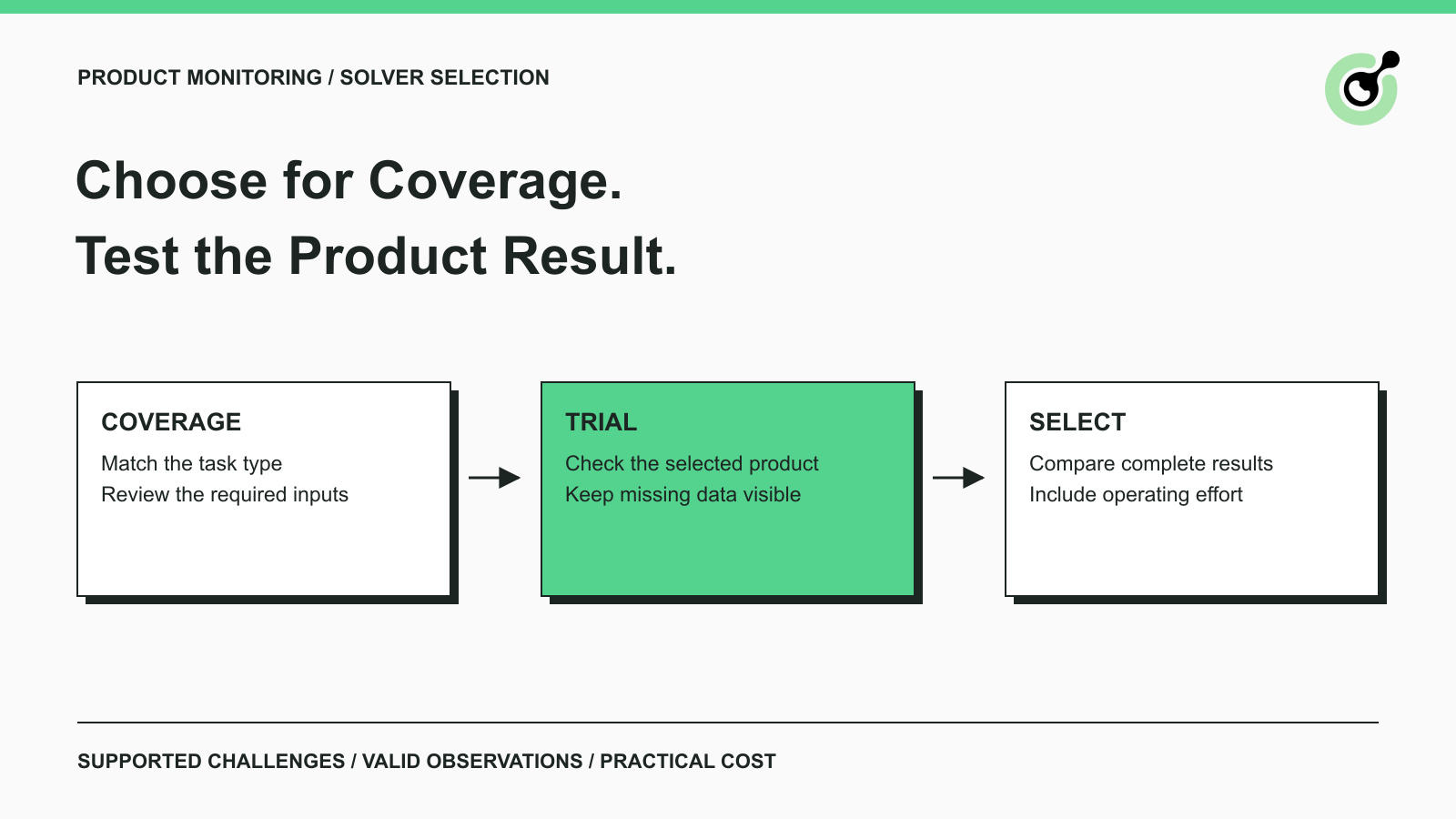
Challenge coverage is the first filter because a low price has little value when the service does not support your required task.
Collect a small set of permitted examples from your own monitoring workflow. Identify the challenge family and the relevant page state. Avoid assuming that two pages on the same domain always use the same verification method.
Then compare those observations with the provider's current task documentation. For example, CapSolver documents reCAPTCHA v2 task inputs and results separately from its image-to-text recognition task. Those are different interfaces with different inputs and outputs.
Ask practical questions:
A provider's complete API catalog can be broader than a particular wrapper's supported features. Evaluate the path your developers will actually use rather than counting the logos on a general coverage page.
The best unit of comparison is a complete, correct product observation that your monitoring system can use.
Before a trial, define the fields that make an observation valid. A reasonable starting point is the product identifier, variant, observed price, currency, availability when present, source URL, and observation time. These are proposed application fields, not a solver response schema.
Product identity matters because the same product family can have several offers. Schema.org's Product definition includes identifying properties such as SKU and GTIN. Its separate Offer definition describes properties including price, currency, and availability. That distinction is useful when deciding what your monitor must match.
For example, a page for a blue, medium-sized item should not silently replace the previous observation for the black, large-sized variant. A CAPTCHA solution does not detect that product-matching error.
Keep the same questions for every provider so your team can compare the results fairly.
| Evaluation area | What to check in the trial |
|---|---|
| Coverage | The documented task matches the challenge you observed |
| Integration | Your actual browser or HTTP workflow can supply the inputs and use the result |
| Completion | The correct product and offer information are available afterward |
| Failure handling | The application can distinguish pending work, solver errors, and missing observations |
| Operating cost | The trial accounts for attempts, browser usage, and developer effort |
| Support | A redacted task report is enough to obtain useful troubleshooting guidance |
There is no universal weighting for this table. A small catalog with infrequent checks may prioritize simplicity. A team with a strict freshness requirement may put more weight on completed observations arriving within its reporting window.
A useful trial covers the page patterns and challenges in your real workload without immediately running the entire catalog.
Choose a limited set of permitted pages that represents your intended monitoring scope. Include ordinary pages that load without challenges as well as supported challenge cases when available. Keep the browser configuration and requested product fields consistent while comparing options.
Record the outcome of every attempt. Otherwise, a provider can appear unusually fast because only its successful responses were included in the summary.
Consider this hypothetical evaluation: a team checks an approved catalog page for a specific SKU and currency. A supported CAPTCHA appears. The solver returns a result, the monitor continues, and the page now contains product details.
The evaluation is not finished until the team confirms that the SKU and currency match the request and that the price was actually read from the resulting page. If the page still shows a challenge, or the parser cannot find the requested product, mark the observation incomplete.
This example illustrates a test design. It does not describe a named customer's deployment or promise a particular solve rate.
If a scheduled observation is unavailable, preserve that fact. Do not convert it into a zero price or an out-of-stock event. Keep the last known value with its original timestamp and mark the new check as unsuccessful.
That reporting rule makes provider trials more informative: you can see which attempts produced fresh usable data and which left a gap. It also prevents a change in solver configuration from silently changing the meaning of your monitoring alerts.
Redeem Your CapSolver Bonus Code
Boost your automation budget instantly!
Use bonus code CAP26 when topping up your CapSolver account to get an extra 5% bonus on every recharge — with no limits.
Redeem it now in your CapSolver Dashboard
Integration effort affects the cost of adopting a solver because the returned solution must fit the monitor you already operate.
A browser-based monitor and an HTTP scraper have different responsibilities. A browser can maintain the current page and expose its rendered state. An HTTP workflow must deliberately handle the requests and responses required by its approved target. A CAPTCHA API does not automatically turn one into the other.
Review the provider's task lifecycle with the developer who owns the monitor. CapSolver's task creation interface distinguishes immediate results from asynchronous tasks. An asynchronous task needs result retrieval; a synchronous result may already be available in the creation response.
Ask the developer to explain the happy path and one failure path in plain language. If the explanation depends on undocumented response fields or an unbounded retry loop, resolve that before procurement.
For teams considering several APIs, the broader CAPTCHA API selection guide provides additional context. Your final choice should still be based on the specific integration tested for product monitoring.
Compare operating cost over the complete trial, including unsuccessful attempts and the supporting browser infrastructure.
A quoted price per solving task is only one part of the total. The workflow may also use hosted browsers, proxies, model calls, storage, and operator time. Some of those costs exist even if no CAPTCHA appears.
Review the provider's current charging rules for failed, unsupported, or repeated tasks. Use the applicable task type on the CapSolver pricing page when building an estimate rather than applying one advertised rate to every challenge family.
A simple internal measure is the total trial cost divided by the number of valid observations produced. Define what is included in the numerator so the comparison stays fair. You can also track solving-service spend separately to understand that component.
Avoid turning a tiny pilot into a precise forecast. Page behavior, challenge frequency, and operating schedules may differ in the larger workload. Use the trial to identify obvious mismatches, then increase scope gradually while monitoring the same measures.
Useful support should help you distinguish a solver problem from a browser, input, or extraction problem.
Prepare a redacted example with the task ID when available, challenge type, time of the request, returned status or error, and the application outcome. Include a screenshot only when it is necessary and safe to share.
Do not send API keys, session cookies, full solution tokens, or unrelated customer data. The OWASP logging guidance explains why sensitive credentials and session data should be excluded or protected in operational records.
Support quality is something you can evaluate during the trial. Was the error understandable? Could the team reproduce the problem with a limited report? Did the response explain the next diagnostic step? These observations are more useful than assuming every support channel provides the same service level.
Keep access scope equally clear. Product monitoring should stay within the sources and actions your organization is permitted to automate. Solving a CAPTCHA does not expand those permissions or authorize account creation, checkout automation, or collection of private information.
Choose the solver that supports your observed challenges and produces usable product observations with acceptable maintenance effort.
For a CapSolver evaluation, begin with the matching task guide, keep the trial small, and verify the complete monitoring result. Expand only when the team understands both the successful and unsuccessful paths.
CapSolver can handle the supported CAPTCHA step; your monitor remains responsible for the accuracy and freshness of the product data.
Q: What is the best CAPTCHA solver for product monitoring?
The best fit is the provider that supports your actual challenge types and works reliably within your permitted monitoring workflow. Compare complete product observations, integration effort, failure handling, and operating cost using the same trial conditions.
Q: Does a CAPTCHA solver also extract prices and stock levels?
A CAPTCHA solver does not automatically provide your product extraction logic. Your monitor must read and validate the product fields after the challenge is handled.
Q: Should I choose the lowest price per CAPTCHA?
Use price as one criterion, alongside coverage and completed results. Include unsuccessful attempts and supporting browser costs when comparing the expense of a usable observation.
Q: What should the monitor report when solving fails?
Report an incomplete observation and retain the previous value with its original timestamp. Do not interpret missing data as a price drop or an out-of-stock event.
Q: Do I need a CAPTCHA service for every product-monitoring project?
No. Use the simplest permitted data source that meets your needs. Consider a solver when supported CAPTCHAs actually interrupt the workflow you are evaluating.
Lola Ng
Key Account Manager
Connecting customer needs with practical automation solutions.
ABOUT THE AUTHOR
Learn scalable Rust web scraping architecture with reqwest, scraper, async scraping, headless browser scraping, proxy rotation, and compliant CAPTCHA handling.

Learn the best techniques to scrape job listings without getting blocked. Master Indeed scraping, Google Jobs API, and web scraping API with CapSolver.

