
🎉NEWCapSolver for AI agents-MCP, agent tools, and SDK integrations

Ethan Collins
AI Agent Workflow Engineer
Published Nov 12, 2026
Updated Nov 12, 2026 · min read
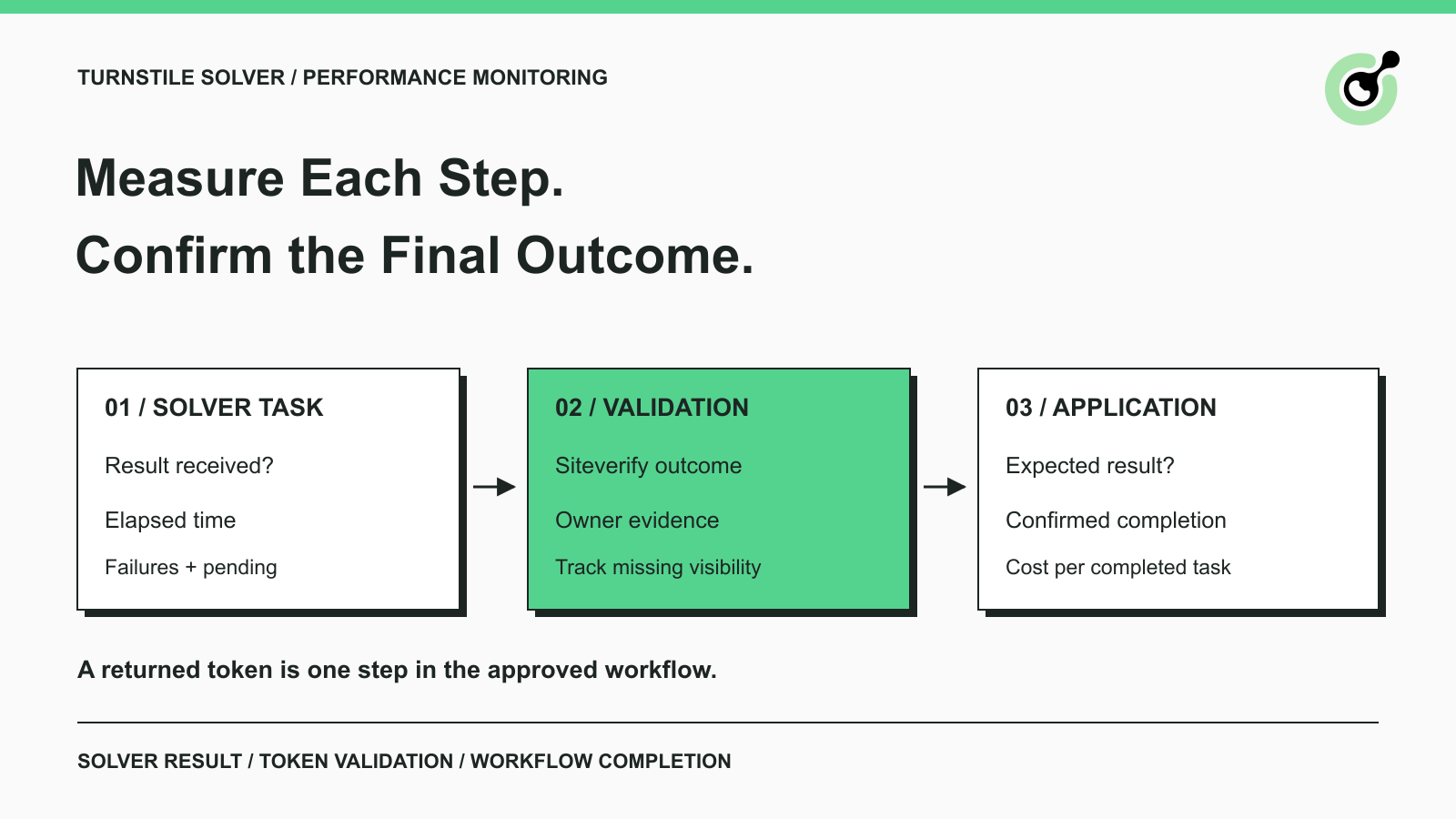
A scheduled browser job receives a Turnstile token, but the page never reaches its expected confirmation. The solver dashboard looks healthy while the operations team still sees failed jobs. Which number should they trust?
Both observations can be correct. The solver returned a result; the application has not confirmed completion. Useful Cloudflare Turnstile solver metrics show where those outcomes diverge. CapSolver supplies the solving-task response, while your browser workflow and, where available, the protected application's backend supply the remaining evidence. This guide explains what to record for an existing, authorized integration and how to summarize a redacted log export with Python. It focuses on practical monitoring for QA teams and enterprise automation services, with no assumed access to a third-party website's private analytics.
Your monitoring scope depends on whether you control the protected website, the automation client, or both.
An application owner can inspect widget activity, server-side validation, and the final application operation. An automation service working on an approved client journey may see only its solver responses and browser outcomes. Agree with the client which backend evidence is available before labeling a result “validated.”
Cloudflare's challenge outcome analytics describe challenges issued and solved, including interactive and non-interactive outcomes. Those are widget observations. They are not a direct report of how many tasks your external CAPTCHA solver accepted or completed.
Keep Turnstile widgets separate from full-page Cloudflare challenges in the report. If the team is unsure which checkpoint it encountered, use the guide to identifying Turnstile and Cloudflare challenges before grouping the attempts. Combining different challenge types makes a change in workload look like a change in solver quality.
The solver-result metric should count tasks that return the expected solution, using a clearly defined set of submitted attempts.
The official CapSolver Turnstile API guide documents AntiTurnstileTaskProxyLess, with websiteURL and websiteKey as required inputs. Optional metadata includes the widget's action and cdata values. Record a safe identifier for the configuration used, so an input change can be compared with later failures.
CapSolver uses createTask to submit the task and getTaskResult to retrieve its outcome. The documented Turnstile result includes status: ready and solution.token. A taskId alone is not a completed solution. The result retrieval reference explains the response handling your existing integration should already perform.
For monitoring, keep a workflow ID and solver task ID separately. A single approved browser operation might create more than one solving attempt. Count those attempts individually for solver metrics, but count the original operation once when reporting workflow completion.
Choose an observation deadline for each cohort of attempts and report successful, failed, and unresolved tasks together. A cohort means the same selected group of requests, such as tasks submitted during a particular hour for one approved workflow.
For a conservative result rate, divide successful solver results by all submitted attempts in that cohort. Also show the unresolved count; a result rate measured while many tasks are still running is provisional. If you instead calculate a completed-task rate, label its narrower denominator explicitly.
Group creation and result errors using CapSolver's documented error responses. A rejected configuration and a failed solve require different investigations. They can both affect the service your client experiences, but they should retain distinct causes.
Token validation measures whether the protected application's backend accepts the Turnstile token through Siteverify.
Cloudflare's token validation metrics count Siteverify requests and responses with success: true or success: false. When those records are available, report valid responses divided by all validation responses in the selected cohort. Keep network failures with no response in a separate, visible count.
The token glossary explains the general role of a token. In this workflow, receiving the token is an intermediate event. The application still has to validate it and complete its own operation.
Use an observable application outcome, such as the expected confirmation page or the requested permitted record. Label this “workflow completed,” with the assertion that established completion.
Do not infer a Siteverify response from a green widget, an HTTP success status, or the disappearance of a challenge. If the client has not provided validation evidence, report token validation as unavailable. A clear missing observation is more useful than an estimated success rate presented as a measured one.
For client reporting, retain the original failure reason when the final outcome remains unknown. “Solver returned a token; confirmation not observed before the deadline” tells the next engineer where to begin.
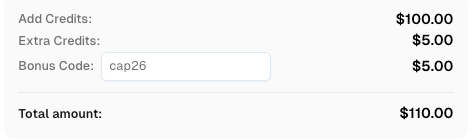
Redeem Your CapSolver Bonus Code
Boost your automation budget instantly!
Use bonus code CAP26 when topping up your CapSolver account to get an extra 5% bonus on every recharge — with no limits.
Redeem it now in your CapSolver Dashboard
Latency monitoring should distinguish solver waiting time, token handoff delay, and total workflow time.
Start the solver timer when the client sends its task request, and stop it when the client receives the expected result or a terminal failure. This measures client-observed elapsed time, including network and polling delay. It does not isolate the provider's internal processing time.
Track the interval from receiving the token to submitting the application's request separately. A browser job that waits in a queue after solving can create a token problem even when the solver responded promptly.
Cloudflare's server-side validation reference states that Turnstile tokens expire after 300 seconds and are single-use. The same reference explains validation errors and checking relevant response fields, including the expected hostname and action. Your receipt timestamp is useful for diagnosing handoff delays; it is not proof of the token's exact remaining lifetime.
Show a median and a slower-tail percentile, such as p95, for comparable completed attempts. Add the sample count and timeout count beside them. A success-only latency chart can look faster when the slowest requests have all timed out and disappeared from the calculation.
Keep local tests, cloud workers, different page families, and changed integration versions distinguishable. Compare the same workflow before and after a deployment before blaming a global provider change.
A useful first dashboard connects each metric to an event you can verify.
| Metric | Suggested definition | What it helps investigate |
|---|---|---|
| Solver-result rate | Expected solver results / all submitted solving attempts, with unresolved count | Request construction or solving failures |
| Token-validation rate | Successful Siteverify responses / all received Siteverify responses, with transport failures shown separately | Validation failures in an application you operate |
| Workflow completion | Confirmed completed operations / all eligible challenged operations | Whether the requested business task finished |
| Client-observed solver latency | Request sent to result or failure received, split by outcome | Slow responses, polling, and network effects |
| Token handoff delay | Token received to application request submitted | Queues or browser logic that delay token use |
| Cost per completed operation | Attributable billed solving cost / confirmed completed challenged operations | The effect of unsuccessful attempts and retries |
These are proposed application-level definitions, not claims that every field is supplied by a CapSolver API response. Calculate only what your logs and billing records support. When the completion denominator is zero, display cost per completed operation as unavailable rather than forcing a misleading number.
Python can summarize a redacted export from your existing solver integration without sending another solving request.
This example uses only Python 3's standard library; no package installation or API credential is required. It measures the records you supply. It does not collect live tasks, validate tokens, or measure a provider's performance by itself.
Export a snapshot at a defined observation deadline. Use an internal attempt_id even when task creation fails before the API returns a task ID. Include every attempt in your selected workflow cohort, including failed creation and still-pending tasks. Do not export every poll response as a separate attempt.
The CSV fields below are an application reporting schema, not CapSolver API parameters:
solver_result: use ready only after your integration receives a successful ready result with the expected token; use failed for a terminal error and pending for unresolved work at the snapshot deadline.validation: use passed or failed only for an observed backend validation response. Use unknown when evidence is unavailable, validation has not run, or no response arrived. Keep transport error details in your separate diagnostic logs.workflow_completed: use yes only when the expected application result has been confirmed. Use the same workflow_id across retries.Save this illustrative dataset as attempts.csv. These five records are invented examples, not production observations or benchmark results:
attempt_id,workflow_id,solver_result,validation,workflow_completed
a1,w1,ready,passed,yes
a2,w2,failed,unknown,no
a3,w2,ready,passed,yes
a4,w3,ready,failed,no
a5,w4,pending,unknown,noSave the following script as summarize_turnstile.py. The duplicate-ID check prevents an export containing repeated poll rows from silently inflating the counts.
import csv
import json
import sys
from collections import Counter


def summarize(path):
    with open(path, newline='', encoding='utf-8') as handle:
        rows = list(csv.DictReader(handle))
    seen = set()
    completed = set()
    workflows = set()
    solver = Counter()
    validation = Counter()
    for row in rows:
        attempt = row['attempt_id'].strip()
        workflow = row['workflow_id'].strip()
        if not attempt or attempt in seen or not workflow:
            raise ValueError('Use unique, nonempty attempt IDs and nonempty workflow IDs')
        if row['solver_result'] not in {'ready', 'failed', 'pending'}:
            raise ValueError('Invalid solver_result')
        if row['validation'] not in {'passed', 'failed', 'unknown'}:
            raise ValueError('Invalid validation')
        if row['workflow_completed'] not in {'yes', 'no'}:
            raise ValueError('Invalid workflow_completed')
        seen.add(attempt)
        workflows.add(workflow)
        solver[row['solver_result']] += 1
        validation[row['validation']] += 1
        if row['workflow_completed'] == 'yes':
            completed.add(workflow)

    def percent(numerator, denominator):
        return round(100 * numerator / denominator, 2) if denominator else None

    observed_validation = validation['passed'] + validation['failed']
    return {
        'attempts': len(rows),
        'solver_ready': solver['ready'],
        'solver_failed': solver['failed'],
        'solver_pending': solver['pending'],
        'solver_result_rate_pct': percent(solver['ready'], len(rows)),
        'validation_observed': observed_validation,
        'validation_unknown': validation['unknown'],
        'validation_pass_rate_pct': percent(validation['passed'], observed_validation),
        'workflows': len(workflows),
        'workflows_completed': len(completed),
        'workflow_completion_rate_pct': percent(len(completed), len(workflows)),
    }


if __name__ == '__main__':
    print(json.dumps(summarize(sys.argv[1]), indent=2))
Run the script from the directory containing both files:
python3 summarize_turnstile.py attempts.csvThe sample produces:
{
  "attempts": 5,
  "solver_ready": 3,
  "solver_failed": 1,
  "solver_pending": 1,
  "solver_result_rate_pct": 60.0,
  "validation_observed": 3,
  "validation_unknown": 2,
  "validation_pass_rate_pct": 66.67,
  "workflows": 4,
  "workflows_completed": 2,
  "workflow_completion_rate_pct": 50.0
}
Three of the five attempts produced a solver result, so the sample's solver-result rate is 60%. Two of three observed validations passed, giving 66.67%. Two of four unique workflows completed, giving 50%. The failed attempt and successful retry for w2 count as two attempts but one completed workflow.
The pending count makes the 60% result provisional. Rebuild the snapshot after outstanding work finishes; do not append another row with the same attempt ID. If there are no rows or no observed validations, the corresponding rate is null rather than a fabricated zero.
For a time-window report, select workflows first and include their relevant attempts through the observation deadline. Filtering arbitrary attempt rows can leave out an earlier success or a later retry and change the workflow denominator. Keep a separate count of eligible workflows that never reached solver submission; this small script cannot count operations missing from its input.
The example's local calculation can be reproduced without credentials. To monitor your service, replace the sample with redacted records from your real integration and document the export's cohort and observation deadline. Avoid including API keys, raw tokens, cookies, or personal form contents.
Investigate the first stage whose outcome changed, using the same workflow cohort throughout.
If task creation errors rise, inspect configuration and credentials before increasing retry counts. If solver results remain stable but validation failures grow, review the validation error categories and token handoff timing. If validation stays stable but application completion falls, inspect the final assertion, form response, or permitted data output.
For example, a QA provider might notice that a client release adds a background operation between token receipt and form submission. The useful comparison is that client's handoff delay and validation outcomes before and after the release. An aggregate success percentage across every client can hide the affected journey.
Treat such scenarios as investigation paths, not proof of a cause. Check a small number of authorized failures with timestamps before changing the integration. Keep retries bounded and preserve the original attempt so retries do not inflate the completion count.
Cloudflare provides test sitekeys and secret keys for controlled implementation checks. Use those to test your own application's pass and fail branches. Keep dummy-token tests out of real solver performance reports: they verify application behavior, not production solving quality.
Avoid storing raw solution tokens, API keys, cookies, or unnecessary page contents in monitoring logs. Workflow identifiers, task identifiers, timestamps, outcome categories, and safe configuration labels usually provide a better starting point.
Start Turnstile monitoring with three separate questions: did the solver return its result, did the application validate the token where that evidence is available, and did the approved operation finish?
Add latency and cost once those outcomes have stable definitions. An existing CapSolver integration can supply the solver-task events; your application supplies the completion evidence. Keeping that division visible makes troubleshooting and client reporting easier without building an oversized monitoring system.
Q: Which Cloudflare Turnstile solver metrics should I track first?
Track solver-result rate, workflow completion, and client-observed time to a result. Add Siteverify validation outcomes when you operate the protected backend or have authorized access to its logs. Always display failures and unresolved attempts.
Q: Does a ready CapSolver task mean the website accepted the token?
No. A ready task with the expected token confirms a solver result. Website validation and the final application operation are later events that need their own evidence.
Q: Can I measure token-validation success on a website I do not operate?
Only when the owner provides authorized validation evidence. Otherwise, report the browser outcome you can observe and mark backend validation as unavailable.
Q: Why can Turnstile validation fail after a fast solver response?
Token reuse, delayed submission, or implementation problems can still affect validation. Inspect the actual error and application timing; fast token delivery does not establish that every later step was correct.
Q: Are the example success rates performance promises?
No. The example numbers illustrate different denominators. Measure your own authorized workflows under comparable conditions, and keep test-key traffic separate from production observations.
Ethan Collins
AI Agent Workflow Engineer
Building clearer handoffs between AI agents and tools.
ABOUT THE AUTHOR
Estimate Cloudflare Turnstile troubleshooting costs from solver usage, browser runtime, retries, and engineering time, with a clear worked budget example.

Fix the AntiCloudflareTask dynamic DNS proxy error. Learn why a 10-minute sticky session can use different exit IPs and how to verify both request paths.