🎉NEWCapSolver for AI agents-MCP, agent tools, and SDK integrations

Lucas Mitchell
Automation Engineer
Published Sep 19, 2025
Updated Sep 19, 2025 · min read
AWS WAF is a powerful tool for protecting your web applications from common web exploits. However, it can also present a significant challenge for web scraping and data extraction. This guide provides a comprehensive overview of how to solve AWS WAF challenges in 2025, with a focus on using CapSolver for a streamlined and effective solution. Whether you're a developer, data scientist, or researcher, this article will equip you with the knowledge and tools to overcome AWS WAF and access the data you need.
In this guide, we'll explore 10 detailed solutions to AWS WAF challenges, complete with code examples and step-by-step instructions. We'll also delve into the benefits of using CapSolver and how it can help you save time and resources. By the end of this article, you'll have a clear understanding of how to solve AWS WAF challenges and be able to implement these solutions in your own projects.
AWS WAF (Web Application Firewall) acts as a shield for web applications, filtering and monitoring HTTP and HTTPS requests. It helps protect against common web exploits that could affect application availability, compromise security, or consume excessive resources. While essential for security, WAFs often pose significant obstacles for legitimate web scraping activities by presenting various challenges designed to differentiate human users from automated bots.
These challenges can manifest in several forms, including:
Overcoming these hurdles is crucial for anyone involved in data collection, market research, or competitive analysis. This guide will focus on practical, actionable solutions, particularly leveraging CapSolver's capabilities, to navigate these AWS WAF challenges effectively.
CapSolver is an AI-powered CAPTCHA solving service designed to automate the solve of various CAPTCHA types, including those deployed by AWS WAF. It offers a robust API that integrates seamlessly into existing scraping workflows, providing solutions for both image recognition and token-based challenges. CapSolver's continuous updates ensure it remains effective against evolving WAF defenses, making it a reliable choice for maintaining uninterrupted data streams [1].
According to a report by Grand View Research, the global CAPTCHA market size was valued at USD 307.9 million in 2022 and is projected to grow at a compound annual growth rate (CAGR) of 15.1% from 2023 to 2030. This growth underscores the increasing complexity of CAPTCHAs and the rising demand for specialized solving services like CapSolver.
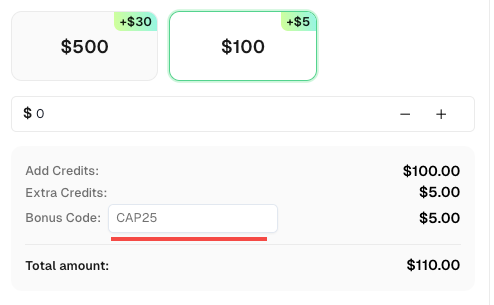
Don’t miss the chance to further optimize your operations! Use the bonus code CAP25 when topping up your CapSolver account and receive an extra 5% bonus on each recharge, with no limits. Visit the CapSolver Dashboard to redeem your bonus now!
Here are ten comprehensive solutions, ranging from basic integration to advanced scenarios, to help you solve AWS WAF challenges using CapSolver Dashboard
.
This is the most common scenario where AWS WAF presents a JavaScript challenge, and you need to obtain an aws-waf-token cookie. CapSolver's AntiAwsWafTaskProxyLess task type is ideal for this.
Steps:
key, iv, context, and challengeJS.createTask endpoint with AntiAwsWafTaskProxyLess.getTaskResult endpoint until the task is ready.aws-waf-token cookie from CapSolver's solution.Code Example (Python):
import requests
import re
import time

CAPSOLVER_API_KEY = "YOUR_CAPSOLVER_API_KEY"
CAPSOLVER_CREATE_TASK_ENDPOINT = "https://api.capsolver.com/createTask"
CAPSOLVER_GET_TASK_RESULT_ENDPOINT = "https://api.capsolver.com/getTaskResult"

WEBSITE_URL = "https://efw47fpad9.execute-api.us-east-1.amazonaws.com/latest" # Example URL

def solve_aws_waf_captcha_proxyless(website_url, capsolver_api_key):
    client = requests.Session()
    response = client.get(website_url)
    script_content = response.text

    key_match = re.search(r'"key":"([^"]+)"', script_content)
    iv_match = re.search(r'"iv":"([^"]+)"', script_content)
    context_match = re.search(r'"context":"([^"]+)"', script_content)
    jschallenge_match = re.search(r'<script.*?src="(.*?)".*?></script>', script_content)

    key = key_match.group(1) if key_match else None
    iv = iv_match.group(1) if iv_match else None
    context = context_match.group(1) if context_match else None
    jschallenge = jschallenge_match.group(1) if jschallenge_match else None

    if not all([key, iv, context, jschallenge]):
        print("Error: AWS WAF parameters not found in the page content.")
        return None

    task_payload = {
        "clientKey": capsolver_api_key,
        "task": {
            "type": "AntiAwsWafTaskProxyLess",
            "websiteURL": website_url,
            "awsKey": key,
            "awsIv": iv,
            "awsContext": context,
            "awsChallengeJS": jschallenge
        }
    }

    create_task_response = client.post(CAPSOLVER_CREATE_TASK_ENDPOINT, json=task_payload).json()
    task_id = create_task_response.get('taskId')

    if not task_id:
        print(f"Error creating CapSolver task: {create_task_response.get('errorId')}, {create_task_response.get('errorCode')}")
        return None

    print(f"CapSolver task created with ID: {task_id}")

    for _ in range(10):
        time.sleep(5)
        get_result_payload = {"clientKey": capsolver_api_key, "taskId": task_id}
        get_result_response = client.post(CAPSOLVER_GET_TASK_RESULT_ENDPOINT, json=get_result_payload).json()

        if get_result_response.get('status') == 'ready':
            aws_waf_token_cookie = get_result_response['solution']['cookie']
            print("CapSolver successfully solved the CAPTCHA.")
            return aws_waf_token_cookie
        elif get_result_response.get('status') == 'failed':
            print(f"CapSolver task failed: {get_result_response.get('errorId')}, {get_result_response.get('errorCode')}")
            return None

    print("CapSolver task timed out.")
    return None

# Example usage:
# aws_waf_token = solve_aws_waf_captcha_proxyless(WEBSITE_URL, CAPSOLVER_API_KEY)
# if aws_waf_token:
#     print(f"Received AWS WAF Token: {aws_waf_token}")
#     final_response = requests.get(WEBSITE_URL, cookies={"aws-waf-token": aws_waf_token})
# print(final_response.text)For more robust scraping operations, especially when dealing with aggressive WAFs or IP-based restrictions, using proxies with CapSolver is essential. This solution is similar to Solution 1 but incorporates proxy usage.
Steps:
createTask endpoint with AntiAwsWafTask and include your proxy details.getTaskResult endpoint until the task is ready.aws-waf-token cookie.Code Example (Python - Task Payload modification):
# ... (previous code for imports and parameter extraction)

    task_payload = {
        "clientKey": capsolver_api_key,
        "task": {
            "type": "AntiAwsWafTask", # Use AntiAwsWafTask for proxy support
            "websiteURL": website_url,
            "awsKey": key,
            "awsIv": iv,
            "awsContext": context,
            "awsChallengeJS": jschallenge,
            "proxy": "http:user:pass@ip:port" # Example: "http:your_user:your_pass@192.168.1.1:8080"
        }
    }

# ... (rest of the code for creating task and getting result remains the same)Sometimes, the initial request to an AWS WAF protected page might return a 405 status code, and the necessary key, iv, and context parameters are embedded directly in the HTML. This scenario requires careful parsing.
Steps:
websiteURL.window.gokuProps = {"key":"AQID...","iv":"A6we...","context":"rGXm.."} or similar structures to extract key, iv, and context.AntiAwsWafTask or AntiAwsWafTaskProxyLess.aws-waf-token and proceed.Code Example (Python - Parameter Extraction):
import requests
import re

WEBSITE_URL = "https://efw47fpad9.execute-api.us-east-1.amazonaws.com/latest"

response = requests.get(WEBSITE_URL)
script_content = response.text

if response.status_code == 405:
    key_match = re.search(r'"key":"([^"]+)"', script_content)
    iv_match = re.search(r'"iv":"([^"]+)"', script_content)
    context_match = re.search(r'"context":"([^"]+)"', script_content)
    # ... (extract jschallenge if present)

    key = key_match.group(1) if key_match else None
    iv = iv_match.group(1) if iv_match else None
    context = context_match.group(1) if context_match else None
    # ... (use these parameters with CapSolver)
else:
print(f"Unexpected status code: {response.status_code}")awsChallengeJSIn other cases, an AWS WAF protected page might return a 202 status code, and only the awsChallengeJS parameter is required. The key, iv, and context can be ignored in this specific scenario.
Steps:
websiteURL.challenge.js link.websiteURL and awsChallengeJS to CapSolver.aws-waf-token and proceed.Code Example (Python - Parameter Extraction):
import requests
import re

WEBSITE_URL = "https://example.com/protected-202"

response = requests.get(WEBSITE_URL)
script_content = response.text

if response.status_code == 202:
    jschallenge_match = re.search(r'<script.*?src="(.*?challenge.js)".*?></script>', script_content)
    jschallenge = jschallenge_match.group(1) if jschallenge_match else None

    if jschallenge:
        # ... (use websiteURL and jschallenge with CapSolver)
        pass
    else:
        print("awsChallengeJS not found.")
else:
print(f"Unexpected status code: {response.status_code}")When AWS WAF presents an image-based CAPTCHA, specifically a grid-type challenge (e.g.,
“Choose all the beds”), CapSolver’s AwsWafClassification task type can solve it.
Steps:
question (e.g., aws:grid:bed).websiteURL, images (as a list of base64 strings), and question to CapSolver using the createTask endpoint with AwsWafClassification.objects (indices of the correct images) or box (coordinates for carcity type).Code Example (Python - Image Recognition):
import capsolver
import base64
import requests
import re

capsolver.api_key = "YOUR_CAPSOLVER_API_KEY"

WEBSITE_URL = "https://example.com/aws-waf-image-challenge" # Example URL with image challenge

def solve_aws_waf_image_captcha(website_url, capsolver_api_key):
    # This part would involve scraping the page to get the base64 images and the question
    # For demonstration, let's assume we have them:
    # In a real scenario, you'd use a headless browser or advanced parsing to get these.
    # Example: response = requests.get(website_url)
    #          images_base64 = re.findall(r'data:image/png;base64,([a-zA-Z0-9+/=]+)', response.text)
    #          question_match = re.search(r'"question":"(aws:grid:[a-zA-Z]+)"', response.text)
    #          question = question_match.group(1) if question_match else "aws:grid:bed"

    # Placeholder for actual scraped data
    images_base64 = ["/9j/4AAQSkZJRgABAgAA...", "/9j/2wCEAAoHBwgH..."] # Replace with actual base64 images
    question = "aws:grid:bed" # Replace with actual question from the page

    if not images_base64 or not question:
        print("Error: Image data or question not found.")
        return None

    try:
        solution = capsolver.solve({
            "type": "AwsWafClassification",
            "websiteURL": website_url,
            "images": images_base64,
            "question": question
        })
        print("CapSolver successfully solved the image CAPTCHA.")
        return solution
    except Exception as e:
        print(f"CapSolver image task failed: {e}")
        return None

# Example usage:
# image_solution = solve_aws_waf_image_captcha(WEBSITE_URL, capsolver.api_key)
# if image_solution:
#     print(f"Received Image Solution: {image_solution}")
# # The solution will contain 'objects' for grid type, indicating which images to select.Another common image recognition challenge is the "toy car city" type, where you need to place a dot at the end of a car's path. CapSolver also supports this with AwsWafClassification.
Steps:
question aws:toycarcity:carcity.websiteURL, images (single base64 string), and question to CapSolver.box coordinates (x, y) where the dot should be placed.Code Example (Python - Toy Car City Recognition):
import capsolver
import base64

capsolver.api_key = "YOUR_CAPSOLVER_API_KEY"

WEBSITE_URL = "https://example.com/aws-waf-toycar-challenge" # Example URL

def solve_aws_waf_toycar_captcha(website_url, capsolver_api_key):
    # Placeholder for actual scraped data
    image_base64 = "/9j/4AAQSkZJRgABAgAA..." # Replace with actual base64 image
    question = "aws:toycarcity:carcity"

    if not image_base64:
        print("Error: Image data not found.")
        return None

    try:
        solution = capsolver.solve({
            "type": "AwsWafClassification",
            "websiteURL": website_url,
            "images": [image_base64],
            "question": question
        })
        print("CapSolver successfully solved the toy car city CAPTCHA.")
        return solution
    except Exception as e:
        print(f"CapSolver toy car city task failed: {e}")
        return None

# Example usage:
# toycar_solution = solve_aws_waf_toycar_captcha(WEBSITE_URL, capsolver.api_key)
# if toycar_solution:
#     print(f"Received Toy Car City Solution: {toycar_solution}")
# # The solution will contain 'box' with x, y coordinates.AWS WAF tokens can expire quickly. If CapSolver returns an error like timeout metering, your parameters have expired, it indicates that the awsKey, awsIv, awsContext, or awsChallengeJS are no longer valid. The solution is to parse these parameters in real-time for each request.
Steps:
key, iv, context, and challengeJS immediately before sending the task to CapSolver.Code Example (Python - Real-time Parsing Strategy):
def get_aws_waf_params(website_url):
    client = requests.Session()
    response = client.get(website_url)
    script_content = response.text

    key_match = re.search(r'"key":"([^"]+)"', script_content)
    iv_match = re.search(r'"iv":"([^"]+)"', script_content)
    context_match = re.search(r'"context":"([^"]+)"', script_content)
    jschallenge_match = re.search(r'<script.*?src="(.*?)".*?></script>', script_content)

    return {
        "key": key_match.group(1) if key_match else None,
        "iv": iv_match.group(1) if iv_match else None,
        "context": context_match.group(1) if context_match else None,
        "jschallenge": jschallenge_match.group(1) if jschallenge_match else None
    }

def solve_aws_waf_with_retry(website_url, capsolver_api_key, max_retries=3):
    for attempt in range(max_retries):
        print(f"Attempt {attempt + 1} to solve AWS WAF challenge...")
        params = get_aws_waf_params(website_url)
        if not all(params.values()):
            print("Failed to extract all AWS WAF parameters. Retrying...")
            time.sleep(2) # Wait before retrying extraction
            continue

        # Construct task_payload using params and send to CapSolver
        # ... (similar to Solution 1, but using the dynamically fetched params)

        # Placeholder for CapSolver call and result retrieval
        # For example:
        # aws_waf_token = call_capsolver_api(website_url, capsolver_api_key, params)
        # if aws_waf_token:
        #     return aws_waf_token
        # else:
        #     print("CapSolver failed to return token. Retrying...")
        #     time.sleep(5) # Wait before retrying CapSolver call

    print("Failed to solve AWS WAF challenge after multiple retries.")
return NoneawsChallengeJS when Key, IV, Context are AbsentSometimes, the key, iv, and context parameters might not be present on the page, but a challenge.js link is available. In such cases, passing awsChallengeJS to CapSolver is sufficient.
Steps:
challenge.js.challenge.js.websiteURL and the extracted awsChallengeJS to CapSolver.aws-waf-token.Code Example (Python - awsChallengeJS only):
# ... (imports and API key setup)

WEBSITE_URL = "https://example.com/challenge-js-only"

def solve_aws_waf_challenge_js(website_url, capsolver_api_key):
    client = requests.Session()
    response = client.get(website_url)
    script_content = response.text

    jschallenge_match = re.search(r'<script.*?src="(.*?challenge.js)".*?></script>', script_content)
    jschallenge = jschallenge_match.group(1) if jschallenge_match else None

    if not jschallenge:
        print("Error: awsChallengeJS not found.")
        return None

    task_payload = {
        "clientKey": capsolver_api_key,
        "task": {
            "type": "AntiAwsWafTaskProxyLess",
            "websiteURL": website_url,
            "awsChallengeJS": jschallenge
        }
    }

# ... (rest of the code for creating task and getting result remains the same as Solution 1)awsApiJs for Dynamic challenge.jsIn more complex scenarios, the challenge.js URL might not be directly visible but is assembled from the code within jsapi.js. CapSolver can handle this by accepting awsApiJs.
Steps:
jsapi.js.jsapi.js.websiteURL and the extracted awsApiJs to CapSolver.challenge.js and solve the AWS WAF challenge.Code Example (Python - awsApiJs):
# ... (imports and API key setup)

WEBSITE_URL = "https://example.com/jsapi-challenge"

def solve_aws_waf_api_js(website_url, capsolver_api_key):
    client = requests.Session()
    response = client.get(website_url)
    script_content = response.text

    jsapi_match = re.search(r'<script.*?src="(.*?jsapi.js)".*?></script>', script_content)
    jsapi = jsapi_match.group(1) if jsapi_match else None

    if not jsapi:
        print("Error: awsApiJs not found.")
        return None

    task_payload = {
        "clientKey": capsolver_api_key,
        "task": {
            "type": "AntiAwsWafTaskProxyLess",
            "websiteURL": website_url,
            "awsApiJs": jsapi
        }
    }

# ... (rest of the code for creating task and getting result remains the same as Solution 1)awsProblemUrl for Visual ChallengesFor highly dynamic visual challenges where key, iv, context, and challenge.js are absent, but a problem endpoint URL is present, CapSolver can use awsProblemUrl.
Steps:
problem endpoint URL, which typically contains keywords like problem and num_solutions_required.visualSolutionsRequired in the page HTML.websiteURL and the extracted awsProblemUrl to CapSolver.Code Example (Python - awsProblemUrl):
# ... (imports and API key setup)

WEBSITE_URL = "https://example.com/problem-url-challenge"

def solve_aws_waf_problem_url(website_url, capsolver_api_key):
    client = requests.Session()
    response = client.get(website_url)
    script_content = response.text

    # Example of how to find awsProblemUrl (this might vary)
    problem_url_match = re.search(r'"problemUrl":"(https://.*?problem\?.*?)"', script_content)
    problem_url = problem_url_match.group(1) if problem_url_match else None

    if not problem_url:
        print("Error: awsProblemUrl not found.")
        return None

    task_payload = {
        "clientKey": capsolver_api_key,
        "task": {
            "type": "AntiAwsWafTaskProxyLess",
            "websiteURL": website_url,
            "awsProblemUrl": problem_url
        }
    }

# ... (rest of the code for creating task and getting result remains the same as Solution 1)To help you choose the right CapSolver task type, here's a comparison:
| Feature | AWS WAF Token Tasks (AntiAwsWafTask/AntiAwsWafTaskProxyLess) |
AWS WAF Recognition Tasks (AwsWafClassification) |
|---|---|---|
| Challenge Type | JavaScript challenges, token generation | Image-based CAPTCHAs (grid, toy car city) |
| Input Parameters | key, iv, context, challengeJS, awsApiJs, awsProblemUrl, awsApiKey, awsExistingToken |
images (base64), question |
| Output | aws-waf-token cookie |
box coordinates or objects (image indices) |
| Complexity | Requires parsing JavaScript-generated parameters | Requires image extraction and question identification |
| Use Case | Solving programmatic challenges | Solving visual verification challenges |
| Proxy Support | Yes (AntiAwsWafTask) / No (AntiAwsWafTaskProxyLess) |
No (currently) |
CapSolver's versatility in handling AWS WAF challenges makes it invaluable across various applications. Here are a few scenarios:
A data analytics company specializing in e-commerce price monitoring faced constant disruptions due to AWS WAF challenges on major retail websites. Their existing scrapers were frequently blocked, leading to incomplete data and delayed insights. By integrating CapSolver's AntiAwsWafTaskProxyLess, they automated the token generation process. This allowed their bots to consistently solve the WAF, ensuring real-time price updates and competitive intelligence. The solution significantly reduced manual intervention and improved data accuracy by 90%.
A global travel aggregator needed to collect flight and hotel availability data from numerous airline and hotel websites, many of which were protected by AWS WAF. They encountered both JavaScript challenges and occasional image CAPTCHAs. Implementing a hybrid approach with CapSolver, they used AntiAwsWafTask with proxies for the majority of sites and AwsWafClassification for the visual challenges. This comprehensive strategy enabled them to maintain a high success rate in data collection, expanding their service offerings and improving customer experience. The ability to handle diverse AWS WAF challenges with a single solution provider was a key factor in their success.
A compliance-focused SaaS company needed to collect publicly available legal and regulatory data, such as corporate filings, intellectual property records, and case updates. These platforms, while offering open access, depoyed AWS WAF .
By integrating CapSolver’s AntiAwsWafTaskProxyLess, the company ensured stable and automated access to these datasets without manual intervention. This allowed them to provide real-time alerts and analytics for their clients in law, finance, and compliance.
The result was a*more reliable data pipeline and faster delivery of critical legal insights helping their customers stay compliant and competitive.
CapSolver stands out as a premier solution for AWS WAF challenges due to several key advantages:
Navigating AWS WAF challenges is an unavoidable part of modern web scraping. However, with the right tools and strategies, these obstacles can be effectively overcome. CapSolver provides a powerful, flexible, and reliable solution for solving both token-based and image-recognition AWS WAF challenges. By understanding the different scenarios and implementing the detailed solutions outlined in this guide, you can ensure your data collection efforts remain uninterrupted and efficient.
Don't let AWS WAF challenges hinder your projects. Take control of your web scraping operations today. Try CapSolver now and experience seamless CAPTCHA solving. Visit the official CapSolver website to learn more and get started:
A1: AWS WAF (Web Application Firewall) is a security service that protects web applications from common web exploits. It challenges requests to differentiate between legitimate human users and automated bots, often using CAPTCHAs or JavaScript challenges. This poses a challenge for web scraping because automated scripts are designed to mimic human behavior, but WAFs are specifically designed to detect and block such automation.
A2: CapSolver is an AI-powered CAPTCHA solving service that automates the process of solving various CAPTCHA types, including those deployed by AWS WAF. It provides APIs for both token-based challenges (generating aws-waf-token cookies) and image recognition challenges (solving visual puzzles), allowing scrapers to proceed with their requests without manual intervention.
A3: Yes, real-time parameter parsing is crucial. AWS WAF tokens and challenge parameters often have short lifespans. If these parameters expire before being used, CapSolver will return an error. Extracting key, iv, context, challengeJS, or awsProblemUrl immediately before sending them to CapSolver ensures that you are always using fresh, valid data, significantly increasing the success rate of your AWS WAF solve.
A4: Yes, CapSolver is designed to handle both. For JavaScript challenges that require generating an aws-waf-token, it offers AntiAwsWafTask and AntiAwsWafTaskProxyLess task types. For image-based CAPTCHAs, such as grid or toy car city types, it provides the AwsWafClassification task type, which returns the correct selections or coordinates.
A5: Using proxies with CapSolver (via AntiAwsWafTask) enhances the robustness of your web scraping operations. Proxies help in rotating IP addresses, making it harder for AWS WAF to detect and block your requests based on IP reputation or rate limiting. This is particularly beneficial for large-scale scraping or when targeting websites with aggressive anti-bot measures, ensuring higher success rates and preventing IP bans.
Lucas Mitchell
Automation Engineer
Helping browser automation recover and continue.
ABOUT THE AUTHOR
Explore how AI detects and solves CAPTCHA challenges, from image recognition to behavioral analysis. Understand the technology behind AI CAPTCHA solvers and how CapSolver aids automated workflows. Learn about the evolving battle between AI and human verification.

Compare top CAPTCHA solving APIs by speed, accuracy, uptime, and pricing. See how CapSolver, 2Captcha, CapMonster Cloud, and others stack up in our detailed performance comparison.