
🎉NEWCapSolver for AI agents-MCP, agent tools, and SDK integrations

Ethan Collins
AI Agent Workflow Engineer
Published Jul 23, 2026
Updated Jul 23, 2026 · min read
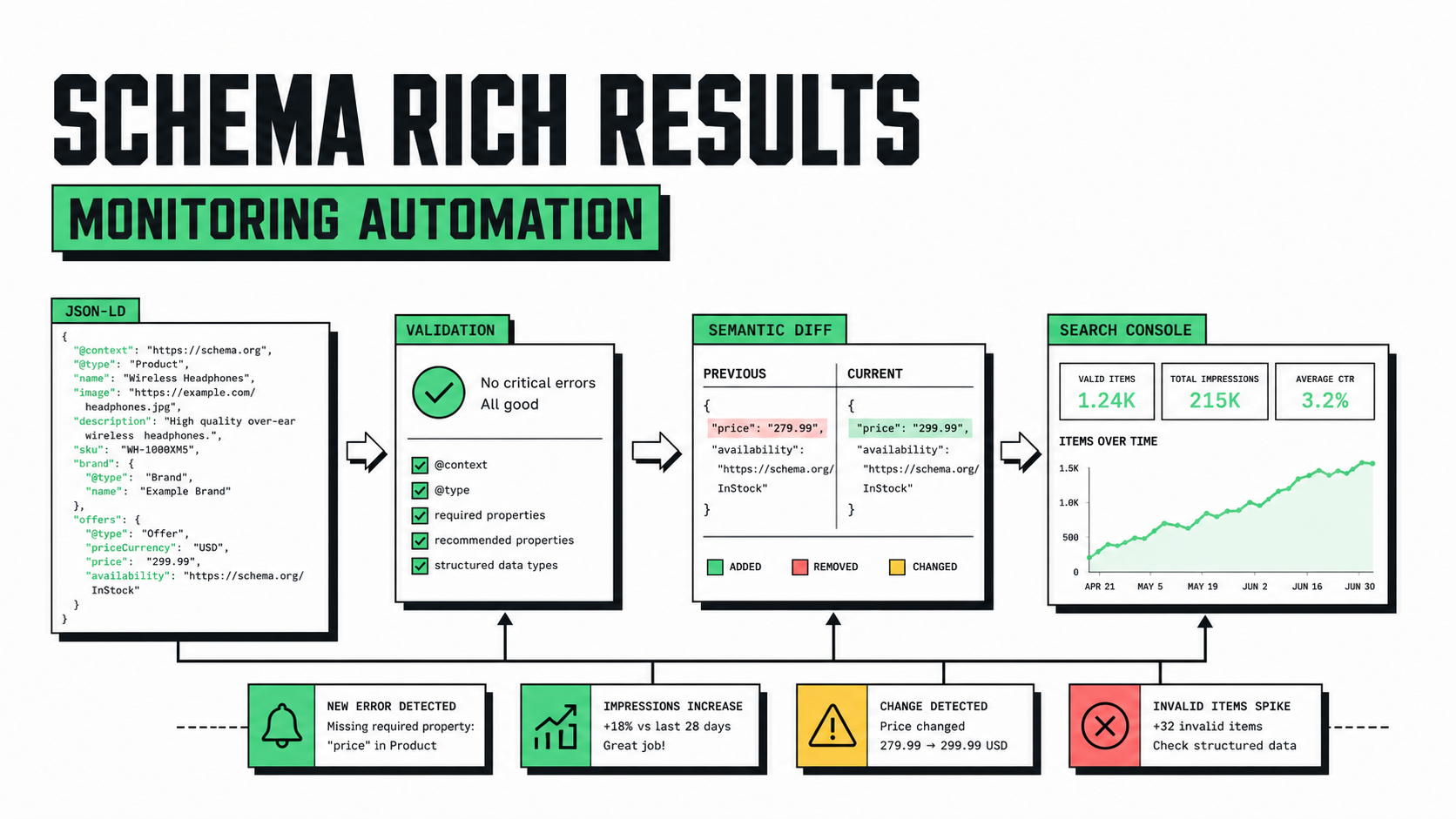
Schema rich result monitoring is the continuous detection of structured-data changes that can affect a page's eligibility for enhanced Google Search appearances. A one-time test tells you whether one page passes at one moment. Monitoring tells you when a template deployment removes a required property, changes an entity type, produces invalid JSON-LD, points to the wrong canonical entity, or reduces coverage across thousands of pages.
CapSolver can support an authorized browser-recovery step when a monitoring job for an owned property encounters a documented verification challenge. It should remain an optional layer. The core SEO system still owns URL inventory, rendering, structured-data parsing, rule evaluation, baselines, alerting, and Search Console reconciliation.
Google's general structured data guidelines make two constraints clear: markup must follow content and technical policies, and valid markup does not guarantee that a rich result will appear. That distinction gives the monitor two separate outcomes:
Do not collapse these into one binary “schema works” flag.
A production pipeline can be represented as:
URL inventory → fetch/render → extract JSON-LD → normalize → validate → compare baseline → classify → alert → reconcile
Each stage needs a stable input, output, and failure boundary:
| Stage | Input | Output | Main failure |
|---|---|---|---|
| Inventory | Sitemap, database, or template sample | Approved URL set | Missing or duplicated URLs |
| Fetch | URL and rendering policy | HTML and final URL | Status, timeout, or challenge |
| Extract | Rendered HTML | JSON-LD objects | Invalid JSON or missing scripts |
| Normalize | Parsed objects | Stable canonical representation | Order-sensitive noise |
| Validate | Normalized entities | Rule findings | Stale or wrong rules |
| Compare | Baseline and current snapshot | Semantic changes | False positives |
| Alert | Classified changes | Ticket or notification | Alert fatigue |
| Reconcile | Search Console data | Observed impact | Reporting delay |
Start with representative template samples rather than crawling every generated URL. Expand coverage after the change classifier proves useful.
Choose URLs by template, business value, release risk, and structured-data type. A commerce site might monitor Product, BreadcrumbList, Organization, and WebSite. A publisher might monitor Article, NewsArticle, VideoObject, and BreadcrumbList. A local business network might sample LocalBusiness and its more specific subtypes.
Keep a registry like this:
{
  "product-detail": {
    "sampleUrls": [
      "https://www.example.com/products/example-one",
      "https://www.example.com/products/example-two"
    ],
    "expectedTypes": ["Product", "BreadcrumbList"],
    "criticalProperties": {
      "Product": ["name", "image", "offers"]
    }
  }
}
This is monitoring configuration, not Schema.org markup. It makes expectations explicit and reviewable. Do not require every optional property merely to increase field count; monitor properties that reflect the visible page and the applicable Google feature documentation.
Static HTML is sufficient when the server emits JSON-LD. Use a browser renderer when client-side code inserts or modifies the scripts. The following function extracts every application/ld+json block and records parse failures without stopping the whole page:
import json
from bs4 import BeautifulSoup

def extract_jsonld(html: str) -> dict:
    soup = BeautifulSoup(html, "html.parser")
    entities = []
    errors = []

    for index, script in enumerate(
        soup.find_all("script", attrs={"type": "application/ld+json"})
    ):
        raw = script.string or script.get_text()
        try:
            value = json.loads(raw)
            if isinstance(value, list):
                entities.extend(value)
            else:
                entities.append(value)
        except json.JSONDecodeError as exc:
            errors.append({
                "block": index,
                "line": exc.lineno,
                "column": exc.colno,
                "message": exc.msg,
            })

    return {"entities": entities, "parseErrors": errors}
Store the error location and page URL, but do not dump an entire page into an alert. The relevant JSON-LD block plus a deployment identifier is usually enough evidence.
JSON object key order is not meaningful, and entity order often changes without affecting eligibility. Normalize dictionaries recursively and sort lists only when their order has no semantic meaning for your use case.
import json
from hashlib import sha256

VOLATILE_KEYS = {"dateModified", "uploadDate"}

def normalize(value):
    if isinstance(value, dict):
        return {
            key: normalize(value[key])
            for key in sorted(value)
            if key not in VOLATILE_KEYS
        }
    if isinstance(value, list):
        normalized = [normalize(item) for item in value]
        return sorted(
            normalized,
            key=lambda item: json.dumps(item, sort_keys=True, ensure_ascii=False),
        )
    return value

def snapshot_hash(entities: list[dict]) -> str:
    payload = json.dumps(
        normalize(entities),
        sort_keys=True,
        separators=(",", ":"),
        ensure_ascii=False,
    )
    return sha256(payload.encode("utf-8")).hexdigest()
Be conservative with volatile fields. A change to dateModified can be meaningful for Article markup, while it may be noisy in a template fixture. Make exclusions template-specific and document why each field is ignored.
Redeem Your CapSolver Bonus Code
Boost your automation budget instantly!
Use bonus code CAP26 when topping up your CapSolver account to get an extra 5% bonus on every recharge — with no limits.
Redeem it now in your CapSolver Dashboard
Google's feature documentation changes over time, and Schema.org vocabulary is broader than Google rich-result support. Maintain rules that point to the exact first-party documentation revision your team reviewed.
def schema_types(entity: dict) -> set[str]:
    value = entity.get("@type", [])
    if isinstance(value, str):
        return {value}
    return {item for item in value if isinstance(item, str)}

def validate_expectations(
    entities: list[dict],
    expected_types: set[str],
    critical_properties: dict[str, set[str]],
) -> list[dict]:
    findings = []
    present_types = set().union(
        *(schema_types(entity) for entity in entities if isinstance(entity, dict))
    )

    for expected in sorted(expected_types - present_types):
        findings.append({
            "severity": "critical",
            "check": "missing-type",
            "type": expected,
        })

    for entity in entities:
        if not isinstance(entity, dict):
            continue
        for entity_type in schema_types(entity):
            required = critical_properties.get(entity_type, set())
            missing = sorted(key for key in required if not entity.get(key))
            if missing:
                findings.append({
                    "severity": "critical",
                    "check": "missing-critical-property",
                    "type": entity_type,
                    "properties": missing,
                })
    return findings
This validator checks your monitoring contract; it is not a replacement for Google's Rich Results Test or Search Console. Use the official tools for Google-specific eligibility and use local checks for fast deployment feedback.
A useful diff names the entity, property path, previous value, current value, and severity. Examples of critical changes include:
offers.priceCurrency becomes empty across a region.headline no longer matches visible content.Warnings may include optional recommended properties or a sample URL changing type by design. Informational changes include expected dateModified updates.
Bind each baseline to:
Without these fields, responders cannot tell whether a diff is new, expected, or caused by monitoring infrastructure.
For properties you own, the best solution is to allowlist the monitoring worker or expose a staging fixture that behaves like production. An unexpected challenge is operational evidence: it may indicate a changed security policy, missing session state, or a monitor that no longer follows the approved path.
If an authorized recovery step is required, CapSolver documents browser-mode methods in its Core SDK guide: detect(page), get_captcha_info(page), and solve_on_page(page). Keep this adapter isolated from schema extraction.
async def fetch_owned_page(page, capsolver, url: str) -> str:
    await page.goto(url, wait_until="networkidle")
    detected = await capsolver.detect(page)
    if detected:
        results = await capsolver.solve_on_page(page)
        failures = [item for item in results if item.error or not item.filled]
        if failures:
            raise RuntimeError("authorized challenge recovery failed")
        await page.wait_for_load_state("networkidle")
    return await page.content()
The example is syntax-validated but requires an owned test page, browser runtime, and secret stored outside the script. Never log the solution token.
Use two cadences:
Run against representative fixtures before production. Fail the deployment on invalid JSON, missing critical entity types, staging-domain URLs, or removed required properties.
Run after releases and on a risk-based schedule. Production monitoring catches personalization, CDN behavior, CMS content changes, third-party script failures, and data-feed issues that static fixtures miss.
Avoid checking every URL at the same frequency. A template sample plus rotating coverage gives broad detection without unnecessary load.
Search Console enhancement reports provide Google's observed perspective, but reporting can lag page changes. Compare:
Do not claim causation from timing alone. A markup deployment and impression change can coincide while ranking, demand, eligibility selection, or other page changes drive the result.
An effective alert answers:
Send critical template-wide changes immediately. Batch warnings into a digest. Suppress a change only with an expiry date and owner; permanent blanket suppressions become invisible technical debt.
Raw markup produces noise from script order, whitespace, analytics tags, and unrelated components. Extract and normalize JSON-LD first.
Schema.org vocabulary supports structures that Google may not use for rich results. Validate against the specific Google feature documentation.
Regional, inventory, content, or personalization differences can affect structured data. Sample meaningful variants.
Google explicitly does not guarantee a rich result even when markup is valid. Track actual Search behavior separately.
Store the minimum evidence needed for debugging. Redact personal data and never retain challenge tokens.
Schema rich result monitoring works best when structured data is treated as a versioned interface between templates, visible content, and search engines. Normalize the output, validate high-impact expectations, compare semantic changes, and reconcile technical eligibility with Search Console observations.
For owned properties that occasionally interrupt authorized browser monitoring, CapSolver can support a bounded recovery step. The SEO system must still enforce scope, evidence retention, failure classification, and human review. Explore related implementation guidance in the CapSolver blog and current task details in the CapSolver documentation.
Q: What is schema rich result monitoring?
Schema rich result monitoring continuously checks structured-data extraction, validity, semantic changes, and observed Search coverage across representative pages.
Q: Does valid schema guarantee a Google rich result?
No. Google states that valid structured data does not guarantee that a rich result will appear.
Q: Should a monitor compare raw JSON-LD strings?
No. Parse and normalize JSON-LD before comparison so key order and non-semantic list ordering do not create false alerts.
Q: Which schema changes should be critical?
Missing expected types, invalid JSON, removed critical properties, staging URLs, and template-wide eligibility changes should normally be critical.
Q: How often should structured data be checked?
Run representative checks during deployments and schedule production checks according to template risk, traffic, and content volatility.
Q: Can CapSolver fix structured data errors?
No. CapSolver can support authorized browser access when a verification challenge interrupts monitoring; extraction, validation, and schema fixes remain your responsibility.
Ethan Collins
AI Agent Workflow Engineer
Building clearer handoffs between AI agents and tools.
ABOUT THE AUTHOR
Learn scalable Rust web scraping architecture with reqwest, scraper, async scraping, headless browser scraping, proxy rotation, and compliant CAPTCHA handling.

Learn the best techniques to scrape job listings without getting blocked. Master Indeed scraping, Google Jobs API, and web scraping API with CapSolver.
