CapSolver और n8n का उपयोग करके reCAPTCHA v2/v3 कैसे हल करें

Rajinder Singh
Deep Learning Researcher
यदि आपने कभी वेब इंटरैक्शन को स्वचालित करने की कोशिश की है, तो आपने लगभग निश्चित रूप से reCAPTCHA का सामना किया होगा — Google की चुनौती प्रणाली जो बॉट्स को वेबसाइटों तक पहुंचने से रोकती है। चाहे आप स्क्रैपर्स बना रहे हों, वेब एप्लिकेशन का परीक्षण कर रहे हों, या दोहराए जाने वाले कार्यों को स्वचालित कर रहे हों, reCAPTCHA आपके पूरे वर्कफ़्लो को रोक सकता है।
क्या होगा अगर आप अपने n8n वर्कफ़्लो के अंदर reCAPTCHA को स्वचालित रूप से हल कर सकें — चाहे आप एक पुन: उपयोग योग्य सॉल्वर API बना रहे हों, कैप्चा-संरक्षित साइट को स्क्रैप कर रहे हों, या लॉगिन फॉर्म को स्वचालित कर रहे हों — वह भी बिना एक भी पारंपरिक कोड की लाइन लिखे?
इस गाइड में, आप सीखेंगे कि कैसे n8n (एक विज़ुअल वर्कफ़्लो ऑटोमेशन टूल) को CapSolver (एक AI-संचालित कैप्चा सॉल्विंग सेवा) के साथ मिलाकर reCAPTCHA v2, v2 Invisible, और v3 चुनौतियों को मांग पर हल किया जा सकता है — चाहे वह एक स्टैंडअलोन API एंडपॉइंट के रूप में हो या किसी भी ऑटोमेशन वर्कफ़्लो के अंदर एक स्टेप के रूप में।
आप क्या बनाएंगे:
सॉल्वर API — एक पुन: उपयोग योग्य एंडपॉइंट जिसे आपके अन्य टूल कॉल कर सकते हैं:
- एक reCAPTCHA सॉल्वर API (v2, v2 Invisible, और v3 के लिए काम करता है — बस CapSolver नोड में ऑपरेशन बदलें)
प्रत्यक्ष उपयोग वर्कफ़्लो — CapSolver को बड़े ऑटोमेशन के अंदर एक स्टेप के रूप में एम्बेड किया गया:
- एक प्राइस और प्रोडक्ट स्क्रैपर जो reCAPTCHA को हल करता है, संरक्षित पेज लाता है, और मूल्य परिवर्तन पर अलर्ट करता है
- एक अकाउंट लॉगिन ऑटोमेशन जो क्रेडेंशियल्स सबमिट करने से पहले reCAPTCHA को हल करता है
reCAPTCHA क्या है?
reCAPTCHA Google की बॉट डिटेक्शन प्रणाली है जिसका उपयोग लाखों वेबसाइटें करती हैं। आप तीन मुख्य संस्करणों से मिलेंगे:
reCAPTCHA v2 — चेकबॉक्स ("मैं रोबोट नहीं हूँ") + इमेज चुनौतियाँ
reCAPTCHA v2 Invisible — कोई दिखाई देने वाला चेकबॉक्स नहीं, पृष्ठभूमि में स्वचालित रूप से ट्रिगर होता है
reCAPTCHA v3 — पूरी तरह से अदृश्य, व्यवहार के आधार पर एक स्कोर (0.0–1.0) असाइन करता है
यह समझना कि कोई वेबसाइट कौन सा संस्करण उपयोग करती है, महत्वपूर्ण है — हर एक को हल करते समय थोड़े अलग पैरामीटर की आवश्यकता होती है।
पूर्वापेक्षाएँ
शुरू करने से पहले, सुनिश्चित करें कि आपके पास निम्नलिखित हैं:
- एक n8n इंस्टेंस — या तो स्वयं-होस्टेड या n8n क्लाउड
- एक CapSolver खाता — यहाँ साइन अप करें और अपना API की प्राप्त करें
- CapSolver n8n नोड — n8n में आधिकारिक नोड के रूप में पहले से उपलब्ध (इंस्टॉलेशन की आवश्यकता नहीं)
- CapSolver ब्राउज़र एक्सटेंशन (वैकल्पिक लेकिन अनुशंसित) — लक्षित वेबसाइटों पर कैप्चा पैरामीटर की पहचान के लिए
महत्वपूर्ण: सुनिश्चित करें कि आपके CapSolver खाते में पर्याप्त बैलेंस है। reCAPTCHA सॉल्विंग कार्य कैप्चा प्रकार के आधार पर क्रेडिट्स का उपयोग करते हैं।
n8n में CapSolver सेटअप करना
CapSolver n8n में एक आधिकारिक इंटीग्रेशन के रूप में उपलब्ध है — किसी कम्युनिटी नोड इंस्टॉलेशन की आवश्यकता नहीं। आप इसे वर्कफ़्लो बनाते समय नोड पैनल में सीधे पा सकते हैं।
चूंकि यह एक आधिकारिक इंटीग्रेशन है, आपको n8n में एक क्रेडेंशियल बनाना होगा ताकि CapSolver नोड आपके खाते के साथ प्रमाणीकरण कर सके।
चरण 1: क्रेडेंशियल पेज खोलें
अपने n8n इंस्टेंस पर जाएं और Settings → Credentials पर नेविगेट करें। यहाँ आपके सभी कॉन्फ़िगर किए गए क्रेडेंशियल्स दिखेंगे।

चरण 2: CapSolver क्रेडेंशियल बनाएँ
- Create credential (ऊपर दाईं ओर) पर क्लिक करें
- "CapSolver" खोजें और CapSolver API चुनें
- अपना API Key दर्ज करें — इसे सीधे CapSolver डैशबोर्ड से कॉपी करें
- Allowed HTTP Request Domains को
All(डिफ़ॉल्ट) पर छोड़ दें - Save पर क्लिक करें
n8n स्वचालित रूप से कनेक्शन का परीक्षण करेगा। आपको एक हरा "Connection tested successfully" बैनर दिखाई देगा जो पुष्टि करता है कि आपका API की मान्य है।
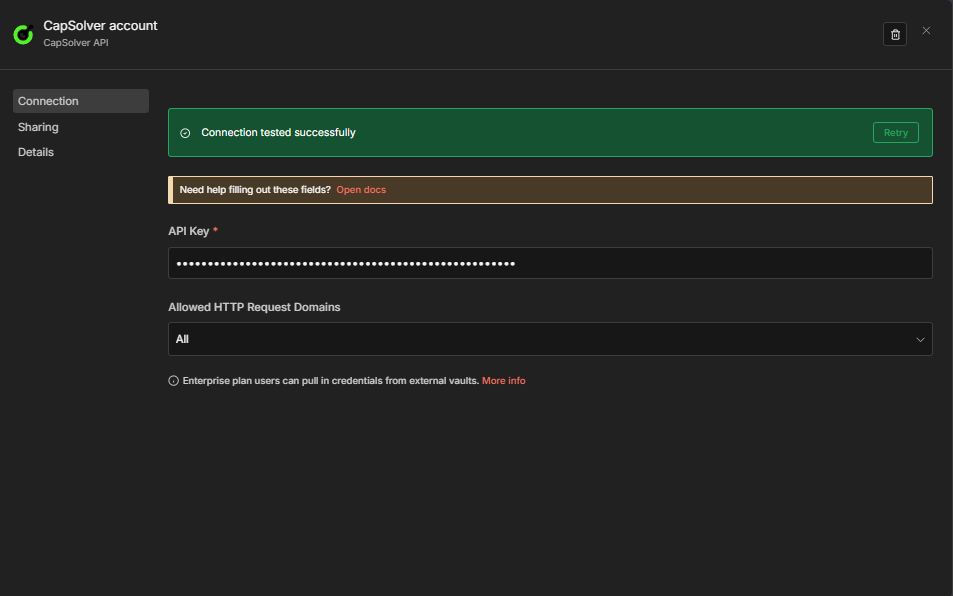
महत्वपूर्ण: आपके वर्कफ़्लो में हर CapSolver नोड इस क्रेडेंशियल को संदर्भित करेगा। आपको इसे केवल एक बार बनाना है — आपके सभी सॉल्वर वर्कफ़्लो एक ही क्रेडेंशियल साझा करेंगे।
अब आप अपना reCAPTCHA सॉल्वर वर्कफ़्लो बनाने के लिए तैयार हैं!
reCAPTCHA पैरामीटर कैसे पहचानें
reCAPTCHA को हल करने से पहले, आपको इसके पैरामीटर जानने होंगे — विशेष रूप से websiteURL और websiteKey (जिसे साइट की भी कहा जाता है)। इन्हें खोजने का सबसे आसान तरीका है CapSolver ब्राउज़र एक्सटेंशन का उपयोग करना।
चरण 1: CapSolver एक्सटेंशन इंस्टॉल करें
CapSolver एक्सटेंशन Chrome Web Store या Firefox Add-ons से डाउनलोड और इंस्टॉल करें।
चरण 2: CAPTCHA डिटेक्टर खोलें
- लक्षित वेबसाइट पर जाएं
- डेवलपर टूल्स खोलने के लिए F12 दबाएं
- DevTools में "CapSolver Captcha Detector" टैब खोजें

चरण 3: CAPTCHA ट्रिगर करें
डिटेक्टर पैनल खुला होने पर, पेज के साथ इंटरैक्ट करें ताकि reCAPTCHA ट्रिगर हो। एक्सटेंशन स्वचालित रूप से सभी संबंधित पैरामीटर का पता लगाएगा और दिखाएगा:
- Website URL — CAPTCHA होस्ट करने वाला पेज URL
- Website Key (Site Key) — कैप्चा के लिए सार्वजनिक कुंजी पहचानकर्ता
- pageAction — सत्यापित की जा रही विशिष्ट क्रिया (v3 के लिए)
- isInvisible — क्या यह एक अदृश्य reCAPTCHA है
- isEnterprise — क्या यह reCAPTCHA Enterprise का उपयोग करता है
- apiDomain — उपयोग किया जा रहा API एंडपॉइंट (जैसे,
recaptcha.net)

टिप: एक्सटेंशन एक JSON आउटपुट जनरेट करता है जो दिखाता है कि इन पैरामीटरों को आपके सॉल्विंग अनुरोध के लिए कैसे फॉर्मेट करना है। इससे आपको मैन्युअल रूप से पेज सोर्स जांचने की जरूरत नहीं पड़ती।
कैप्चा पैरामीटर की पहचान पर विस्तृत गाइड के लिए, आधिकारिक CapSolver दस्तावेज़ देखें।
वर्कफ़्लो: reCAPTCHA सॉल्वर API
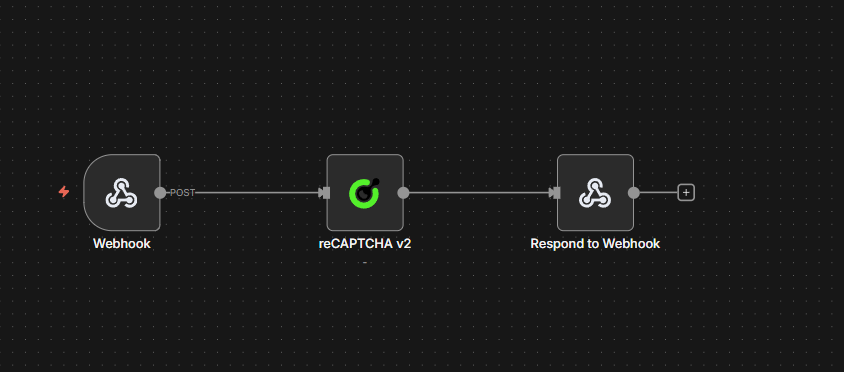
यह वर्कफ़्लो एक POST एंडपॉइंट बनाता है जो reCAPTCHA पैरामीटर स्वीकार करता है और एक हल किया गया टोकन लौटाता है। यही 4-नोड संरचना सभी reCAPTCHA प्रकारों के लिए काम करती है — बस CapSolver नोड में Operation बदलें।
यह कैसे काम करता है
- Webhook — कैप्चा पैरामीटर के साथ POST अनुरोध प्राप्त करता है
- CapSolver — कॉन्फ़िगर किए गए ऑपरेशन का उपयोग करके चुनौती को हल करता है
- CapSolver Error? — IF नोड जो यह जांचता है कि हल करना विफल हुआ या नहीं (
$json.errorखाली नहीं है) - Respond to Webhook — सफलता पर समाधान लौटाता है, या विफलता पर
{"error": "..."}लौटाता है
अपना reCAPTCHA प्रकार चुनना
| प्रकार | चयन करने के लिए ऑपरेशन | अतिरिक्त पैरामीटर |
|---|---|---|
| v2 स्टैंडर्ड | reCAPTCHA v2 |
— |
| v2 Invisible | reCAPTCHA v2 |
नोड में Is Invisible को true सेट करें |
| v3 | reCAPTCHA v3 |
pageAction जोड़ें — लक्षित साइट की कॉन्फ़िगर की गई क्रिया से मेल खाना चाहिए (जैसे, login, submit) |
नीचे दिया गया वर्कफ़्लो डिफ़ॉल्ट रूप से reCAPTCHA v2 का उपयोग करता है। CapSolver नोड खोलें और प्रकार बदलने के लिए Operation ड्रॉपडाउन बदलें। अन्य कोई संरचनात्मक बदलाव आवश्यक नहीं हैं।
नोड कॉन्फ़िगरेशन
1. Webhook नोड
| सेटिंग | मान |
|---|---|
| HTTP Method | POST |
| Path | solver-recaptcha |
| Respond | Response Node |
यह एक एंडपॉइंट बनाता है: https://your-n8n-instance.com/webhook/solver-recaptcha
2. CapSolver नोड
| पैरामीटर | मान | विवरण |
|---|---|---|
| Operation | reCAPTCHA v2 |
v3 के लिए इसे reCAPTCHA v3 में बदलें; v2 Invisible के लिए, reCAPTCHA v2 रखें और Is Invisible को true सेट करें |
| Website URL | ={{ $json.body.websiteURL }} |
कैप्चा वाले पेज का URL |
| Website Key | ={{ $json.body.websiteKey }} |
reCAPTCHA साइट की |
| Page Action | ={{ $json.body.pageAction || '' }} |
v3 के लिए आवश्यक — साइट की कॉन्फ़िगर की गई क्रिया से मेल खाना चाहिए |
| Is Invisible | ={{ $json.body.isInvisible || false }} |
v2 Invisible के लिए true सेट करें |
| API Domain | ={{ $json.body.apiDomain || '' }} |
वैकल्पिक — कस्टम API डोमेन (जैसे, recaptcha.net) |
| Enterprise Payload | ={{ $json.body.enterprisePayload || '' }} |
वैकल्पिक — reCAPTCHA Enterprise के लिए अतिरिक्त पेलोड |
| Is Session | ={{ $json.body.isSession || false }} |
वैकल्पिक — सत्र-आधारित सॉल्विंग सक्षम करें |
| Task Type | ={{ $json.body.taskType || 'ReCaptchaV2TaskProxyLess' }} |
CapSolver टास्क प्रकार — नीचे संदर्भ देखें। डिफ़ॉल्ट ReCaptchaV2TaskProxyLess है |
| Proxy | ={{ $json.body.proxy || '' }} |
केवल तब उपयोग किया जाता है जब चयनित टास्क प्रकार को प्रॉक्सी की आवश्यकता होती है (गैर-ProxyLess प्रकार)। ProxyLess टास्क प्रकार के लिए खाली छोड़ें या छोड़ दें। प्रारूप: ip:port:user:pass |
नोड में अपने CapSolver क्रेडेंशियल्स का चयन भी करें।
reCAPTCHA टास्क प्रकार संदर्भ:
| टास्क प्रकार | प्रॉक्सी आवश्यक | नोट्स |
|---|---|---|
ReCaptchaV2TaskProxyLess |
नहीं | v2 डिफ़ॉल्ट |
ReCaptchaV2Task |
हाँ | प्रॉक्सी के साथ v2 |
ReCaptchaV2EnterpriseTaskProxyLess |
नहीं | एंटरप्राइज़ v2, बिना प्रॉक्सी |
ReCaptchaV2EnterpriseTask |
हाँ | एंटरप्राइज़ v2, प्रॉक्सी आवश्यक |
ReCaptchaV3TaskProxyLess |
नहीं | v3 डिफ़ॉल्ट |
ReCaptchaV3Task |
हाँ | प्रॉक्सी के साथ v3 |
ReCaptchaV3EnterpriseTaskProxyLess |
नहीं | एंटरप्राइज़ v3, बिना प्रॉक्सी |
ReCaptchaV3EnterpriseTask |
हाँ | एंटरप्राइज़ v3, प्रॉक्सी आवश्यक |
प्रॉक्सी: केवल गैर-
ProxyLessटास्क प्रकारों के लिए लागू (जैसे,ReCaptchaV2Task,ReCaptchaV3EnterpriseTask)।ProxyLessटास्क प्रकार का उपयोग करते समय, प्रॉक्सी फ़ील्ड को नजरअंदाज किया जाता है — CapSolver अपनी खुद की इन्फ्रास्ट्रक्चर का उपयोग करता है। गैर-ProxyLessप्रकार का उपयोग करते समय, आपको प्रॉक्सी प्रदान करना होगा।
3. CapSolver Error? नोड (IF)
| सेटिंग | मान |
|---|---|
| Condition | ={{ $json.error }} खाली नहीं है |
| True branch | Error Respond to Webhook नोड की ओर रूट करता है |
| False branch | Success Respond to Webhook नोड की ओर रूट करता है |
यह कैनवास पर त्रुटि पथ को स्पष्ट बनाता है। CapSolver नोड त्रुटि पर जारी रहता है (onError: continueRegularOutput), इसलिए विफलताएं यहाँ { "error": "..." } के रूप में आती हैं बजाय वर्कफ़्लो क्रैश होने के। आप ट्रू ब्रांच पर अतिरिक्त नोड्स (लॉगिंग, अलर्ट, पुनः प्रयास) जोड़ सकते हैं बिना सफलता पथ को छुए।
4. Respond to Webhook नोड्स
सफलता शाखा (CapSolver Error? के फॉल्स आउटपुट):
| सेटिंग | मान |
|---|---|
| Respond With | JSON |
| Response Body | ={{ JSON.stringify($json.data) }} |
इसे टेस्ट करें
अपने वेबहुक एंडपॉइंट पर POST अनुरोध भेजें:bash curl -X POST https://your-n8n-instance.com/webhook/solver-recaptcha \ -H "Content-Type: application/json" \ -d '{ "websiteURL": "https://example.com/login", "websiteKey": "6Le-wvkSAAAAAPBMRTvw0Q4Muexq9bi0DJwx_mJ-", "taskType": "ReCaptchaV2TaskProxyLess" }' > कार्य प्रकार नोड के ऑपरेशन से मेल खाना चाहिए। प्रत्येक तैनात वर्कफ़्लो को CapSolver नोड में ऑपरेशन फ़ील्ड के माध्यम से एक विशिष्ट reCAPTCHA संस्करण के लिए कॉन्फ़िगर किया गया है (reCAPTCHA v2 या reCAPTCHA v3)। केवल उस संस्करण के लिए कार्य प्रकार मान्य हैं — v3 कार्य प्रकार को v2 वर्कफ़्लो में भेजना (या इसके विपरीत) काम नहीं करेगा। नोट: v2 Invisible मानक v2 के समान reCAPTCHA v2 ऑपरेशन का उपयोग करता है — अंतर isInvisible पैरामीटर में है, ऑपरेशन में नहीं।
reCAPTCHA v3 के लिए, अनुरोध बॉडी में "pageAction": "login" (या जो भी क्रिया साइट उपयोग करती है) जोड़ें, और v3 कार्य प्रकार का उपयोग करें (जैसे, "taskType": "ReCaptchaV3TaskProxyLess").
अपेक्षित प्रतिक्रिया:```json
{
"taskId": "abc123...",
"solution": {
"gRecaptchaResponse": "03AGdBq24PBCb..."
},
"status": "ready"
}
### इस वर्कफ़्लो को इम्पोर्ट करें
नीचे दिया गया JSON कॉपी करें और इसे n8n में **Menu** → **Import from JSON** के माध्यम से इम्पोर्ट करें। फिर CapSolver नोड में **Operation** को अपने लक्षित reCAPTCHA प्रकार के अनुसार बदलें।
<details>
<summary>वर्कफ़्लो JSON को विस्तृत करने के लिए क्लिक करें (reCAPTCHA v2 — अन्य प्रकारों के लिए Operation बदलें)</summary>```json
{
"nodes": [
{
"parameters": {
"content": "## reCAPTCHA Solver API\n\n### How it works\n\n1. A webhook receives the reCAPTCHA solver request.\n2. The request is passed to the solver node to resolve the reCAPTCHA.\n3. The system checks if the solver encountered an error.\n4. If an error occurred, a response is sent indicating the failure.\n5. If successful, a response is sent with the result.\n\n### Setup steps\n\n- [ ] Configure webhook endpoint to receive solver requests.\n- [ ] Set up CapSolver credentials if necessary.\n\n### Customization\n\nAdjust the solver node settings depending on reCAPTCHA type or difficulty.",
"width": 480,
"height": 592
},
"type": "n8n-nodes-base.stickyNote",
"typeVersion": 1,
"position": [
-800,
-240
],
"id": "497d295f-4668-48ff-8eaa-97773cfd1c89",
"name": "Sticky Note"
},
{
"parameters": {
"content": "## Receive request and solve\n\nHandles incoming requests and solves reCAPTCHA.",
"width": 496,
"height": 272,
"color": 7
},
"type": "n8n-nodes-base.stickyNote",
"typeVersion": 1,
"position": [
-240,
-112
],
"id": "cb4b7a54-ae67-458e-bbef-18e3f6d242bb",
"name": "Sticky Note1"
},
{
"parameters": {
"content": "## Evaluate and respond\n\nChecks for errors and sends appropriate webhook responses.",
"width": 560,
"height": 432,
"color": 7
},
"type": "n8n-nodes-base.stickyNote",
"typeVersion": 1,
"position": [
464,
-240
],
"id": "fc9430f0-b899-45ce-b5cf-de9a1b10fbe2",
"name": "Sticky Note2"
},
{
"parameters": {
"httpMethod": "POST",
"path": "solver-recaptcha",
"responseMode": "responseNode",
"options": {}
},
"id": "rc-api-001",
"name": "Receive Solver Request",
"type": "n8n-nodes-base.webhook",
"typeVersion": 2,
"position": [
-192,
0
],
"webhookId": "solver-recaptcha"
},
{
"parameters": {
"websiteURL": "={{ $json.body.websiteURL }}",
"websiteKey": "={{ $json.body.websiteKey }}",
"optional": {}
},
"id": "rc-api-002",
"name": "Solve reCAPTCHA",
"type": "n8n-nodes-capsolver.capSolver",
"typeVersion": 1,
"position": [
112,
0
],
"credentials": {
"capSolverApi": {
"id": "BeBFMAsySMsMGeE9",
"name": "CapSolver account"
}
},
"continueOnFail": true
},
{
"parameters": {
"conditions": {
"options": {
"version": 2,
"caseSensitive": true,
"leftValue": "",
"typeValidation": "strict"
},
"combinator": "and",
"conditions": [
{
"id": "1",
"operator": {
"type": "string",
"operation": "isNotEmpty",
"singleValue": true
},
"leftValue": "={{ $json.error }}",
"rightValue": ""
}
]
},
"options": {}
},
"id": "rc-api-003",
"name": "CapSolver Error?",
"type": "n8n-nodes-base.if",
"typeVersion": 2.2,
"position": [
512,
-32
]
},
{
"parameters": {
"respondWith": "json",
"responseBody": "={{ JSON.stringify({ error: $json.error }) }}",
"options": {}
},
"id": "rc-api-004",
"name": "Respond to Webhook (Error)",
"type": "n8n-nodes-base.respondToWebhook",
"typeVersion": 1.1,
"position": [
880,
-128
]
},
{
"parameters": {
"respondWith": "json",
"responseBody": "={{ JSON.stringify($json.data) }}",
"options": {}
},
"id": "rc-api-005",
"name": "Respond to Webhook",
"type": "n8n-nodes-base.respondToWebhook",
"typeVersion": 1.1,
"position": [
880,
32
]
}
],
"connections": {
"Receive Solver Request": {
"main": [
[
{
"node": "Solve reCAPTCHA",
"type": "main",
"index": 0
}
]
]
},
"Solve reCAPTCHA": {
"main": [
[
{
"node": "CapSolver Error?",
"type": "main",
"index": 0
}
]
]
},
"CapSolver Error?": {
"main": [
[
{
"node": "Respond to Webhook (Error)",
"type": "main",
"index": 0
}
],
[
{
"node": "Respond to Webhook",
"type": "main",
"index": 0
}
]
]
}
},
"pinData": {},
"meta": {
"instanceId": "962ff0267b713be0344b866fa54daae28de8ed2144e2e6867da355dae193ea1f"
}
}
```</details>
---
## वर्कफ़्लो: वेबसाइटों को टोकन सबमिट करना
अब तक, ऊपर दिए गए API वर्कफ़्लो दिखाते हैं कि कैसे एक हल किया गया कैप्चा टोकन **प्राप्त** किया जाए। लेकिन आप वास्तव में इसके साथ क्या **करते** हैं?
वास्तविक दुनिया के ऑटोमेशन में, कैप्चा को हल करना केवल आधा काम है। आपको टोकन को लक्षित वेबसाइट पर **सबमिट** करना होता है — बिल्कुल वैसे ही जैसे कोई ब्राउज़र करता है — ताकि कैप्चा के पीछे का डेटा या क्रिया अनलॉक हो सके।
यहाँ सामान्य पैटर्न है:
1. **कैप्चा हल करें** → CapSolver से `gRecaptchaResponse` टोकन प्राप्त करें
2. **टोकन सबमिट करें** → इसे HTTP अनुरोध के माध्यम से लक्षित वेबसाइट को भेजें (आमतौर पर `g-recaptcha-response` फॉर्म फ़ील्ड या URL पैरामीटर के रूप में)
3. **प्रतिक्रिया सत्यापित करें** → जांचें कि क्या वेबसाइट ने टोकन स्वीकार किया और अपेक्षित डेटा लौटाया
4. **परिणाम संसाधित करें** → आवश्यक डेटा निकालें
### उदाहरण: reCAPTCHA v2 को हल करना और सबमिट करना
**उदाहरण:** [example.com](https://example.com)
#### वर्कफ़्लो प्रवाह```
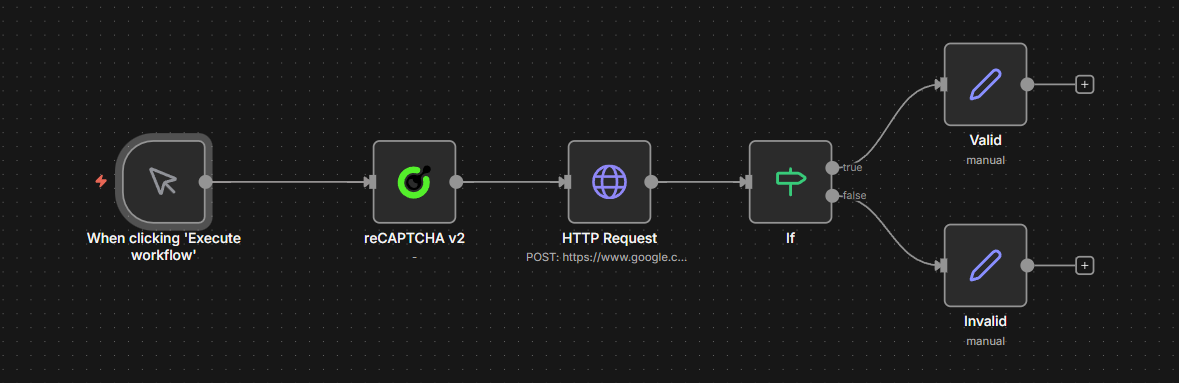
Manual Trigger → CapSolver reCAPTCHA v2 → HTTP POST Request → IF (check success) → Valid / Invalid
```#### यह कैसे काम करता है
1. **मैनुअल ट्रिगर** — वर्कफ़्लो को मैन्युअली शुरू करता है (क्लिक करें "Execute workflow")। आप इसे किसी भी ट्रिगर से बदल सकते हैं — वेबहुक, शेड्यूल, ऐप इवेंट, आदि।
2. **CapSolver reCAPTCHA v2** — डेमो पेज के लिए कैप्चा हल करता है:
- वेबसाइट URL: `https://example.com`
- वेबसाइट कुंजी: `YOUR_SITE_KEY`
3. **HTTP POST अनुरोध** — हल किए गए टोकन को उसी URL पर एक फॉर्म POST के रूप में सबमिट करता है:
- टोकन `g-recaptcha-response` फॉर्म फ़ील्ड में भेजा जाता है
- यह बिल्कुल वैसा ही है जैसा ब्राउज़र करता है जब आप कैप्चा हल करने के बाद "Submit" पर क्लिक करते हैं
4. **IF नोड** — जांचता है कि प्रतिक्रिया HTML में `"recaptcha-success"` है या नहीं, जिसका मतलब है कि कैप्चा स्वीकार कर लिया गया है
5. **वैध / अमान्य** — IF नोड सफलता पर **वैध** शाखा पर रूट करता है (जहां आप आवश्यक डेटा निकालते हैं, जैसे कि उत्पाद सूची, फॉर्म परिणाम आदि के लिए **HTML नोड** के साथ) या विफलता पर **अमान्य** शाखा पर (जहां आप त्रुटि को संभालते हैं)
> **मुख्य अवधारणा:** हर वेबसाइट टोकन सबमिशन को अलग तरीके से संभालती है। इस डेमो में, टोकन `g-recaptcha-response` फॉर्म फ़ील्ड में POST के माध्यम से जाता है — लेकिन अन्य साइटें इसे URL पैरामीटर के रूप में, JSON बॉडी में, या पूरी तरह से अलग एंडपॉइंट के माध्यम से अपेक्षित कर सकती हैं। हमेशा साइट के वास्तविक फॉर्म सबमिशन (DevTools नेटवर्क टैब का उपयोग करके) का निरीक्षण करें ताकि यह ठीक से पता चल सके कि टोकन कैसे भेजना है।
<details>
<summary>वर्कफ़्लो JSON विस्तार के लिए क्लिक करें</summary>```json
{
"nodes": [
{
"parameters": {
"content": "## reCAPTCHA v2 \u2014 All Triggers\n\n### How it works\n\n1. Receives solver requests through a webhook.\n2. Processes these requests using CapSolver and returns the results.\n3. Regularly triggers checks every hour using a schedule.\n4. Executes the scheduled process and checks the status of tasks.\n5. Allows manual testing of CapSolver through a manual trigger.\n\n### Setup steps\n\n- [ ] Set up webhook credentials for 'Receive Solver Request'.\n- [ ] Configure CapSolver with necessary keys for all CapSolver nodes.\n- [ ] Assign necessary permissions for HTTP request to reCAPTCHA endpoint.\n- [ ] Review and adjust the schedule in 'Schedule Trigger'.\n- [ ] Test manual execution with 'Manual Trigger'.\n",
"width": 480,
"height": 896
},
"type": "n8n-nodes-base.stickyNote",
"typeVersion": 1,
"position": [
-816,
-128
],
"id": "68e8c344-ce45-4e9f-859b-ca005db7c73e",
"name": "Sticky Note"
},
{
"parameters": {
"content": "## Receive and handle requests\n\nStarts with receiving a solver request via webhook, processes it, and returns the solver result.",
"width": 800,
"height": 304,
"color": 7
},
"type": "n8n-nodes-base.stickyNote",
"typeVersion": 1,
"position": [
-256,
-128
],
"id": "c26741c7-e0e6-4a4e-9fbf-2a623df014c8",
"name": "Sticky Note1"
},
{
"parameters": {
"content": "## Scheduled recurrent process\n\nInitiates the process on an hourly schedule, sets target parameters, and sends them to CapSolver.",
"width": 800,
"height": 304,
"color": 7
},
"type": "n8n-nodes-base.stickyNote",
"typeVersion": 1,
"position": [
-256,
224
],
"id": "4b879cbf-e269-4260-9596-740b95df628a",
"name": "Sticky Note2"
},
{
"parameters": {
"content": "## Process and validate token\n\nPosts to the reCAPTCHA validation endpoint and checks results, branching into pass or fail paths.",
"width": 736,
"height": 464,
"color": 7
},
"type": "n8n-nodes-base.stickyNote",
"typeVersion": 1,
"position": [
656,
96
],
"id": "7c860b53-f4a7-4d0b-8537-5253eec5a043",
"name": "Sticky Note3"
},
{
"parameters": {
"content": "## Manual testing process\n\nAllows manual trigger testing with CapSolver and formats the result for review.",
"width": 800,
"height": 272,
"color": 7
},
"type": "n8n-nodes-base.stickyNote",
"typeVersion": 1,
"position": [
-256,
576
],
"id": "8936a2df-c5b5-4c63-a0d5-afd190553a57",
"name": "Sticky Note4"
},
{
"parameters": {
"httpMethod": "POST",
"path": "solve-recaptcha-v2",
"responseMode": "responseNode",
"options": {}
},
"type": "n8n-nodes-base.webhook",
"typeVersion": 2.1,
"position": [
-208,
0
],
"id": "11111111-1111-1111-1111-111111111101",
"name": "Receive Solver Request",
"webhookId": "a1b2c3d4-e5f6-7890-abcd-ef1234567801",
"onError": "continueRegularOutput"
},
{
"parameters": {
"type": "={{ $json.body.taskType || 'ReCaptchaV2TaskProxyLess' }}",
"proxy": "={{ $json.body.proxy || '' }}",
"websiteURL": "={{ $json.body.websiteURL }}",
"websiteKey": "={{ $json.body.websiteKey }}",
"optional": {
"pageAction": "={{ $json.body.pageAction || '' }}",
"isInvisible": "={{ $json.body.isInvisible || false }}",
"apiDomain": "={{ $json.body.apiDomain || '' }}",
"enterprisePayload": "={{ $json.body.enterprisePayload || '' }}",
"isSession": "={{ $json.body.isSession || false }}"
}
},
"type": "n8n-nodes-capsolver.capSolver",
"typeVersion": 1,
"position": [
112,
0
],
"id": "11111111-1111-1111-1111-111111111102",
"name": "CapSolver [Webhook]",
"credentials": {
"capSolverApi": {
"id": "BeBFMAsySMsMGeE9",
"name": "CapSolver account"
}
}
},
{
"parameters": {
"respondWith": "json",
"responseBody": "={{ JSON.stringify($json.data) }}",
"options": {}
},
"type": "n8n-nodes-base.respondToWebhook",
"typeVersion": 1.5,
"position": [
400,
0
],
"id": "11111111-1111-1111-1111-111111111103",
"name": "Return Solver Result"
},
{
"parameters": {
"rule": {
"interval": [
{
"field": "hours",
"hoursInterval": 1
}
]
}
},
"type": "n8n-nodes-base.scheduleTrigger",
"typeVersion": 1.3,
"position": [
-208,
352
],
"id": "11111111-1111-1111-1111-111111111104",
"name": "Schedule Trigger (Every 1h)"
},
{
"parameters": {
"assignments": {
"assignments": [
{
"id": "sa-001",
"name": "websiteURL",
"value": "https://www.google.com/recaptcha/api2/demo",
"type": "string"
},
{
"id": "sa-002",
"name": "websiteKey",
"value": "6Le-wvkSAAAAAPBMRTvw0Q4Muexq9bi0DJwx_mJ-",
"type": "string"
}
]
},
"options": {}
},
"type": "n8n-nodes-base.set",
"typeVersion": 3.4,
"position": [
112,
352
],
"id": "11111111-1111-1111-1111-111111111105",
"name": "Set Target Params"
},
{
"parameters": {
"websiteURL": "={{ $json.websiteURL }}",
"websiteKey": "={{ $json.websiteKey }}",
"optional": {}
},
"type": "n8n-nodes-capsolver.capSolver",
"typeVersion": 1,
"position": [
400,
352
],
"id": "11111111-1111-1111-1111-111111111106",
"name": "CapSolver [Schedule]",
"credentials": {
"capSolverApi": {
"id": "BeBFMAsySMsMGeE9",
"name": "CapSolver account"
}
}
},
{
"parameters": {
"method": "POST",
"url": "https://www.google.com/recaptcha/api2/demo",
"sendHeaders": true,
"headerParameters": {
"parameters": [
{
"name": "content-type",
"value": "application/x-www-form-urlencoded"
},
{
"name": "user-agent",
"value": "Mozilla/5.0 (Windows NT 10.0; Win64; x64) AppleWebKit/537.36 (KHTML, like Gecko) Chrome/125.0.0.0 Safari/537.36"
}
]
},
"sendBody": true,
"contentType": "form-urlencoded",
"bodyParameters": {
"parameters": [
{
"name": "g-recaptcha-response",
"value": "={{ $json.data.solution.gRecaptchaResponse }}"
}
]
},
"options": {}
},
"type": "n8n-nodes-base.httpRequest",
"typeVersion": 4.3,
"position": [
704,
352
],
"id": "11111111-1111-1111-1111-111111111107",
"name": "Submit Token"
},
{
"parameters": {
"conditions": {
"options": {
"caseSensitive": true,
"leftValue": "",
"typeValidation": "strict",
"version": 2
},
"conditions": [
{
"id": "if-001",
"leftValue": "={{ $json.data }}",
"rightValue": "recaptcha-success",
"operator": {
"type": "string",
"operation": "contains"
}
}
],
"combinator": "and"
},
"options": {}
},
"type": "n8n-nodes-base.if",
"typeVersion": 2.3,
"position": [
1008,
352
],
"id": "11111111-1111-1111-1111-111111111108",
"name": "Check Result"
},
{
"parameters": {
"assignments": {
"assignments": [
{
"id": "sp-001",
"name": "status",
"value": "passed",
"type": "string"
},
{
"id": "sp-002",
"name": "message",
"value": "reCAPTCHA v2 monitor passed successfully",
"type": "string"
},
{
"id": "sp-003",
"name": "timestamp",
"value": "={{ new Date().toISOString() }}",
"type": "string"
}
]
},
"options": {}
},
"type": "n8n-nodes-base.set",
"typeVersion": 3.4,
"position": [
1248,
224
],
"id": "11111111-1111-1111-1111-111111111109",
"name": "Monitor Passed"
},
{
"parameters": {
"assignments": {
"assignments": [
{
"id": "sf-001",
"name": "status",
"value": "failed",
"type": "string"
},
{
"id": "sf-002",
"name": "message",
"value": "reCAPTCHA v2 monitor FAILED \u2014 token rejected",
"type": "string"
},
{
"id": "sf-003",
"name": "timestamp",
"value": "={{ new Date().toISOString() }}",
"type": "string"
}
]
},
"options": {}
},
"type": "n8n-nodes-base.set",
"typeVersion": 3.4,
"position": [
1248,
384
],
"id": "11111111-1111-1111-1111-111111111110",
"name": "Monitor Failed"
},
{
"parameters": {},
"type": "n8n-nodes-base.manualTrigger",
"typeVersion": 1,
"position": [
-208,
688
],
"id": "11111111-1111-1111-1111-111111111111",
"name": "Manual Trigger (Test)"
},
{
"parameters": {
"websiteURL": "https://www.google.com/recaptcha/api2/demo",
"websiteKey": "6Le-wvkSAAAAAPBMRTvw0Q4Muexq9bi0DJwx_mJ-",
"optional": {}
},
"type": "n8n-nodes-capsolver.capSolver",
"typeVersion": 1,
"position": [
112,
688
],
"id": "11111111-1111-1111-1111-111111111112",
"name": "CapSolver [Manual]",
"credentials": {
"capSolverApi": {
"id": "BeBFMAsySMsMGeE9",
"name": "CapSolver account"
}
}
},
{
"parameters": {
"assignments": {
"assignments": [
{
"id": "mr-001",
"name": "token",
"value": "={{ $json.data.solution.gRecaptchaResponse }}",
"type": "string"
},
{
"id": "mr-002",
"name": "taskId",
"value": "={{ $json.data.taskId }}",
"type": "string"
},
{
"id": "mr-003",
"name": "status",
"value": "solved",
"type": "string"
},
{
"id": "mr-004",
"name": "solvedAt",
"value": "={{ new Date().toISOString() }}",
"type": "string"
}
]
},
"options": {}
},
"type": "n8n-nodes-base.set",
"typeVersion": 3.4,
"position": [
400,
688
],
"id": "11111111-1111-1111-1111-111111111113",
"name": "Format Result"
}
],
"connections": {
"Receive Solver Request": {
"main": [
[
{
"node": "CapSolver [Webhook]",
"type": "main",
"index": 0
}
]
]
},
"CapSolver [Webhook]": {
"main": [
[
{
"node": "Return Solver Result",
"type": "main",
"index": 0
}
]
]
},
"Schedule Trigger (Every 1h)": {
"main": [
[
{
"node": "Set Target Params",
"type": "main",
"index": 0
}
]
]
},
"Set Target Params": {
"main": [
[
{
"node": "CapSolver [Schedule]",
"type": "main",
"index": 0
}
]
]
},
"CapSolver [Schedule]": {
"main": [
[
{
"node": "Submit Token",
"type": "main",
"index": 0
}
]
]
},
"Submit Token": {
"main": [
[
{
"node": "Check Result",
"type": "main",
"index": 0
}
]
]
},
"Check Result": {
"main": [
[
{
"node": "Monitor Passed",
"type": "main",
"index": 0
}
],
[
{
"node": "Monitor Failed",
"type": "main",
"index": 0
}
]
]
},
"Manual Trigger (Test)": {
"main": [
[
{
"node": "CapSolver [Manual]",
"type": "main",
"index": 0
}
]
]
},
"CapSolver [Manual]": {
"main": [
[
{
"node": "Format Result",
"type": "main",
"index": 0
}
]
]
}
},
"pinData": {},
"meta": {
"instanceId": "962ff0267b713be0344b866fa54daae28de8ed2144e2e6867da355dae193ea1f"
}
}
```</details>
> **अन्य reCAPTCHA प्रकारों के लिए अनुकूलन:** यह वही पैटर्न **v2 Invisible** और **v3** के लिए भी काम करता है। v2 Invisible के लिए, CapSolver नोड में `isInvisible: true` सेट करें। v3 के लिए, ऑपरेशन को `reCAPTCHA v3` में बदलें और `pageAction` पैरामीटर जोड़ें। HTTP अनुरोध सबमिशन चरण साइट के अनुसार भिन्न होगा — हमेशा DevTools में वास्तविक फॉर्म सबमिशन का निरीक्षण करें।
---
## वर्कफ़्लो: उपयोग-मामले के उदाहरण
सॉल्वर API और ऊपर दिए गए स्क्रैपिंग उदाहरण मूल पैटर्न दिखाते हैं: कैप्चा हल करें, टोकन सबमिट करें, परिणाम संसाधित करें। निम्नलिखित वर्कफ़्लो इस पैटर्न को **उत्पादन-तैयार उपयोग-मामलों** तक बढ़ाते हैं — प्रत्येक में दोहरे ट्रिगर (शेड्यूल + वेबहुक), स्थायी स्थिति ट्रैकिंग, और संरचित आउटपुट होता है।
| वर्कफ़्लो | उद्देश्य |
|---|---|
| `reCAPTCHA स्क्रैपिंग — मूल्य और उत्पाद विवरण — CapSolver + शेड्यूल + वेबहुक` | हर 6 घंटे में मूल्य और उत्पाद नाम स्क्रैप करता है, `staticData` में संग्रहीत पिछले मानों से तुलना करता है, परिवर्तनों पर अलर्ट करता है |
| `reCAPTCHA खाता लॉगिन — CapSolver + शेड्यूल + वेबहुक` | कैप्चा-संरक्षित साइट पर अपने खाते में लॉगिन करता है, पहले कैप्चा हल करके, फिर टोकन के साथ क्रेडेंशियल्स POST करता है |
### उदाहरण 1: स्क्रैपिंग — मूल्य और उत्पाद विवरण
यह वर्कफ़्लो हर 6 घंटे (शेड्यूल) या मांग पर (वेबहुक) एक उत्पाद पृष्ठ स्क्रैप करता है, HTML नोड का उपयोग करके मूल्य निकालता है, और इसे पहले से संग्रहीत मान से तुलना करता है।
**शेड्यूल पथ:**```
Every 6 Hours → Solve reCAPTCHA v3 → Fetch Product Page → Extract Data
→ Compare Data → Data Changed? → Build Alert / No Change
```> **त्रुटि प्रबंधन:** यदि CapSolver विफल होता है, तो निष्पादन रुक जाता है और n8n में असफल के रूप में चिह्नित किया जाता है। त्रुटि देखने के लिए **Executions** जांचें, या स्वचालित रूप से सूचित होने के लिए n8n के [Error Workflow](https://docs.n8n.io/flow-logic/error-handling/) को कॉन्फ़िगर करें।
प्रमुख व्यवहार:
- `pageAction` पैरामीटर (कॉन्फ़िगर करने योग्य) के साथ **reCAPTCHA v3** का उपयोग करता है
- टोकन को `x-recaptcha-token` हेडर के रूप में भेजा जाता है (अपनी साइट के अपेक्षित प्रारूप के अनुसार अनुकूलित करें)
- **HTML नोड** CSS सेलेक्टर्स (`.product-price`, `h1`) के माध्यम से मूल्य और उत्पाद नाम निकालता है
- `$workflow.staticData.lastPrice` पिछले मूल्य को निष्पादनों के बीच बनाए रखता है
- मूल्य तुलना दोनों **गिरावट** (गंभीरता: `deal`) और **वृद्धि** (गंभीरता: `info`) का पता लगाती है
- कार्य प्रकार `ReCaptchaV3TaskProxyLess` है (हार्डकोडेड) — कार्य प्रकार या प्रॉक्सी बदलने के लिए Solve reCAPTCHA v3 नोड को सीधे संपादित करें
<details>
<summary>पूर्ण वर्कफ़्लो JSON (17 नोड्स) देखने के लिए क्लिक करें</summary>```json
{
"nodes": [
{
"parameters": {
"content": "## reCAPTCHA Scraping \u2014 Price & Product Monitor\n\n### How it works\n\n1. Triggers the workflow every 6 hours or via webhook.\n2. Configures target website URL and key for scraping.\n3. Solves reCAPTCHA to access the webpage.\n4. Fetches and extracts product data from the webpage.\n5. Compares current data with previous data to check for changes.\n6. Builds alert or updates status based on data changes.\n\n### Setup steps\n\n- [ ] Configure the 'Every 6 Hours' trigger to set the appropriate time schedule.\n- [ ] Set up the target website URL and key parameters in the 'Set Target Config [Schedule]' node.\n- [ ] Ensure the 'Solve reCAPTCHA' and 'Solve reCAPTCHA [Webhook]' nodes are configured with the correct CAPTCHA services.\n- [ ] Set up webhook endpoint in the 'Webhook Trigger' node.\n- [ ] Configure the 'Respond to Webhook' node for handling webhook responses.\n\n### Customization\n\nAdjust the 'Compare Data' and 'Compare Data [Webhook]' code to fit specific data comparison logic or data formats.",
"height": 896,
"width": 480
},
"type": "n8n-nodes-base.stickyNote",
"typeVersion": 1,
"position": [
-1312,
-352
],
"id": "871c5a60-20b4-4cc0-a357-d5cecb8a322a",
"name": "Sticky Note"
},
{
"parameters": {
"content": "## Scheduled trigger setup\n\nTriggers every 6 hours and sets the target config for scraping.",
"height": 304,
"width": 496,
"color": 7
},
"type": "n8n-nodes-base.stickyNote",
"typeVersion": 1,
"position": [
-752,
-128
],
"id": "43acb039-cfcd-47c3-892e-e13da011b721",
"name": "Sticky Note1"
},
{
"parameters": {
"content": "## Scheduled CAPTCHA solving and page fetch\n\nSolves the CAPTCHA and fetches the product page based on schedule.",
"height": 304,
"width": 496,
"color": 7
},
"type": "n8n-nodes-base.stickyNote",
"typeVersion": 1,
"position": [
-144,
-128
],
"id": "68fc53a6-181e-4ca8-bf7d-f3f8e9b12f9d",
"name": "Sticky Note2"
},
{
"parameters": {
"content": "## Scheduled data extraction and comparison\n\nExtracts and compares data from the fetched page.",
"height": 272,
"width": 784,
"color": 7
},
"type": "n8n-nodes-base.stickyNote",
"typeVersion": 1,
"position": [
464,
-112
],
"id": "155fc92b-721a-40bf-80e6-6dd2082b126a",
"name": "Sticky Note3"
},
{
"parameters": {
"content": "## Scheduled alert or status update\n\nHandles response based on data comparison for scheduled runs.",
"height": 560,
"color": 7
},
"type": "n8n-nodes-base.stickyNote",
"typeVersion": 1,
"position": [
1296,
-352
],
"id": "ee2c8c8e-d21d-42aa-b261-49a6fffb3d11",
"name": "Sticky Note4"
},
{
"parameters": {
"content": "## Webhook trigger setup\n\nInitiates the workflow via a webhook request.",
"height": 368,
"color": 7
},
"type": "n8n-nodes-base.stickyNote",
"typeVersion": 1,
"position": [
-752,
304
],
"id": "6957473e-81a0-4afd-a0ea-e6f61c3be715",
"name": "Sticky Note5"
},
{
"parameters": {
"content": "## Webhook CAPTCHA solving and page fetch\n\nSolves the CAPTCHA and fetches the product page via webhook.",
"height": 304,
"width": 496,
"color": 7
},
"type": "n8n-nodes-base.stickyNote",
"typeVersion": 1,
"position": [
-144,
304
],
"id": "48990176-a5b5-48db-ac09-bcc207318f0a",
"name": "Sticky Note6"
},
{
"parameters": {
"content": "## Webhook data extraction and comparison\n\nProcesses data fetched from the page and checks for changes via webhook.",
"height": 272,
"width": 784,
"color": 7
},
"type": "n8n-nodes-base.stickyNote",
"typeVersion": 1,
"position": [
464,
320
],
"id": "844166d1-75f7-4192-8bfb-3a1381fb6235",
"name": "Sticky Note7"
},
{
"parameters": {
"content": "## Webhook alert or status update\n\nResponds to webhook trigger with alert or status update.",
"height": 544,
"width": 384,
"color": 7
},
"type": "n8n-nodes-base.stickyNote",
"typeVersion": 1,
"position": [
1328,
240
],
"id": "c1926a60-dfb3-4520-a530-82aa40c6341c",
"name": "Sticky Note8"
},
{
"parameters": {
"rule": {
"interval": [
{
"field": "hours",
"hoursInterval": 6
}
]
}
},
"type": "n8n-nodes-base.scheduleTrigger",
"typeVersion": 1.3,
"position": [
-704,
0
],
"id": "rc-s-901",
"name": "Every 6 Hours"
},
{
"parameters": {
"assignments": {
"assignments": [
{
"id": "cfg-001",
"name": "websiteURL",
"value": "https://YOUR-TARGET-SITE.com/product-page",
"type": "string"
},
{
"id": "cfg-002",
"name": "websiteKey",
"value": "YOUR_SITE_KEY_HERE",
"type": "string"
}
]
},
"options": {}
},
"type": "n8n-nodes-base.set",
"typeVersion": 3.4,
"position": [
-400,
0
],
"id": "rc-s-900",
"name": "Set Target Config [Schedule]"
},
{
"parameters": {
"websiteURL": "={{ $json.websiteURL }}",
"websiteKey": "={{ $json.websiteKey }}",
"optional": {}
},
"type": "n8n-nodes-capsolver.capSolver",
"typeVersion": 1,
"position": [
-96,
0
],
"id": "rc-s-902",
"name": "Solve reCAPTCHA",
"credentials": {
"capSolverApi": {
"id": "BeBFMAsySMsMGeE9",
"name": "CapSolver account"
}
}
},
{
"parameters": {
"method": "POST",
"url": "={{ $('Set Target Config [Schedule]').first().json.websiteURL }}",
"sendHeaders": true,
"headerParameters": {
"parameters": [
{
"name": "user-agent",
"value": "Mozilla/5.0 (Windows NT 10.0; Win64; x64) AppleWebKit/537.36 (KHTML, like Gecko) Chrome/125.0.0.0 Safari/537.36"
}
]
},
"sendBody": true,
"contentType": "form-urlencoded",
"bodyParameters": {
"parameters": [
{
"name": "g-recaptcha-response",
"value": "={{ $json.data.solution.gRecaptchaResponse }}"
}
]
},
"options": {
"response": {
"response": {}
}
}
},
"type": "n8n-nodes-base.httpRequest",
"typeVersion": 4.3,
"position": [
208,
0
],
"id": "rc-s-903",
"name": "Fetch Product Page"
},
{
"parameters": {
"operation": "extractHtmlContent",
"extractionValues": {
"values": [
{
"key": "price",
"cssSelector": ".product-price, [data-price], .price"
},
{
"key": "productName",
"cssSelector": "h1, .product-title"
}
]
},
"options": {}
},
"type": "n8n-nodes-base.html",
"typeVersion": 1.2,
"position": [
512,
0
],
"id": "rc-s-904",
"name": "Extract Data"
},
{
"parameters": {
"jsCode": "const staticData = $workflow.staticData;\nconst currentPrice = $input.first().json.price;\nconst previousPrice = staticData.lastPrice;\nconst productName = $input.first().json.productName || 'Product';\nconst parsePrice = (str) => { if (!str) return null; const match = str.match(/[\\d]+\\.?\\d*/); return match ? parseFloat(match[0].replace(',', '')) : null; };\nconst currentNum = parsePrice(currentPrice);\nconst previousNum = parsePrice(previousPrice);\nstaticData.lastPrice = currentPrice;\nstaticData.lastChecked = new Date().toISOString();\nconst changed = previousNum !== null && currentNum !== null && currentNum !== previousNum;\nconst direction = changed ? (currentNum < previousNum ? 'dropped' : 'increased') : 'unchanged';\nconst diff = changed ? Math.abs(currentNum - previousNum).toFixed(2) : '0';\nreturn [{ json: { productName, currentPrice, previousPrice: previousPrice || 'first check', changed, direction, diff: changed ? `$${diff}` : null, checkedAt: new Date().toISOString() } }];"
},
"type": "n8n-nodes-base.code",
"typeVersion": 2,
"position": [
800,
0
],
"id": "rc-s-905",
"name": "Compare Data"
},
{
"parameters": {
"conditions": {
"options": {
"caseSensitive": true,
"leftValue": "",
"typeValidation": "strict",
"version": 2
},
"conditions": [
{
"id": "if-1",
"leftValue": "={{ $json.changed }}",
"operator": {
"type": "boolean",
"operation": "true",
"singleValue": true
}
}
],
"combinator": "and"
},
"options": {}
},
"type": "n8n-nodes-base.if",
"typeVersion": 2.2,
"position": [
1104,
0
],
"id": "rc-s-906",
"name": "Data Changed?"
},
{
"parameters": {
"assignments": {
"assignments": [
{
"id": "a1",
"name": "alert",
"value": "=Price {{ $json.direction }} for {{ $json.productName }}: {{ $json.previousPrice }} \u2192 {{ $json.currentPrice }}",
"type": "string"
},
{
"id": "a2",
"name": "severity",
"value": "={{ $json.direction === 'dropped' ? 'deal' : 'info' }}",
"type": "string"
},
{
"id": "a3",
"name": "checkedAt",
"value": "={{ $json.checkedAt }}",
"type": "string"
}
]
},
"options": {}
},
"type": "n8n-nodes-base.set",
"typeVersion": 3.4,
"position": [
1344,
-160
],
"id": "rc-s-907",
"name": "Build Alert"
},
{
"parameters": {
"assignments": {
"assignments": [
{
"id": "n1",
"name": "status",
"value": "no_change",
"type": "string"
},
{
"id": "n2",
"name": "currentPrice",
"value": "={{ $json.currentPrice }}",
"type": "string"
},
{
"id": "n3",
"name": "checkedAt",
"value": "={{ $json.checkedAt }}",
"type": "string"
}
]
},
"options": {}
},
"type": "n8n-nodes-base.set",
"typeVersion": 3.4,
"position": [
1344,
48
],
"id": "rc-s-908",
"name": "No Change"
},
{
"parameters": {
"httpMethod": "POST",
"path": "price-monitor-recaptcha",
"responseMode": "responseNode",
"options": {}
},
"type": "n8n-nodes-base.webhook",
"typeVersion": 2.1,
"position": [
-704,
480
],
"id": "rc-s-909",
"name": "Webhook Trigger",
"webhookId": "rc-s-909-webhook",
"onError": "continueRegularOutput"
},
{
"parameters": {
"websiteURL": "={{ $json.body.websiteURL }}",
"websiteKey": "={{ $json.body.websiteKey }}",
"optional": {}
},
"type": "n8n-nodes-capsolver.capSolver",
"typeVersion": 1,
"position": [
-96,
432
],
"id": "rc-s-910",
"name": "Solve reCAPTCHA [Webhook]",
"credentials": {
"capSolverApi": {
"id": "BeBFMAsySMsMGeE9",
"name": "CapSolver account"
}
}
},
{
"parameters": {
"method": "POST",
"url": "={{ $('Webhook Trigger').item.json.body.websiteURL }}",
"sendHeaders": true,
"headerParameters": {
"parameters": [
{
"name": "user-agent",
"value": "Mozilla/5.0 (Windows NT 10.0; Win64; x64) AppleWebKit/537.36 (KHTML, like Gecko) Chrome/125.0.0.0 Safari/537.36"
}
]
},
"sendBody": true,
"contentType": "form-urlencoded",
"bodyParameters": {
"parameters": [
{
"name": "g-recaptcha-response",
"value": "={{ $json.data.solution.gRecaptchaResponse }}"
}
]
},
"options": {
"response": {
"response": {}
}
}
},
"type": "n8n-nodes-base.httpRequest",
"typeVersion": 4.3,
"position": [
208,
432
],
"id": "rc-s-911",
"name": "Fetch Product Page [Webhook]"
},
{
"parameters": {
"operation": "extractHtmlContent",
"extractionValues": {
"values": [
{
"key": "price",
"cssSelector": ".product-price, [data-price], .price"
},
{
"key": "productName",
"cssSelector": "h1, .product-title"
}
]
},
"options": {}
},
"type": "n8n-nodes-base.html",
"typeVersion": 1.2,
"position": [
512,
432
],
"id": "rc-s-912",
"name": "Extract Data [Webhook]"
},
{
"parameters": {
"jsCode": "const staticData = $workflow.staticData;\nconst currentPrice = $input.first().json.price;\nconst previousPrice = staticData.lastPrice;\nconst productName = $input.first().json.productName || 'Product';\nconst parsePrice = (str) => { if (!str) return null; const match = str.match(/[\\d]+\\.?\\d*/); return match ? parseFloat(match[0].replace(',', '')) : null; };\nconst currentNum = parsePrice(currentPrice);\nconst previousNum = parsePrice(previousPrice);\nstaticData.lastPrice = currentPrice;\nstaticData.lastChecked = new Date().toISOString();\nconst changed = previousNum !== null && currentNum !== null && currentNum !== previousNum;\nconst direction = changed ? (currentNum < previousNum ? 'dropped' : 'increased') : 'unchanged';\nconst diff = changed ? Math.abs(currentNum - previousNum).toFixed(2) : '0';\nreturn [{ json: { productName, currentPrice, previousPrice: previousPrice || 'first check', changed, direction, diff: changed ? `$${diff}` : null, checkedAt: new Date().toISOString() } }];"
},
"type": "n8n-nodes-base.code",
"typeVersion": 2,
"position": [
800,
432
],
"id": "rc-s-913",
"name": "Compare Data [Webhook]"
},
{
"parameters": {
"conditions": {
"options": {
"caseSensitive": true,
"leftValue": "",
"typeValidation": "strict",
"version": 2
},
"conditions": [
{
"id": "if-2",
"leftValue": "={{ $json.changed }}",
"operator": {
"type": "boolean",
"operation": "true",
"singleValue": true
}
}
],
"combinator": "and"
},
"options": {}
},
"type": "n8n-nodes-base.if",
"typeVersion": 2.2,
"position": [
1104,
432
],
"id": "rc-s-914",
"name": "Data Changed? [Webhook]"
},
{
"parameters": {
"assignments": {
"assignments": [
{
"id": "a4",
"name": "alert",
"value": "=Price {{ $json.direction }} for {{ $json.productName }}: {{ $json.previousPrice }} \u2192 {{ $json.currentPrice }}",
"type": "string"
},
{
"id": "a5",
"name": "severity",
"value": "={{ $json.direction === 'dropped' ? 'deal' : 'info' }}",
"type": "string"
},
{
"id": "a6",
"name": "checkedAt",
"value": "={{ $json.checkedAt }}",
"type": "string"
}
]
},
"options": {}
},
"type": "n8n-nodes-base.set",
"typeVersion": 3.4,
"position": [
1376,
368
],
"id": "rc-s-915",
"name": "Build Alert [Webhook]"
},
{
"parameters": {
"assignments": {
"assignments": [
{
"id": "n4",
"name": "status",
"value": "no_change",
"type": "string"
},
{
"id": "n5",
"name": "currentPrice",
"value": "={{ $json.currentPrice }}",
"type": "string"
},
{
"id": "n6",
"name": "checkedAt",
"value": "={{ $json.checkedAt }}",
"type": "string"
}
]
},
"options": {}
},
"type": "n8n-nodes-base.set",
"typeVersion": 3.4,
"position": [
1392,
608
],
"id": "rc-s-916",
"name": "No Change [Webhook]"
},
{
"parameters": {
"respondWith": "json",
"responseBody": "={{ JSON.stringify($json) }}",
"options": {}
},
"type": "n8n-nodes-base.respondToWebhook",
"typeVersion": 1.5,
"position": [
1568,
512
],
"id": "rc-s-917",
"name": "Respond to Webhook"
}
],
"connections": {
"Every 6 Hours": {
"main": [
[
{
"node": "Set Target Config [Schedule]",
"type": "main",
"index": 0
}
]
]
},
"Set Target Config [Schedule]": {
"main": [
[
{
"node": "Solve reCAPTCHA",
"type": "main",
"index": 0
}
]
]
},
"Solve reCAPTCHA": {
"main": [
[
{
"node": "Fetch Product Page",
"type": "main",
"index": 0
}
]
]
},
"Fetch Product Page": {
"main": [
[
{
"node": "Extract Data",
"type": "main",
"index": 0
}
]
]
},
"Extract Data": {
"main": [
[
{
"node": "Compare Data",
"type": "main",
"index": 0
}
]
]
},
"Compare Data": {
"main": [
[
{
"node": "Data Changed?",
"type": "main",
"index": 0
}
]
]
},
"Data Changed?": {
"main": [
[
{
"node": "Build Alert",
"type": "main",
"index": 0
}
],
[
{
"node": "No Change",
"type": "main",
"index": 0
}
]
]
},
"Webhook Trigger": {
"main": [
[
{
"node": "Solve reCAPTCHA [Webhook]",
"type": "main",
"index": 0
}
]
]
},
"Solve reCAPTCHA [Webhook]": {
"main": [
[
{
"node": "Fetch Product Page [Webhook]",
"type": "main",
"index": 0
}
]
]
},
"Fetch Product Page [Webhook]": {
"main": [
[
{
"node": "Extract Data [Webhook]",
"type": "main",
"index": 0
}
]
]
},
"Extract Data [Webhook]": {
"main": [
[
{
"node": "Compare Data [Webhook]",
"type": "main",
"index": 0
}
]
]
},
"Compare Data [Webhook]": {
"main": [
[
{
"node": "Data Changed? [Webhook]",
"type": "main",
"index": 0
}
]
]
},
"Data Changed? [Webhook]": {
"main": [
[
{
"node": "Build Alert [Webhook]",
"type": "main",
"index": 0
}
],
[
{
"node": "No Change [Webhook]",
"type": "main",
"index": 0
}
]
]
},
"Build Alert [Webhook]": {
"main": [
[
{
"node": "Respond to Webhook",
"type": "main",
"index": 0
}
]
]
},
"No Change [Webhook]": {
"main": [
[
{
"node": "Respond to Webhook",
"type": "main",
"index": 0
}
]
]
}
},
"pinData": {},
"meta": {
"instanceId": "962ff0267b713be0344b866fa54daae28de8ed2144e2e6867da355dae193ea1f"
}
}
```</details>
### उदाहरण 2: खाता लॉगिन
यह वर्कफ़्लो कैप्चा-संरक्षित साइट में लॉगिन को स्वचालित करता है। एक **Set Login Config** नोड सभी पैरामीटरों को केंद्रीकृत करता है — **[Schedule]** शेड्यूल पथ के लिए और **[Webhook]** ऑन-डिमांड वेबहुक पथ के लिए। प्रत्येक पथ को कॉन्फ़िगर करने के लिए उपयुक्त कॉन्फ़िग नोड को संपादित करें।
**शेड्यूल पथ:**```
Every 24 Hours → Set Login Config → Solve Captcha → Submit Login
→ Login Successful? → Mark Login Success / Mark Login Failed
```> **त्रुटि प्रबंधन:** यदि CapSolver विफल हो जाता है, तो निष्पादन रुक जाता है और n8n में असफल के रूप में चिह्नित किया जाता है। त्रुटि देखने के लिए **Executions** जांचें, या स्वचालित रूप से सूचित होने के लिए n8n के [Error Workflow](https://docs.n8n.io/flow-logic/error-handling/) को कॉन्फ़िगर करें।
मुख्य व्यवहार:
- डिफ़ॉल्ट रूप से **reCAPTCHA v2** (`ReCaptchaV2TaskProxyLess`) — संबंधित पथ के लिए **Set Login Config [Schedule]** या **Set Login Config [Webhook]** में `taskType` बदलें; v2 और v3 के बीच स्विच करने के लिए Solve Captcha नोड में `Operation` बदलें
- फॉर्म फ़ील्ड्स हार्डकोडेड हैं जैसे `email`, `password`, और `g-recaptcha-response` — अपने लक्षित साइट के फ़ील्ड नामों से मेल खाने के लिए सीधे **Submit Login** नोड को संपादित करें
- **Login Successful?** जांच दोनों `statusCode < 400` और प्रतिक्रिया बॉडी में कॉन्फ़िगर करने योग्य `successMarker` की उपस्थिति का मूल्यांकन करती है
- **Webhook पथ** में वही हार्डकोडेड प्लेसहोल्डर मानों के साथ **Set Login Config [Webhook]** का उपयोग होता है — ऑन-डिमांड पथ के लिए वेबहुक कॉन्फ़िगर करने हेतु उस नोड को संपादित करें
- वेबहुक पथ परिणाम को JSON के रूप में **Respond to Webhook** के माध्यम से लौटाता है
<details>
<summary>पूर्ण वर्कफ़्लो JSON (15 नोड्स) देखने के लिए क्लिक करें</summary>```json
{
"nodes": [
{
"parameters": {
"content": "## reCAPTCHA Account Login\n\n### How it works\n\n1. The workflow triggers every 24 hours to initiate a login process.\n2. It solves reCAPTCHA challenges for login attempts.\n3. Submits login credentials via HTTP requests.\n4. Checks if login is successful and records the outcome.\n5. A webhook can trigger the login process manually.\n6. Responds to webhook calls with login status.\n\n### Setup steps\n\n- [ ] Configure the schedule trigger for desired intervals.\n- [ ] Set up the webhook URL for manual login attempts.\n- [ ] Ensure that credentials for solving reCAPTCHA are valid.\n- [ ] Configure the HTTP request nodes with the correct login endpoint.\n- [ ] Confirm that response nodes are set with the correct output format.\n\n### Customization\n\nCustomizable time intervals for automated login attempts and custom webhook endpoints can be configured.",
"width": 480,
"height": 896
},
"type": "n8n-nodes-base.stickyNote",
"typeVersion": 1,
"position": [
-1248,
-352
],
"id": "b76c0299-05e6-4d65-ba90-63a8148242af",
"name": "Sticky Note"
},
{
"parameters": {
"content": "## Scheduled login initialization\n\nTriggers login attempts every 24 hours and configures necessary parameters.",
"width": 1408,
"height": 272,
"color": 7
},
"type": "n8n-nodes-base.stickyNote",
"typeVersion": 1,
"position": [
-688,
-112
],
"id": "0610b8c8-fce5-4efd-b3d2-1eeeb6eba648",
"name": "Sticky Note1"
},
{
"parameters": {
"content": "## Scheduled login results\n\nDetermines and marks the results of scheduled login attempts.",
"width": 240,
"height": 528,
"color": 7
},
"type": "n8n-nodes-base.stickyNote",
"typeVersion": 1,
"position": [
816,
-352
],
"id": "73eec9f0-dbe8-43a5-bff7-2308b4cac998",
"name": "Sticky Note2"
},
{
"parameters": {
"content": "## Webhook login initialization\n\nManual login attempts triggered by webhook, solving reCAPTCHA.",
"width": 1408,
"height": 272,
"color": 7
},
"type": "n8n-nodes-base.stickyNote",
"typeVersion": 1,
"position": [
-688,
320
],
"id": "0680f603-0a47-429f-81cb-69ff7741a9bd",
"name": "Sticky Note3"
},
{
"parameters": {
"content": "## Webhook login results and response\n\nRecords results of webhook login attempts and sends response.",
"width": 512,
"height": 496,
"color": 7
},
"type": "n8n-nodes-base.stickyNote",
"typeVersion": 1,
"position": [
816,
208
],
"id": "4f244d27-03e3-4670-8e6f-67ed6264ac8d",
"name": "Sticky Note4"
},
{
"parameters": {
"rule": {
"interval": [
{
"field": "hours",
"hoursInterval": 24
}
]
}
},
"type": "n8n-nodes-base.scheduleTrigger",
"typeVersion": 1.3,
"position": [
-640,
0
],
"id": "rc-l-921",
"name": "Every 24 Hours"
},
{
"parameters": {
"assignments": {
"assignments": [
{
"id": "l1",
"name": "websiteURL",
"value": "https://YOUR-LOGIN-PAGE.com",
"type": "string"
},
{
"id": "l2",
"name": "websiteKey",
"value": "YOUR_SITE_KEY_HERE",
"type": "string"
},
{
"id": "l3",
"name": "successMarker",
"value": "account-dashboard",
"type": "string"
},
{
"id": "l4",
"name": "userAgent",
"value": "Mozilla/5.0 (Windows NT 10.0; Win64; x64) AppleWebKit/537.36 (KHTML, like Gecko) Chrome/125.0.0.0 Safari/537.36",
"type": "string"
}
]
},
"options": {}
},
"type": "n8n-nodes-base.set",
"typeVersion": 3.4,
"position": [
-336,
0
],
"id": "rc-l-922",
"name": "Set Login Config [Schedule]"
},
{
"parameters": {
"websiteURL": "={{ $json.websiteURL }}",
"websiteKey": "={{ $json.websiteKey }}",
"optional": {}
},
"type": "n8n-nodes-capsolver.capSolver",
"typeVersion": 1,
"position": [
-32,
0
],
"id": "rc-l-923",
"name": "Solve Captcha [Schedule]",
"credentials": {
"capSolverApi": {
"id": "BeBFMAsySMsMGeE9",
"name": "CapSolver account"
}
}
},
{
"parameters": {
"method": "POST",
"url": "={{ $('Set Login Config [Schedule]').item.json.websiteURL }}/login",
"sendHeaders": true,
"headerParameters": {
"parameters": [
{
"name": "content-type",
"value": "application/x-www-form-urlencoded"
},
{
"name": "user-agent",
"value": "={{ $('Set Login Config [Schedule]').item.json.userAgent }}"
}
]
},
"sendBody": true,
"contentType": "form-urlencoded",
"bodyParameters": {
"parameters": [
{
"name": "email",
"value": "your-email@example.com"
},
{
"name": "password",
"value": "YOUR_ACCOUNT_PASSWORD"
},
{
"name": "g-recaptcha-response",
"value": "={{ $json.data.solution.gRecaptchaResponse }}"
}
]
},
"options": {
"response": {
"response": {
"fullResponse": true,
"neverError": true
}
}
}
},
"type": "n8n-nodes-base.httpRequest",
"typeVersion": 4.3,
"position": [
272,
0
],
"id": "rc-l-924",
"name": "Submit Login [Schedule]"
},
{
"parameters": {
"conditions": {
"options": {
"caseSensitive": false,
"leftValue": "",
"typeValidation": "strict",
"version": 2
},
"conditions": [
{
"id": "lif1",
"leftValue": "={{ $json.statusCode < 400 && String($json.body || $json.data || '').includes($('Set Login Config [Schedule]').item.json.successMarker) }}",
"operator": {
"type": "boolean",
"operation": "true",
"singleValue": true
}
}
],
"combinator": "and"
},
"options": {}
},
"type": "n8n-nodes-base.if",
"typeVersion": 2.2,
"position": [
576,
0
],
"id": "rc-l-925",
"name": "Login Successful? [Schedule]"
},
{
"parameters": {
"assignments": {
"assignments": [
{
"id": "s1",
"name": "action",
"value": "account_login",
"type": "string"
},
{
"id": "s2",
"name": "status",
"value": "success",
"type": "string"
},
{
"id": "s3",
"name": "message",
"value": "Configured account login flow succeeded",
"type": "string"
},
{
"id": "s4",
"name": "checkedAt",
"value": "={{ new Date().toISOString() }}",
"type": "string"
}
]
},
"options": {}
},
"type": "n8n-nodes-base.set",
"typeVersion": 3.4,
"position": [
864,
-192
],
"id": "rc-l-926",
"name": "Mark Login Success [Schedule]"
},
{
"parameters": {
"assignments": {
"assignments": [
{
"id": "f1",
"name": "action",
"value": "account_login",
"type": "string"
},
{
"id": "f2",
"name": "status",
"value": "failed",
"type": "string"
},
{
"id": "f3",
"name": "statusCode",
"value": "={{ $json.statusCode }}",
"type": "number"
},
{
"id": "f4",
"name": "message",
"value": "Login response did not match the configured success marker",
"type": "string"
},
{
"id": "f5",
"name": "checkedAt",
"value": "={{ new Date().toISOString() }}",
"type": "string"
}
]
},
"options": {}
},
"type": "n8n-nodes-base.set",
"typeVersion": 3.4,
"position": [
864,
16
],
"id": "rc-l-927",
"name": "Mark Login Failed [Schedule]"
},
{
"parameters": {
"httpMethod": "POST",
"path": "account-login-recaptcha",
"responseMode": "responseNode",
"options": {}
},
"type": "n8n-nodes-base.webhook",
"typeVersion": 2.1,
"position": [
-640,
432
],
"id": "rc-l-928",
"name": "Webhook Trigger",
"webhookId": "rc-l-928-webhook",
"onError": "continueRegularOutput"
},
{
"parameters": {
"websiteURL": "={{ $json.body.websiteURL }}",
"websiteKey": "={{ $json.body.websiteKey }}",
"optional": {}
},
"type": "n8n-nodes-capsolver.capSolver",
"typeVersion": 1,
"position": [
-32,
432
],
"id": "rc-l-929",
"name": "Solve Captcha [Webhook]",
"credentials": {
"capSolverApi": {
"id": "BeBFMAsySMsMGeE9",
"name": "CapSolver account"
}
}
},
{
"parameters": {
"method": "POST",
"url": "={{ $('Webhook Trigger').item.json.body.loginActionURL }}",
"sendHeaders": true,
"headerParameters": {
"parameters": [
{
"name": "content-type",
"value": "application/x-www-form-urlencoded"
},
{
"name": "user-agent",
"value": "={{ $('Webhook Trigger').item.json.body.userAgent || 'Mozilla/5.0 (Windows NT 10.0; Win64; x64) AppleWebKit/537.36 (KHTML, like Gecko) Chrome/125.0.0.0 Safari/537.36' }}"
}
]
},
"sendBody": true,
"contentType": "form-urlencoded",
"bodyParameters": {
"parameters": [
{
"name": "={{ $('Webhook Trigger').item.json.body.usernameField || 'email' }}",
"value": "={{ $('Webhook Trigger').item.json.body.usernameValue }}"
},
{
"name": "={{ $('Webhook Trigger').item.json.body.passwordField || 'password' }}",
"value": "={{ $('Webhook Trigger').item.json.body.passwordValue }}"
},
{
"name": "g-recaptcha-response",
"value": "={{ $json.data.solution.gRecaptchaResponse }}"
}
]
},
"options": {
"response": {
"response": {
"fullResponse": true,
"neverError": true
}
}
}
},
"type": "n8n-nodes-base.httpRequest",
"typeVersion": 4.3,
"position": [
272,
432
],
"id": "rc-l-930",
"name": "Submit Login [Webhook]"
},
{
"parameters": {
"conditions": {
"options": {
"caseSensitive": false,
"leftValue": "",
"typeValidation": "strict",
"version": 2
},
"conditions": [
{
"id": "lif2",
"leftValue": "={{ $json.statusCode < 400 && String($json.body || $json.data || '').includes($('Webhook Trigger').item.json.body.successMarker) }}",
"operator": {
"type": "boolean",
"operation": "true",
"singleValue": true
}
}
],
"combinator": "and"
},
"options": {}
},
"type": "n8n-nodes-base.if",
"typeVersion": 2.2,
"position": [
576,
432
],
"id": "rc-l-931",
"name": "Login Successful? [Webhook]"
},
{
"parameters": {
"assignments": {
"assignments": [
{
"id": "ws1",
"name": "action",
"value": "account_login",
"type": "string"
},
{
"id": "ws2",
"name": "status",
"value": "success",
"type": "string"
},
{
"id": "ws3",
"name": "message",
"value": "Configured account login flow succeeded",
"type": "string"
},
{
"id": "ws4",
"name": "checkedAt",
"value": "={{ new Date().toISOString() }}",
"type": "string"
}
]
},
"options": {}
},
"type": "n8n-nodes-base.set",
"typeVersion": 3.4,
"position": [
864,
336
],
"id": "rc-l-932",
"name": "Mark Login Success [Webhook]"
},
{
"parameters": {
"assignments": {
"assignments": [
{
"id": "wf1",
"name": "action",
"value": "account_login",
"type": "string"
},
{
"id": "wf2",
"name": "status",
"value": "failed",
"type": "string"
},
{
"id": "wf3",
"name": "statusCode",
"value": "={{ $json.statusCode }}",
"type": "number"
},
{
"id": "wf4",
"name": "message",
"value": "Login response did not match the configured success marker",
"type": "string"
},
{
"id": "wf5",
"name": "checkedAt",
"value": "={{ new Date().toISOString() }}",
"type": "string"
}
]
},
"options": {}
},
"type": "n8n-nodes-base.set",
"typeVersion": 3.4,
"position": [
880,
528
],
"id": "rc-l-933",
"name": "Mark Login Failed [Webhook]"
},
{
"parameters": {
"respondWith": "json",
"responseBody": "={{ JSON.stringify($json) }}",
"options": {}
},
"type": "n8n-nodes-base.respondToWebhook",
"typeVersion": 1.5,
"position": [
1184,
496
],
"id": "rc-l-934",
"name": "Respond to Webhook"
}
],
"connections": {
"Every 24 Hours": {
"main": [
[
{
"node": "Set Login Config [Schedule]",
"type": "main",
"index": 0
}
]
]
},
"Set Login Config [Schedule]": {
"main": [
[
{
"node": "Solve Captcha [Schedule]",
"type": "main",
"index": 0
}
]
]
},
"Solve Captcha [Schedule]": {
"main": [
[
{
"node": "Submit Login [Schedule]",
"type": "main",
"index": 0
}
]
]
},
"Submit Login [Schedule]": {
"main": [
[
{
"node": "Login Successful? [Schedule]",
"type": "main",
"index": 0
}
]
]
},
"Login Successful? [Schedule]": {
"main": [
[
{
"node": "Mark Login Success [Schedule]",
"type": "main",
"index": 0
}
],
[
{
"node": "Mark Login Failed [Schedule]",
"type": "main",
"index": 0
}
]
]
},
"Webhook Trigger": {
"main": [
[
{
"node": "Solve Captcha [Webhook]",
"type": "main",
"index": 0
}
]
]
},
"Solve Captcha [Webhook]": {
"main": [
[
{
"node": "Submit Login [Webhook]",
"type": "main",
"index": 0
}
]
]
},
"Submit Login [Webhook]": {
"main": [
[
{
"node": "Login Successful? [Webhook]",
"type": "main",
"index": 0
}
]
]
},
"Login Successful? [Webhook]": {
"main": [
[
{
"node": "Mark Login Success [Webhook]",
"type": "main",
"index": 0
}
],
[
{
"node": "Mark Login Failed [Webhook]",
"type": "main",
"index": 0
}
]
]
},
"Mark Login Success [Webhook]": {
"main": [
[
{
"node": "Respond to Webhook",
"type": "main",
"index": 0
}
]
]
},
"Mark Login Failed [Webhook]": {
"main": [
[
{
"node": "Respond to Webhook",
"type": "main",
"index": 0
}
]
]
}
},
"pinData": {},
"meta": {
"instanceId": "962ff0267b713be0344b866fa54daae28de8ed2144e2e6867da355dae193ea1f"
}
}
```</details>निष्कर्ष
आपने सीखा कि कैसे n8n और CapSolver का उपयोग करके reCAPTCHA-सॉल्विंग API और प्रोडक्शन-रेडी स्क्रैपिंग वर्कफ़्लो बनाए जाएं — बिना पारंपरिक कोडिंग के।
इस गाइड में, हमने कवर किया:
- वेबहुक-आधारित वर्कफ़्लो का उपयोग करके reCAPTCHA v2, v2 Invisible, और v3 के लिए API सॉल्वर एंडपॉइंट्स
- उपयोग के उदाहरण — स्क्रैपिंग और खाता लॉगिन — दिखाते हुए कि कैसे सॉल्व किए गए टोकन सबमिट करें और संरक्षित डेटा को प्रोसेस करें
- CapSolver ब्राउज़र एक्सटेंशन का उपयोग करके कैप्चा पैरामीटर कैसे पहचानें
- टोकन हैंडलिंग, त्रुटि प्रबंधन, और प्रोडक्शन उपयोग के लिए सर्वोत्तम प्रथाएँ
मुख्य बात: कैप्चा सॉल्व करना केवल आधा काम है — आपको संरक्षित डेटा को अनलॉक करने के लिए टोकन को लक्ष्य वेबसाइट पर सबमिट भी करना होता है।
टिप: ये वर्कफ़्लो Schedule + Webhook ट्रिगर्स का उपयोग करते हैं, लेकिन आप ट्रिगर नोड को किसी भी n8n ट्रिगर — मैनुअल, ऐप इवेंट, फॉर्म सबमिशन आदि से बदल सकते हैं। डेटा प्राप्त करने के बाद, n8n के बिल्ट-इन नोड्स का उपयोग करके परिणामों को Google Sheets, डेटाबेस, क्लाउड स्टोरेज में सेव करें, या Telegram/Slack/Email के माध्यम से अलर्ट भेजें।
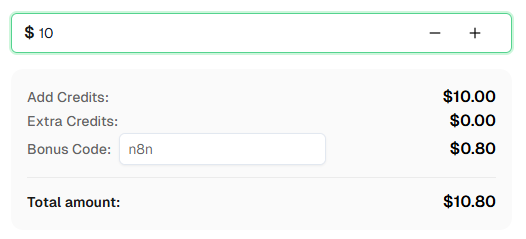
शुरू करने के लिए तैयार हैं? CapSolver के लिए साइन अप करें और अपने पहले रिचार्ज पर अतिरिक्त 8% बोनस के लिए बोनस कोड n8n का उपयोग करें!
अक्सर पूछे जाने वाले प्रश्न
reCAPTCHA सॉल्व करने की लागत कितनी होती है?
कीमत कैप्चा प्रकार के अनुसार भिन्न होती है। reCAPTCHA v2 आमतौर पर 1,000 सॉल्व के लिए $1-3 के आसपास होती है। वर्तमान दरों के लिए CapSolver प्राइसिंग पेज देखें।
reCAPTCHA सॉल्व करने में कितना समय लगता है?
अधिकांश reCAPTCHA v2 चुनौतियाँ 5-20 सेकंड में सॉल्व हो जाती हैं। reCAPTCHA v3 आमतौर पर तेज़ होती है क्योंकि इसमें कोई इमेज चुनौती नहीं होती।
क्या मैं इन वर्कफ़्लो को n8n क्लाउड के साथ उपयोग कर सकता हूँ?
हाँ! ये वर्कफ़्लो सेल्फ-होस्टेड n8n और n8n क्लाउड दोनों के साथ काम करते हैं। CapSolver नोड पहले से ही एक आधिकारिक इंटीग्रेशन के रूप में उपलब्ध है — बस अपनी API क्रेडेंशियल्स जोड़ें।
मैं किसी वेबसाइट के लिए reCAPTCHA साइट की कैसे ढूंढूं?
सबसे आसान तरीका है CapSolver ब्राउज़र एक्सटेंशन का उपयोग करना — DevTools खोलें, "CapSolver Captcha Detector" टैब पर जाएं, और कैप्चा ट्रिगर करें। एक्सटेंशन सभी पैरामीटर स्वचालित रूप से दिखाएगा। वैकल्पिक रूप से, आप पेज सोर्स में data-sitekey या reCAPTCHA स्क्रिप्ट URL में render= खोज सकते हैं।
reCAPTCHA v2 और v2 Invisible में क्या अंतर है?
दोनों में समान तकनीक का उपयोग होता है, लेकिन v2 एक दिखाई देने वाला चेकबॉक्स ("मैं रोबोट नहीं हूँ") दिखाता है जबकि v2 Invisible बिना किसी दिखाई देने वाले विजेट के पृष्ठभूमि में चलता है। सॉल्व करते समय, केवल अंतर isInvisible: true सेट करना होता है।
CapSolver ने टोकन लौटाया लेकिन वेबसाइट ने इसे फिर भी अस्वीकार कर दिया — क्यों?
इसके कई कारण हो सकते हैं। सबसे पहले, टोकन जल्दी एक्सपायर हो जाते हैं — सुनिश्चित करें कि आप टोकन तुरंत सबमिट कर रहे हैं। दूसरा, सुनिश्चित करें कि आप टोकन सही जगह भेज रहे हैं: फॉर्म सबमिट करते समय ब्राउज़र द्वारा की गई वास्तविक नेटवर्क रिक्वेस्ट (DevTools → Network टैब) की जांच करें और पुष्टि करें कि फील्ड नाम, रिक्वेस्ट मेथड, और एंडपॉइंट n8n में कॉन्फ़िगर किए गए अनुसार हैं। तीसरा, कुछ साइटों को enterprisePayload जैसे अतिरिक्त पैरामीटर या विशिष्ट कुकीज़ और हेडर की आवश्यकता होती है — जांचने के लिए CapSolver एक्सटेंशन का उपयोग करें कि क्या इनमें से कोई लागू होता है। यदि टोकन फिर भी अस्वीकार किया जाता है, तो साइट-विशिष्ट सहायता के लिए CapSolver सपोर्ट से संपर्क करें।
और देखें
Web ScrapingApr 22, 2026
रस्ट वेब स्क्रैपिंग आर्किटेक्चर लिए स्केलेबल डेटा निष्कर्षण
Rust में वेब स्क्रैपिंग के स्केलेबल आर्किटेक्चर सीखें, reqwest, scraper, असिंक्रोनस स्क्रैपिंग, हेडलेस ब्राउज़र स्क्रैपिंग, प्रॉक्सी रोटेशन, और संगत CAPTCHA का निपटारा।
Web ScrapingFeb 03, 2026
रॉक्सीब्राउज़र में कैप्चा हल करना कैपसॉल्वर एकीकरण के साथ
CapSolver के साथ RoxyBrowser के एकीकरण करें ताकि ब्राउज़र के कार्यों को स्वचालित किया जा सके और reCAPTCHA, Turnstile और अन्य CAPTCHAs को बायपास किया जा सके।